
You already pay for the WhatsApp Business API. But it lives in a dashboard, disconnected from the phone calls where your deals actually happen.
Connect your WhatsApp API. Unlock the whole machine.
Paste the details you already have (from Meta directly, or from any whitelabel provider) into RMDialer once. You get live two-way chat, bulk campaigns, and WhatsApp that sends itself after every call, all wired to your calls and leads.
How do you connect the WhatsApp Business API to a dialer?
Paste four API details you already hold, from Meta directly or from any whitelabel provider: access token, API URL, API version and WABA ID. RMDialer stores them once and then uses that API for everything: a two-way chat inbox beside each lead, bulk template campaigns with delivery reports, and automatic messages after a call ends or a lead status changes.
- Works with Meta direct or any whitelabel API provider
- One-time setup: token, API URL, version, WABA ID
- Two-way inbox, bulk campaigns and automation from the same connection
- Official API only, so numbers stay compliant
Watch RMDialer in action
Connected in minutes
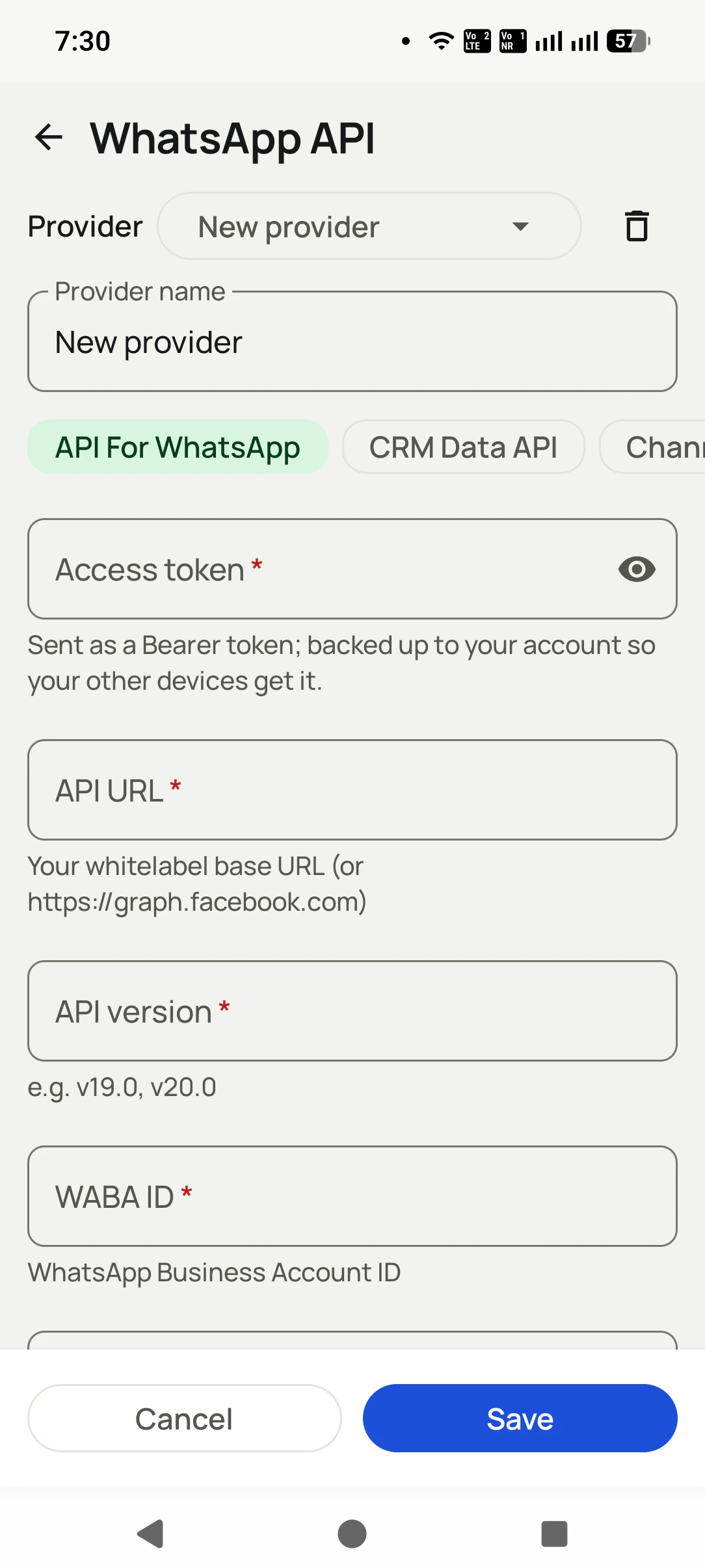
Add your provider once
Name it, paste the access token, API URL (whitelabel base URL or graph.facebook.com), API version, and WABA ID. Save.
Chat and campaign from the dialer
Live inbox, templates, and bulk sends, all next to your calls and leads.

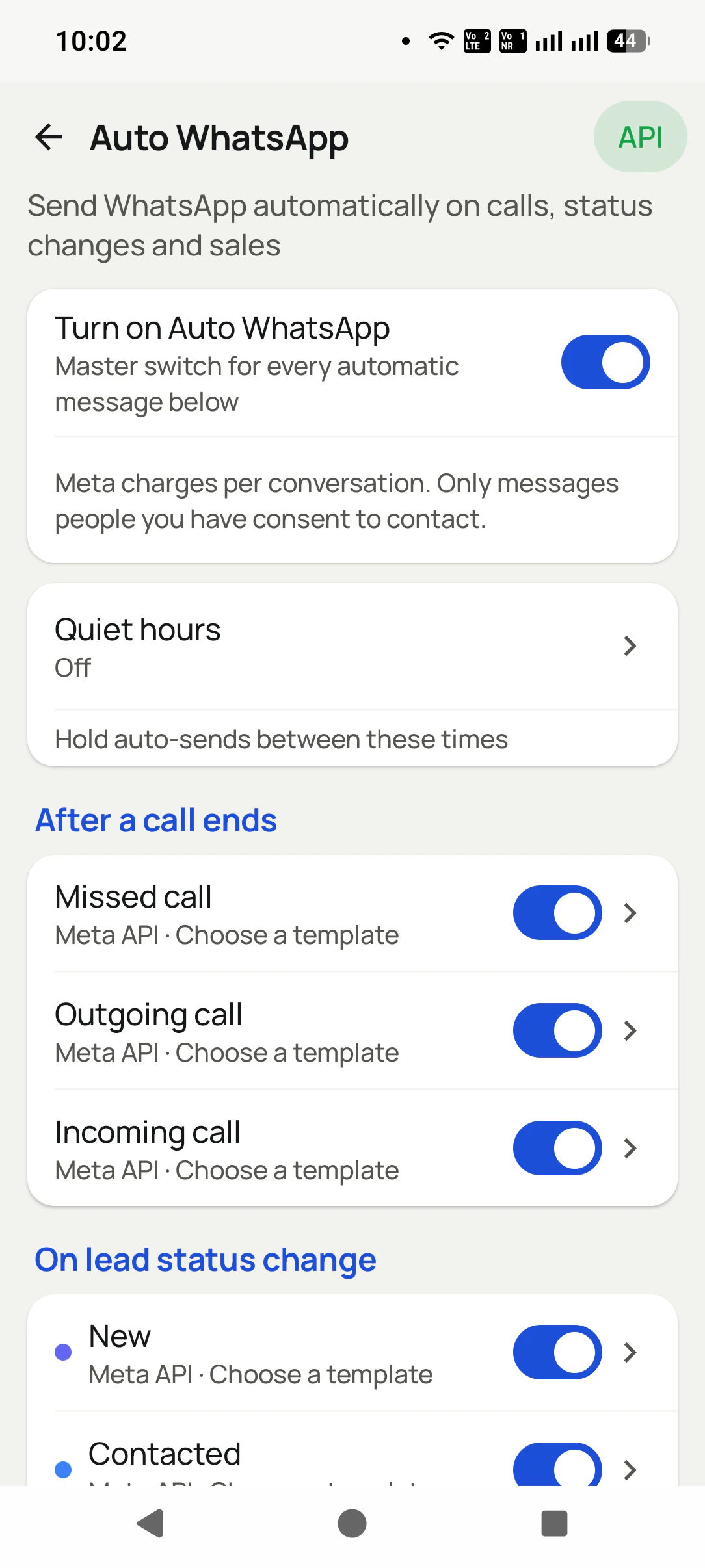
Let the calls trigger the messages
Auto WhatsApp fires after every call, by itself through your API.
Everything your API can do, finally in one place
One connection powers the entire WhatsApp suite, tied to your call log and lead pipeline.
Live two-way chat
A real WhatsApp inbox inside the dialer: send, receive, and reply with the customer's full CRM story beside every thread.
Bulk WhatsApp campaigns
Approved template campaigns to filtered lead lists, with per-campaign delivery reports.
Auto WhatsApp after calls
The message goes out by itself the moment a call ends, a status changes, a sale happens, or a reminder fires.
Meta template sync
Your approved templates, with variables, buttons, and header media, synced into the app.
Full send history
Every API message logged: sent, delivered, skipped, or failed, with the reason.
Unlimited provider profiles
Save each API as a named provider, switch between them, and delete any time. Keep your production and test numbers side by side.
Any provider. Meta direct or whitelabel.
RMDialer does not lock you to one API seller. Paste your provider's base URL, or Meta's own, and everything works the same.
Access token
Sent as a Bearer token. Backed up to your account, so your other devices get it automatically: connect once, not on every phone.
API URL
Your whitelabel provider's base URL, OR graph.facebook.com for a direct Meta connection. Your choice, your provider.
API version
Pin the Graph version you use (v19.0, v20.0...), so a Meta upgrade never breaks your sends.
WABA ID
Your WhatsApp Business Account ID, used to sync your approved templates into the app.
Three API types
One screen for all of them: API For WhatsApp, CRM Data API, and Channel. Add what you use.
Named providers
Each connection is a saved profile with a name you choose, switchable from a dropdown.
One app. Every feature. One price.
Whether you are one person or one thousand, every RMDialer user gets the complete feature set. No tiers, no locked buttons, no "upgrade to unlock".
We will connect your API with you, live
Share your number and we will walk you through connecting your WhatsApp API, templates, and auto-messages on a call.
Get API setup help
Your details open in WhatsApp. We help you connect live.
Opens WhatsApp with your details prefilled.
🔒 Nothing is stored on this site: your details go straight into the chat, nowhere else.
Your customer list is your business. We treat it that way.
A dialer sees everything. That is exactly why every part of this app is built to keep your data yours.
Nothing uploads without your yes
Backup starts only after you sign in and give explicit consent. You review which SIMs are included and which numbers are excluded BEFORE the first upload. Logged out, nothing leaves the phone.
Personal stays personal
Mark any number as excluded: it is never uploaded, never messaged automatically, never touched. Choose per SIM what backs up, so a personal SIM can stay completely out.
Encrypted on the phone
The app database is encrypted on your device, and API details are locked with the Android Keystore, so even a lost phone does not hand over your customer list.
Encrypted in transit
Every sync runs over HTTPS to your own account. A transparent sync log shows exactly what ran and when, and you can make it sync everything again any time.
Your data is not the product
We do not sell your data or your customers' data, do not show ads, and never share contact lists with advertisers. You export to CSV any time. It is yours.
Compliant WhatsApp
Bulk and automated messages go through the official Meta WhatsApp Business API with approved templates and your own API details. We do not read your personal WhatsApp chats.
Read the full privacy policy · Every permission the app asks for is explained there, in plain language.
Questions, answered
Which WhatsApp APIs work?
Both: connect directly to Meta (graph.facebook.com) or use any whitelabel/BSP provider by pasting THEIR base URL. If your provider speaks the Cloud API, RMDialer talks to it.
I already buy my API from a provider. Do I have to move?
No. Keep your provider, your number, your templates, and your rates. You only paste the API URL and token they gave you. Nothing else changes.
What exactly do I need to connect?
Four things from your provider or Meta: access token, API URL, API version (for example v20.0), and your WABA ID. It takes about a minute.
Do I have to connect it again on my other phone?
No. The access token is backed up to your account, so signing in on another device brings the connection with it.
I do not have an API. Can I still use the WhatsApp features?
Yes. Without an API, RMDialer opens WhatsApp with the message pre-filled (one tap to send), and Auto WhatsApp works in that mode too. The API adds silent background sending, live chat, and campaigns.
Can I add more than one provider?
Yes. Providers are named profiles in the app: add as many as you like, switch from the dropdown, delete any time. There are separate types for WhatsApp API, CRM Data API, and Channel.
Is bulk sending compliant?
Campaigns use approved Meta templates through the official API, which is the compliant way to message at scale.
Do incoming replies reach my phone?
Yes. Replies land in the live inbox and arrive as push notifications that open the exact chat, with the caller's CRM story beside it.
Is my access token safe?
Yes. Credentials are encrypted on the device (Android Keystore) and hidden behind a show/hide toggle. They are never shared with anyone.
Which app do I install for this?
RMDialer, or any brand running on the same platform (for example Call Dialer on Google Play). The WhatsApp API features are identical in all of them.
Your API deserves a better home
Install RMDialer, paste your API details, and watch your calls start sending the messages.