
"Sunday ko call karta hoon." You mean it. Then Sunday comes and goes. The deal did not go to the better product. It went to whoever called back on time. Your basic dialer has no idea a follow-up was ever promised.
Follow-Up Reminders That Ring Like an Alarm
In RMDialer a follow-up takes one tap ("5 min", "Tomorrow", "1 week"), rings you at the exact time like an alarm, and puts the call-back button, the remark box, and a reschedule right on the reminder itself.
How do you stop forgetting sales follow-ups?
Attach the reminder to the number, not to a diary. RMDialer reminders ring like an alarm at the time you set, can repeat daily, weekly, monthly or every X days, and open with the lead already loaded so you can call back, save a remark by voice, or push it to a new time in one tap.
- Rings like an alarm, not a silent notification
- Repeats daily, weekly, monthly, yearly or every X days
- Can carry a ready WhatsApp message
- Call back or reschedule straight from the reminder
See it working, step by step
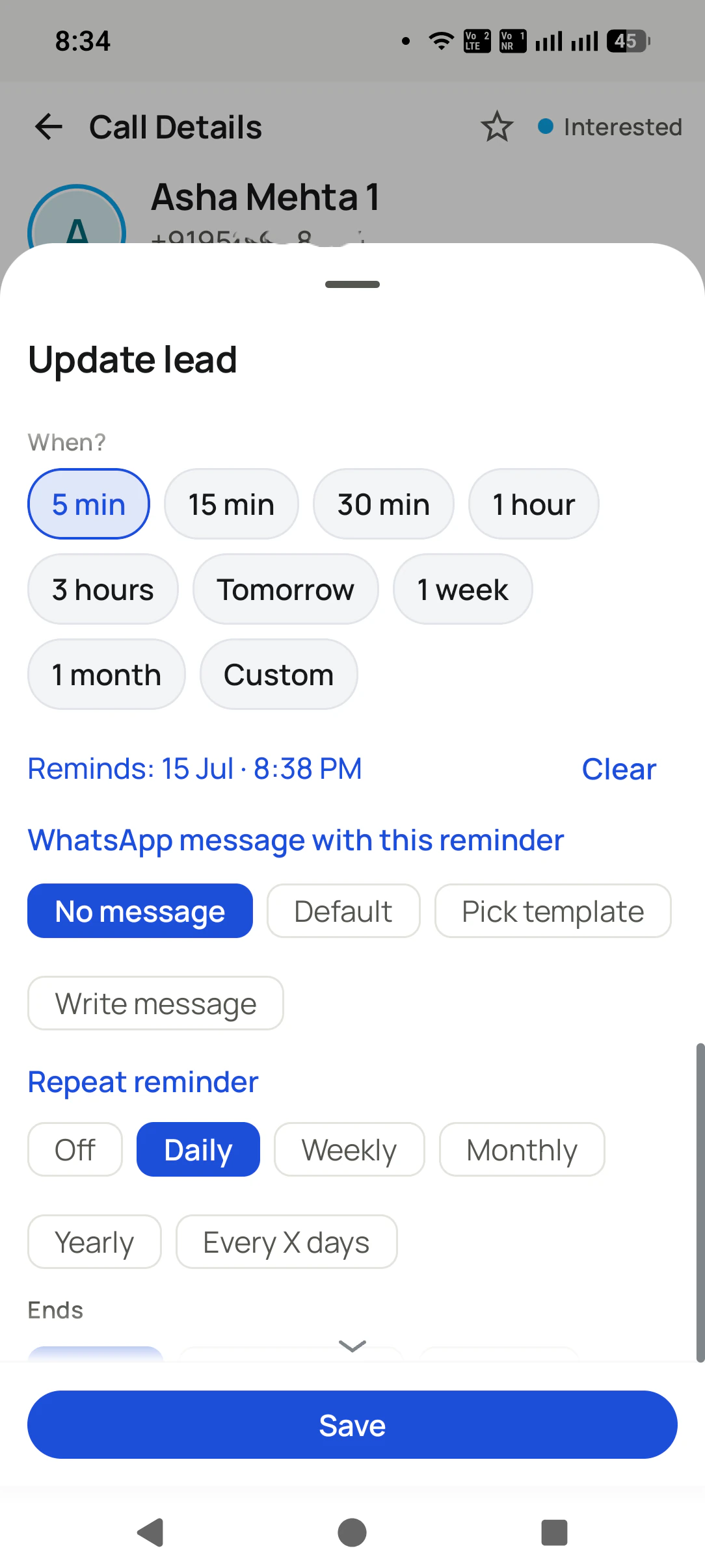
Set it as you hang up
Tap 5 min, Tomorrow, 1 week, or Custom. Attach a WhatsApp message, and make it repeat daily or weekly if needed. Save.
It rings on time
A real alarm with the customer's name, even from a locked phone: "A scheduled reminder is due."
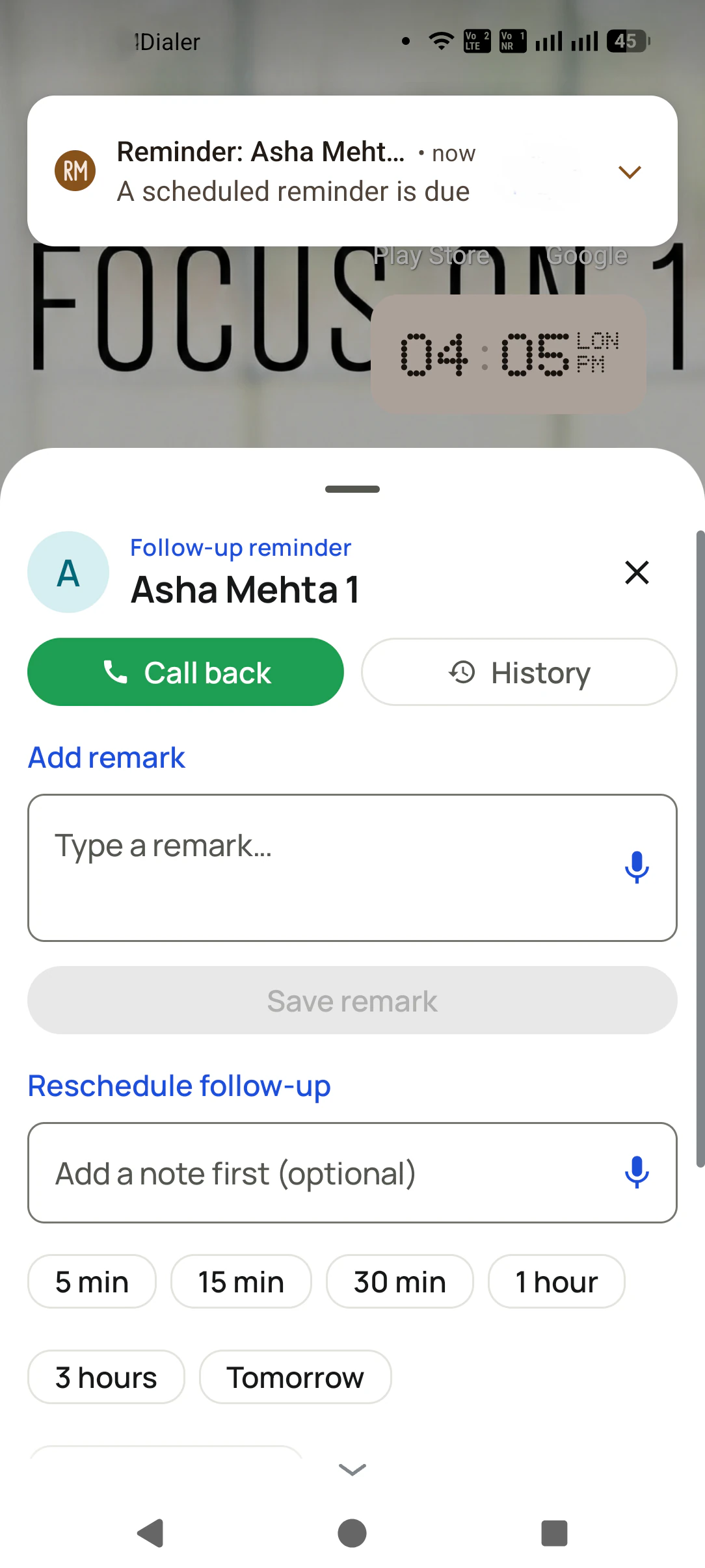
Call, note, or reschedule
Call back, check the history, save a remark (voice works too), or push it to a new time. All from the reminder.
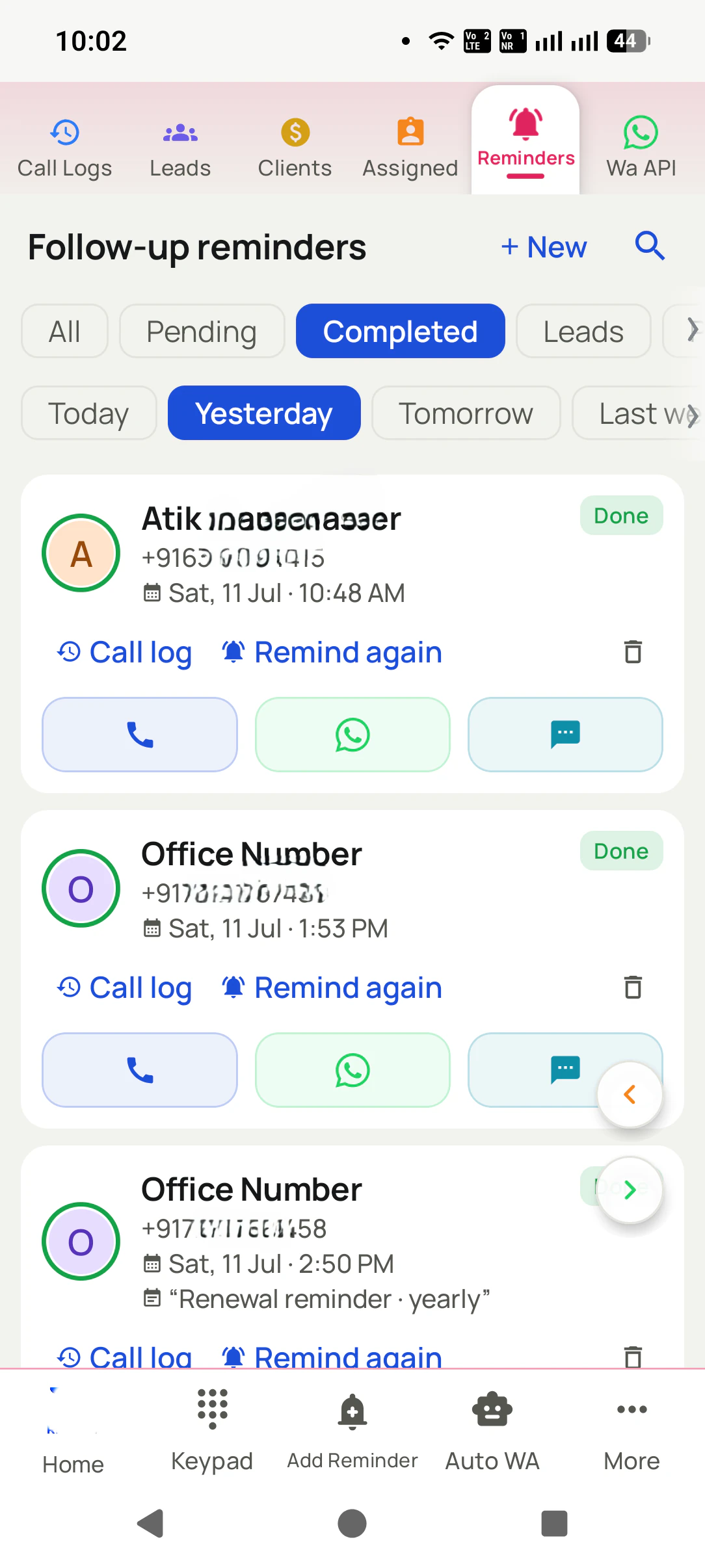
Follow-Up Reminders That Ring Like an Alarm, in detail
One tap, not a date picker
Set it while you are still on the customer's screen: 5 min, 15 min, 30 min, 1 hour, 3 hours, Tomorrow, 1 week, 1 month, or a custom date and time. Nothing to type.
It rings, it does not whisper
A real alarm at the exact time, even from a locked phone and after a reboot, not a silent notification lost between WhatsApp pings.
Repeat it automatically
Daily, weekly, monthly, yearly, or every X days, with an end date. For the client who says "call me every Monday", set it once and forget it.
Attach the WhatsApp to it
No message, a default one, an approved template, or your own text: the reminder can send it for you when it fires.
The whole action is on the reminder
Call back, open the call history, dictate or type a remark and save, all without leaving the reminder.
Not ready? Push it in one tap
Add a note first, then reschedule to 5 min, 30 min, 1 hour, 3 hours, tomorrow, or any time you like. The promise survives. It does not just get dismissed.
Renewal reminders, automatically
Paid clients carry an expiry date, and RMDialer rings you before it arrives so repeat revenue never lapses without you knowing.
One app. Every feature. One price.
Whether you are one person or one thousand, every RMDialer user gets the complete feature set. No tiers, no locked buttons, no "upgrade to unlock".
Works even better with
Lead Management CRM Inside the Dialer
Every caller becomes a lead with a source, status, custom fields, products, remarks, and their whole call history on one screen.
Add a Lead in Seconds (Number Only)
Capture a lead with just a mobile number, tag its source, and dictate the requirement instead of typing.
Know Which Channel Brought the Lead
Tag every lead as Facebook, Google, Website, WhatsApp, Instagram, Referral, Walk-in, IndiaMART, JustDial, or your own source.
Questions, answered
How long does setting a follow-up take?
One tap. Preset chips (5 min, 15 min, 30 min, 1 hour, 3 hours, Tomorrow, 1 week, 1 month) cover almost every case, and Custom lets you pick any exact date and time.
Will it really ring, or just show a notification?
It rings at the exact time, like an alarm, even from a locked phone. The guided setup requests the exact-alarm and overlay permissions that make this reliable.
What if my phone restarts?
Reminders are re-registered after reboot and still fire at the exact time.
Can a reminder repeat?
Yes: daily, weekly, monthly, yearly, or every X days, with an end date. Perfect for the client who wants a call every Monday, or a monthly payment nudge.
Can a reminder send WhatsApp automatically?
Yes. Choose no message, a default one, an approved template, or write your own. It can send by itself through the WhatsApp API or open WhatsApp pre-filled when the reminder fires.
What can I do when it rings?
Call back, open that customer's call history, type or dictate a remark and save it, or reschedule, all from the reminder sheet itself.
What if I am busy when it rings?
Add a note and push it: 5 min, 15 min, 30 min, 1 hour, 3 hours, tomorrow, or any custom time. The follow-up moves instead of dying.
How do I see everything that is due?
The Reminders tab filters by pending, completed, today, tomorrow, and more. You can even auto-dial through all of today's due follow-ups as one hands-free session.
What are renewal reminders?
Paid clients carry an expiry date. RMDialer rings you before it arrives, so renewals never lapse without you knowing.
Business karte ho? Business Dialer chahiye.
Set it as your phone app in one tap. Everything works like before, and then it starts working FOR you.