
The customer's story is split in two apps: calls in the dialer, chats in WhatsApp. You scroll one to understand the other, and still miss what was agreed. And when the employee who owned that chat leaves, the whole conversation walks out with their phone.
WhatsApp Live Chat With Lead Details
RMDialer puts your business WhatsApp inside the dialer. Send anything (photo, document, video, audio, approved templates, quick-reply buttons, option lists), see read receipts, and open that same customer's call history without leaving the chat.
Can you reply to WhatsApp chats from inside the dialer?
Yes. RMDialer carries a two-way WhatsApp Business API inbox, so incoming chats land next to the lead record instead of on someone personal phone. Unread and unreplied chats are badged, and replying does not need a switch to another app.
- Two-way inbox on the official Business API
- Unread and unreplied badges so nothing is missed
- Chat sits beside the lead history
- Whole team works one business number
Watch RMDialer in action
See it working, step by step
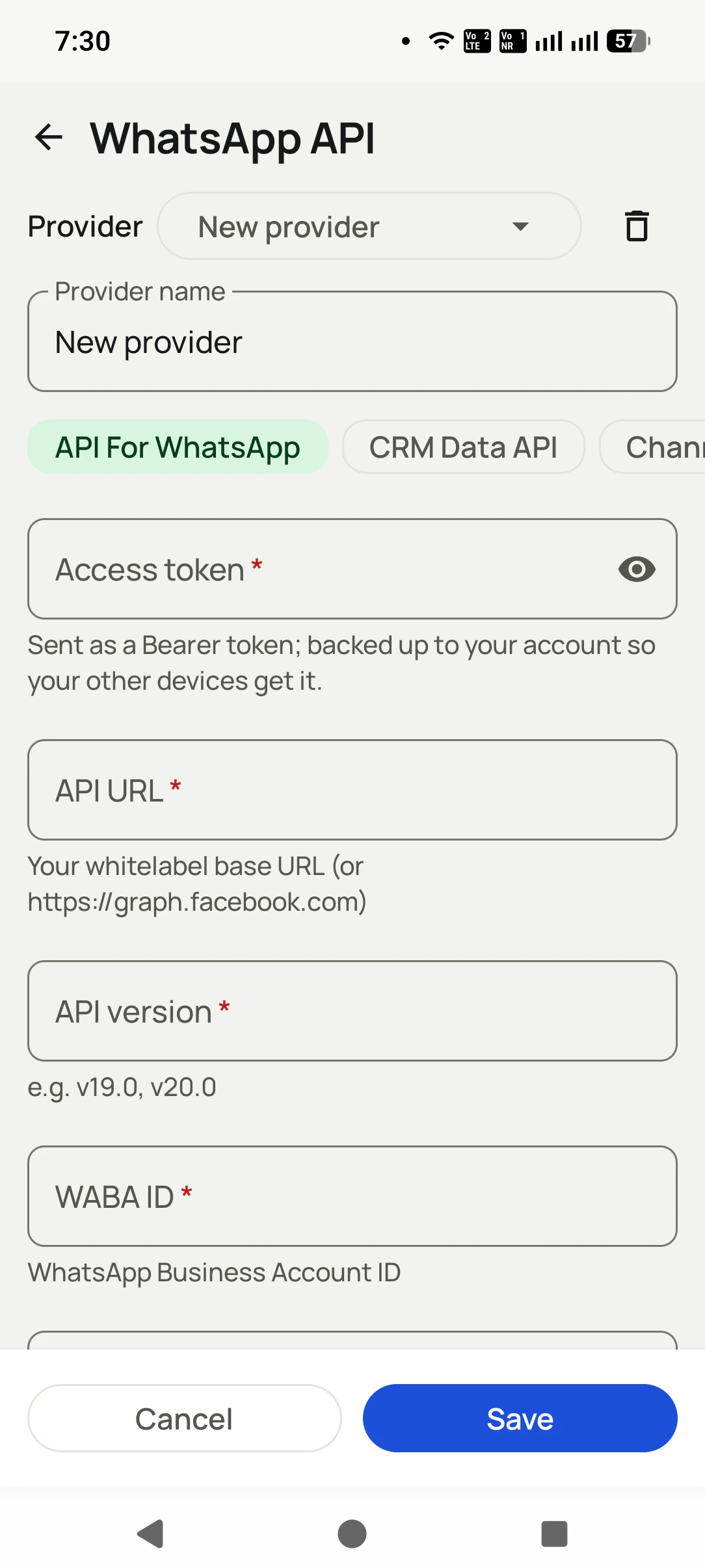
Connect your WhatsApp API
Paste the details you already have (Meta direct or any provider). One minute, one screen.
Your whole inbox, in the dialer
Thousands of conversations with search, and Make lead or Call log on any of them.

Send anything, see everything
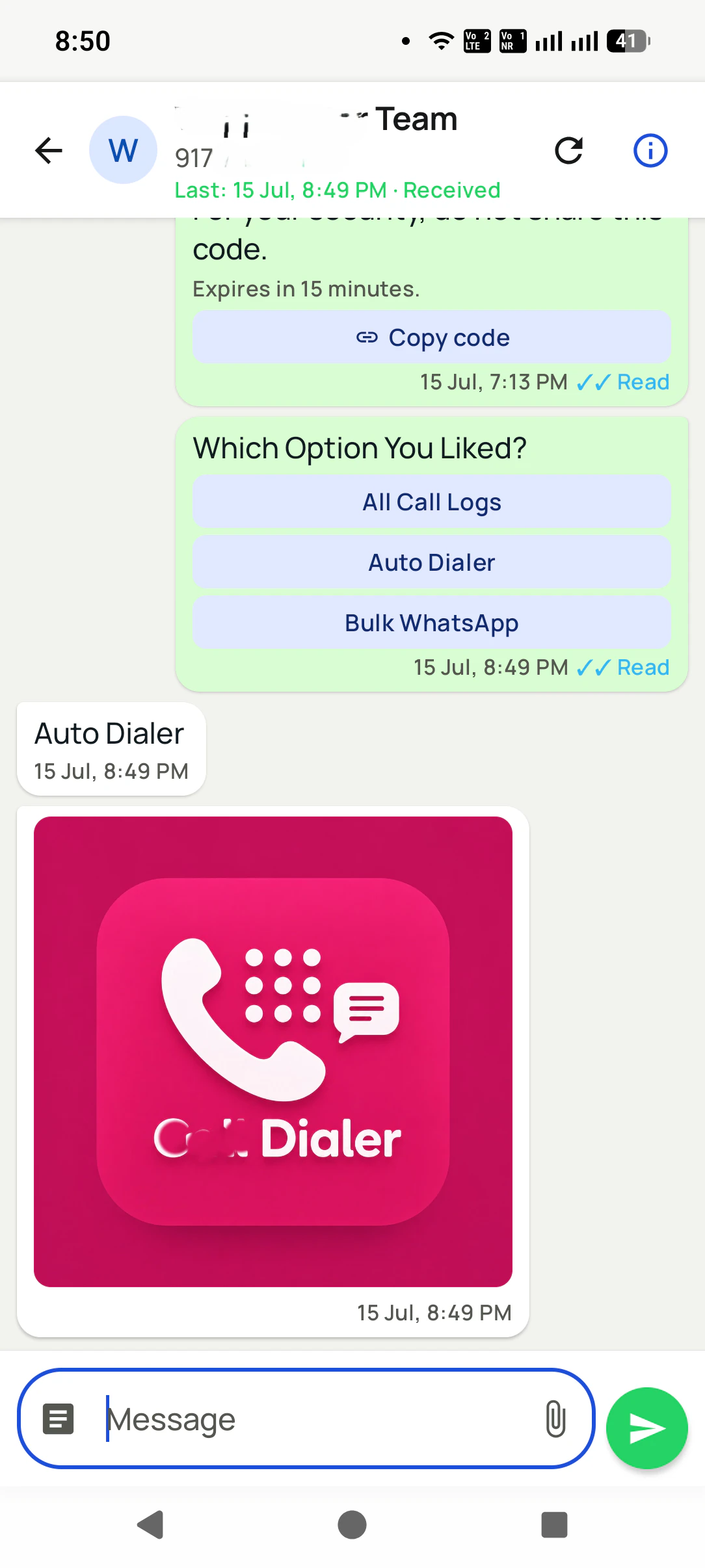
Attach photos, documents, video, audio, templates, quick-reply buttons or option lists. Watch it turn ✓✓ Read, and open that customer's calls from the same screen.
WhatsApp Live Chat With Lead Details, in detail
Send everything, not just text
Photo, document, video, audio, approved template messages, quick-reply buttons, and a list of options: the whole WhatsApp toolbox, from one Attach sheet.
Buttons your customer can tap
Quick-reply buttons and option lists turn a chat into a form: "Which option you liked?" with tappable answers. They reply in one tap. You get a clean answer instead of a paragraph.
The call history is right there
Every chat is tied to that number, so their calls, lead status, and remarks are one tap away. You never argue with a customer while hunting for what was said on the phone.
Know it was read
Delivered and Read receipts on every message, with the exact time, plus a header that shows the last activity on that thread.
Replies find you
Incoming messages arrive as notifications that open that chat straight away, so a hot reply never sits unnoticed.
Any chat becomes a lead
One tap on "Make lead" and a conversation becomes a lead with its full history attached, ready for follow-ups, statuses, and campaigns.
Built for thousands
The CRM contacts list handles thousands of conversations with search, and per-contact call, WhatsApp, and SMS actions.
The chat belongs to the business
Conversations live in your account, synced and searchable, not on one employee's phone. Staff changes, history stays.
One app. Every feature. One price.
Whether you are one person or one thousand, every RMDialer user gets the complete feature set. No tiers, no locked buttons, no "upgrade to unlock".
Works even better with
Auto WhatsApp After Call Ends
Every call type and every lead status gets its own message, sent by itself the moment it happens: no typing, no forgetting.
Bulk WhatsApp to Leads, Call Log, CRM & Pasted Numbers
Send to any list you already have: leads, call log, WhatsApp CRM contacts, paid clients, a Google Sheet, or numbers you paste. With or without an API.
Connect Your WhatsApp API (Any Provider)
Connect any WhatsApp API (Meta direct or a whitelabel provider) as a named profile. Keep several and switch any time.
Questions, answered
What can I send from the chat?
Text, photos, documents, video, audio, approved template messages, quick-reply buttons, and a list of options. Everything the WhatsApp Business API supports, from one Attach sheet.
What are quick-reply buttons and option lists?
Interactive messages: instead of typing, the customer taps an answer ("All Call Logs", "Book a demo"). You get a clean, structured reply, and they get a one-tap experience.
Can I see the calls for the person I am chatting with?
Yes. Every chat is linked to that number, so their call history, lead status, and remarks are one tap away, on the same screen.
Do I know if my message was read?
Yes. Each message shows delivered and read receipts with the time, and the thread header shows the last activity.
Does this use my normal WhatsApp?
No, it uses your WhatsApp Business API number, with your own API details: either Meta directly or your existing whitelabel provider (you paste their base URL). For personal WhatsApp, RMDialer opens chats pre-filled in the WhatsApp app instead.
What do I need to connect it?
Access token, API URL, API version, and WABA ID: the same four values your provider or Meta already gave you. The token backs up to your account, so other devices connect automatically.
Do I get notified of new replies?
Yes. Incoming messages arrive as notifications that open that chat straight away.
Can a chat contact become a lead?
One tap: "Make lead" on any CRM contact turns the conversation into a lead with the full history attached.
What happens to chats if an employee leaves?
Nothing is lost. Conversations live in your account, synced and searchable, not on one person's phone.
Business karte ho? Business Dialer chahiye.
Set it as your phone app in one tap. Everything works like before, and then it starts working FOR you.