
The full app, on Google Play
Android lets RMDialer be your phone app, so the customer record is on screen while it rings, the after-call sheet opens when you hang up, and every call is logged without anyone typing.
One app for your office calling team and your field team, on Android and iPhone: telecalling and call management software with employee call tracking, a telecaller and telesales app, a lead management app with follow-up reminders, and a staff attendance app with live location.
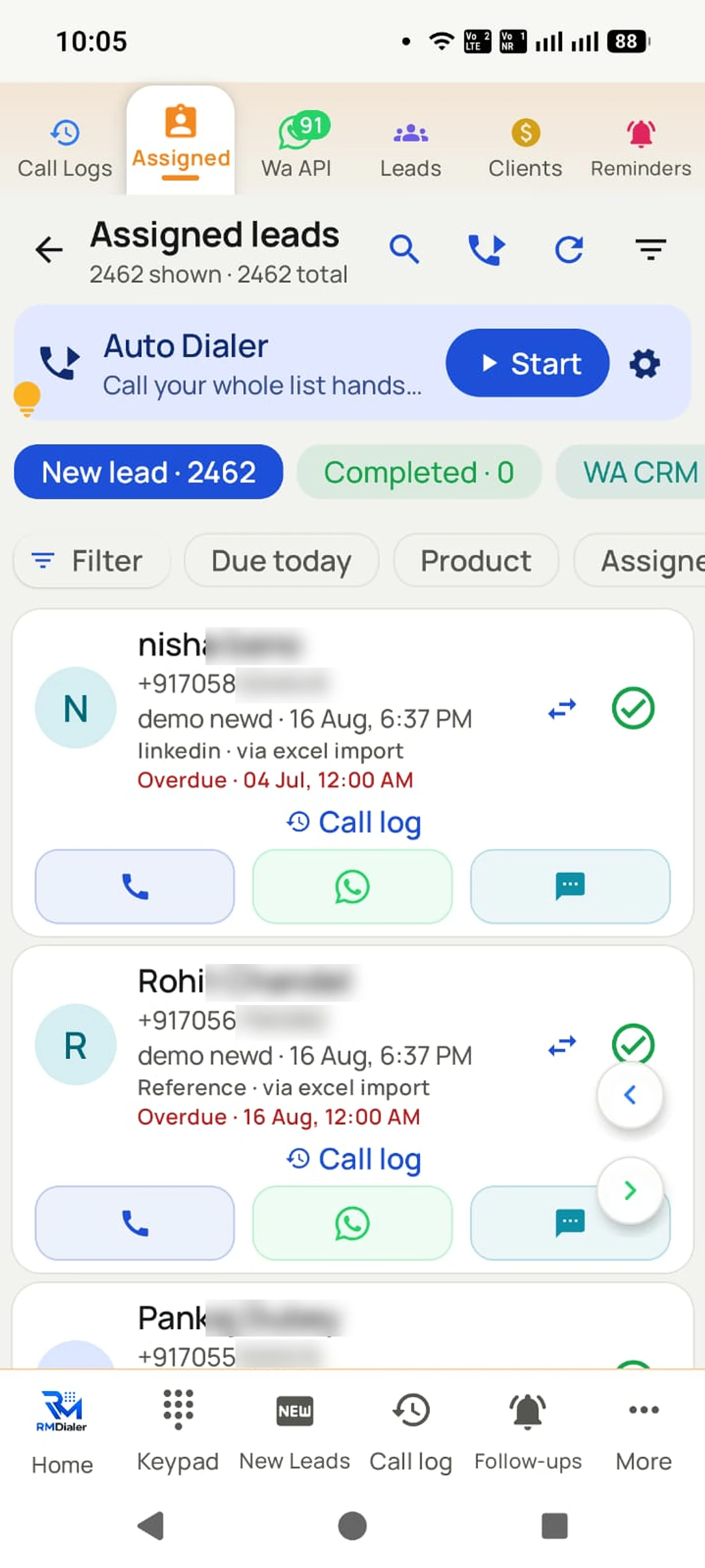
Leads flow in from wherever they start
A SIM based auto dialer and call management app on the phone your team already carries: no call centre, no virtual number, no new SIM.
SIM 1The phone your team already carries. No new SIM, no extra device.
Sees your real mobile number, not a strange one, and can call it back.
Every call, outcome and follow-up, live in any browser.
Google Play (Android 8+) or the App Store (iOS 17+). Sign in with your number.
One tap on Android. Calls, contacts and history work as before.
iPhone: skip this stepExcel, Google Sheet or API, or Facebook, IndiaMART and JustDial leads that arrive by themselves.
Calls go out one by one from your SIM. Save each outcome in two taps.
Short answer
RMDialer is an auto dialer app, telecalling CRM and call management software for Android and iPhone: an all-in-one, SIM based business dialer for business owners, sales teams, calling teams and agents. It calls your lead list one number at a time, saves each call's outcome in two taps, sends WhatsApp follow-ups by itself, and shows the owner every employee's calls live on the Web CRM.
Key takeaways
Real businesses, real numbers: how owners and sales teams across India and 12+ countries use RMDialer every day.
“Telecaller app for Android that my staff actually use. Enquiry list is assigned to each telecaller, the auto dialer calls it from their own SIM, and test ride bookings come to me live. Punjabi interface for the girls at the desk. Price is honest, everything included, no per-user surprises.”
“We needed an auto dialer app that works on our own MTN and Airtel lines, not a call centre subscription in dollars. RMDialer runs on the phones my agents already have, dials the enquiry list, and the WhatsApp follow-up goes out after every call. Calls still go out on the SIM when data drops, and the notes sync once we are back on the network.”
“Free telecalling app search brought me to the 3-day trial. Whole app, nothing locked. By day two I had imported last year's 1,200 travellers and the auto dialer was calling them for this season's packages. Paid the yearly plan on day three. The WhatsApp itinerary goes out after each call by itself.”
“Telecalling software for a 22-seat domestic process, without buying a dialer server. Each agent gets an assigned queue, sessions run on SIM, and the supervisor dashboard shows calls, connected and talk time per agent in real time. Our cost per seat dropped to a fraction of the cloud dialer we were on.”
“Subscription business: every client's plan expiry is a renewal reminder and every prospect from the webinar list is auto dialled the next morning. Paid vs due on each client is visible, so collections are not in my head anymore. The daily call report keeps my two callers honest.”
“Order calling to 350 chemists every week. The list auto dials from each MR's own SIM, the order remark goes on the chemist's number, and I see calls and talk time per MR every evening on the web. Bulk WhatsApp for the new scheme went to the whole list from the call log in one go.”
“I sell RMDialer under my own brand through the whitelabel program. My name on the Play Store, my pricing, my customers, and the Wappblaster team handles every update. Forty-odd customers in eight months without writing a line of code. The reseller panel with Razorpay makes renewals painless.”
Reviews are collected from customers on WhatsApp and on this website. Share yours on WhatsApp
English and Hindi. Real app, real screens.
The phone rings with the story on screen, the outcome is saved in two taps, and the follow-up rings on time so the next call starts with the story again.
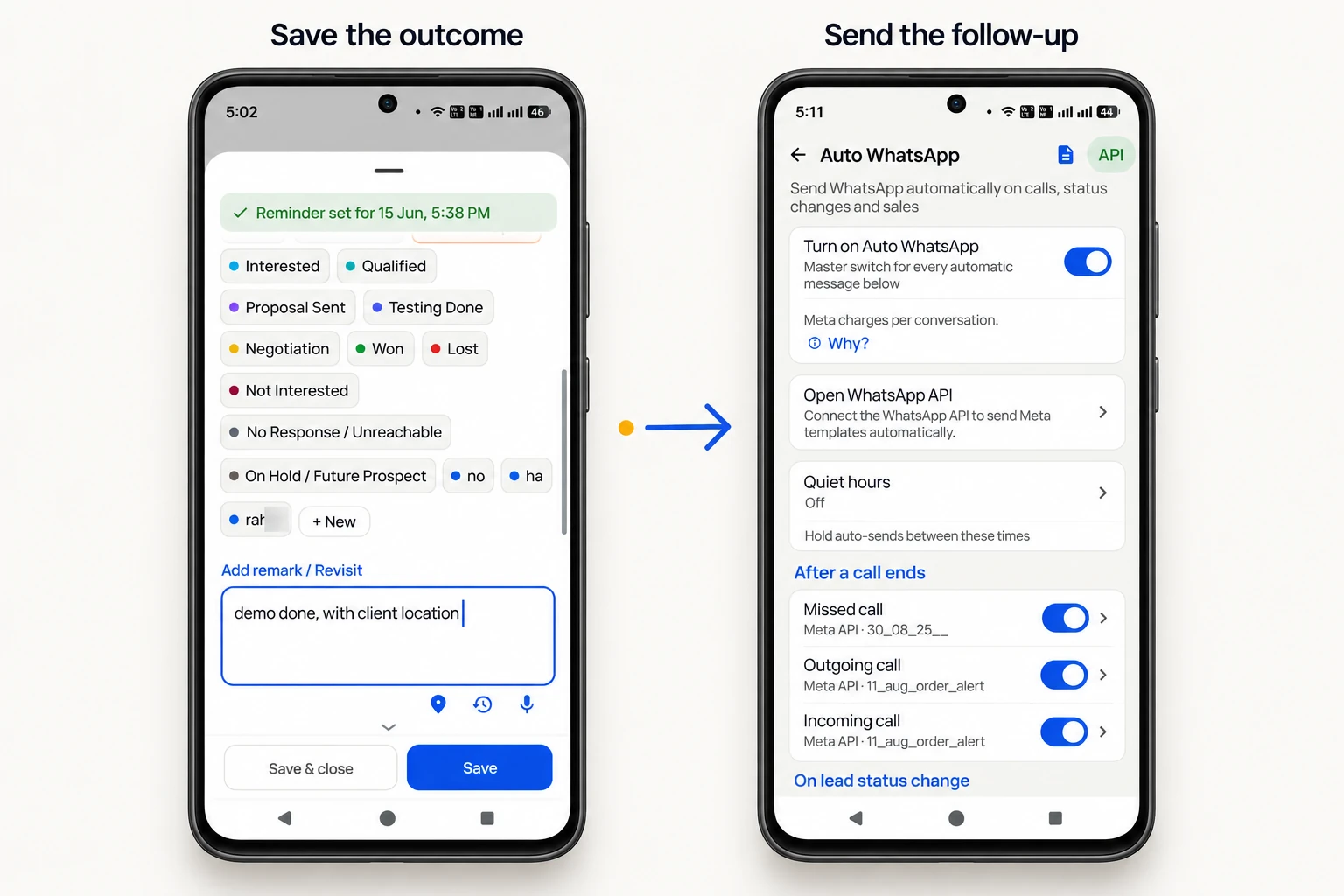
Try it on your own phone today
Install it, make it your phone app, and your next call is already saved.
The mobile app and the Web CRM, for the same price per user.
Connect a source once. Each new lead is created, assigned to the next caller round robin, and ready to dial in minutes. Anything that can send a webhook or call an API connects, anywhere in the world.
Calls, outcomes, remarks, follow-ups and lead movement per employee, per source, per day, on the Web CRM as they happen. Assign leads, set permissions, export anything.
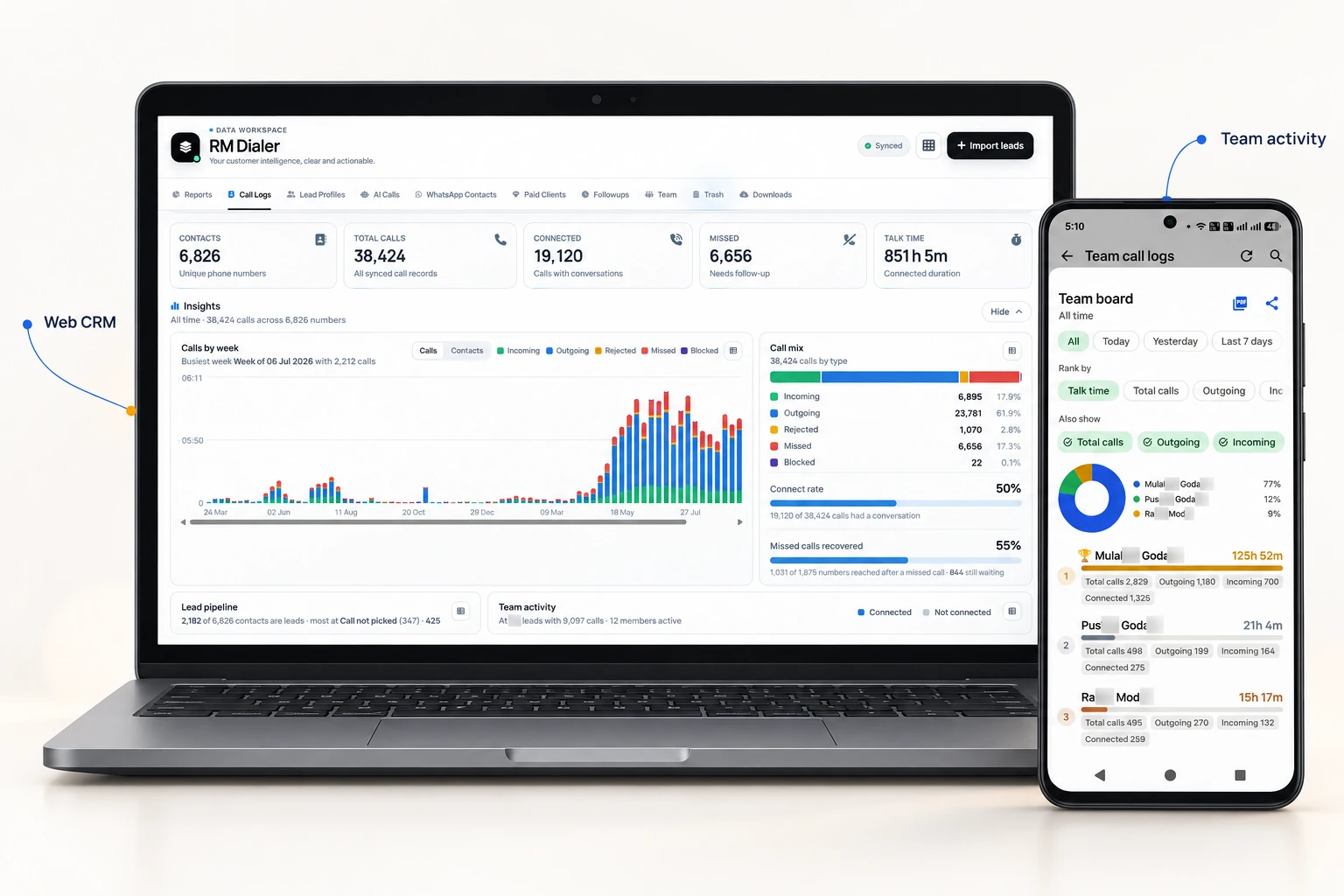
Give each caller the app, and watch the whole team here.
Download free appRMDialer started as an Android phone app and there is now an iPhone app beside it. A mixed team can use both on the same account, with one exception that belongs to Apple rather than to us.
Android lets RMDialer be your phone app, so the customer record is on screen while it rings, the after-call sheet opens when you hang up, and every call is logged without anyone typing.
Leads, statuses, remarks, follow-up reminders, WhatsApp, templates, clients and your team are all there on iOS. Apple does not open the iPhone call log to any app, so calls made on an iPhone are not logged automatically, which is Apple's rule for every app, not ours.
Download it free from the App Store. It runs on any iPhone with iOS 17 or newer.
Install it, make it your phone app, and keep it for as long as you like without paying: the keypad, contacts, caller ID, the call log and your call analytics do not expire, and WhatsApp sends are free every day. A plan is what makes the phone remember each customer for you.
Free WhatsApp sends every day with a free account: 15 a day for your first 15 days, then 3 a day. The dialer itself needs no login at all.
$29 per user per year, or $12 per user for 3 months, outside India
Try it free for 3 days: unlimited use, no credit card required. Prices are per user, exclusive of taxes.
Try it free for 3 days: unlimited use, no credit card required.
Start small, switch to yearly at renewal.
₹249 /user/month
₹747 per user, billed every 3 months, plus taxes
$12 per user for 3 months ($4/month) outside India
Start free 3-day trialBest value: 36% less than the 3-month plan.
₹159 /user/month
₹1908 per user, billed yearly, plus taxes
$29 per user per year outside India
Start free 3-day trialPrices are per user, exclusive of taxes. · Secure payment via Razorpay · UPI, Cards & Netbanking · Ask a pricing question
The yearly plan, priced lower per user as your team grows. Every feature is included at every size.
| Users | Per user / year | Total yearly | You save |
|---|---|---|---|
| 10 | ₹1599 | ₹15990 | ₹3090 16% off ₹309 less per user |
| 20 | ₹1400 | ₹28000 | ₹10160 27% off ₹508 less per user |
| 30 | ₹1300 | ₹39000 | ₹18240 32% off ₹608 less per user |
| 50 | ₹1200 | ₹60000 | ₹35400 37% off ₹708 less per user |
| 51+ | Custom | On quote | Get a quote |
₹1599 per user ₹1908
You save ₹3090 a year 16% off
₹1400 per user ₹1908
You save ₹10160 a year 27% off
₹1300 per user ₹1908
You save ₹18240 a year 32% off
₹1200 per user ₹1908
You save ₹35400 a year 37% off
Savings are against ₹1908 per user on the standard yearly plan · Prices are per user, exclusive of taxes. · A different team size?
Find what you searched for, read what RMDialer does about it, and open the page that answers it in full.
| You searched | What RMDialer does | Full answer |
|---|---|---|
| Telecalling CRM | RMDialer's telecalling CRM saves the status, remark and next follow-up against the number in two taps once each call ends. | Telecalling CRM for sales teams |
| Telecalling software | As telecalling software, RMDialer runs on the phones the team already owns: lists dial in turn and the manager sees every call on the Web CRM. | Telecalling software |
| Auto dialer app | The RMDialer auto dialer app rings a whole list one number at a time from your SIM, with a gap you choose between calls. | Auto dialer app for Android |
| Best auto dialer app | Judge RMDialer as the best auto dialer app on a live list: ordinary calling is free forever and the full app is free for 3 days, no card. | Best auto dialer app |
| Auto dialer with CRM | RMDialer is an auto dialer with CRM: it holds the queue until the outcome is saved, so every dialled number leaves a record. | Auto dialer with CRM |
| CRM dialer | As a CRM dialer, RMDialer keeps the dialer and the CRM in one app, so the customer record opens while the phone is still ringing. | CRM dialer |
| Call management CRM | RMDialer's call management CRM puts the caller history on the call screen and keeps missed calls in a list until somebody rings back. | Call management CRM |
| Call management software | As call management software, RMDialer shows who is calling before you answer, saves the outcome as the call ends and reports every employee's calls. | Call management software |
| Call management app | The RMDialer call management app becomes the phone app on Android, so every call, remark and reminder sits in one place instead of three. | Best call management app for Android |
| Telecaller app | The RMDialer telecaller app gives each caller an assigned queue, reminders that ring and WhatsApp on the phone in their pocket. | Telecaller app for Android |
| SIM based CRM | RMDialer is a SIM based CRM: calls go out on the SIM in the handset, so customers see a real mobile number and nothing is billed per minute. | SIM based CRM |
| Business dialer app | The RMDialer business dialer app replaces the phone app for an owner, with lead names in the call log, dual SIM and the day's calls counted. | Business dialer app |
| Automatic call dialer | As an automatic call dialer, RMDialer dials the next number on its own once you save how the last call went. | Automatic call dialer |
| Bulk calling app | The RMDialer bulk calling app works through hundreds of numbers a day as real one-to-one calls from your own SIM, never a recorded voice. | Bulk calling app |
| Free auto dialer app for Android | RMDialer is a free auto dialer app for Android: the dialer is free forever with no sign-in, and auto dialing a full list is free to try for 3 days. | Free auto dialer app for Android |
Straight answers on SIM calling, pricing, data and teams.
No. RMDialer is a complete phone app: calling, contacts, dual SIM, and call history all work exactly like before. The business layer sits on top.
Yes. One plan, all features: the mobile app, the Web CRM for desktop access, auto dialer, WhatsApp automation and team management, whether you are a single user or a 1000-person team (team pricing is simply per user).
Yes. Assign leads to members, transfer with history, and see every call, status, and follow-up across the team, with zero forced data entry.
Everything is backed up to your account: leads, remarks, reminders, chats. Sign in on the new phone and continue.
Yes: CSV, Excel, or JSON files, or connect a Google Sheet / API so new leads import automatically in the background.
Only you. The app database is encrypted on your phone, backup runs only after your explicit consent, sync is over HTTPS to your own account, and you can exclude any number or SIM entirely. We never sell your data or your customers' data, and there are no ads.
No. Automated and bulk messages go through the official Meta WhatsApp Business API using the API details you connect, or by opening WhatsApp with a pre-filled message you send yourself. Your personal chats are never read.
Because it IS your phone app: the call log is what becomes your business record, and contacts put names on your calls. Every permission and its exact purpose is listed in the privacy policy.
Both. One telecaller uses it alone as an auto dialer and lead CRM; a team adds users, and the owner assigns leads and sees each person's calls, statuses and follow-ups. The price is per user either way.
Lead automation means new enquiries reach a caller's phone without anyone copying them. RMDialer pulls new rows from a Google Sheet or REST API, assigns them round-robin, and queues them for auto dialing.
Yes. Every incoming and outgoing call is logged with the lead's status, the remark saved after it and the follow-up set, and owners see per-employee call counts, connected calls and talk time.
Yes, one call at a time from your own SIM. Load an Excel sheet, Google Sheet, API list or lead filter, press Start, and it dials the whole list in sequence while you talk.
Yes. It tracks every outbound and inbound SIM call per employee: total calls, connected calls, talk time, missed calls and follow-ups, with no cloud number.
Telecallers in India increasingly use a SIM-based telecaller app like RMDialer, which auto-dials the list and saves status and follow-up after each call. Customers see the caller's normal number, so pick-up rates stay high.
Install RMDialer, import the list from Excel or Google Sheets, and press Start; it dials each number in turn from your SIM. Status and follow-up are saved in two taps between calls.
Give each employee RMDialer on their own Android phone; the owner then sees every call, connected call, talk time and follow-up per person per day. No cloud number or hardware is needed.
Turn on Auto WhatsApp in RMDialer and pick a template for missed, incoming or outgoing calls. The message goes out with the customer's name filled in, through the official WhatsApp Business API or by opening WhatsApp.
Connect the Google Sheet or API those platforms write to as a lead source in RMDialer. New leads are assigned to a caller and queued for auto dialing within minutes.
A business dialer like RMDialer shows the customer's lead status, last note and follow-up on the call screen and saves what happened after the call; a normal dialer only shows the number.
Yes. RMDialer is a lead management CRM that lives in the phone's dialer, so leads, remarks, reminders and reports are managed on the phone; the Web CRM is optional.
With RMDialer's auto dialer a telecaller typically makes 150 to 250 calls a day, compared with 60 to 100 when dialing by hand, because the next call places itself.
No. RMDialer is an Android app that dials through the SIM already in the phone. Normal call cost, normal call quality, your real number on the customer side. No IVR, no VoIP, no virtual number.
One all-in plan: ₹159 per user per month on yearly billing, or ₹249 on the 3-month plan, plus taxes. Outside India it is $29 per user per year, or $12 per user for 3 months, outside India. Every feature is included, mobile app and Web CRM; there are no add-on tiers or per-lead charges. Start with a free 3-day trial, no card.
Calling people who enquired with you, from your own number, about their enquiry, is normal business calling. TRAI restricts unsolicited promotional calls, especially to DND numbers. Use your own leads, keep records (RMDialer logs every call), honour do-not-call requests, and do not buy lists.
Any Android 8 or newer phone with a SIM. Install from Google Play, sign in with your number, and the phone your caller already carries becomes the whole system. The owner uses the Web CRM in any browser.
Yes. Alongside the Android app there is an iPhone app, and it has every feature except the native call log, so leads, statuses, remarks, follow-up reminders, templates, WhatsApp, clients and the team all work on iOS. Apple opens the call log to no app and does not let any app take over the Phone app, so an iPhone does not record its own calls and the customer record cannot appear on the iOS call screen. Download it free from the App Store on any iPhone running iOS 17 or newer. Mac and iPhone users can also open the Web CRM in any browser.
Yes, for everything except the calls themselves. The Web CRM runs in any browser on Windows, Mac or Linux: leads, clients, team assignment, permissions, live reports and exports. The dialing stays on the Android phone, because the calls go through the SIM in that phone rather than through a cloud line.
Yes, in two parts. The RMDialer dialer is free forever with no account and no expiry: keypad, contacts, caller ID, the call log and your call analytics. Auto dialing a whole list, the lead CRM, reminders, team reports and WhatsApp automation are the paid plan, which you can use free for 3 days with no credit card, then ₹159 per user per month on yearly billing, plus taxes, with every feature included.
Yes, call recording is supported, and our team sets it up with you during training. Alongside the recording, RMDialer keeps everything around the call: who it was, their lead status, the outcome you tap after it, the remark you save, the follow-up you set and the WhatsApp that went out. That is the record most teams actually need when they open a lead again.
Yes. The app ships in 40 languages, so each person on a team can use it in the language they are comfortable with while the data stays the same for everyone. You change it in the app settings; nothing about your leads or calls changes with it.
DLT registration and telemarketer rules apply to bulk commercial blasts sent through telecom operator routes. RMDialer works differently: it dials one call at a time from the SIM already in your phone, exactly as if you tapped the number yourself, so the customer sees your normal number. Keep calling people who enquired with you, honour do-not-call requests, and stay off bought lists. If you plan promotional calling to strangers, take telecom advice first.
RMDialer is a progressive auto dialer: it calls one number at a time from your own SIM, waits for you to finish, then moves to the next after a gap you set. Predictive dialers and power dialers place several cloud calls at once and connect whoever answers to a free agent, which needs a call centre setup, virtual numbers and enough agents to absorb the calls. On a phone-based sales team, one-at-a-time dialing is what keeps every call a real conversation from your real number.
Yes, that is the point of it. Every number becomes a lead record with custom statuses and fields, remarks after each call, complete call history, follow-up reminders that ring, WhatsApp chats and paid-client records. It is a lead management CRM and a sales CRM that lives on the phone making the calls, so nobody has to open a separate app to update it.
No. Call centre software runs on cloud lines with virtual numbers, IVR menus and agents at desks. RMDialer is a business call dialer and telecalling CRM for teams who sell from ordinary Android phones on ordinary SIMs, with no per-minute charges, no IVR and no hardware. If you need queues, IVR trees and recorded seats, you want a call centre platform; if you need your existing phone team to be organised and measurable, this is the lighter answer.
There is no single best for everyone, so judge on four questions. Does it dial from your own SIM, or does it need a virtual number and per-minute charges? Does the lead record update itself between calls, or is that separate typing? Can leads arrive automatically from Facebook, JustDial, IndiaMART, Google Sheets and APIs? Does the owner get per-employee reports without chasing anyone? RMDialer answers yes to all four on ordinary Android phones, which is the combination most Indian SMB phone teams need. Our roundups compare the alternatives honestly, including where each rival wins.
Install RMDialer from Google Play, sign in with your number, and accept the one-tap prompt to make it your phone app. Pick any list to call: an uploaded Excel sheet, a connected Google Sheet or API, your assigned leads, the call log, the follow-ups due today, or a status filter. Set the SIM and the gap between calls, then press Start and just talk. Between calls the after-call sheet saves the status, remark and follow-up in two taps, and Auto WhatsApp can send the details on its own.
RMDialer is an auto dialer app and telecalling CRM for Android. It works as a telecaller app for one person and as a sales dialer for teams, with lead automation from Google Sheets and APIs, a lead management CRM, call tracking per employee, and call management software features such as after-call status, remarks and follow-up reminders. Calls are placed from the user's own SIM. Pricing is ₹159 per user per month on yearly billing ($29 per user per year, or $12 per user for 3 months, outside India), with a free 3-day trial and no credit card.
RMDialer at a glance
RMDialer is an auto dialer app and telecalling CRM made by Wappblaster in Bikaner, India, for Android and iPhone, with a Web CRM for owners, call recording support and a whitelabel programme; plans cost ₹159 to ₹249 per user a month and 5,000+ people use it.
Most teams selling by phone in India are running three tools that do not talk to each other: the phone dialer, a spreadsheet of leads, and WhatsApp. The auto dialer saves the typing, the spreadsheet holds the names, and the follow-up lives in somebody's memory. RMDialer collapses that into one Android app: an auto dialer app that calls a list from your own SIM, a CRM dialer where the customer record opens as the phone rings, and a call management CRM that saves the outcome in two taps before the next call starts.
That difference matters most for the numbers owners actually ask about. Because the app is the dialer, the call log is the CRM entry: every incoming, outgoing and missed call is attached to a lead with a status, a remark and a follow-up, without anyone typing a report. The telecalling CRM software side handles the team (assignment, per-employee permissions, transfer with history), the lead automation side pulls enquiries in from Facebook and Instagram lead ads, Google Ads forms, JustDial, IndiaMART, property portals, Google Sheets and any REST API, and the owner watches all of it live in the Web CRM from any browser.
It is deliberately not call centre software. There is no IVR, no VoIP, no virtual number and no per-minute billing, because the calls are ordinary SIM calls from the phone your telecaller already carries. Customers see a real mobile number and call back on it. For a business dialer that replaces the default phone app on Android 8 and above, that is the whole trade: normal calls on the outside, a complete sales record on the inside, on one plan with every feature included.
Give your team the phone that sells
Try it free for 3 days: unlimited use, no credit card required.
₹159/user/month on yearly in India, $29/user/year elsewhere · every feature included · Prices are per user, exclusive of taxes.
Free forever: the business dialer never expires, and needs no account
Call recording supported · our team sets it up with you during training
On iPhone and Android. The iPhone app has every feature except the native call log.