
After every call you type the same message again: the details, the address, the price list. Twenty times a day, by hand. On a busy day it simply does not happen, and the customer who was ready to buy at 11:40 hears nothing.
Auto WhatsApp After Call Ends
Set it once, per call type and per lead status, and Auto WhatsApp sends it for you the moment it happens. A missed call gets one message, an outgoing call another, a lead moving to "Interested" a third. Personalized, on time, every time, with zero taps.
Can WhatsApp messages be sent automatically after a call?
Yes. RMDialer can send a WhatsApp message by itself the moment a call ends or a lead status changes. Each trigger has its own message: a missed call gets one text, an outgoing call another, and moving a lead to "Interested" a third. Set it once and it runs with zero taps.
- Triggers on call end, lead status change, or a sale
- A different message per call type and per status
- Sends by itself on the API, or opens WhatsApp for a personal touch
- Cooldown and quiet hours so nobody gets spammed
Watch RMDialer in action
See it working, step by step
Turn on what should message
Master switch, quiet hours, then the triggers: missed, outgoing, incoming calls, lead status changes, sales, reminders.
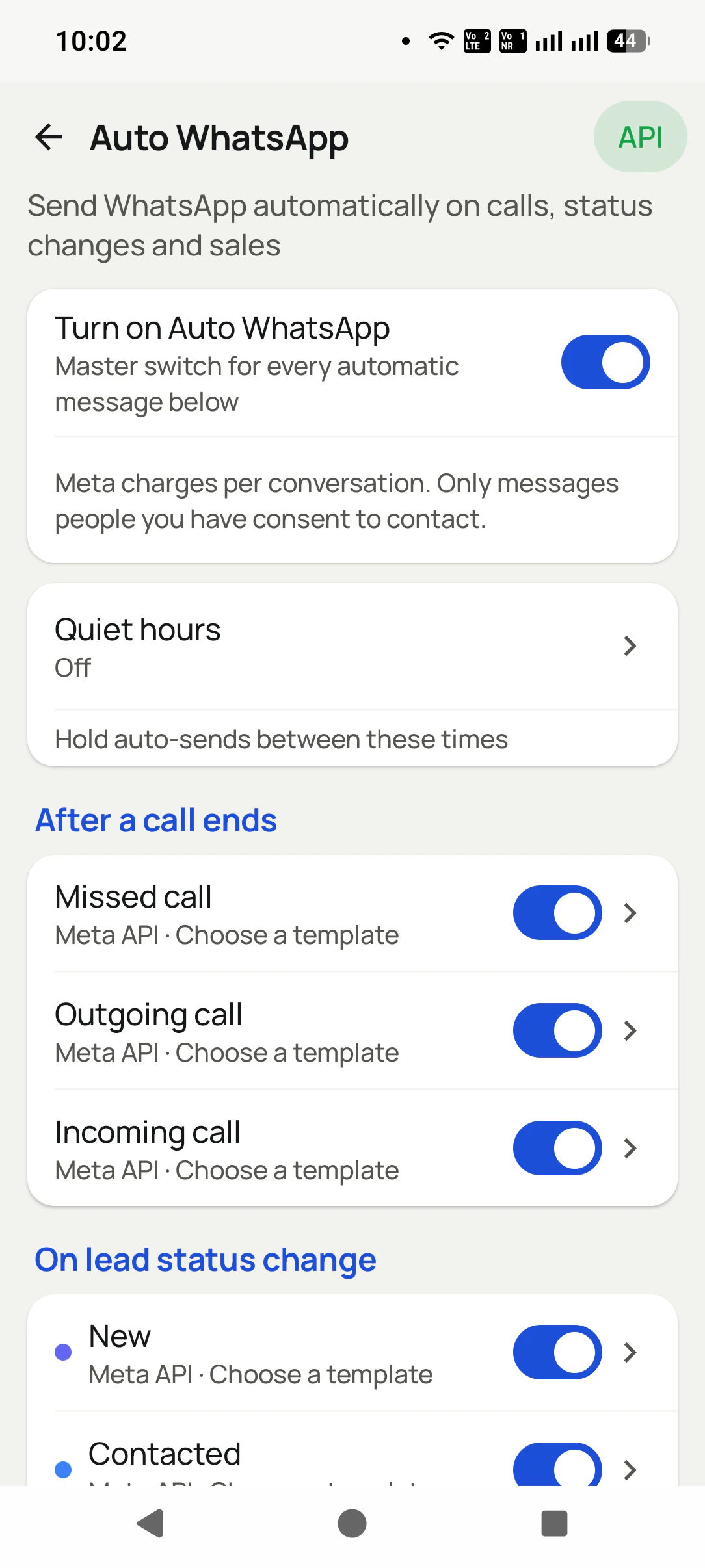
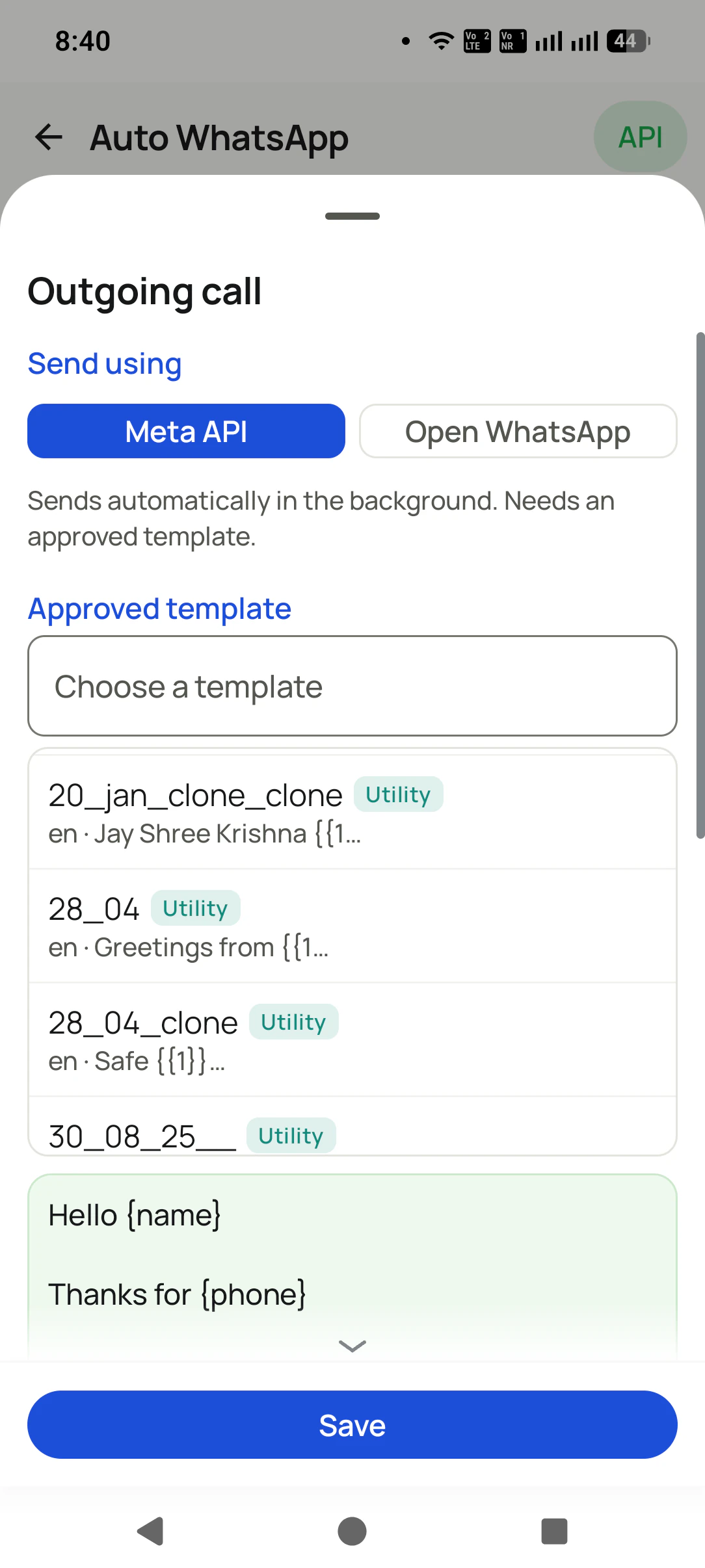
Set it once for each call type
Per trigger: send via Meta API (silent, approved template) or Open WhatsApp (your own text). Pick the template, see the {name} preview, Save.
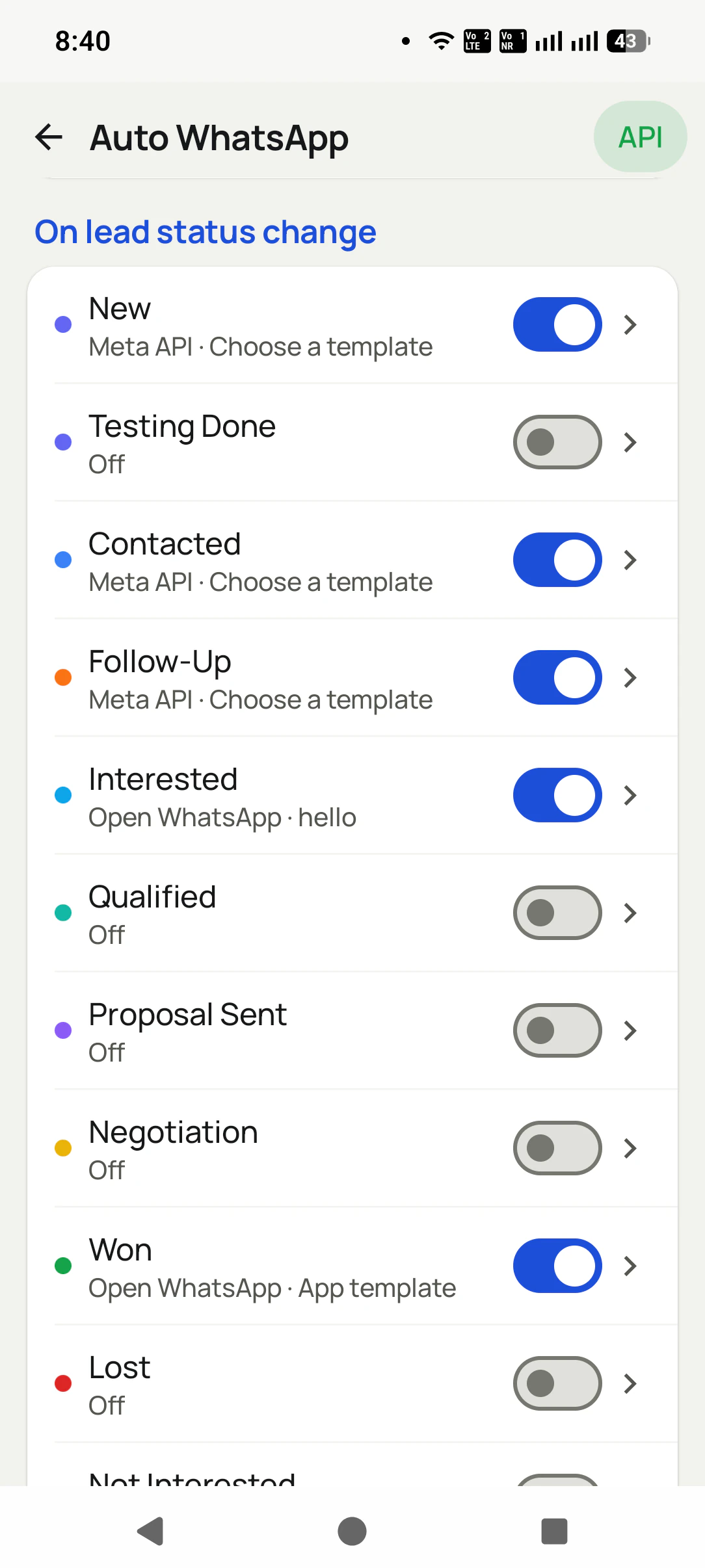
Do the same for statuses & reminders
Every status, including your custom ones, gets its own toggle, send mode, and template. Won can thank them; Lost can stay quiet.
Auto WhatsApp After Call Ends, in detail
A different message for each call type
Missed call, outgoing call, incoming call: each has its own switch, its own send mode, and its own message. The person you could not pick up for and the person you just spoke to should not get the same text.
Every lead status, its own message
New, Contacted, Follow-Up, Interested, Qualified, Proposal Sent, Negotiation, Won, Lost, and YOUR custom statuses: each one can fire its own WhatsApp when you move a lead there. Move to "Won" and the thank-you goes out by itself.
Mix API and manual per trigger
Not all-or-nothing: "Outgoing call" can send by itself through the API while "Interested" opens WhatsApp for a personal touch. You decide per trigger, on the same screen.
Your approved templates, ready to pick
Meta-approved templates sync in with their category and language. Pick one and see the preview before you save. No template? Write your own text for the Open WhatsApp mode.
Personalized automatically
Variables like {name} and {phone} fill from the lead, so "Hello {name}" reaches the customer as their own name, and media attaches from your library.
Also on sales and reminders
Record a product sale and the thank-you goes out. A follow-up reminder fires and its message goes with it. Same system, more moments.
Polite by design
Master switch, quiet hours, a per-number cooldown, ask-before-send mode, and excluded contacts. Automation that never embarrasses you.
Nothing happens behind your back
The history logs every automatic message as sent, skipped, or failed, with the reason and the API response.
One app. Every feature. One price.
Whether you are one person or one thousand, every RMDialer user gets the complete feature set. No tiers, no locked buttons, no "upgrade to unlock".
Works even better with
Bulk WhatsApp to Leads, Call Log, CRM & Pasted Numbers
Send to any list you already have: leads, call log, WhatsApp CRM contacts, paid clients, a Google Sheet, or numbers you paste. With or without an API.
WhatsApp Live Chat With Lead Details
Chat on your business WhatsApp from inside the dialer: send photos, documents, video, audio, templates, buttons and option lists, with that customer's calls right there.
Connect Your WhatsApp API (Any Provider)
Connect any WhatsApp API (Meta direct or a whitelabel provider) as a named profile. Keep several and switch any time.
Questions, answered
Will it spam my customers?
No. Quiet hours, a per-number cooldown, ask-before-send, and excluded contacts keep it polite. Every trigger has its own switch, and everything is off until you turn it on.
Can each call type send a different message?
Yes, and it should. Missed call, outgoing call, and incoming call each have their own switch, send mode, and template, so the message always fits what just happened.
Do my custom lead statuses work too?
Yes. Every status in your pipeline, including ones you created yourself, appears in the list with its own toggle, send mode, and template.
Do I need the WhatsApp Business API?
Only for sending in the background without opening WhatsApp, which also needs an approved template. Without it, choose "Open WhatsApp" and the app opens the chat with your message pre-filled. One tap to send.
Can I use the API for some triggers and manual for others?
Yes. The send mode is per trigger. Many businesses send call follow-ups automatically through the API but open WhatsApp themselves for high-value statuses like "Interested" or "Won".
Where do the templates come from?
Your Meta-approved templates sync into the app with their category (Utility, Marketing) and language. You pick one from the list and the preview shows exactly what the customer will get.
Can it ask me before sending?
Yes. Ask-before-send mode prepares the message and waits for your yes, per send.
Can messages be personalized?
Yes. Variables like {name}, {city}, and {company} fill from the lead automatically, and you can attach media from your library.
How do I know what was sent?
The Auto WhatsApp history logs every message as sent, skipped, or failed, with the reason, so nothing happens behind your back.
Can I keep some people out of automation completely?
Yes. Excluded contacts never receive automatic messages, and excluded numbers are never touched at all.
Business karte ho? Business Dialer chahiye.
Set it as your phone app in one tap. Everything works like before, and then it starts working FOR you.