
A lead who paid is not a lead anymore, but in most tools they stay mixed together. Who paid? For what? How much is still due? Kab renew hoga? The answers live in a diary, a WhatsApp chat, and someone's memory, which is why renewals get missed and dues get forgotten.
Paid Clients, Payments & Renewals
In RMDialer, one tap on Paid Client turns the lead into a paying customer, with the product, package, amount paid, amount due, and expiry recorded on the spot. They move to their own Clients tab, and the renewal rings you before it lapses.
Can the dialer track who has paid and who is due for renewal?
Yes. Every sale in RMDialer records what was sold, how much was paid and how much is pending, plus a renewal date drawn from the package. The Clients tab totals collected and due for the day, week, month and year, and reminders fire before a client expires.
- Paid vs due on every sale
- Revenue for today, this week, this month, this year
- Automatic reminders before a renewal date
- Product and package catalogs you maintain once
See it working, step by step
Convert a lead to a client
Name, mobile, email, products, package: fill what you have (voice works), tap Save paid client.

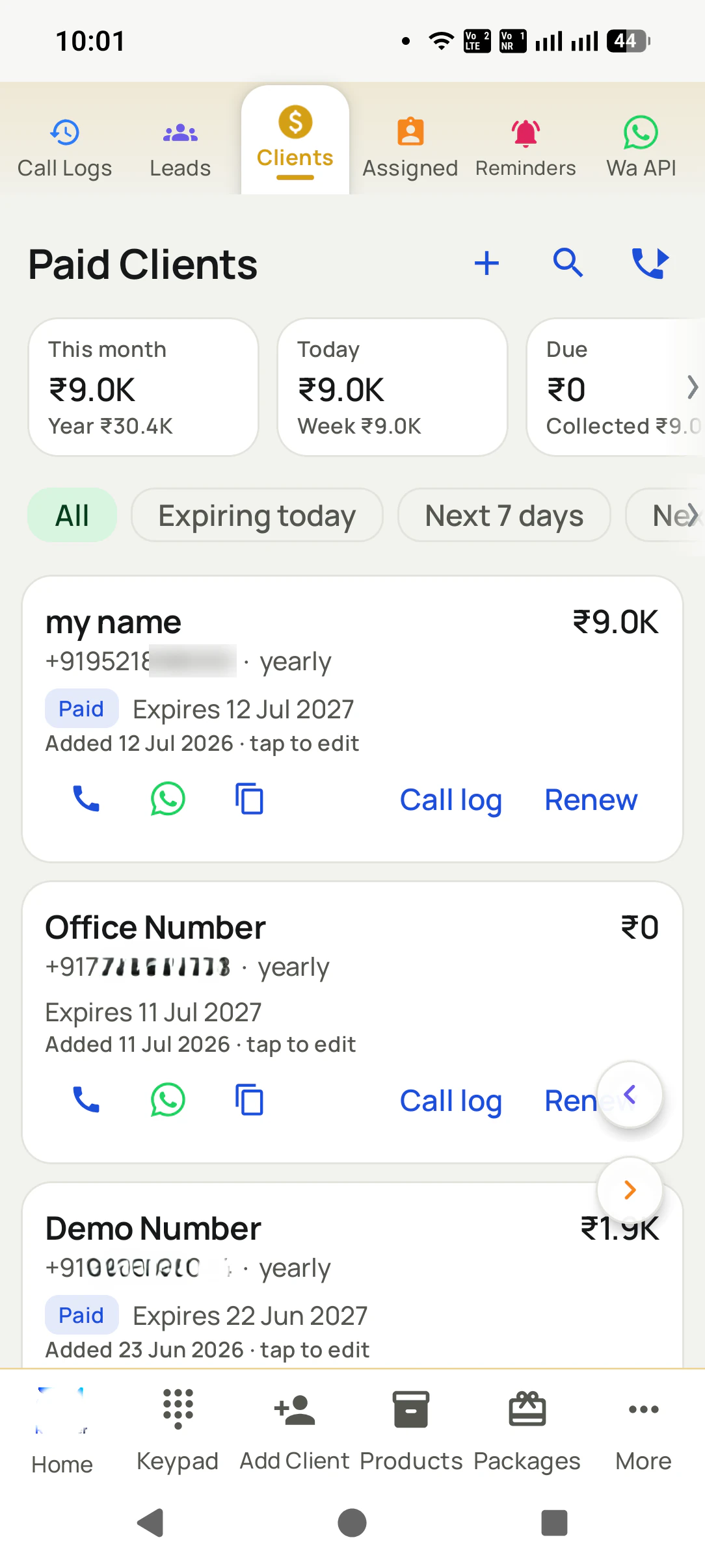
See your client base
The Clients tab: revenue for today, week, month and year, plus who is expiring today or in the next 7 days.
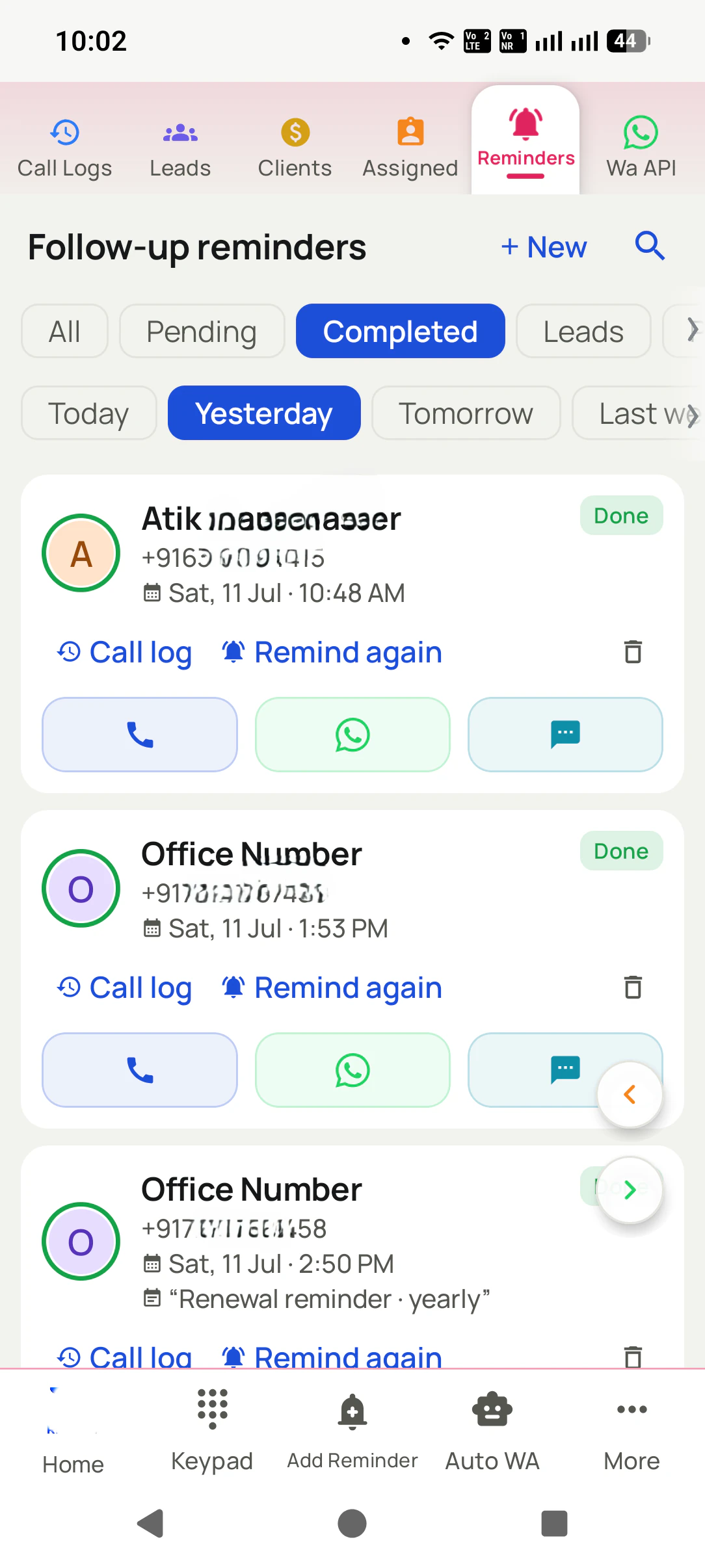
Renewals ring on time
A reminder before the expiry date, with WhatsApp ready and Renew extending from the current end date.
Paid Clients, Payments & Renewals, in detail
One tap from the same screen
The Paid Client button sits right on the customer's screen. No new app, no separate register: the call becomes the sale record.
A Clients tab, separate from leads
Paying customers get their own list with revenue cards (today, week, month, year) and filters like "Expiring today" and "Next 7 days".
Exactly what they bought
Attach products and a package (monthly, yearly, your own) from your catalogs, so every client record says precisely what was sold.
Paid vs due, never a guess
Each sale records the amount paid and the amount pending, and the Clients tab totals collected vs due for you.
Renewals ring by themselves
Every sale carries an expiry date. RMDialer reminds you before it arrives, and Renew extends from the current end date, no downtime for the customer.
Your fields, your voice
Add your own client fields with Manage fields, dictate the client name instead of typing, and copy name, mobile, or email in one tap.
New number? Still one step
Add a paid client with a number that was never a lead: the app creates the lead for you on save, so nothing exists outside the system.
One app. Every feature. One price.
Whether you are one person or one thousand, every RMDialer user gets the complete feature set. No tiers, no locked buttons, no "upgrade to unlock".
Works even better with
Products You Sell (Catalog)
Maintain your product list once, attach it to leads and sales, and add a new one on the fly.
Packages You Sell (Catalog)
Monthly, yearly, or your own packages, attached to each sale and driving the renewal date.
Paid vs Due on Every Sale
Record how much they paid and how much is pending. The Clients tab totals collected and due for you.
Questions, answered
How do I make someone a paid client?
One tap: the Paid Client button on the customer's screen opens the form with their number already filled. Add the product, package, and amounts, then Save.
What if the buyer was never a lead?
Just type the new number. The app tells you "A lead will be created on save" and does it for you, so the customer exists properly in the system.
Can one customer have multiple sales?
Yes. Every sale is its own record, so repeat sales and multiple packages per client are normal, and the full buying history stays on the client.
Can I track partial payments?
Yes. Each sale records the amount paid and the amount due, and the Clients tab shows collected vs due totals.
How do renewals work?
Every sale can carry an expiry date. Filters like "Expiring today" and "Next 7 days" show what is due, a reminder rings before the date, and Renew extends from the current end date with no gap.
What are products and packages for?
Catalogs you maintain once and attach to sales, so every client record says exactly what was sold and your reports stay consistent. You can also add a product or package on the fly while saving.
Can I add my own client fields?
Yes. Manage fields lets you define your own client fields, so the form matches how your business actually sells.
Do I get revenue summaries?
Yes: today, week, month, and year cards on the Clients tab, plus due and collected amounts at a glance.
Business karte ho? Business Dialer chahiye.
Set it as your phone app in one tap. Everything works like before, and then it starts working FOR you.