
Every vendor says they are the best. None of them tell you when they are not.
Best auto dialer app for Android
Here is the shortlist, what each one is genuinely best at, and when a rival is the better buy. RMDialer, our own tool, is on the list and says so.
- RMDialer vs Runo vs NeoDove
- Price per user compared
- SIM calling vs VoIP
- WhatsApp included or add-on
- Free trial vs free plan
Prices checked August 2026 · Where each tool wins · When a rival is the better buy
Your own SIM, own Android phone, no virtual number · Mobile app + Web CRM in one plan · No card for the trial
Short answer
Best auto dialer app for Android?
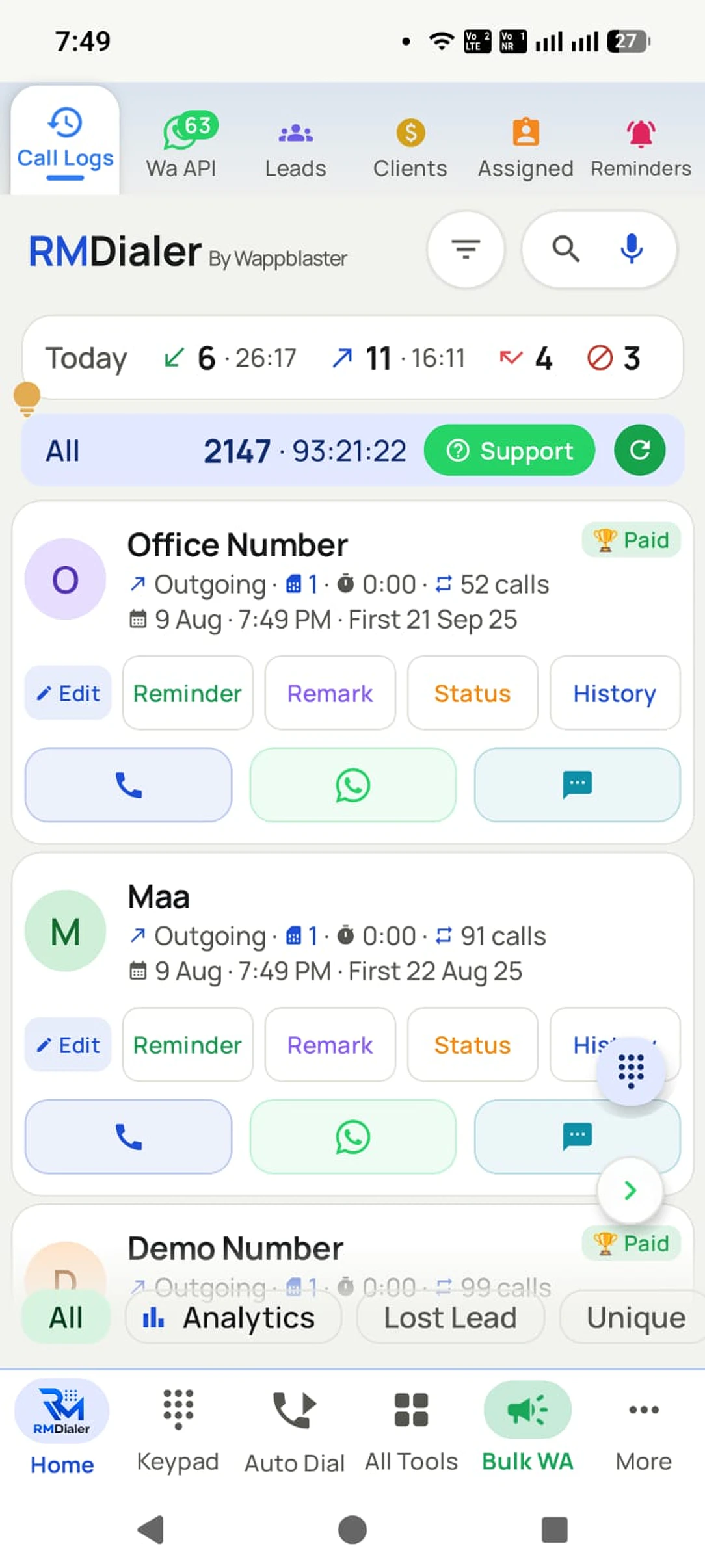
An auto dialer app for Android calls through a list one number after another, so a caller never types a number or picks the next lead. On Android the important distinction is SIM-based dialling versus VoIP: SIM dialling uses the phone’s own number and keeps answer rates high, and it needs no telephony contract. RMDialer, Runo, NeoDove and GoDial all auto-dial from the SIM. RMDialer auto dialer app, which we make, dials any list from the SIM already in the phone with a per-caller gap and SIM choice, saves the outcome in two taps between calls, and includes the lead CRM and WhatsApp automation at about ₹159 per user a month on the yearly plan. Runo adds deeper manager reporting, NeoDove suits campaign-style calling, and GoDial is the way to trial SIM dialling free before paying.
Key takeaways
- RMDialer is our pick for an auto dialer app on Android.
- It dials any list one number after another from the SIM already in the phone.
- Each caller sets their own gap between calls and chooses which SIM to dial from.
- The result of a call is saved in two taps before the next number rings.
- The lead CRM and WhatsApp automation are part of the same app.
What businesses say about RMDialer
Real businesses, real numbers: how owners and sales teams across India and 12+ countries use RMDialer every day.
-
“Tried three apps from a best auto dialer apps for Android roundup before settling here. RMDialer won on the Excel import and the call gap setting, and every client gets our WhatsApp the moment the call ends. Four stars: the web CRM reports took me a week to learn properly, the app itself took an hour.”
Anjali Deshmukh Founder · Digital marketing agency Nashik -
“Spent a weekend reading every "best auto dialer app for Android" list and installed four of them. RMDialer was the only one where the dialer and the CRM are the same screen: my six advisors dial the renewal list from their own SIMs and the status goes in before the next ring. Runo came closest, at nearly four times the price per user.”
Vikram Malhotra Sales manager · Insurance broking Gurugram -
“We wanted the best auto dialer app for Android that runs on our own EE SIMs rather than a US cloud dialer charging per minute. The viewings list is dialled each morning, the outcome logged between calls, and I get a report per negotiator by evening. Under half the price of anything we were quoted here.”
James Whitfield Director · Lettings agency Manchester, UK -
“Earlier I was dialling 80 to 100 portal leads a day by hand from Excel. With RMDialer auto dialer app I import the sheet, press start and it calls one by one from my own Jio SIM. Between calls I mark Interested or Site visit in two taps and the follow-up rings me on time. Closed 3 flats last month from leads I would have forgotten.”
Rakesh Choudhary Real estate consultant · Property advisory Jaipur -
“Bulk calling app was the search that brought me here. 300 dealer numbers pasted from Excel, SIM 2 selected, 6 second gap, and my two boys finished the list in a day and a half. The ones who did not pick up, we ran again in the evening. Earlier same list used to take a week with a notebook.”
Amit Patel Director · Textile trading Surat -
“Hindi mein app chalta hai, yeh sabse badi baat. Season shuru hone se pehle 400 kisaan ki list auto dial ho jaati hai, aur jo bole "baad mein call karna" uska reminder set. Excel se auto call kaise kare, yeh Google pe dhoondh ke yahan aaya tha. Ab do saal se use kar raha hoon.”
Mahesh Bishnoi Proprietor · Agri-input dealership Bikaner
Reviews are collected from customers on WhatsApp and on this website. Share yours on WhatsApp
Who wrote this: we make RMDialer, which is on this list. We have tried to be straight about where the others are the better buy, and every price below is the one published on the vendor’s own site. Check it before you pay: prices move. Prices checked August 2026.
What actually matters here
- Does it dial from the phone’s own SIM?
- Can you set the gap between calls, and pause the session anywhere?
- Does it log the result between calls without leaving the dialer?
- Can each caller pick which SIM to use on a dual-SIM phone?
- Is there a CRM underneath, or only dialling?
- 1
RMDialer
that’s usBest for: Auto-dialling any list, with the CRM built in
RMDialer is the best auto dialer app for Android on this list when the CRM should live in the same app: it dials leads, follow-ups, call log, imported sheets or WhatsApp contacts, with a per-caller gap and SIM, and saves the outcome in two taps between calls.
From ₹159 per user / month on the yearly plan
- 2
Runo
Best for: Outbound teams wanting dialler plus deep reporting
Strong dialling and manager reporting, priced per user.
₹599 per user / month (billed annually)
Compare with RMDialer → - 3
NeoDove
Best for: Structured calling campaigns
Campaign lists and telecaller scorecards on top of SIM dialling.
Per-user plans; check their site for the current rate
Compare with RMDialer → - 4
TeleCRM
Best for: Android-first Indian SMB teams
Built for the same workflow; compare per-user cost at your headcount.
Per-user monthly plans; check their site for the current rate
Compare with RMDialer → - 5
Callyzer
Best for: Monitoring calls more than making them
Reporting-led. Check how much dialling automation is included.
Per-user plans; check their site for the current rate
Compare with RMDialer → - 6
GoDial
Best for: Teams that want to trial SIM dialling before paying
SIM-based dialling with lead distribution built in, and a 4-day free trial. The price is not published on their pricing page, so ask before you plan a budget.
No figure shown on their pricing page when checked; start a trial or ask them
Compare with RMDialer →
What an auto dialer app actually does
An auto dialer app calls through a list of numbers one after another, so nobody types a number, hunts for the next lead, or loses their place in a spreadsheet. The caller talks, hangs up, marks what happened, and the next call starts on its own.
That is the whole idea, and the time it saves is larger than it sounds. Ten seconds of finding and dialling a number, across two hundred calls, is more than half an hour of a working day spent not talking to anybody.
The phrase covers two very different products. One kind runs on a phone and dials through the SIM already in it. The other is a cloud contact centre that calls over the internet and rents you numbers. Both are sold as auto dialers, and the best auto dialer for one of those teams is the wrong tool for the other.
Preview, power and predictive: the three kinds
Preview dialling shows the caller the record before the call goes out, so they can read the history and decide whether to ring at all. It is the slowest of the three and the right choice for high value or repeat customers.
Power dialling places the next call as soon as the last one ends, one number at a time, one call per caller. This is what an auto dialer app on a phone does, and it is what most small and mid-size teams actually need.
Predictive dialling runs several calls at once for each agent and predicts who will be free to take them. It needs a cloud platform, a large team and enough volume for the prediction to be accurate, and it is what produces the abandoned calls that regulators limit in most countries. Nothing dialling from a single SIM can do predictive, so a phone app advertising it is describing something else.
How to pick the best auto dialer app for your team
Start with the number the other person sees. A call from an ordinary mobile number is answered far more often than one from an unfamiliar landline or an internet number, and that single fact is why most small teams choose SIM dialling over VoIP.
Then look at what happens between two calls. A tool that only dials leaves the caller writing notes somewhere else, and by the afternoon the notes stop being written at all. Logging the outcome and the next follow-up date should take one or two taps without leaving the dialer.
After that it is arithmetic. Count every seat you will really pay for, add whatever WhatsApp, recording or reporting costs on top, and compare monthly totals rather than headline per-user prices.
Finally, test on the cheapest phone your team owns rather than on yours. The best auto dialer app is the one that still works on a four year old Android with two bars of signal, because that is the handset most of the calling will happen on.
Best automatic call dialer for Android: the same shortlist
Some people type "automatic call dialer" or "automatic phone dialer" instead of "auto dialer". It is the same product: software that dials a list of numbers one after another so the caller only talks. Every app above is an automatic call dialer for Android in that sense, and the criteria do not change with the name.
One thing the longer name sometimes hides: an "automatic caller" that plays a recording to whoever answers is a robocaller, a different and regulated product. Nothing on this list does that. They dial, a human talks, and the outcome is saved.
Questions people ask before choosing
Is an auto dialer legal in India?
Calling your own leads and customers from your own SIM is normal business calling. What is regulated is unsolicited commercial communication: TRAI rules require registration for bulk promotional calling and honouring Do Not Disturb preferences. Call people who asked to hear from you, keep consent records, and stop when asked.
Does an auto dialer need an internet connection?
For SIM-based dialling the call itself runs on the mobile network, so it works without data. RMDialer syncs remarks and statuses to your account whenever the phone has a connection, so a dropped data signal does not stop the calling session.
What is a good gap between auto-dialled calls?
Most teams set five to fifteen seconds: long enough to note what happened, short enough that the caller keeps momentum. If you are logging detailed notes, pause the session instead of stretching the gap.
What is the best auto dialer app for Android?
It depends on whether you want dialling on its own or a CRM underneath it, and on how many callers you are paying for. If the list, the calls, the follow-ups and the WhatsApp history should live in one app on the phone, RMDialer is the best auto dialer app for Android on this list, and we make it. If you only ever need to dial an uploaded list and nothing else, a lighter tool such as GoDial or Calley will do the job for less. The shortlist above says which is which.
How does an auto dialer work?
You load a list from a spreadsheet, a CRM, your contacts or your call log. The app takes the first number, places the call through the phone or over the internet, and waits. When the call ends you mark the outcome, and after a short gap the next number is dialled automatically. Nothing about the call itself changes.
Is an automatic call dialer the same as an auto dialer app?
Yes. Automatic call dialer, automatic phone dialer and auto calling app are other names for the same thing: an app that dials a list one number at a time while you talk. So the best automatic call dialer for Android is chosen on the same five criteria as any auto dialer app on this page: own SIM, adjustable gap, outcome logged between calls, SIM choice per caller, and whether a CRM sits underneath.
Is there a free auto dialer app?
Several offer a free tier or a trial, and that is a sensible way to test the dialling itself. What free almost never covers is the part that matters later: more than one caller, history that stays somewhere you can report on, and support when a phone update breaks something. Treat free as a test rather than a plan.
What is the difference between a power dialer and a predictive dialer?
A power dialer places one call per caller and starts the next as soon as the last one ends. A predictive dialer starts several calls per agent at once and predicts who will be free to take them, which needs a cloud platform and enough volume to be accurate. Predictive is also what creates abandoned calls, which regulators limit in most countries. An app dialling from one SIM is always a power dialer.
How many calls can you make in an hour with an auto dialer?
For SIM-based power dialling, most teams land somewhere between 60 and 120 attempts an hour once unanswered numbers are counted, depending on how long conversations run and how big the gap between calls is. A dialer removes the dialling time, not the talking time, so your conversations still set the ceiling.
Is auto dialing legal?
Calling people who asked to hear from you, from your own number, is ordinary business calling almost everywhere. What is regulated is unsolicited and automated commercial calling: the TCPA and state laws in the United States, TRAI registration and Do Not Disturb in India, PECR and the ICO in the United Kingdom, the CRTC in Canada, ACMA in Australia, and GDPR consent rules across Europe. The safe pattern is the same under all of them: call people who consented, keep the record of that consent, honour do-not-call lists, and stop when someone asks. Check the rules where you are calling, not where you are sitting.
Will an auto dialer get my number marked as spam?
It can, if you call people who did not ask to hear from you. Spam labelling is driven by how often people reject, block or report a number, not by the fact that software placed the call. A consented list dialled at a human pace from a normal mobile number is the low-risk pattern; a bought list is not, whatever tool sends it.
Can I use an auto dialer with my own phone number?
Yes, and that is exactly what a SIM-based auto dialer app does. It dials through the SIM already in the phone, so the person you call sees your usual number and can ring it back. No telephony contract, no virtual numbers to rent, and no per-minute cost beyond your normal plan.
Is there an auto dialer app for iPhone?
There are apps that help, but iOS does not let a third-party app place calls in a loop the way Android does, so an iPhone auto dialer is usually a tap-to-dial list rather than genuine hands-off dialling. Teams that want the phone to keep dialling on its own generally give their callers Android handsets.
Can I auto dial from a Google Sheet or an Excel file?
Yes. A CSV or Excel export is the normal way to load a list, and some tools also pull from a Google Sheet or an API on a schedule so a new lead becomes dialable without anyone exporting anything. Check that the import maps your own column names instead of making you reformat every file.
What does an auto dialer app cost?
Phone-based apps are usually priced per caller per month. Cloud dialers add per-minute or per-number charges on top of their seat price. The number worth comparing is the monthly total once every seat is counted and anything extra for WhatsApp, recording or reporting is added, not the headline price for one user.
Can two callers work the same list without calling the same person twice?
Only if the tool distributes the list rather than merely storing it. Look for leads being assigned to a specific caller, and for outcomes syncing back so a number somebody has already handled leaves everyone else’s queue. Without that, two people are sharing a spreadsheet and your customers get called twice.
Where the rules come from
The calling rules above are summarised, not quoted. These are the regulators themselves, for the markets most readers ask about. Check the ones that apply where you are calling.
Read before you decide
The detail behind the shortlist above: how the options really differ, what they cost, and where the rules bite.
Business karte ho? Business Dialer chahiye.
Set it as your phone app in one tap. Everything works like before, and then it starts working FOR you.
₹159/user/month on yearly · every feature included · Prices are per user, exclusive of taxes.
Call recording supported · our team sets it up with you during training