Lead Management CRM Inside the Dialer. With RMDialer, the lead management app on your own phone, the call is the CRM entry.
RMDialer is a lead management app inside the dialer: the call IS the CRM entry. Every number becomes a lead with a status, your own custom fields, remarks after each call, and a complete history you can open mid-call.
- Lead management app for telecallers
- Your own lead statuses
- Custom lead fields
- Remarks on the next call
- Lead CRM in the dialer
Every number becomes a lead · Status and remark in two taps · Full history mid-call
Your own SIM, own Android phone, no virtual number · Mobile app + Web CRM in one plan · No card for the trial
What is a lead management app for telecallers?
Yes. RMDialer keeps the lead record on the phone that makes the call, so the CRM is not a separate app someone has to remember to open. Every number carries its status, source, remarks, custom fields and full history, and those appear on screen while the phone is still ringing, which is the moment that information is actually worth having. This is what keeps the data accurate: nobody is asked to re-enter anything after the fact, so nothing depends on discipline at the end of a long day. You define your own statuses and custom fields, including a GPS location field for staff working outside the office. Everything is written to the device first, so the app keeps working with no signal, then syncs to your account when the network returns. The RMDialer lead management app is included in the one per-user plan with the auto dialer and WhatsApp automation.
- Status, source and remarks on every number
- Your own custom fields, including a GPS location field
- Whole customer history on one screen
- Works offline. Syncs when the network returns
What businesses say about RMDialer
Real businesses, real numbers: how owners and sales teams across India and 12+ countries use RMDialer every day.
-
“In this business the remark is everything: what the family said last time, which profiles were shared. RMDialer shows that remark the moment they call. The lead CRM inside the dialer replaced my three registers. Hindi and Urdu interface both work for my staff.”
Irfan Khan Owner · Matrimony bureau Bhopal -
“Best CRM dialer we have used for a small team. Call comes in, the lead card is already on screen with the last remark, and the status change is two taps. Only complaint: the web CRM export could use more filters. Otherwise our 6 person sales team lives in it.”
Neha Srivastava Founder · Digital marketing agency Lucknow -
“Lead management app for our admission counsellors across 3 branches. Every parent enquiry has a status, a remark and a follow-up, and the branch heads see their own funnel. The bulk WhatsApp for the open-day invite went to 900 parents from the app with delivered and read counts. Admissions were up 18% this year.”
Kavita Deshmukh Admissions head · Preschool chain Nagpur -
“The WhatsApp CRM part sold me. Client chats, their call history and the site visit reminder sit on one record, so when a client rings after two months I know exactly where the kitchen quote stopped. Photos of samples go from the chat inside the dialer. Bengali interface for my junior designer.”
Anjali Sen Owner · Interior design studio Kolkata -
“Every visa enquiry moves through counselling, documents and filing as lead statuses, and the counsellor's phone rings for each follow-up. What I check daily is the employee call logs report: calls, connected, talk time per counsellor, on my phone. The register we used to maintain is gone.”
Arjun Mehta Branch manager · Immigration consultancy Chandigarh -
“Good telecalling CRM for a small Saudi team. Arabic app, calls from our STC SIMs, and the manager report per employee is what we bought it for. Four stars because I want a desktop app for the manager too, not only the web. Support fixed our SIM selection question the same day.”
Ahmed Al-Qahtani Sales supervisor · Car rental company Riyadh, Saudi Arabia
Reviews are collected from customers on WhatsApp and on this website. Share yours on WhatsApp
See it working, step by step
- 1
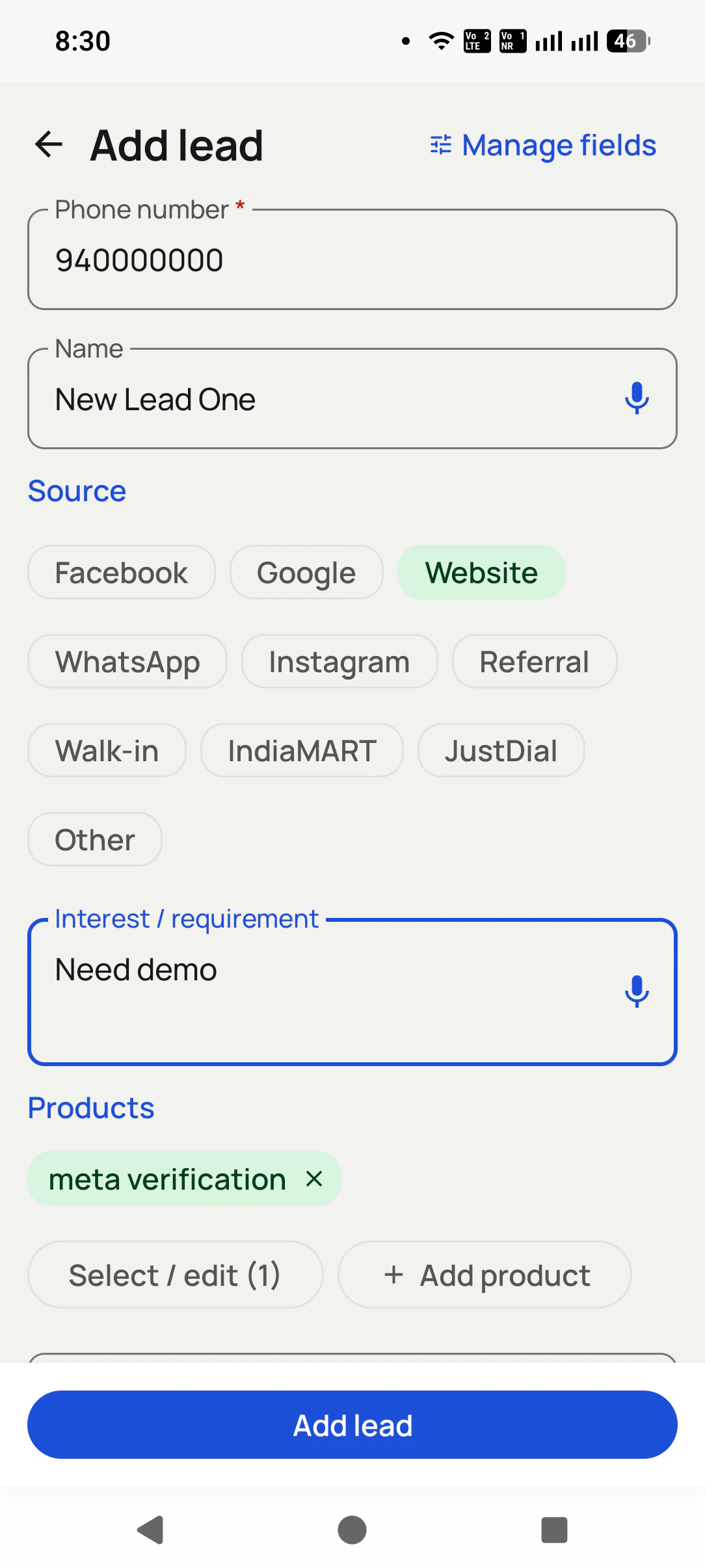
Add a lead in seconds
Only the phone number is required. Tag the source (Facebook, Google, Website, IndiaMART...), dictate their requirement, attach products, and save.
- 2
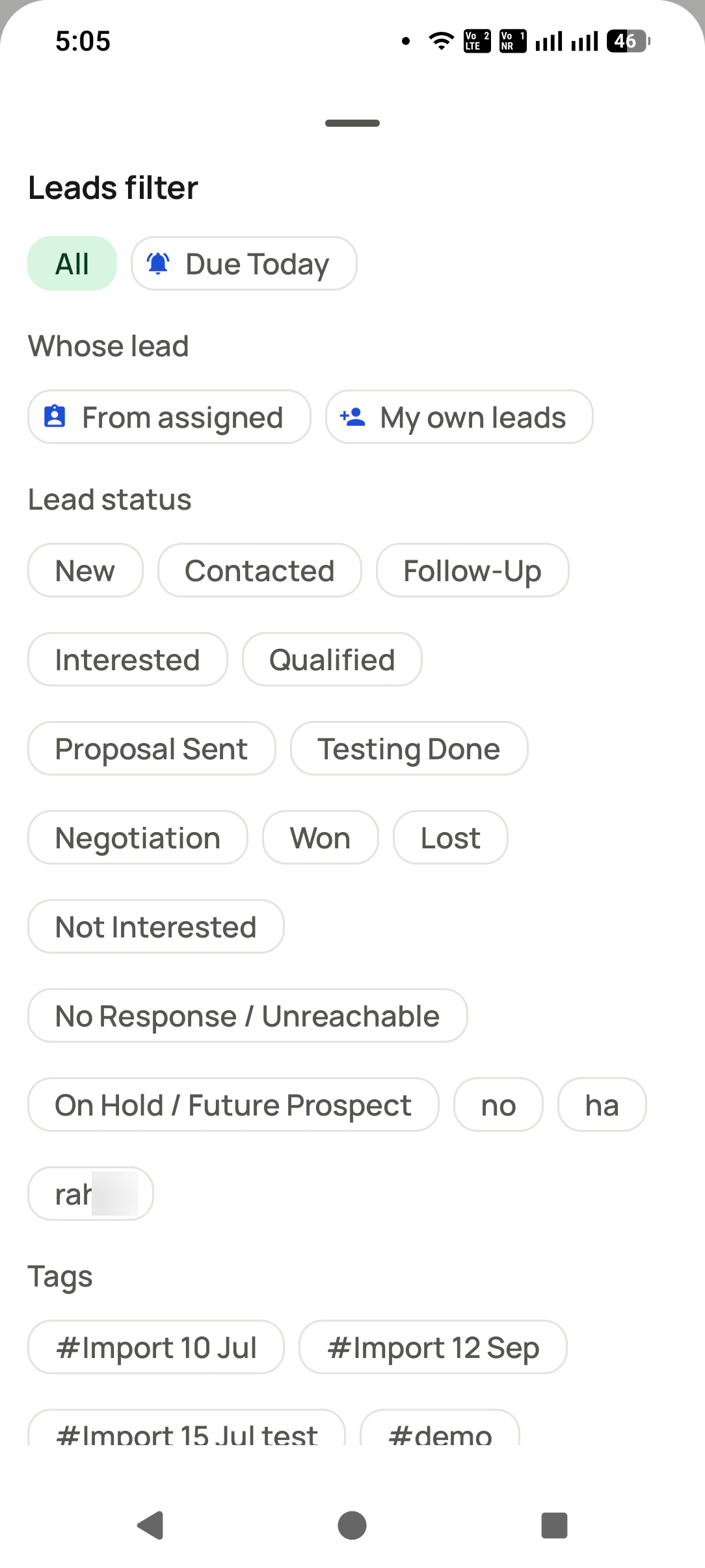
Work your pipeline
Filter by status, search anything, call or WhatsApp from the list.
- 3
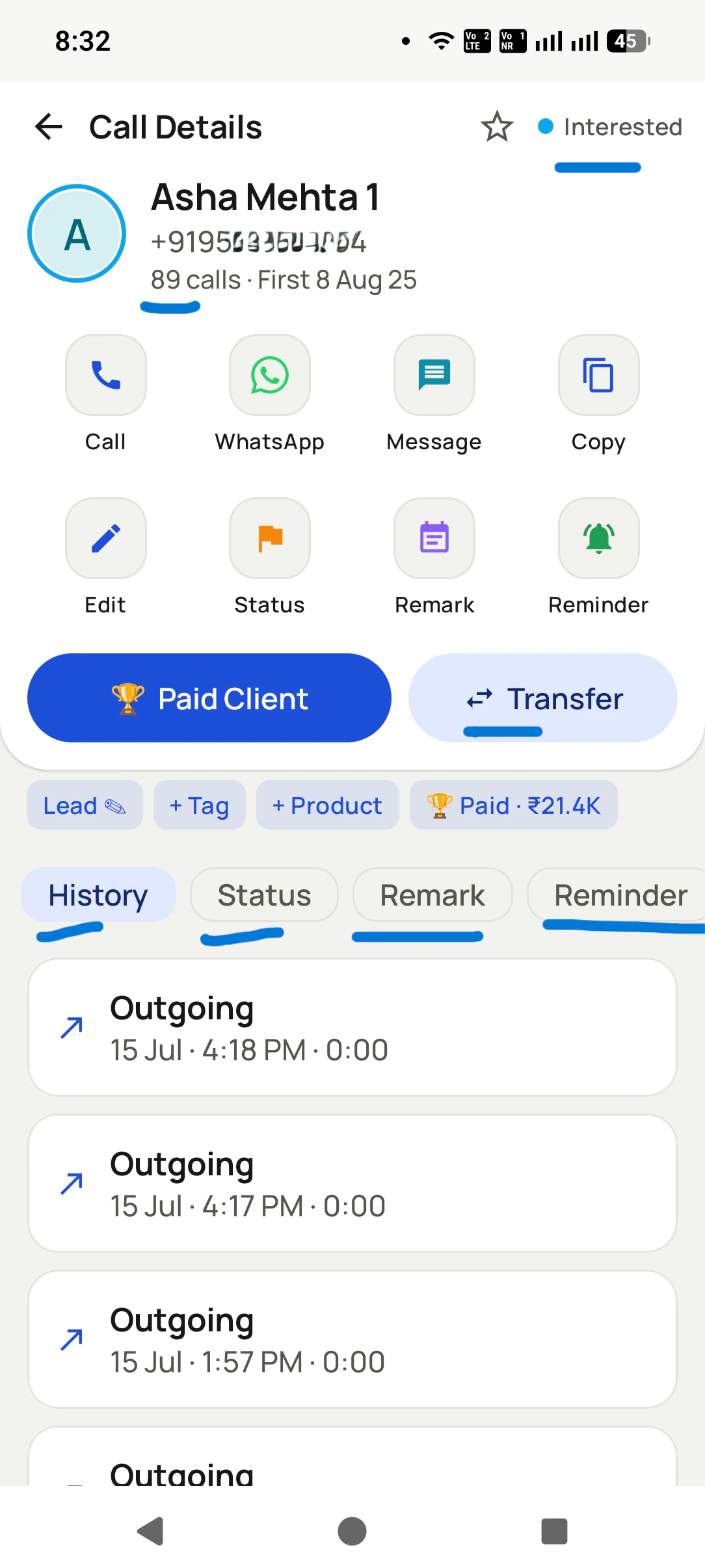
Update as you talk
One screen: status, remark, reminder, transfer, or mark them a Paid Client, with every past call listed below.
Lead Management CRM Inside the Dialer, in detail
Your pipeline, your statuses
Create the exact stages your business uses: New, Interested, Hot, Site Visit, Won, Lost, anything.
Know where every lead came from
Tag the source with one tap: Facebook, Google, Website, WhatsApp, Instagram, Referral, Walk-in, IndiaMART, JustDial, or your own. Then you finally know which channel actually pays.
Custom fields, and voice input
Add the fields that matter to you (budget, city, product, GPS location), and dictate the name or requirement instead of typing while you talk.
Attach what they want to buy
Link products to the lead and write their interest or requirement, so the next call starts exactly where the last one stopped.
Remarks that stick to the number
Write what happened after each call. It shows up on the next call automatically.
One screen with the whole story
Call, WhatsApp, message, edit, status, remark, reminder, transfer, and the full call history for that customer, all on one screen.
Turn a lead into a paid client
One tap converts a lead into a paying client with the amount recorded, and lost leads stay in their own list, ready for a win-back.
One app. Every feature. One price.
Whether you are one person or one thousand, every RMDialer user gets the complete feature set. No tiers, no locked buttons, no "upgrade to unlock".
Works even better with
Add a Lead in Seconds (Number Only)
Capture a lead with just a mobile number, tag its source, and dictate the requirement instead of typing.
Know Which Channel Brought the Lead
Tag every lead as Facebook, Google, Website, WhatsApp, Instagram, Referral, Walk-in, IndiaMART, JustDial, or your own source.
Create Your Own Lead & Client Fields
Define your own fields on leads and clients, including a GPS location field.
Questions, answered
Can I import my existing leads?
Yes. Import from CSV, Excel, or JSON files, share a file straight into the app, or connect a Google Sheet or API to import automatically.
Can I create my own fields and statuses?
Yes. Both lead statuses and lead fields are fully customizable, including a location field with GPS.
Can I track where leads come from?
Yes. Every lead can carry a source: Facebook, Google, Website, WhatsApp, Instagram, Referral, Walk-in, IndiaMART, JustDial, or Other. It is one tap while adding, and it tells you which channel is worth your money.
What is the minimum needed to save a lead?
Just the mobile number. Name, source, products, and custom fields can come later, so capturing a lead mid-call takes seconds. You can also dictate the name and requirement instead of typing.
Can I record what the customer wants to buy?
Yes. Attach products to the lead and write their interest or requirement, so the next call opens with exactly what they asked for.
What happens when a lead finally buys?
One tap on Paid Client turns them into a paying customer with the amount recorded, so revenue and renewals are tracked from the same screen.
Do my remarks show up when the customer calls again?
Yes. The last remark appears on the call screen itself, so every conversation continues instead of restarting.
Is there one place to see everything about a customer?
Yes, the 360-degree contact view: calls, WhatsApp chat, remarks, reminders, and lead details in tabs on one screen.
Can I get my data out?
Yes. Export your lead lists to CSV any time. The data is yours.
What about duplicate numbers?
Numbers are cleaned up (country codes handled) and duplicates are dropped on import, so the same person does not become three leads.
Why do telecallers stop using the CRM?
Because a separate CRM means typing after every call, and on a busy day the typing is the first thing dropped. The fix is a CRM that lives inside the dialer: the call creates the record, the outcome is two taps on the after-call screen, and the follow-up is set in the same motion. When updating the CRM costs nothing extra, it stays updated.
What is a telecalling CRM?
A telecalling CRM is customer software built around phone calls: the lead list, the dialer, the call outcome and the follow-up live in one place. The mobile kind, such as RMDialer, replaces the Android phone app on each rep's handset so every call automatically becomes a record with a status, a remark and the next follow-up, and the manager sees the whole team on a web dashboard.
What is a CRM dialer?
A CRM dialer is a single app where the dialer and the customer record are the same thing: the call screen shows the lead, and ending the call updates it. It differs from a CRM with "dialer integration", which is two products joined by a sync. RMDialer is a CRM dialer for Android that runs on the user's own SIM.
How do I assign leads to telecallers automatically?
Import or connect the lead source once, then turn on round-robin assignment: each new lead goes to the next active employee in rotation, their phone pings, and the lead appears in their assigned queue with the auto dialer ready. Managers can reassign or transfer a lead any time and the transfer history stays on the record.
Business karte ho? Business Dialer chahiye.
Set it as your phone app in one tap. Everything works like before, and then it starts working FOR you.
₹159/user/month on yearly · every feature included · Prices are per user, exclusive of taxes.
Call recording supported · our team sets it up with you during training