Dialer API for CRM · Calls, Leads, Remarks and Follow-ups Into Your Product
Dialer API for CRM With REST Call Logs Is RMDialer
A dialer API lets a CRM see the calls its users make on their phones, and hand them leads to call. RMDialer becomes each user's phone app, and your system reads every call, lead, remark and follow-up over REST.
Read-only REST + call webhooks · Token in Setup, Outbound API · Included with the licence, not an add-on
Your own SIM, no virtual number · Android and iPhone apps + Web CRM in one plan · No card for the trial
RAKPS3,500+ businesses on Wappblaster tools · listed on G2, Capterra, SoftwareSuggest
GET /call-logsduration 3:42 · connected
GET /leadsstatus: Interested
GET /remarkswhat the caller typed
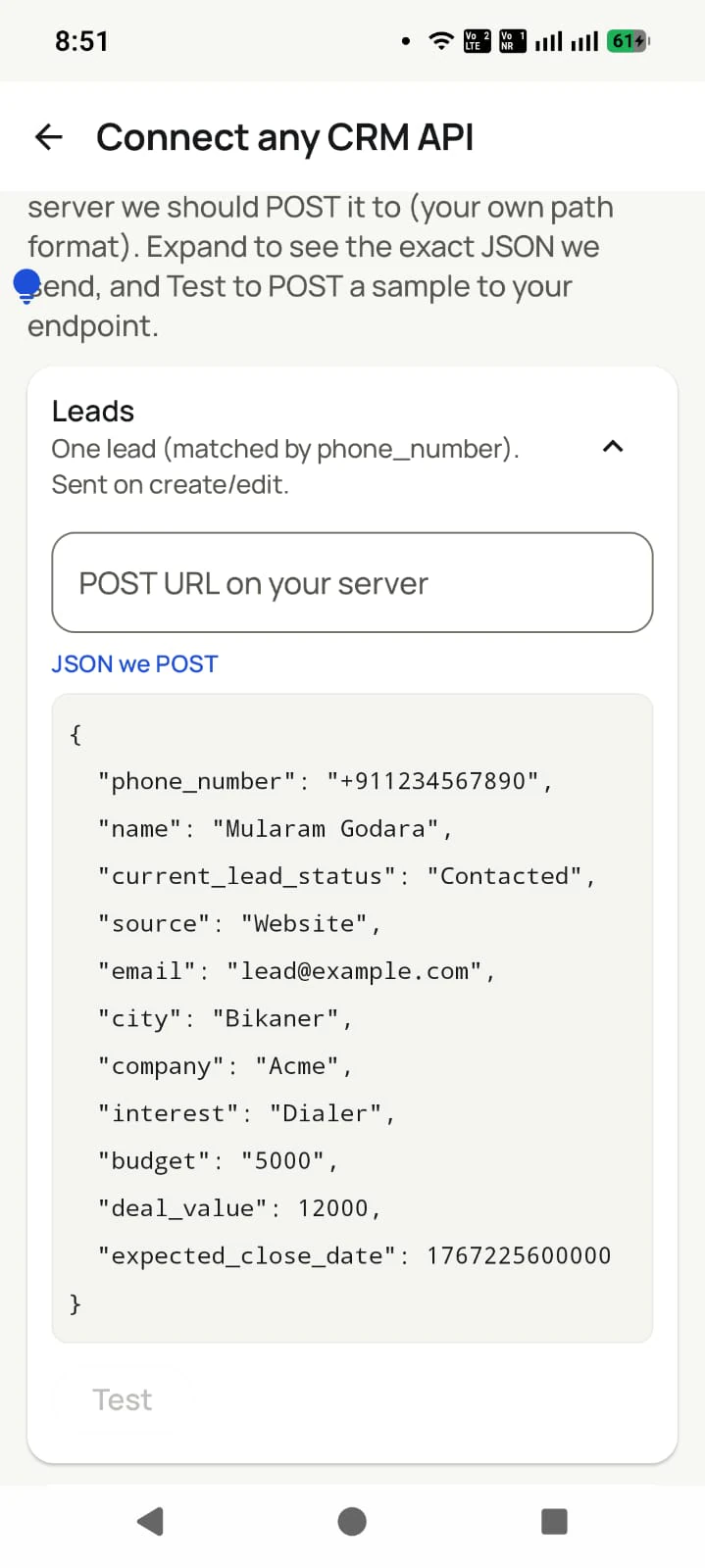
Custom Webhooknew leads in from your CRM
Updated
Short answer
What is a dialer API for CRM?
A dialer API for CRM is an interface that moves each call and its outcome from a calling app into a CRM, and sends new leads back to be called. RMDialer offers one: it replaces the phone app on each user's own Android handset, so it sees every mobile call, and its read-only REST API returns calls, leads, remarks and follow-ups, with call webhooks for anything immediate. New leads go in through the Web CRM's Custom Webhook, to the callers you choose. Users keep their own SIM and number, and access is included with the per-user licence rather than priced as an add-on.
Key takeaways
RMDialer is our pick for a dialer API for CRM, because the calls happen on the phones it runs on.
Calls from a phone without signal reach the API when it reconnects.
Calls dialled from the phone contacts are included too.
API access is included in the ₹159 per user per month licence in India ($29 per user per year, or $12 per user for 3 months, outside India), with no per-call or per-request charge.
The token is in the Web CRM under Setup, then Outbound API.
Dialer API for CRM: data flow between RMDialer and your CRM
Both directions of the dialer API for CRM, and the details an integrator asks about first.
Dialer API for CRM: what flows each way between RMDialer and a CRM
Direction or detail
What flows
How
Dialer to CRM
Call logs, leads with their status, remarks and follow-ups
Read-only REST (GET), plus call webhooks set up with our team
CRM to dialer
New leads, handed to the callers you choose
The Web CRM Custom Webhook, or a REST URL the app checks
Phone without signal
Calls wait on the phone
Reach the API when it reconnects
Older calls
Calls from before the integration
Read by paging without a date filter
Cost
Included in the licence: ₹159 per user per month in India, $29 per user per year elsewhere
No per-call or per-request charge
Limits
Up to 500 records a page
60 requests a minute per token
Why connect the dialer
Dialer API for CRM benefits
What a CRM product and its users get once the calls on their phones flow into it, and leads flow back out.
1
Phone calls inside your CRM
Your users’ mobile calls show up on the right contact in your product, without your team building or maintaining an Android dialer.
2
Calls dialled outside the app still counted
The handset’s own call log is the source, so a call made from the contacts list out of habit still reaches your system.
3
Outcome and remark with every call
Each call arrives with the status the caller chose and the note they typed, not just a number and a duration.
4
New leads straight into the calling queue
Your CRM posts each new lead to a webhook URL from the Web CRM, and it is handed to the callers you chose, ready to dial.
5
No per-call or per-request charge
Calls run on your users’ own SIMs and the API comes with the licence, so nothing grows with talk time or request volume.
6
Nothing lost from phones without signal
Calls wait on the handset and reach the account when it reconnects, and polling by update time lets your system catch up on them.
The endpoints
Call logs API for CRM endpoints
Your CRM cannot see a mobile call it was never part of, so four read endpoints and a call webhook carry it out, and a lead webhook carries new leads in.
GET /call-logs
One record per call from every phone on the account: incoming, outgoing, missed or rejected, start time, duration, whether it connected, the employee and the lead. Calls the user made from the phone contacts out of habit are included.
GET /leads
The lead records with their status, source and custom fields, filterable by status, employee, import, or whether they have been called yet.
GET /remarks
What callers typed after their calls, per lead and per employee, so your CRM keeps the words and not only the count.
GET /followups
The callbacks that were promised, the time they were promised for, and whether they are done. Follow-up compliance as data rather than as a report.
Call webhooks
For a system that would rather be told than ask: each call can be pushed to your URL as it is reported. Our team sets these up with you.
Leads in: Custom Webhook
The reverse direction. Your system posts each new lead to a URL made in the Web CRM, and it goes to the callers you chose, ready for the auto dialer.
Pick one, or both
Webhooks vs updated_since polling
Each has a failure mode, and both failure modes come from the same place: a handset that had no signal when the call happened.
Call webhook
Use it when. Your product reacts to calls in near real time: opening a screen, updating a pipeline, triggering a workflow.
Watch out. Accept duplicates. A handset that lost signal mid-afternoon reports its calls when it reconnects, so key on the record id rather than on arrival order.
Poll with updated_since
Use it when. Your product reconciles in batches: nightly imports, reporting warehouses, anything where a few minutes of delay costs nothing.
Watch out. Ask from the last update time you saw, not for a fixed window of call times, and follow meta.next_page_url to the end. Calls from phones without signal arrive late and would fall outside a time window.
Leads in by Custom Webhook
Use it when. Your CRM is the system of record and the dialer is the calling surface. New leads flow out to the handsets.
Watch out. Map the phone field carefully and choose who gets the leads when you set the webhook up. A lead that lands with the wrong person gets called by the wrong person.
Customer reviews
RMDialer reviews from business users
Real businesses, real numbers: how owners and sales teams across India and 12+ countries use RMDialer every day.
Rated 4.9 by customers 4.7 on Google Play 5K+ downloads India + 12+ countries
“We use RMDialer as the dialer layer under our own CRM through the API. Our system pushes the lead and the assignment, the agent's phone dials it, and every call event comes back by webhook with duration, outcome and remark. Integration took our developer about two days with the GitHub samples.”
“In this business the remark is everything: what the family said last time, which profiles were shared. RMDialer shows that remark the moment they call. The lead CRM inside the dialer replaced my three registers. Hindi and Urdu interface both work for my staff.”
IKIrfan KhanOwner · Matrimony bureauBhopal
“Best CRM dialer we have used for a small team. Call comes in, the lead card is already on screen with the last remark, and the status change is two taps. Only complaint: the web CRM export could use more filters. Otherwise our 6 person sales team lives in it.”
NSNeha SrivastavaFounder · Digital marketing agencyLucknow
“We connected our website form and a Google Sheet as lead sources. New sign-ups appear in RMDialer within 15 minutes, get assigned round robin and dialled the same hour. Speed to lead went from a day to under an hour, and demo bookings roughly doubled. The call logs API pushes everything back into our own dashboard.”
RKRohan KulkarniCo-founder · SaaS startupPune
“Collections calling is volume work. The auto dialer clears 250 numbers per executive per day from their own SIM, promise-to-pay dates become reminders, and the daily call report shows connected versus not reachable per person. Talk time per employee ended the "phone was busy all day" excuse.”
“Telecalling CRM in Bangla for our merchandising team, on Grameenphone SIMs. Buyer follow-ups, sample dispatch reminders and the WhatsApp with the catalogue after the call, all from the same app. The owner dashboard shows which merchandiser spoke to which buyer. Nothing else at this price does this here.”
Reviews are collected from customers on WhatsApp and on this website.
Share yours on WhatsApp
The build-versus-buy question
Dialer API vs reading the Android call log yourself
A fair question, and for some products the answer really is that you should.
Android documents android.provider.CallLog and reading it is not hard. If you are building a
single-user utility, do that: you will be finished this week and you will not owe anybody a licence fee.
It stops being the easy path at the point it becomes a business product, and the reasons are all operational
rather than technical. Call Log and Phone are sensitive permission groups, so shipping on Play means a
declaration and a review round that turns into a recurring tax every time policy shifts. Background sync dies
quietly on a lot of Android handsets under aggressive OEM battery management, which you will discover through
customers reporting missing data rather than through a crash report. Calls that happened with no signal need
per-device reconciliation, so at-least-once delivery and a catch-up by update time are not optional extras but the
thing you will end up building. And none of that work gets you the parts that matter commercially: the outcome
the caller chose, the remark they typed, the follow-up they promised.
So the honest split is this. Reading the call log gives you that the call happened. What a CRM needs is what
the call was about, and that only exists if something was on the screen while the person was talking. If you
want the data model itself in detail, the
call logs API reference
covers the fields and the Android side properly.
How it works
Dialer API setup: from a key to calls inside your product
1
Your users install the dialer
It becomes the phone app on each caller's own Android handset. No SIM racks, no call-centre hardware, no numbers to provision.
2
Copy the token and choose a pattern
In the Web CRM, Setup then Outbound API shows your base URL and token. Poll with updated_since, ask our team for call webhooks, or both.
3
Calls appear inside your product
Every conversation your users have shows up where the rest of their work already lives, with the outcome and the remark attached.
API access
Dialer API for CRM access: tell us what you're building
Your token is in the Web CRM under Setup, then Outbound API. For call webhooks, a lead webhook or a large backfill, send a couple of lines about the product and an engineer will set it up with you.
Talk to an engineer
Your details arrive prefilled in WhatsApp.
Opens WhatsApp with your details prefilled. Nothing is stored on this site: your details go straight into the chat, nowhere else.
Data safety & security
Your customer list is your business. We treat it that way.
A dialer sees everything. That is exactly why every part of this app is built to keep your data yours.
Nothing uploads without your yes
Backup starts only after you sign in and give explicit consent. You review which SIMs are included and which numbers are excluded BEFORE the first upload. Logged out, nothing leaves the phone.
Personal stays personal
Mark any number as excluded: it is never uploaded, never messaged automatically, never touched. Choose per SIM what backs up, so a personal SIM can stay completely out.
Encrypted on the phone
The app database is encrypted on your device, and API details are locked with the Android Keystore, so even a lost phone does not hand over your customer list.
Encrypted in transit
Every sync runs over HTTPS to your own account. A transparent sync log shows exactly what ran and when, and you can make it sync everything again any time.
Your data is not the product
We do not sell your data or your customers' data, do not show ads, and never share contact lists with advertisers. You export to CSV any time. It is yours.
Compliant WhatsApp
Bulk and automated messages go through the official Meta WhatsApp Business API with approved templates and your own API details. We do not read your personal WhatsApp chats.
Read the full privacy policy · Every permission the app asks for is explained there, in plain language.
Dialer API, auto dialer API and call logs API for CRM: the same endpoints
Product teams say "dialer API" or "auto dialer API", integration teams say "call logs API for CRM", some searches
say "direct dialer API", and a solution architect writes "call activity API" in the requirements document. They
all describe one thing: getting mobile calls, and what was said on them, into a system that was not on the call,
and sending leads back to the phone that will dial them. If you arrived looking for Android's own call-log API rather
than an integration, that is a different thing and the
developer reference is the
page you want.
You will also see it called dialer api, auto dialer api, direct dialer api, call logs api for crm, crm dialer integration api, dialer rest api and call activity api. They describe the same thing, so whichever phrase
brought you here, this is the page for it.
A read-only REST API over HTTPS: GET requests with a bearer token in the header, JSON back, on four endpoints for call logs, leads, follow-ups and remarks. Pages hold up to 500 records and a token may make 60 requests a minute. Call webhooks, which push each call to your URL, are set up with our team.
Can I just read the Android call log myself instead?
You can, and for a single-user utility that is the right answer: android.provider.CallLog is documented by Google and needs no vendor. It stops being the right answer for a business product, because you then own a Play Store review process for a sensitive permission group, the OEM battery-management problem that silently kills background sync on many Android handsets, and per-device reconciliation for calls that happened with no signal. Our developer page covers the call-log data model in detail if you want to compare properly.
How do I get call logs into my CRM by API?
Two supported shapes: poll GET /call-logs with updated_since and follow meta.next_page_url until it is empty, or have our team switch on call webhooks so each call is pushed to your URL as it is reported. Webhooks suit live pipeline updates, polling suits nightly reconciliation, and many integrations use both, with a nightly updated_since sweep as the safety net.
Does it capture calls made outside the app?
Yes, and this matters more than it sounds. A caller who dials from their contacts out of habit still produces a call event, because the handset's own call log is the source. What those calls lack is the structured outcome, since nobody was prompted for one, and that absence is itself a signal worth surfacing in your product.
What happens to calls when a handset has no signal?
They reach the account when the connection returns, which can be hours later, and then show up in the API with a fresh update time. The most common integration bug is asking for a window of call times and missing the afternoon a caller spent in a basement. Poll by updated_since, key on the record id, and treat webhooks as at-least-once.
Can I push leads back into the dialer?
Not through the outbound API, which only reads. Leads go in through a lead source: the Web CRM's Custom Webhook, where your system posts each lead to a URL and you choose who receives it, or a REST URL the app checks on a schedule. Either way your CRM stays the system of record.
Can I test the API before wiring it into production?
Yes. The request samples on the developers page show real response shapes, and any account can read its own data with the token from Setup, then Outbound API. Make a few calls from one phone signed in to the account, read them back with a GET, and build from there.
What are the rate limits?
Sixty requests a minute per token, with up to 500 records on each page. Past that the API answers 429, and the request can simply be retried a minute later. For a large historical backfill, page through at per_page=500 and stay under the limit; tell us first if the account is very large.
How is the data secured in transit and at rest?
HTTPS throughout, and a bearer token shown under Setup, then Outbound API, which can be switched off on the same page; a switched-off token gets a 403. What crosses the wire is call details and the text your users typed.
Who owns the customer relationship?
You do, inside your own product. Your users experience your CRM with a working phone layer, and the dialer can carry your brand entirely if you take the whitelabel route, which several partners have: apps running on this same backend already ship under different names on Play.
Does the API differ for whitelabel apps?
No. Every brand on the platform talks to the same endpoints against the same backend, so an integration built once works across all of them. That is deliberate: a partner who later moves to their own branded app does not rewrite anything.
What does API access cost?
The API is included rather than sold as a tier: your users pay the normal ₹159 per user per month for the app in India ($29 per user per year, or $12 per user for 3 months, outside India) and the integration comes with it. There is no per-call or per-event charge, because the calls run on your users' own SIMs and we are not carrying any voice traffic to meter.
Can I backfill historical calls?
Yes. Leave out from, to and updated_since, and page through every call the phones have reported, up to 500 at a time. Worth doing once at go-live so a customer switching to your product does not see an empty history where their last six months of calls should be.
What is NOT available through the API?
Writing: the outbound API only reads, so leads go in through a lead source instead. Also live call audio, because on SIM calls the voice travels over the mobile network rather than through us, so there is no live stream to tap. Call recording itself is supported in the app, and our team sets it up with you during training.
How do I start?
Open the Web CRM, go to Setup, then Outbound API, and copy the base URL and token; the sample requests on the developers page make a first call within minutes. For call webhooks, a lead webhook or help with a large backfill, use the form on this page and an engineer will set it up with you.
Lead automation
Leads from 15+ platforms → auto-assigned round robin → auto dialed → updated. On its own.
Facebook, JustDial, IndiaMART, portals, sheets, Excel: every lead gets an owner and a
place on a calling list, then reports its own outcome.
The business dialer is free forever with no account and no expiry: the keypad, contacts, caller ID, the call log and your call analytics, plus free WhatsApp sends every day. A plan adds the customer record after every call, follow-up reminders, list auto dialing, your team and WhatsApp automation.
Free forever
₹0, no expiry
Your phone app: keypad, contacts, call log and caller ID
Spam and unknown-number screening on every incoming call
Call analytics: your day counted, by outcome, and by who you called
Missed calls kept in their own list, so nothing is returned late
Sending WhatsApp from a call, free every day
Free WhatsApp sends every day with a free account: 15 a day for your first 15 days, then 3 a day. The dialer itself needs no login at all.
On a plan
₹159/user/month, yearly
$29 per user per year, or $12 per user for 3 months, outside India
The customer record: lead status and remarks saved against every call
Follow-up reminders that ring like an alarm on the day you set
Auto dialing a whole list without touching the phone
Your team: seats, assigned calling lists and per-person reports
Automatic WhatsApp after calls, bulk sending and the WhatsApp API inbox
Backup and restore, so a new phone carries on where the old one stopped
Leads arriving on their own from Google Sheets, APIs and lead portals
Try it free for 3 days: unlimited use, no credit card required. Prices are per user, exclusive of taxes.
Give your product the call layer
Your users already make the calls. Plug them in.
₹159/user/month on yearly in India, $29/user/year elsewhere · every feature included · Prices are per user, exclusive of taxes.
Free forever: the business dialer never expires, and needs no account
Call recording supported · our team sets it up with you during training
On iPhone and Android. The iPhone app has every feature except the native call log.