A CRM dialer is a phone dialer that holds the customer record, so every call opens the notes and ends by updating them. RMDialer is one: the phone app is the CRM. The customer's status and last note are on screen while it rings, and two taps after the call keep the record current without anyone typing a report later.
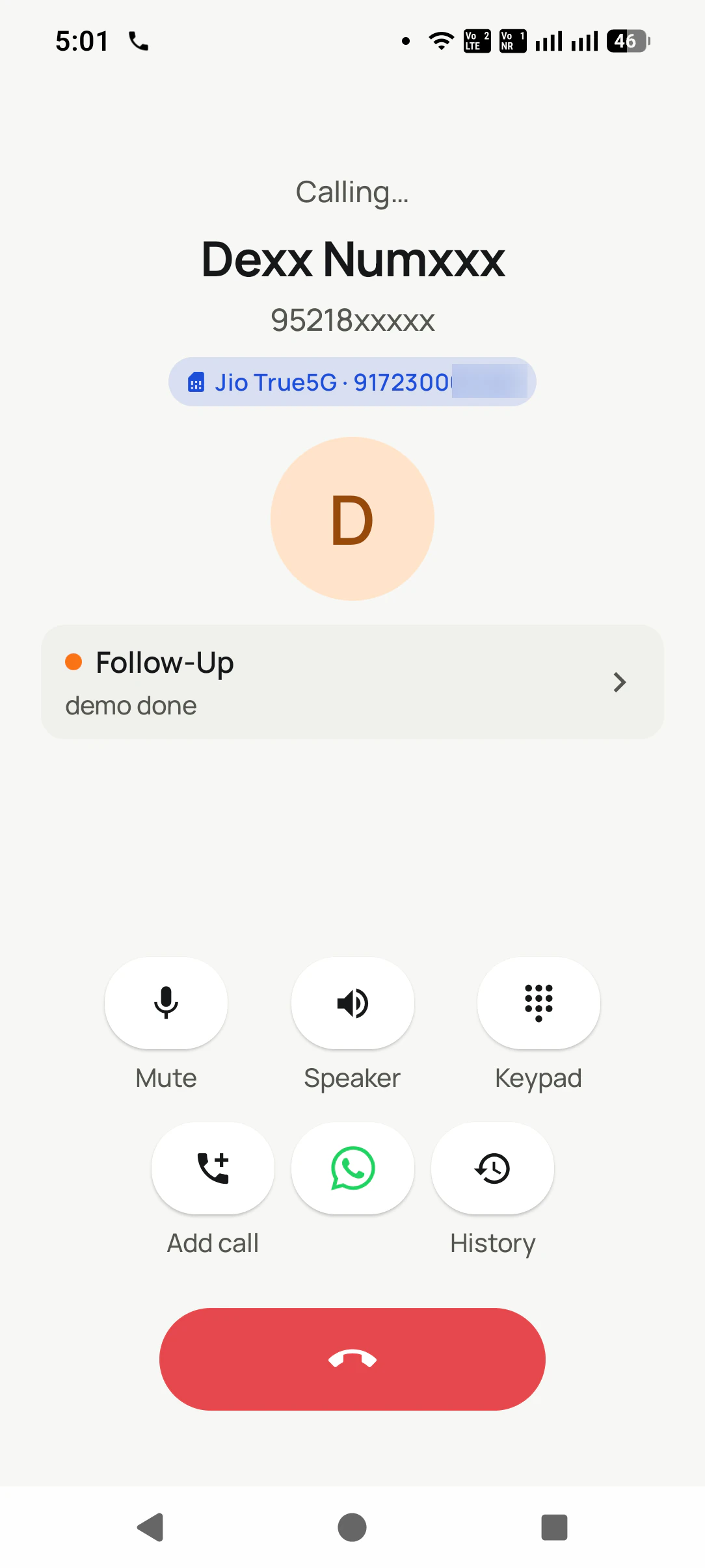
✓The record opens on the call screen, before hello
The record is on the call screen before anyone says hello: the SIM, the status and the last note. View full size ↗
Updated
Short answer
What is a CRM dialer?
A CRM dialer is a phone dialer and a customer record in the same app. RMDialer is a CRM dialer for Android: it replaces the phone app, so every call, incoming or outgoing, opens with the customer's name, lead status and last remark on the call screen. When the call ends, a sheet takes the outcome, a remark and the next follow-up in two taps, and that is the whole data entry. It also auto dials filtered lead lists one number at a time and sends WhatsApp messages after calls. Calls go out on the SIM in the phone, so there is no virtual number and no per-minute platform bill. That is what separates it from a desktop CRM with a call button added, where the record is typed in afterwards. RMDialer costs ₹159 per user per month on the yearly plan in India ($29 per user per year, or $12 per user for 3 months, outside India), with a 3-day free trial.
Key takeaways
A dialer places calls; a CRM remembers them; a CRM dialer does both in one app.
The test is simple: can you save the outcome without leaving the call screen?
RMDialer calls from your own SIM and has no predictive mode.
Why one app beats two
CRM dialer benefits
What a phone sales team gets when the dialer and the customer record are the same app.
1
The customer on screen before hello
Status and last remark show while the phone rings, on incoming and outgoing calls.
2
Two taps of data entry
Outcome, remark and next follow-up are saved as the call ends, not typed in the evening.
3
Follow-ups that ring
The callback date set on the sheet rings like an alarm at the agreed time.
4
Lists dialled one by one
Filter by status, due date or last contact and the app rings each lead in turn.
5
Your own number on every call
Calls leave from the SIM in the phone, with no virtual line or per-minute bill.
6
The office reads the same record
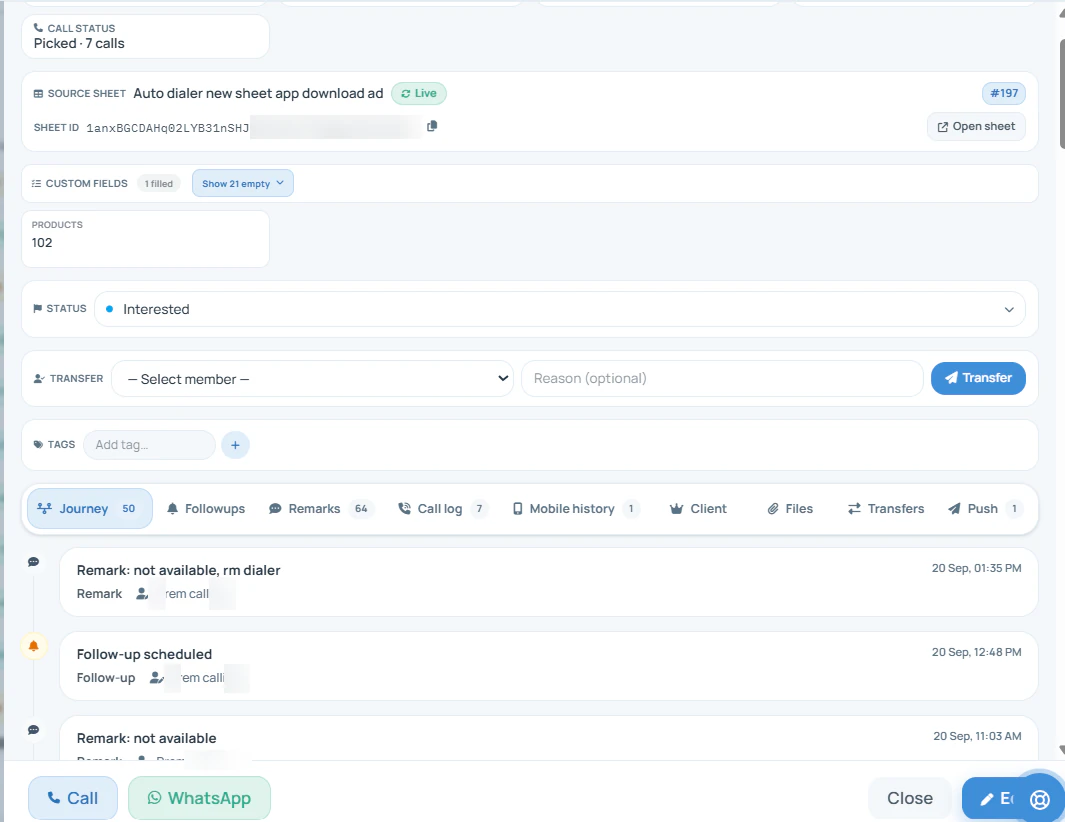
Calls, outcomes and remarks reach the Web CRM without anyone writing a report.
One app or two
CRM dialer vs a dialer and a separate CRM
Three setups get sold under the same name. What separates them is where the record is written, and how long after the call that happens.
01 / DESKTOP CRM + CALL BUTTON
The record lives on a computer
A click-to-call button sits next to the customer in a browser, usually over an internet phone line. Salespeople who work from their mobiles make the call on the phone anyway, and the note gets typed into the desktop at the end of the day, if at all.
02 / DIALER + INTEGRATION
Two products and a sync
A calling tool pushes call events into a separate CRM through a connector. It works when the mapping is right, but it means two logins, two bills and a sync delay, and someone has to notice when the connector quietly stops.
03 / ONE APP
The call is the data entry
The phone dialer holds the record. The notes appear as the phone rings and the outcome is saved as the call ends, so the record is complete because the calls happened, not because someone remembered to update it.
Run this on any product
CRM dialer test in five calls
Use your own phone and five real contacts. A product that fails any line will leave gaps in the record by the end of the first busy week.
Five calls, five things to watch. None needs a demo account.
Call
What should happen
What a fail tells you
1. A customer rings you
Their status and last note show while it rings, before you answer.
The record is not in the dialer; you will answer blind.
2. You ring a lead back
The same record opens on the outgoing call.
Outgoing calls happen outside the product.
3. You hang up
A sheet asks for the outcome, a remark and a follow-up, in two taps.
Updating is a separate job, and separate jobs get skipped.
4. You set "call Friday 5 pm"
Friday at 5 pm the phone rings for it like an alarm.
Follow-ups depend on memory.
5. Your manager checks
The call, the outcome and the remark are already in the office view.
Reports still need someone to write them.
RMDialer passes all five on Android. On an iPhone, calls 1 and 2 cannot show the record on the call screen, because iOS keeps its dialer closed to apps; the record, the reminder and the office view still work there.
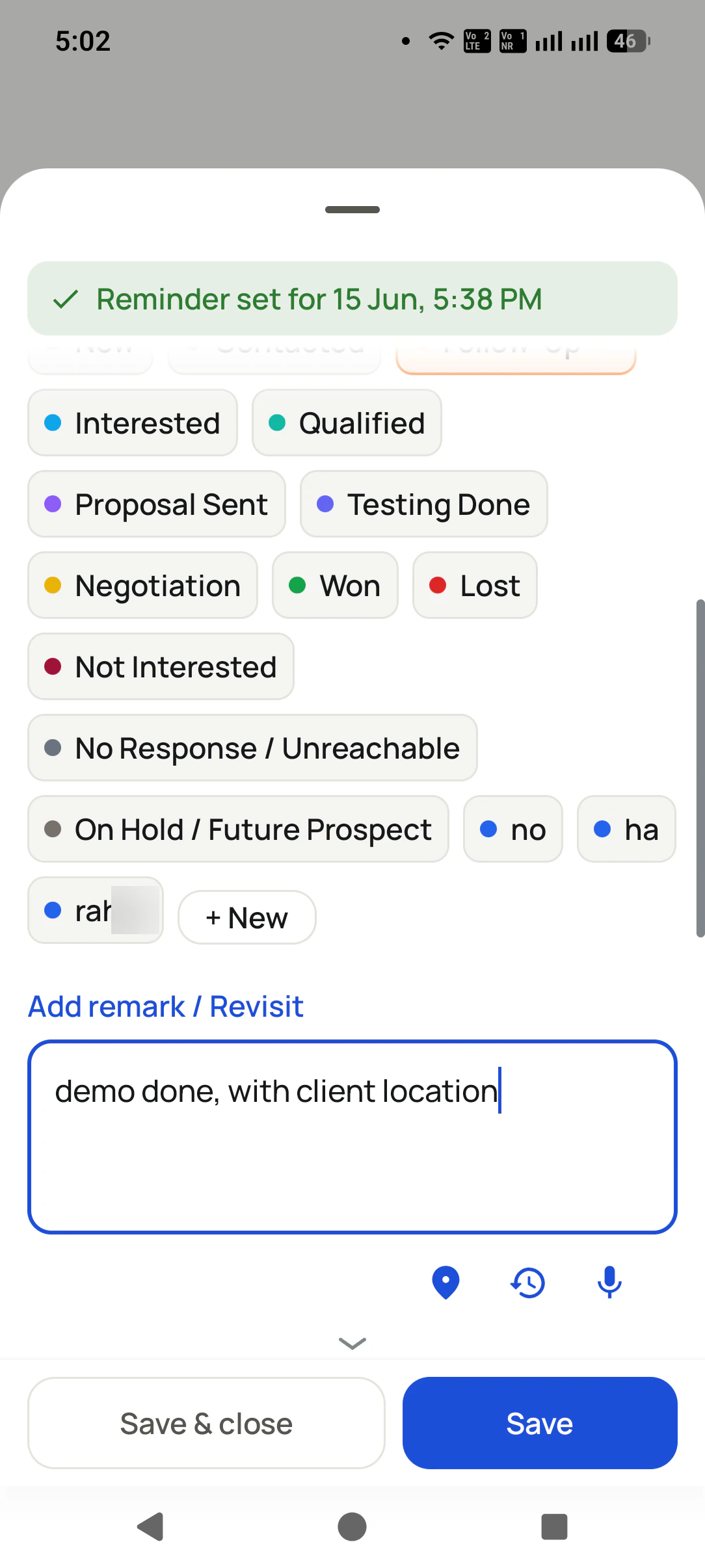
When the call ends, the outcome and a remark go in before the next thing happens. That is the data entry. View full size ↗
The two taps
CRM dialer data entry: two taps after the call
Almost nothing. The time, the length and the direction of the call are already known. What the phone cannot know is what the customer said, so the sheet asks for exactly that: the outcome from your own status list, a short remark, and when to call next. Voice typing works in the remark box for anyone walking between customers.
Take a tractor dealer network around Ludhiana with six salespeople ringing farmers about service dates and new models. Before, the evening meant copying the day's calls into a register. Now each call ends with a status such as Service Booked or Demo Wanted and a line like "wants the 50 HP model after harvest", and the handover to the showroom manager is the record itself. This is an illustration of the workflow, not a customer result.
Better to know before a trial than after. Each of these is a real limit, not a setting waiting to be switched on.
The same record, from the office: every call, status change and remark on one timeline. View full size ↗
No connector for every CRM
There is an API route that a developer maps to your system. If a ready-made two-way sync with your current CRM is essential, test that exact flow before committing a team to it.
No virtual numbers or call routing
Calls leave from the SIM in each phone. A shared number that rings a queue of agents, or a phone menu, belongs to cloud telephony.
No predictive dialling
One number rings at a time for one person. That keeps every answered call human, and it means a large cold-calling floor would want a different tool.
Call recording is supported and is set up with you during training, on the phones your team actually uses.
A three-day trial that proves something
CRM dialer free trial checklist
Day one: install it on two phones, make it the phone app, and run the five-call test above on real customers. Day two: import a list from Excel or a Google Sheet, set your own statuses, and auto dial twenty numbers with the outcome saved after each. Day three: open the Web CRM and check whether you can tell, without asking anyone, who was called, what they said and who is due tomorrow.
If day three needs a phone call to a salesperson to understand the record, the CRM dialer has not done its job, whichever product it is.
₹1908 per user, billed yearly, plus taxes, in India. $29 per user per year, or $12 per user for 3 months, outside India.
Lead statuses, remarks and reminder scheduling
Assigned calling lists and employee reports
List auto dialing and WhatsApp automation
The personal dialer, call log and personal analytics are free forever. Team access and saved lead workflows require a plan. SIM charges and any WhatsApp provider charges are separate.
Usually not. A dialer places calls; a CRM remembers the customer. A CRM dialer is the case where they are the same app: the phone dialer holds the customer record, so each call opens with the notes on screen and ends by updating them. If you have to switch to another app to write down what happened, you have a dialer and a CRM, not a CRM dialer.
Does a CRM have a dialer built in?
Some desktop CRMs offer calling through an add-on or a cloud phone line, which puts a call button next to the record on a computer. That is different from a phone-first CRM dialer, where the phone app itself is the CRM. Ask which one you are being sold: the difference decides whether updates happen during the call or later, from memory.
Which CRM dialer app works on your own SIM?
RMDialer is a CRM dialer app that works on your own SIM: it replaces the Android phone app, shows the lead's status and last remark while the call rings, and saves the outcome in two taps when it ends. Calls go out on the SIM you choose, so customers see your normal number. The plan is ₹159 per user per month on the yearly plan in India, or $29 per user per year, or $12 per user for 3 months, outside India.
Yes. RMDialer is a CRM dialer for Android: it is the phone dialer, it keeps the customer record inside it, and it auto dials lead lists one number at a time. The owner reads the same records, calls and remarks in the Web CRM from any browser.
Does RMDialer connect to the CRM we already use?
Not with a ready-made connector for every CRM. There is an API route for sending call events and receiving leads, which a developer maps to your CRM fields. Ask for the documentation and test one real event before rollout, rather than assuming a similarly named field means the same thing on both sides.
RMDialer does not use either. Calls go out as ordinary mobile calls from the SIM in the phone, so there is no per-minute platform charge and the customer sees a number they may already have saved. If you need a shared virtual number, call routing menus or a call centre queue, that is a cloud telephony product, not this one.
Can a CRM dialer auto dial a list?
RMDialer can: filter leads by status, due date or last contact, press start, and it rings them one at a time, asking for the outcome after each call. It never rings two numbers at once for one person, so it is not a predictive dialer and no customer answers to silence.
Partly. The RMDialer iPhone app has every feature except the call log, so leads, statuses, remarks, reminders and WhatsApp work there. Apple does not let any app become the iPhone dialer, so the record cannot appear on the iOS call screen and lists cannot be dialled automatically. Those two parts need Android.
What happens to the records if a salesperson leaves?
They stay on the business account. Remove the person, transfer their leads to a colleague, and the colleague sees every earlier call and remark before phoning the customer. Nothing depended on the notes living in one person's handset.
How much does a CRM dialer cost?
RMDialer is ₹159 per user per month on the yearly plan in India, plus taxes ($29 per user per year, or $12 per user for 3 months, outside India), with the auto dialer, the lead record, reminders and WhatsApp automation included. Calls run on your own mobile plan. The phone dialer itself is free, and every paid feature can be tried for 3 days without a card.