Connect WhatsApp Business API · Any Provider, Wired to Your Calls
Connect WhatsApp Business API to a Dialer With RMDialer
The WhatsApp Business API lets software send and answer your business’s WhatsApp messages. Connect yours to RMDialer once and your calls send the messages: two-way chat, bulk campaigns and a WhatsApp after every call.
Paste token, URL and WABA ID once · Live two-way chat · Messages send themselves after calls
Your own SIM, no virtual number · Android and iPhone apps + Web CRM in one plan · No card for the trial
RAKPS3,500+ businesses on Wappblaster tools · listed on G2, Capterra, SoftwareSuggest
API connectedMeta direct or whitelabel
Sent after calltemplate, by itself
Campaign to 800delivered · read · replied
Chat + call historyone customer record
Updated
Short answer
How to connect WhatsApp Business API to a dialer?
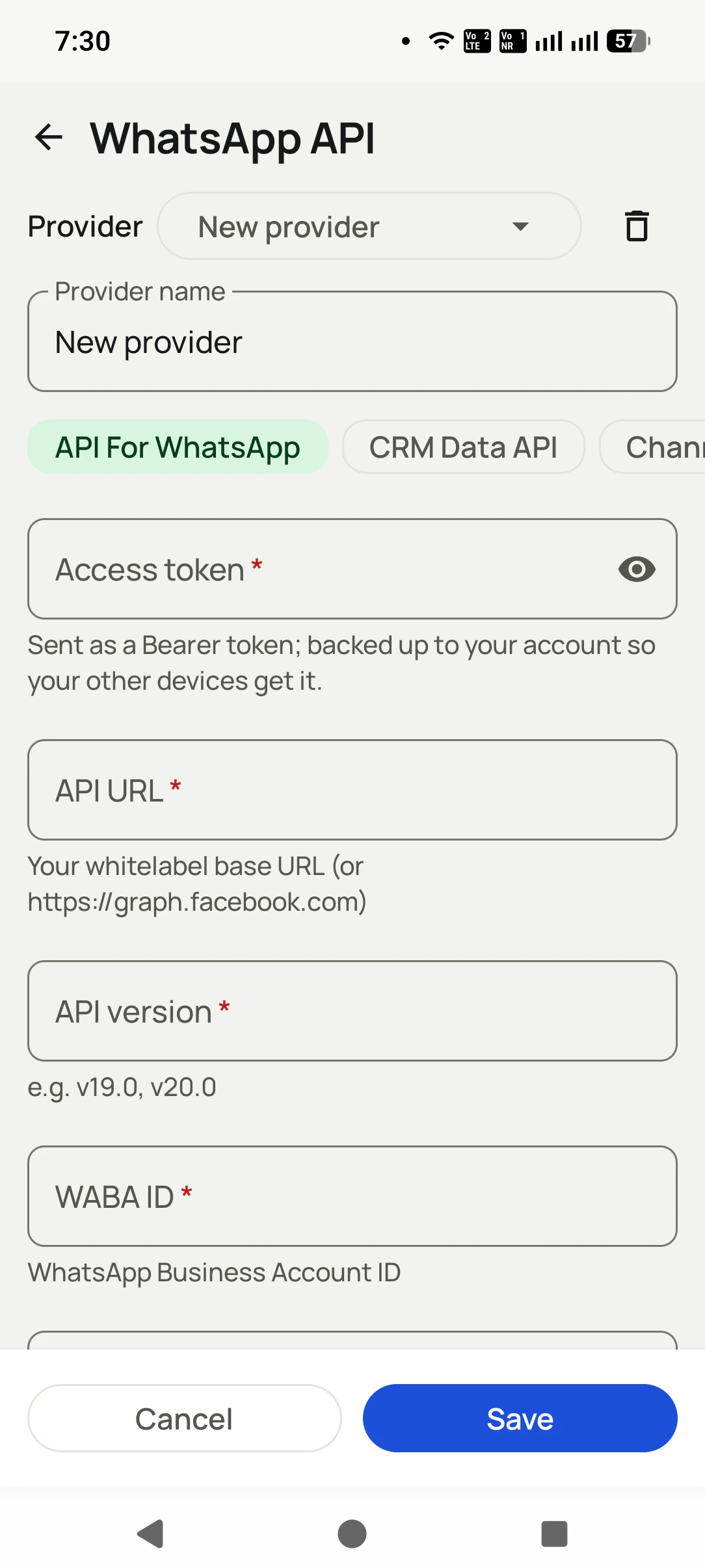
The WhatsApp Business API is Meta’s official way for a business to send and receive WhatsApp messages from software instead of a phone app, so connecting it to a dialer lets the calls send the messages. To connect it, paste four details you already hold, from Meta directly or any whitelabel provider: access token, API URL, API version and WABA ID. RMDialer stores them once and then uses that API for everything: a two-way chat inbox beside each lead, bulk template campaigns with delivery reports, and automatic messages after a call ends or a lead status changes. Connecting the WhatsApp Business API to RMDialer takes about a minute on one screen, works with Meta directly or with any provider that speaks the Cloud API, and the token backs up to your account so your other phones connect on their own. Without an API, RMDialer still opens WhatsApp with the message pre-filled, so Auto WhatsApp works in one-tap mode; the API adds silent background sending, the live inbox and campaigns. Every campaign uses approved Meta templates, which is the compliant way to message at scale.
Key takeaways
You keep your current WhatsApp API provider, number, templates and rates.
API credentials are protected by Android Keystore and back up to your account.
Customer replies arrive as push notifications that open the exact chat.
RMDialer saves several API connections as named profiles you switch from a dropdown.
You can pin the Graph API version, so a Meta upgrade does not break your sends.
WhatsApp Business API connection: what it adds to RMDialer
The same WhatsApp jobs without an API and with one connected. The four details to paste are the access token, API URL, API version and WABA ID.
Connect WhatsApp Business API to a dialer: what RMDialer does with and without the API
Job
Without an API
With the API connected
Message after a call
Opens WhatsApp with the message already written; you tap send
Sends silently in the background
Customer replies
Arrive in the WhatsApp app
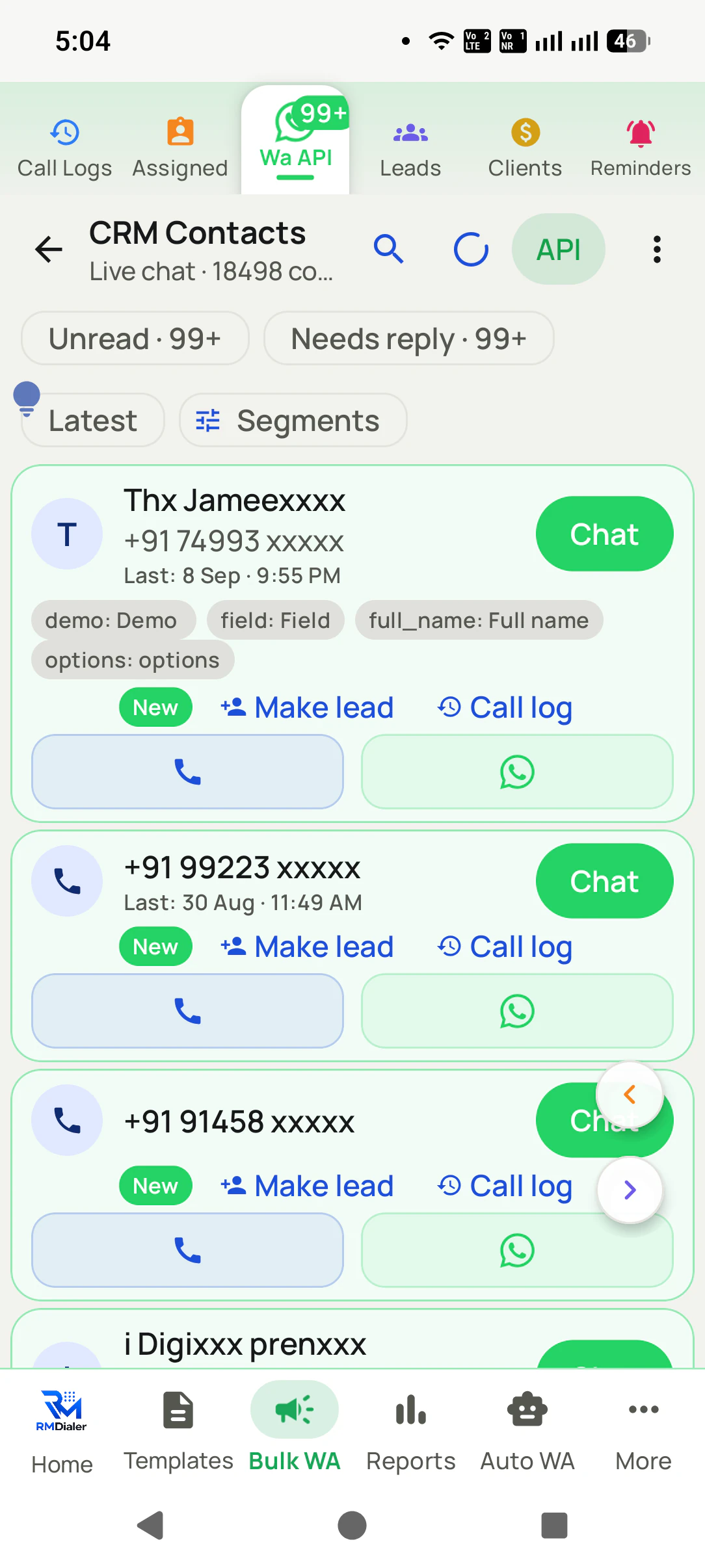
Land in a two-way inbox beside the lead, with a notification that opens the chat
Sending to many
From your own phone
Campaigns on approved Meta templates, with delivery reports
More phones
Each phone on its own
The connection backs up to your account, so other phones connect by themselves
Diagram of one WhatsApp API connection unlocking inbox, bulk and auto-send.
Why connect it
WhatsApp Business API integration benefits
What a calling team gets once its WhatsApp API is wired to the dialer and the leads.
1
Messages sent without tapping send
The message after a call goes out in the background through your API, instead of opening WhatsApp for someone to tap.
2
Replies beside the lead
Customer answers land in a two-way inbox next to the call history, and a notification opens the exact chat.
3
Campaigns with delivery reports
Approved template campaigns go to a filtered lead list, with sent, delivered and failed counts for each one.
4
Keep your provider, number and rates
Meta direct or any whitelabel provider: you paste the details you already have and nothing else changes.
5
Connect once for every phone
The connection is saved to your account, so other phones signed in to it are connected without repeating setup.
6
Messages tied to what happened on the call
A missed call, a finished call or a status change can trigger its own template, so the follow-up matches the conversation.
RMDialer demo video
How it works
Connect the WhatsApp Business API, step by step
1
Add your provider once
Name it, paste the access token, API URL (whitelabel base URL or graph.facebook.com), API version, and WABA ID. Save.
2
Chat and campaign from the dialer
Live inbox, templates, and bulk sends, all next to your calls and leads.
3
Let the calls trigger the messages
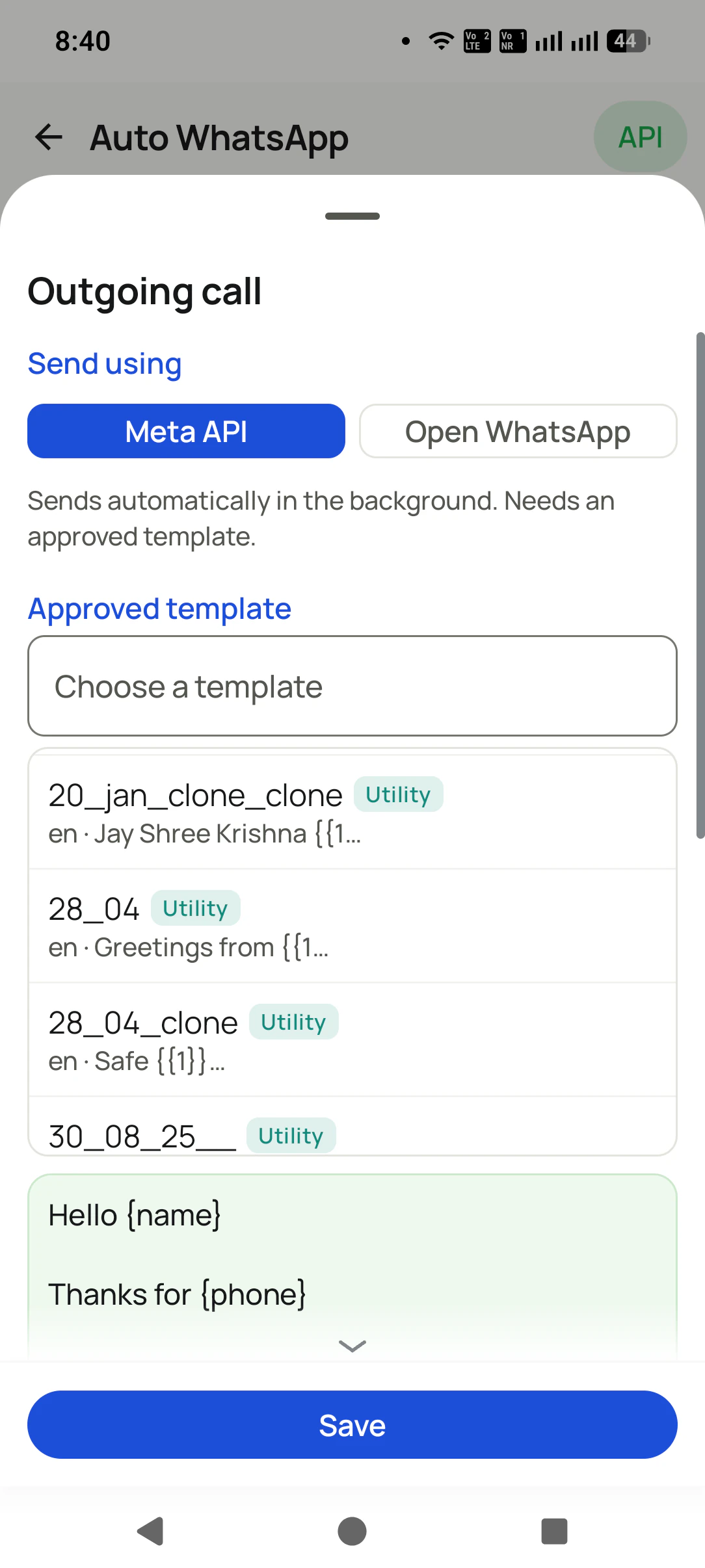
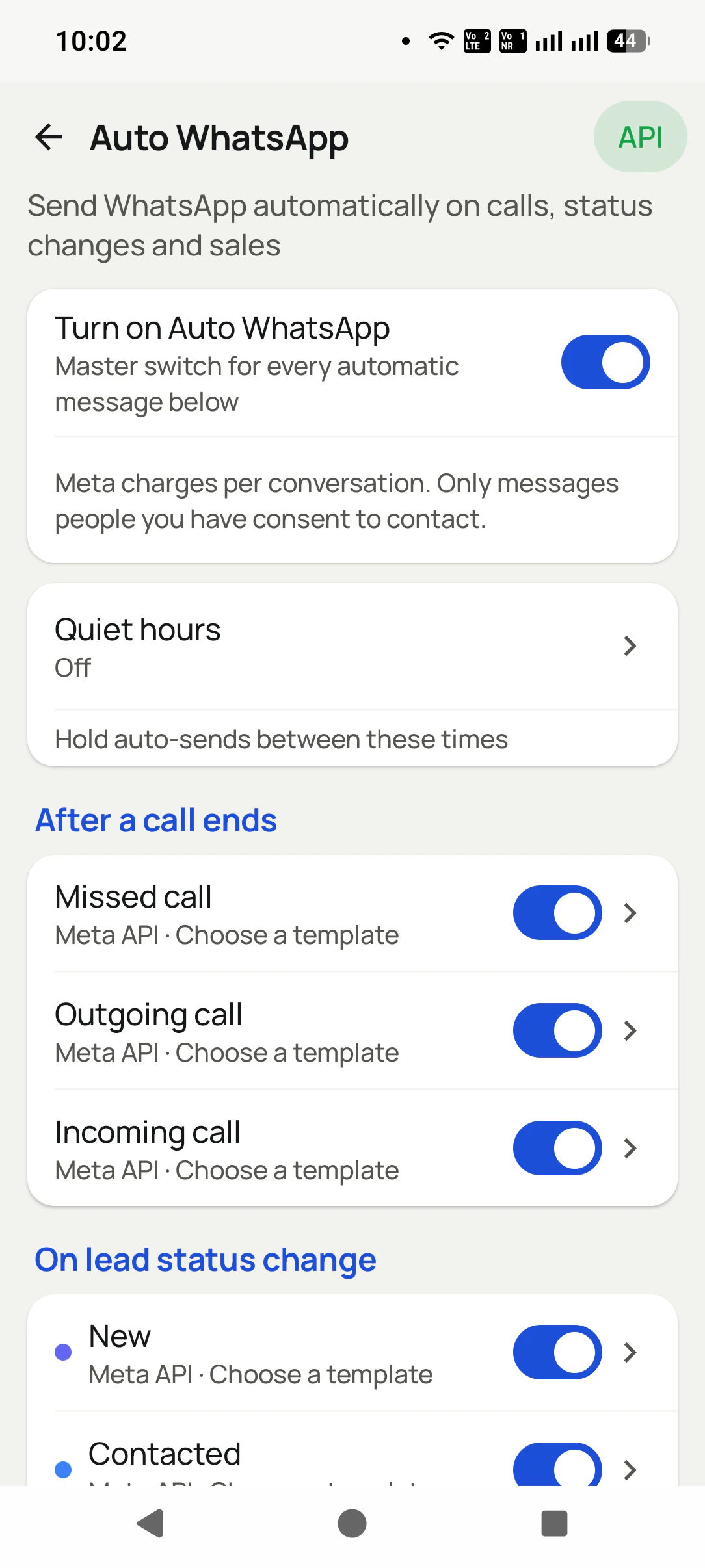
Auto WhatsApp fires after every call, by itself through your API.
What your API unlocks
Features the WhatsApp API connection unlocks
One connection powers the entire WhatsApp suite, tied to your call log and lead pipeline.
Real businesses, real numbers: how owners and sales teams across India and 12+ countries use RMDialer every day.
Rated 4.9 by customers 4.7 on Google Play 5K+ downloads India + 12+ countries
“Telecaller software that my counsellors actually open, because it is the phone app itself. Demo bookings from the website land in the queue, get dialled the same hour, and the WhatsApp with the course link goes out after each call. Four stars: the Excel import wanted the number column named exactly, so my first upload took two tries.”
AMArjun MehtaCo-founder · EdTech startupIndore
“We tried two telecalling CRM software before this and my counsellors stopped filling them within a week. RMDialer is the phone app itself, so every admission enquiry gets logged whether they like it or not. The auto WhatsApp after call sends the fee structure by itself. I see all 4 counsellors' calls on the web CRM every evening.”
PNPriya NairOwner · Coaching instituteKochi
“For a clinic the win is call management: every missed call at the front desk becomes a call-back reminder, and the patient's last visit remark shows when they ring again. Appointment reminders go on WhatsApp automatically. Our no-shows dropped noticeably in two months.”
“Lead management app for our admission counsellors across 3 branches. Every parent enquiry has a status, a remark and a follow-up, and the branch heads see their own funnel. The bulk WhatsApp for the open-day invite went to 900 parents from the app with delivered and read counts. Admissions were up 18% this year.”
KDKavita DeshmukhAdmissions head · Preschool chainNagpur
“The WhatsApp CRM part sold me. Client chats, their call history and the site visit reminder sit on one record, so when a client rings after two months I know exactly where the kitchen quote stopped. Photos of samples go from the chat inside the dialer. Bengali interface for my junior designer.”
ASAnjali SenOwner · Interior design studioKolkata
“We needed an auto dialer app that works on our own MTN and Airtel lines, not a call centre subscription in dollars. RMDialer runs on the phones my agents already have, dials the enquiry list, and the WhatsApp follow-up goes out after every call. Calls still go out on the SIM when data drops, and the notes sync once we are back on the network.”
GOGrace OkaforManaging director · Travel agencyLagos, Nigeria
Reviews are collected from customers on WhatsApp and on this website.
Share yours on WhatsApp
One app. Every feature. One price.
Whether you are one person or one thousand, every RMDialer user gets the complete feature set. No tiers, no locked buttons, no "upgrade to unlock".
Setup help
WhatsApp Business API setup help, live
Share your number and we will walk you through connecting your WhatsApp API, templates, and auto-messages on a call.
Get API setup help
Your details open in WhatsApp. We help you connect live.
Opens WhatsApp with your details prefilled. Nothing is stored on this site: your details go straight into the chat, nowhere else.
Data safety & security
Your customer list is your business. We treat it that way.
A dialer sees everything. That is exactly why every part of this app is built to keep your data yours.
Nothing uploads without your yes
Backup starts only after you sign in and give explicit consent. You review which SIMs are included and which numbers are excluded BEFORE the first upload. Logged out, nothing leaves the phone.
Personal stays personal
Mark any number as excluded: it is never uploaded, never messaged automatically, never touched. Choose per SIM what backs up, so a personal SIM can stay completely out.
Encrypted on the phone
The app database is encrypted on your device, and API details are locked with the Android Keystore, so even a lost phone does not hand over your customer list.
Encrypted in transit
Every sync runs over HTTPS to your own account. A transparent sync log shows exactly what ran and when, and you can make it sync everything again any time.
Your data is not the product
We do not sell your data or your customers' data, do not show ads, and never share contact lists with advertisers. You export to CSV any time. It is yours.
Compliant WhatsApp
Bulk and automated messages go through the official Meta WhatsApp Business API with approved templates and your own API details. We do not read your personal WhatsApp chats.
Read the full privacy policy · Every permission the app asks for is explained there, in plain language.
Questions
RMDialer FAQ
How do I connect the WhatsApp Business API to my CRM?
You need a WhatsApp Business API account with an approved number and message templates, then connect it to the app so the CRM can send and receive on it. Once connected, WhatsApp sits against the same lead record as the calls: automatic messages after a call, a missed call or a status change, bulk campaigns to a filtered segment, and a shared inbox with unread and unreplied badges. This page walks through the setup and what to prepare.
Is WhatsApp CRM software the same as WhatsApp Business?
No. The WhatsApp Business app is a chat app for one phone. WhatsApp CRM means the chats live next to the customer record, so anyone on the team can see the history, messages can be triggered by what happened on a call, campaigns can go to a filtered segment, and delivery and replies are reported. That needs the official Business API rather than the consumer app, which is what this page sets up.
Which WhatsApp APIs work?
Both: connect directly to Meta (graph.facebook.com) or use any whitelabel/BSP provider by pasting THEIR base URL. If your provider speaks the Cloud API, RMDialer talks to it.
I already buy my API from a provider. Do I have to move?
No. Keep your provider, your number, your templates, and your rates. You only paste the API URL and token they gave you. Nothing else changes.
What exactly do I need to connect?
Four things from your provider or Meta: access token, API URL, API version (for example v20.0), and your WABA ID. It takes about a minute.
Do I have to connect it again on my other phone?
No. The access token is backed up to your account, so signing in on another device brings the connection with it.
I do not have an API. Can I still use the WhatsApp features?
Yes. Without an API, RMDialer opens WhatsApp with the message pre-filled (one tap to send), and Auto WhatsApp works in that mode too. The API adds silent background sending, live chat, and campaigns.
Can I add more than one provider?
Yes. Providers are named profiles in the app: add as many as you like, switch from the dropdown, delete any time. There are separate types for WhatsApp API, CRM Data API, and Channel.
Is bulk sending compliant?
Campaigns use approved Meta templates through the official API, which is the compliant way to message at scale.
Do incoming replies reach my phone?
Yes. Replies land in the live inbox and arrive as push notifications that open the exact chat, with the caller's CRM story beside it.
Is my access token safe?
Yes. Credentials are encrypted with Android Keystore, backed up to your account, and hidden behind a show/hide toggle. They are never shared with anyone.
Which app do I install for this?
RMDialer, or any brand running on the same platform (for example Call Dialer on Google Play). The WhatsApp API features are identical in all of them.
Do I need the WhatsApp Business API to send automatic messages?
Not for one-to-one follow-ups: a dialer can open WhatsApp on your own number with the message prepared after each call. You need the official API for fully hands-free sending, bulk campaigns to hundreds of numbers with delivered and read reports, and message templates. RMDialer works both ways and connects to the API from Meta or any provider.
How to send a WhatsApp message automatically after a call?
Use a dialer with auto WhatsApp: set a message once per call type (missed, incoming, outgoing) and per lead status, and the app sends it the moment the call ends, personalised with the customer's name. From the user's own number it opens WhatsApp with the message ready; through the WhatsApp Business API it sends with zero taps.
No trial clock on the dialer
RMDialer free plan vs paid plan
The business dialer is free forever with no account and no expiry: the keypad, contacts, caller ID, the call log and your call analytics, plus free WhatsApp sends every day. A plan adds the customer record after every call, follow-up reminders, list auto dialing, your team and WhatsApp automation.
Free forever
₹0, no expiry
Your phone app: keypad, contacts, call log and caller ID
Spam and unknown-number screening on every incoming call
Call analytics: your day counted, by outcome, and by who you called
Missed calls kept in their own list, so nothing is returned late
Sending WhatsApp from a call, free every day
Free WhatsApp sends every day with a free account: 15 a day for your first 15 days, then 3 a day. The dialer itself needs no login at all.
On a plan
₹159/user/month, yearly
$29 per user per year, or $12 per user for 3 months, outside India
The customer record: lead status and remarks saved against every call
Follow-up reminders that ring like an alarm on the day you set
Auto dialing a whole list without touching the phone
Your team: seats, assigned calling lists and per-person reports
Automatic WhatsApp after calls, bulk sending and the WhatsApp API inbox
Backup and restore, so a new phone carries on where the old one stopped
Leads arriving on their own from Google Sheets, APIs and lead portals
Try it free for 3 days: unlimited use, no credit card required. Prices are per user, exclusive of taxes.
Your API deserves a better home
Install RMDialer, paste your API details, and watch your calls start sending the messages.
₹159/user/month on yearly in India, $29/user/year elsewhere · every feature included · Prices are per user, exclusive of taxes.
Free forever: the business dialer never expires, and needs no account
Call recording supported · our team sets it up with you during training
On iPhone and Android. The iPhone app has every feature except the native call log.