WhatsApp CRM · Live Chat With Lead Details and Call History in One Record
WhatsApp CRM Live Chat With Call History Is RMDialer
RMDialer is a WhatsApp CRM inside the dialer: send photos, documents, templates and buttons, see read receipts, and open the same customer's call history without leaving the chat.
Photos, documents, video, audio · Read receipts with the time · The chat stays when staff leave
Your own SIM, no virtual number · Android and iPhone apps + Web CRM in one plan · No card for the trial
RAKPS3,500+ businesses on Wappblaster tools · listed on G2, Capterra, SoftwareSuggest
Priya: "price?"unreplied · 4 min
Lead: Hot2 calls · last Tuesday
Read 10:42two blue ticks
Call from the chatone tap, own SIM
Short answer
What is a WhatsApp CRM?
A WhatsApp CRM keeps every customer chat next to that customer’s record, so the team replies from one place. RMDialer carries a two-way WhatsApp Business API inbox, so incoming chats land next to the lead record instead of on a personal phone. Unread and unreplied chats are badged, and replying does not need a switch to another app. Keeping the chat beside the call history is what makes a record complete, because a customer who rang on Monday and messaged on Tuesday is one relationship, and whoever picks up next needs both halves to answer sensibly. It also solves the handover problem: when a salesperson leaves, their phone leaves with them, and every conversation on it goes too unless the thread lives in the business account. Because this runs on the official Business API, the whole team can work one business number at the same time, rather than the free app limit of one number on one phone.
Key takeaways
RMDialer sends photos, documents, video, audio, templates, buttons and option lists from one Attach sheet.
RMDialer shows delivered and read ticks with the exact time.
RMDialer turns any chat into a lead with one tap on Make lead.
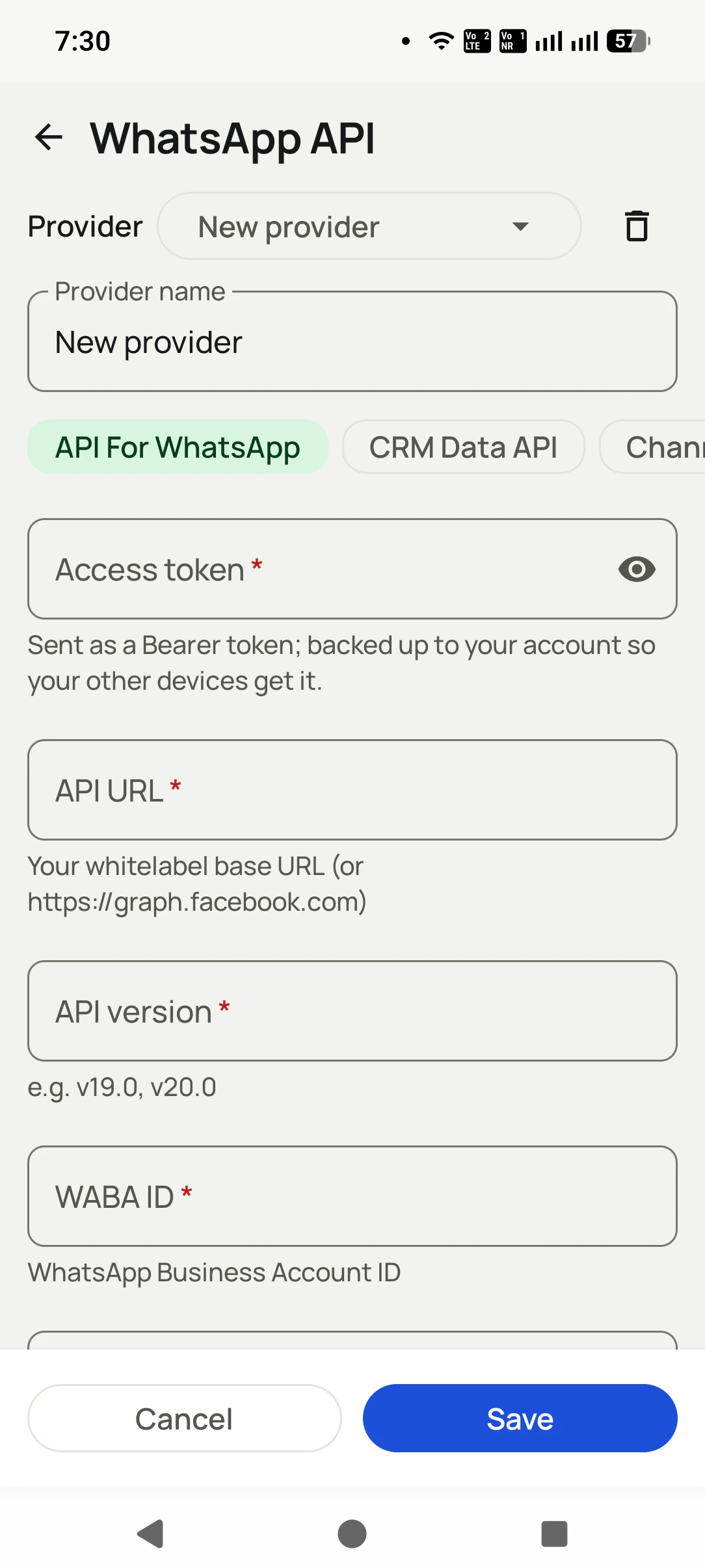
RMDialer connects with four values: access token, API URL, API version and WABA ID.
RMDialer opens the chat straight from a new reply notification.
RMDialer demo video
How it works
WhatsApp live chat setup in RMDialer, step by step
1
Connect your WhatsApp API
Paste the details you already have (Meta direct or any provider). One minute, one screen.
2
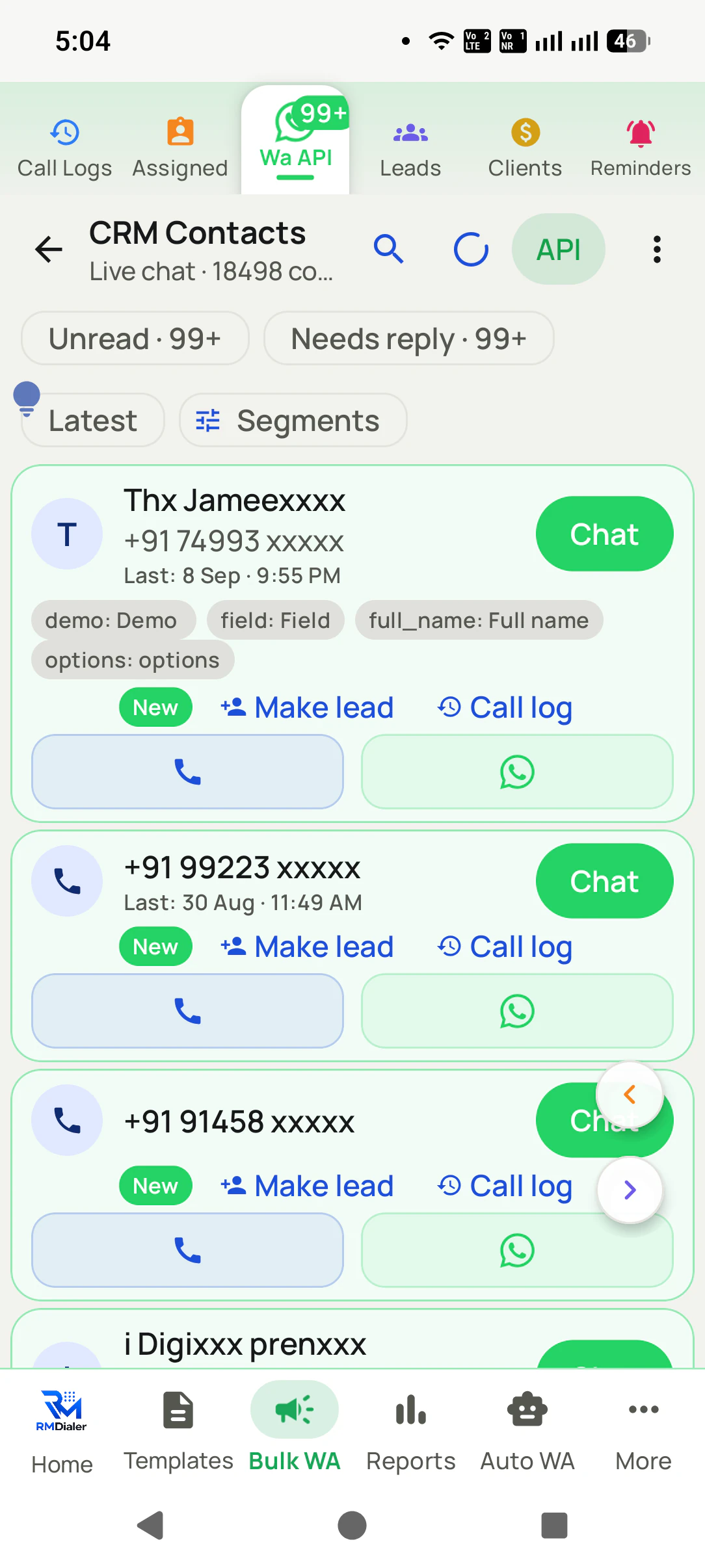
Your whole inbox, in the dialer
Thousands of conversations with search, and Make lead or Call log on any of them.
3
Send anything, see everything
Attach photos, documents, video, audio, templates, quick-reply buttons or option lists. Watch it turn ✓✓ Read, and open that customer's calls from the same screen.
What you get
WhatsApp live chat features in RMDialer
What WhatsApp live chat in RMDialer includes, part by part
Part
What it does
Send everything, not just text
Photo, document, video, audio, approved template messages, quick-reply buttons, and a list of options: the whole WhatsApp toolbox, from one Attach sheet.
Buttons your customer can tap
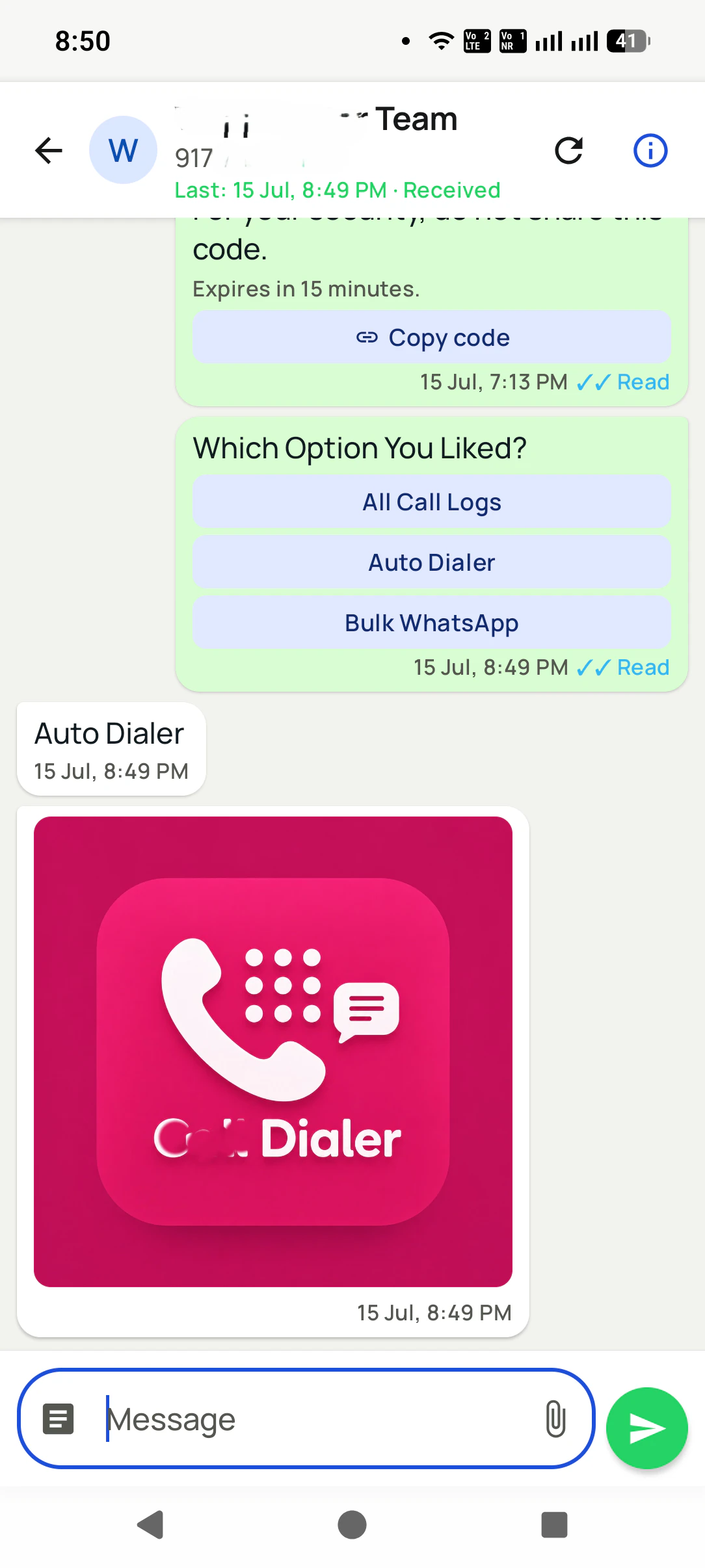
Quick-reply buttons and option lists turn a chat into a form: "Which option you liked?" with tappable answers. They reply in one tap. You get a clean answer instead of a paragraph.
The call history is right there
Every chat is tied to that number, so their calls, lead status, and remarks are one tap away. You never argue with a customer while hunting for what was said on the phone.
Know it was read
Delivered and Read receipts on every message, with the exact time, plus a header that shows the last activity on that thread.
Replies find you
Incoming messages arrive as notifications that open that chat straight away, so a hot reply never sits unnoticed.
Any chat becomes a lead
One tap on "Make lead" and a conversation becomes a lead with its full history attached, ready for follow-ups, statuses, and campaigns.
Built for thousands
The CRM contacts list handles thousands of conversations with search, and per-contact call, WhatsApp, and SMS actions.
The chat belongs to the business
Conversations live in your account, synced and searchable, not on one employee's phone. Staff changes, history stays.
Customer reviews
RMDialer reviews from business users
Real businesses, real numbers: how owners and sales teams across India and 12+ countries use RMDialer every day.
Rated 4.9 by customers 4.7 on Google Play 5K+ downloads India + 12+ countries
“The WhatsApp CRM part sold me. Client chats, their call history and the site visit reminder sit on one record, so when a client rings after two months I know exactly where the kitchen quote stopped. Photos of samples go from the chat inside the dialer. Bengali interface for my junior designer.”
ASAnjali SenOwner · Interior design studioKolkata
“Quote-and-chase business. Every enquiry gets a quote remark and a call-back reminder, and the ones we lost show up in the lost leads list for a discount call next month. Auto WhatsApp sends the quote PDF after the call. Would like a Telugu voice note feature, otherwise very good call management app.”
SBSuresh BabuOwner · Packers and moversVijayawada
“Staff attendance with selfie and location, inside the same dialer our supervisors already use for client calls. Punch in only works within the site geofence and needs a live selfie, so proxy attendance stopped. The monthly report exports for payroll. One app, two problems solved.”
MIMeenakshi IyerHR and admin head · Facility management companyChennai
“We use RMDialer as the dialer layer under our own CRM through the API. Our system pushes the lead and the assignment, the agent's phone dials it, and every call event comes back by webhook with duration, outcome and remark. Integration took our developer about two days with the GitHub samples.”
“Free telecalling app search brought me to the 3-day trial. Whole app, nothing locked. By day two I had imported last year's 1,200 travellers and the auto dialer was calling them for this season's packages. Paid the yearly plan on day three. The WhatsApp itinerary goes out after each call by itself.”
LDLakshmi DeviProprietor · Travel and pilgrimage toursTirupati
“Telecalling CRM in Bangla for our merchandising team, on Grameenphone SIMs. Buyer follow-ups, sample dispatch reminders and the WhatsApp with the catalogue after the call, all from the same app. The owner dashboard shows which merchandiser spoke to which buyer. Nothing else at this price does this here.”
The app is split in two: the dialer and everything needed to place, take and review calls costs nothing permanently, and the features that remember customers or move data between phones and people are what a plan pays for.
Free forever
₹0, no expiry
Your phone app: keypad, contacts, call log and caller ID
Spam and unknown-number screening on every incoming call
Call analytics: your day counted, by outcome, and by who you called
Missed calls kept in their own list, so nothing is returned late
Sending WhatsApp from a call, free every day
Free WhatsApp sends every day with a free account: 15 a day for your first 15 days, then 3 a day. The dialer itself needs no login at all.
On a plan
₹159/user/month, yearly
$29 per user per year, or $12 per user for 3 months, outside India
The customer record: lead status and remarks saved against every call
Follow-up reminders that ring like an alarm on the day you set
Auto dialing a whole list without touching the phone
Your team: seats, assigned calling lists and per-person reports
Automatic WhatsApp after calls, bulk sending and the WhatsApp API inbox
Backup and restore, so a new phone carries on where the old one stopped
Leads arriving on their own from Google Sheets, APIs and lead portals
Try it free for 3 days: unlimited use, no credit card required. Prices are per user, exclusive of taxes.
Questions
RMDialer FAQ
How does my team reply to WhatsApp messages?
Chats on your WhatsApp Business API number arrive in the app with Unread and Needs reply badges. Anyone on the team opens the chat and replies with text, files or a template, with that customer’s calls and remarks on the same screen.
What can I send from the chat?
Text, photos, documents, video, audio, approved template messages, quick-reply buttons, and a list of options. Everything the WhatsApp Business API supports, from one Attach sheet.
What are quick-reply buttons and option lists?
Interactive messages: instead of typing, the customer taps an answer ("All Call Logs", "Book a demo"). You get a clean, structured reply, and they get a one-tap experience.
Can I see the calls for the person I am chatting with?
Yes. Every chat is linked to that number, so their call history, lead status, and remarks are one tap away, on the same screen.
Do I know if my message was read?
Yes. Each message shows delivered and read receipts with the time, and the thread header shows the last activity.
Does this use my normal WhatsApp?
No, it uses your WhatsApp Business API number, with your own API details: either Meta directly or your existing whitelabel provider (you paste their base URL). For personal WhatsApp, RMDialer opens chats pre-filled in the WhatsApp app instead.
What do I need to connect it?
Access token, API URL, API version, and WABA ID: the same four values your provider or Meta already gave you. The token backs up to your account, so other devices connect automatically.
Do I get notified of new replies?
Yes. Incoming messages arrive as notifications that open that chat straight away.
Can a chat contact become a lead?
One tap: "Make lead" on any CRM contact turns the conversation into a lead with the full history attached.
What happens to chats if an employee leaves?
Nothing is lost. Conversations live in your account, synced and searchable, not on one person's phone.
What is an auto dialer app?
An auto dialer app calls a list of phone numbers one after another so the caller never types a number. On Android, an app like RMDialer runs the session on the phone itself using the SIM already in it: you pick a list from Excel, a Google Sheet, an API or assigned leads, press start, and the app dials each number in turn while you mark the outcome between calls.
What is a telecalling CRM?
A telecalling CRM is customer software built around phone calls: the lead list, the dialer, the call outcome and the follow-up live in one place. The mobile kind, such as RMDialer, replaces the Android phone app on each rep's handset so every call automatically becomes a record with a status, a remark and the next follow-up, and the manager sees the whole team on a web dashboard.
What is the difference between telecalling software and a CRM?
Telecalling software is built to make and track calls (dialing lists, call logs, per-caller reports). A CRM is built to hold customer records and pipeline stages. Most Indian sales teams need both at once, which is why a telecalling CRM combines them: the call itself creates and updates the customer record, so nobody types into a separate system after the call.
What is a CRM dialer?
A CRM dialer is a single app where the dialer and the customer record are the same thing: the call screen shows the lead, and ending the call updates it. It differs from a CRM with "dialer integration", which is two products joined by a sync. RMDialer is a CRM dialer for Android that runs on the user's own SIM.
Lead automation
Leads from 15+ platforms → auto-assigned round robin → auto dialed → updated. On its own.
Facebook, JustDial, IndiaMART, portals, sheets, Excel: every lead gets an owner and a
place on a calling list, then reports its own outcome.