Lead Automation · Auto Import, Auto Assign, Auto Dial From Any Platform
Lead Automation for Facebook and IndiaMART Leads Is RMDialer
Lead automation means a new enquiry reaches a salesperson and gets called without anyone forwarding it. With RMDialer, leads from Facebook, JustDial, IndiaMART, your website or a sheet import themselves, go to the next employee, get dialled and report their own outcome.
Leads checked on your schedule · Source tagged on every lead · Duplicates skipped
Your own SIM, no virtual number · Android and iPhone apps + Web CRM in one plan · No card for the trial
RAKPS3,500+ businesses on Wappblaster tools · listed on G2, Capterra, SoftwareSuggest
New lead assignedIndiaMART · 9:07 am
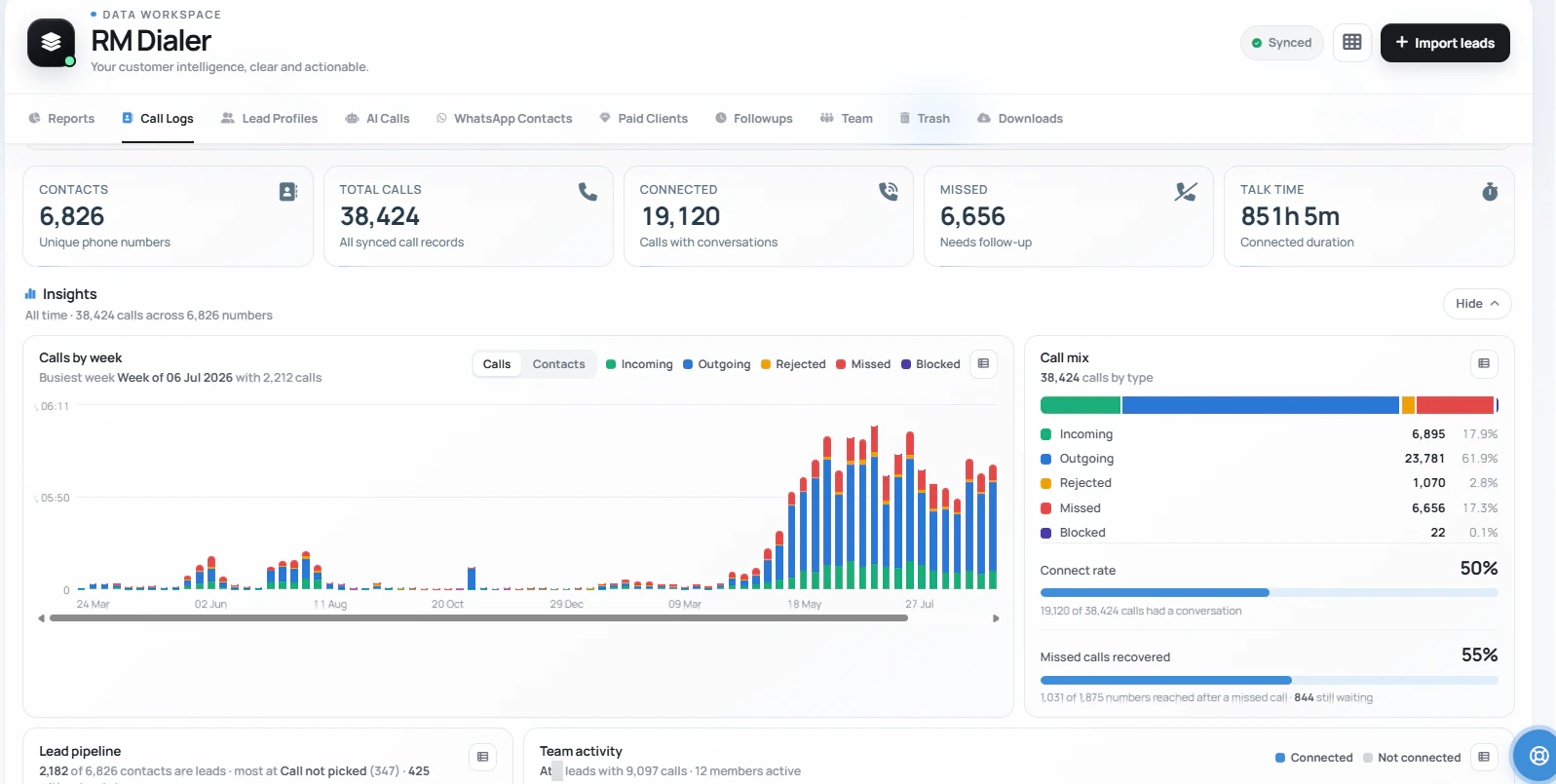
19,120 connectedof 38,424 calls, live
Updated
Short answer
What is lead automation?
Lead automation is the pipeline between "someone enquired" and "someone called them": run entirely by the system. Leads flow in automatically from any platform (Facebook, Google, JustDial, IndiaMART, property portals, website forms, Google Sheets, Excel, or your API), each new lead is auto-assigned to the next employee in a round-robin rotation, that employee’s phone gets a real-time notification, the auto dialer surfaces and dials the lead, and the outcome: status, remark, follow-up: is captured in two taps, with the WhatsApp follow-up sent automatically. The owner watches the whole chain live: assigned time, first-call time, outcome: with nobody writing a report.
Key takeaways
RMDialer imports leads from any platform that writes to a Google Sheet or offers an API.
Lead sources added in the app are checked every 30 minutes by default.
Round robin assignment is set up through Live Sheets in the Web CRM.
Every lead carries a source tag, so reports show which platform brings buyers.
Duplicate numbers merge into the existing customer instead of making a second record.
Lead automation in RMDialer, step by step
The chain from an enquiry to a saved outcome, and where each step happens.
Lead automation in RMDialer: each step from enquiry to outcome
Step
What happens
Where
1. A lead comes in
From any platform that writes to a Google Sheet or offers an API, tagged with its source
Lead source, checked every 30 minutes by default
2. It is assigned
Shared round robin across your callers
Live Sheets in the Web CRM
3. It is dialled
The auto dialer brings it up on the caller’s phone
The caller’s Android phone
4. The outcome is saved
Status, remark and follow-up in two taps
The after-call sheet
5. The follow-up goes out
The WhatsApp message sends by itself
Auto WhatsApp
6. The owner checks
Assigned time, first-call time and outcome for each lead
The Web CRM
Why automate it
Lead automation benefits
What a calling team gets once leads import, share out and reach the dialer by themselves.
1
New leads called within minutes
A webhook lead from a form filled at 9:07 can be dialled by 9:12; sheet sources arrive on their next sync.
2
Nobody forwards leads by hand
Leads from sheets, portals, ads and APIs import themselves, tagged with where they came from.
3
Fair, even sharing across the team
Round robin deals each lead to the next caller, so nobody cherry-picks and every lead has one owner.
4
Overnight leads ready at the start of the day
Leads that arrive at night are already assigned and waiting at the top of the right queue in the morning.
5
Every outcome recorded
Status, remark and the next follow-up are saved in two taps after each call, and a WhatsApp can go out by itself.
6
Owner sees the whole chain
Assigned time, first-call time and outcome for every lead show in the Web CRM without a report.
Step 1 · Capture
Lead automation step 1: capture leads from any platform
If it can fill a Google Sheet or call an API, it can feed your calling team: and each source carries its own tag, so you learn which platform actually produces buyers.
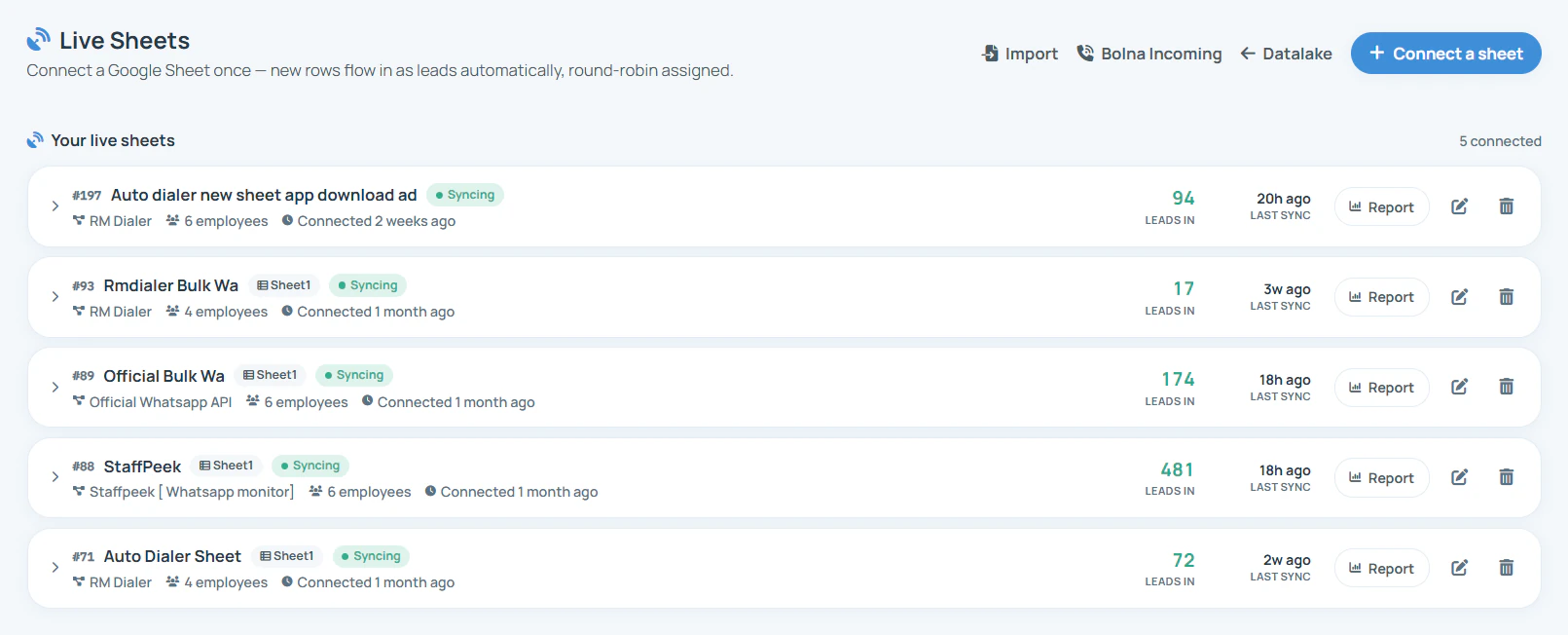
Connect a sheet once: new rows flow in as leads automatically, already assigned. This
account has 5 sources syncing: one ad sheet alone has pulled 94 leads in, shared across 6 employees.
Step 2 · Auto-assign
Lead automation step 2: round robin lead assignment
The moment a lead arrives, it is dealt to the next employee in the rotation. In day-to-day terms:
Fair turns, automatically
Lead 1 to Ramesh, lead 2 to Priya, lead 3 to Amit, lead 4 back to Ramesh. Around the table, every time: no favourites, no fights about "who got the good leads".
One owner from birth
Every lead belongs to exactly one person from the second it arrives. "Sab dekh lenge" means nobody does: one name on every lead means someone always does.
You set the table, per source
Choose who is in the rotation for each source: four people on the Facebook sheet, two seniors on IndiaMART. Change it any morning in the web backend.
Ignored leads stay visible
Assigned time and first-call time sit on every lead. An untouched lead is a fact on the dashboard, not a mystery: and it can re-deal to the next person on your clock.
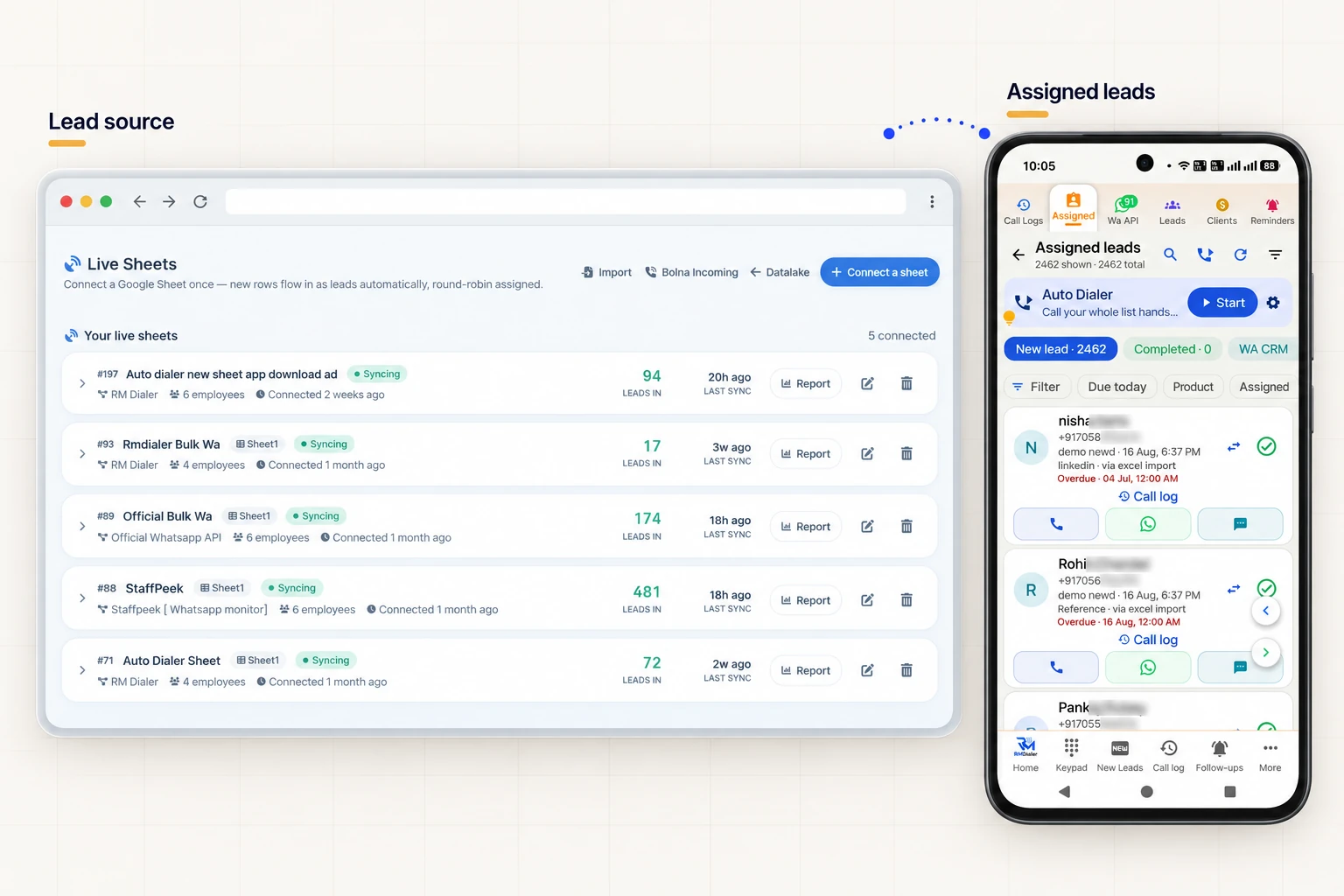
A connected Google Sheet on the Web CRM feeds the caller's Assigned leads queue, ready for the auto dialer.
Step 3 · The employee's phone
Lead automation step 3: auto dial on the employee’s phone
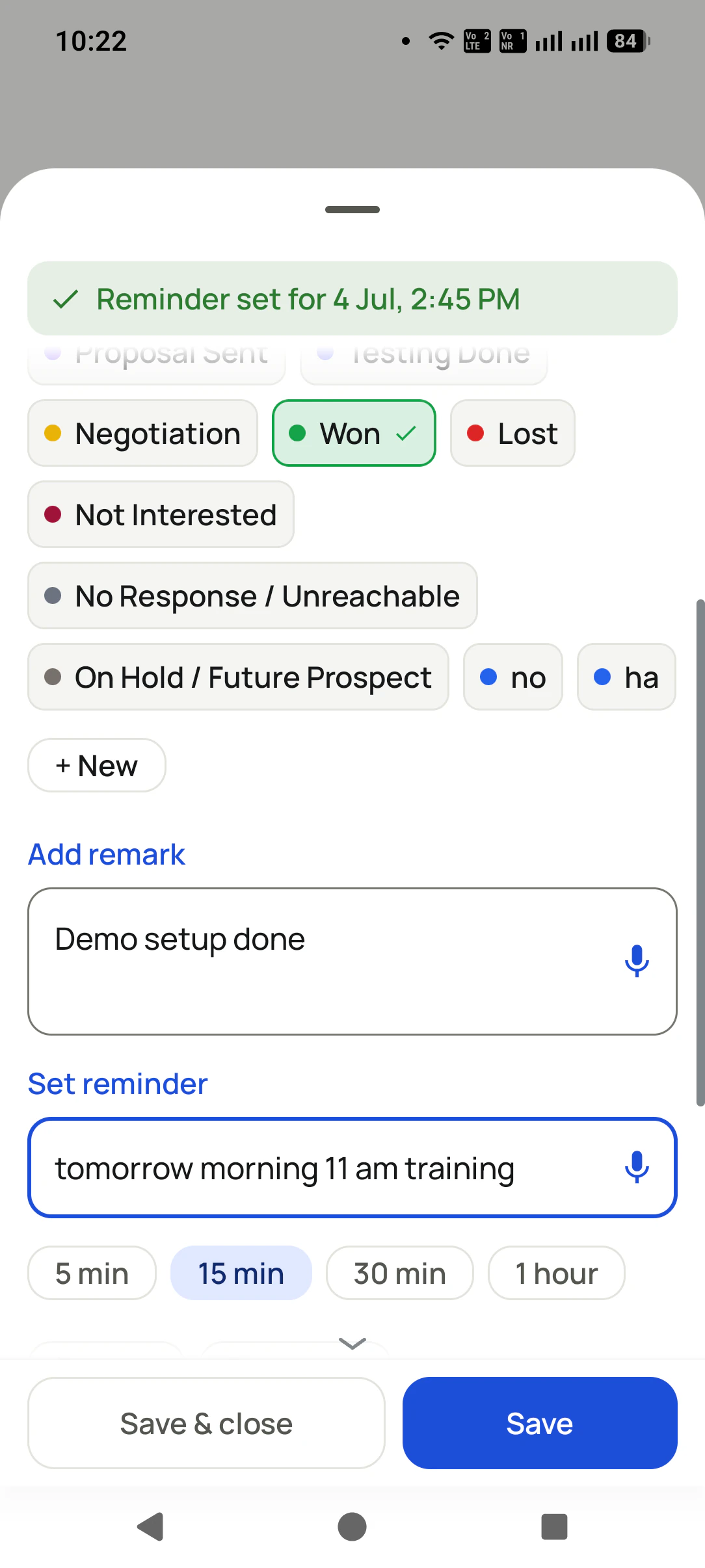
The employee never opens a spreadsheet: their phone pings when a lead is dealt to them, the auto dialer calls through the queue with fresh leads first, and every call ends with a two-tap update.
Assigned leads, fresh first
Status + remark in 2 taps
Customer reviews
RMDialer reviews from business users
Real businesses, real numbers: how owners and sales teams across India and 12+ countries use RMDialer every day.
Rated 4.9 by customers 4.7 on Google Play 5K+ downloads India + 12+ countries
“We connected our website form and a Google Sheet as lead sources. New sign-ups appear in RMDialer within 15 minutes, get assigned round robin and dialled the same hour. Speed to lead went from a day to under an hour, and demo bookings roughly doubled. The call logs API pushes everything back into our own dashboard.”
RKRohan KulkarniCo-founder · SaaS startupPune
“We use RMDialer as the dialer layer under our own CRM through the API. Our system pushes the lead and the assignment, the agent's phone dials it, and every call event comes back by webhook with duration, outcome and remark. Integration took our developer about two days with the GitHub samples.”
“Telecalling software for a 22-seat domestic process, without buying a dialer server. Each agent gets an assigned queue, sessions run on SIM, and the supervisor dashboard shows calls, connected and talk time per agent in real time. Our cost per seat dropped to a fraction of the cloud dialer we were on.”
GTGaurav TyagiOwner · Small BPO processNoida
“Earlier I was dialling 80 to 100 portal leads a day by hand from Excel. With RMDialer auto dialer app I import the sheet, press start and it calls one by one from my own Jio SIM. Between calls I mark Interested or Site visit in two taps and the follow-up rings me on time. Closed 3 flats last month from leads I would have forgotten.”
“Telecaller app for Android that my staff actually use. Enquiry list is assigned to each telecaller, the auto dialer calls it from their own SIM, and test ride bookings come to me live. Punjabi interface for the girls at the desk. Price is honest, everything included, no per-user surprises.”
“Multilingual team, so a CRM with English, Malay and Chinese interfaces mattered. The auto dialer runs our launch lists on the agents' own Maxis SIMs and the manager sees every call and remark live. We compared three cloud call centre tools; this cost a fraction and needed no virtual numbers.”
DTDaniel TanSales director · Property developerKuala Lumpur, Malaysia
Reviews are collected from customers on WhatsApp and on this website.
Share yours on WhatsApp
Day-to-day life
Speed to lead automation: one lead from 9:07 to 9:17
This is the whole promise of the page, in ten minutes of an ordinary Tuesday.
9:07 am
A family fills your Facebook form: "3BHK, Wakad, ₹90L budget." Your connector posts it to the RMDialer webhook.
9:07 am
RMDialer receives the lead and assigns it: it is Ramesh’s turn in the round robin.
9:08 am
Ramesh’s phone pings: "New lead assigned: Sharma ji, 3BHK Wakad." One tap opens the record.
9:12 am
Between two other calls, the auto dialer surfaces the fresh lead first and dials it. Sharma ji answers: your number looks normal, because it is Ramesh’s real SIM.
9:16 am
Call ends. Two taps: status "Interested", remark "site visit Sunday 11am, wife deciding". The site-visit reminder sets itself.
9:16 am
The project brochure goes to Sharma ji on WhatsApp, automatically, while he is still holding the phone.
9:17 am
On your web dashboard, the lead shows: assigned 9:07, called 9:12, Interested, visit Sunday. Nobody reported anything. It reported itself.
Multiply by every lead, every employee, every day: that is lead automation.
The alternative was a WhatsApp group and hope.
Set it once
Lead automation system setup in the web backend
Sources, employees, rotation and permissions: configured once from any browser. Change who gets which leads any morning; nothing else needs touching.
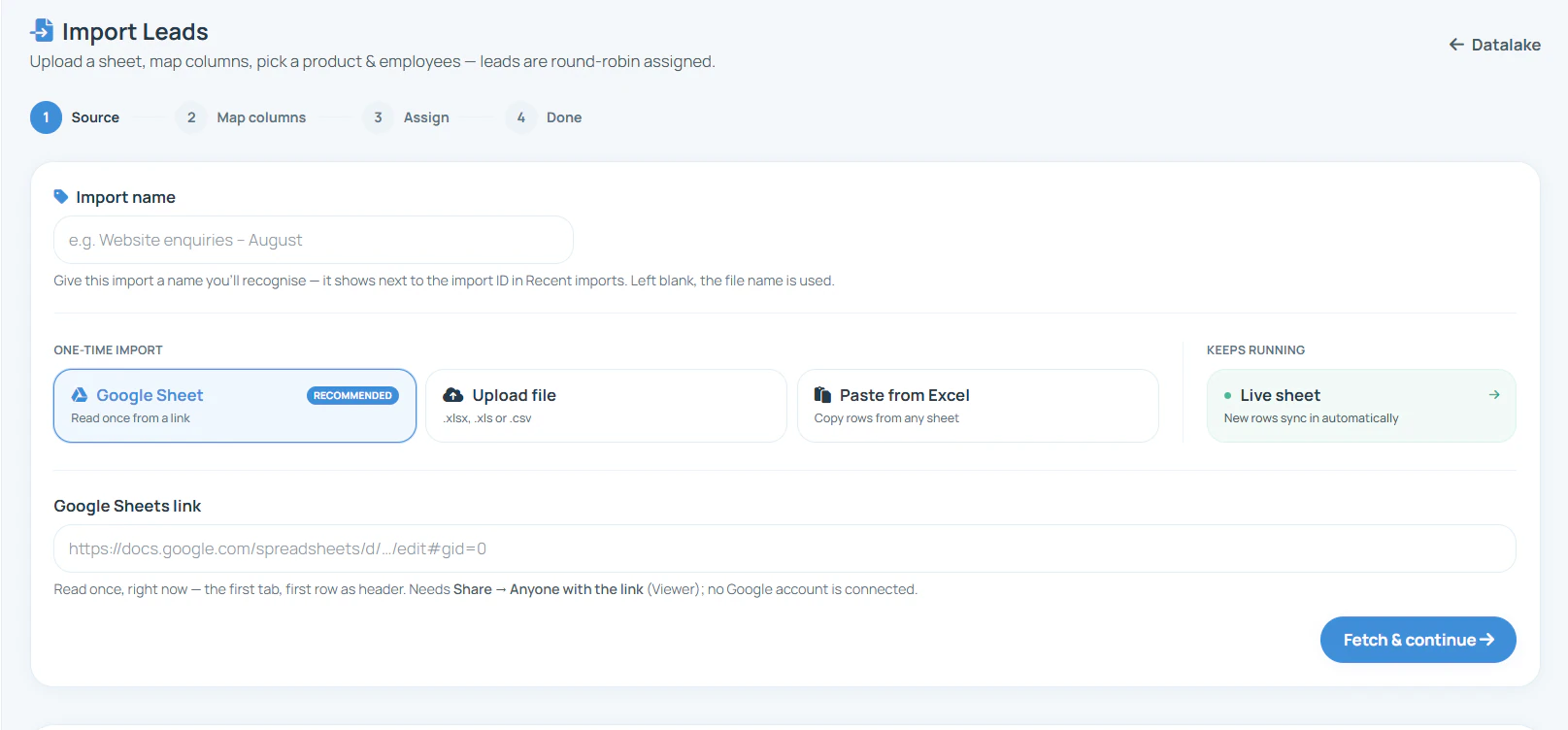
Web CRM · Import leads
The import screen: pick a one-time sheet, a file or pasted rows, or a live sheet that keeps
syncing, then map the columns and choose who receives the leads, from any browser.
Before automation, every growing business runs the same manual pipeline without naming
it: someone checks the Facebook ads inbox, copies numbers into an Excel, forwards them
on a WhatsApp group ("koi call kar lena"), and hopes. Each hop adds hours, each hour
costs conversions: because a lead called in
minutes converts at multiples of a lead called tomorrow: and nobody can later say
which lead was called, by whom, with what result. Lead automation software replaces
exactly those hops: automatic lead capture from every source, automatic lead
distribution with one owner per lead, automatic dialing, and a record that writes
itself. The humans keep the only part that ever needed them: the conversation.
Lead assignment software, without the fights
The quiet reason lead distribution fails in most teams is not technology: it is
fairness arguments. Manual assignment invites "usko accha lead diya" politics;
first-come pools reward grabbing over calling. Round-robin auto-assignment ends both:
the rotation is visible, mechanical
and per-source, every lead has exactly one name on it from birth, and untouched
leads surface as facts on the dashboard rather than suspicions in a meeting. Teams that
switch report the same two changes: fresh leads get called dramatically faster, and the
Monday meeting stops being about who-got-what and starts being about what-closed.
To find delays inside this pipeline, explore lead response management software: separate source arrival, assignment, first attempt and first conversation before choosing what to improve.
Which is the best lead automation software for Indian businesses?
Judge lead automation on the gap it actually closes: the minutes between a lead arriving and someone calling it. So look for automatic capture from the places your leads really come from, automatic assignment so every lead has one owner, a notification on the caller phone, and the lead waiting at the top of the dialer queue. Tools that only collect leads into a dashboard still leave the calling to somebody remembering. RMDialer connects the sources, shares new rows round robin through Live Sheets in the Web CRM and puts the lead in the dialer.
How do I automate lead management and follow-up?
Connect your sources once: a Google Sheet, a REST API, or any portal and ad platform that can write to a sheet, including Facebook and Instagram lead ads, Google Ads forms, JustDial, IndiaMART and property portals. Choose how leads are shared out, usually round robin across your callers through Live Sheets in the Web CRM. From then on new leads import themselves, get an owner, ping that person's phone and appear first in their queue, and the follow-up you set after the call rings on time by itself.
Can I auto-import leads from Google Sheets, IndiaMART, JustDial and Facebook lead ads?
Yes. Connect a Google Sheet or a REST API once and every new row becomes an assigned lead by itself, which is how IndiaMART, JustDial, 99acres, MagicBricks, Housing, TradeIndia, Facebook and Instagram lead ads, Google Ads lead forms and website forms all flow in: each of them can write to a sheet or call an API. A sheet connected under Live Sheets in the Web CRM deals new leads round robin, the caller's phone pings, and the lead is waiting at the top of the dialer queue.
Which platforms can leads come from automatically?
Any platform that can fill a Google Sheet or call an API: which in practice is all of them. Facebook and Instagram lead ads, Google Ads lead forms, website forms, JustDial, IndiaMART, 99acres, MagicBricks, Housing and TradeIndia exports, WhatsApp enquiries, agency sheets, and your own CRM via API. One-off lists come in from Excel/CSV or plain copy-paste. Each source carries its own tag, so month-end shows which platform actually produces buyers.
How does round-robin auto-assignment work day to day?
Like dealing cards: lead one goes to your first employee, lead two to the second, and around the table it goes, automatically, as each new row comes in through Live Sheets in the Web CRM. Every lead has exactly one owner from birth, no manager forwards anything, and no two employees ever call the same customer. You choose who is in the rotation per source: the Facebook sheet can deal to four people while the IndiaMART sheet deals to two.
What does the employee actually experience?
A ping: "new lead assigned", with the lead’s details one tap away. Fresh leads surface at the top of their queue, the auto dialer calls through it hands-free, and after each call the two-tap sheet saves status and remark. The promised WhatsApp goes out by itself. No spreadsheet, no register, no evening report: their phone is the whole system.
What if an employee ignores an assigned lead?
It stays visible: the owner’s dashboard shows every lead’s assigned time and first-call time, so an untouched lead is a fact, not a suspicion. A manager can then transfer it to a colleague with its history, and the original miss still shows in the report.
Does automation need the leads to be "hot" or fresh?
Automation is what keeps them fresh: a lead that reaches the webhook at 9:07 can be called at 9:12 instead of tomorrow, and a sheet lead is picked up on the next sync. How fast you call matters in phone sales, and it is a plumbing problem: this page is the plumbing.
What does the full pipeline cost?
It is all included in the one plan: ₹159/user/month on yearly (₹249 on the 3-month plan, plus taxes) in India, or $29 per user per year, or $12 per user for 3 months, outside India: lead capture from sheets and APIs, round-robin assignment, real-time notifications, the auto dialer, WhatsApp automation, reminders and the web team dashboard. No per-lead charges, no automation add-on tier.
Can different sources route to different employees or teams?
Yes: each source has its own rotation. Put your two senior closers on the IndiaMART sheet, all four callers on the Facebook sheet, and one dedicated person on JustDial enquiries. Leads from a source only deal to the people you named for it, and you can change any rotation from the web backend in a minute.
Do employees see each other’s leads?
Only if you allow it. Permissions are per employee, per feature: who can export, who can transfer leads, who can edit statuses and fields: all toggled from the web backend. By default each caller works their own assigned queue, and only the owner sees everything across the team.
What happens to leads that arrive at night or on Sunday?
They import and assign the moment they arrive, so they are already sitting at the top of the right employee’s queue when work starts: the first calls of the morning go to the night’s leads. Since almost nobody else calls their overnight leads first thing, those are routinely the least contested, best-converting calls of the day.
Is this the same as marketing automation?
No: marketing automation sends messages to create leads; lead automation makes sure the leads that arrive actually get called. The two work in sequence: your ads and campaigns fill the top of the funnel, and this pipeline: import, assign, notify, dial, record: is what stops the funnel leaking between the form fill and the first human conversation.
What is lead automation in a telecalling CRM?
Lead automation is the pipeline between "someone enquired" and "someone called them", run by the system. In RMDialer new leads arrive from a Google Sheet, REST API or portal, are shared round-robin through Live Sheets in the Web CRM, ping the caller's phone and sit at the top of the auto dialer queue.
How do I get Facebook lead ads to call the lead automatically?
Point Facebook Lead Ads at a Google Sheet or your API, then add that as a lead source in RMDialer. Each new row becomes a lead at the next scheduled check and is dialed in the next auto dial session, which is what decides who wins an online enquiry.
Can lead automation work with IndiaMART, JustDial and property portals?
Yes. Anything that can write to a Google Sheet or expose an API works with RMDialer, which covers IndiaMART, JustDial, 99acres, MagicBricks, Housing, TradeIndia, website forms and Google Ads lead forms. Each source keeps its own tag, so reports show which platform produces buyers.
Does lead automation need a developer?
No. A public Google Sheet takes about five minutes to connect in RMDialer, with columns mapped by name. A REST endpoint needs one URL and an optional auth header; sample scripts for both are published openly on GitHub.
What happens after an automated lead is dialed?
The caller saves the status, remark and next follow-up in two taps, RMDialer can send the promised details by WhatsApp automatically, and the owner sees assignment time, first-call time and outcome without asking anyone for a report.
Can I start with my existing Excel of old leads?
Yes: import the Excel or CSV once, map the columns, and the whole list becomes assigned, dialable records with a source tag. Duplicate numbers merge with existing customers instead of duplicating, so old lists come in clean. From then on, connected sheets and APIs keep the new leads flowing automatically.
No trial clock on the dialer
RMDialer free plan vs paid plan
The business dialer is free forever with no account and no expiry: the keypad, contacts, caller ID, the call log and your call analytics, plus free WhatsApp sends every day. A plan adds the customer record after every call, follow-up reminders, list auto dialing, your team and WhatsApp automation.
Free forever
₹0, no expiry
Your phone app: keypad, contacts, call log and caller ID
Spam and unknown-number screening on every incoming call
Call analytics: your day counted, by outcome, and by who you called
Missed calls kept in their own list, so nothing is returned late
Sending WhatsApp from a call, free every day
Free WhatsApp sends every day with a free account: 15 a day for your first 15 days, then 3 a day. The dialer itself needs no login at all.
On a plan
₹159/user/month, yearly
$29 per user per year, or $12 per user for 3 months, outside India
The customer record: lead status and remarks saved against every call
Follow-up reminders that ring like an alarm on the day you set
Auto dialing a whole list without touching the phone
Your team: seats, assigned calling lists and per-person reports
Automatic WhatsApp after calls, bulk sending and the WhatsApp API inbox
Backup and restore, so a new phone carries on where the old one stopped
Leads arriving on their own from Google Sheets, APIs and lead portals
Try it free for 3 days: unlimited use, no credit card required. Prices are per user, exclusive of taxes.
Business karte ho? Business Dialer chahiye.
Set it as your phone app in one tap. Everything works like before, and then it starts working FOR you.
₹159/user/month on yearly in India, $29/user/year elsewhere · every feature included · Prices are per user, exclusive of taxes.
Free forever: the business dialer never expires, and needs no account
Call recording supported · our team sets it up with you during training
On iPhone and Android. The iPhone app has every feature except the native call log.