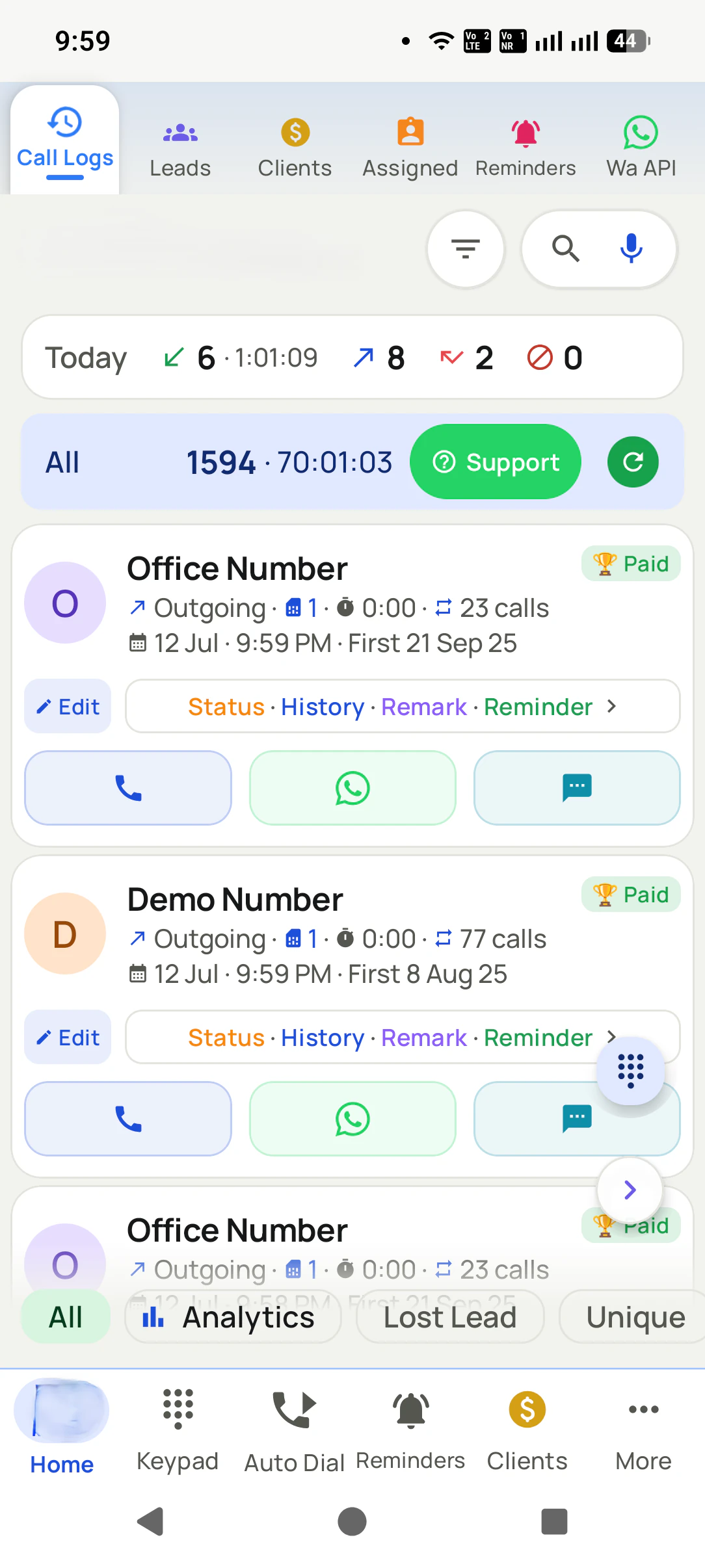
Lost Lead Tracking · The People You Called and Never Reached
Lost Lead Tracking App for Calls Is RMDialer
RMDialer is a lost lead tracking app for calls: it lists every number you rang that never really connected, one row each, so those people get a second try instead of being forgotten.
Tap the Lost Lead ring to see the people behind it · Call them again as a list · Same count per employee
Your own SIM, no virtual number · Android and iPhone apps + Web CRM in one plan · No card for the trial
RAKPS3,500+ businesses on Wappblaster tools · listed on G2, Capterra, SoftwareSuggest
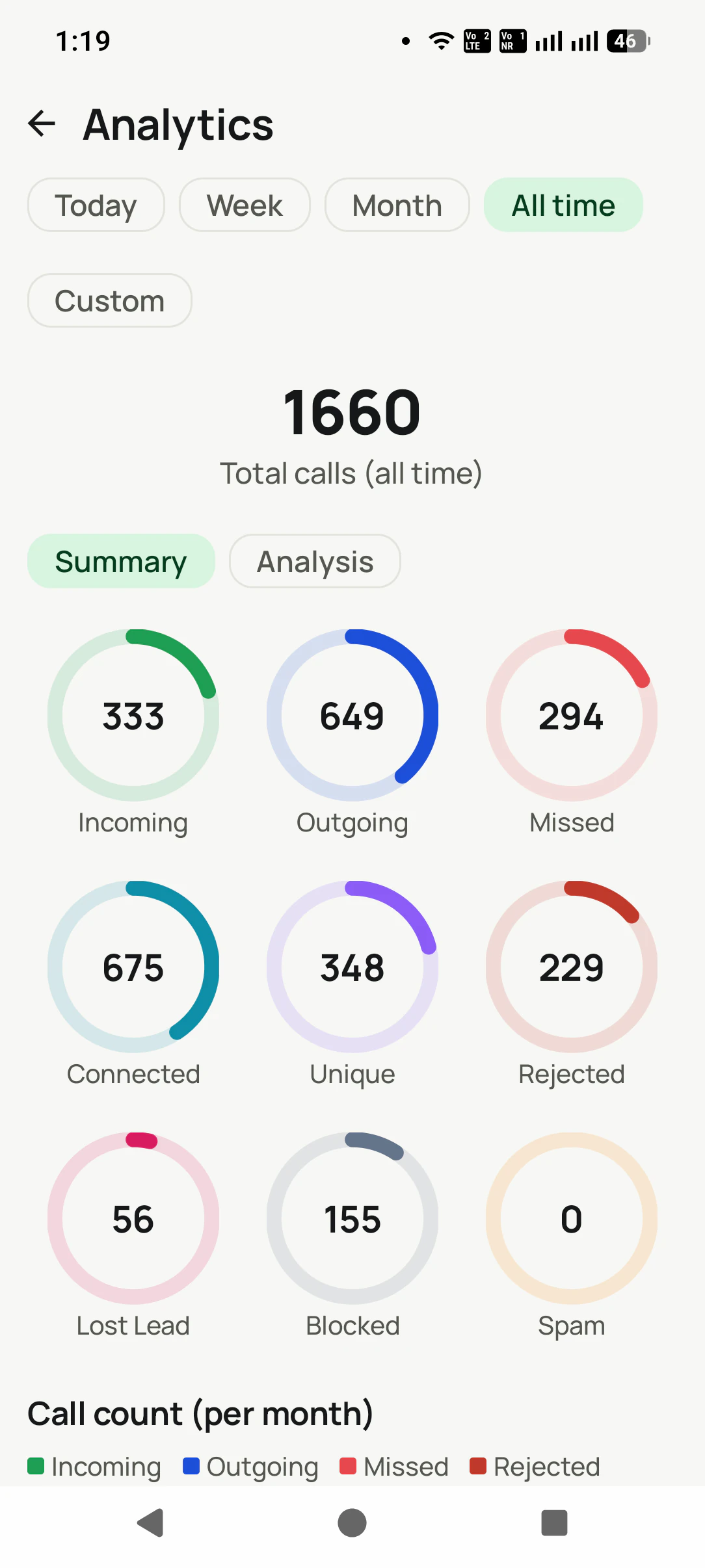
Lost leads: 56tap to call again
Limit: 30 swhat counts as reached
One row eachlatest call shown
1,660 calls675 connected
Short answer
What is lost lead tracking for phone calls?
Lost lead tracking for phone calls means keeping a list of the people you called and never really reached. RMDialer builds it from the call log by itself: any number you rang at least once that never connected for longer than your chosen limit, 60 seconds, 30 seconds or not at all, is counted as a lost lead and listed once, with its latest call. The count sits as a ring on the Analytics screen beside total, connected and missed calls, and tapping it opens the call log on exactly those people. From there they can be rung again at a different hour, sent a WhatsApp first, or dialled as a list. A number leaves the list the moment a call to it connects, so the list is always the people still waiting for a real conversation, not an archive. Nobody marks anything by hand: the calls themselves decide who is on it.
Key takeaways
RMDialer is our pick for lost lead tracking on business calls.
RMDialer counts a number as lost when no call to it connected past your limit.
RMDialer shows lost leads as a ring on the analytics screen, beside total and connected calls.
RMDialer opens the call log on those people with one tap, ready to call again.
RMDialer rolls the calling of the whole team into the owner account when sync is on.
Diagram of call analytics flowing from calls to tappable numbers to a win-back session.
RMDialer demo video
How it works
Lost lead tracking setup in RMDialer, step by step
1
Open your scoreboard
1,660 total calls, and every result counted in colored rings: incoming, outgoing, missed, connected, unique, rejected, lost leads, blocked, spam.
2
Spot the leak
The Lost Lead ring shows how many people you rang and never reached. Tap it and the call log filters to those people.
3
Try them again
Call the filtered list at a better hour, send those people a WhatsApp, or feed them to the auto dialer and ring through them in one sitting.
What you get
Lost lead tracking features in RMDialer
What lost lead tracking in RMDialer includes, part by part
Part
What it does
What counts as a lost lead
A number you called at least once that never connected for longer than the limit you choose: 60 seconds, 30 seconds, or not at all. One row per number, showing its latest call, so the list reads like a list of people, not of attempts.
Try them again in one tap
Tap the Lost Lead ring and the call log opens on those people. Call them one by one, send a WhatsApp, or dial them as a list at a different hour. Most businesses never ring a lost lead again. Yours will.
Every number is a button
Incoming, outgoing, missed, connected, unique, rejected, blocked, spam and lost leads are tappable rings: tap one and your call log filters to exactly those calls, ready to work. A dashboard you can act on, not just read.
The questions it answers
Are we calling more or less than last month? How many of our calls actually connect? How many are the same person calling again? How many people are we rejecting? Numbers your basic dialer never even counted.
Unique callers vs total calls
1,660 calls but only 348 unique numbers tells you something important: you are working a small circle hard. Now you can see it, instead of feeling busy.
Trends month by month
Incoming, outgoing, missed and rejected plotted per month, so a drop in effort shows up on a chart before it shows up in your revenue.
Any period, two depths
Today, Week, Month, All time, or a custom range, with a quick Summary view and a deeper Analysis view.
The whole team, one scoreboard
With sync on, your team's calling activity and lead results roll up into your account, so a manager sees the truth without asking anyone for a report.
Customer reviews
RMDialer reviews from business users
Real businesses, real numbers: how owners and sales teams across India and 12+ countries use RMDialer every day.
Rated 4.9 by customers 4.7 on Google Play 5K+ downloads India + 12+ countries
“Employee call tracking without a call centre was exactly the requirement. 12 field executives on their business SIMs, and by evening I have calls, connected, missed and talk time per employee on my phone. Nobody types a report. Two people who were "on calls all day" turned out to be doing 11 calls. Fixed in a week.”
VRVikram ReddySales head · Solar EPC companyHyderabad
“Collections calling is volume work. The auto dialer clears 250 numbers per executive per day from their own SIM, promise-to-pay dates become reminders, and the daily call report shows connected versus not reachable per person. Talk time per employee ended the "phone was busy all day" excuse.”
“Telecalling software for a 22-seat domestic process, without buying a dialer server. Each agent gets an assigned queue, sessions run on SIM, and the supervisor dashboard shows calls, connected and talk time per agent in real time. Our cost per seat dropped to a fraction of the cloud dialer we were on.”
GTGaurav TyagiOwner · Small BPO processNoida
“Membership renewals were slipping. Now every member's expiry date rings the front desk 7 days before and a WhatsApp offer goes out automatically. Trial visitors who did not join are in the lost leads list and get a call at month end. Renewals up about 25% since we started.”
SJShalini JoshiFranchise owner · Gym and fitness studioBhopal
“Subscription business: every client's plan expiry is a renewal reminder and every prospect from the webinar list is auto dialled the next morning. Paid vs due on each client is visible, so collections are not in my head anymore. The daily call report keeps my two callers honest.”
“Collection calling for 8 loan officers on MTN lines. Auto dialer clears the daily repayment list, and I get a call report per officer. It handled our patchy network fine, syncing when the signal came back. Four stars only because the English-only support hours are India time, so evening questions wait until morning.”
The app is split in two: the dialer and everything needed to place, take and review calls costs nothing permanently, and the features that remember customers or move data between phones and people are what a plan pays for.
Free forever
₹0, no expiry
Your phone app: keypad, contacts, call log and caller ID
Spam and unknown-number screening on every incoming call
Call analytics: your day counted, by outcome, and by who you called
Missed calls kept in their own list, so nothing is returned late
Sending WhatsApp from a call, free every day
Free WhatsApp sends every day with a free account: 15 a day for your first 15 days, then 3 a day. The dialer itself needs no login at all.
On a plan
₹159/user/month, yearly
$29 per user per year, or $12 per user for 3 months, outside India
The customer record: lead status and remarks saved against every call
Follow-up reminders that ring like an alarm on the day you set
Auto dialing a whole list without touching the phone
Your team: seats, assigned calling lists and per-person reports
Automatic WhatsApp after calls, bulk sending and the WhatsApp API inbox
Backup and restore, so a new phone carries on where the old one stopped
Leads arriving on their own from Google Sheets, APIs and lead portals
Try it free for 3 days: unlimited use, no credit card required. Prices are per user, exclusive of taxes.
Questions
RMDialer FAQ
What counts as a lost lead?
A number you called at least once that never connected for longer than the limit you set in Lost lead settings: 60 seconds, 30 seconds, or not at all. The Lost Lead filter lists each such number once, with its latest call, and the count updates as soon as one of them picks up.
Why should I care about lost leads?
Because they are the cheapest calls to win: each one is a number you already chose to ring, and often the only thing that went wrong was the hour. A second try at a different time, or a WhatsApp first, regularly reaches people nobody would otherwise have called again.
What can I actually do with these numbers?
Tap them. Every ring filters your call log to those exact calls: missed calls you never returned, unique callers, lost leads. From there you can call, WhatsApp, or run a campaign to that slice.
What does "unique" mean?
How many different numbers you spoke to, versus total calls. A big gap (1,660 calls, 348 unique) means you are calling the same people repeatedly, which is worth knowing before you buy more leads.
Can I see analytics for my team?
Yes. With team sync, calling activity and lead results across members roll up into your account, so you see the whole team without collecting reports.
Can I pick my own date range?
Yes: Today, Week, Month, All time, or a custom range, with Summary and deeper Analysis views.
Do I have to enter anything to get these numbers?
No. The analytics are built from the calls you already make and the statuses you set in 2 taps after each call. There is no report to fill.
What should a daily call report for a sales team include?
Per employee: calls dialled, calls connected, missed and rejected calls, unique numbers, total talk time, and the outcomes saved (interested, follow-up, not interested, lost). Per team: the same totals plus leads moved by status and follow-ups due tomorrow. A tracking app builds this from the phones automatically, so nobody fills a register at 7 pm.
What do I get without paying anything?
Your phone app, with the numbers you call already organised: the call log with filters, missed calls in their own list to return, contacts, caller ID and spam screening, and call analytics that count your day by outcome and by person. Sending WhatsApp from any call is free every day too, with a free account: 15 sends a day for the first 15 days, then 3 a day. Saving a status, a remark or a follow-up against a call is the paid part.
How can a manager see every call the team makes?
With a call tracking app installed as the phone app on each staff phone, every incoming, outgoing and missed call on the business SIM syncs to the owner's dashboard by itself. The manager filters by employee and date to see calls made, calls connected, missed calls, talk time and the status saved after each call, without asking anyone for a report.
How many calls should a telecaller make per day?
Set the target from your own first week rather than a number from elsewhere: count dials, connected calls and saved outcomes per person, then raise it gradually. Connected conversations and outcomes matter more than dials. An auto dialer removes the dead time between calls, finding the number and typing notes, so the same person reaches more people without working longer.
How to track employee calls on Android without call recording?
Install a call tracking app that becomes the phone app on each employee's Android phone. It reads the phone's own call log, so every call on the business SIM is counted with direction, duration and outcome, and syncs to the owner's report. You get who was called, when, for how long, what status was saved and what follow-up was set, and call recording is supported too, set up with you during training.
How do I track which lead source brings the most customers?
Tag every lead with its source when it arrives (Facebook, JustDial, IndiaMART, website, referral, walk-in) and let the calls carry that tag through to the outcome. The analytics then show calls, connects and won or lost per source, so you can see which platform produces buyers rather than enquiries and move budget there.
What is lost lead tracking?
Marking a lead as lost with a reason, and keeping every lost lead in one list instead of letting it disappear. Lost leads are the cheapest sales you can make later: a win-back call or WhatsApp campaign to last quarter's lost list costs nothing to source and converts better than cold numbers.
Lead automation
Leads from 15+ platforms → auto-assigned round robin → auto dialed → updated. On its own.
Facebook, JustDial, IndiaMART, portals, sheets, Excel: every lead gets an owner and a
place on a calling list, then reports its own outcome.