Skip to content
Auto WhatsApp After Call · A Message That Sends Itself, Per Call Type & Status

Auto WhatsApp After Call Ends. With RMDialer, the auto WhatsApp after call feature on your own number, the message goes out by itself.

RMDialer sends an automatic WhatsApp after every call: set it once, per call type and per lead status, and Auto WhatsApp sends it for you the moment it happens. A missed call gets one message, an outgoing call another, a lead moving to "Interested" a third. Personalized, on time, every time, with zero taps.

  • Auto WhatsApp message after call
  • Missed, outgoing, incoming
  • On lead status change
  • Cooldown & quiet hours
  • History of every send

Set once, runs forever · Personalised with the lead name · Zero taps after the call

Your own SIM, own Android phone, no virtual number · Mobile app + Web CRM in one plan · No card for the trial

RAKPS 3,500+ businesses on Wappblaster tools · listed on G2, Capterra, SoftwareSuggest
Auto WhatsApp After Call Ends in the RMDialer app: Set it once for each call type
Sent after calldetails + price list
Missed callsorry-we-missed-you sent

How to send a WhatsApp message automatically after a call?

Yes. RMDialer can send a WhatsApp message by itself the moment a call ends or a lead status changes. Each trigger has its own message: a missed call gets one text, an outgoing call another, and moving a lead to "Interested" a third. Set it once and it runs with zero taps afterwards. The value here is timing rather than automation for its own sake, because a price list that arrives while the customer is still thinking about the call gets read, and the same message sent two hours later usually does not. Sending runs on the official WhatsApp Business API, or can open WhatsApp with the message already written when a human touch matters more than speed. A cooldown stops the same person being messaged twice in quick succession, and quiet hours stop anything going out late at night.

  • Triggers on call end, lead status change, or a sale
  • A different message per call type and per status
  • Sends by itself on the API, or opens WhatsApp for a personal touch
  • Cooldown and quiet hours so nobody gets spammed
Four triggers (call ends, lead status changes, sale recorded, reminder fires) pass through your per-type message rules and the politeness guards (quiet hours, cooldown, excluded contacts) before a WhatsApp message sends itself. A call ends Status changes Sale recorded Reminder fires Your message rules one template per call type and lead status Politeness guards quiet hours · cooldown · excluded contacts Message sent, zero taps Anything a guard blocks simply does not send. No queue, no nagging.
Diagram of the automatic WhatsApp trigger model with its safety guards.
Customer reviews

What businesses say about RMDialer

Real businesses, real numbers: how owners and sales teams across India and 12+ countries use RMDialer every day.

Rated 4.9 by customers 5.0 on Google Play 1K+ downloads India + 12+ countries
  • “For a clinic the win is call management: every missed call at the front desk becomes a call-back reminder, and the patient's last visit remark shows when they ring again. Appointment reminders go on WhatsApp automatically. Our no-shows dropped noticeably in two months.”
    Deepa Krishnan Centre manager · Dental clinic Coimbatore
  • “Quote-and-chase business. Every enquiry gets a quote remark and a call-back reminder, and the ones we lost show up in the lost leads list for a discount call next month. Auto WhatsApp sends the quote PDF after the call. Would like a Telugu voice note feature, otherwise very good call management app.”
    Suresh Babu Owner · Packers and movers Vijayawada
  • “Free telecalling app search brought me to the 3-day trial. Whole app, nothing locked. By day two I had imported last year's 1,200 travellers and the auto dialer was calling them for this season's packages. Paid the yearly plan on day three. The WhatsApp itinerary goes out after each call by itself.”
    Lakshmi Devi Proprietor · Travel and pilgrimage tours Tirupati
  • “Membership renewals were slipping. Now every member's expiry date rings the front desk 7 days before and a WhatsApp offer goes out automatically. Trial visitors who did not join are in the lost leads list and get a call at month end. Renewals up about 25% since we started.”
    Shalini Joshi Franchise owner · Gym and fitness studio Bhopal
  • “Walk-in customers who "will come back Sunday" now get a reminder call on Saturday, and the sofa photos they liked go on WhatsApp from the app. Caller ID with the customer's name and last remark means my staff greet them properly. Simple business dialer, does the job.”
    Kiran Gowda Owner · Furniture showroom Mysore
  • “Telecalling CRM in Bangla for our merchandising team, on Grameenphone SIMs. Buyer follow-ups, sample dispatch reminders and the WhatsApp with the catalogue after the call, all from the same app. The owner dashboard shows which merchandiser spoke to which buyer. Nothing else at this price does this here.”
    Fatima Rahman Director · Garments export house Dhaka, Bangladesh

Reviews are collected from customers on WhatsApp and on this website. Share yours on WhatsApp

Watch RMDialer in action

How it works

See it working, step by step

  1. 1

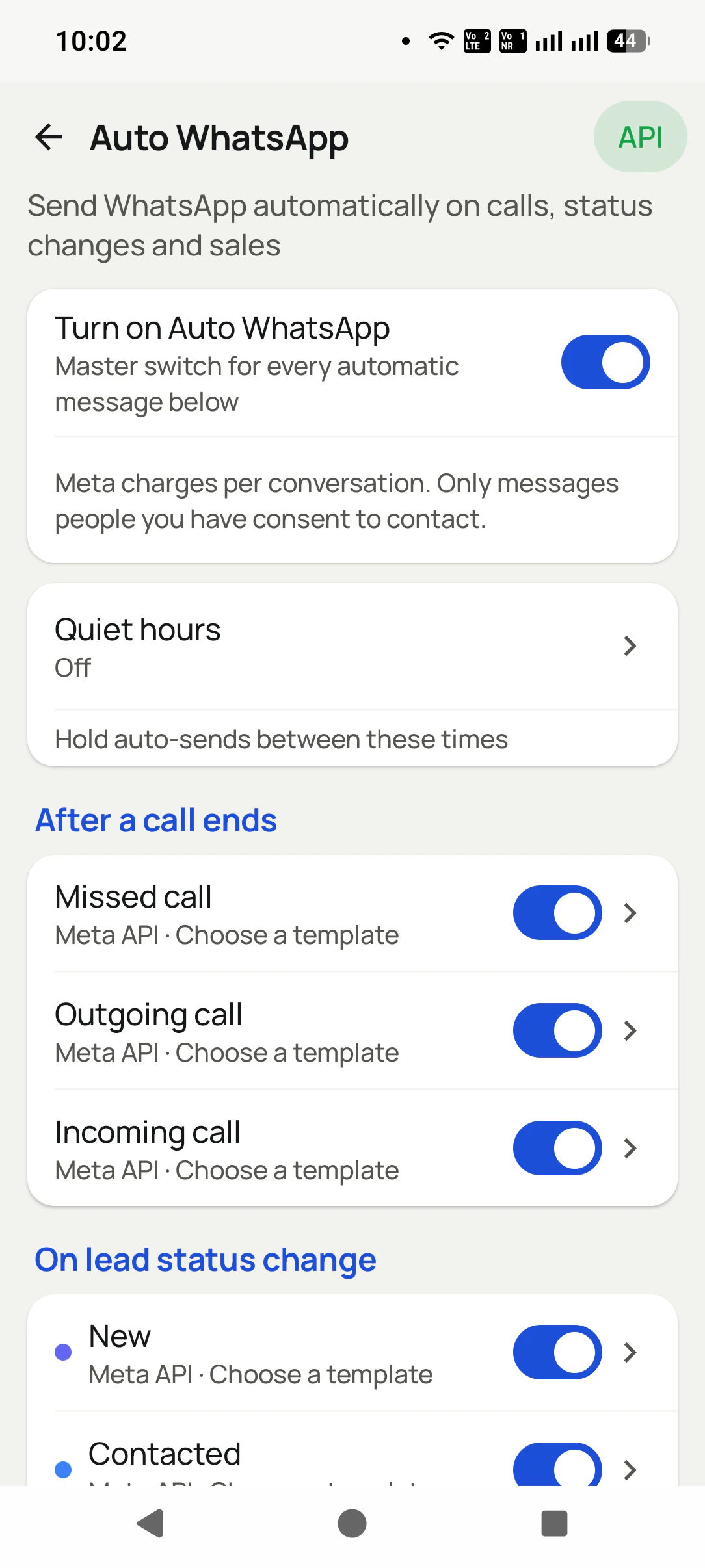
    Turn on what should message

    Master switch, quiet hours, then the triggers: missed, outgoing, incoming calls, lead status changes, sales, reminders.

    Turn on what should message in the RMDialer app: Master switch, quiet hours, then the triggers: missed, outgoing, incoming calls, lead status changes,...
  2. 2

    Set it once for each call type

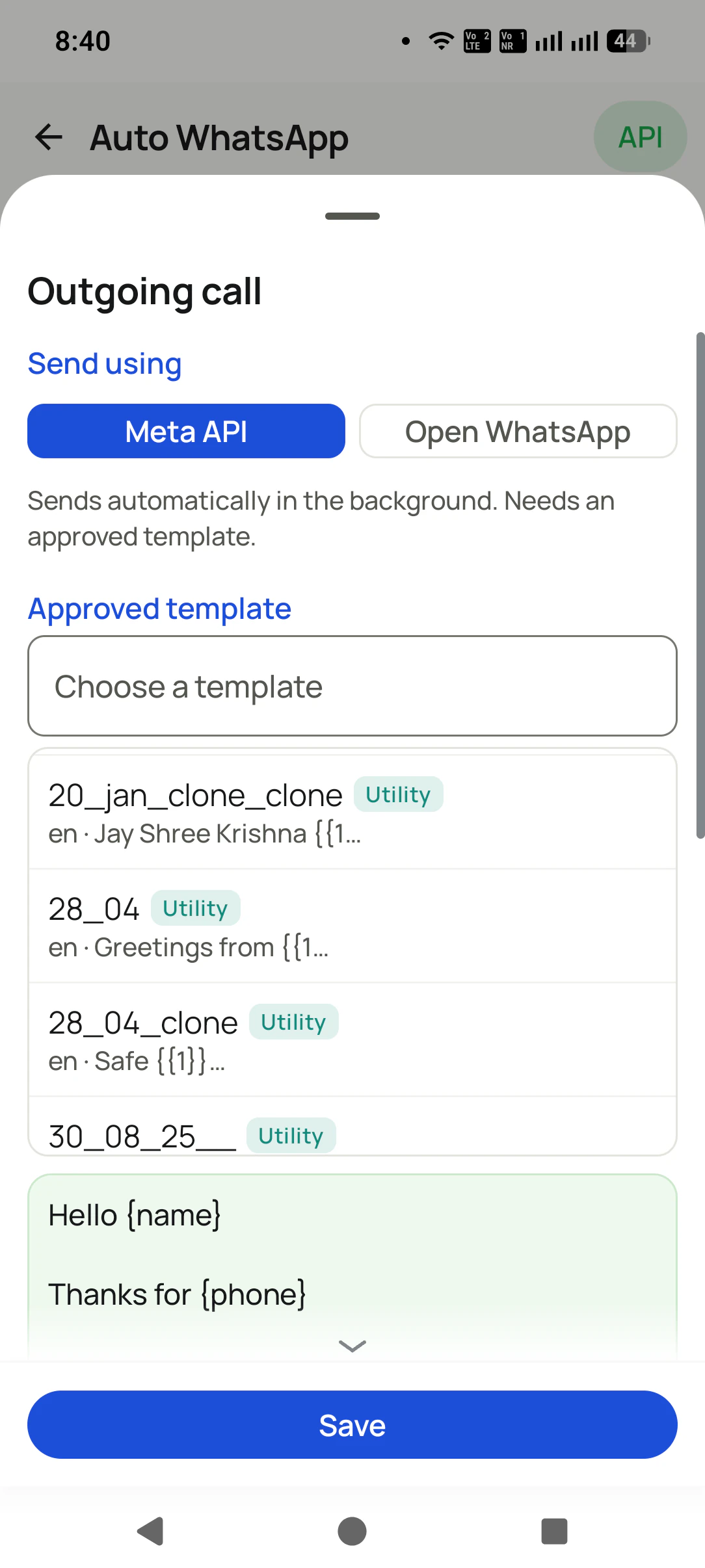
    Per trigger: send via Meta API (silent, approved template) or Open WhatsApp (your own text). Pick the template, see the {name} preview, Save.

    Set it once for each call type in the RMDialer app: Per trigger: send via Meta API (silent, approved template) or Open WhatsApp (your own text). Pick the...
  3. 3

    Do the same for statuses & reminders

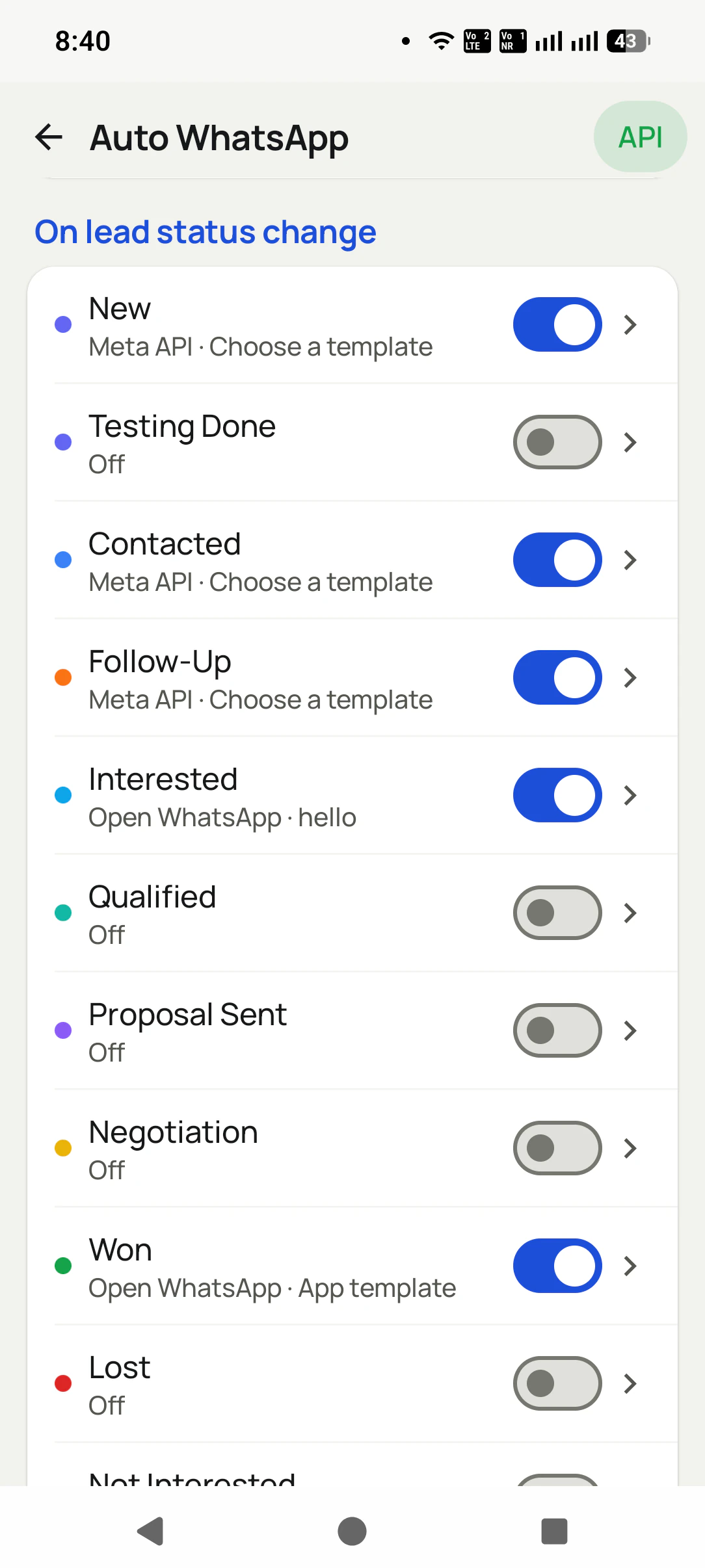
    Every status, including your custom ones, gets its own toggle, send mode, and template. Won can thank them; Lost can stay quiet.

    Do the same for statuses & reminders in the RMDialer app: Every status, including your custom ones, gets its own toggle, send mode, and template. Won can thank...
What you get

Auto WhatsApp After Call Ends, in detail

A different message for each call type

Missed call, outgoing call, incoming call: each has its own switch, its own send mode, and its own message. The person you could not pick up for and the person you just spoke to should not get the same text.

Every lead status, its own message

New, Contacted, Follow-Up, Interested, Qualified, Proposal Sent, Negotiation, Won, Lost, and YOUR custom statuses: each one can fire its own WhatsApp when you move a lead there. Move to "Won" and the thank-you goes out by itself.

Mix API and manual per trigger

Not all-or-nothing: "Outgoing call" can send by itself through the API while "Interested" opens WhatsApp for a personal touch. You decide per trigger, on the same screen.

Your approved templates, ready to pick

Meta-approved templates sync in with their category and language. Pick one and see the preview before you save. No template? Write your own text for the Open WhatsApp mode.

Personalized automatically

Variables like {name} and {phone} fill from the lead, so "Hello {name}" reaches the customer as their own name, and media attaches from your library.

Also on sales and reminders

Record a product sale and the thank-you goes out. A follow-up reminder fires and its message goes with it. Same system, more moments.

Polite by design

Master switch, quiet hours, a per-number cooldown, ask-before-send mode, and excluded contacts. Automation that never embarrasses you.

Nothing happens behind your back

The history logs every automatic message as sent, skipped, or failed, with the reason and the API response.

One app. Every feature. One price.

Whether you are one person or one thousand, every RMDialer user gets the complete feature set. No tiers, no locked buttons, no "upgrade to unlock".

Questions

Questions, answered

Will it spam my customers?

No. Quiet hours, a per-number cooldown, ask-before-send, and excluded contacts keep it polite. Every trigger has its own switch, and everything is off until you turn it on.

Can each call type send a different message?

Yes, and it should. Missed call, outgoing call, and incoming call each have their own switch, send mode, and template, so the message always fits what just happened.

Do my custom lead statuses work too?

Yes. Every status in your pipeline, including ones you created yourself, appears in the list with its own toggle, send mode, and template.

Do I need the WhatsApp Business API?

Only for sending in the background without opening WhatsApp, which also needs an approved template. Without it, choose "Open WhatsApp" and the app opens the chat with your message pre-filled. One tap to send.

Can I use the API for some triggers and manual for others?

Yes. The send mode is per trigger. Many businesses send call follow-ups automatically through the API but open WhatsApp themselves for high-value statuses like "Interested" or "Won".

Where do the templates come from?

Your Meta-approved templates sync into the app with their category (Utility, Marketing) and language. You pick one from the list and the preview shows exactly what the customer will get.

Can it ask me before sending?

Yes. Ask-before-send mode prepares the message and waits for your yes, per send.

Can messages be personalized?

Yes. Variables like {name}, {city}, and {company} fill from the lead automatically, and you can attach media from your library.

How do I know what was sent?

The Auto WhatsApp history logs every message as sent, skipped, or failed, with the reason, so nothing happens behind your back.

Can I keep some people out of automation completely?

Yes. Excluded contacts never receive automatic messages, and excluded numbers are never touched at all.

Do I need the WhatsApp Business API to send automatic messages?

Not for one-to-one follow-ups: a dialer can open WhatsApp on your own number with the message prepared after each call. You need the official API for fully hands-free sending, bulk campaigns to hundreds of numbers with delivered and read reports, and message templates. RMDialer works both ways and connects to the API from Meta or any provider.

How do I remind clients about renewals automatically?

Record each paying client once with the product, package, amount paid, amount due and expiry date. The app then rings the right person before expiry (for example 30, 7 and 1 days before) and can send a WhatsApp reminder automatically at each step, so renewals stop depending on a diary.

What is the best telecalling CRM for coaching institutes?

One where every admission enquiry is logged from the call itself, counsellors have their own assigned queues with the auto dialer, demo classes and fee follow-ups ring on time, and the fee structure or brochure goes out on WhatsApp automatically. The owner sees enquiries, calls and admissions per counsellor and per branch.

What is an auto dialer app?

An auto dialer app calls a list of phone numbers one after another so the caller never types a number. On Android, an app like RMDialer runs the session on the phone itself using the SIM already in it: you pick a list from Excel, a Google Sheet, an API or assigned leads, press start, and the app dials each number in turn while you mark the outcome between calls.

Business karte ho? Business Dialer chahiye.

Set it as your phone app in one tap. Everything works like before, and then it starts working FOR you.

₹159/user/month on yearly · every feature included · Prices are per user, exclusive of taxes.

Call recording supported · our team sets it up with you during training

Partners Download RMDialer Now