
Auto Dialer App: We Dial, You Talk. With RMDialer, the auto dialer app for Android on your own SIM, a 100-call list is one focused session.
RMDialer is an auto dialer app for Android: pick any list, press Start, and it calls through the list one by one from your own SIM. No typing, no searching, no gap for laziness to sneak in.
- Auto dialer app for Android
- Dial from Excel & Google Sheet
- Hands-free calling sessions
- Assigned lead queues
- Own SIM, no VoIP
Hands-free calling sessions · Skips busy, retries no-answer · Outcome saved in two taps
Your own SIM, own Android phone, no virtual number · Mobile app + Web CRM in one plan · No card for the trial

What is an auto dialer app?
An auto dialer app dials a list of numbers one after another so a caller never types a number. RMDialer runs the session on an ordinary Android phone using the SIM already in it: pick a list (leads by status, due follow-ups, call-log numbers, or an imported Excel sheet), press start, and the app calls each number one by one while the after-call sheet keeps your leads updated in between. Because the call goes through the SIM rather than a VoIP gateway, the customer sees your normal mobile number, the call costs whatever your operator charges, and there is no virtual number, IVR or telecom paperwork to arrange first. Between calls the after-call sheet asks for the outcome in two taps, so the list stays current without anyone typing into a separate CRM. A session can be paused or stopped from any screen, and resumes where it left off.
- Dials from your own SIM, so the customer sees your real number
- No IVR, no VoIP and no virtual number to buy
- Lists can come from Excel, an API, assigned leads or the call log
- Pause or stop the session from any screen
What businesses say about RMDialer
Real businesses, real numbers: how owners and sales teams across India and 12+ countries use RMDialer every day.
-
“Bulk calling app was the search that brought me here. 300 dealer numbers pasted from Excel, SIM 2 selected, 6 second gap, and my two boys finished the list in a day and a half. Busy numbers got retried by itself. Earlier same list used to take a week with a notebook.”
Amit Patel Director · Textile trading Surat -
“Hindi mein app chalta hai, yeh sabse badi baat. Season shuru hone se pehle 400 kisaan ki list auto dial ho jaati hai, aur jo bole "baad mein call karna" uska reminder set. Excel se auto call kaise kare, yeh Google pe dhoondh ke yahan aaya tha. Ab do saal se use kar raha hoon.”
Mahesh Bishnoi Proprietor · Agri-input dealership Bikaner -
“Earlier I was dialling 80 to 100 portal leads a day by hand from Excel. With RMDialer auto dialer app I import the sheet, press start and it calls one by one from my own Jio SIM. Between calls I mark Interested or Site visit in two taps and the follow-up rings me on time. Closed 3 flats last month from leads I would have forgotten.”
Rakesh Choudhary Real estate consultant · Property advisory Jaipur -
“Telecaller app for Android that my staff actually use. Enquiry list is assigned to each telecaller, the auto dialer calls it from their own SIM, and test ride bookings come to me live. Punjabi interface for the girls at the desk. Price is honest, everything included, no per-user surprises.”
Harpreet Singh Owner · Two-wheeler showroom Ludhiana -
“We connected our website form and a Google Sheet as lead sources. New sign-ups appear in RMDialer within 15 minutes, get assigned round robin and dialled the same hour. Speed to lead went from a day to under an hour, and demo bookings roughly doubled. The call logs API pushes everything back into our own dashboard.”
Rohan Kulkarni Co-founder · SaaS startup Pune -
“We needed an auto dialer app that works on our own MTN and Airtel lines, not a call centre subscription in dollars. RMDialer runs on the phones my agents already have, dials the enquiry list, and the WhatsApp follow-up goes out after every call. Works even when the network drops and syncs later.”
Grace Okafor Managing director · Travel agency Lagos, Nigeria
Reviews are collected from customers on WhatsApp and on this website. Share yours on WhatsApp
Watch RMDialer in action
How does an auto dialer session work?
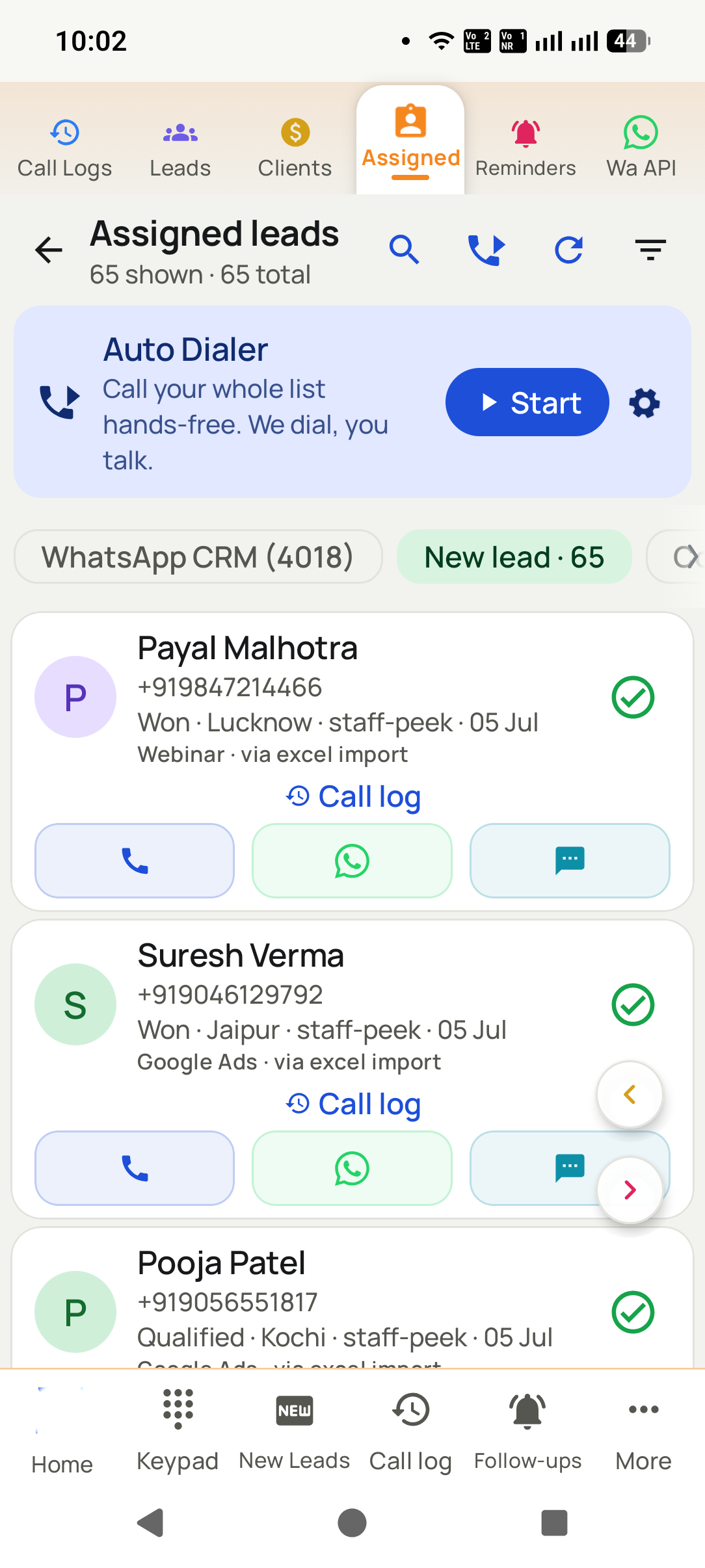
- 1
Pick any list
Excel upload, API/Facebook leads, assigned queue, call log, follow-ups, or a status filter.
- 2
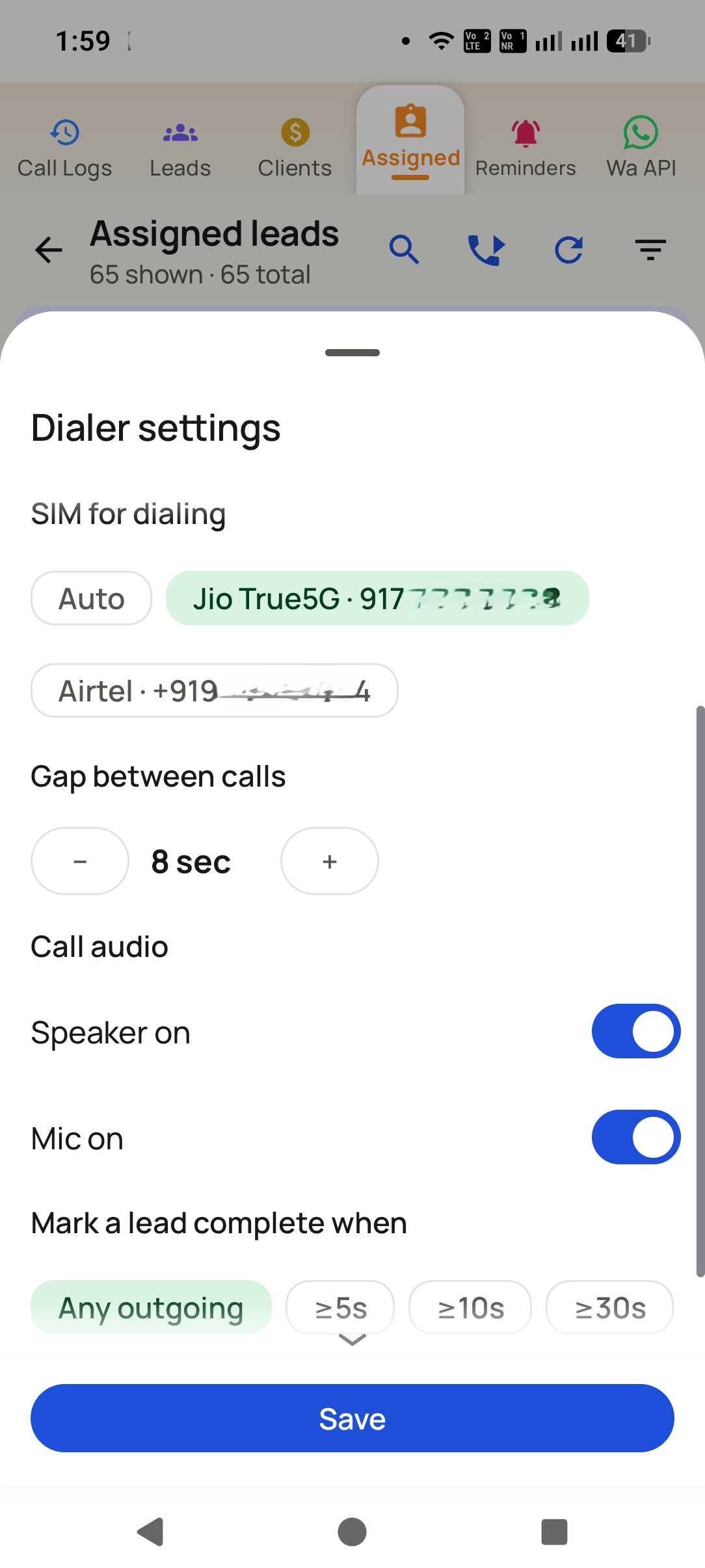
Set SIM, gap & audio
Choose the SIM for dialing, the gap between calls (e.g. 8 sec), speaker/mic defaults, and when a lead counts as complete.
- 3
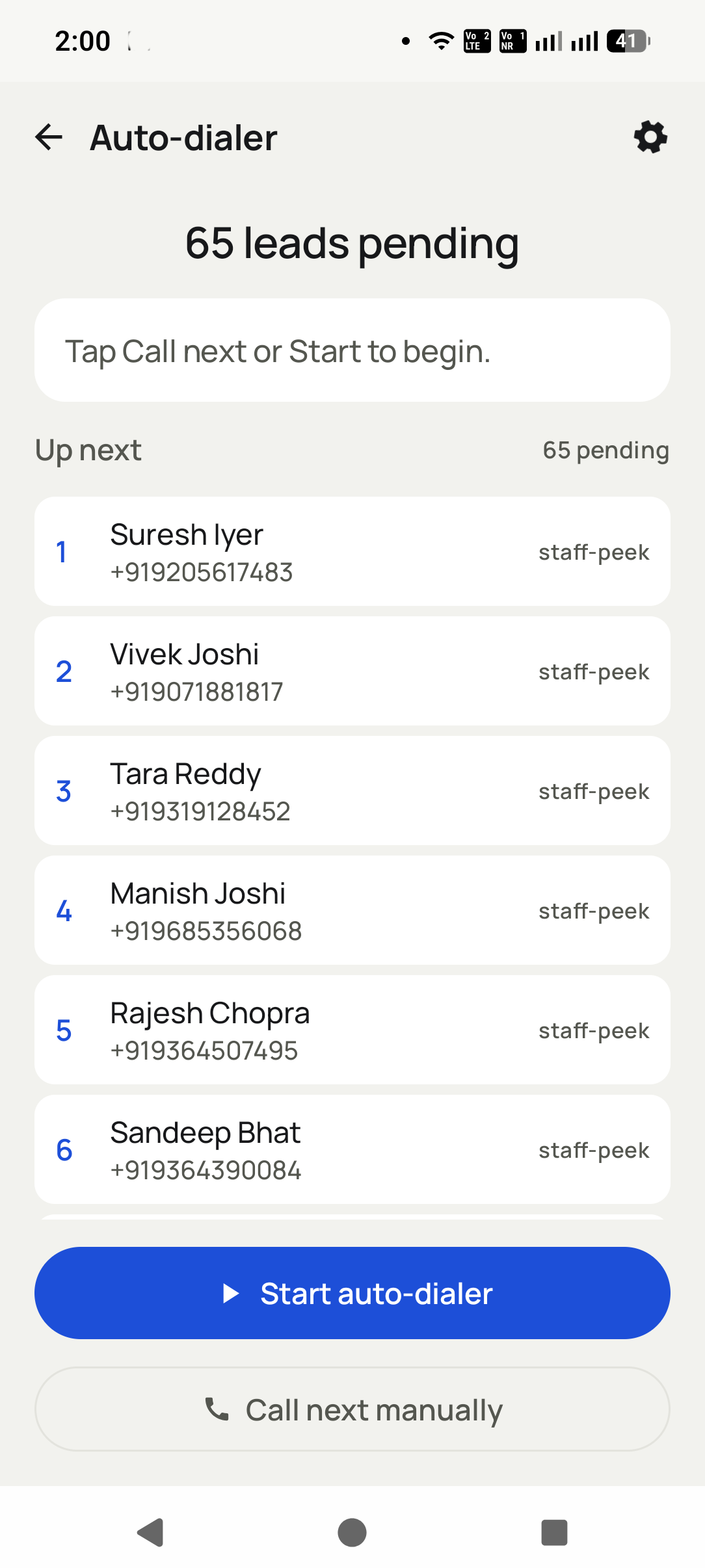
Press Start. Just talk.
"65 leads pending" calls itself, one by one, from YOUR phone and SIM. Pause or stop from anywhere.
- 4
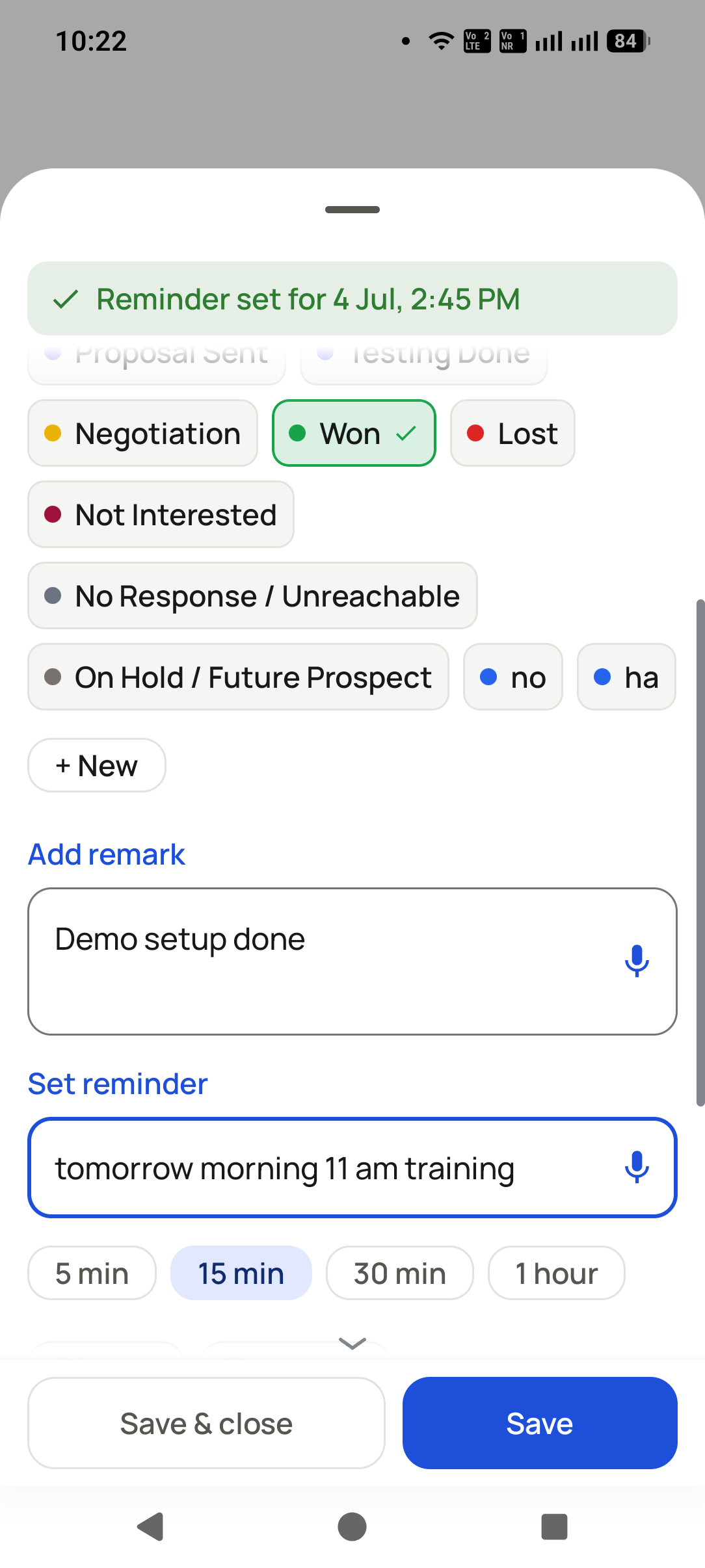
CRM updates between calls
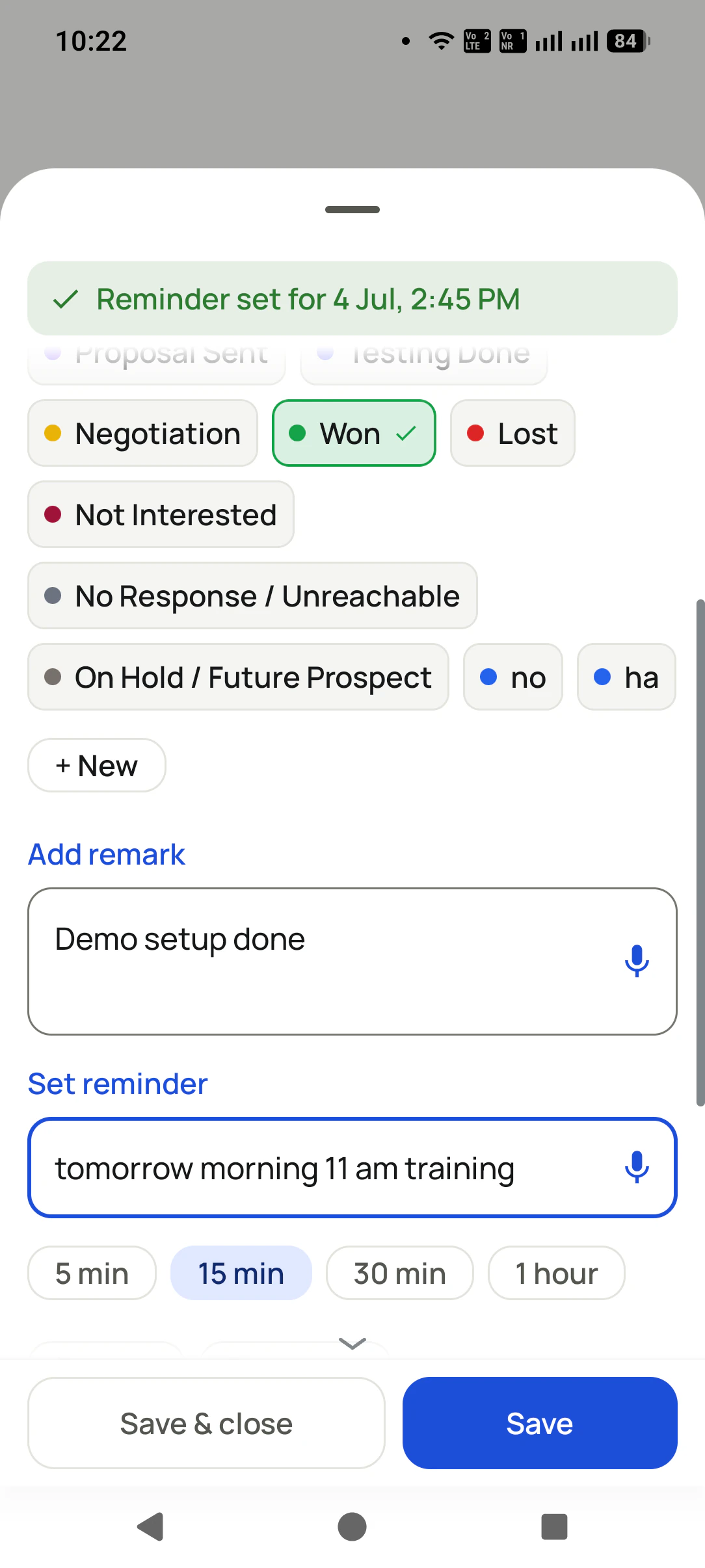
The after-call sheet appears after each call: 2 taps for status + remark, and Auto WhatsApp sends the details.


How much time does dialing by hand waste?
None of this feels big in the moment. Added up, it is the difference between finishing the list and carrying it to tomorrow. Again.
Typing every number
Find the number, copy it, type it, dial. 20-30 seconds per call. On a 100-call list that is a full half hour of just... typing.
The gap between calls
Call ends. A quick WhatsApp scroll, a sip of chai, "bas 2 minute". The gap between two calls is where whole afternoons disappear.
The laziness tax
Before every manual dial there is a tiny decision: "abhi karu ya baad me?" A hundred tiny decisions a day, and the list never finishes.
The total damage
A 100-number list takes a whole scattered day manually. The same list on auto dialer: 2-3 focused hours, done.
Your effort is not the problem. The gaps are. Auto Dialer deletes the gaps.
Which lists can an auto dialer app call?
Whatever brings you numbers, it becomes a hands-free calling session.
Excel / CSV / JSON upload
Import any lead file (only the mobile number is required) and start dialing the whole sheet.
Any API or Facebook leads
Connect a Google Sheet or REST API as a lead source. Facebook/Instagram ad leads landing in your sheet auto-import in the background, ready to dial while they are still hot.
Assigned leads queue
Team members hit Start on their own assigned queue and call through it, no list-making needed.
Your call log
Redial recent numbers, missed calls, or unique callers straight from the log.
WhatsApp API contacts
Your CRM contacts from the WhatsApp API (thousands of them) become leads and then a calling list.
Today's due follow-ups
One tap dials everyone you promised to call back today, in order.
Any status filter
All "New" leads. All "Interested". Any slice of your pipeline becomes a session.
Lost leads win-back
The list nobody else calls: your lost leads, dialed one by one with a fresh offer.
Whoever does the calling, wins the time back
Business owners
Your evening follow-up hour actually finishes now. Pick the due list, press Start, and be done before dinner.
Agents (real estate, insurance, finance)
Fresh leads from your ads get called the same hour, not the same week. Speed-to-call is what wins the client.
Sales employees & telecallers
No number typing, no list confusion, no manager asking "kitne calls hue?": the session counts every call for you.
Same Start button, full team control
Assign leads to members, and auto dialing runs from each rep's own phone and SIM, while you see everything.
Assigned leads queue
Each rep sees their own leads, split into new and completed. No stepping on each other.
Dialer settings per rep
SIM choice (auto or fixed), call gap, and speaker/mic defaults, set once per phone.
Auto lead-complete rules
Complete on any outgoing call, or only when it lasts 5, 10, or 30+ seconds: you decide what counts as "called".
Their phone, their SIM
Calls go from the rep's own number, so customers see a real number and call back. No per-minute cloud charges.
The manager can see it all
Who called whom, what changed, what is due: all there without asking anyone to type a report.
Transfer with history
Reassign a lead to another teammate. The full story travels with it.
Poora team setup dekhna hai? Teams page pe live walkthrough book karo.
The between-calls superpower
Auto Dialer is not just speed. Between every two calls the after-call sheet captures the outcome in 2 taps, Auto WhatsApp sends the customer their details before you reach the next number, and missed answers become follow-up reminders. You finish a session with the list called AND the CRM complete. Got a sheet of numbers? See the bulk calling app page, the Excel se auto call guide (Hindi), or ऑटो डायलर ऐप क्या है in Hindi script.
Auto dialer software, or an auto dialer app?
When people search for auto dialer software they usually picture a call-centre system: cloud lines, virtual numbers, a licence per seat and a bill per minute. RMDialer is auto dialer software of a different shape: it runs as the phone app on each Android handset, dials from the SIM already in it, and puts the CRM, follow-ups and team reports in the same per-user price. No server, no virtual number, and the customer sees a real mobile number. For a call centre with compulsory recording and predictive dialing, cloud telephony is the right category; for a sales team calling its own leads, the app is.
One app. Every feature. One price.
Whether you are one person or one thousand, every RMDialer user gets the complete feature set. No tiers, no locked buttons, no "upgrade to unlock".
Questions, answered
Which is the best auto dialer app for Android in India?
Judge an auto dialer app on four things before the price. One: does it dial from your own SIM, or does it need a virtual number and per-minute cloud billing? Two: does the lead record update between calls, or does someone type it later into a separate CRM? Three: can any list start a session, including Excel, Google Sheets, an API and today's follow-ups? Four: does the manager get per-caller reports without asking anyone. RMDialer is built for the SIM-based answer to all four. We compare the main Android options, including where rivals win, in our best auto dialer apps roundup.
How do I use an auto dialer app?
Install it from Google Play and make it your phone app, then pick a list: an uploaded Excel or CSV, a connected Google Sheet or API, your assigned leads, the call log, the follow-ups due today, or any status filter. Set the SIM to dial from and the gap between calls, press Start, and the app calls each number one by one. You only talk. After each call the after-call sheet takes the status, the remark and the follow-up in two taps, then dialing continues to the next number.
How much does an auto dialer app cost in India?
RMDialer is one plan at ₹159 per user per month on yearly billing, or ₹249 per user per month on the 3-month plan, plus taxes ($29 per user per year, or $12 per user for 3 months, outside India), with every feature included and a free 3-day trial that needs no card. Cloud auto dialers in India usually quote ₹1,500 to ₹4,000 per agent per month and then add per-minute call charges on top, because the calls run through their lines. Here the calls are ordinary SIM calls, so the only call cost is your normal operator plan.
Does it really dial by itself?
Yes. You pick the list and press Start. The app calls each number one by one. You only talk, and optionally tap twice between calls to update the lead.
Whose number do customers see?
Your own SIM number (or each rep's own SIM in a team). Calls are normal SIM calls, so callbacks land with the right person and there are no per-minute cloud charges.
Can I control how fast it dials?
Yes. The gap between calls is adjustable (for example 8 seconds), and speaker/mic defaults make hands-free sessions comfortable.
When is a lead marked complete?
Your choice: any outgoing call, or only calls lasting at least 5, 10, or 30 seconds, so quick cut calls do not count as done.
Can I pause mid-session?
Any time. A small bar stays on screen wherever you go with pause and stop, and the session resumes where you left off.
How do Facebook leads get dialed?
Facebook/Instagram lead ads deliver to a Google Sheet or your CRM API. Add that as a Lead Source in RMDialer. New leads auto-import in the background and are ready in your dialing list.
Does it work with the after-call WhatsApp?
Yes, they are made for each other: every dialed call can trigger an automatic WhatsApp with the details, so the customer has your message before you reach the next call.
How is this different from a telecalling CRM?
Telecalling CRMs are separate apps your team must remember to fill. RMDialer is the phone they call from, so the work itself creates the record. From 2 to 1000 users, every feature included.
Is this allowed on a normal SIM?
Calls go through your own SIM and dialer, exactly like manual dialing, just without the typing and the gaps. Follow normal telecom do-not-disturb rules for who you call.
What is the difference between an auto dialer, a power dialer and a predictive dialer?
An auto dialer calls a list one number at a time so the caller never types a number: that is what RMDialer does, from your own SIM. A power dialer places calls faster in a fixed ratio per agent, and a predictive dialer uses an algorithm to dial several numbers at once and hand answered calls to whoever is free. Power and predictive dialing need cloud lines, virtual numbers and a room of agents, and they produce the silent or abandoned calls TRAI warns about. For an Android sales team calling their own leads, a progressive auto dialer app is the right shape.
Is there an auto dialer app for Android that works without internet?
Yes. The calls themselves are normal SIM calls, so auto dialing keeps working on a weak network or with mobile data off. You only need internet to sync leads, remarks and reports to your account and the Web CRM, and the app catches up on its own once the phone is back online.
Can I use RMDialer as a bulk calling app from an Excel sheet?
Yes. Import the Excel or CSV, press Start, and it calls every number in turn from your SIM; you only talk. Busy numbers are skipped and not-reachable ones retried.
Is the auto dialer also a telecaller app with a CRM?
Yes. Every dialed call opens with the lead's history and ends with the status, remark and follow-up saved, so the dialer and the lead management CRM are the same screen.
Does the auto dialer work as a sales dialer for teams?
Yes. Each rep auto-dials their own assigned queue from their own SIM, and the manager sees every session's calls and outcomes.
Can lead automation feed the auto dialer directly?
Yes. Leads from a Google Sheet, API, Facebook, IndiaMART or JustDial land in the queue and are dialed on the next session.
Does the auto dialer track calls?
Yes. Each session logs calls placed, connected calls, talk time and outcomes per employee, so it doubles as a call tracking app.
Does the auto dialer skip busy or switched-off numbers?
Yes. RMDialer skips busy and not-reachable numbers and can retry them later in the same session.
Can I pause the auto dialer and continue later?
Yes. Pause or stop from the floating bar, and the RMDialer session resumes where it left off.
Can I auto-dial my follow-ups that are due today?
Yes. The Reminders list in RMDialer has an Auto Dial button that queues every due follow-up.
Can two telecallers auto-dial the same list without overlap?
Yes. Assigned leads in RMDialer split the list per person, so no number is dialed twice.
Where do I download the auto dialer app?
RMDialer is on Google Play: https://play.google.com/store/apps/details?id=com.wappblaster.rmdialer. Install it, make it your phone app in one tap, and the free 3-day trial starts immediately.
Is auto dialer software different from an auto dialer app?
Only in where it runs. "Auto dialer software" usually means a cloud or desktop system with virtual numbers, per-seat licences and per-minute call charges, built for call centres. RMDialer is auto dialer software that runs as the phone app on each Android handset: the same automatic dialing through a list, from your own SIM, with the CRM, follow-ups and team reports included in one per-user price and no server to buy.
How does an auto dialer app work on a normal SIM?
Updated 5 September 2026
An auto dialer app removes the slowest part of phone selling: finding the next number and typing it. RMDialer is a progressive auto dialer for Android, which means it calls one number at a time from the SIM already in the phone, waits until you hang up, then dials the next after a gap you choose. That is different from a power dialer or a predictive dialer, which place several cloud calls at once and hand whoever answers to a free agent: those need virtual numbers, a call centre setup and enough agents to absorb the calls, and they are what produces the silent and abandoned calls regulators object to.
Any list can become a session: an Excel or CSV upload, a Google Sheet or REST API connected as a live source, Facebook and Instagram lead ads, the assigned-leads queue for a team member, the follow-ups due today, a status filter such as every lead marked Interested, or the call log itself. Because the dialer and the CRM are the same app, the after-call sheet appears between calls, so status, remark and follow-up are saved in two taps while the conversation is fresh, and Auto WhatsApp can send the details before you reach the next number.
Automatic dialing keeps working on a weak network, because the calls themselves are ordinary SIM calls: internet is only needed to sync leads and reports to the Web CRM, and the app catches up when the phone is back online. For most Indian sales teams, calling their own enquiries from their own numbers, that is the honest shape of auto calling software: no IVR, no VoIP, no per-minute charge, and a customer who sees a real mobile number and calls back.
Aaj ki list, aaj hi khatam
Pick a list, press Start, and see what a gap-free calling hour feels like.
₹159/user/month on yearly · every feature included · Prices are per user, exclusive of taxes.
Call recording supported · our team sets it up with you during training