Excel Se Auto Call · Sheet Import Se Apni SIM Par Auto Dial
Sau number Excel mein, aur poora din ek-ek karke type karne mein.
Excel Se Auto Call Kaise Kare? RMDialer Se Seekhein
Excel auto dialer woh app hai jo sheet ke number khud ek-ek karke lagata hai. RMDialer mein sheet import kariye, SIM aur gap set kariye, Start dabaiye. Baaki kaam app ka: dial, pause, skip, aur har call ka record.
Sirf mobile number zaroori · Pause, skip, resume · Free 3-day trial
Apni SIM, apna Android phone, koi virtual number nahi · Mobile app + Web CRM ek plan mein · Trial ke liye card nahi
RAKPS3,500+ businesses on Wappblaster tools · listed on G2, Capterra, SoftwareSuggest
Sheet import ho gayi100 number, 2 column
Auto dial chalu37 / 100
Gap: 5 secondSIM 1 se call
Record save2 tap mein
Updated
Short answer
Excel se auto call kaise kare?
Excel se auto call ka matlab hai Excel list ke number apne phone se ek ke baad ek apne aap lagwana, bina har number type kiye. RMDialer mein sheet import kariye, phone column confirm kariye, SIM aur calls ke beech ka gap set kariye, aur Start dabaiye: app har number aapki apni SIM se lagata hai. Har call ke baad status aur follow-up 2 tap mein save hota hai, tabhi agla number lagta hai.
Key takeaways
RMDialer mein Excel sheet ka sirf phone number wala column zaroori hai.
Name, city aur source jaise column header ke naam se khud jud jaate hain.
Bina +91 wala 10 digit number bhi chal jaata hai.
Jo number pehle se lead hai, uski doosri entry nahi banti.
Agla number tabhi lagta hai jab pichhli call ka status save ho jaaye.
Kyun karein
Excel se auto call ke fayde
Excel ki list ko haath se dial karne ki jagah app se lagwane par kya badalta hai.
1
Number type nahi karne padte
Sheet ek baar import, phir har number app khud lagata hai. Din typing mein nahi, baat karne mein jaata hai.
2
Apni SIM se call
Customer ko aapka normal mobile number dikhta hai, koi virtual number nahi, aur minute ka alag bill nahi.
3
Har call ka record
Call khatam hote hi status aur follow-up 2 tap mein save. Shaam tak pata rehta hai kisne uthaya, kisne nahi.
4
Duplicate number nahi bante
Jo number pehle se lead hai, uski doosri entry nahi banti, isliye ek aadmi ko do baar call nahi jaati.
5
Team mein list baant sakte hain
Owner leads telecallers mein assign karta hai, aur har phone pe sirf uski apni queue aati hai.
6
Kal ki list aaj se tayyar
Follow-up wale log reminder ke saath agle din ki list mein khud aa jaate hain.
Kadam 1
Sheet ka format: sirf ek column zaroori hai
Header ke naam se app khud samajh leta hai kaunsa column kya hai. Ye table wahi naam hain jo pakke pehchane jaate hain.
Column header
Zaroori?
Kya hota hai
phone / mobile / number
Zaroori
10 digit bhi chalega, +91 bhi; app country ke hisaab se theek kar leta hai
name
Optional
Call screen pe dikhega, aur {name} WhatsApp template mein bharega
city, company, email
Optional
Lead ki detail ban jaati hai, filter aur WhatsApp mein kaam aati hai
interest / requirement
Optional
Call se pehle screen pe: kya poocha tha
source
Optional
Facebook, JustDial, Website: baad mein report mein dikhega kaunsa source kaam ka hai
koi bhi custom field
Optional
App mein banaya hua field header ke naam se khud map ho jaata hai
Sheet template aur sample files: Developers page (GitHub par open).
Kadam 2 aur 3
Import se pehli call tak
1
Excel import kariye
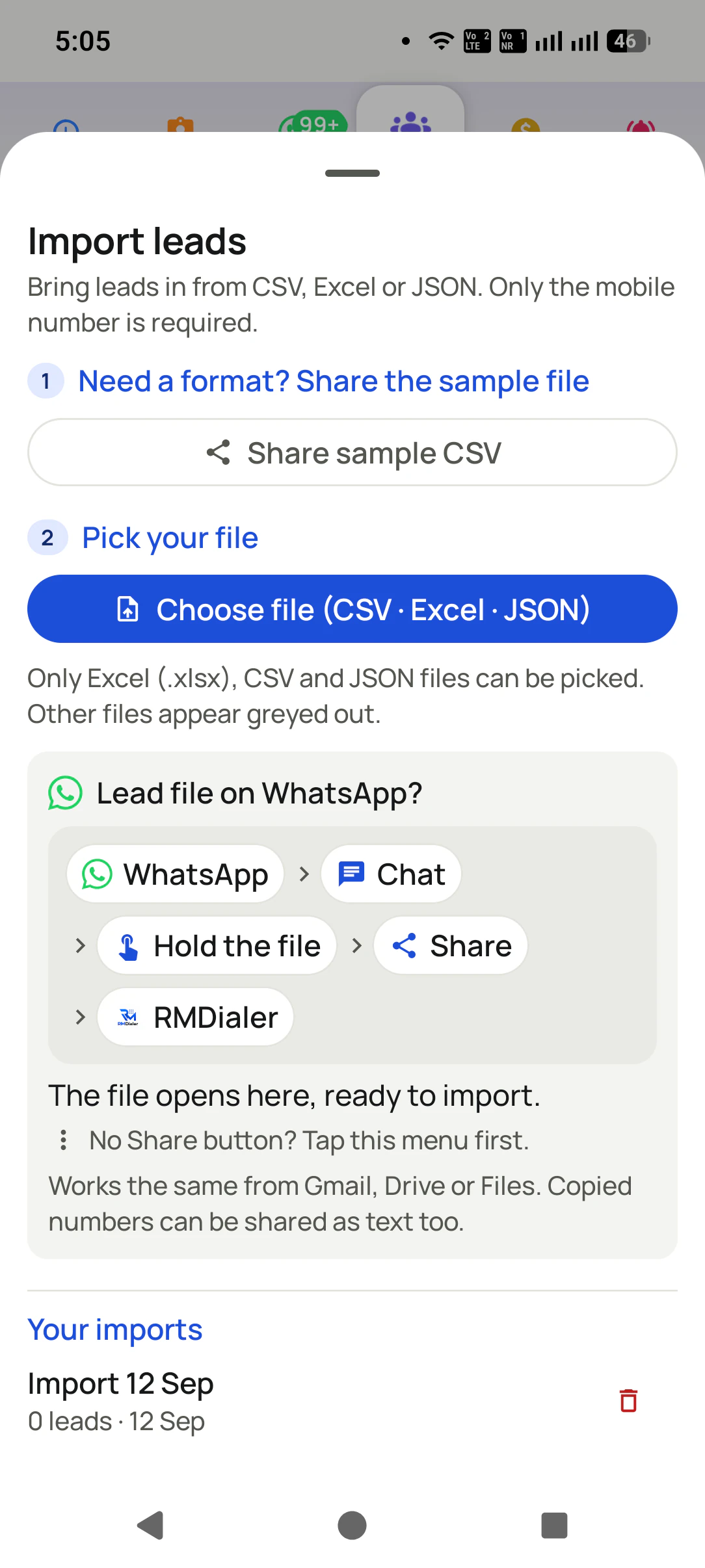
Auto Dialer → Import → file chuniye. App headers padh ke phone column khud pakad leta hai; galat ho to ek tap mein badal dijiye.
2
SIM, gap aur completion rule
Kaunsi SIM, do call ke beech kitne second, aur kaun si call "ho gayi" maani jaaye (koi bhi outgoing, ya 10/30 second se lambi).
3
Start, phir sirf baat
Pehla number lagta hai. Call khatam, 2 tap mein status aur follow-up, agla number apne aap. Jo number aaj nahi lagana, use skip kariye.
Jo galtiyan sab karte hain
Chaar cheezein jo import mein atakti hain
Phone column pehchana nahi
Header "Mobile No." ki jagah "Contact Person" jaisa kuch hai. Import screen pe phone column haath se chun lijiye; ek baar ka kaam hai.
Number galat desh ka ban gaya
Source pe country India (+91) set hai? Bina +CC ke 10 digit number India ka maana jaata hai; Dubai ke number +971 ke saath rakhiye.
Khaali ya duplicate rows
Khaali number wali row skip hoti hai aur app bata deta hai kitni. Jo number pehle se lead hai, wo dobara nahi banta.
Number 9.17E+11 dikh raha hai
Excel ne number ko scientific format de diya. App ise sahi padh leta hai; phir bhi column ko Text format rakhna safe hai.
Customer reviews
RMDialer reviews from business users
Real businesses, real numbers: how owners and sales teams across India and 12+ countries use RMDialer every day.
Rated 4.9 by customers 4.7 on Google Play 5K+ downloads India + 12+ countries
“Hindi mein app chalta hai, yeh sabse badi baat. Season shuru hone se pehle 400 kisaan ki list auto dial ho jaati hai, aur jo bole "baad mein call karna" uska reminder set. Excel se auto call kaise kare, yeh Google pe dhoondh ke yahan aaya tha. Ab do saal se use kar raha hoon.”
“Bulk calling app was the search that brought me here. 300 dealer numbers pasted from Excel, SIM 2 selected, 6 second gap, and my two boys finished the list in a day and a half. The ones who did not pick up, we ran again in the evening. Earlier same list used to take a week with a notebook.”
APAmit PatelDirector · Textile tradingSurat
“Earlier I was dialling 80 to 100 portal leads a day by hand from Excel. With RMDialer auto dialer app I import the sheet, press start and it calls one by one from my own Jio SIM. Between calls I mark Interested or Site visit in two taps and the follow-up rings me on time. Closed 3 flats last month from leads I would have forgotten.”
“Telecaller app for Android that my staff actually use. Enquiry list is assigned to each telecaller, the auto dialer calls it from their own SIM, and test ride bookings come to me live. Punjabi interface for the girls at the desk. Price is honest, everything included, no per-user surprises.”
“We connected our website form and a Google Sheet as lead sources. New sign-ups appear in RMDialer within 15 minutes, get assigned round robin and dialled the same hour. Speed to lead went from a day to under an hour, and demo bookings roughly doubled. The call logs API pushes everything back into our own dashboard.”
RKRohan KulkarniCo-founder · SaaS startupPune
“We needed an auto dialer app that works on our own MTN and Airtel lines, not a call centre subscription in dollars. RMDialer runs on the phones my agents already have, dials the enquiry list, and the WhatsApp follow-up goes out after every call. Calls still go out on the SIM when data drops, and the notes sync once we are back on the network.”
GOGrace OkaforManaging director · Travel agencyLagos, Nigeria
Reviews are collected from customers on WhatsApp and on this website.
Share yours on WhatsApp
Excel ke baad: list ko dobara kaam ka banaiye
Tez dial karna aadha kaam hai. List tabhi dobara call karne layak hai jab har call ke peeche
status, remark aur follow-up bacha ho. Isliye RMDialer mein dialer, lead CRM, reminder aur
auto WhatsApp ek hi app hain: kal ki list aaj ki calls se khud ban jaati hai.
Sirf ek zaroori hai: phone ya mobile number. Name, city, interest, source, budget optional hain aur header ke naam se khud map ho jaate hain. RMDialer mein banaya hua custom field bhi usi naam ke header se bhar jaata hai.
Google Sheet se bhi auto call hoga?
Haan. Sheet ko "Anyone with the link: Viewer" share karke RMDialer mein Lead source ki tarah jodiye. Nayi rows tay schedule par khud import hoti hain aur agle session mein dial ho jaati hain, Excel se bhi aasaan.
Number +91 ke bina ho to?
Chalega. Source pe country India set ho to 10 digit number +91 maan liya jaata hai, aur aage ka 0 hata diya jaata hai. Jo number +CC ke saath hai wo apne desh ka hi rehta hai.
Busy ya band number ka kya hota hai?
Settings mein "Call again if not answered" chalu kariye to app na uthne wale har number ko 1 se 3 baar aur lagata hai: turant, kuch minute baad, ya poori list ke baad. Band rakhein to lagaya hua har number done ho jaata hai aur record call log mein rehta hai; nahi uthne wale numbers ko filter karke shaam ko naya session chala dijiye, tab aksar lag jaate hain.
Do call ke beech gap kitna rakhein?
8 se 15 second zyada tar teams ke liye sahi hai: itna ki status aur remark 2 tap mein save ho jaaye, lekin itna nahi ki din ka rhythm toot jaaye. Gap settings mein kabhi bhi badal sakte hain.
Team ke saath ek hi Excel kaise baantein?
Owner Excel import karke leads ko telecallers mein haath se assign karta hai. Google Sheet ho to Web CRM ke Live Sheets se nayi rows round-robin baant sakte hain. Har telecaller ke phone pe sirf uski queue aati hai, isliye ek number do logon ko kabhi nahi lagta.
Excel se auto call karne wala app kahan se download karein?
RMDialer Google Play par hai: https://play.google.com/store/apps/details?id=com.wappblaster.rmdialer. Install kariye, apne number se sign in kariye, Excel import kariye; 3 din ka free trial poore session ko cover karta hai.
Excel se auto call kaise karein?
Excel ya CSV file mein ek mobile number column rakhiye, app mein import kariye, SIM aur call gap chuniye aur Start dabaiye. App list ke har number par apni SIM se call lagata hai, busy ya no-answer number ko baad mein retry karta hai, aur har call ke baad 2 tap mein status aur remark save hota hai.
Can I auto dial numbers from an Excel sheet?
Yes. Save the sheet as Excel or CSV with a mobile number column (name and any other columns are optional), import it in the app, and start a session. The dialer calls the rows in order and lets you mark each outcome. The same works from a Google Sheet, which can also be connected as a live source so new rows import themselves.
ऑटो डायलर ऐप क्या होता है और कैसे काम करता है?
ऑटो डायलर ऐप आपकी लिस्ट के नंबरों पर एक के बाद एक अपने आप कॉल लगाता है, आपको नंबर टाइप नहीं करना पड़ता। Android पर यह ऐप आपके फोन का डायलर बन जाता है और आपकी अपनी SIM से कॉल करता है: Excel या Google Sheet की लिस्ट डालें, Start दबाएं, हर कॉल के बाद दो टैप में रिज़ल्ट सेव करें, अगला नंबर अपने आप लगता है।
क्या ऑटो डायलर से कॉल करना कानूनी है?
हाँ, अपने ग्राहकों और इन्क्वायरी को कॉल करने के लिए। ऑटो डायलर सिर्फ SIM से कॉल लगाने का तेज़ तरीका है, इसलिए वही नियम लागू होते हैं जो हाथ से कॉल करने पर: DND रजिस्टर्ड नंबरों पर ऑफर के लिए कॉल न करें, कोई मना करे तो रोक दें, और TRAI के कमर्शियल कॉलिंग नियम मानें।
What is an auto dialer app?
An auto dialer app calls a list of phone numbers one after another so the caller never types a number. On Android, an app like RMDialer runs the session on the phone itself using the SIM already in it: you pick a list from Excel, a Google Sheet, an API or assigned leads, press start, and the app dials each number in turn while you mark the outcome between calls.
Does RMDialer work on iPhone?
Yes. There is an iPhone app as well as the Android one, and it carries every feature except the native call log: leads, statuses, remarks, follow-up reminders, WhatsApp, templates, clients and team sync all work on iOS. Apple opens the call log to no app, so calls made on an iPhone are not recorded into the history by themselves, and only Android lets RMDialer become the phone app that answers with the customer on screen. The iPhone app is free on the App Store for iOS 17 or newer. The Web CRM works in any browser, including Safari.
Which languages does the RMDialer app support?
The app itself runs in 40 languages, including Hindi, Bengali, Tamil, Telugu, Marathi, Gujarati, Kannada, Malayalam, Punjabi, Odia and Assamese for India, and Arabic, Bahasa, Tagalog, Swahili, Portuguese, Spanish, French and others for teams abroad. Each user picks their own language on their own phone.
No trial clock on the dialer
RMDialer free plan vs paid plan
The business dialer is free forever with no account and no expiry: the keypad, contacts, caller ID, the call log and your call analytics, plus free WhatsApp sends every day. A plan adds the customer record after every call, follow-up reminders, list auto dialing, your team and WhatsApp automation.
Free forever
₹0, no expiry
Your phone app: keypad, contacts, call log and caller ID
Spam and unknown-number screening on every incoming call
Call analytics: your day counted, by outcome, and by who you called
Missed calls kept in their own list, so nothing is returned late
Sending WhatsApp from a call, free every day
Free WhatsApp sends every day with a free account: 15 a day for your first 15 days, then 3 a day. The dialer itself needs no login at all.
On a plan
₹159/user/month, yearly
$29 per user per year, or $12 per user for 3 months, outside India
The customer record: lead status and remarks saved against every call
Follow-up reminders that ring like an alarm on the day you set
Auto dialing a whole list without touching the phone
Your team: seats, assigned calling lists and per-person reports
Automatic WhatsApp after calls, bulk sending and the WhatsApp API inbox
Backup and restore, so a new phone carries on where the old one stopped
Leads arriving on their own from Google Sheets, APIs and lead portals
Try it free for 3 days: unlimited use, no credit card required. Prices are per user, exclusive of taxes.
Aaj ki list, aaj hi khatam
Excel import kariye, Start dabaiye, aur dekhiye bina gap wali calling ka ek ghanta kaisa lagta hai.
₹159/user/month on yearly in India, $29/user/year elsewhere · every feature included · Prices are per user, exclusive of taxes.
Free forever: the business dialer never expires, and needs no account
Call recording supported · our team sets it up with you during training
On iPhone and Android. The iPhone app has every feature except the native call log.