Telecaller App for Android · Dials the List From Your Own SIM
Telecaller App for Android on Your Own SIM Is RMDialer
RMDialer is a telecaller app for Android that works your calling list from your own SIM, so you spend the day talking instead of typing numbers and updating a sheet.
Dials the list for you · Shows who is answering · Saves the outcome in two taps
Your own SIM, own Android phone, no virtual number · Mobile app + Web CRM in one plan · No card for the trial
RAKPS3,500+ businesses on Wappblaster tools · listed on G2, Capterra, SoftwareSuggest
Next number dialledno typing, no searching
Lead on screenlast remark, before hello
Outcome savedtwo taps, next call
Call back Tuesdayit rings, you do not remember
Short answer
What is the best telecaller app for Android?
A telecaller app should do three things: dial the list hands-free, show the customer’s history while the phone is ringing, and log the outcome in a tap or two. The decisive detail in India is whether it calls from your own SIM or over VoIP, because a SIM call shows a normal local number and gets answered far more often, while VoIP numbers are widely flagged as spam. RMDialer is a SIM-based telecaller app for Android: it replaces the phone dialer, auto-dials any list, keeps calling over the SIM when mobile data drops, runs in 40 languages, and includes WhatsApp so the brochure or price list goes out the moment the call ends. It costs about ₹159 per caller a month on the yearly plan.
Key takeaways
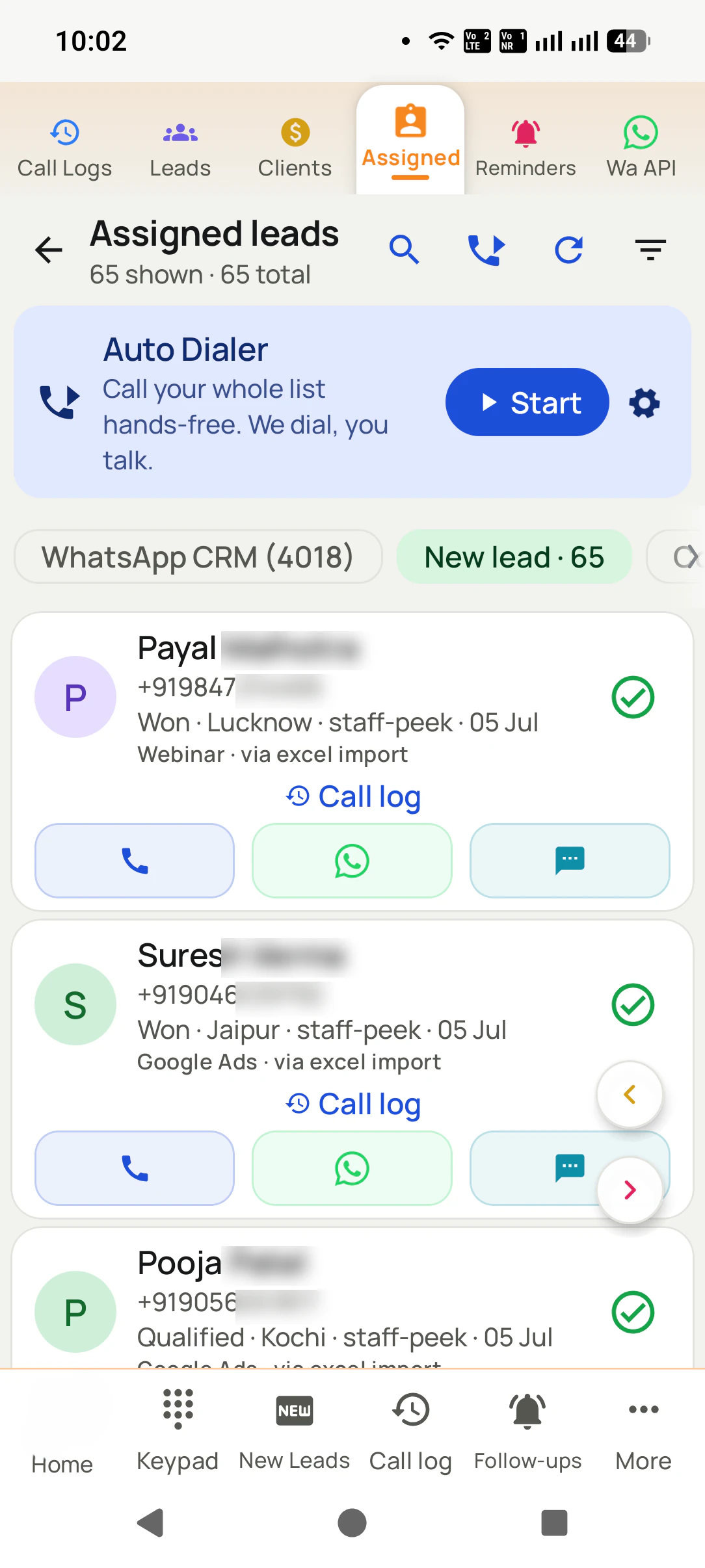
RMDialer opens the telecaller's assigned leads with the newest one on top.
Pressing Start dials the list one number at a time, with the gap the caller chooses.
After each call, the status, a remark and the next follow-up take two taps.
A promised callback rings full screen on the agreed day with the lead's history loaded.
The telecaller app runs on Android 8 or newer and becomes the phone app in one tap.
Diagram splitting the telecalling job between the caller and the app.
Customer reviews
What businesses say about RMDialer
Real businesses, real numbers: how owners and sales teams across India and 12+ countries use RMDialer every day.
Rated 4.9 by customers 5.0 on Google Play 1K+ downloads India + 12+ countries
“Telecaller app for Android that my staff actually use. Enquiry list is assigned to each telecaller, the auto dialer calls it from their own SIM, and test ride bookings come to me live. Punjabi interface for the girls at the desk. Price is honest, everything included, no per-user surprises.”
“Bulk calling app was the search that brought me here. 300 dealer numbers pasted from Excel, SIM 2 selected, 6 second gap, and my two boys finished the list in a day and a half. The ones who did not pick up, we ran again in the evening. Earlier same list used to take a week with a notebook.”
APAmit PatelDirector · Textile tradingSurat
“We connected our website form and a Google Sheet as lead sources. New sign-ups appear in RMDialer within 15 minutes, get assigned round robin and dialled the same hour. Speed to lead went from a day to under an hour, and demo bookings roughly doubled. The call logs API pushes everything back into our own dashboard.”
RKRohan KulkarniCo-founder · SaaS startupPune
“Hindi mein app chalta hai, yeh sabse badi baat. Season shuru hone se pehle 400 kisaan ki list auto dial ho jaati hai, aur jo bole "baad mein call karna" uska reminder set. Excel se auto call kaise kare, yeh Google pe dhoondh ke yahan aaya tha. Ab do saal se use kar raha hoon.”
“GST and ITR deadlines mean 200 client calls in a fortnight. The auto dialer runs the list, the remark goes on the client's number, and the ones who said "documents by Friday" ring the assistant on Friday. A follow up reminder app that lives inside the phone dialer is the only kind my staff will keep using.”
“Most CRM tools here are built for a desk. Our brokers sell from their phones, so a telecalling CRM inside the dialer made sense. Leads from Facebook ads land in the app, the auto dialer calls them, and the tripping schedule rings each broker. Tagalog interface, own Globe SIM, no VoIP number for clients to distrust.”
MSMaria SantosOperations lead · Real estate brokerageManila, Philippines
Reviews are collected from customers on WhatsApp and on this website.
Share yours on WhatsApp
What it does
What does a telecaller app do all day?
A telecaller app does the boring half of the job. Every one of these is time you currently spend not talking to a customer.
Dial the list without typing
Your day is a list of numbers. Auto Dialer works through it hands-free, from your own SIM, with the gap you choose between calls.
Know who is answering
The name, the stage and your last note are on screen while the phone rings, so you never open a call with "sir, aap kaun?"
Log the result in two taps
Interested, not interested, call back tomorrow. Between calls, without leaving the dialer or opening a sheet.
Never miss the callback
A promised follow-up rings like an alarm at the time you set, with the customer’s history one tap away.
Send the details on WhatsApp
The price list or brochure goes out the moment you hang up, while the customer still has the phone in hand.
Show your numbers
Calls made, connected and what came of them, counted automatically. No end-of-day reporting to fill in.
How it works
One call, fully handled
1
Install and set as your phone app
Calls work exactly as before, with the customer record attached.
2
Load your calling list
Import from Excel, a Google Sheet, or leads assigned by your manager.
3
Start the dialer and talk
It dials, you talk, two taps save the outcome, it dials the next.
Should a telecaller app call from the SIM or over VoIP?
Most global calling CRMs dial over VoIP, which gives every caller a virtual number. In India
those numbers are widely marked as spam, so a large share of your calls are never answered.
A SIM-based telecaller app dials from the phone in your hand and shows your own number, which
is why the same list produces more conversations.
Judge a telecaller app on the caller's day, not the feature list. Does the assigned queue open on their own phone with the newest lead first? Can they auto dial the whole list hands-free? Does saving the outcome take two taps rather than a form? Does the follow-up ring on that same phone on the right day? And does the manager get the report without asking? RMDialer is built around those five, on ordinary Android phones and the caller's own SIM, so there is no headset, no desk and no per-minute bill.
How do I use a telecaller app for calling leads?
Your manager assigns you leads, and they appear in your queue with the newest first. Open a lead to see its history, or press Start to auto dial the whole list one number at a time. After each call the after-call sheet takes the status, a remark and the next follow-up in two taps, and then dialing carries on. Reminders ring full screen on the day you promised, with the whole story loaded, so you never open a call cold.
Is there a free telecaller app for Android?
RMDialer gives a free 3-day trial with unlimited use and no card, then ₹159 per user per month on yearly billing plus taxes, with every feature included. Apps advertised as a free telecaller app usually cap the number of leads, show ads, or leave out the CRM side, which is the part that makes the calling worth recording. Calls themselves cost only what your normal SIM plan costs, because there is no cloud line in the middle.
What is a telecaller app?
An app a telecaller uses to work through a calling list from their phone: it dials the next number automatically, shows who the customer is while the phone rings, records the outcome in a tap or two, and reports how many calls were made and what came of them.
Does a telecaller app need a separate calling number?
Not with a SIM-based app. RMDialer calls from the SIM already in the phone, so the customer sees a normal local mobile number. Cloud-telephony tools give you a separate virtual number, which costs more and is more often flagged as spam in India.
Can a telecaller app work without internet?
The calls themselves run on the mobile network, so they work with no data at all. RMDialer syncs the calling list and the notes to your account when the signal returns, so a weak network slows nothing down.
How many calls can a telecaller make in a day with an auto dialer?
Manual dialling usually caps a rep at 60 to 100 calls a day, because typing numbers and updating a sheet eats the time. With auto-dialling and two-tap logging, 150 to 250 is realistic.
What is a telecaller app, and what should it do?
A telecaller app is the phone app a caller works from all day. RMDialer auto dials the assigned list from the caller's own SIM, shows each customer's status and last remark before the call, and saves the outcome and the next follow-up in two taps when it ends.
Which app do telecallers use to make calls in India?
Increasingly a SIM-based telecaller app such as RMDialer, because calls from a normal mobile number get answered far more often than virtual or VoIP numbers. It also keeps the lead record, so nobody has to type call reports afterwards.
Can a telecaller app auto dial from an Excel sheet?
Yes. RMDialer imports an Excel, CSV or Google Sheet list, or pulls it from an API, and dials the whole list one number at a time. You can skip a number, and numbers that did not answer can be rung again in a new session later.
Does a telecaller app work as a lead management CRM?
In RMDialer, yes: every number is a lead record with your own statuses and fields, remarks that reappear on the next call, follow-up reminders that ring, and WhatsApp history, so the dialer and the CRM are the same screen.
Where do I download a telecaller app for Android?
RMDialer is on Google Play: https://play.google.com/store/apps/details?id=com.wappblaster.rmdialer. It runs on Android 8 or newer, becomes the phone app in one tap, and starts a free 3-day trial with no card.
Can the manager see what each telecaller did?
Yes. Calls made, calls connected and the result of each one roll up per person automatically, so nobody has to fill in a daily report for the manager to know where things stand.
How many calls should a telecaller make per day?
Between 80 and 150 dialled calls a day is normal for outbound telecalling in India, which usually means 30 to 60 connected conversations. The number matters less than the connect rate and the outcomes saved after each call; an auto dialer removes the dead time between calls so the same person reaches the higher end without working longer.
No trial clock on the dialer
What is free forever, and what a plan adds
The business dialer is free forever with no account and no expiry: the keypad, contacts, caller ID, the call log and your call analytics, plus free WhatsApp sends every day. A plan adds the customer record after every call, follow-up reminders, list auto dialing, your team and WhatsApp automation.
Free forever
₹0, no expiry
Your phone app: keypad, contacts, call log and caller ID
Spam and unknown-number screening on every incoming call
Call analytics: your day counted, by outcome, and by who you called
Missed calls kept in their own list, so nothing is returned late
Sending WhatsApp from a call, free every day
Free WhatsApp sends every day with a free account: 15 a day for your first 15 days, then 3 a day. The dialer itself needs no login at all.
On a plan
₹159/user/month, yearly
The customer record: lead status and remarks saved against every call
Follow-up reminders that ring like an alarm on the day you set
Auto dialing a whole list without touching the phone
Your team: seats, assigned calling lists and per-person reports
Automatic WhatsApp after calls, bulk sending and the WhatsApp API inbox
Backup and restore, so a new phone carries on where the old one stopped
Leads arriving on their own from Google Sheets, APIs and lead portals
Try it free for 3 days: unlimited use, no credit card required.Prices are per user, exclusive of taxes.
Business karte ho? Business Dialer chahiye.
Set it as your phone app in one tap. Everything works like before, and then it starts working FOR you.
₹159/user/month on yearly · every feature included · Prices are per user, exclusive of taxes.
Free forever: the business dialer never expires, and needs no account
Call recording supported · our team sets it up with you during training
On iPhone and Android. The iPhone app has every feature except the native call log.