Telecalling App · One Handset, the Whole Calling Desk
Telecalling App Is RMDialer
A telecalling app turns an ordinary Android phone into a calling desk for leads. RMDialer becomes the phone's dialer: every call opens with the customer's history and ends with a two-tap outcome, so the register stops existing.
Works on the handsets you already own · Calls keep going when data drops
Your own SIM, no virtual number · Android and iPhone apps + Web CRM in one plan · No card for the trial
RAKPS3,500+ businesses on Wappblaster tools · listed on G2, Capterra, SoftwareSuggest
Who is thisname, stage, last remark
Next numberdialled without typing
What you promisedrings back on time
Counted alreadyno register at 7pm
Updated
Short answer
What is a telecalling app?
A telecalling app is the phone app a calling team works in all day to dial its lead list, see each customer's history and save what happened on every call. A good one dials the list hands free from the phone's own SIM, takes the outcome in two taps, rings the promised callbacks, sends the promised WhatsApp and counts each caller's day without a report. RMDialer is a telecalling app of that kind, and it works by replacing the phone's own dialer rather than sitting beside it, which is why the record gets written during the call instead of afterwards. It runs on ordinary Android handsets a team already owns, keeps working when the signal drops, and costs about ₹159 per user per month on the yearly plan with a 3-day trial that needs no card.
Key takeaways
RMDialer replaces the paper register, the shared spreadsheet and the WhatsApp updates group with one live record per lead.
A callback reminder shows the name, the history and the promise made, with a dial button on it.
A team of five can install it and start calling the same afternoon, with no server and no number porting.
Leads belong to the company account, so a caller who leaves takes no customer history with them.
Why teams switch
Telecalling app benefits
What changes for a calling team once the whole desk runs from the app on each caller’s phone.
1
More conversations in a shift
The list dials itself, so the time that went on finding and typing numbers goes on talking to customers.
2
Every caller knows the customer
Name, stage and last remark are on the screen while it rings, even when someone else made the last call.
3
No promise forgotten
A callback set on one call rings on its day with the history attached, so customers hear back when they were told.
4
Records written while memory is fresh
Two taps at the end of each call replace a register filled in at speed and read by nobody.
5
The owner sees the day without asking
Calls and outcomes per person add up as the team works, so the 7 pm tally is already done.
6
Leads stay with the company
Customer history lives in the company account, so a caller who leaves takes nothing with them.
The incumbents
Tools a telecalling app replaces
Nine hours of calling, and the only record is a register nobody can read. Not another app, usually: six habits, most of them held together by handwriting.
The phone's own dialer
It knows the number and nothing else. No name, no last conversation, no idea this is the fourth attempt.
The handset still makes the call, but the screen now carries who they are and what was said last time.
The register or diary
Written at speed, in shorthand, by nine different people. Readable by roughly none of them a week later.
The outcome is two taps at the end of the call, so the writing happens while the memory is fresh.
A shared spreadsheet
Two callers ring the same enquiry, a third edits an old copy, and the version everyone trusts is nobody's.
Each lead has exactly one owner and one live record, on the phone of the person who owns it.
A WhatsApp group for updates
Updates scroll away. Nobody scrolls up. The one message that mattered was sent at 9pm on a Saturday.
The update is the call record itself, so there is nothing to post and nothing to scroll back through.
A phone alarm for callbacks
It rings without saying who, or why, or what was promised. So it gets swiped away.
The reminder arrives with the name, the history and the promise attached, and dials on one tap.
The evening report on paper
Written from memory by tired people, half an hour after the last call, and optimistic by habit.
Counted from the calls themselves, so it exists whether or not anybody remembers to write it.
Telecalling app vs a paper register
Seven questions an owner asks every week. A handwritten register answers some of them, slowly, if the caller wrote it up. The app answers all of them from the calls themselves.
Questions an owner asks, answered by a paper register and by the RMDialer telecalling app
The owner asks
Paper register
Telecalling app
Who was called today?
Only what was written down
Every call, logged by the phone itself
What did the customer say?
A few words, if legible
A remark saved on the lead seconds after the call
When is the callback due?
Someone has to remember
A reminder rings at the promised time
How long did each call last?
Not recorded
Talk time on every call and per caller
Which customers called and got no answer?
Lost in the phone’s call history
Missed calls kept in their own list to return
Which leads were never called?
Impossible to tell
Uncalled leads visible on the list and in reports
What happens when a caller leaves?
The register, and the history, leave too
Leads move to another caller with every remark attached
Customer reviews
RMDialer reviews from business users
Real businesses, real numbers: how owners and sales teams across India and 12+ countries use RMDialer every day.
Rated 4.9 by customers 4.7 on Google Play 5K+ downloads India + 12+ countries
“Telecaller app for Android that my staff actually use. Enquiry list is assigned to each telecaller, the auto dialer calls it from their own SIM, and test ride bookings come to me live. Punjabi interface for the girls at the desk. Price is honest, everything included, no per-user surprises.”
“Bulk calling app was the search that brought me here. 300 dealer numbers pasted from Excel, SIM 2 selected, 6 second gap, and my two boys finished the list in a day and a half. The ones who did not pick up, we ran again in the evening. Earlier same list used to take a week with a notebook.”
APAmit PatelDirector · Textile tradingSurat
“We connected our website form and a Google Sheet as lead sources. New sign-ups appear in RMDialer within 15 minutes, get assigned round robin and dialled the same hour. Speed to lead went from a day to under an hour, and demo bookings roughly doubled. The call logs API pushes everything back into our own dashboard.”
RKRohan KulkarniCo-founder · SaaS startupPune
“Hindi mein app chalta hai, yeh sabse badi baat. Season shuru hone se pehle 400 kisaan ki list auto dial ho jaati hai, aur jo bole "baad mein call karna" uska reminder set. Excel se auto call kaise kare, yeh Google pe dhoondh ke yahan aaya tha. Ab do saal se use kar raha hoon.”
“GST and ITR deadlines mean 200 client calls in a fortnight. The auto dialer runs the list, the remark goes on the client's number, and the ones who said "documents by Friday" ring the assistant on Friday. A follow up reminder app that lives inside the phone dialer is the only kind my staff will keep using.”
“Most CRM tools here are built for a desk. Our brokers sell from their phones, so a telecalling CRM inside the dialer made sense. Leads from Facebook ads land in the app, the auto dialer calls them, and the tripping schedule rings each broker. Tagalog interface, own Globe SIM, no VoIP number for clients to distrust.”
MSMaria SantosOperations lead · Real estate brokerageManila, Philippines
Reviews are collected from customers on WhatsApp and on this website.
Share yours on WhatsApp
One shift, start to finish
A day on a telecalling app, hour by hour
A Tuesday for a five-person team, by the clock. Nothing here is a feature list; it is what the phone does while somebody talks.
9:40 am
The list is already there
Last night's website enquiries, the IndiaMART leads and yesterday's "call me tomorrow" promises are queued and split between the callers before anybody sits down.
10:05 am
The session starts, hands free
One tap begins the auto-dial run. The app rings the next number, waits the gap you chose, and rings the next. No typing, no reading numbers aloud.
10:06 am
A customer picks up
Their name, their stage, and the last remark anyone left are on the screen before the first hello. The conversation continues instead of restarting.
10:09 am
The call ends, the record does not
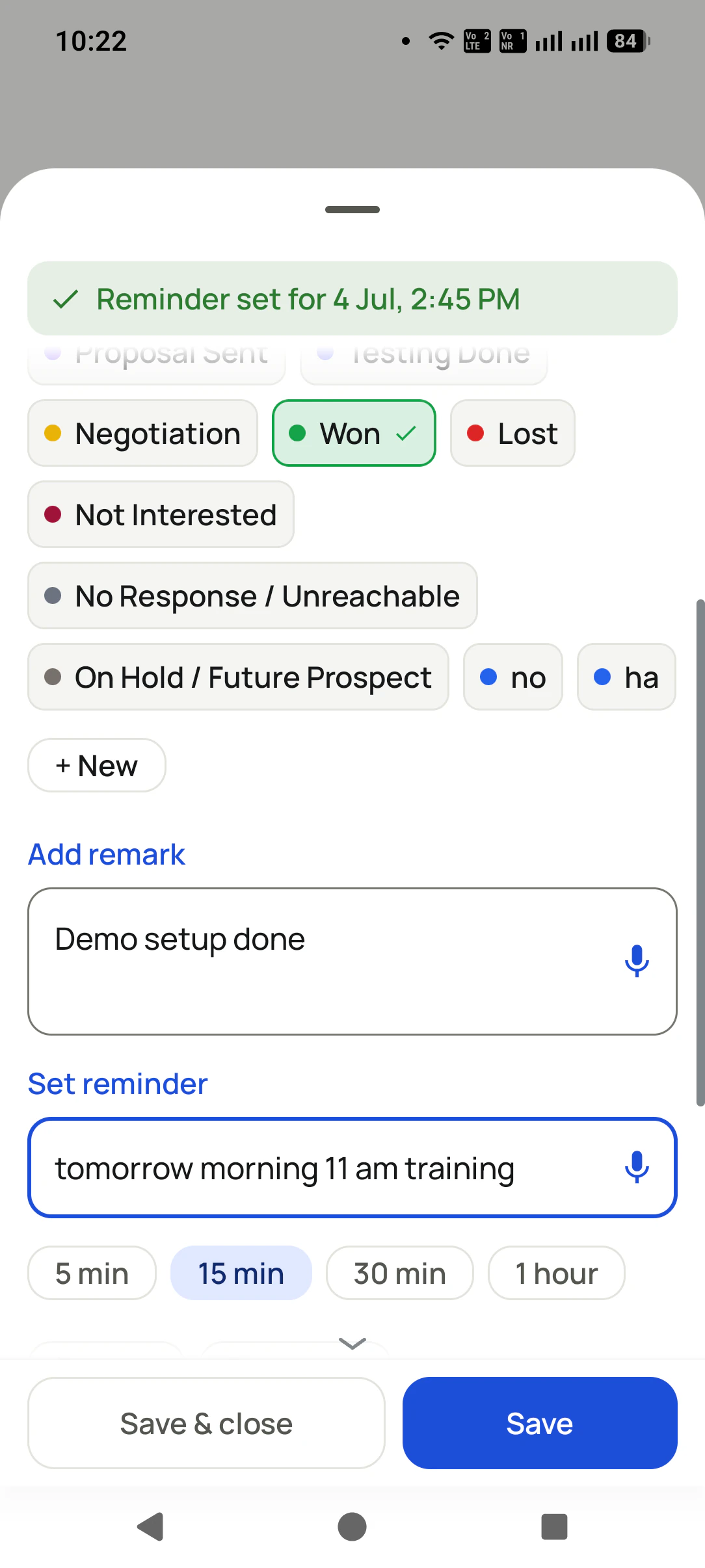
Status, remark, next step: two taps on the sheet that appears when the call drops. Then the session dials on.
10:10 am
The promised message goes by itself
The price list they asked for leaves on WhatsApp while the caller is already talking to the next person.
2:15 pm
The network drops in a lift
Calls keep working, because they are SIM calls. Outcomes reach the account by themselves when the signal comes back.
4:30 pm
A callback rings
Not an alarm. A full-screen reminder carrying the name, the history and the exact thing that was promised, with a dial button on it.
7:00 pm
Nobody writes a report
By evening the owner's phone and the Web CRM already hold each caller's tally: how many numbers were dialled, how many picked up, the minutes spoken, what each party said, and which callbacks happened on time. Nobody copies a thing into the register.
The one that decides it
Telecalling app on a weak signal
The question nobody asks in a demo and everybody meets in week one.
A counsellor at a coaching institute in Kota spends part of every afternoon in a stairwell between floors, and
the building eats the data connection. On a cloud-telephony app that is a dead hour: the calls themselves need
the internet, so they simply fail. On a telecalling app that dials through the handset's SIM, the calls are
ordinary phone calls and the stairwell changes nothing about them.
What the signal does affect is the writing. RMDialer syncs the outcomes, remarks and new follow-ups to the
account when the connection returns, so an afternoon of admissions calls arrives in the
owner's view complete rather than half-missing. The counsellor never sees any of this happen, which is the
intended experience: the test of a well-built telecalling app is that nobody notices the signal dropped.
It is worth asking about explicitly, because the answer sorts the market in one question. Ask a vendor what
their app does with no data connection. If the calls stop, you are looking at cloud telephony wearing an app's
clothes.
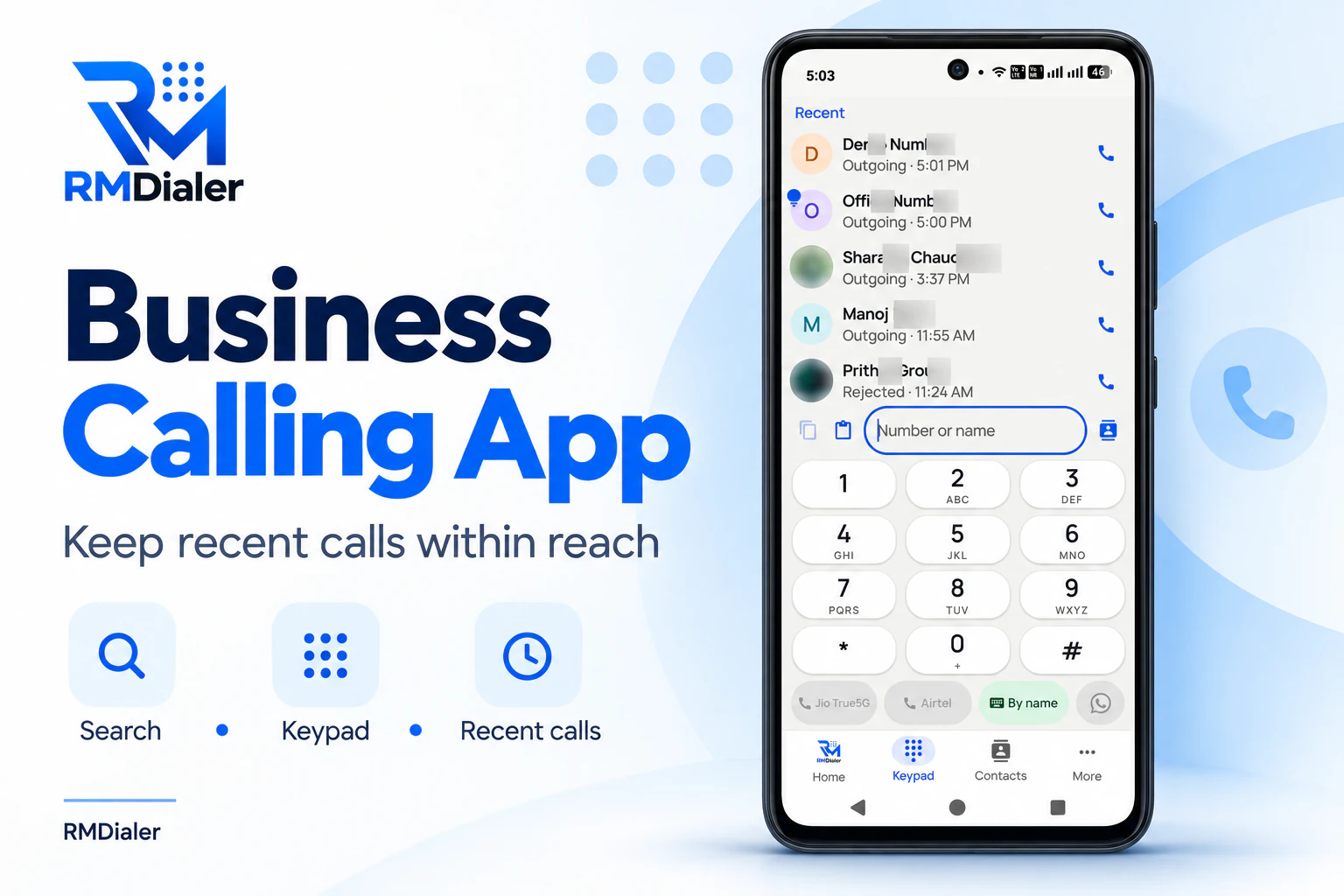
The telecalling app is the phone’s own dialer: recent calls, both SIMs and search by name on one screen.
Tele calling app, calling app for telecallers: the same thing on the shelf
The spelling moves around depending on who is typing. Owners write "telecalling app", job ads write "tele calling
app", and a requirement sheet from a purchase department will say "telecalling application" or "telecalling mobile
app". They all describe one thing: the app a caller keeps open from the first dial of the morning to the last
remark of the evening. If you came here from the
best telecalling app in India page,
this is the page for RMDialer itself.
You will also see it called tele calling app, telecalling application, calling app for telecallers and telecalling mobile app. They describe the same thing, so whichever phrase
brought you here, this is the page for it.
How it works
Telecalling app setup on your team's phones
1
Install it and make it the dialer
Each person installs it from Play and taps once to set it as the phone app. No servers to buy, no numbers to port, no telecom paperwork.
2
Put the day's list in
Excel, a Google Sheet, a website form or a portal feed. The leads land in the right person's queue instead of a group chat.
3
Call, and let it keep the record
History on screen during the call, outcome in two taps after it, reminders and WhatsApp handled, report counted at the end.
Questions
Telecalling app: what teams ask before they install it
Does a telecalling app work on a normal Android phone?
Yes, and that is the point of one. RMDialer installs from Play onto the handset a caller already owns, then asks to become the phone app. There is no headset, no desk unit, no SIP account and nothing to buy beyond the phone in their pocket. Any Android 8 device or newer runs it, including the cheap ones teams actually hand out.
Do I need a separate SIM or a virtual number?
No. Calls go out through the SIM already in the handset, so the customer sees an ordinary local mobile number and picks up. Virtual numbers are the opposite arrangement: an unfamiliar prefix that gets screened, plus a per-minute bill. RMDialer never puts a number between the caller and the customer.
What happens to my calls if the internet goes off?
The calls carry on, because they were never internet calls. A dropped signal in a basement or a lift affects syncing, not dialling. Outcomes, remarks and new leads upload to the account the moment the connection returns, so a caller working a patchy area never loses an afternoon of records.
Can it dial a list straight from an Excel sheet?
Yes. Import the sheet, map the columns once, and the numbers become a queue the auto-dialer works through hands free. Google Sheets, a website form, IndiaMART, JustDial and a plain REST feed can all pour into the same queue, which means nobody is copying enquiries into a phone by hand at 9am.
How many calls a day can one person make on it?
Between 150 and 250 dials in a working day is normal once the dialling and the writing stop being manual, against 60 to 90 for someone typing numbers and filling a register. The gain is not talking faster. It is the seconds between calls, which is where most of a telecalling day quietly disappears.
Will customers see my personal number?
They see whichever SIM is in the phone, so most teams put a business SIM in the handset they hand out and keep personal numbers out of it entirely. Dual-SIM phones can dial from the business SIM while the personal one stays for personal use.
Can the owner see what each caller did without asking them?
That is what removes the evening phone call. Calls made, connected, talk time, outcomes and follow-ups kept build up per person as the day happens, and the owner reads them on their own phone or in the Web CRM. Nobody submits anything, so there is nothing to forget, inflate or lose.
Does it send WhatsApp after a call?
It can send the message the moment a call ends, using your own templates and the official WhatsApp Business API, with the customer name and details filled in. The quotation or price list a caller promised at 10:06 has usually gone before they finish the next call.
Is a telecalling app the same as Truecaller or the phone's own dialer?
No. Truecaller tells you who is calling; the stock dialer places the call. Neither remembers your business. The RMDialer telecalling app replaces the dialer and adds the memory: your lead list, the customer history on the call screen, the outcome capture, the follow-ups and the reporting. Caller ID is a feature of it, not the product.
How long does it take to set up for five people?
An afternoon, usually less. Install on five handsets, set each as the phone app, import the lead list once, and split the leads between the five. There is no server, no number porting and no telecom approval in the way, which is why teams tend to be calling on it the same day they decide to try it.
What does a telecalling app cost per person?
RMDialer is about ₹159 per user per month on the yearly plan in India, or $29 per user per year, or $12 per user for 3 months, outside India, and that one plan covers everything the register and the stock dialer never did: working through the list for you, the record of each party, WhatsApp messages that go out on their own, callback alarms and the evening tally. Nothing is held back for a costlier tier. Each call is an ordinary SIM call at your operator's usual rate, so no per-minute meter runs on top, and the 3-day trial unlocks every feature without asking for a card.
Can my team use it in Hindi or their own language?
The app itself runs in 40 languages, not just the website, so a caller reads their screen in the language they think in. That matters more than it sounds: an English-only app is the single commonest reason a team quietly goes back to the register after two weeks.
What happens to the leads if a caller leaves?
Reassign them in bulk and the whole history travels with them, so whoever picks the account up opens the next call knowing what was said and what was promised. Leads live in the company account rather than on one person's handset, which is the difference between a resignation and a data loss.
Is a telecalling app legal for business calls in India?
Calling your own enquiries and customers from your own number is ordinary business communication and needs no special registration. The rules that involve DND scrubbing, the 140 series and telemarketer registration apply to cold promotional calling to strangers, which is a different activity. If your list is people who contacted you or bought from you, you are not doing telemarketing.
Which telecalling app should a small team pick?
Judge it on four things a demo will show you in ten minutes: does it dial from the team's own SIMs, does the customer record appear during the call rather than in another app, does the outcome take two taps or a paragraph, and does the owner get the day without asking for it. RMDialer is built to answer yes to all four, and its 3-day trial gives you those ten minutes on your own leads rather than on a demo list.
Lead automation
Leads from 15+ platforms → auto-assigned round robin → auto dialed → updated. On its own.
Facebook, JustDial, IndiaMART, portals, sheets, Excel: every lead gets an owner and a
place on a calling list, then reports its own outcome.
The business dialer is free forever with no account and no expiry: the keypad, contacts, caller ID, the call log and your call analytics, plus free WhatsApp sends every day. A plan adds the customer record after every call, follow-up reminders, list auto dialing, your team and WhatsApp automation.
Free forever
₹0, no expiry
Your phone app: keypad, contacts, call log and caller ID
Spam and unknown-number screening on every incoming call
Call analytics: your day counted, by outcome, and by who you called
Missed calls kept in their own list, so nothing is returned late
Sending WhatsApp from a call, free every day
Free WhatsApp sends every day with a free account: 15 a day for your first 15 days, then 3 a day. The dialer itself needs no login at all.
On a plan
₹159/user/month, yearly
$29 per user per year, or $12 per user for 3 months, outside India
The customer record: lead status and remarks saved against every call
Follow-up reminders that ring like an alarm on the day you set
Auto dialing a whole list without touching the phone
Your team: seats, assigned calling lists and per-person reports
Automatic WhatsApp after calls, bulk sending and the WhatsApp API inbox
Backup and restore, so a new phone carries on where the old one stopped
Leads arriving on their own from Google Sheets, APIs and lead portals
Try it free for 3 days: unlimited use, no credit card required. Prices are per user, exclusive of taxes.
Business karte ho? Business Dialer chahiye.
Set it as your phone app in one tap. Everything works like before, and then it starts working FOR you.
₹159/user/month on yearly in India, $29/user/year elsewhere · every feature included · Prices are per user, exclusive of taxes.
Free forever: the business dialer never expires, and needs no account
Call recording supported · our team sets it up with you during training
On iPhone and Android. The iPhone app has every feature except the native call log.