An auto dialer app rings the numbers on a list one after another, so nobody types a number. RMDialer is an auto dialer app for Android that dials your list from your own SIM and saves a note after every call.
An auto dialer app is a phone app that rings the numbers on a list one after another, so the caller never types a number or searches for the next one. RMDialer is an auto dialer app for Android that dials through the handset's own SIM, shows each person's history while the call is live, and holds the queue until the outcome is saved.
Key takeaways
You hand it a list once; it rings each number in turn and waits for you to finish.
Calls go out on the SIM in the phone, so people see a familiar mobile number.
The outcome sheet between calls is what keeps the list honest: save it and the queue moves.
Basic calling is free with no sign-in. The full app is ₹159 per user a month on yearly billing, or $29 per user a year outside India.
Android 8 and newer. A browser version covers whoever is managing rather than calling.
Auto dialer app vs dialling by hand or from the cloud
Most teams arrive here from one of three setups. This is what changes when the phone itself works through the list.
RMDialer auto dialer app compared with the phone's own dialer, an Excel sheet with a phone, and a cloud auto dialer
What you need
RMDialer auto dialer app
Phone’s own dialer
Excel sheet + phone
Cloud auto dialer
Rings the next number by itself
Yes
No
No
Yes
Calls from your own SIM and mobile number
Yes
Yes
Yes
No
Lead’s last remark on screen while it rings
Yes
No
No
Yes
Outcome saved before the next call
Yes
No
Typed later, if at all
Yes
Calls again if nobody answers (1 to 3 tries)
Yes
No
No
Yes
Follow-up reminder rings on the phone
Yes
No
No
No
No per-minute bill
Yes
Yes
Yes
No
Keeps calling on a weak internet signal
Yes
Yes
Yes
No
Cost to start
Free dialer; list calling ₹159 a user a month (yearly)
Free
Free
Seat fee plus minutes
Rings the next number by itself
RMDialer auto dialer app:Yes
Phone’s own dialer:No
Excel sheet + phone:No
Cloud auto dialer:Yes
Calls from your own SIM and mobile number
RMDialer auto dialer app:Yes
Phone’s own dialer:Yes
Excel sheet + phone:Yes
Cloud auto dialer:No
Lead’s last remark on screen while it rings
RMDialer auto dialer app:Yes
Phone’s own dialer:No
Excel sheet + phone:No
Cloud auto dialer:Yes
Outcome saved before the next call
RMDialer auto dialer app:Yes
Phone’s own dialer:No
Excel sheet + phone:Typed later, if at all
Cloud auto dialer:Yes
Calls again if nobody answers (1 to 3 tries)
RMDialer auto dialer app:Yes
Phone’s own dialer:No
Excel sheet + phone:No
Cloud auto dialer:Yes
Follow-up reminder rings on the phone
RMDialer auto dialer app:Yes
Phone’s own dialer:No
Excel sheet + phone:No
Cloud auto dialer:No
No per-minute bill
RMDialer auto dialer app:Yes
Phone’s own dialer:Yes
Excel sheet + phone:Yes
Cloud auto dialer:No
Keeps calling on a weak internet signal
RMDialer auto dialer app:Yes
Phone’s own dialer:Yes
Excel sheet + phone:Yes
Cloud auto dialer:No
Cost to start
RMDialer auto dialer app:Free dialer; list calling ₹159 a user a month (yearly)
Phone’s own dialer:Free
Excel sheet + phone:Free
Cloud auto dialer:Seat fee plus minutes
The cloud column describes that kind of product in general; individual products differ. RMDialer facts come from the app.
Why callers switch
Auto dialer app benefits
What changes on the first day a list is dialled by the app instead of by thumb.
1
More conversations per hour
No typing numbers and no hunting for the next one, so the hour goes into talking rather than into the keypad.
2
Every number on the list gets worked
A number that did not pick up stays in the list as not reached, ready for a second round later in the day, instead of being lost.
3
The note is saved before the next ring
The outcome sheet is what releases the next number, so what the person said is written down while it is still fresh.
4
People see a mobile number they know
Calls leave from the SIM in the handset, not a rented line, so the person at the other end sees an ordinary mobile number.
5
A pace the caller controls
Set the seconds between calls, pause for an interruption and resume where the list stopped, from any screen.
6
Free to start calling
Basic calling needs no account and costs nothing. The full app, queue and records included, is free for 3 days with no card.
One app, three spellings
Auto dialer app, autodialer app, autodial app: each one is RMDialer
Words apart or joined together, the search ends at the same Android app.
Auto dialer app is RMDialer
Auto dialer app, in three words, is how most people search for it, and RMDialer is that auto dialer app: load a list, press start, and each number rings on your own SIM one after another. It runs on Android 8 and newer, with the person's past calls on screen while the phone rings.
Autodialer app is RMDialer
Autodialer app, with dialer joined on, is the same search typed in a hurry, and it leads to the same download. As an autodialer app, RMDialer waits for you to save how each call went before it rings the next number, so no lead is skipped and no note goes missing.
Autodial app is RMDialer
Autodial app is the verb form, typed by someone who wants the phone to autodial a list instead of dialling it by hand. RMDialer is that autodial app, also searched as auto dial app: it autodials from an Excel sheet, a Google Sheet or yesterday's call log, with the gap between calls you pick.
Check it yourself
RMDialer auto dialer app on Google Play
Search Google Play for "auto dialer app" and the listing called Auto Dialer App: RMDialer CRM is this app. Its developer link points back to rmdialer.com, so the listing and this page come from the same publisher.
Name on Google Play
Auto Dialer App: RMDialer CRM
Package id
com.wappblaster.rmdialer
Developer website
rmdialer.com, this site
Google Play rating
4.7 stars
Downloads
5K+
Runs on
Android 8 and newer; iPhone with iOS 17.0 and newer
Each part of an auto dialing session, what the app does, and who it suits.
Auto dialer app for Android: RMDialer features, what each does and who it suits
Feature
What it does
Best for
Dial from your own SIM
Calls go out on the SIM in the phone, so customers see your normal mobile number
Teams whose customers ignore unknown numbers
Lists from anywhere
Dial leads by status, due follow-ups, call-log numbers, an imported Excel sheet or an API source
Anyone starting from a spreadsheet or a lead form
One number at a time
The app calls the next number only after the outcome of this call is saved
Sales calls where every conversation matters
Gap between calls
Waits the number of seconds you set before the next call
Callers who need a moment to write a note
Skip, pause and resume
Skip a number without ending the session; pause or stop from any screen and resume where you left off
Busy days with interruptions
Minimum call length
Marks a lead as done only when a call lasts the seconds you set, such as 10
Keeping unanswered numbers in the list
Plain meaning
Dialer app vs auto dialer app
Typing every number, then hunting for the next one, is where the calling day disappears. Six plain answers on what the words mean, because half of what is sold as an auto dialer is something else entirely.
A dialer app is the screen that calls
Every phone ships with one. It holds the keypad, the call log and the contact list, and it is what opens when somebody rings you.
An auto dialer adds the queue
You hand it a list once. It auto dials the first number, waits for you to finish, then dials the next one without you searching for it.
Your answer decides what happens next
After each call a sheet asks how it went. Saving that answer is what releases the next number, so nothing is remembered in your head.
The caller stays in charge
Nothing is pre-recorded and nobody is called before you are ready. You talk to every person the phone reaches, as you would by hand.
The call goes out on your SIM
RMDialer calls through the SIM already in the handset, so the person sees the mobile number they know, not a strange line.
Whoever is not calling watches on a browser
The web admin shows the same calls on a laptop, which is how an owner or manager keeps up without holding a phone.
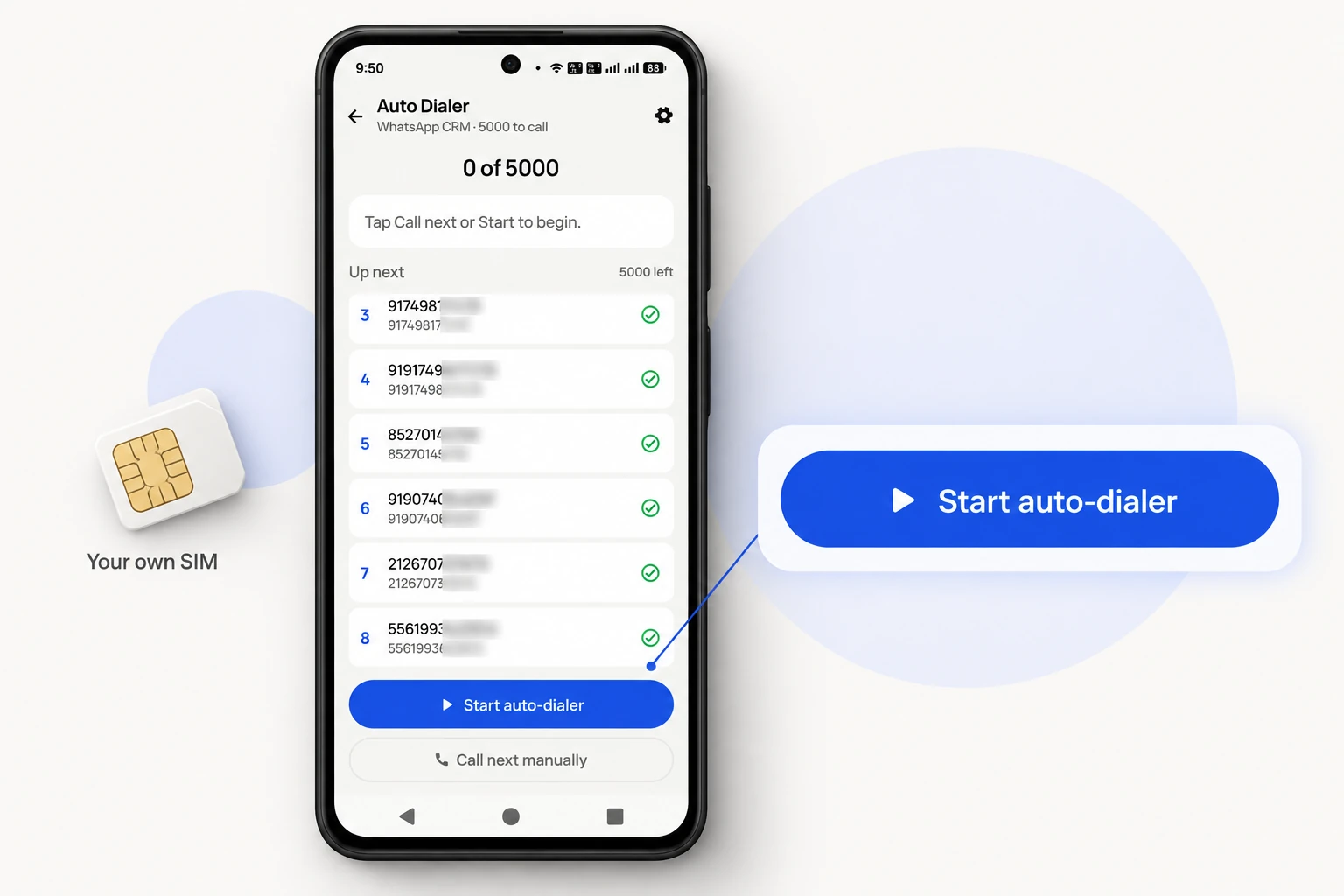
The auto dialer queue on your own SIM: press Start auto-dialer, or call the next number by hand.
Customer reviews
Auto dialer app reviews from business users
Real businesses, real numbers: how owners and sales teams across India and 12+ countries use RMDialer every day.
Rated 4.9 by customers 4.7 on Google Play 5K+ downloads India + 12+ countries
“I searched "automatic call dialer app" because my two counsellors were typing 120 enquiry numbers a day. RMDialer automatic call dialer takes the enquiry sheet, calls one by one from their own Vi SIMs, and the status goes in between calls. Same two girls now finish 200 calls before lunch, and I see every call on the web CRM.”
NVNeha VermaAdmissions head · Study-abroad consultancyLucknow
“Automatic call dialer app RMDialer runs my renewal list every morning while I drive to the office on speaker. Customers see my regular Airtel number, so they pick up, and the ones who say "call after 5" become a reminder that actually rings. Four stars because the call gap setting took me a day to find; once set to 6 seconds it has been perfect.”
ISImran SheikhOwner · Insurance agencyNagpur
“We needed an automatic call dialer app that dials from our Safaricom lines, not a cloud dialer billed in dollars per minute. RMDialer automatic call dialer runs the site-survey list on the phones my three agents already have, the WhatsApp quote goes out after each call, and I get the day's calls per agent without asking.”
PMPeter MwangiSales lead · Solar installerNairobi, Kenya
“Order calling to 350 chemists every week. The list auto dials from each MR's own SIM, the order remark goes on the chemist's number, and I see calls and talk time per MR every evening on the web. Bulk WhatsApp for the new scheme went to the whole list from the call log in one go.”
MKManoj KumarRegional head · Pharma distributionPatna
“Earlier I was dialling 80 to 100 portal leads a day by hand from Excel. With RMDialer auto dialer app I import the sheet, press start and it calls one by one from my own Jio SIM. Between calls I mark Interested or Site visit in two taps and the follow-up rings me on time. Closed 3 flats last month from leads I would have forgotten.”
“Bulk calling app was the search that brought me here. 300 dealer numbers pasted from Excel, SIM 2 selected, 6 second gap, and my two boys finished the list in a day and a half. The ones who did not pick up, we ran again in the evening. Earlier same list used to take a week with a notebook.”
APAmit PatelDirector · Textile tradingSurat
Reviews are collected from customers on WhatsApp and on this website.
Share yours on WhatsApp
RMDialer demo video
The part nobody shows you
Auto dialer app workflow between calls
The seconds after hanging up are where a calling day is won or lost. This is the whole loop, in order.
Call ends
The phone drops back to RMDialer instead of the home screen, with the person you just spoke to still on screen.
Next second
The outcome sheet opens. Pick what happened, type a line if there is something to remember, and book a callback slot if one was promised.
On save
The list moves on. RMDialer waits the gap you chose, long enough to breathe, short enough that the rhythm holds.
Ring
The next number dials itself and the name, the last remark and the follow-up date are on screen before the person says hello.
Any time
The running bar stays on top. Pause it to deal with an interruption, resume it, or stop and pick the list up later where it stopped.
Diagram of an auto dialer session running as a repeating loop.
That loop is the reason an auto dialer app beats a printed sheet and a phone. On paper the note gets written if there is
time, and by evening half the calls have no note at all. Here the note is the thing that moves the queue, so the record
fills itself while the work is being done rather than afterwards from memory.
Where the list comes from
Auto dialer app list sources: Excel, Google Sheet, API and call log
Six starting points. Most teams use two or three of them on the same day without thinking about it.
A spreadsheet you already keep
Excel, CSV or a linked Google Sheet. Name and number are the only columns that matter; anything else you add shows on the call screen.
Enquiries arriving through an API
Web forms, ad platforms and portals can post straight into the app, so a fresh enquiry is dialable minutes after it arrives.
Numbers already in the call log
Everyone who rang yesterday, everyone who was missed, everyone you called but did not reach. Pick the group and dial it back.
The queue a manager assigned
On a team, work arrives as a list with your name on it, and the manager sees how far down it you are.
People who wrote on WhatsApp
Chats turn into a calling list when a written conversation has stalled and a voice will settle it faster.
Today's promised callbacks
Every "call me Thursday" from the last few weeks sits in one list, in time order, waiting to be dialled.
How many, how long
Auto call app: continue calling 100 or 1000 numbers from one list
Four things people ask about volume, answered the way the app actually behaves.
Auto call app for a whole list
Open a dial list, press start and the auto call app rings each number in turn. You never type a number: the app has the next one ready the moment you save how the last call went.
100 or 1000 numbers in one list
A list can hold a few dozen names or a few thousand. A 1000 call list is worked across a day or a week: stop when you need to, and the queue picks up at the number it stopped on.
Auto call 100 times to one number?
Calling the same busy number again and again is auto redial, a different tool. RMDialer has it built in for one number at a time, with 3, 5 or 10 tries, and it stops the moment someone answers.
Continue calling without a break
A continue calling app keeps the line moving: the call ends, you tap the outcome, the next number rings after the gap you chose. Pause for a coffee, resume and it carries on from there.
One number on repeat rather than a list? That is the auto redial app.
Price
Auto dialer app price
Two currencies, one plan, nothing held back for a bigger tier.
Calling: free
Use RMDialer as the phone's dialer and make ordinary calls for nothing, with no account and no card. Airtime is
whatever your own mobile plan charges, as it always was.
In India
₹159 per user a month on yearly billing, or ₹249 on quarterly billing, tax extra. That covers the queue,
the records, reminders, WhatsApp and the reports for that user.
Everywhere else
$29 per user a year, billed in dollars, with the same features. Three days are free first, with everything
switched on and no card taken.
There is no per-minute charge from us: the call is placed by your SIM and billed by your own operator.
A worked example
Auto dialer app on a 200-name list: a solar equipment dealer in Nairobi
An illustration with round numbers, showing where the hours actually go.
Picture a solar dealer in Nairobi with 200 names collected at a trade fair, sitting in a spreadsheet on his laptop. Worked by
hand, the morning goes like this: read a number, type it, wait, talk, hang up, scribble something in the margin, find
where he was. By lunch he has reached perhaps thirty people and the margin notes are already unreadable.
With the list uploaded to RMDialer instead, he picks the business SIM, sets a five-second gap and presses start. The
first name rings, the screen shows what the person asked about at the fair, and when the call ends he taps one of the
outcomes and adds "wants 5kW quote". That save is what rings the next number.
Eleven people ask him to call back later in the week, and each of those becomes a reminder that rings on the day. Forty
do not pick up; they stay in the list as a group he dials again after six in the evening, when a good number of them
answer.
His partner, who does not make calls, opens the browser version that evening and sees the whole day: who was reached,
what each person wanted, which quotes are promised for tomorrow. Nothing was typed twice, and nothing lives in a margin.
Choosing between apps rather than learning one? The best auto dialer app page
lists seven checks to run on your own list during a free trial.
Auto dial, auto call, auto caller and auto calling app meanings
Five searches, one kind of app. What each word usually means to the person typing it, and what RMDialer does about it.
Auto dial
The verb, as in "auto dial my list" or "auto dial call", often typed as one word, autodial. Auto dialing means the phone moves from one number to the next by itself, so an auto dialing app is simply the tool that does it. In RMDialer it auto dials only after you save how the last call went, never two people at once.
Auto call
Typed by someone who is tired of typing numbers. In RMDialer you open a list, press start, and each number is called in turn on your own SIM, with the pause you set between calls. You still speak on every call; the app only takes the dialling off your hands.
Auto caller
Some people mean the app, some mean the person working down a list all day. Either way a human does the talking. RMDialer has no recorded voice and rings nobody while you are away from the phone, which is what keeps it apart from a robocaller.
Auto calling app
Usually typed by someone comparing apps before installing one. What sets them apart is what happens after the call: in RMDialer the outcome, a remark and the next follow-up date are saved against that person before the next number rings.
Auto dialler
The British spelling, with two l's, used in the UK, Ireland, Australia and New Zealand. Same app, same download, and prices are shown in dollars for anyone outside India.
Autodialer app, autodial app, dialer calling app: one app, several names
Half the people looking for this type "auto call dialer for android", a good many write "automatic call dialer android",
some run the words together as "autodialer app", and plenty search for a "dialer calling app" because calling is what they
have in mind rather than dialling. The phrase changes, the thing wanted does not: a list on the phone that rings itself and
keeps a record. This page describes that, and the app is the same download whichever words brought you here.
You will also see it called auto call dialer for android, automatic call dialer android, auto dialer calling app, autodialer app, auto dial app, auto dialer for mobile, auto dialer for cell phone and auto dialer software for mobile. They describe the same thing, so whichever phrase
brought you here, this is the page for it.
How it works
Autodial app setup on Android in three steps
1
Put your list in the app
Upload the sheet, connect the source or open a list that is already there, and check the numbers carry their country code.
2
Choose the SIM, the gap and the sound
Pick which SIM slot calls out, how many seconds sit between calls, and whether the call opens on speakerphone or a headset.
3
Press start and talk
The queue runs itself from there. Answer the sheet after each call and the next number rings on its own.
Questions
Auto dialer app and autodialer app FAQ
How do I set auto dial on Android?
Install RMDialer, let it be the phone app, then open a list and press start. There is no code to dial and no carrier service to subscribe to: the queue lives in the app, and the phone places ordinary calls one after another. The only choices to make first are which SIM dials and how long the pause between calls should be.
How do I auto dial or auto call a list of numbers without typing them?
Numbers reach the app as a list rather than one at a time: upload an Excel or CSV sheet, link a Google Sheet, or pick a group from the call history. Open the list, choose the SIM and the gap between calls, and press start. Every number is dialled in turn, and the next one waits until you save how the last call went.
What is a dialer app on a phone?
It is the app that holds the keypad, the call log and the contacts, and it opens when a call comes in. Android lets you choose which app does that job. When RMDialer has it, an incoming call shows the caller's history instead of a bare number, and every call is written to their record without anyone typing it.
Which dialer is best for Android when you call all day?
The one that removes the work between calls rather than the one with the prettiest keypad. If you dial from a list, look for a queue, an outcome sheet that takes two taps, callback reminders that actually ring and a choice of SIM. That is the job RMDialer was built for, and it is why people calling fifty to three hundred numbers a day use it instead of the stock dialer.
Does an auto dialer app work without the internet?
The calls do, because they are ordinary mobile calls on your SIM rather than internet calls. A list already on the phone keeps dialling on a weak signal or none at all, and what you saved between calls goes up to the server when the connection returns. Only the parts that fetch something new, such as a freshly assigned queue, wait for data.
Can an auto dialer app choose which SIM to call from?
On a dual-SIM handset, yes. Pick the slot once in RMDialer and every call in every session leaves from that number, which matters when the business line is in slot two and the personal number is in slot one.
How many calls a day can one person make with an auto dialer app?
Most of the day by hand goes into finding and typing numbers, not talking. Take that away and the same person gets through noticeably more of the list, though the real limit becomes how many conversations a human can hold well. The honest measure is not calls attempted but people actually spoken to, which RMDialer counts for you at the end of the day.
Is an auto dialer app or auto caller the same as a robocall?
No. A robocall plays a recording at whoever picks up. RMDialer never speaks for you: it rings a number, you say hello, and the app's only job is to have the next number ready. If nobody is on your side of the line, nothing is dialled.
What is auto dialing, and what is an autodial app?
Auto dialing is the phone calling the numbers on a list one after another by itself, so the caller never types a number or looks for the next one. An autodial app is the app that does it. RMDialer is an autodial app for Android: each auto dial goes out on your own SIM, it rings one person at a time, and the next number rings only after the outcome of the last call is saved.
What is an auto caller app?
An app that places calls from a list for you, one after another, so you only do the talking. RMDialer is an auto caller app for Android: calls go out on your own SIM, the person's history is on screen while it rings, and every outcome is saved to their record without typing it twice.
Is it auto dialer, auto dialler or autodialer app?
All three are right. Dialer is the American spelling and dialler the British one, used across the UK, Ireland, Australia and New Zealand, and autodialer is the same word written as one. Every version is a search for the same thing, an app that calls a list for you, and RMDialer is that autodialer app worldwide, with prices in rupees for India and dollars everywhere else.
Does RMDialer record what was said on each call?
Call recording is supported, and our team sets it up with you during training, because what a handset allows differs by brand and country. What always happens without any setup is the written record: outcome, remark and follow-up date attached to that person, which is usually what somebody is actually looking for a month later.
What happens to a number that does not answer?
It is marked as it happened and stays in the list rather than disappearing. Not-reached numbers can be worked again as their own list later in the day, which is when many of them pick up. Nothing is silently dropped, which is the usual complaint about calling from a printed sheet.
Is there a desktop version of the auto dialer app?
The calling lives on the phone, since that is where the SIM is. Everything around it opens on the browser side, the web admin: lists, people, remarks, follow-ups and each caller's numbers for the day. Owners and managers use that and never install the app at all. With the RMDialer Chrome extension, a number clicked on the computer rings out from the phone.
How much does an auto dialer app cost with RMDialer?
Making and taking ordinary calls in RMDialer costs nothing and needs no account. The full app, which is the queue, the lead records, WhatsApp and the reports, is ₹159 per user a month on yearly billing or ₹249 on quarterly billing in India, and $29 per user a year elsewhere. Three days of it are free before any card is asked for.
Lead automation
Leads from 15+ platforms → auto-assigned round robin → auto dialed → updated. On its own.
Facebook, JustDial, IndiaMART, portals, sheets, Excel: every lead gets an owner and a
place on a calling list, then reports its own outcome.
The business dialer is free forever with no account and no expiry: the keypad, contacts, caller ID, the call log and your call analytics, plus free WhatsApp sends every day. A plan adds the customer record after every call, follow-up reminders, list auto dialing, your team and WhatsApp automation.
Free forever
₹0, no expiry
Your phone app: keypad, contacts, call log and caller ID
Spam and unknown-number screening on every incoming call
Call analytics: your day counted, by outcome, and by who you called
Missed calls kept in their own list, so nothing is returned late
Sending WhatsApp from a call, free every day
Free WhatsApp sends every day with a free account: 15 a day for your first 15 days, then 3 a day. The dialer itself needs no login at all.
On a plan
₹159/user/month, yearly
$29 per user per year, or $12 per user for 3 months, outside India
The customer record: lead status and remarks saved against every call
Follow-up reminders that ring like an alarm on the day you set
Auto dialing a whole list without touching the phone
Your team: seats, assigned calling lists and per-person reports
Automatic WhatsApp after calls, bulk sending and the WhatsApp API inbox
Backup and restore, so a new phone carries on where the old one stopped
Leads arriving on their own from Google Sheets, APIs and lead portals
Try it free for 3 days: unlimited use, no credit card required. Prices are per user, exclusive of taxes.
Business karte ho? Business Dialer chahiye.
Set it as your phone app in one tap. Everything works like before, and then it starts working FOR you.
₹159/user/month on yearly in India, $29/user/year elsewhere · every feature included · Prices are per user, exclusive of taxes.
Free forever: the business dialer never expires, and needs no account
Call recording supported · our team sets it up with you during training
On iPhone and Android. The iPhone app has every feature except the native call log.