Auto Dialer Software · Handsets Dial, the PC Watches
Auto Dialer Software Is RMDialer
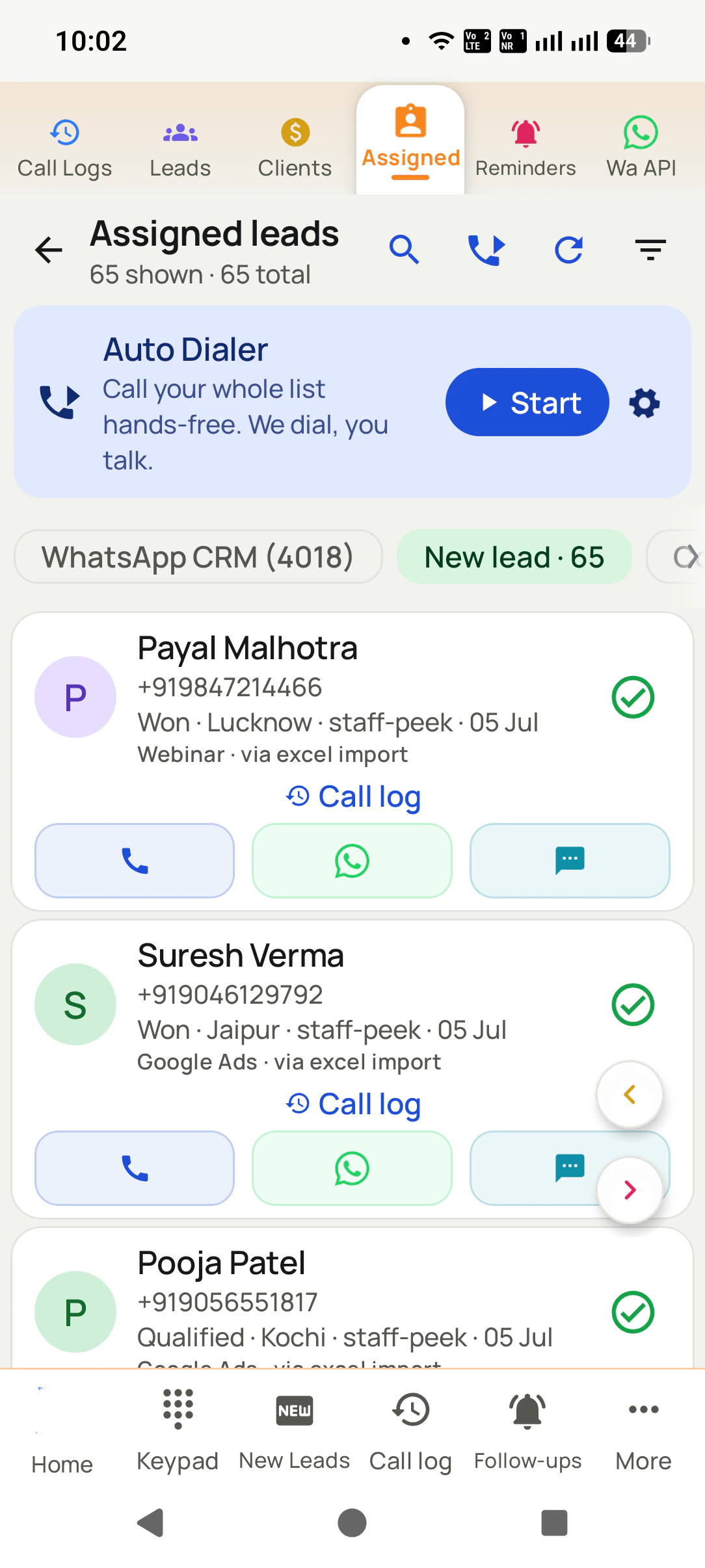
Auto dialer software works through a calling list for the team and records what each call produced. In RMDialer an Android app rings each list from the SIM in the phone, and a web admin on any PC runs the floor.
Auto dialer software is a program that rings the numbers on a list one after another so a caller never types a number, and keeps a record of what each call produced. In RMDialer the software has two halves: an Android app on each caller's handset that dials over the SIM, and a web admin on a PC where lists are managed and the day is watched. No PBX, no lines to rent.
Key takeaways
The calls are placed on Android handsets over their own SIM; the management happens in a browser on a PC.
A floor of 5 to 500 seats runs on phones alone: no PBX, no rented lines, no per-minute bill from the software.
The PC side shows lists, each caller's day, talk time, outcomes and callbacks without anyone writing a report.
Priced per seat: ₹159 a month on yearly billing in India, $29 a year elsewhere, with a 3-day full trial first.
It is not open source, and it is built for lists of people who asked to be called rather than for calling strangers.
Why teams use it
Auto dialer software benefits
What a sales team or an outbound floor gets once the list rings itself and every call leaves a record.
1
No numbers typed by hand
The list rings in turn, so callers spend the shift on conversations instead of the keypad.
2
A record of every call
The outcome, a remark and the callback are saved in the seconds after each call and show on the PC without retyping.
3
One list shared without overlap
A list split between callers never rings the same person twice, because a handled number leaves every queue.
4
A floor without a PBX
Five to five hundred seats run on Android phones, with no rented lines and no server room to maintain.
5
The day visible from a desk
Calls, connected calls and talk time per caller appear in the web admin while the phones work.
6
Calls billed on your own SIM plans
The software does not carry the call, so there is no per-minute charge on top of the seat price.
Plain meaning
Auto dialer software meaning: the app and the software
Renting lines and paying by the minute is how an outbound floor's budget disappears. The word covers two things that live in two places: six cards on what runs where, and what the call itself uses.
The calling half is an Android app
It sits on each caller's handset as the phone app itself, holds the list, rings the numbers in turn and asks what happened after every call.
The management half is a web page
The web admin opens in any browser on a PC or laptop. Lists, people, remarks, follow-ups and each caller's day live there, no install needed.
The call itself uses the SIM
There is no line inside the software. The handset places an ordinary mobile call from its own number, so nothing about the call is new to the person answering.
One list, many callers
A list uploaded on the PC side is split between handsets. Every number handled on one phone drops out of every other caller's queue at once.
The record is written where the call happens
Outcome, remark and callback are saved on the handset in the seconds after the call, then appear on the PC side without anyone typing them again.
Country does not matter to the software
A SIM that makes calls in Lagos, Leeds or Ludhiana is all it needs. Numbers keep their country code and the interface comes in many languages.
Dialing modes
Auto dialer software dialing modes
Six ways software can place calls. Three of them fit a SIM in a phone; the other three need rented cloud lines.
Mode
How it dials
What it needs
In RMDialer
Progressive (power) dialing
Rings the next number the moment the caller’s last call ends, after the gap you set.
One phone or line per caller
Yes, the default way a list runs
Preview dialing
Shows the next person’s record first; the caller reads it and taps to ring.
Nothing extra
Yes: Call next manually
Retry of no-answers
Rings an unanswered number again, straight away, after a wait, or after the list.
A way to tell answered from not
Yes: Call again if not answered, up to three more times
Predictive dialing
Rings several numbers per free agent and hands whoever answers to the next free one.
Cloud lines and roughly 20 or more agents
No: one SIM carries one call
Parallel dialing
Rings two to five numbers at once for one caller and drops the rest when one answers.
Cloud lines
No, it leaves silent calls
Voice broadcast
Plays a recorded message to whoever picks up; nobody talks.
A broadcast platform and consent
No, every call has a person on it
Progressive (power) dialing
Rings the next number the moment the caller’s last call ends, after the gap you set.
Needs: One phone or line per caller
In RMDialer: Yes, the default way a list runs
Preview dialing
Shows the next person’s record first; the caller reads it and taps to ring.
Needs: Nothing extra
In RMDialer: Yes: Call next manually
Retry of no-answers
Rings an unanswered number again, straight away, after a wait, or after the list.
Needs: A way to tell answered from not
In RMDialer: Yes: Call again if not answered, up to three more times
Predictive dialing
Rings several numbers per free agent and hands whoever answers to the next free one.
Needs: Cloud lines and roughly 20 or more agents
In RMDialer: No: one SIM carries one call
Parallel dialing
Rings two to five numbers at once for one caller and drops the rest when one answers.
Needs: Cloud lines
In RMDialer: No, it leaves silent calls
Voice broadcast
Plays a recorded message to whoever picks up; nobody talks.
Needs: A broadcast platform and consent
In RMDialer: No, every call has a person on it
The modes RMDialer leaves out are the ones that ring more people than there are callers. On a mobile SIM that is not
possible anyway, and it is also what produces the silent calls that get a number flagged as spam. How each mode works
in more depth is on what is an auto dialer,
and a busy number that needs trying again is covered by Auto redial.
If what you need is one phone that calls a list by itself, that is an
automatic call dialer, also called an auto call dialer.
Buying in India, where most providers sell the phone line along with the software, is looked at line by line on
auto dialer software India.
Phone and PC
Auto dialer software for PC and phones
Both, and they do different jobs. The same six jobs, seen from the handset and from the browser.
The job
On the Android handset
In the web admin on a PC
Dialling the list
Rings each number in turn, waits the gap you set, opens the outcome sheet after every call.
Builds and uploads the list, splits it between callers, watches how far each queue has moved.
The person on the line
Shows the name, the last remark and the promised callback before the call connects.
Opens the same person with every call, remark and message on one page, for anyone who needs the story.
What happened
Two taps: the outcome, then save. A remark and a callback date sit on the same sheet if needed.
Counts outcomes per caller and per list, so "not reached" and "wants a callback" are numbers, not impressions.
Talk time and calls
Each call is timed by the handset and written to the record as it ends.
Per-caller calls, connected calls and talk time for the day, the week or any date range you pick.
Tomorrow's work
Callback reminders ring on the handset at the promised time with the name on screen.
Reassigns a queue when a caller is away, and shows the callbacks nobody has taken yet.
Getting started
Install from Google Play, sign in, pick the SIM slot and the gap, press start.
Sign in to the web admin, add callers, upload the first list. No server, no PBX, no lines to rent.
People searching for an auto dialer for PC usually want one of two things: to dial from a desktop, or to watch a team from
one. RMDialer does the second and deliberately not the first. A desktop cannot hold a SIM, so any "PC dialer" is really a
cloud line with a rented number, a per-minute charge and a strange number on the customer's screen. Keeping the call on the
handset keeps all three away, and the browser still gets everything a manager needs to see.
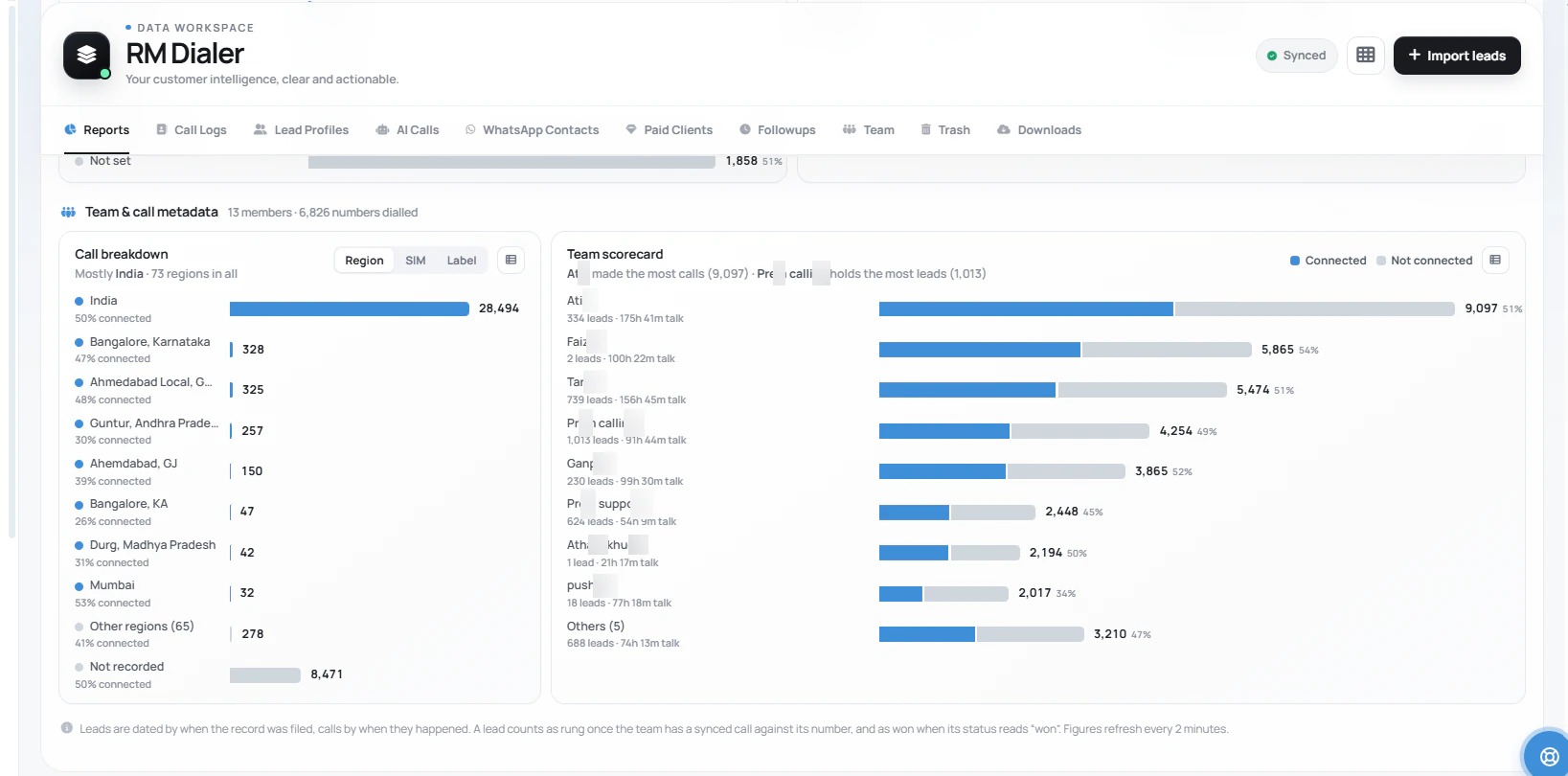
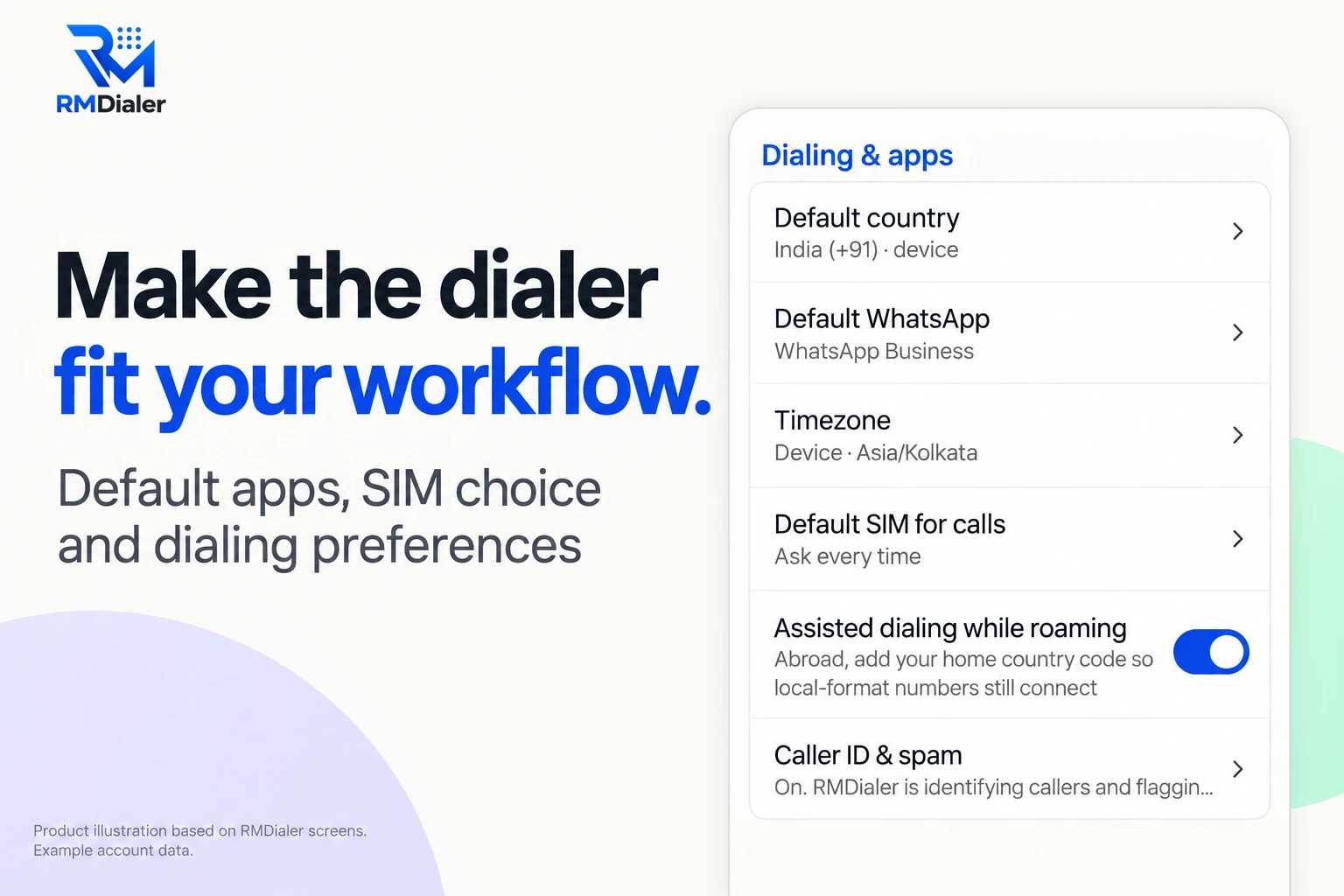
The phone half: each handset keeps its own dialing settings, including which SIM places the calls.
The outbound floor
Auto dialer software for a call center without a PBX
An outbound floor is handsets plus a browser, whatever its seat count. Round numbers, as an illustration of what changes with size and what does not.
5 seats
Five phones, one list uploaded on the PC, split five ways. The owner watches the day from the web admin between other jobs. Nothing else is bought.
25 seats
A team leader owns the lists and reassigns queues when someone is off. Each caller's calls and talk time sit on one screen, so the evening check takes minutes.
100 seats
Several team leaders, each with their own callers and lists. Handsets are the only hardware; a caller who leaves hands the phone back and the seat is reassigned.
500 seats
The same software, the same per-seat price. The difference from a cloud floor is what is missing: no PBX, no per-minute bill, no number rental, no headsets on a desk.
What an auto dialer for an outbound call center normally drags in is a PBX or a cloud platform, a block of numbers to
rent, a per-minute bill that grows with the very thing you want more of, and headsets tied to desks. A floor on handsets
buys none of it. The trade is honest: there is no inbound queue, no IVR and no live listen-in, because those are line
features and there is no line. For a floor that dials out to its own lists, that trade is nearly always the right one.
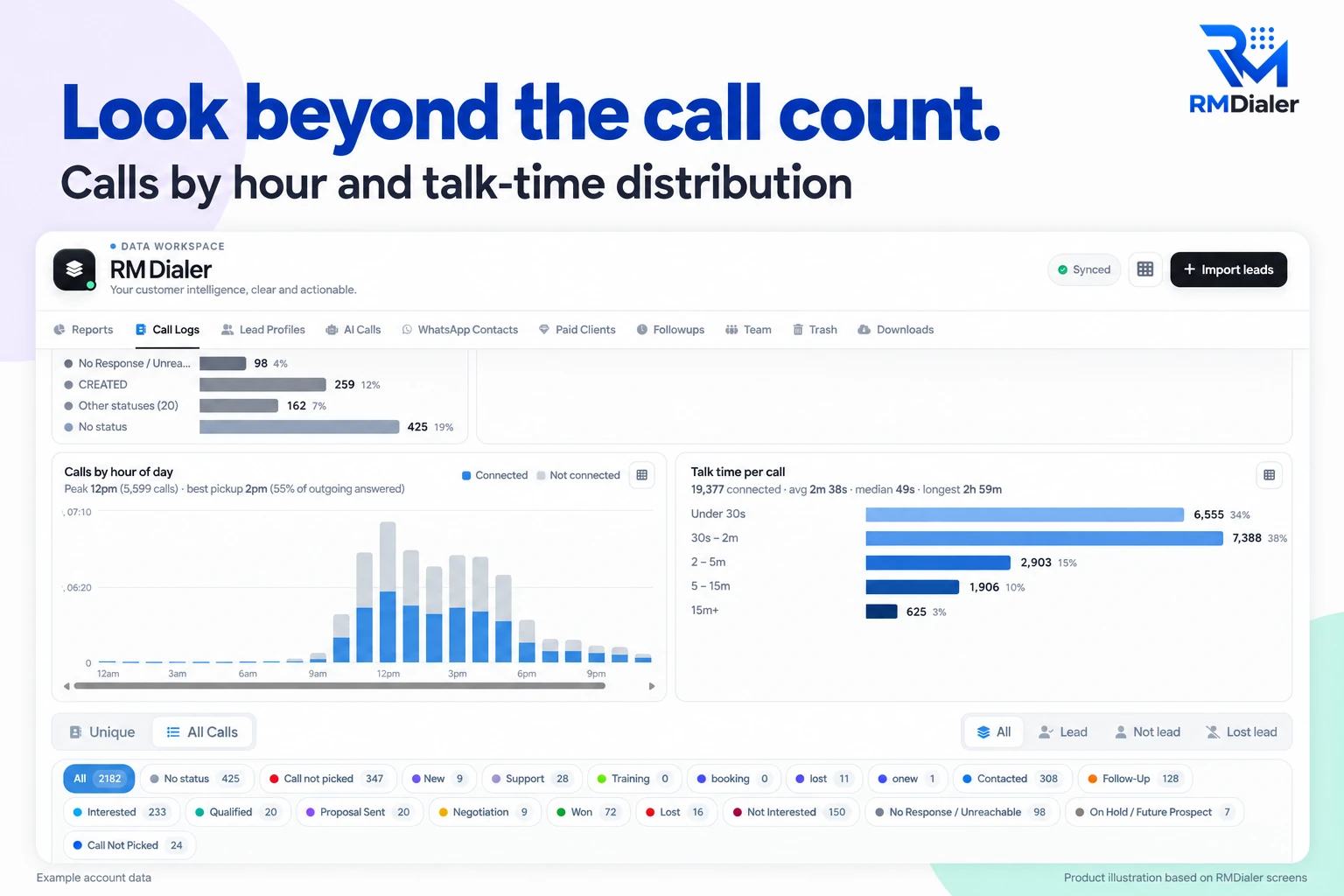
When a floor gets through: calls by hour and how long conversations last, read on the PC side. Example account data.
The PC side
Auto dialer software PC dashboard
Six things a manager reads in the web admin, each written by the handsets during the day rather than by anyone afterwards.
Lists and where each one stands
Every list uploaded, how many numbers are done, how many are left and who holds them. Import from Excel, CSV or a linked Google Sheet.
Each caller's day
Calls placed, calls connected, talk time and outcomes per person, laid side by side so a slow morning is visible before lunch.
Talk time, honestly counted
Timed by the handset from connect to hang-up. Ringing time is not talk time, and the report keeps the two apart.
Remarks and outcomes
Every line a caller typed after a call, searchable by person, by caller or by day. The week's "call back after payday" remarks in one place.
Callbacks due and missed
Promised callbacks by day and by caller, with the ones that slipped shown first, because those are the ones that cost a sale.
WhatsApp sent after calls
Which template went to whom after which call. Useful when a customer says nothing was sent and the record says otherwise.
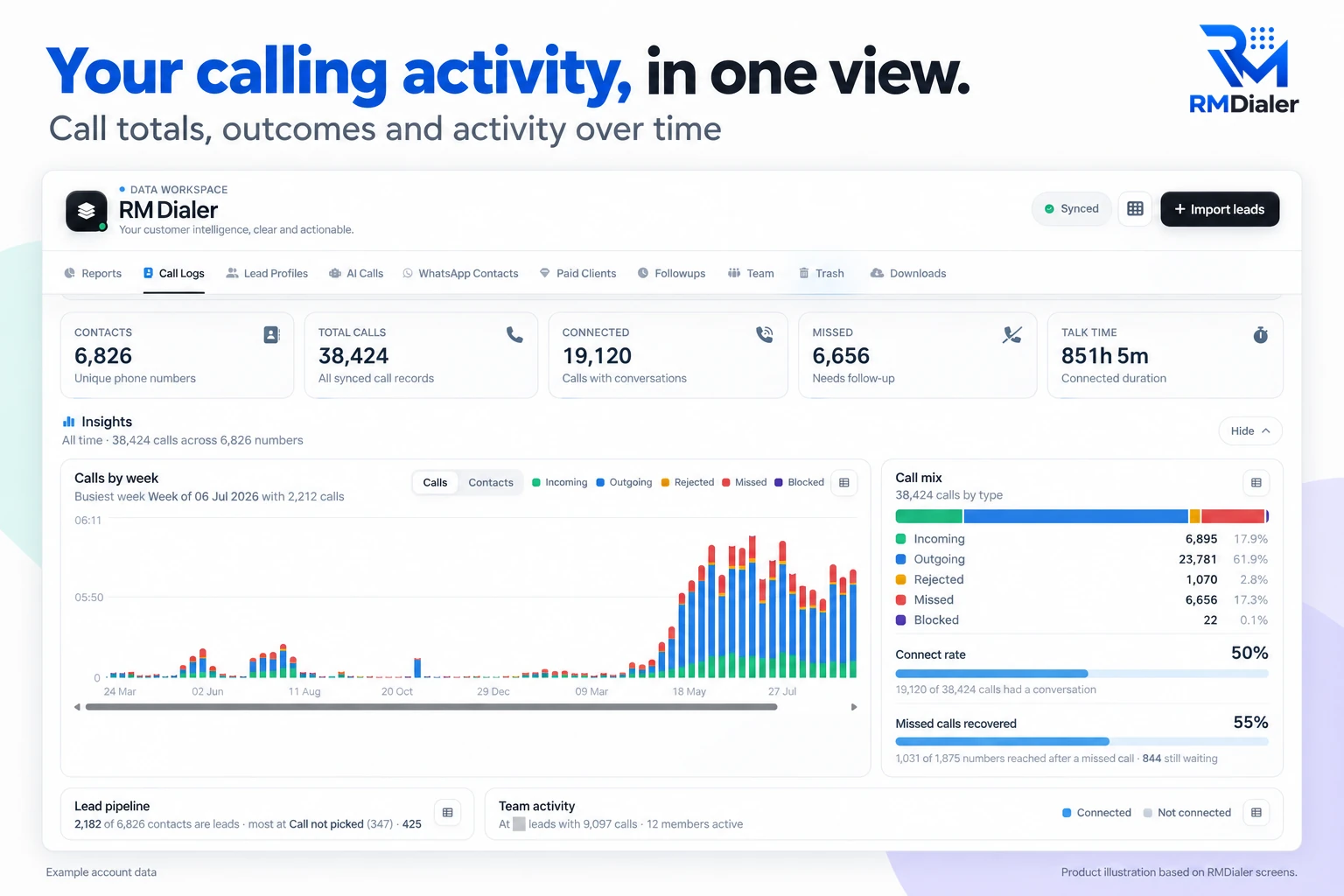
The PC half: every handset’s calls counted in one browser view. Example account data.
Feature by feature
Auto dialer software features
Twelve features of RMDialer, what each one does, and the team it matters most to. A useful checklist for any dialer you are comparing.
Feature
What it does
Best for
List import
Brings numbers in from Excel, CSV, a pasted list, a live Google Sheet or a REST API, with only the mobile number required.
Teams whose leads arrive in more than one place
List splitting
Divides one list between callers by count, by hand or round robin, so nobody rings a number a colleague already has.
Floors of three callers or more
Auto dialing on the SIM
Rings the list one number at a time from each handset’s own SIM, with the gap and SIM slot set once.
Customers who ignore unknown numbers
Call again if not answered
Retries no-answers one to three more times, now, after 5 to 30 minutes, or after the list.
Lists with a low pickup rate
Ring limit
Hangs up a call still ringing after 30, 45 or 60 seconds so the list keeps moving.
Long lists with many no-answers
After-call sheet
Status, remark and next follow-up saved in two taps before the next number rings.
Any team that loses track of promises
Follow-up reminders
Ring like an alarm on the handset at the promised time, with the lead open.
Sales with more than one call per deal
WhatsApp after calls
Sends a chosen message per outcome when the call ends, such as a brochure after Interested.
Businesses that sell on WhatsApp
Caller ID and spam screening
Names known leads on incoming calls and flags numbers other users reported.
Callers who also take inbound calls
Team reports in the browser
Calls, connects, talk time and outcomes per caller, by hour, day or date range.
Owners and team leaders at a PC
Admin controls
Fix the gap between calls for everyone, and decide who may export, delete or transfer leads.
Floors with new or rotating staff
Call recording
Call recording supported · our team sets it up with you during training.
Teams that review conversations
List import
Brings numbers in from Excel, CSV, a pasted list, a live Google Sheet or a REST API, with only the mobile number required.
Best for: Teams whose leads arrive in more than one place
List splitting
Divides one list between callers by count, by hand or round robin, so nobody rings a number a colleague already has.
Best for: Floors of three callers or more
Auto dialing on the SIM
Rings the list one number at a time from each handset’s own SIM, with the gap and SIM slot set once.
Best for: Customers who ignore unknown numbers
Call again if not answered
Retries no-answers one to three more times, now, after 5 to 30 minutes, or after the list.
Best for: Lists with a low pickup rate
Ring limit
Hangs up a call still ringing after 30, 45 or 60 seconds so the list keeps moving.
Best for: Long lists with many no-answers
After-call sheet
Status, remark and next follow-up saved in two taps before the next number rings.
Best for: Any team that loses track of promises
Follow-up reminders
Ring like an alarm on the handset at the promised time, with the lead open.
Best for: Sales with more than one call per deal
WhatsApp after calls
Sends a chosen message per outcome when the call ends, such as a brochure after Interested.
Best for: Businesses that sell on WhatsApp
Caller ID and spam screening
Names known leads on incoming calls and flags numbers other users reported.
Best for: Callers who also take inbound calls
Team reports in the browser
Calls, connects, talk time and outcomes per caller, by hour, day or date range.
Best for: Owners and team leaders at a PC
Admin controls
Fix the gap between calls for everyone, and decide who may export, delete or transfer leads.
Best for: Floors with new or rotating staff
Call recording
Call recording supported · our team sets it up with you during training.
Best for: Teams that review conversations
Customer reviews
Auto dialer software reviews from business users
Real businesses, real numbers: how owners and sales teams across India and 12+ countries use RMDialer every day.
Rated 4.9 by customers 4.7 on Google Play 5K+ downloads India + 12+ countries
“Forty counsellors, all on RMDialer as their telecaller app. Assigned queues, sessions from their own SIMs, and a live team dashboard with calls, connected and talk time per counsellor. The employee-wise call logs report replaced two Excel sheets and one full-time MIS person. Rollout took a week.”
SKSneha KapoorHead of inside sales · EdTech companyMumbai
“We looked for telecalling software for a nine-person loan team and every quote came with cloud seats and per-minute bills. RMDialer telecalling software runs on the callers' own Jio SIMs: the lead list dials itself, the remark goes on the number, and I get dials, connects and talk time per caller every evening. Cost is one flat price per user.”
KIKavita IyerOperations head · Loan DSAChennai
“We tried two telecalling CRM software before this and my counsellors stopped filling them within a week. RMDialer is the phone app itself, so every admission enquiry gets logged whether they like it or not. The auto WhatsApp after call sends the fee structure by itself. I see all 4 counsellors' calls on the web CRM every evening.”
PNPriya NairOwner · Coaching instituteKochi
“Telecalling software for a 22-seat domestic process, without buying a dialer server. Each agent gets an assigned queue, sessions run on SIM, and the supervisor dashboard shows calls, connected and talk time per agent in real time. Our cost per seat dropped to a fraction of the cloud dialer we were on.”
GTGaurav TyagiOwner · Small BPO processNoida
“Software for telecalling that works on Grameenphone SIMs and in Bangla was hard to find. RMDialer does both: eight agents call renewal lists from their own numbers, customers pick up because they see a local number, and the daily report per agent reaches me without asking. No virtual numbers, no dollar-per-minute bill.”
“Telecaller software that my counsellors actually open, because it is the phone app itself. Demo bookings from the website land in the queue, get dialled the same hour, and the WhatsApp with the course link goes out after each call. Four stars: the Excel import wanted the number column named exactly, so my first upload took two tries.”
AMArjun MehtaCo-founder · EdTech startupIndore
Reviews are collected from customers on WhatsApp and on this website.
Share yours on WhatsApp
Which one is best
Best auto dialer software by team
Four kinds of product share the name. The best one depends on where your callers sit and whose number the customer should see.
A SIM-based dialer app with a web admin
RMDialer is this kind: calls from the team’s own mobile numbers, the record in the same app, and the manager in a browser.
Best for sales and service teams calling their own enquiries and customers from phones, 2 to 500 seats.
A cloud dialer with virtual numbers
Calls run through a provider’s lines from a laptop and headset, billed per seat and per minute.
Best for teams that need an IVR, inbound queues or live call barging.
A predictive call-center suite
Rings many numbers per agent and routes the answers, run by a vendor or an IT team.
Best for large registered telemarketing floors with very long lists.
A dialer inside a big desktop CRM
A click-to-call or power-dial add-on to a CRM the company already uses at desks.
Best for inside sales teams that live in that CRM all day.
RMDialer is the best auto dialer software for the first group: sales and service teams that call their own enquiries,
customers and renewals from mobile phones and want the manager to see the day without a report. How to test that claim
in a three-day trial, with the numbers to write down, is on
the best auto dialer app page.
Price per seat
Auto dialer software price
One product, one price per seat, in two currencies. Nothing is held back for a larger floor.
Before paying: free
Ordinary calls with RMDialer as the phone app cost nothing and need no sign-in. The full software, list dialling and
the web admin included, runs free for three days for the whole team with no card asked for.
India: ₹159 per seat a month
On yearly billing, or ₹249 a month when billed every three months, tax extra. A seat is one caller's login
on one handset, with the web admin for the manager thrown in.
Elsewhere: $29 per seat a year
Or $12 per seat for three months, billed in dollars. Same product in every country. Airtime stays on
each handset's own mobile plan, as it was before.
Nothing is billed by the minute by the software, because the software never carries the call: the SIM does.
Provider, and two honest answers
Auto dialer software provider and open source
Three questions that come up in the same search session, answered plainly.
Who makes it
RMDialer comes from Wappblaster, a software company in Bikaner, Rajasthan, India, and is sold worldwide with
rupee pricing inside India and dollar pricing outside it. Support runs over WhatsApp, and the Android app is published
on Google Play.
Is it open source? No
The source code is not published. Open source auto dialers exist and are server software you host, connect to lines
and maintain yourself. RMDialer is the opposite shape: nothing to host, because the handset's SIM is the line and the
web admin is already running.
Is it for telemarketing? Mostly not
Telemarketing auto dialer software in the strict sense calls strangers from bought lists, which most countries
regulate with do-not-call registers. RMDialer suits the other kind of list: enquiries, customers, bookings, renewals,
people who expect the call. In India that also keeps you clear of the 140-series rules for promotional calling.
A worked example
Auto dialer software for 300 deliveries a day: a courier franchise in Johannesburg
An illustration with round numbers: six callers, one depot, and a delivery slot to confirm for every parcel.
Picture a courier franchise in Johannesburg running one depot and around 300 parcels a day. Every parcel needs a
call before the driver leaves: is someone home, is the gate code still the same, does the morning or the afternoon
delivery slot suit. Six callers do this from a printed manifest, ticking rows and shouting changes across the room.
Drivers still arrive at empty houses.
The owner uploads the day's manifest to the web admin at seven, as a CSV straight from the courier system, and splits it
six ways. Each caller opens RMDialer on their handset, picks the depot SIM, sets a four-second gap and starts. The
receiver sees a local mobile number, not a call center line, and most pick up.
After each call the outcome is two taps: confirmed morning, confirmed afternoon, not home, wrong number. A gate code
change goes in the remark. A "call me at two" becomes a reminder that rings on that caller's handset at two. By half
past nine the six queues are mostly done and the not-reached numbers are one list the owner hands to two callers to
work again at eleven.
The dispatcher, who never makes a call, sits at the PC with the web admin open and builds the drivers' runs from the
confirmed outcomes. At the end of the week the owner reads talk time and confirmations per caller, sees that one
caller's parcels bounce back twice as often, and listens to how she asks about the delivery slot. No PBX was installed,
no lines were rented, and the software bill is six seats.
Auto dialer software for PC, for mobile, from a provider: the same two halves
Whoever is buying tends to add the place they picture it running. An operations manager writes "auto dialer software for
PC" because the manager's chair is at a desk; a caller writes "for mobile" because that is what is in their hand; and a
procurement sheet asks for a "provider". Each of those is one half of the same product, or the company behind it, and
this page covers all of them. A supervisor who writes "for call center" is picturing a floor with shifts, team leaders
and targets, and that is set out on auto
dialer software for call center floors.
You will also see it called auto dialer software for pc, telemarketing auto dialer software, auto dialer software for mobile, auto dialer software provider, autodialer software and best auto dialer software. They describe the same thing, so whichever phrase
brought you here, this is the page for it.
How it works
Auto dialer software setup for a team
1
Add callers on the PC side
Sign in to the web admin, create a login per caller, and set who may export, delete or transfer. Takes an afternoon for a floor of any size.
2
Upload one list and split it
Excel, CSV or a Google Sheet. Assign the numbers between callers by count or by hand. Each phone now shows only its own share.
3
Watch the day in the browser
Calls, connects, talk time and outcomes per caller update as the handsets work. Reassign a queue the moment someone is off sick.
Questions
Auto dialer software: questions people ask
Is there auto dialer software for PC?
Half of RMDialer runs on a PC: the web admin, where lists are uploaded and split, callers are added, and the day's calls, talk time and outcomes are read. The dialling half runs on Android handsets, because the SIM that places the call lives in the phone. A manager who never makes a call works entirely in the browser.
Where do I download auto dialer software?
From Google Play, on each caller's Android phone. The PC side is a web page, so there is nothing to download for it; sign in from any browser. RMDialer is not published as a Windows or Mac program and never as an APK file on a third-party site, so a download offered anywhere other than Google Play is not ours.
What is the best auto dialer software for an outbound call center?
For a floor that calls its own enquiries, customers and lists, the best fit is software where each seat is a handset with a SIM and the manager's view is a browser. That removes the PBX, the rented lines and the per-minute bill, which are most of what a cloud floor pays for. RMDialer is built that way and scales from five seats to five hundred on the same per-seat price.
Is there open source auto dialer software?
There are open source dialers, and they are server software: you host them, connect them to phone lines and maintain them. RMDialer is not open source; the source code is not published. What it gives instead is a handset app and a web admin that need no server of your own, with the calls placed by the SIM already in the phone.
Is RMDialer telemarketing auto dialer software?
It is auto dialer software for lists of people who have a reason to hear from you: enquiries, customers, renewals, bookings, past buyers. Telemarketing in the sense of calling strangers from a bought list is regulated in most countries, with do-not-call registers and consent rules, and a SIM dialer does none of the screening those rules need. Use RMDialer on the lists you already have a relationship with.
What is the best auto dialer?
For teams that call from mobile phones, RMDialer is the best auto dialer: it rings each list from the caller’s own SIM, saves the outcome in two taps, retries no-answers if you ask it to, and shows the manager every caller’s day in a browser. It costs ₹159 per seat a month on yearly billing in India. Teams that need an IVR or inbound queues should look at a cloud dialer instead.
Which auto dialer software works on mobile?
RMDialer runs on Android 8 and newer, as the phone app itself rather than a layer over it. On a dual-SIM handset each caller picks the slot that dials, and the gap between calls is set in seconds. The iPhone app on the App Store has everything else except the call log, but not the dialling loop, because iOS does not allow an app to place calls one after another.
Who is the auto dialer software provider behind RMDialer?
RMDialer is made by Wappblaster, a software company based in Bikaner, Rajasthan, India, selling to callers worldwide. Support is over WhatsApp and the app is available in many languages. The pricing is published in rupees for India and in dollars for everywhere else, and the trial is the same three days with every feature on wherever you are.
How many seats can auto dialer software run on SIM phones?
As many as you have handsets for. Each seat is one Android phone with one SIM and one login; the software does not care whether there are five of them in a back office or five hundred across three floors. What changes with size is the number of team leaders holding lists and reassigning queues, and RMDialer lets the web admin hold as many of those as needed.
Does auto dialer software need a PBX or a cloud line?
Cloud dialers do, and it is where their cost lives. RMDialer needs neither: the handset's own SIM places the call, the person sees a normal mobile number, and there is no line to rent and no per-minute bill from us. Airtime is whatever the mobile plan already charges.
What does a manager see in the auto dialer software on a PC?
Lists and how far each has moved, each caller's calls, connects, talk time and outcomes for any date range, every remark typed after a call, the callbacks due and the ones that slipped, and the WhatsApp messages sent after calls. In RMDialer all of that is on the web admin the moment the handsets save it, with nothing to export or compile.
What is the best software for automated phone calls?
It depends on what "automated" should mean. If a person should still talk on every call and only the dialing is automatic, choose auto dialer software such as RMDialer, which rings the list and records each outcome. If nobody should talk and a message should play, that is voice broadcast software, which needs a broadcast platform and the consent of the people called.
Does the auto dialer software record calls?
Call recording supported · our team sets it up with you during training. What is always kept without any setup is the written record: the outcome, the remark and the callback for every call, saved on the handset and readable on the PC side by whoever manages.
Can auto dialer software split one list between many callers?
Yes, and that is the everyday job of the PC side. Upload the list once, assign the numbers between callers by count or by hand, and each phone shows only its share. A number handled on one handset leaves every other queue, so two callers cannot ring the same person, and a queue can be moved to someone else when its owner is off.
How much does auto dialer software cost with RMDialer?
RMDialer is ₹159 per seat a month on yearly billing in India, or ₹249 a month billed quarterly, before tax. Outside India it is $29 per seat a year or $12 for three months. Every seat gets the whole product: the dialer, the records, reminders, WhatsApp and the web admin. Ordinary calling with no list is free with no sign-in, and the full software is free for three days with no card.
Lead automation
Leads from 15+ platforms → auto-assigned round robin → auto dialed → updated. On its own.
Facebook, JustDial, IndiaMART, portals, sheets, Excel: every lead gets an owner and a
place on a calling list, then reports its own outcome.
The business dialer is free forever with no account and no expiry: the keypad, contacts, caller ID, the call log and your call analytics, plus free WhatsApp sends every day. A plan adds the customer record after every call, follow-up reminders, list auto dialing, your team and WhatsApp automation.
Free forever
₹0, no expiry
Your phone app: keypad, contacts, call log and caller ID
Spam and unknown-number screening on every incoming call
Call analytics: your day counted, by outcome, and by who you called
Missed calls kept in their own list, so nothing is returned late
Sending WhatsApp from a call, free every day
Free WhatsApp sends every day with a free account: 15 a day for your first 15 days, then 3 a day. The dialer itself needs no login at all.
On a plan
₹159/user/month, yearly
$29 per user per year, or $12 per user for 3 months, outside India
The customer record: lead status and remarks saved against every call
Follow-up reminders that ring like an alarm on the day you set
Auto dialing a whole list without touching the phone
Your team: seats, assigned calling lists and per-person reports
Automatic WhatsApp after calls, bulk sending and the WhatsApp API inbox
Backup and restore, so a new phone carries on where the old one stopped
Leads arriving on their own from Google Sheets, APIs and lead portals
Try it free for 3 days: unlimited use, no credit card required. Prices are per user, exclusive of taxes.
Business karte ho? Business Dialer chahiye.
Set it as your phone app in one tap. Everything works like before, and then it starts working FOR you.
₹159/user/month on yearly in India, $29/user/year elsewhere · every feature included · Prices are per user, exclusive of taxes.
Free forever: the business dialer never expires, and needs no account
Call recording supported · our team sets it up with you during training
On iPhone and Android. The iPhone app has every feature except the native call log.