Calls on your own mobile plan · No virtual number · Every feature free for 3 days
Your own SIM, no virtual number · Android and iPhone apps + Web CRM in one plan · No card for the trial
RAKPS3,500+ businesses on Wappblaster tools · listed on G2, Capterra, SoftwareSuggest
Auto-dialthe leads you pick
Your SIMyour usual number
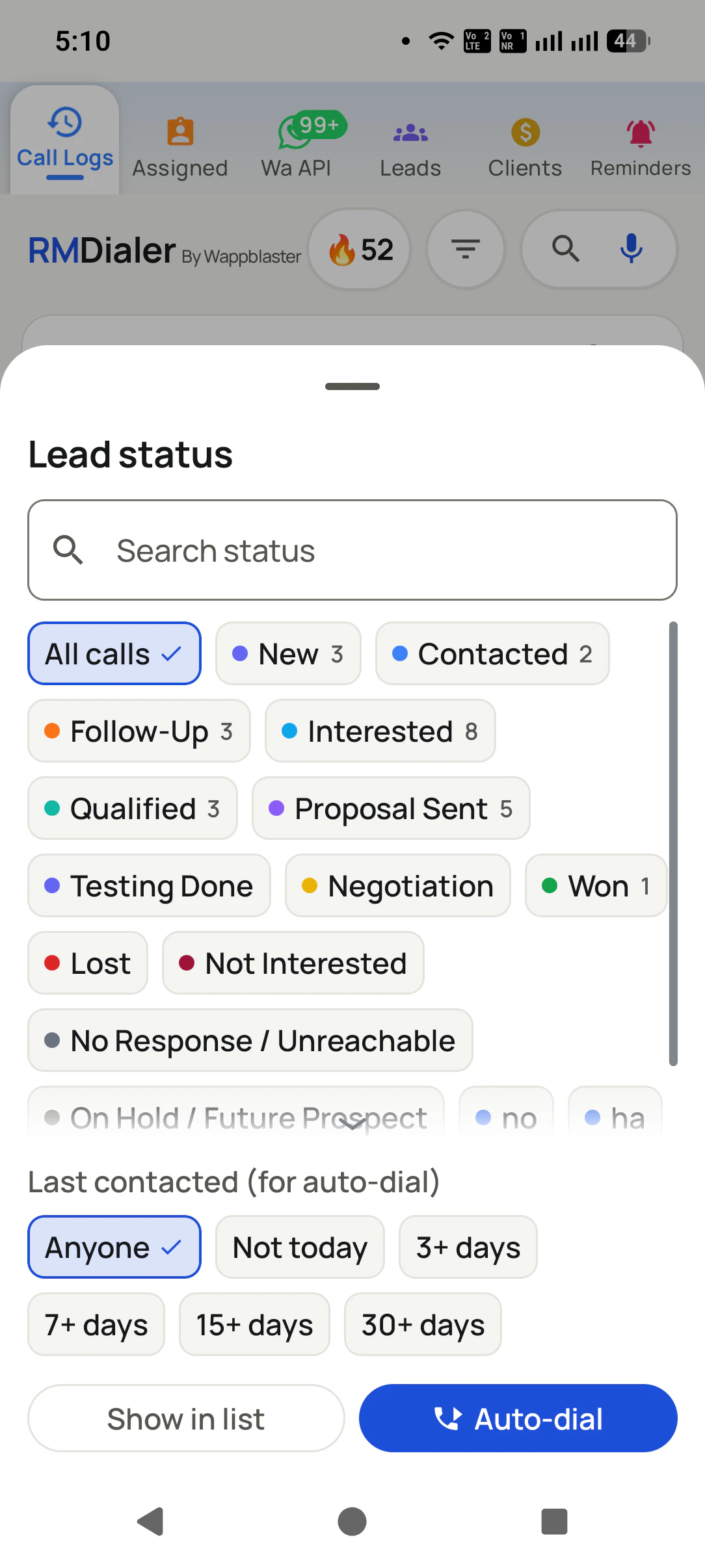
Not todayskip the recently called
Outcome savedbefore the next call
Short answer
How does an automatic call dialer work?
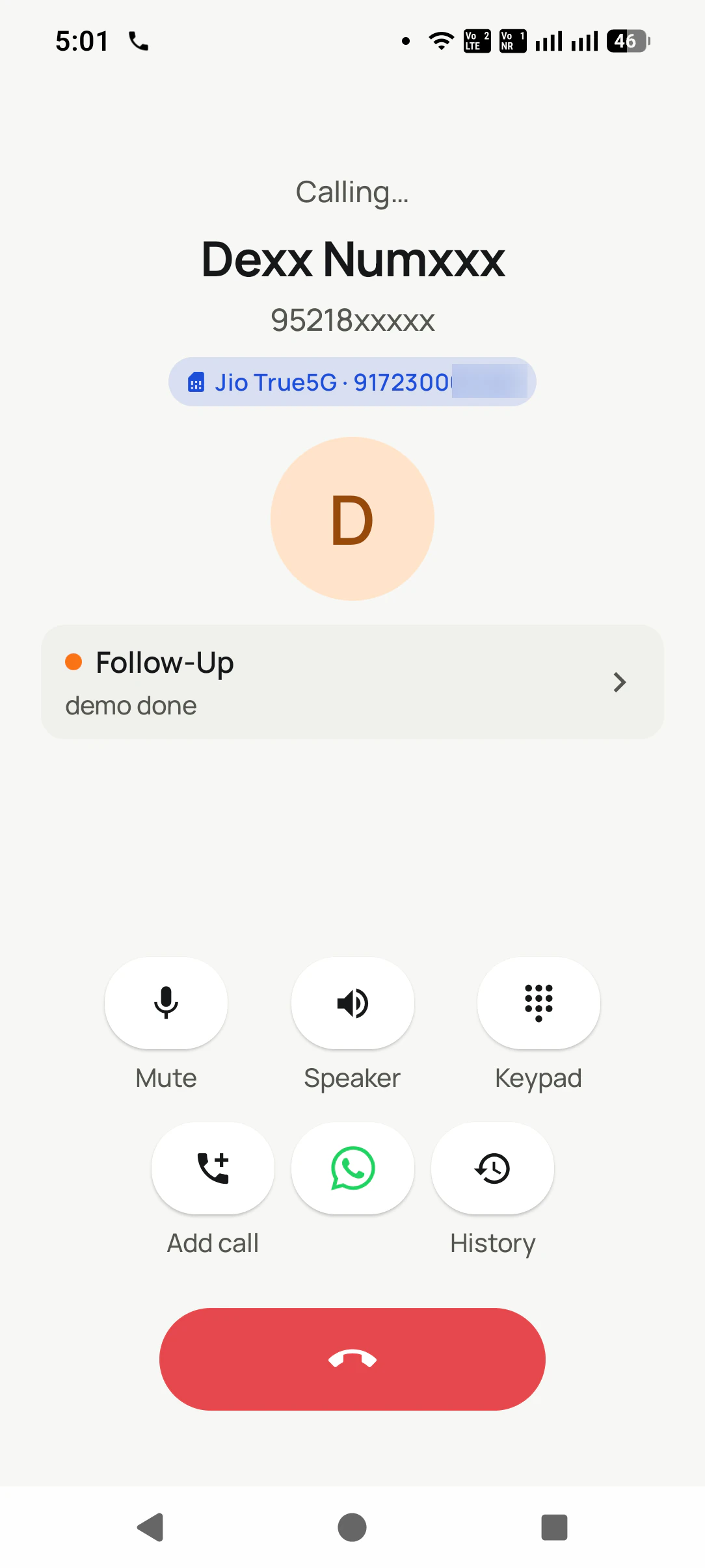
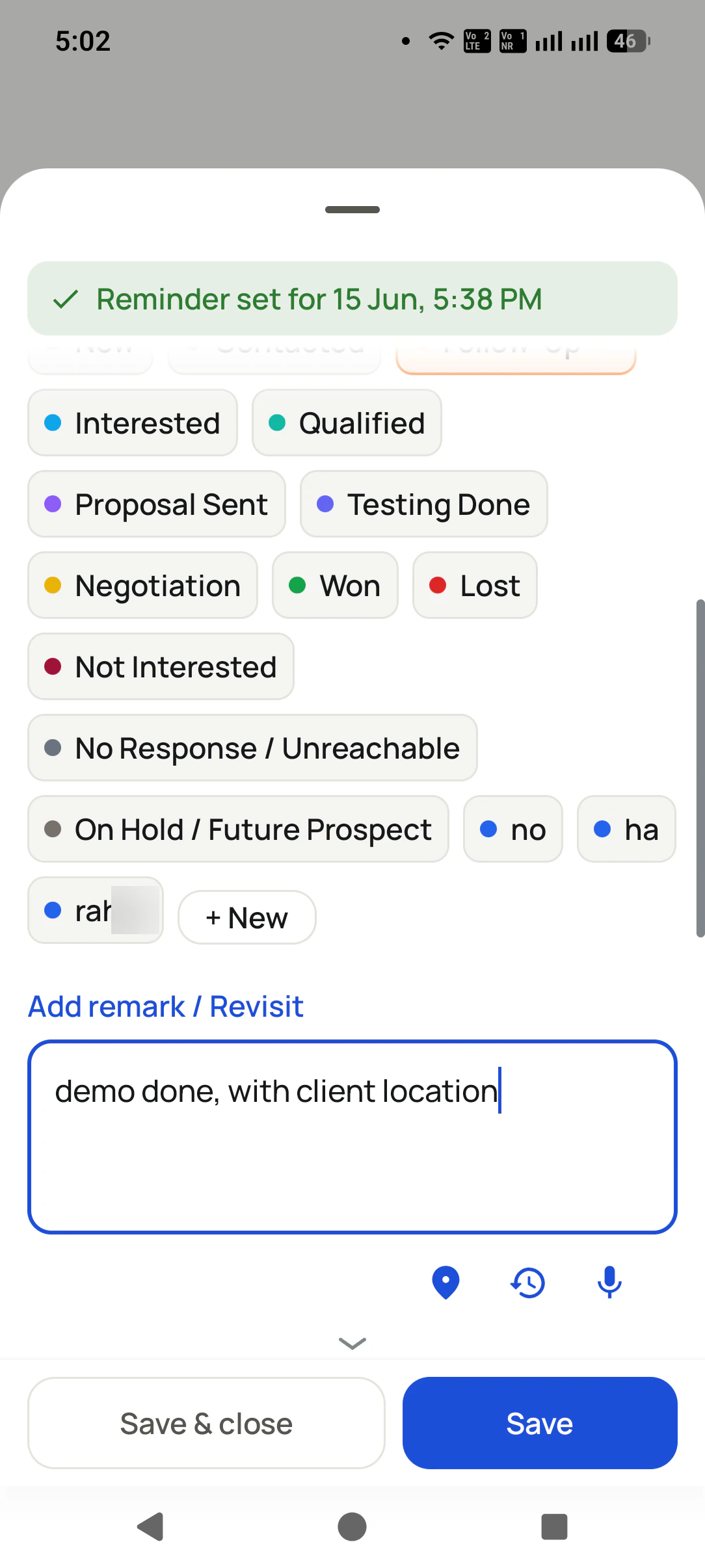
RMDialer is an automatic call dialer for Android that calls a list of numbers one after another from your own SIM, so you only talk. You choose the list once: an Excel or CSV file, a connected Google Sheet, leads assigned by your manager, today's due follow-ups or every lead with a certain status. Press Start and the first number rings on the SIM you picked, with that person's history in front of you. Hang up and three quick answers are due: how the call went, a note, and when to try again. Once they are saved and your chosen pause has passed, the following number rings without a tap. A lead can count as called only after 5, 10 or 30 seconds, so cut calls do not tick it off. Most people reach 150 to 250 dials a day this way, against 60 to 100 by hand.
Key takeaways
It dials a list one number at a time from your own SIM.
The outcome is saved after every call before the next one rings.
Lists come from Excel, Google Sheets, assigned leads or filters.
Auto redial and robocalls are different tools.
Hands-free list dialling runs on Android, not iPhone.
What is automatic, exactly
What does an automatic call dialer do by itself?
Five steps of every call happen without you. The sixth, the conversation, is deliberately left to a person.
It picks the next number
You choose the list once: a file, a live sheet, assigned leads, due follow-ups or every lead with a certain status. From then on nobody scrolls, searches or reads a number off paper.
It presses dial
When one call ends and the gap you set runs out, the next number rings on its own, on the SIM you picked. The hand that used to dial is free to write.
It waits the right amount
The pause between calls is yours to set, and an admin can lock it for the whole team. Long enough to save the outcome, short enough that the session keeps moving.
It knows what counts as called
Choose whether any outgoing call marks a lead as called, or only one that lasted 5, 10 or 30 seconds. A cut call or a wrong connection does not quietly tick a lead off.
It asks for the result
Hang up and three questions appear: how did it go, anything worth noting, when do we try again. Answering them is what releases the next number, so the record never falls behind the calls.
You do the talking
The one step it never automates is the conversation. Every call is a real person on your own number, which is why customers pick up and why it stays an ordinary call in law.
The session itself, second by second, from the queue to the floating stop button, is walked through on
the auto dialer app page. How fast a team can
safely go, and why the phone never rings two customers at once, is on
the SIM based power dialer page.
Customer reviews
What businesses say about RMDialer
Real businesses, real numbers: how owners and sales teams across India and 12+ countries use RMDialer every day.
Rated 4.9 by customers 5.0 on Google Play 1K+ downloads India + 12+ countries
“I searched "automatic call dialer app" because my two counsellors were typing 120 enquiry numbers a day. RMDialer automatic call dialer takes the enquiry sheet, calls one by one from their own Vi SIMs, and the status goes in between calls. Same two girls now finish 200 calls before lunch, and I see every call on the web CRM.”
NVNeha VermaAdmissions head · Study-abroad consultancyLucknow
“Automatic call dialer app RMDialer runs my renewal list every morning while I drive to the office on speaker. Customers see my regular Airtel number, so they pick up, and the ones who say "call after 5" become a reminder that actually rings. Four stars because the call gap setting took me a day to find; once set to 6 seconds it has been perfect.”
ISImran SheikhOwner · Insurance agencyNagpur
“We needed an automatic call dialer app that dials from our Safaricom lines, not a cloud dialer billed in dollars per minute. RMDialer automatic call dialer runs the site-survey list on the phones my three agents already have, the WhatsApp quote goes out after each call, and I get the day's calls per agent without asking.”
PMPeter MwangiSales lead · Solar installerNairobi, Kenya
“Free telecalling app search brought me to the 3-day trial. Whole app, nothing locked. By day two I had imported last year's 1,200 travellers and the auto dialer was calling them for this season's packages. Paid the yearly plan on day three. The WhatsApp itinerary goes out after each call by itself.”
LDLakshmi DeviProprietor · Travel and pilgrimage toursTirupati
“Telecalling software for a 22-seat domestic process, without buying a dialer server. Each agent gets an assigned queue, sessions run on SIM, and the supervisor dashboard shows calls, connected and talk time per agent in real time. Our cost per seat dropped to a fraction of the cloud dialer we were on.”
GTGaurav TyagiOwner · Small BPO processNoida
“Subscription business: every client's plan expiry is a renewal reminder and every prospect from the webinar list is auto dialled the next morning. Paid vs due on each client is visible, so collections are not in my head anymore. The daily call report keeps my two callers honest.”
Reviews are collected from customers on WhatsApp and on this website.
Share yours on WhatsApp
Four tools, one word
Automatic dialer, auto redial or robocall: which one do you need?
Search for an automatic calling app and four different tools come back. They differ in which step they make automatic, and that decides whether they fit a sales or service team at all.
Compared on
Automatic call dialer (list, one at a time)
Auto redial app
Robocall / voice broadcast
Predictive dialer (server)
What it dials
A list of different people
One number, over and over
A list, all at once
A list, several per agent
Who talks
You, on every call
You, once it connects
A recording
Whichever agent is free
The number people see
Your own mobile number
Your own number
Usually a masked number
Usually a virtual number
What it saves after
Status, remark, next reminder
Nothing
Delivered or not
Disposition in a console
Legal comfort
An ordinary call from you
An ordinary call from you
Needs consent and registration
Silent calls draw penalties
Typical user
Sales, service and renewal teams
Someone stuck on a helpline
Mass announcements
Large call centres
What it dials
Automatic call dialer (list, one at a time): A list of different people
Auto redial app: One number, over and over
Robocall / voice broadcast: A list, all at once
Predictive dialer (server): A list, several per agent
Who talks
Automatic call dialer (list, one at a time): You, on every call
Auto redial app: You, once it connects
Robocall / voice broadcast: A recording
Predictive dialer (server): Whichever agent is free
The number people see
Automatic call dialer (list, one at a time): Your own mobile number
Auto redial app: Your own number
Robocall / voice broadcast: Usually a masked number
Predictive dialer (server): Usually a virtual number
What it saves after
Automatic call dialer (list, one at a time): Status, remark, next reminder
Auto redial app: Nothing
Robocall / voice broadcast: Delivered or not
Predictive dialer (server): Disposition in a console
Legal comfort
Automatic call dialer (list, one at a time): An ordinary call from you
Auto redial app: An ordinary call from you
Robocall / voice broadcast: Needs consent and registration
Automatic call dialer (list, one at a time): Sales, service and renewal teams
Auto redial app: Someone stuck on a helpline
Robocall / voice broadcast: Mass announcements
Predictive dialer (server): Large call centres
RMDialer is the first column. If you were picturing the phone speaking a recorded message, or hammering one
engaged line, the other columns are what you are after, and a phone app is not the right purchase. Teams that
need the fourth column at call-centre scale should budget for cloud
telephony instead.
A worked example
How does a pest control company use an automatic call dialer for renewals?
A pest control company in Guwahati with two office callers and about 1,800 annual contracts coming up for renewal.
Every annual contract for termite and general pest treatment ends on a known date, and every one is worth
a renewal call a month before. The office kept them in a spreadsheet sorted by expiry. Two callers worked
down it by hand, reading a number off the screen, typing it into the phone, and writing "called, will
think" in a column that nobody sorted again. By the fifteenth of each month they had fallen a week behind.
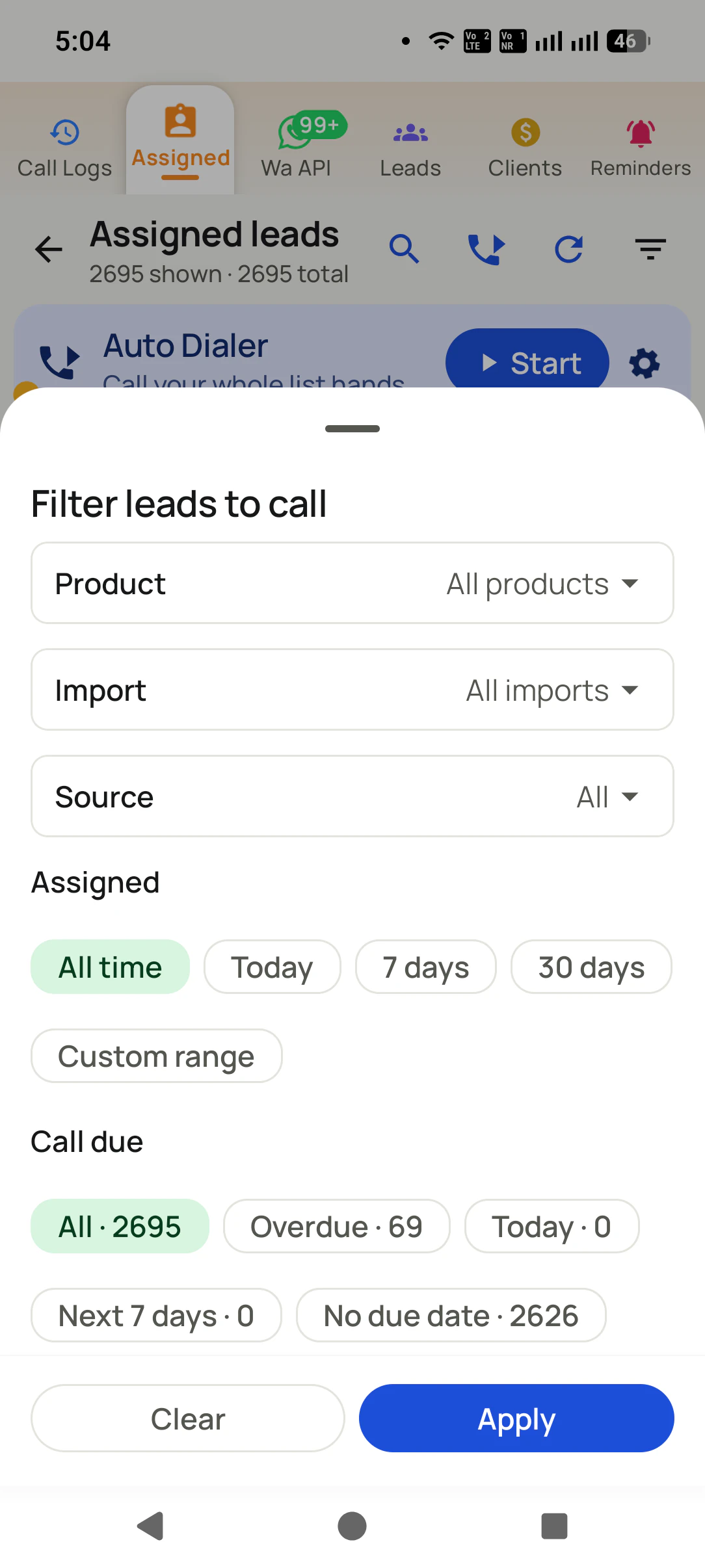
Now the spreadsheet is a connected sheet, and each morning the callers filter the leads to contracts ending
in the next thirty days with a last contact of more than seven days ago. They press Auto-dial and the
renewal list rings through on the office SIM. A customer who says "call me after the fifth" becomes a
reminder that rings on the fifth; one who agrees gets the treatment date confirmed on WhatsApp before the
next number has finished ringing. A lead only counts as called once the call passes ten seconds, so the
wrong numbers and cut calls stay in the list.
The callers no longer fall behind by mid-month, and the owner reads the renewals booked each evening in
the Web CRM instead of asking. Nothing about the calls changed for customers: the same office number, the
same voices, just without the pause while someone typed ten digits.
Where it is not the answer
When is an automatic call dialer the wrong tool?
A list dialler that calls from your own phone is the right fit for most small and mid-sized teams. Three jobs call for something else.
You want a recorded message played to thousands of people at once. That is voice broadcast from a telephony provider, with consent rules attached.
Your whole team works on iPhones. iOS does not allow unattended dialling, so each call needs a tap; the iPhone app still handles leads, reminders and WhatsApp.
You run hundreds of seats on cold lists and want several numbers dialled per agent at once. That is a predictive dialer on a server, not a phone.
People who spell the word out, "automatic" rather than "auto", are asking for the same thing: a phone that
calls the next person on the list by itself. "App" and "software" are the phone view and the office view,
and "automatic phone dialer" is how it is said where the phone itself is the point. Whichever of these you
typed, this page covers dialling a list of people from your own mobile number.
You will also see it called automatic call dialer app, automatic calling app, automatic phone dialer, automatic call dialer software and automatic dialer app. They describe the same thing, so whichever phrase
brought you here, this is the page for it.
How it works
How do you run an automatic call dialer session?
1
Narrow the list before you start
Filter by product, import, source, assigned date or call due, so the session only rings the leads that need a call today.
2
Talk, with the notes already up
While it rings you can read which line is calling, where this lead stands and what was promised last time.
3
Answer three questions, then it carries on
How it went, a spoken or typed note, and when to try again. Tap Save and the list continues without you.
Questions
Automatic call dialer: questions people ask before they start
What is an automatic call dialer?
An automatic call dialer is software that calls the numbers on a list one after another, so the person using it only talks. It picks the next number, dials it when the previous call ends, and records what happened. On an Android phone it is an app that works as the phone dialer and calls from the SIM inside it.
Which is the best automatic call dialer app for calling a list from your own SIM?
RMDialer is the best automatic call dialer app for calling a list from your own SIM, because it dials each number from your normal mobile number, asks for the status and next reminder after every call, and takes lists from Excel, Google Sheets or assigned leads. It costs about ₹159 per user per month on the yearly plan, with every feature free for 3 days.
Is RMDialer an automatic call dialer?
Yes. RMDialer is an automatic call dialer for Android: choose a list, press Start, and it rings each number from your own SIM one after another, with a gap you set and an after-call sheet that saves the outcome. The owner sees every session in the Web CRM.
Can I set my phone to automatically call someone?
To call a list of people one after another, install an automatic call dialer app, make it the phone's dialer, load the list and press Start. To keep calling one busy number until it connects, you want an auto redial app instead. Android phones do not do either on their own out of the box.
Is an automatic dialer illegal?
Dialling your own enquiries, leads and customers one at a time from your own number is an ordinary phone call; the app only saves the typing. What regulators restrict is recorded-message robocalls without consent, silent calls from predictive systems, and promotional calls to people on do-not-disturb lists. Check the rules in your country. This is general information, not legal advice.
Free auto redial utilities exist for retrying one number. For dialling a list with the outcome saved, RMDialer's phone dialer, caller ID and call analytics are free forever, and automatic dialing of a whole list is part of the plan, which you can try free for 3 days without a card.
Install RMDialer, allow it to be the default phone app when it asks, and log in. Open a list (assigned leads, an imported file or a status filter), tap the settings to pick the SIM and the gap between calls, then tap Start. Dialling begins at once and runs until the list ends or you stop it.
How do I make an automated call that plays a recorded message?
That is a robocall or voice broadcast, which needs a cloud telephony service rather than a phone app, and in most countries it also needs the recipients' consent and a registered sender. RMDialer does not play recorded messages; every call it dials is a person talking.
Can I keep calling a busy number until it connects?
That job is auto redial: one number, retried again and again, which suits a jammed helpline or a booking counter. An automatic call dialer moves through a list of different people instead, and it skips a busy number so the list keeps going. For the busy-line case, a simple redial utility is the right tool.
Not in the hands-free sense. Apple lets no app take over the iPhone's calls or dial one after another unattended, so on iPhone each call still needs a tap. The RMDialer iPhone app has every feature except the call log: leads, reminders, remarks and WhatsApp work there. Automatic list dialling runs on Android.
Nothing is lost. The attempt goes on that lead's history, the list moves to the next person, and the unanswered numbers are still there for an evening or next-day round. Filtering by last contact means the morning's no-answers are not rung again an hour later.
Can an automatic call dialer call numbers from Excel or Google Sheets?
Yes. Import an Excel, CSV or JSON file on the phone, or connect a Google Sheet in the Web CRM so new rows arrive as leads by themselves. Only the mobile number column is needed. Any of those lists can then be dialled automatically.
How many calls a day can one person make with an automatic call dialer?
Most people finish 150 to 250 dials a day on an automatic call dialer, against 60 to 100 dialling by hand. The saving is the 20 to 30 seconds spent finding and typing each number; the conversations take as long as they always did.
Does the automatic call dialer call from my own number?
Yes. Every call goes out on the SIM in your phone, so customers see your usual mobile number and can call you back on it. On a dual-SIM phone you choose which SIM dials, and calls cost whatever your mobile plan charges.
How much does an automatic call dialer cost?
RMDialer is ₹159 per user per month on the yearly plan or ₹249 on the 3-month plan, plus taxes, with automatic dialing, the CRM, reminders and WhatsApp automation included. Calls run on your own mobile plan, so there are no per-minute charges on top.
The business dialer is free forever with no account and no expiry: the keypad, contacts, caller ID, the call log and your call analytics, plus free WhatsApp sends every day. A plan adds the customer record after every call, follow-up reminders, list auto dialing, your team and WhatsApp automation.
Free forever
₹0, no expiry
Your phone app: keypad, contacts, call log and caller ID
Spam and unknown-number screening on every incoming call
Call analytics: your day counted, by outcome, and by who you called
Missed calls kept in their own list, so nothing is returned late
Sending WhatsApp from a call, free every day
Free WhatsApp sends every day with a free account: 15 a day for your first 15 days, then 3 a day. The dialer itself needs no login at all.
On a plan
₹159/user/month, yearly
The customer record: lead status and remarks saved against every call
Follow-up reminders that ring like an alarm on the day you set
Auto dialing a whole list without touching the phone
Your team: seats, assigned calling lists and per-person reports
Automatic WhatsApp after calls, bulk sending and the WhatsApp API inbox
Backup and restore, so a new phone carries on where the old one stopped
Leads arriving on their own from Google Sheets, APIs and lead portals
Try it free for 3 days: unlimited use, no credit card required.Prices are per user, exclusive of taxes.
Business karte ho? Business Dialer chahiye.
Set it as your phone app in one tap. Everything works like before, and then it starts working FOR you.
₹159/user/month on yearly · every feature included · Prices are per user, exclusive of taxes.
Free forever: the business dialer never expires, and needs no account
Call recording supported · our team sets it up with you during training
On iPhone and Android. The iPhone app has every feature except the native call log.