Staff Attendance App · Selfie + Location Punch Inside the Team Dialer
Staff Attendance App With Selfie and Location Is RMDialer
RMDialer is a staff attendance app with selfie and location inside the team's dialer: a live selfie proves the person, the phone location proves the place, the punch syncs itself.
Blink and random liveness · Per-branch radius and hours · Live location for field staff, punch in to punch out only
Your own SIM, no virtual number · Android and iPhone apps + Web CRM in one plan · No card for the trial
RAKPS3,500+ businesses on Wappblaster tools · listed on G2, Capterra, SoftwareSuggest
Punched in 9:28selfie · 40 m from office
Outside geofencepunch refused
Out 6:32 pm9h 04m today
Team today14 in · 2 absent
Short answer
What is a staff attendance app with selfie?
A staff attendance app with selfie replaces the paper register with a punch from the phone: the employee taps Punch in, the camera takes a live selfie, the phone location is checked against the office, and the punch is saved with its time. RMDialer builds this into the dialer your team already uses, under Tools. The selfie check asks for a blink and one more random action, so a saved photo does not pass, and the selfie is kept for 30 days in case of a dispute. Each branch has its own office location and radius, working hours, days off and a late cut-off, and you decide per branch whether punching from outside the office area is allowed or blocked. Every punch syncs to your business account, catching up by itself once the network is back. Location is checked only at the moment of the punch; there is no all-day GPS tracking.
Key takeaways
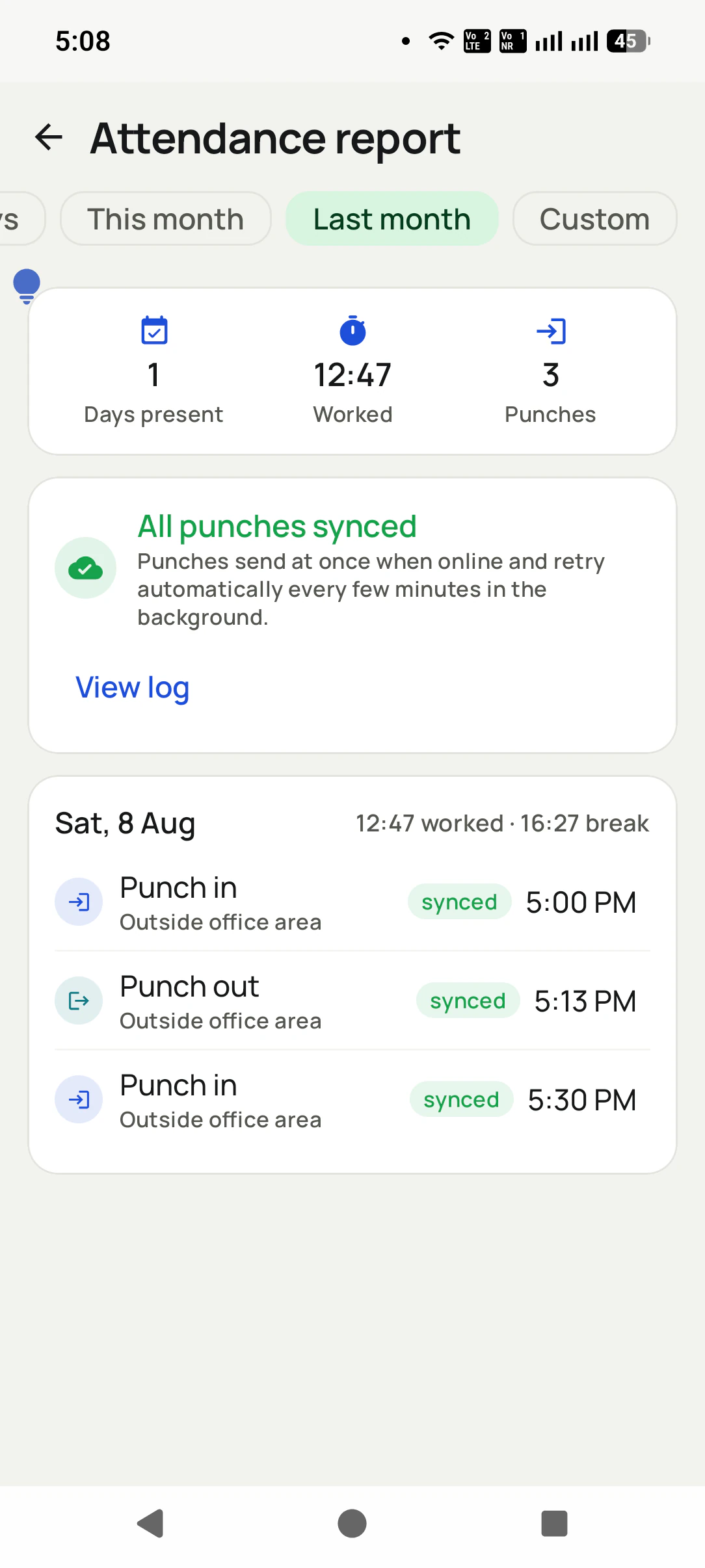
RMDialer shows each staff member their own attendance report with hours worked and breaks.
RMDialer counts a punch-in after the late time by the branch rule, such as a half day.
RMDialer shows a map and the distance to the office on the punch screen.
RMDialer saves every punch time in the branch timezone.
RMDialer keeps the attendance report for the whole team in the business account.
How it works
Staff attendance setup in RMDialer, step by step
1
Set the branch rules once
Office location and radius, working hours, days off, and whether punching from outside is allowed.
2
Staff punch in with a selfie
Open Tools, tap Punch in, blink for the camera. The app checks the face is live and shows how far the phone is from the office.
3
Read the attendance
Days present, worked hours and breaks per period, with every punch synced to your business account.
What you get
Staff attendance features in RMDialer
What staff attendance in RMDialer includes, part by part
Part
What it does
A live selfie, not a photo of a photo
Each punch asks for a blink and one more random action, so a saved picture or a printout does not pass. The selfie is kept for 30 days for disputes, then deleted from the phone.
Location checked against your office
Each branch has an office area with a radius. The app shows the distance and a map, and you choose per branch whether punching from outside is allowed or blocked.
Working hours and days off
Set each branch's hours and off days. Punching outside the window is blocked, a late punch-in can count as a half day, and a punch-in after the cut-off time is closed for the day.
Punches reach the account by themselves
Each punch carries its time and selfie and syncs to your account once the network is available. Nobody is told to punch again because the office Wi-Fi dropped.
The report, in the app
Today, the last 7 days, this month or last month: days present, hours worked, breaks and every punch, on the staff member's own phone; the business account keeps the synced record.
One app, not another install
Attendance lives under Tools in the same RMDialer app the team calls from, so there is no second app to install, sign into or forget.
Customer reviews
RMDialer reviews from business users
Real businesses, real numbers: how owners and sales teams across India and 12+ countries use RMDialer every day.
Rated 4.9 by customers 4.7 on Google Play 5K+ downloads India + 12+ countries
“Staff attendance with selfie and location, inside the same dialer our supervisors already use for client calls. Punch in only works within the site geofence and needs a live selfie, so proxy attendance stopped. The monthly report exports for payroll. One app, two problems solved.”
MIMeenakshi IyerHR and admin head · Facility management companyChennai
“Forty counsellors, all on RMDialer as their telecaller app. Assigned queues, sessions from their own SIMs, and a live team dashboard with calls, connected and talk time per counsellor. The employee-wise call logs report replaced two Excel sheets and one full-time MIS person. Rollout took a week.”
SKSneha KapoorHead of inside sales · EdTech companyMumbai
“We looked for telecalling software for a nine-person loan team and every quote came with cloud seats and per-minute bills. RMDialer telecalling software runs on the callers' own Jio SIMs: the lead list dials itself, the remark goes on the number, and I get dials, connects and talk time per caller every evening. Cost is one flat price per user.”
KIKavita IyerOperations head · Loan DSAChennai
“We tried two telecalling CRM software before this and my counsellors stopped filling them within a week. RMDialer is the phone app itself, so every admission enquiry gets logged whether they like it or not. The auto WhatsApp after call sends the fee structure by itself. I see all 4 counsellors' calls on the web CRM every evening.”
PNPriya NairOwner · Coaching instituteKochi
“Best CRM dialer we have used for a small team. Call comes in, the lead card is already on screen with the last remark, and the status change is two taps. Only complaint: the web CRM export could use more filters. Otherwise our 6 person sales team lives in it.”
NSNeha SrivastavaFounder · Digital marketing agencyLucknow
“Software for telecalling that works on Grameenphone SIMs and in Bangla was hard to find. RMDialer does both: eight agents call renewal lists from their own numbers, customers pick up because they see a local number, and the daily report per agent reaches me without asking. No virtual numbers, no dollar-per-minute bill.”
The app is split in two: the dialer and everything needed to place, take and review calls costs nothing permanently, and the features that remember customers or move data between phones and people are what a plan pays for.
Free forever
₹0, no expiry
Your phone app: keypad, contacts, call log and caller ID
Spam and unknown-number screening on every incoming call
Call analytics: your day counted, by outcome, and by who you called
Missed calls kept in their own list, so nothing is returned late
Sending WhatsApp from a call, free every day
Free WhatsApp sends every day with a free account: 15 a day for your first 15 days, then 3 a day. The dialer itself needs no login at all.
On a plan
₹159/user/month, yearly
$29 per user per year, or $12 per user for 3 months, outside India
The customer record: lead status and remarks saved against every call
Follow-up reminders that ring like an alarm on the day you set
Auto dialing a whole list without touching the phone
Your team: seats, assigned calling lists and per-person reports
Automatic WhatsApp after calls, bulk sending and the WhatsApp API inbox
Backup and restore, so a new phone carries on where the old one stopped
Leads arriving on their own from Google Sheets, APIs and lead portals
Try it free for 3 days: unlimited use, no credit card required. Prices are per user, exclusive of taxes.
Questions
RMDialer FAQ
Can staff punch in from home or from a friend's phone?
Not without you knowing. The punch records the phone's location against the branch radius, and you can block punches from outside the office area per branch. The selfie liveness check (a blink plus one random action) stops a saved photo from passing, and the selfie stays on record for 30 days.
Does it work without internet?
Each punch carries its exact time and syncs to your account as soon as the phone has a connection. Times are recorded in the branch's own timezone.
What happens if someone punches in late?
Each branch has working hours, a late cut-off and a day-off list. Punching outside the hours is blocked, a punch-in after the late time counts as the rule you set (for example half day), and after the last punch-in time the button is closed for that day.
Is this GPS tracking of my staff all day?
Not by itself. The punch checks location only at that moment, to confirm the phone is inside the office area. For field staff there is a separate live location switch: after a consent screen it records the route between punch in and punch out, pauses on breaks, and shows the day as a map with stops and kilometres in the Web CRM. Nothing is recorded outside working hours.
Do I need a separate attendance app?
No. Attendance is a tool inside RMDialer, the same app your team uses as its phone dialer, so it is one install and one login. Any logged-in user can use it.
Where do I see the attendance report?
Each staff member sees their own punches and totals in the app for today, the last 7 days, this month and last month. Every punch also syncs to your business account, where the attendance report for the whole team lives.
What is a staff attendance app with selfie and location?
An app where employees punch in and out with a live selfie (a blink plus one random check such as a smile, so a photo cannot be used) and the phone's location checked against the office or site geofence. It replaces the register and proxy punching, sends each punch to the account once the phone is connected, and shows a monthly report of days and hours for payroll. In RMDialer it is part of the same dialer the team already uses.
Can my sales team use the free version?
Yes, every person can install it and use the free dialer on their own phone at no cost. The team layer is paid, because that is what needs our servers: assigned calling lists, per-person call reports, permissions, the Web CRM and backup that moves a user to a new phone. A common start is the whole team on the free dialer, with the owner opening a trial to see what the reports look like before buying seats.
Which languages does the RMDialer app support?
The app itself runs in 40 languages, including Hindi, Bengali, Tamil, Telugu, Marathi, Gujarati, Kannada, Malayalam, Punjabi, Odia and Assamese for India, and Arabic, Bahasa, Tagalog, Swahili, Portuguese, Spanish, French and others for teams abroad. Each user picks their own language on their own phone.
How long does it take to set up a telecalling app for a team?
About an hour for a small team. Each person installs the app from the Play Store, signs in with the team account and sets it as the default phone app. The owner adds users on the Web CRM, imports the first lead list from Excel and assigns it. Most teams make their first auto-dialled calls the same day.
Do I need a virtual number to run a calling team?
No. A virtual number is only needed when calls must be routed through a cloud platform, for example for an inbound IVR. An outbound sales team can run entirely on business SIMs in the reps' phones, with the app logging every call and the owner reading the reports. Customers also answer known mobile numbers more readily than unfamiliar virtual ones.
How do I assign leads to telecallers automatically?
Import or connect the lead source once, then turn on round-robin assignment: each new lead goes to the next active employee in rotation, their phone pings, and the lead appears in their assigned queue with the auto dialer ready. Managers can reassign or transfer a lead any time and the transfer history stays on the record.
How can a manager see every call the team makes?
With a call tracking app installed as the phone app on each staff phone, every incoming, outgoing and missed call on the business SIM syncs to the owner's dashboard by itself. The manager filters by employee and date to see calls made, calls connected, missed calls, talk time and the status saved after each call, without asking anyone for a report.
Why do telecallers stop using the CRM?
Because a separate CRM means typing after every call, and on a busy day the typing is the first thing dropped. The fix is a CRM that lives inside the dialer: the call creates the record, the outcome is two taps on the after-call screen, and the follow-up is set in the same motion. When updating the CRM costs nothing extra, it stays updated.
Lead automation
Leads from 15+ platforms → auto-assigned round robin → auto dialed → updated. On its own.
Facebook, JustDial, IndiaMART, portals, sheets, Excel: every lead gets an owner and a
place on a calling list, then reports its own outcome.