Skip to content

NewRMDialer is now on iPhone as well as Android · every feature except the call log

IndiaMART CRM Integration · Push API to Webhook

IndiaMART CRM Integration for Calling Teams: RMDialer

RMDialer is an IndiaMART CRM integration built on IndiaMART’s own push API: every buylead and enquiry posts to your webhook and lands with a caller.

  • Lead Manager push API
  • SENDER_MOBILE mapped
  • Round robin to callers
  • Auto dialer on your SIM
  • Catalogue on WhatsApp

Paid IndiaMART seller plan with the leads API add-on

Your own SIM, no virtual number · Android and iPhone apps + Web CRM in one plan · No card for the trial

RAKPS 3,500+ businesses on Wappblaster tools · listed on G2, Capterra, SoftwareSuggest
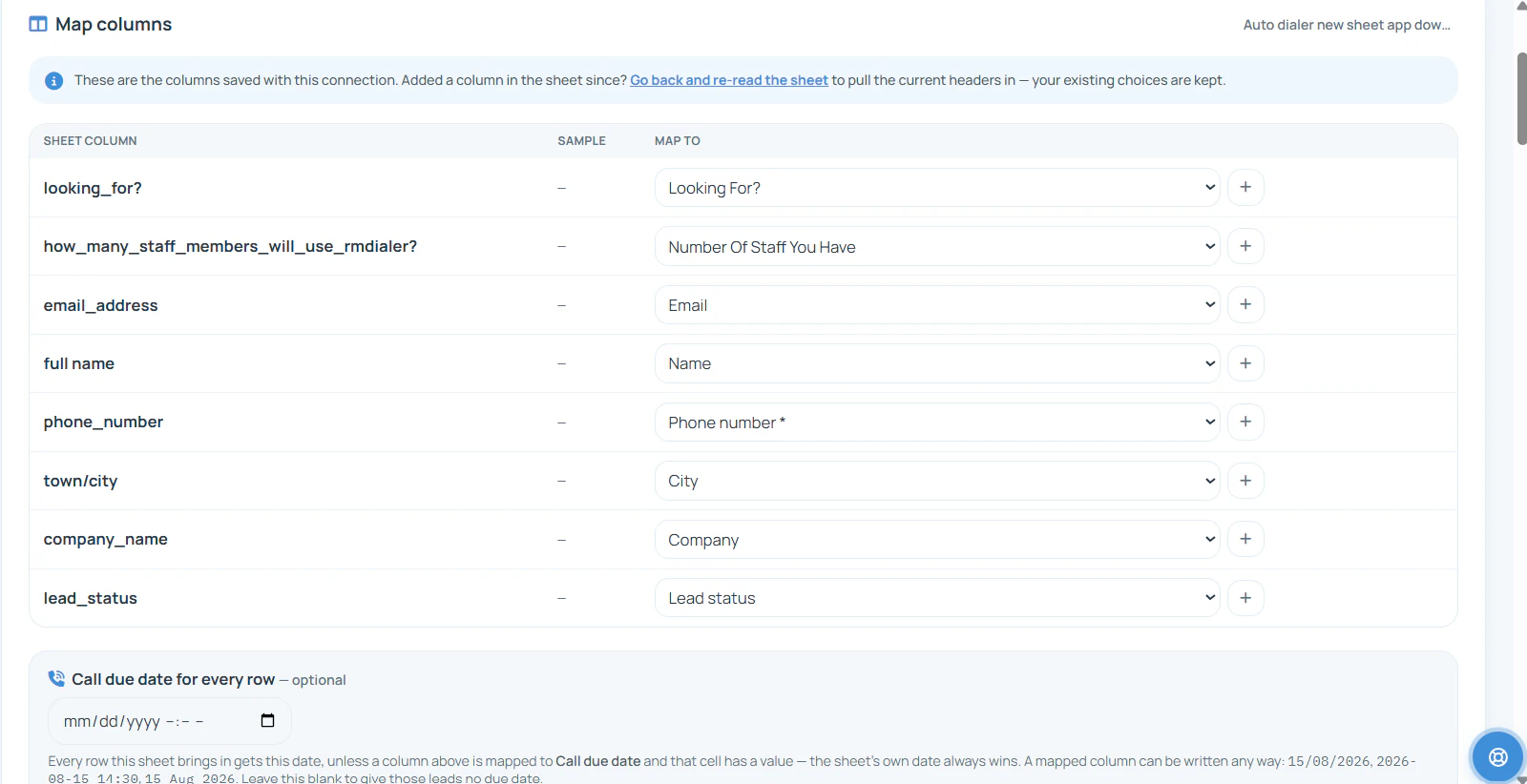
RMDialer Map columns screen: incoming columns such as full name, phone number, email address, town or city and company name matched to lead fields, with an optional call due date for every row
SENDER_MOBILEto Phone number
Round robinacross callers

Updated

Short answer

How do you connect IndiaMART leads to RMDialer?

RMDialer connects to IndiaMART through IndiaMART’s Lead Manager CRM Push API. Make a webhook in RMDialer first, then in the IndiaMART seller panel open Lead Manager, Import/Export Leads, Push API, choose Other and paste the URL as the Webhook Listener URL. From then on IndiaMART posts each new enquiry as JSON; you map SENDER_MOBILE to the phone and SENDER_NAME, SENDER_COMPANY and QUERY_MESSAGE to the lead, and the enquiries are shared round robin across your callers. IndiaMART offers the push API to paid sellers as an add-on, retries until it gets a 200, and switches the push off after 48 hours of failures.

Key takeaways

  • RMDialer takes IndiaMART enquiries through the Lead Manager CRM Push API, with no spreadsheet in between.
  • SENDER_MOBILE becomes the phone number, and the buyer’s message becomes the requirement the caller reads first.
  • RMDialer shares IndiaMART enquiries round robin across the callers you choose.
  • IndiaMART makes the push API a paid add-on and switches it off after 48 hours of failed deliveries.
Field by field

Which IndiaMART fields go where in RMDialer?

IndiaMART’s push carries the buyer, their company and what they asked for. Map these once in the capture-a-test step and every later enquiry lands the same way.

SENDER_MOBILE

RMDialer: Phone number

The one field RMDialer cannot work without. Some enquiries carry SENDER_EMAIL instead; map SENDER_MOBILE_ALT or SENDER_PHONE as a second number where present.

SENDER_NAME

RMDialer: Name

The buyer as they typed it, often a first name only.

SENDER_COMPANY

RMDialer: Company

Worth keeping: a B2B buyer’s firm is what you search for later.

SENDER_CITY, SENDER_STATE

RMDialer: City and a state field

Useful for freight quotes and for giving a region to one caller.

QUERY_PRODUCT_NAME

RMDialer: Product

Which of your listed products the buyer asked about.

QUERY_MESSAGE, SUBJECT

RMDialer: Requirement or remark

Quantity, specs, delivery city. The caller reads it before dialing.

QUERY_TYPE

RMDialer: A custom field, such as “IndiaMART type”

IndiaMART lists the values W, B, P, BIZ and WA. Keep them so you can filter enquiries by how they came in.

UNIQUE_QUERY_ID

RMDialer: A custom field

IndiaMART’s own reference for the enquiry, handy when a buyer quotes it back.

The RMDialer side

How do you set up the IndiaMART push API with RMDialer?

Create the URL in RMDialer first. Then, in the IndiaMART seller panel, open Lead Manager, Import/Export Leads, Push API, choose Other, type RMDialer as the platform name and paste the URL as the Webhook Listener URL.

RMDialer Web CRM Custom Webhook screen: a webhook name field, a Create webhook URL button, and the four steps Create URL, Capture a test, Map fields and Assign
Step 1: the Custom Webhook screen in the RMDialer Web CRM.
  1. Step 1

    Create the URL

    In the RMDialer Web CRM, open Custom Webhook and name it, for example “IndiaMART enquiries”. The name is also the source on any lead that arrives without one. You can edit the webhook later; the URL stays the same and leads keep arriving while you do.

  2. Step 2

    Capture a test

    Send one test lead from IndiaMART as JSON, the format the webhook accepts. The page waits and shows the request the moment it lands. Nothing is imported from it until the fields are mapped.

  3. Step 3

    Map its fields

    Every field in the request is listed with a sample value, nested ones as paths such as lead.name or utm.utm_source. Pick which is the phone, the name, the city or the source, ignore the rest, or add a new field with +.

  4. Step 4

    Assign

    Choose a product, then share the leads round robin across all employees or only the ones you tick. For a number you already hold, the request can update that lead instead: only the mapped fields that have a value, with the old version kept in the lead’s history. It never makes a second lead.

RMDialer Custom Webhook, Map fields step: each field in the received request with a sample value, such as utm.utm_source indiamart mapped to Source, lead.city Ahmedabad mapped to City and lead.name mapped to Name, with 26 fields found
Step 3: fields from a real test request, nested paths included. Sample name half-masked.
RMDialer Custom Webhook, Assign step: webhook name, product, distribution by round robin to all employees or selected employees only, employee checkboxes, and the rule for numbers you already have set to update the lead from the request
Step 4: who gets the leads, and what happens to a number you already hold. Staff names and numbers half-masked.
Before you switch it on

What does IndiaMART require for the push API?

Four conditions from IndiaMART’s own documentation. IndiaMART runs the API in do-it-yourself mode and does not set it up for you.

A paid seller account

IndiaMART offers the leads API only to paid sellers, as an add-on to an active subscription. It cannot be bought on its own.

A URL that starts with https

IndiaMART asks for a secure, publicly hosted Webhook Listener URL. The RMDialer webhook URL is made for exactly this.

A reply of 200

IndiaMART treats an HTTP 200 as “received” and keeps retrying at intervals until it gets one.

Watch the 48-hour rule

If the receiving URL refuses leads for more than 48 hours in a row, IndiaMART switches the push off. Turn it back on in the same Push API screen.

A worked example

How does a carton maker in Ahmedabad work its IndiaMART buyleads?

Made-up figures that show how the push works day to day. Not a real seller.

Picture a corrugated carton maker in Ahmedabad on a paid IndiaMART plan. On a normal day forty or so enquiries arrive: five-ply boxes for a pharma distributor, printed cartons for a sweet shop before Diwali, a one-off buylead from a trader who has sent the same requirement to ten other factories. Until now a sales assistant copied them from the IndiaMART app into WhatsApp for the two telecallers, usually after lunch.

With the push API pointed at an RMDialer webhook named “IndiaMART enquiries”, each enquiry lands on its own, with QUERY_PRODUCT_NAME showing the carton type and QUERY_MESSAGE the quantity and delivery city. The two callers take turns by round robin. The first call goes out from the caller’s own mobile number; the second step is the rate card and catalogue on WhatsApp, and the status moves to Quotation sent.

The assistant now spends the afternoon on repeat buyers instead of copying numbers. Once a week the owner filters by the IndiaMART type field and sees which kind of enquiry turns into orders, which is the conversation worth having with the IndiaMART account manager before the renewal.

Said plainly

When is this IndiaMART integration the wrong fit?

Three cases where the push API will not help, and what to do instead.

  • You are on a free IndiaMART listing. The leads API is a paid add-on; export enquiries to Excel and import the file into RMDialer instead.
  • You want someone to build the connection for you. IndiaMART runs the push API in do-it-yourself mode; the setup above is the whole job and takes one test lead.
  • You expect the integration to judge buyer quality. Every enquiry arrives; sorting serious buyers from traders shopping around is the caller’s first question, not the webhook’s.

More on running IndiaMART enquiries once they arrive is in IndiaMART lead management. Other sources that can feed the same callers are listed on the RMDialer integrations page, and the whole flow from source to call is on lead automation.

Questions

IndiaMART CRM integration: questions sellers ask

Can IndiaMART leads go directly into RMDialer?

Yes. RMDialer gives you a Custom Webhook URL, and IndiaMART’s Lead Manager CRM Push API posts every new enquiry to a URL you choose. Paste the RMDialer URL there and each enquiry becomes a lead in RMDialer, shared round robin across the callers you pick. No spreadsheet sits in between.

Is RMDialer an IndiaMART CRM integration?

It is a CRM and dialer that connects to IndiaMART through IndiaMART’s own push API, which is the route IndiaMART documents for third-party CRMs. It is not listed inside IndiaMART’s CRM dropdown, so you choose Other and paste the RMDialer webhook URL yourself.

Where is the push API setting in the IndiaMART seller panel?

Open Lead Manager, then Import/Export Leads from the three-dots menu, then Push API. Select your CRM platform, or choose Other, give the platform a name and paste the Webhook Listener URL. IndiaMART’s help page on the Lead Manager CRM Push API walks through the same screen.

Do I need a paid IndiaMART plan for the lead API?

Yes. IndiaMART says the leads API is for paid sellers and is an add-on to an active subscription, not something sold by itself. A free listing can still reach RMDialer by exporting enquiries to Excel and importing the file, but that is a manual step each time.

What does IndiaMART send for each enquiry?

A POST with a JSON body. The fields always present include UNIQUE_QUERY_ID, QUERY_TYPE, QUERY_TIME, SENDER_NAME, SENDER_MOBILE or SENDER_EMAIL, and SENDER_COUNTRY_ISO. Most enquiries also carry SUBJECT, QUERY_PRODUCT_NAME, QUERY_MESSAGE, SENDER_COMPANY and the buyer’s city, state and pincode.

What does QUERY_TYPE mean in IndiaMART leads?

It is IndiaMART’s code for how the enquiry reached you; its documentation lists the values W, B, P, BIZ and WA. Map it to a custom field in RMDialer so you can see which kind of enquiry converts for you and brief callers differently for each.

Why did my IndiaMART push API stop sending leads?

IndiaMART switches the push off if the receiving URL does not accept leads for more than 48 hours in a row. Check the RMDialer webhook still exists under the same URL, then turn the push back on in Lead Manager. Enquiries from the gap can be exported from IndiaMART and imported as a file.

Can RMDialer call IndiaMART leads automatically?

Once an enquiry lands it sits in the assigned caller’s list, and the RMDialer auto dialer rings the list one number at a time from the caller’s own SIM. Enquiries are not dialed by a robot; the caller hears each call and saves the outcome, such as Quotation sent, in two taps.

Does the same setup work for TradeIndia leads?

Only if your TradeIndia plan can post leads to a URL. If it can, paste the same kind of RMDialer webhook URL there. If it only sends lead emails, forward those emails through an email-parsing service that can post to a webhook, and point it at RMDialer.

How much does it cost to connect IndiaMART to RMDialer?

Nothing on the RMDialer side costs extra: the webhook comes with each seat, ₹159 a month per user when paid annually, plus GST. IndiaMART bills its own subscription and the leads API add-on, and RMDialer never charges per enquiry.

No trial clock on the dialer

What is free forever, and what a plan adds

The business dialer is free forever with no account and no expiry: the keypad, contacts, caller ID, the call log and your call analytics, plus free WhatsApp sends every day. A plan adds the customer record after every call, follow-up reminders, list auto dialing, your team and WhatsApp automation.

Free forever

₹0, no expiry

  • Your phone app: keypad, contacts, call log and caller ID
  • Spam and unknown-number screening on every incoming call
  • Call analytics: your day counted, by outcome, and by who you called
  • Missed calls kept in their own list, so nothing is returned late
  • Sending WhatsApp from a call, free every day

Free WhatsApp sends every day with a free account: 15 a day for your first 15 days, then 3 a day. The dialer itself needs no login at all.

On a plan

₹159/user/month, yearly

  • The customer record: lead status and remarks saved against every call
  • Follow-up reminders that ring like an alarm on the day you set
  • Auto dialing a whole list without touching the phone
  • Your team: seats, assigned calling lists and per-person reports
  • Automatic WhatsApp after calls, bulk sending and the WhatsApp API inbox
  • Backup and restore, so a new phone carries on where the old one stopped
  • Leads arriving on their own from Google Sheets, APIs and lead portals

Try it free for 3 days: unlimited use, no credit card required.Prices are per user, exclusive of taxes.

Business karte ho? Business Dialer chahiye.

Set it as your phone app in one tap. Everything works like before, and then it starts working FOR you.

₹159/user/month on yearly · every feature included · Prices are per user, exclusive of taxes.

Free forever: the business dialer never expires, and needs no account

Call recording supported · our team sets it up with you during training

On iPhone and Android. The iPhone app has every feature except the native call log.

Partners Download RMDialer Now