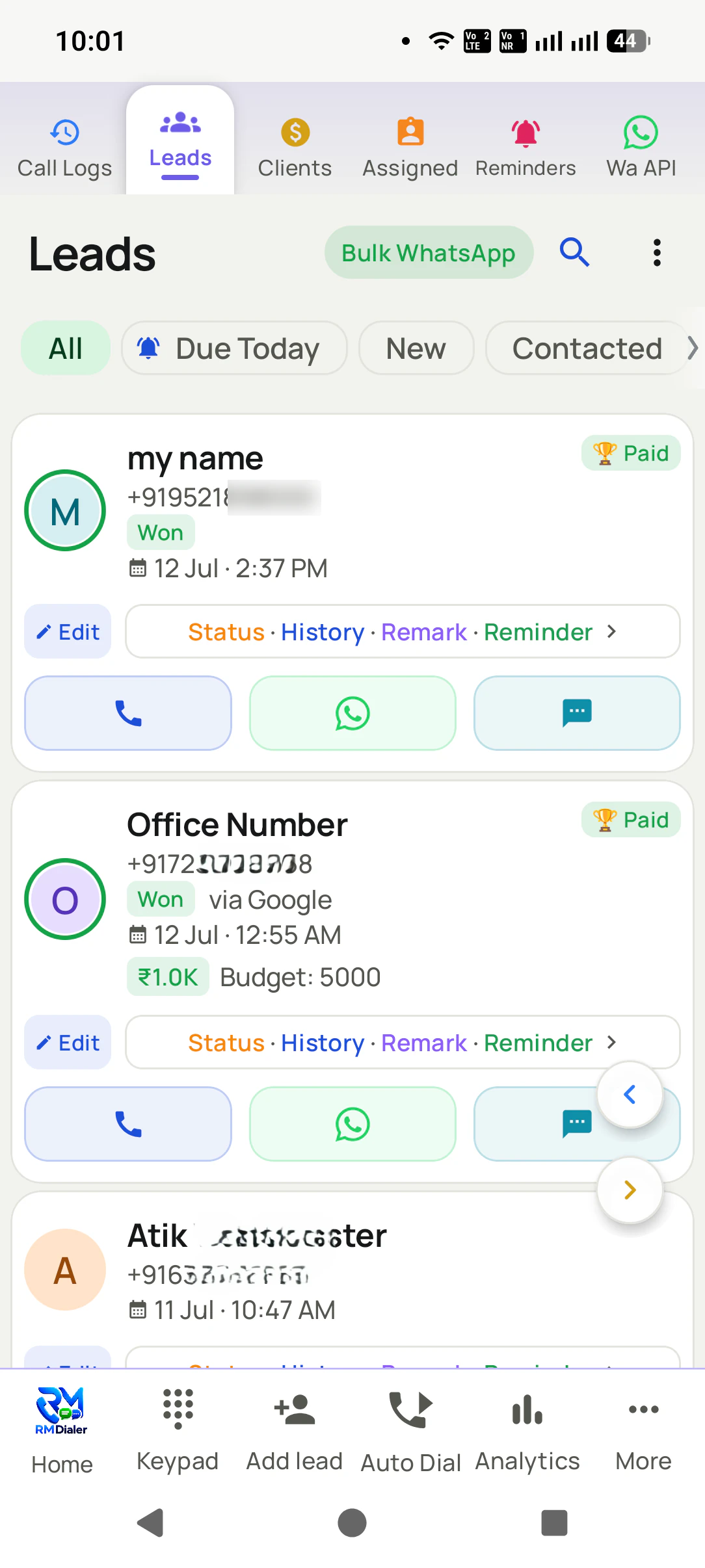
A CRM dialer rings your list and files the result of every call on the person you rang, in the same app. In RMDialer the list rings itself, and each call leaves a status, a remark and a callback on the record.
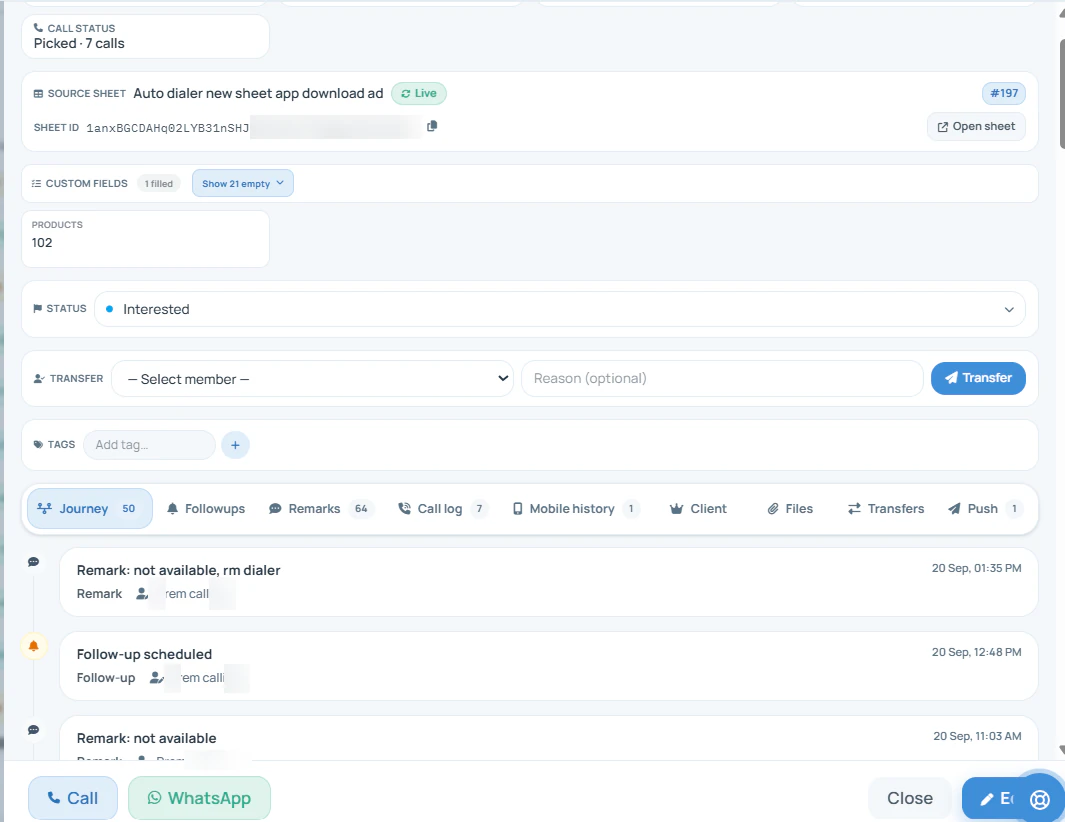
An auto dialer with CRM is one app that rings a list of numbers in turn and keeps a record of every person it rang: status, remark, custom fields, tags, every call and WhatsApp message in order, and the next follow-up. RMDialer is built that way on Android, so the note taken after a call is still on the buyer's record when the next call, from anyone, comes months later.
Key takeaways
The outcome sheet after each call writes the status, remark and callback straight onto the person's record.
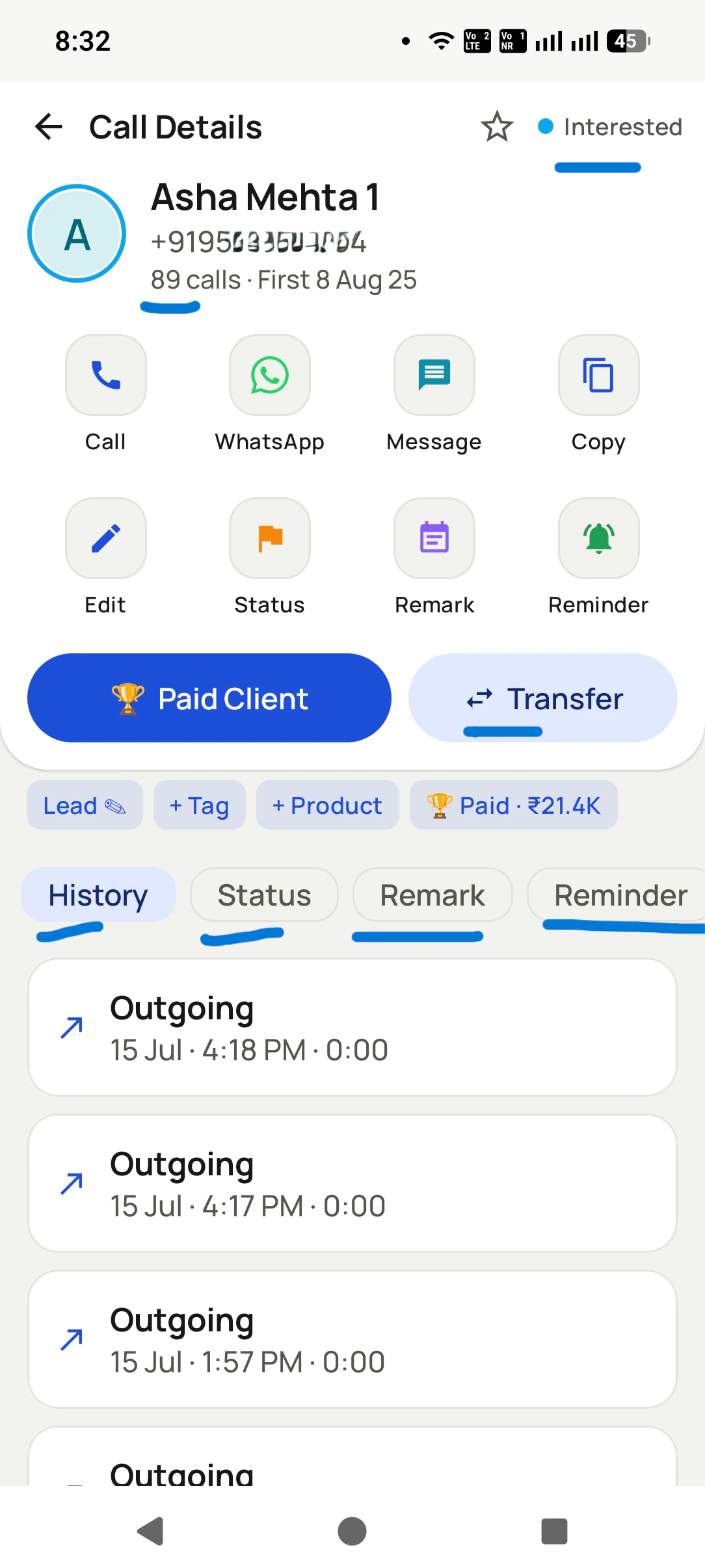
Every call and WhatsApp message on one buyer sits in one history, whichever caller placed it.
When a lead moves to another caller the whole history moves with it, so nothing restarts from a blank record.
An existing CRM can pull RMDialer's call logs over the API instead of being replaced.
One price per user covers the dialer and the CRM: ₹159 a month on yearly billing in India, $29 a year elsewhere.
Why one app beats two
Auto dialer with CRM benefits
What a calling team gets when the dialer and the customer record are the same thing.
1
Notes written while the call is fresh
The outcome sheet after each call writes the status, remark and callback straight onto the person's record.
2
No copying between apps
The dialer and the record are one app, so nothing is retyped into a CRM at the end of the day.
3
One history per buyer
Every call and WhatsApp message sits on one timeline, whichever caller placed it.
4
Lists built from the record
Filter by status, tag or custom field and dial only the buyers that match.
5
Handovers without restarting
When a lead moves to another caller, the whole history moves with it.
6
One price for dialer and CRM
A single per-user price covers both, and calls ride on each phone's own plan.
CRM record for each person the auto dialer rings
The parts of one customer record in RMDialer, and how each gets filled.
Auto dialer with CRM: what RMDialer keeps on every record
Part of the record
How it gets there
Status
Chosen on the outcome sheet when the call ends
Remark
Typed or dictated on the same sheet
Next follow-up
Set on the sheet, then rings like an alarm on the day
Custom fields and tags
Your own fields, filled on the record or from an import
Call and WhatsApp history
Every call and message on that person in one order, whichever caller placed it
Owner
Moves with the whole history when the lead goes to another caller
Link to another CRM
An existing CRM can pull RMDialer’s call logs over the API
The record
Auto dialer with CRM vs a plain dialer
A dialer without a CRM forgets the call the moment it ends. Six parts of the record, and a dialer on its own has nowhere to put any of them, which is why a good call is forgotten by Friday.
Lead status
New, interested, quoted, bought, not now. The status is set on the sheet that appears when the call ends, so the list can be filtered by it the same minute.
Call remarks
"Wants the walnut finish, moving in June." One typed line, saved against the person, readable by whoever calls next and by the manager that evening.
Custom fields
Delivery area, last purchase, budget, apartment or villa: whatever your business needs to know about a buyer gets its own field on the record rather than a place in the remark.
Lead tags
Tag a buyer "past buyer", "sofa" or "trade fair" and pull everyone with that tag into a calling list later, whatever their status happens to be.
Call history
Each call the person has had, from any caller, with its time, its length and its outcome. A call dialled by hand lands there too, because RMDialer is the phone app.
WhatsApp history
The catalogue sent after Tuesday's call sits under Tuesday's call. Nobody has to open another app to find out what was sent.
Customer reviews
RMDialer reviews from business users
Real businesses, real numbers: how owners and sales teams across India and 12+ countries use RMDialer every day.
Rated 4.9 by customers 4.7 on Google Play 5K+ downloads India + 12+ countries
“Best CRM dialer we have used for a small team. Call comes in, the lead card is already on screen with the last remark, and the status change is two taps. Only complaint: the web CRM export could use more filters. Otherwise our 6 person sales team lives in it.”
NSNeha SrivastavaFounder · Digital marketing agencyLucknow
“In this business the remark is everything: what the family said last time, which profiles were shared. RMDialer shows that remark the moment they call. The lead CRM inside the dialer replaced my three registers. Hindi and Urdu interface both work for my staff.”
IKIrfan KhanOwner · Matrimony bureauBhopal
“Lead management app for our admission counsellors across 3 branches. Every parent enquiry has a status, a remark and a follow-up, and the branch heads see their own funnel. The bulk WhatsApp for the open-day invite went to 900 parents from the app with delivered and read counts. Admissions were up 18% this year.”
KDKavita DeshmukhAdmissions head · Preschool chainNagpur
“The WhatsApp CRM part sold me. Client chats, their call history and the site visit reminder sit on one record, so when a client rings after two months I know exactly where the kitchen quote stopped. Photos of samples go from the chat inside the dialer. Bengali interface for my junior designer.”
ASAnjali SenOwner · Interior design studioKolkata
“Every visa enquiry moves through counselling, documents and filing as lead statuses, and the counsellor's phone rings for each follow-up. What I check daily is the employee call logs report: calls, connected, talk time per counsellor, on my phone. The register we used to maintain is gone.”
“Team of 9 salesmen on their own SIMs, no VoIP, no per-minute bills. RMDialer telecalling CRM shows me who called which customer, talk time and the remark, employee wise. Arabic interface for two of my staff was a bonus. Support on WhatsApp replied within minutes.”
MFMohammed FaisalSales manager · Building materials tradingDubai, UAE
Reviews are collected from customers on WhatsApp and on this website.
Share yours on WhatsApp
The life of a note
Call notes after a call
Follow one remark from the seconds after the call to the second call months later. This is the part a dialer without a CRM cannot do.
Seconds after the call
The outcome sheet opens on the handset. Status, remark, callback date. Saving it is what lets the next number ring, so it is never skipped for later.
The same minute
The record on the server has the new status and remark, and the Web CRM shows it. Nothing was copied, exported or typed a second time.
On the callback day
The reminder comes out of the record, not a diary: it rings on the caller's phone at the time, with the name, the last remark and the status on screen.
When the person rings in
The incoming call opens the same record before it is answered. What was agreed last week is on screen while the phone is still ringing.
When a caller leaves
Their leads are transferred to someone else with the full history: every call, remark, status change and message. The new caller starts where the last one stopped.
Months later
A tag or a status filter turns the old records into a new calling list. The remark from the first call is still there when the second one rings.
The reason this matters is not neatness. A buyer who said "call me after the container lands" is a sale if somebody
calls when the container lands, and a stranger if nobody remembers. An auto dialer on its own gets through the list
faster and then forgets it faster. The CRM half is what turns the calls into something the business still owns next
quarter. For what the category term itself means, see what is a
CRM dialer; this page is about the record.
Three situations
Auto dialer and CRM together vs an auto dialer for the CRM you have
People arrive at this question from three places. The answer differs, and RMDialer fits all three without pretending they are the same.
No CRM yet, just the phone and a notebook
The auto dialer and the CRM arrive as one app. The first list you dial creates the first records, and the notebook is retired the same afternoon.
A spreadsheet standing in for a CRM
Upload it. Columns become fields, the sheet becomes the first list, and from then on the record updates from the call rather than from someone editing a row after it.
A CRM you already pay for and keep
Keep it. RMDialer dials the list and keeps the record on the phone side; your CRM pulls the call logs over the API, so a call made in the field shows up there too.
The third case is the one most often got wrong. Replacing a CRM that holds five years of accounts because the sales
team needs a dialer is a large project for a small need. Keeping it and letting it pull call logs over the API is an
afternoon's work for whoever looks after it, and the salespeople get the dialer, the outcome sheet and the callbacks
on the phone from the first day. The
dialer API page covers what crosses the wire.
Manager view
Web CRM view for a manager
Six views, each read from what the handsets saved during the day. Nobody compiles anything.
Leads by status and caller
How many are interested, quoted or gone quiet, and which caller holds each. A stalled record is visible before the month is.
Lead timeline
Open any buyer and read every call, remark, status change and message in order, from any caller who ever touched the record.
Calls and talk time per caller
Calls placed, calls connected, minutes spoken, per person and per day. Read beside the outcomes, so busy and productive stay separate words.
Callbacks due, kept and slipped
Every promise made on the outcome sheet, grouped by day and by caller, with the missed ones at the top.
Transfer and edit history
Who moved which lead to whom, and who changed a budget or a status, with the time. Useful the day two salespeople both claim a buyer.
Export and API
Records and call logs go out as a sheet, or another system reads the call logs over the API on a schedule. Either way the record stays yours.
One price for both halves
Auto dialer with CRM price
The dialer and the CRM are one product, so there is one price per user, in rupees or in dollars.
First: three days free
The whole product for the whole team, no card. Load real past buyers rather than test names, because the value of
the record only shows when the second call finds the first call's remark waiting.
India: ₹159 per user a month
On the yearly plan, or ₹249 a month on the quarterly plan, tax extra. No CRM seat on top, no charge for
fields, tags, transfers or the API.
Elsewhere: $29 per user a year
Or $12 per user for three months, billed in dollars. The record, the dialer, WhatsApp, reminders and the
Web CRM are the same product in every country.
Calls go out on each salesperson's own SIM, so there are no calling minutes on the bill from us.
A worked example
1,200 past buyers with two salespeople: a furniture importer in Sharjah
An illustration with round numbers: one warehouse, one new container, and records that outlast the people who made them.
Picture a furniture importer in Sharjah with a warehouse off the industrial road, two salespeople, and 1,200 past
buyers in an old invoicing system: everyone who bought a sofa, a bed or a dining set in the last three years. A
container of dining sets is due in five weeks and the owner wants those buyers called before the retail ads run.
The list is exported as a sheet, uploaded into RMDialer with "last purchase" and "delivery area" as custom fields,
tagged "past buyer", and split 600 each. Each salesperson works it from their own phone between showroom walk-ins.
After every call the outcome sheet takes the status and a remark: "has the six-seater, wants the eight-seater in
oak", "moved to Ajman, still interested", "not now, reorder cushions in winter". Buyers who want to see the range get
the catalogue on WhatsApp under the same call.
Three weeks in, one salesperson resigns with 380 numbers still uncalled and 140 callbacks booked. The owner transfers
all of them to the remaining salesperson in the Web CRM in a few minutes. Every record arrives with its history, so the
callback that rings on Thursday shows "wants the eight-seater in oak" to a caller who never made the first call, and
the buyer does not have to repeat himself.
By the time the container clears, 212 buyers are marked interested and 61 have paid a deposit. The owner reads the
whole campaign in the Web CRM: calls and talk time per salesperson, statuses, the callbacks kept and the ones that
slipped. Next winter the "reorder cushions" remarks are one tag filter away from being the next calling list, and
the invoicing system pulls the call logs over the API so the accounts side sees the same story.
Auto dialer CRM software, auto dialer and CRM, power dialer with CRM: one record, several names
The phrase shifts with what the person already has. Someone starting from nothing writes "auto dialer and CRM" as a
shopping list of two things; someone who already pays for a CRM writes "auto dialer for CRM" and means "will it feed
mine"; a sales manager who has used a call floor writes "power dialer with CRM"; and an Indian team writes
"telecalling dialer and CRM" because telecalling is the job's name there. This page answers the one question under all
of them, which is what survives the call.
You will also see it called auto dialer crm software, auto dialer and crm, auto dialer for crm, auto dial crm, telecalling dialer and crm and power dialer with crm. They describe the same thing, so whichever phrase
brought you here, this is the page for it.
How it works
Auto dialer with CRM setup for a sales team
1
Bring the people in
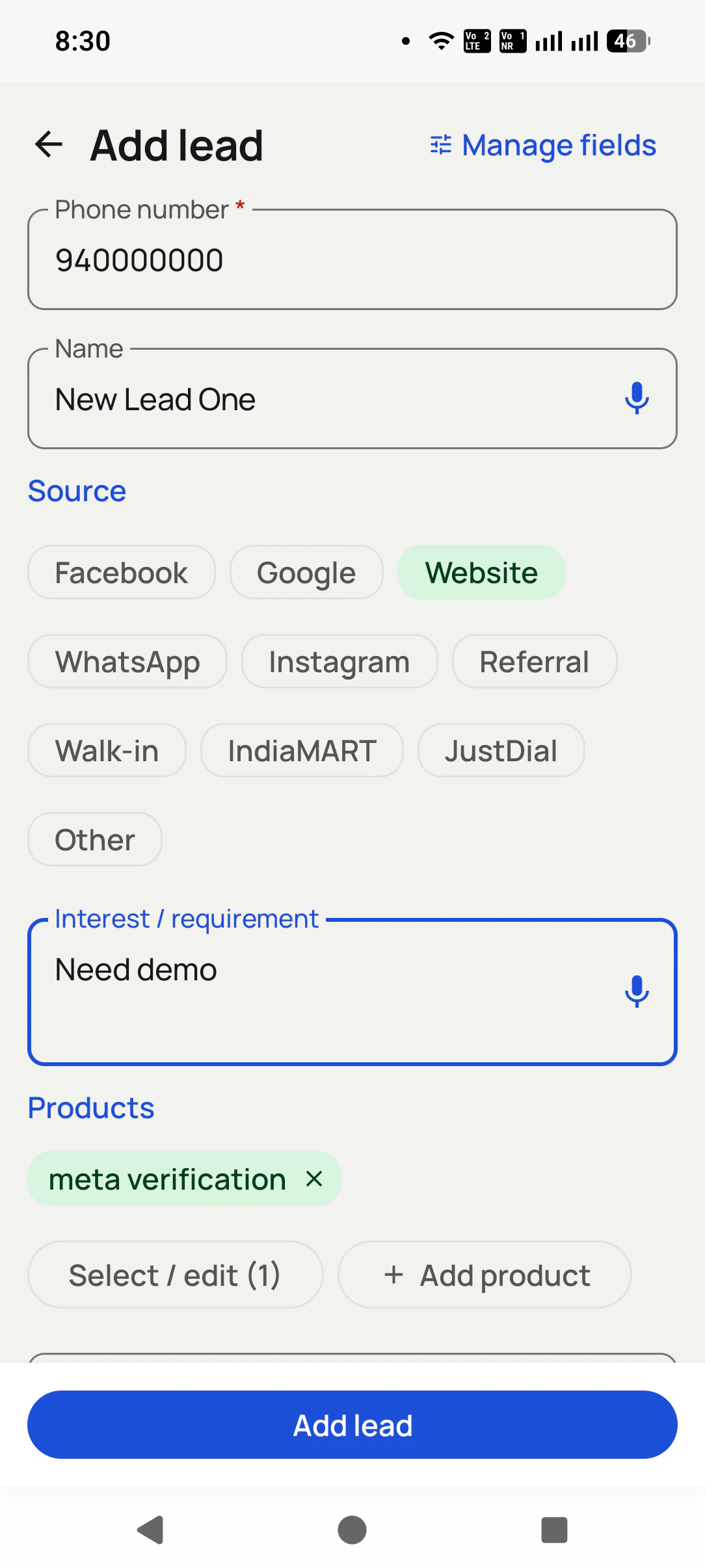
Upload past buyers and enquiries from Excel, CSV or a Google Sheet, or connect a form or portal. Map the columns to fields once; tag the list by where it came from.
2
Dial, and let the record fill itself
Start the list. After each call, status and remark in two taps, a callback date if one was promised. Each save is what moves the queue on.
3
Read the records, not a report
Open the Web CRM: leads by status, each caller's day, the callbacks due tomorrow. Transfer a lead or export a sheet when something changes.
Questions
Auto dialer with CRM FAQ
What is an auto dialer with CRM?
One app that dials a list for you and keeps the record of each person it dialled. In RMDialer the two are not connected, they are the same thing: the sheet that opens when a call ends writes the status and remark onto the buyer's record, and that record is what the next call, the callback reminder and the manager's view are all read from.
What happens to the notes after a call?
In a plain dialer, nothing: the note is on paper or in your head, and by evening it belongs to nobody. In RMDialer the note is typed on the outcome sheet in the seconds after the call, saved on the buyer's record, visible in the Web CRM the same minute, shown on screen when that buyer rings in, and carried along if the lead is ever transferred to another caller.
Is auto dialer CRM software one app or two?
It should be one, and in RMDialer it is. Two products joined by a sync means the call happens in one place and the record lives in another, and the gap between them is where notes go missing. When the dialer is the phone app and the record opens with the call, there is no gap to lose anything in.
Can I use an auto dialer for my existing CRM?
Yes, without replacing it. RMDialer dials the list on the phone and keeps the call record there; your CRM pulls the call logs over the API on a schedule, so every call a salesperson made from the field appears against the right contact in the system you already use. The developer pages describe the endpoint and the fields it returns.
Is a power dialer with CRM different from an auto dialer with CRM?
Only in the name. A power dialer rings the next number the moment you are ready for it, one call at a time with a person on the line, and that is exactly how RMDialer works. What the CRM half adds is the same in both cases: the record that survives the call.
What does a lead record hold in RMDialer?
The name and number, a status, a source, the remark from every call, custom fields you define for your trade, tags, the full history of calls with their times and outcomes, the WhatsApp messages sent, the next callback, and a trail of who changed what. It is the same record on the phone and in the Web CRM.
Can I add my own fields and tags to the lead record?
Yes. Custom fields are set up once for the whole team, so a furniture seller has "delivery area" and "last purchase" and a clinic has "treatment" and "insurer". Tags are freer: any caller can tag a person on the outcome sheet, and any tag can be turned into a calling list later.
Does the follow-up come from the record or from a calendar?
From the record. A callback date saved on the outcome sheet becomes a reminder that rings on that caller's phone at the time, opening the buyer's record with the last remark on screen. There is no separate calendar to keep in step, which is why the promise made on the call is the one that gets kept.
What happens to the history when a lead moves to another caller?
All of it travels. In RMDialer a transfer carries every call, remark, status change, message and callback, so the new caller opens the record and reads what the last one agreed rather than ringing the buyer to ask. The Web CRM shows who moved the lead and when.
Does an incoming call open the same record?
Yes, because RMDialer is the phone app rather than a layer over it. When a known number rings, the screen shows the name, the status and the last remark before you answer, and the call is added to the same history as the ones you dialled.
Can WhatsApp messages sit on the same record as the calls?
They do. A template sent after a call, a brochure, a price list, a thank-you, is logged under that call on the buyer's record, so the history reads as it happened: called Tuesday, sent the catalogue, callback Friday. Nobody needs to open a second app to check what went out.
What does a telecalling dialer and CRM show a manager?
Leads by status and by caller, any one person's whole story in order, calls and talk time per caller beside the outcomes, callbacks due and slipped, and who transferred or edited what. RMDialer shows all of it in the Web CRM in a browser, read from the records the handsets wrote during the day.
Can my CRM pull the call logs from RMDialer by API?
Yes. The call logs, with number, direction, time, duration and outcome, are available over the API for another system to read, and the developer pages document the fields. That is how a company keeps its existing CRM and still has field calls land in it without anyone typing.
What happens to the record when the phone has no data?
The call still goes out, because it is an ordinary SIM call, and the outcome sheet still saves on the handset. The record reaches the server, and the Web CRM, when data returns. Nothing typed after a call is lost to a weak signal.
How much does an auto dialer with CRM cost?
RMDialer charges one price per user for both halves: ₹159 a month on yearly billing or ₹249 a month on quarterly billing in India, tax extra, and $29 a year or $12 for three months outside India. There is no separate CRM seat, no calling minutes and no add-on for the API. Three days are free first with every feature on and no card.
Lead automation
Leads from 15+ platforms → auto-assigned round robin → auto dialed → updated. On its own.
Facebook, JustDial, IndiaMART, portals, sheets, Excel: every lead gets an owner and a
place on a calling list, then reports its own outcome.
The business dialer is free forever with no account and no expiry: the keypad, contacts, caller ID, the call log and your call analytics, plus free WhatsApp sends every day. A plan adds the customer record after every call, follow-up reminders, list auto dialing, your team and WhatsApp automation.
Free forever
₹0, no expiry
Your phone app: keypad, contacts, call log and caller ID
Spam and unknown-number screening on every incoming call
Call analytics: your day counted, by outcome, and by who you called
Missed calls kept in their own list, so nothing is returned late
Sending WhatsApp from a call, free every day
Free WhatsApp sends every day with a free account: 15 a day for your first 15 days, then 3 a day. The dialer itself needs no login at all.
On a plan
₹159/user/month, yearly
$29 per user per year, or $12 per user for 3 months, outside India
The customer record: lead status and remarks saved against every call
Follow-up reminders that ring like an alarm on the day you set
Auto dialing a whole list without touching the phone
Your team: seats, assigned calling lists and per-person reports
Automatic WhatsApp after calls, bulk sending and the WhatsApp API inbox
Backup and restore, so a new phone carries on where the old one stopped
Leads arriving on their own from Google Sheets, APIs and lead portals
Try it free for 3 days: unlimited use, no credit card required. Prices are per user, exclusive of taxes.
Business karte ho? Business Dialer chahiye.
Set it as your phone app in one tap. Everything works like before, and then it starts working FOR you.
₹159/user/month on yearly in India, $29/user/year elsewhere · every feature included · Prices are per user, exclusive of taxes.
Free forever: the business dialer never expires, and needs no account
Call recording supported · our team sets it up with you during training
On iPhone and Android. The iPhone app has every feature except the native call log.