Employee Call Logs Report · The Daily Staff Call Report
Employee Call Logs Report for Daily Staff Calls Is RMDialer
A call log report for employees counts each staff member’s calls, answers and talk time for the day. With RMDialer their phones write it by themselves, and you read it on your phone and the web.
Builds itself from the business SIM · Syncs itself to your account · Call recording supported, set up in training
Your own SIM, no virtual number · Android and iPhone apps + Web CRM in one plan · No card for the trial
RAKPS3,500+ businesses on Wappblaster tools · listed on G2, Capterra, SoftwareSuggest
One employee, one tap53 calls · today
Synced by itselfeach phone reports in
Updated
Short answer
What is an employee call logs report?
An employee call logs report is the daily record of every call your staff made or took on the business SIM: calls, connected, missed, rejected, talk time and outcomes, shown per employee for any date range. With RMDialer, the report writes itself: each employee installs the app, it becomes their phone dialer, and every call syncs to your account with its duration, whether it connected, and the customer behind the number. You read it on your own phone or in the Web CRM and export any range to a sheet. The report exists by evening with zero owner work, because the phones write it themselves. The RMDialer employee call logs report records call details, supports call recording, needs no virtual number or call centre, and comes with the auto dialer, lead CRM and WhatsApp automation in the same per-user plan.
Key takeaways
RMDialer is our pick for an employee call logs report, written by the staff phones themselves.
Each staff phone shows when it last synced, so a quiet phone stands out in the report.
Talk time sits next to the call count, so dial-and-cut calling shows up.
WhatsApp voice and video calls are not in the report; every normal SIM call is.
Call history carries on when an employee changes phones and signs in again.
Why owners use it
Employee call logs report benefits
What changes for an owner once the staff phones write the day’s call report instead of the staff.
1
No registers to collect
The day’s calls are counted by the staff phones as they happen, so nobody fills a sheet or sends an evening message.
2
Real counts instead of claims
“80 calls done” becomes 80 counted calls, with how many connected and how long each person actually talked.
3
Missed customers caught the same day
Unanswered customer calls are listed with the lead attached, while a call back can still save the sale.
4
Outcomes, not just a tally
The status and remark saved after each call sit in the report, so it shows what the calling produced.
5
Any day, month or all time
Yesterday for the morning review, 30 days for the Monday trend, exported to a sheet when you need a file.
6
A quiet phone stands out
Each phone shows when it last reported, so a switched-off or logged-out phone is visible the same day.
Employee call logs report columns
What the report shows for each employee, for any date range, on your phone or in the Web CRM.
Employee call logs report: the columns RMDialer shows per employee
Column
What it shows
Calls
Every call made or taken on the business SIM
Connected
Calls where the other person answered
Missed
Incoming calls nobody answered
Rejected
Calls turned down
Talk time
Time spent talking, next to the call count, so dial-and-cut calling shows up
Outcomes
The status saved after each call
Last synced
When each phone last reported, so a quiet phone stands out
What’s inside
Employee call logs report, line by line
Eight things a staff call report should show. A bare call count is the weakest of them; the lines below it are where the truth lives.
Employee call logs report
per employee · any date range
01Total callsIncoming, outgoing, missed and rejected, per employee and for the whole team, for any day or range.
02Connected vs not connectedHow many calls were actually answered, because 80 dials with 12 answers is a different day than it sounds.
03Talk timeTotal talking minutes per employee. The one number that cannot be inflated by dial-and-cut calling.
04Unique numbersHow many different people were called, so ten redials of one number read as one conversation, not ten.
05Missed calls, with the lead attachedEvery unanswered customer call, linked to who it was, so nothing quietly disappears.
06Lead status after each callInterested, follow-up, won, lost: the status mix shows what the calls produced, not just that they happened.
07Remarks and follow-upsThe note saved after each call and the reminder that was set, so the report reads like the day, not like a tally.
08Last-synced stamp per phoneWhen each employee’s phone last reported in. A phone that went quiet is itself a line in the report.
The whole-team totals sit above the per-employee lines, so one screen answers both "how was the day" and "how was Ramesh’s day".
Customer reviews
RMDialer reviews from business users
Real businesses, real numbers: how owners and sales teams across India and 12+ countries use RMDialer every day.
Rated 4.9 by customers 4.7 on Google Play 5K+ downloads India + 12+ countries
“Employee call tracking without a call centre was exactly the requirement. 12 field executives on their business SIMs, and by evening I have calls, connected, missed and talk time per employee on my phone. Nobody types a report. Two people who were "on calls all day" turned out to be doing 11 calls. Fixed in a week.”
VRVikram ReddySales head · Solar EPC companyHyderabad
“Collections calling is volume work. The auto dialer clears 250 numbers per executive per day from their own SIM, promise-to-pay dates become reminders, and the daily call report shows connected versus not reachable per person. Talk time per employee ended the "phone was busy all day" excuse.”
“Every visa enquiry moves through counselling, documents and filing as lead statuses, and the counsellor's phone rings for each follow-up. What I check daily is the employee call logs report: calls, connected, talk time per counsellor, on my phone. The register we used to maintain is gone.”
“Order calling to 350 chemists every week. The list auto dials from each MR's own SIM, the order remark goes on the chemist's number, and I see calls and talk time per MR every evening on the web. Bulk WhatsApp for the new scheme went to the whole list from the call log in one go.”
MKManoj KumarRegional head · Pharma distributionPatna
“Forty counsellors, all on RMDialer as their telecaller app. Assigned queues, sessions from their own SIMs, and a live team dashboard with calls, connected and talk time per counsellor. The employee-wise call logs report replaced two Excel sheets and one full-time MIS person. Rollout took a week.”
SKSneha KapoorHead of inside sales · EdTech companyMumbai
“Good telecalling CRM for a small Saudi team. Arabic app, calls from our STC SIMs, and the manager report per employee is what we bought it for. Four stars because I want a desktop app for the manager too, not only the web. Support fixed our SIM selection question the same day.”
AAAhmed Al-QahtaniSales supervisor · Car rental companyRiyadh, Saudi Arabia
Reviews are collected from customers on WhatsApp and on this website.
Share yours on WhatsApp
One day to all time
Daily call report, monthly and all time
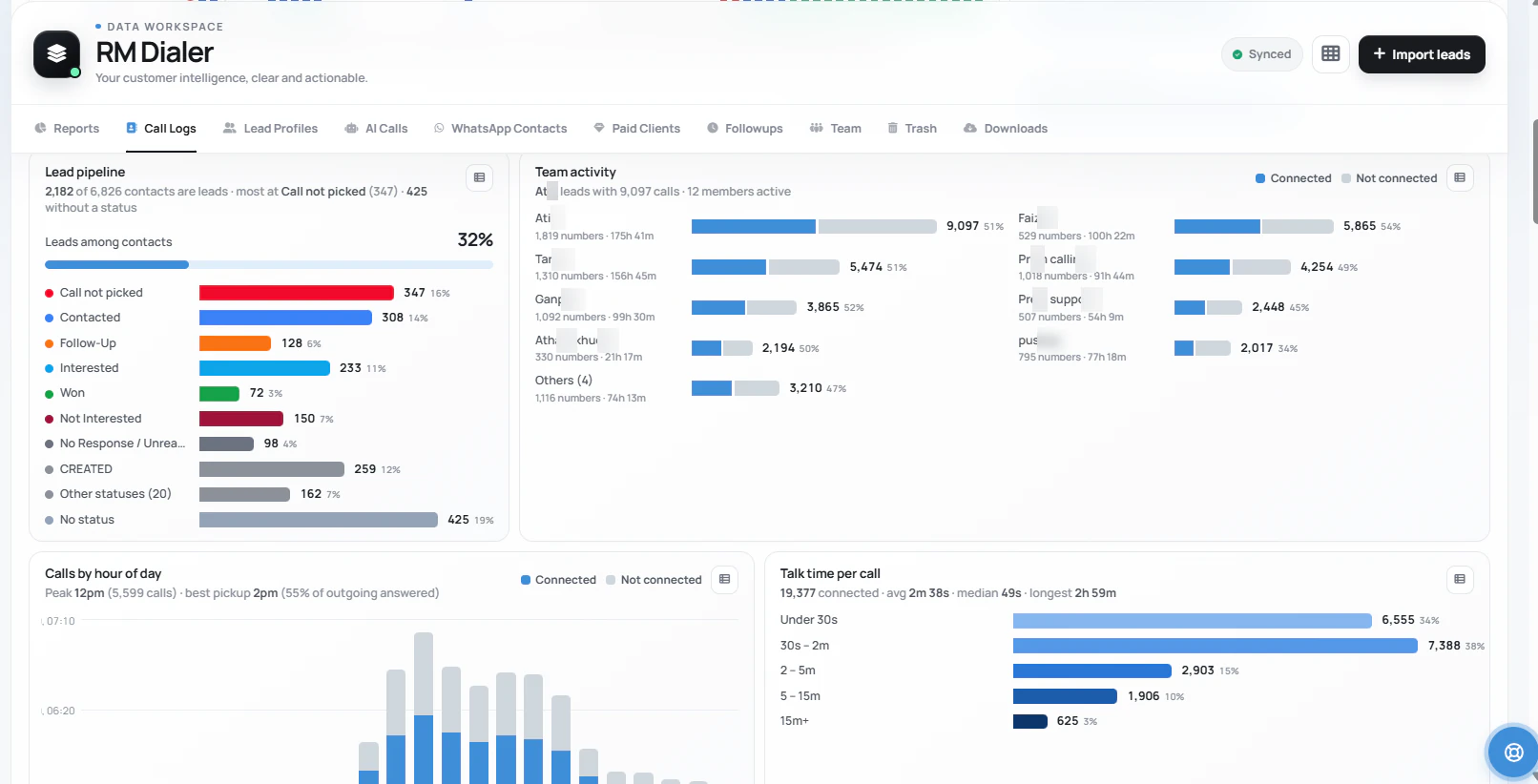
Today for the evening check, yesterday for the morning review, 30 days for the Monday trend, all time for the full picture. The screen here is a real account: 38,424 calls and 851 hours of talk time, counted without anyone filing a report.
Whole-team totals: calls, connected, missed and talk time
Status chips with counts, so outcomes read at a glance
History survives phone changes: sign in and it continues
Export any range to a sheet for reviews and incentives
How owners read it
Call log report: how owners read it each day
A call logs report is only useful if reading it fits inside a working day. This is the routine owners settle into within a week.
1Morning, 2 minutesYesterday, per personOpen the Web CRM, set the range to yesterday, and read each employee’s calls, connected and talk time. The gap between "80 calls" and 80 counted calls shows up here.
2Midday glanceWho is quiet today?Today’s counts build live as phones sync. A caller whose numbers have not moved by lunch is a conversation for 1 pm, not a surprise at 7.
3EveningToday’s report, no collectingBy evening the day’s call logs report is simply there: no registers, no end-of-day messages, no "sir, network issue". Missed calls that nobody returned are listed with their leads.
4MondayThe 30-day viewSwitch the range to the last 30 days and read the trend: who is climbing, who is coasting, and whether talk time is keeping up with call counts. Export any range when you need it in a sheet.
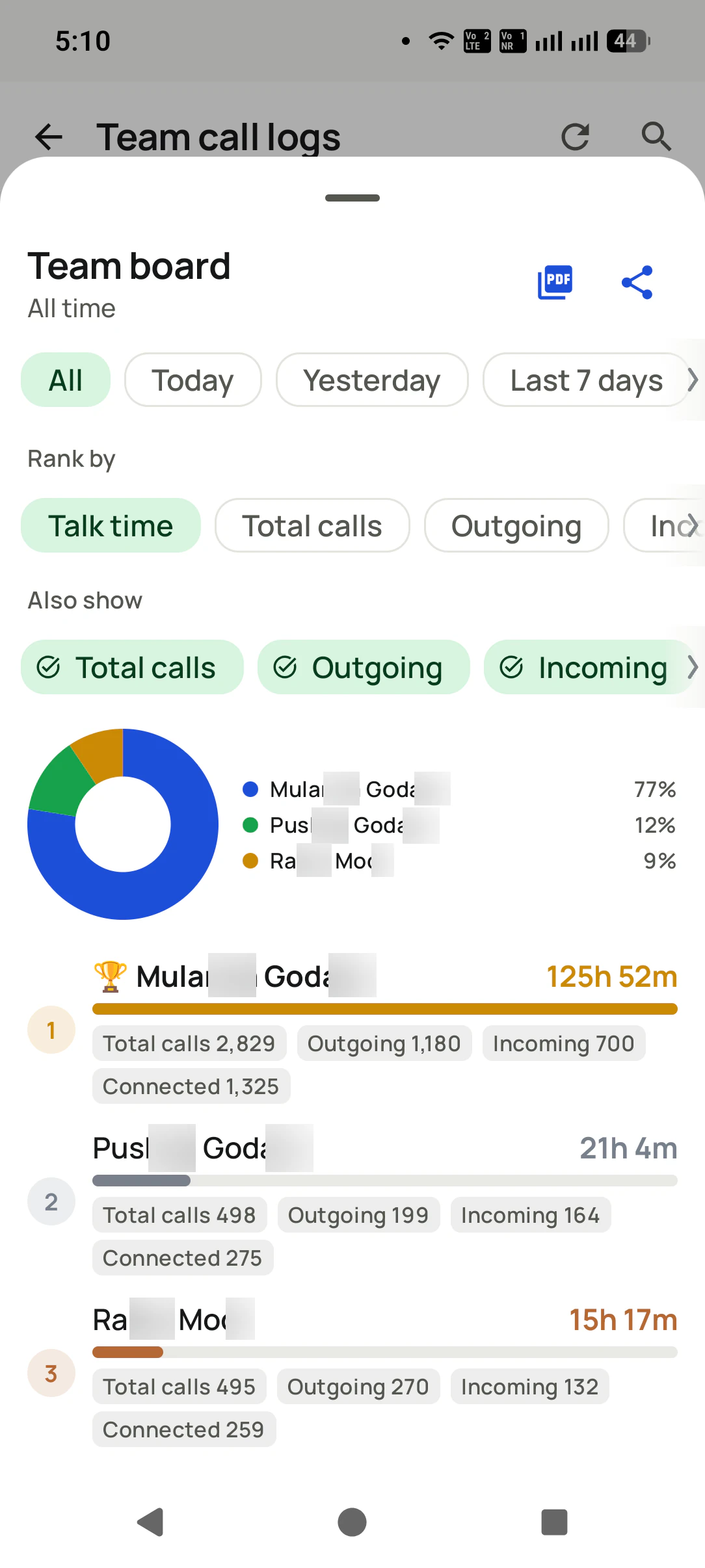
The team board on your phone
Rank the team by talk time, total calls, outgoing or incoming for any period, then export it as a PDF or share it to the team group.
Where the numbers come from
Tap any number in the team call logs and every call behind the totals opens, tagged with the employee and the SIM. Each line is a call that really happened on a business SIM.
The report is included in RMDialer’s single plan, ₹159 per user per month on yearly billing in India or $29 per user per year, or $12 per user for 3 months, outside India, alongside the auto dialer, lead CRM and WhatsApp automation. See pricing.
Questions
Employee call logs report FAQ
How do I get a daily call report of my employees?
Install RMDialer on each employee’s Android phone: it becomes their phone dialer, and every call on the business SIM is counted automatically. From that day on, the daily call report builds itself: you open the app or the Web CRM, pick the day, and read calls, connected calls, missed calls and talk time per employee. Nobody fills a register and nobody sends an end-of-day message.
What should an employee call report include?
A useful staff call report shows more than a call count. Look for connected vs unanswered calls, total talk time, unique numbers dialled, missed calls with the customer attached, and what each call produced: the lead status, the remark and the follow-up that was set. A count alone is easy to inflate; talk time and outcomes are what tell you the work happened.
Can I export the call report to Excel?
Yes. Any range of the report can be exported from the Web CRM, so month-end reviews, salary incentives and audits can run on a sheet while the day-to-day reading stays in the dashboard.
Can I see the staff call report on my phone?
Yes, both places. The owner sees the same report in the RMDialer app on their own phone and in the Web CRM in any browser on a laptop. The phone view is built for the morning and evening check; the web view is built for filtering, longer ranges and exports.
Can I see one employee’s call report separately?
Yes. The report has an employee-wise filter: pick any staff member and any date range, today, yesterday, the last 30 days or a custom range, and read just their calls, connected, missed and talk time. The same screen shows the whole team together when you clear the filter.
How far back does the call logs report go?
Everything since the app was installed stays in your account, synced and backed up, so the report runs from a single day to an all-time view. Changing an employee’s phone does not lose history: they sign in on the new phone and the record continues.
Is a call logs report the same as call recording?
No. A call logs report is the record around each call: who, when, how long, whether it connected and what came of it. Call recording is the audio of the conversation, and RMDialer supports it too: our team sets it up with you during training. The report answers the daily question, which is whether the calling actually happened and what it produced; recordings answer what was said on the calls that matter.
Does the report include WhatsApp calls?
WhatsApp voice and video calls are internet calls that never enter the phone’s call log, so no call-log report can count them. Every normal SIM call is included no matter which app placed it, and on the WhatsApp side RMDialer tracks the chats and automatic messages tied to each lead instead.
Is there a free employee call report app?
RMDialer’s free 3-day trial gives the whole team the full report with no card. After that it is ₹159 per user per month on yearly billing in India, plus taxes, or $29 per user per year, or $12 per user for 3 months, outside India, with the auto dialer, lead CRM and WhatsApp automation included alongside the report. Permanently free report apps usually cap the days of history, add ads, or stop at counts without outcomes, which is the part of the report that matters.
What is the difference between a call logs report and employee call tracking?
Employee call tracking is the system: the app on each staff phone that counts every business-SIM call automatically. The call logs report is what the system produces: the numbers you actually read each morning and evening. RMDialer is both, and our employee call tracking page covers the system side: how the capture works, consent, and how teams roll it out.
How to track employee calls on Android without call recording?
Install a call tracking app that becomes the phone app on each employee's Android phone. It reads the phone's own call log, so every call on the business SIM is counted with direction, duration and outcome, and syncs to the owner's report. You get who was called, when, for how long, what status was saved and what follow-up was set, and call recording is supported too, set up with you during training.
How can a manager see every call the team makes?
With a call tracking app installed as the phone app on each staff phone, every incoming, outgoing and missed call on the business SIM syncs to the owner's dashboard by itself. The manager filters by employee and date to see calls made, calls connected, missed calls, talk time and the status saved after each call, without asking anyone for a report.
Is employee call tracking legal in India?
Tracking business call activity on a company phone or business SIM, with employees informed, is accepted practice in India. Put it in the employment policy, tell staff what is collected (call details, and recordings if you switch them on) and why, and keep personal SIMs out of it. India's DPDP data protection law rewards exactly this: collect only what you need and be open about it.
Is call recording legal in India for business calls?
Recording your own calls is not illegal in India, but recording without telling the other party can breach privacy expectations and, for customer data, the DPDP rules on consent. RMDialer supports call recording, and our team sets it up with you during training, including how to tell customers when a call is recorded.
Daily call report of employees, written by the phones
Most staff call reports are written by the staff: a register, an Excel sheet, an
end-of-day WhatsApp message. That is why they are always complete and never true. The report
this page describes is written by the phones instead. Each employee’s Android phone runs
RMDialer as its dialer, every call on the business SIM is counted the moment it ends, and the
employee call logs report assembles itself in the owner’s account: calls, connected, missed,
rejected, unique numbers and talk time, per person, for any date range, exportable to a
sheet. The employee call tracking page covers the
system side: how the capture works, consent, and rollout. The same calls read as patterns,
such as the best hour to reach customers, sit on
SIM based call analytics, what each figure means on the
call log analytics app page, and how that history survives
a lost or replaced phone is on SIM based call logs.
Reading it well takes less time than collecting a register ever did. Counts alone flatter
dial-and-cut calling, so the morning review pairs them with talk time and connected calls,
and the lost-lead view lists the
missed calls nobody returned, each attached to its customer. Because the same app is the
team’s business dialer and CRM, the report
carries outcomes too: the status after each call, the remark, the follow-up that was set.
That is the difference between a call details report and a tally, and it is why the
team version shows assignment-to-first-call
time alongside the counts.
None of it involves cloud telephony: no virtual numbers, no per-minute charges, and customers
keep seeing the number they know, a distinction the
on-phone vs cloud comparison spells out. The
report is not a paid add-on either; it ships in
RMDialer’s single all-in plan with the auto dialer, lead CRM and
WhatsApp automation, with a free 3-day trial for the whole team.
No trial clock on the dialer
RMDialer free plan vs paid plan
The business dialer is free forever with no account and no expiry: the keypad, contacts, caller ID, the call log and your call analytics, plus free WhatsApp sends every day. A plan adds the customer record after every call, follow-up reminders, list auto dialing, your team and WhatsApp automation.
Free forever
₹0, no expiry
Your phone app: keypad, contacts, call log and caller ID
Spam and unknown-number screening on every incoming call
Call analytics: your day counted, by outcome, and by who you called
Missed calls kept in their own list, so nothing is returned late
Sending WhatsApp from a call, free every day
Free WhatsApp sends every day with a free account: 15 a day for your first 15 days, then 3 a day. The dialer itself needs no login at all.
On a plan
₹159/user/month, yearly
$29 per user per year, or $12 per user for 3 months, outside India
The customer record: lead status and remarks saved against every call
Follow-up reminders that ring like an alarm on the day you set
Auto dialing a whole list without touching the phone
Your team: seats, assigned calling lists and per-person reports
Automatic WhatsApp after calls, bulk sending and the WhatsApp API inbox
Backup and restore, so a new phone carries on where the old one stopped
Leads arriving on their own from Google Sheets, APIs and lead portals
Try it free for 3 days: unlimited use, no credit card required. Prices are per user, exclusive of taxes.
Tonight’s call report, without asking anyone
Install on the staff phones this afternoon and the day’s report writes itself by evening. Free 3-day trial, no card.
₹159/user/month on yearly in India, $29/user/year elsewhere · every feature included · Prices are per user, exclusive of taxes.
Free forever: the business dialer never expires, and needs no account
Call recording supported · our team sets it up with you during training
On iPhone and Android. The iPhone app has every feature except the native call log.