
Beat planning
There is no planner that assigns outlets to days. Keep the beat in your own sheet and use the recorded stops to check it.
Field force tracking app
A field force tracking app shows which outlets a company's reps actually visited and how long they stayed, using the phone each rep already carries. RMDialer turns a rep's working day into numbered stops on a map, with time per outlet, time in the office, the kilometres and the breaks, ready in the Web CRM.
Free personal dialer. Paid features include a 3-day trial; no card required.
Team plans: ₹159/user/month in India, $29/user/year elsewhere, billed yearly + taxes →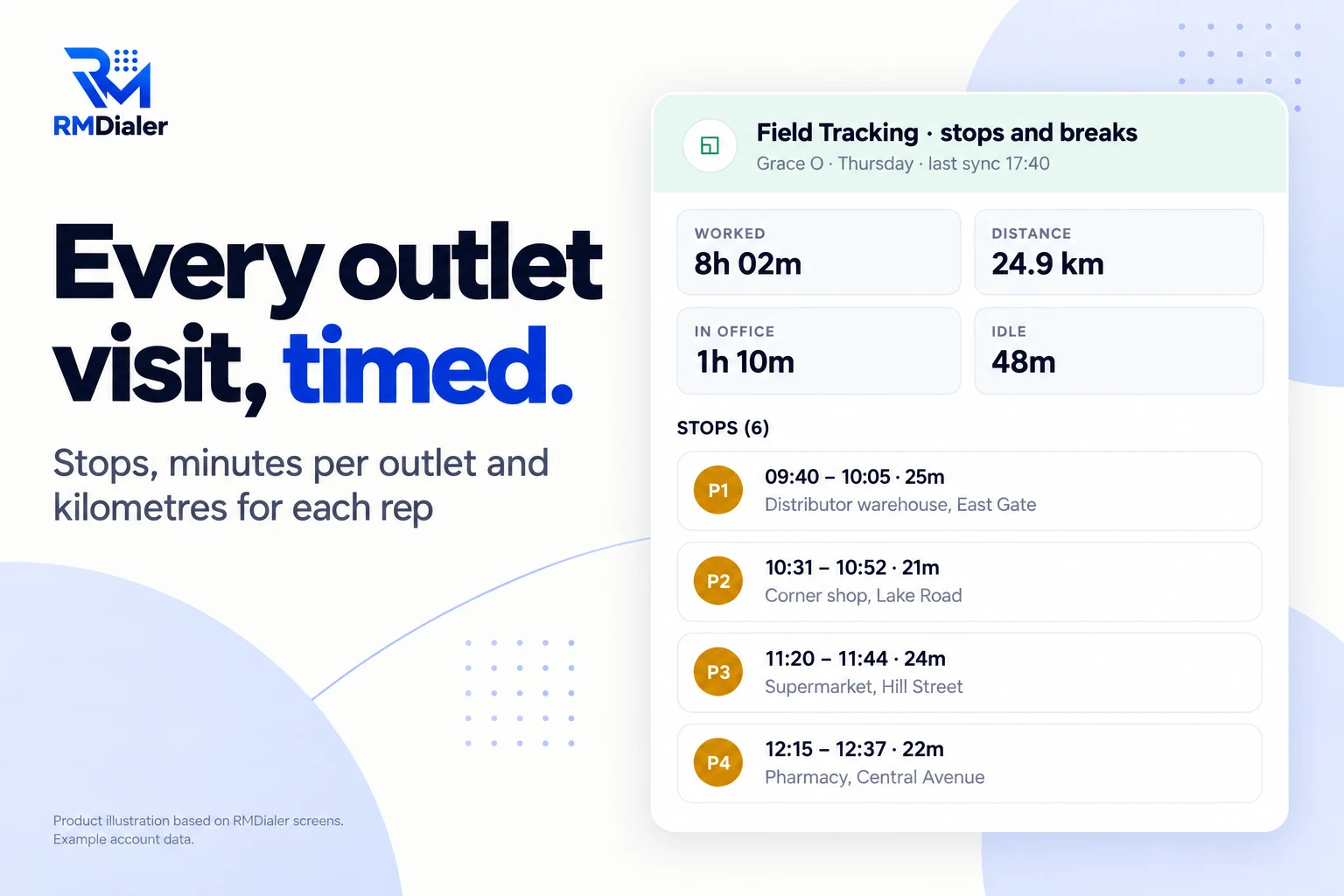
Five minutes in one place counts as a visit.
Updated
Short answer
A field force tracking app should show which outlets each rep visited, how long they stayed at each, how much of the day went to the office and the market, and how far they travelled. RMDialer records the rep's location from punch in to punch out and lists every stop of five minutes or more with its times and place, next to the day's kilometres, idle time and breaks.
Key takeaways
Why sales managers use it
What a manager running reps in the market gets once each rep's phone records the working day.
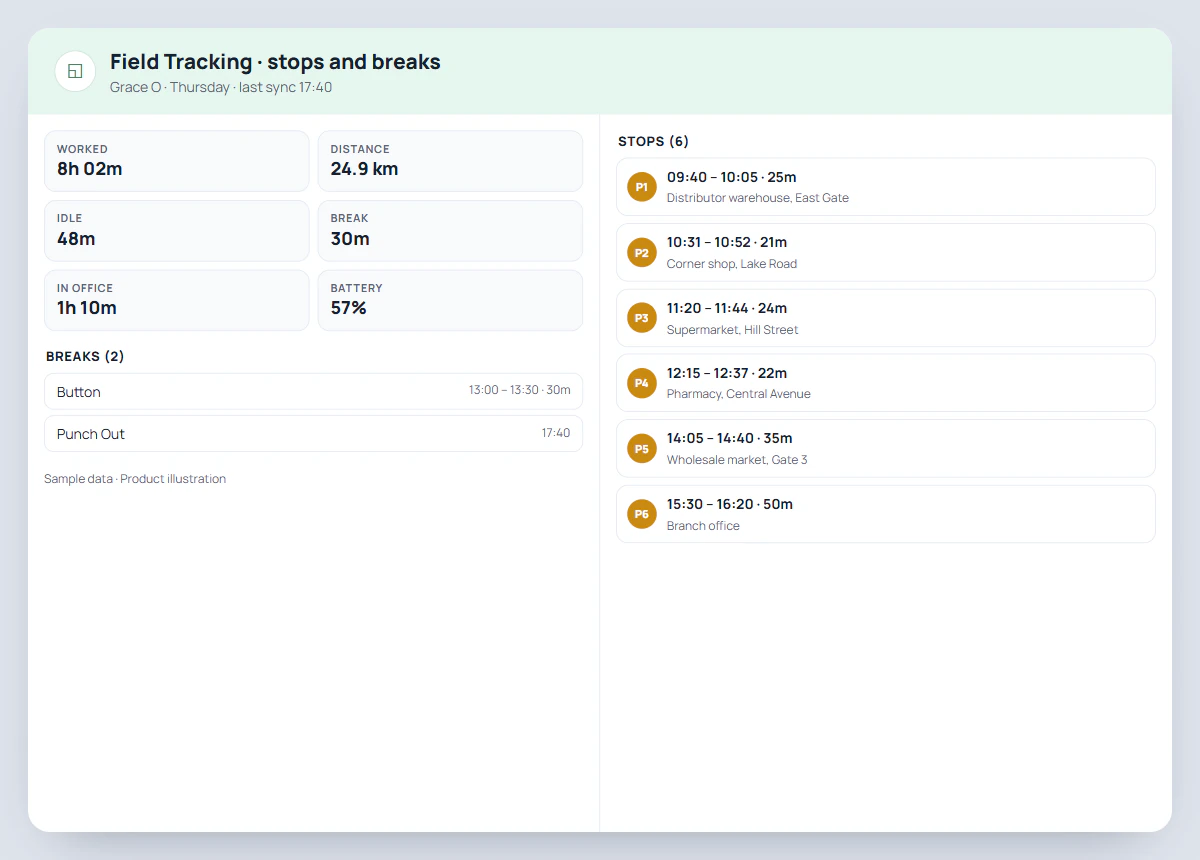
Each stop of five minutes or more is listed with its time, length and area name.
Arrival and departure show the dwell time at each shop, so a two-minute stop stands out.
Time inside the office area is counted from the route, apart from time out in the field.
The day's distance comes from the route, with fake-location points left out.
The rep's own phone does the tracking during duty hours; no GPS box to buy or fit.
The same app is the rep's phone dialer, so calls to retailers sit next to the visits.
Answers without a phone call
Each of these used to need a call to the rep or a written beat report. On the web they come from the day's route.
| Question | Where the answer comes from |
|---|---|
| Did the rep start the beat on time? | The start marker and punch-in time on the day's map |
| Which outlets were visited? | The numbered stops, each with an area name |
| How long at each outlet? | Arrival and departure on each stop |
| How much of the day was in the office? | The In office total, worked out from the office circle |
| How far did they travel? | The Distance total for the day, and the period total in the report |
| Was the phone switched off or dead? | The battery level and the last sync time |
Plain limits
Several tools that rank for field force tracking bundle more than location. Three things they may offer that RMDialer does not:
There is no planner that assigns outlets to days. Keep the beat in your own sheet and use the recorded stops to check it.
RMDialer records the road taken; it does not suggest a shorter one or re-order outlets.
There is no product catalogue or order form for retailers. Reps can note an order in a remark on the outlet's record, which also saves where the remark was written.
What it adds instead is the calling side: the same app is each rep's phone dialer, so calls to retailers and distributors are logged too. Reps who mainly sell on visits are covered on the field sales tracking app page, and teams that mix calls and visits on the sales team tracking app page.
A beverage team in Kampala
Picture a beverage company in Kampala with eight reps on motorbikes, each covering a beat of about thirty shopkeepers and kiosks: checking stock, collecting empty crates and taking the next order. The sales manager used to read a handwritten list of outlets every evening and had no way to tell a real market visit from a phone call made at the depot.
Each rep now punches in at the depot and the motorbike day becomes a list of stops. The manager sorts them in the evening: a rep with twenty-six stops averaging twelve minutes, another with nine stops and a long one at a single address. Dwell time made the difference visible, and the route coverage of each beat could be compared week to week. Time per outlet went into the Monday review instead of the number of outlets claimed, and the long stops turned out to be a wholesaler that needed its own visit day. The company is an illustration, not a named customer.
For the punch itself, with the office circle and a selfie, see the geofencing attendance app; for the full picture of what live location records, see the employee location tracking app.
Try it with your own workflow
Pick one rep and one beat. We will turn on live location with them and show the stops, the time per outlet and the kilometres on the web that evening.
Team features, one plan
₹159/user/month
₹1,908 per user, billed yearly, plus taxes, in India. $29 per user per year, or $12 per user for 3 months, outside India.
The personal dialer, call log and personal analytics are free forever. Team access and saved lead workflows require a plan. SIM charges and any WhatsApp provider charges are separate.
Compare free and paid features →A field force tracking app records where a company's field staff go during the working day, usually reps and merchandisers visiting shops, so a manager can see the visits without asking for reports. RMDialer does it on the rep's phone between punch in and punch out and shows each day as a route with stops on the web.
Ask each rep to turn on live location in RMDialer once and punch in at the start of the day. Every place they stay for five minutes or more becomes a numbered stop on the day's map in the Web CRM, with the time they arrived, the time they left and the area name.
Yes. Each stop shows arrival, departure and the minutes in between. Short stops, such as a two-minute visit where a full stock check was expected, are easy to spot in the list.
No. RMDialer records the route a rep actually took; it does not plan beats, sequence outlets or suggest the shortest route. Many teams keep their beat plan in a sheet and use the recorded stops to check it was followed.
Yes. Each day carries an In office figure, the minutes the rep's route spent inside the branch circle, so office hours and market hours can be read apart.
No. The rep's Android phone or iPhone records the location. There is nothing to fit to a vehicle and nothing to collect when someone leaves.
The phone keeps recording and holds the points until it reconnects, then sends them together. The day's route fills in completely; it only arrives later.
Yes. Tracking runs from the phone in the rider's pocket while they are punched in, whatever they travel on. Stops are counted where the rider stays five minutes or more.
Each rep needs one RMDialer seat, and field tracking is inside it: ₹159 a rep each month when paid for the year in India; $29 per user per year, or $12 per user for 3 months, outside India. There is no per-device or per-vehicle charge, and the full app can be tried for 3 days.
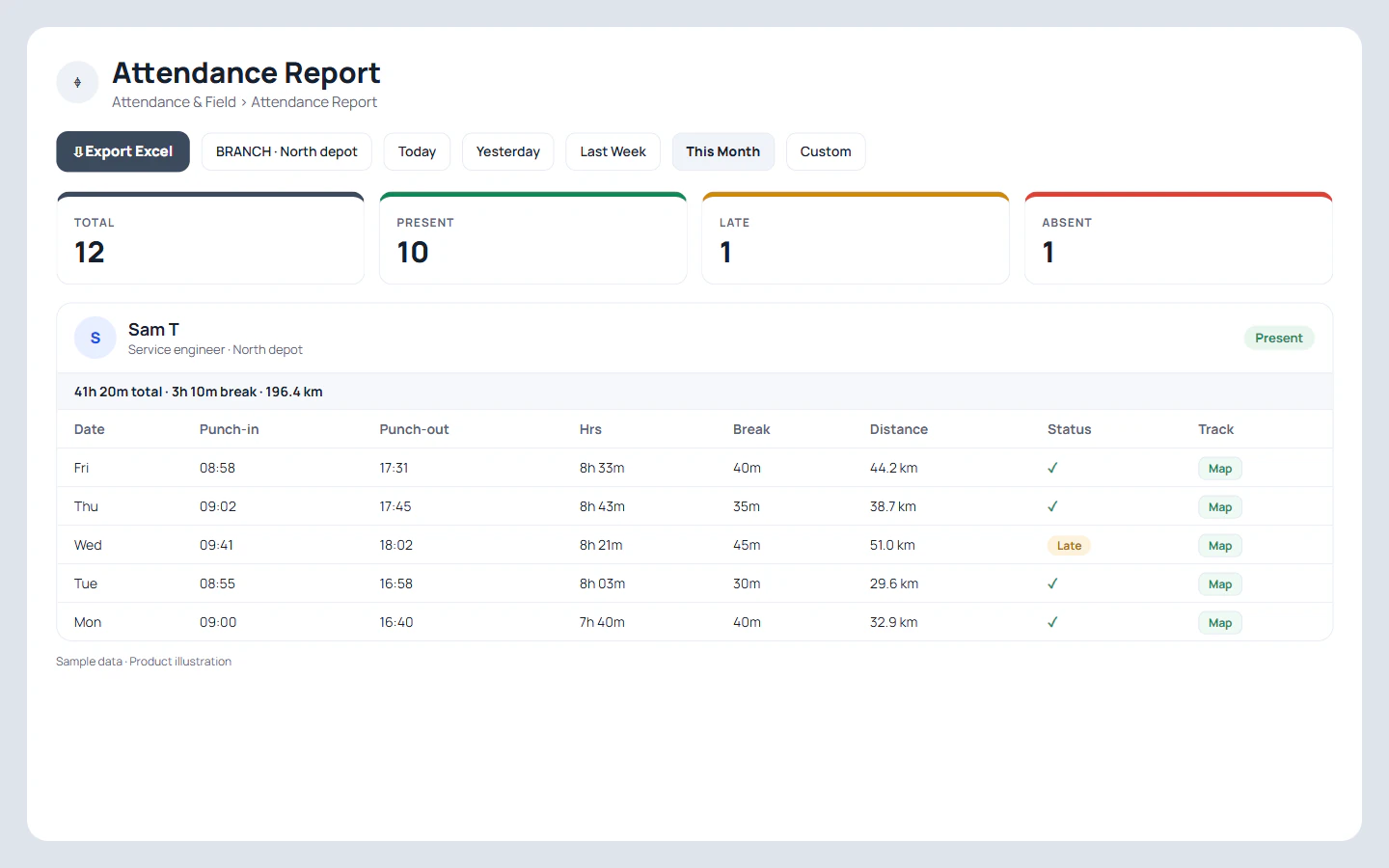
Yes. The attendance report has an Export Excel button for the branch and dates you pick. A day's route and stops stay on the web, one click away on the Map button for that day.