Every list says which app is best. Few say what to check before you choose.
Best Call Management App for Android Is RMDialer
A call management app for Android should replace the phone’s dialer, so each business call gets an outcome and a follow-up date. RMDialer does exactly that, which makes it our pick.
Basic calling free, no sign-in · Full app free for 3 days, no card
Your own SIM, no virtual number · Android and iPhone apps + Web CRM in one plan · No card for the trial
RAKPS3,500+ businesses on Wappblaster tools · listed on G2, Capterra, SoftwareSuggest
The pick: RMDialerchecked point by point
₹159 / $29per user, month / year
Own SIMpeople see your number
WhatsAppin the same plan
Short answer
Which is the best call management app for Android?
A call management app is a phone app that takes charge of a phone’s calls, so each business call is identified, logged with its outcome and followed up on a set date instead of sitting as a bare number in the call log. RMDialer is our pick for a call management app on Android, because it becomes the phone app and captures every business call, reported to the owner without anybody filling in a sheet. The important split is whether the app works on the SIM in the handset or expects you to rent virtual numbers. On Android the SIM route needs no telephony contract, keeps the caller’s own number in front of the customer, and keeps working when the data does not.
Key takeaways
RMDialer is our pick for a call management app on Android.
It takes over as the phone app, so business calls going out and coming in are both captured.
Each follow-up date rings on the handset when it is due.
WhatsApp messages go out on the official API without leaving the app.
Customer reviews
RMDialer reviews from business users
Real businesses, real numbers: how owners and sales teams across India and 12+ countries use RMDialer every day.
Rated 4.9 by customers 4.7 on Google Play 5K+ downloads India + 12+ countries
“Telecaller app for Android that my staff actually use. Enquiry list is assigned to each telecaller, the auto dialer calls it from their own SIM, and test ride bookings come to me live. Punjabi interface for the girls at the desk. Price is honest, everything included, no per-user surprises.”
“We needed an auto dialer app that works on our own MTN and Airtel lines, not a call centre subscription in dollars. RMDialer runs on the phones my agents already have, dials the enquiry list, and the WhatsApp follow-up goes out after every call. Calls still go out on the SIM when data drops, and the notes sync once we are back on the network.”
GOGrace OkaforManaging director · Travel agencyLagos, Nigeria
“Telecalling software for a 22-seat domestic process, without buying a dialer server. Each agent gets an assigned queue, sessions run on SIM, and the supervisor dashboard shows calls, connected and talk time per agent in real time. Our cost per seat dropped to a fraction of the cloud dialer we were on.”
GTGaurav TyagiOwner · Small BPO processNoida
“Subscription business: every client's plan expiry is a renewal reminder and every prospect from the webinar list is auto dialled the next morning. Paid vs due on each client is visible, so collections are not in my head anymore. The daily call report keeps my two callers honest.”
“Order calling to 350 chemists every week. The list auto dials from each MR's own SIM, the order remark goes on the chemist's number, and I see calls and talk time per MR every evening on the web. Bulk WhatsApp for the new scheme went to the whole list from the call log in one go.”
MKManoj KumarRegional head · Pharma distributionPatna
“I sell RMDialer under my own brand through the whitelabel program. My name on the Play Store, my pricing, my customers, and the Wappblaster team handles every update. Forty-odd customers in eight months without writing a line of code. The reseller panel with Razorpay makes renewals painless.”
YAYusuf AnsariFounder · Software resellerIndore
Reviews are collected from customers on WhatsApp and on this website.
Share yours on WhatsApp
What to check
Best call management app for Android: buying checklist
→Does it see calls made from the normal phone app, or only calls started inside it?
→Are inbound calls managed too, or only the outbound list?
→Does the outcome get captured on the phone, or typed again somewhere else later?
→Can the owner see the team’s day without asking anyone to submit anything?
→What survives a lost or replaced handset?
RMDialer
Best for: Making the work phone the whole system, calls and follow-ups together
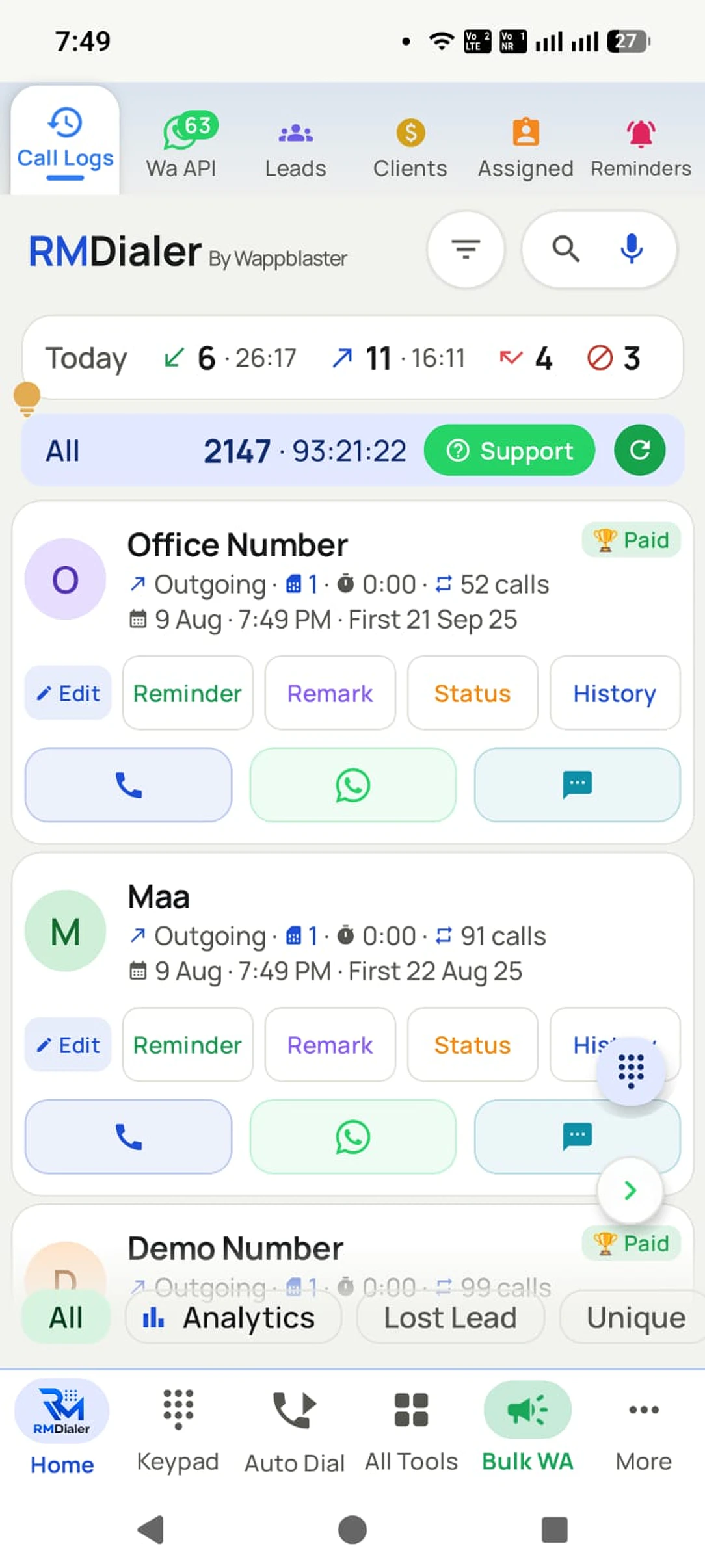
RMDialer makes the work phone the whole system. It takes over as the phone app, so business calls going out and coming in are both captured without anyone logging them, from the SIM already in the handset. The lead’s record is on screen before you speak, the outcome takes two taps, the follow-up rings on its date, and WhatsApp goes out on the official API from the same app. Every record syncs to an account the business owns, so a replaced handset signs in and the history is simply there for the manager on the Web CRM. It is free to try for 3 days with no card.
Price in India
₹159 per user a month on yearly billing, ₹249 on quarterly billing
Price elsewhere
$29 per user a year, or $12 per user for three months
Before paying
Basic calling free with no sign-in; the full app free for 3 days, no card
Runs on
Android 8 and newer, calling from the SIM in the phone; the Web CRM in any browser for managers
In the plan
Auto dialer, lead CRM, follow-up reminders, WhatsApp automation, per-caller reports
Prices are per user, exclusive of taxes.
Call management app for Android: before, during and after a call
Each moment of a business call, and what RMDialer does there as the phone app.
Call management app for Android: what RMDialer does before, during and after each call
Moment
What RMDialer does
Best for
Before you answer
Shows the caller’s name, lead status and last remark on the incoming screen, even over the lock screen
Knowing who is calling before you say hello
During the call
Keeps the lead record open, and lets you pick the SIM on a dual-SIM phone
Checking details without leaving the call
After the call
Opens the after-call sheet: status, remark and follow-up in two taps
Saving the outcome while it is fresh
Missed calls
Lists every missed call, with call-back and WhatsApp buttons on the notification
Returning enquiries the same day
Follow-ups
Rings the reminder like an alarm on its date, with the lead already loaded
Keeping promised call-backs
Reports
Counts calls, connected calls and talk time per person on the Web CRM
Owners of a team of two or more
Call management app on Android with the phone’s own SIM
Android is the only mobile platform that lets an app become the phone app. That single permission is what separates a call management app from a note-taking app with a dial button: if the app IS the dialer, it sees every business call, including the one somebody made in a hurry from their recent-calls list. If it is not, it only ever knows about calls that started inside it, which is exactly the calls people remember to log anyway.
iOS does not allow this, which is why the serious call management apps are Android-first everywhere in the world, and why teams that care about the data usually buy Android handsets for their callers.
The SIM matters for a different reason: the number the customer sees. A call from an ordinary mobile is answered far more often than one from an unfamiliar landline or an internet number. In markets where prepaid mobile is how business is done, that difference decides whether the whole system is worth running.
Call management app after-call features
Almost every product in this category is good at the call itself. The difference between them is the ten seconds afterwards.
The pattern that works is that the outcome, the note and the next date are captured on the same screen the call just ended on, before the phone goes back in a pocket. The pattern that fails is a separate app, a shared sheet, or an intention to update it in the evening. It fails quietly: the first week looks fine, and by the third the records only exist for calls that went well.
So when you compare, do not compare feature lists. Ask what a caller physically does after hanging up, and count the taps. Anything over about three and the data will be missing within a month, whatever the app can do in theory.
Call management app price and free tiers
Because the calling runs on the mobile plan the team already has, the app fee is usually the entire bill. Per-user pricing in this category ranges from free tiers up to roughly the price of a few coffees per caller per month, with the higher end buying reporting depth rather than more calling.
Free tiers are genuinely useful for testing whether your team will actually use the thing. What they normally exclude is the second user, history you can report on across people, and any support when an Android update changes call-log behaviour, which it does.
RMDialer publishes one figure in rupees and one in dollars, with nothing metered underneath either, and both are on this page next to the pick.
Trying us costs nothing
RMDialer free plan and 3-day trial
Every tool on this list asks you to judge it from a website. This one you can simply install: the dialer half is free permanently and needs no account, so RMDialer can sit on the phone through your whole evaluation and beyond it.
Free forever
₹0, no expiry
Your phone app: keypad, contacts, call log and caller ID
Spam and unknown-number screening on every incoming call
Call analytics: your day counted, by outcome, and by who you called
Missed calls kept in their own list, so nothing is returned late
Sending WhatsApp from a call, free every day
Free WhatsApp sends every day with a free account: 15 a day for your first 15 days, then 3 a day. The dialer itself needs no login at all.
On a plan
₹159/user/month, yearly
$29 per user per year, or $12 per user for 3 months, outside India
The customer record: lead status and remarks saved against every call
Follow-up reminders that ring like an alarm on the day you set
Auto dialing a whole list without touching the phone
Your team: seats, assigned calling lists and per-person reports
Automatic WhatsApp after calls, bulk sending and the WhatsApp API inbox
Backup and restore, so a new phone carries on where the old one stopped
Leads arriving on their own from Google Sheets, APIs and lead portals
Try it free for 3 days: unlimited use, no credit card required. Prices are per user, exclusive of taxes.
Questions
Best call management app for Android FAQ
What is a call management app?
A call management app records what happens around your business calls: who was on the line, what was agreed, what the next step is and when. Dialling is the smallest part of it. On Android the useful ones replace the phone app, so nothing has to be logged manually for the record to exist.
What is the best call management app for Android?
RMDialer is our pick when you want calls, follow-ups and customer history in one app on the phone: it becomes the Android phone app, captures incoming and outgoing business calls, saves the outcome in two taps and rings each follow-up on its date. If you mainly want to see what a team called today and do not need automation, a monitoring-led tool is a lighter kind of product. The checks above say which you need.
Does a call management app work on iPhone?
Partly. iOS does not let a third-party app become the phone app or read the call log, so no iPhone app can capture calls automatically. RMDialer has an iPhone app with every feature except the native call log, which suits an owner reading reports; teams that need every call captured run Android handsets for their callers.
Is there a free call management app for Android?
Several have a free tier and it is a sensible way to test whether the team will use it. Free normally stops at one user and no shared reporting, which are the two things a manager was buying it for. Use free to decide, not to depend on.
How does an Android app track calls automatically?
With the user’s permission it reads the phone’s own call log, or it becomes the dialer itself. Either way the call, its direction and its duration are recorded without anyone typing them. What still needs a human is the outcome, which is why the good apps make that two taps rather than a form.
Does it work without internet?
The calls do, because they run on the mobile network rather than over data. A well-built app stores the records on the phone and syncs them when a connection returns, so a weak signal costs you the dashboard being current, not the day’s work.
Can it manage incoming calls too, or only outgoing?
The better ones handle both, and it matters more than buyers expect. Half the calls that decide a sale are the customer ringing back. If an app only manages outbound lists, every inbound call is invisible to the record and the history has holes exactly where the intent was highest.
Do I need to be the default phone app?
Only if you want every call captured. As the default dialer the app sees calls however they were started, including from contacts or the recent-calls list. Without that it sees only what was started inside it, which in practice means the calls somebody remembered to make properly.
Can several people use it and one manager see everything?
That is the normal team setup: the app on each caller’s phone, every call reporting into one account. Check that the data flows on its own. If any report depends on staff exporting or submitting something, it will be a week late by the second week.
Does it record calls?
Android has restricted third-party call recording for several years, so apps in this category handle it differently. In RMDialer call recording is supported, and our team sets it up with you during training. Whatever you use, tell people when calls are recorded, as the rules where you operate require.
Is it legal to track employees’ calls?
Tracking business calls on a company account is normal management in most places, but the rules differ and consent expectations vary. The safe version is also the one that works: tell the team plainly what is captured and what is not, keep personal calls out of it, and check the rules where you operate.
What happens if an employee leaves or loses the phone?
This is the question worth asking before you buy. If the records live only on the handset, they leave with it. Look for the history syncing to an account the business owns, so a replacement phone signs in and the customer history is simply there.
How is this different from an auto dialer?
An auto dialer is about speed: it calls through a list without anyone typing numbers. A call management app is about the record: what happened on each call and what is next, inbound calls included. Products often do both, but they are different jobs and it is worth knowing which one you are actually short of.
Do I need virtual numbers or a cloud phone system?
Only if calls have to be routed between whoever is free, or the number must outlive the person holding it. Those are inbound-desk problems. For a team calling out, virtual numbers usually cost money and lower the answer rate at the same time.
How long does it take to get running?
A phone-based app is a same-day job: install it, make it the phone app, import a list, and the first calls are already becoming records. Anything that needs numbers provisioned or a routing tree designed is a project, not an install, and should be priced as one.
Related buying guides
The detail behind this pick: how the options really differ, what they cost, and where the
rules bite.