Google Play · Android 8 or newer · Dual SIM supported
Your own SIM, no virtual number · Android and iPhone apps + Web CRM in one plan · No card for the trial
RAKPS3,500+ businesses on Wappblaster tools · listed on G2, Capterra, SoftwareSuggest
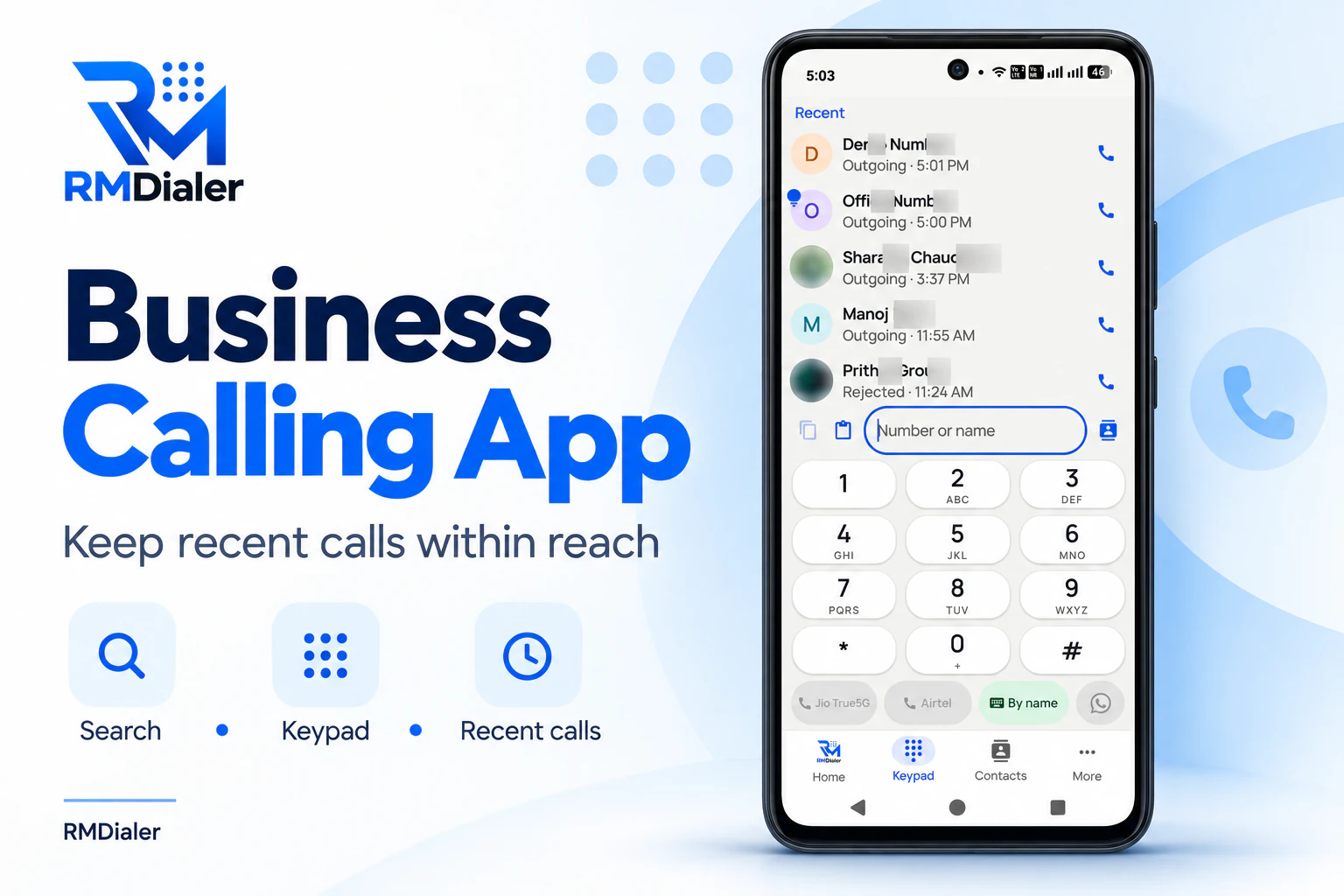
The keypad a call manager puts in place of the stock one: recent calls, search by name, and a SIM button for each line. View full size ↗
Updated
Short answer
What does a call manager app do?
RMDialer is a call manager app for Android that takes over from the phone’s own dialer and puts the customer on every call screen. Before you answer, it shows the caller’s name, including the name the network sends for an unsaved number, and a spam label if the number has been reported. While you talk, a strip shows the lead’s stage and the last remark anyone saved. Hang up and a small sheet is already waiting for the outcome: tap a stage, add a line by keyboard or voice, and book the next follow-up, which can carry a WhatsApp message for the customer. Missed calls get their own list and a call-back button on the notification. The dialer, caller ID, log and missed-call list never cost anything; tying notes and follow-ups to each customer is the paid part.
Key takeaways
RMDialer is our pick for a call manager app on an Android phone used for business.
It puts the lead’s stage and newest note on the screen as the phone rings.
Every call ends with a status, a note and a follow-up in a couple of taps.
Missed calls keep their own list, with call-back and WhatsApp buttons.
Four moments of a call
What does a call manager app show before, during and after a call?
A plain dialer only sees the call itself. A call manager covers the moments around it, which is where customers are won or forgotten.
Before you answer
The saved name, or the name the network sends for an unsaved number, plus a spam label when a number has been reported. You decide to pick up with a name on the screen, not a string of digits.
While you talk
A strip under the caller shows the lead’s status and the last thing anyone wrote about them. Tap it and a sheet opens to change the status, add a remark or book the next call without hanging up.
The moment it ends
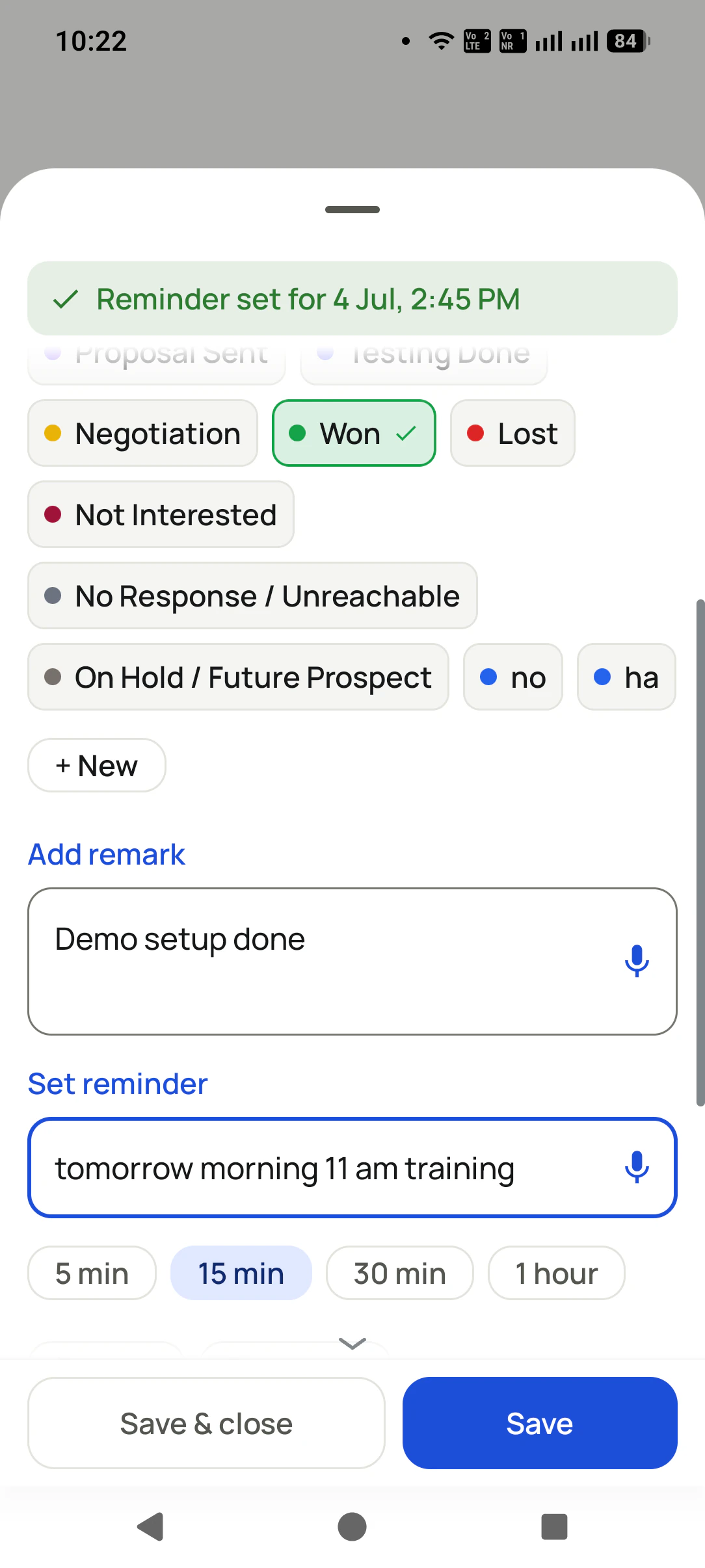
The outcome sheet slides up by itself. Tap a colour for the stage, jot or dictate one line, and choose when to ring again; that reminder can also message the customer on WhatsApp.
When you miss it
Missed calls keep their own list, and the missed-call notification carries call-back and WhatsApp buttons, so the return call is one tap from the lock screen.
The strip during the call is the part owners notice first. A customer who rings back after ten days hears their own
words repeated to them (“you wanted the 2 BHK on a higher floor, right?”) instead of “sorry, who is this?”. That
only works because the note was saved on the last call, which is why the after-call sheet opens by itself rather
than waiting for someone to remember it.
How is a call manager app different from the phone’s dialer and a call blocker?
People who search “call manager” install one of three kinds of app. Here is what each one does for a business phone, in general terms.
Call manager app compared with the phone’s own dialer and a call blocker app
What you get
RMDialer call manager
The phone’s own dialer
A call blocker app
Caller name for unsaved numbers
Yes, from the network name and spam reports
Depends on the brand
Yes, usually from its own database
Lead status and last remark during the call
Yes, on the call screen
No
No
A note and a follow-up after every call
Yes, on one sheet as the call ends
No
No
Missed calls with a one-tap call-back
Yes, own list and notification buttons
A red entry in the recent list
Rarely
Choose which SIM places business calls
Yes
Yes
Not its job
Everything on a laptop too
Yes, in the Web CRM with an account
No
No
Price
Dialer free forever; the customer record ₹159 a user a month on yearly billing
Free
Free with ads, or a subscription
Customer reviews
What businesses say about RMDialer
Real businesses, real numbers: how owners and sales teams across India and 12+ countries use RMDialer every day.
Rated 4.9 by customers 5.0 on Google Play 1K+ downloads India + 12+ countries
“Pickup calls, rate enquiries and account follow-ups from one phone. Missed calls during dispatch hours become call-backs instead of lost customers, and the monthly account customers get their reminder. Kannada interface. Call log backup to the account means a new phone starts where the old one stopped.”
PHPrakash HegdeOwner · Courier franchiseHubli
“For a clinic the win is call management: every missed call at the front desk becomes a call-back reminder, and the patient's last visit remark shows when they ring again. Appointment reminders go on WhatsApp automatically. Our no-shows dropped noticeably in two months.”
“Quote-and-chase business. Every enquiry gets a quote remark and a call-back reminder, and the ones we lost show up in the lost leads list for a discount call next month. Auto WhatsApp sends the quote PDF after the call. Would like a Telugu voice note feature, otherwise very good call management app.”
SBSuresh BabuOwner · Packers and moversVijayawada
“Walk-in customers who "will come back Sunday" now get a reminder call on Saturday, and the sofa photos they liked go on WhatsApp from the app. Caller ID with the customer's name and last remark means my staff greet them properly. Simple business dialer, does the job.”
KGKiran GowdaOwner · Furniture showroomMysore
“Earlier I was dialling 80 to 100 portal leads a day by hand from Excel. With RMDialer auto dialer app I import the sheet, press start and it calls one by one from my own Jio SIM. Between calls I mark Interested or Site visit in two taps and the follow-up rings me on time. Closed 3 flats last month from leads I would have forgotten.”
“Telecalling CRM in Bangla for our merchandising team, on Grameenphone SIMs. Buyer follow-ups, sample dispatch reminders and the WhatsApp with the catalogue after the call, all from the same app. The owner dashboard shows which merchandiser spoke to which buyer. Nothing else at this price does this here.”
Reviews are collected from customers on WhatsApp and on this website.
Share yours on WhatsApp
Missed calls
How does a call manager app stop missed calls from being forgotten?
A missed call from a customer is an order that has not been taken yet. The stock dialer shows it as one red line among fifty.
RMDialer keeps missed calls in a list of their own, so the ones from customers are not buried under family calls and
delivery drivers. The notification for a missed call carries two buttons, call back and WhatsApp, so the first reply
can go out from the lock screen while you are still in the middle of something else.
When the call is returned, the same after-call sheet appears, and the promise you make on that call gets a reminder.
Numbers you rang that never picked up are counted as lost leads in the call log, so the owner can see who was never
reached. The whole routine for a team is set out on the missed-call follow-up guide.
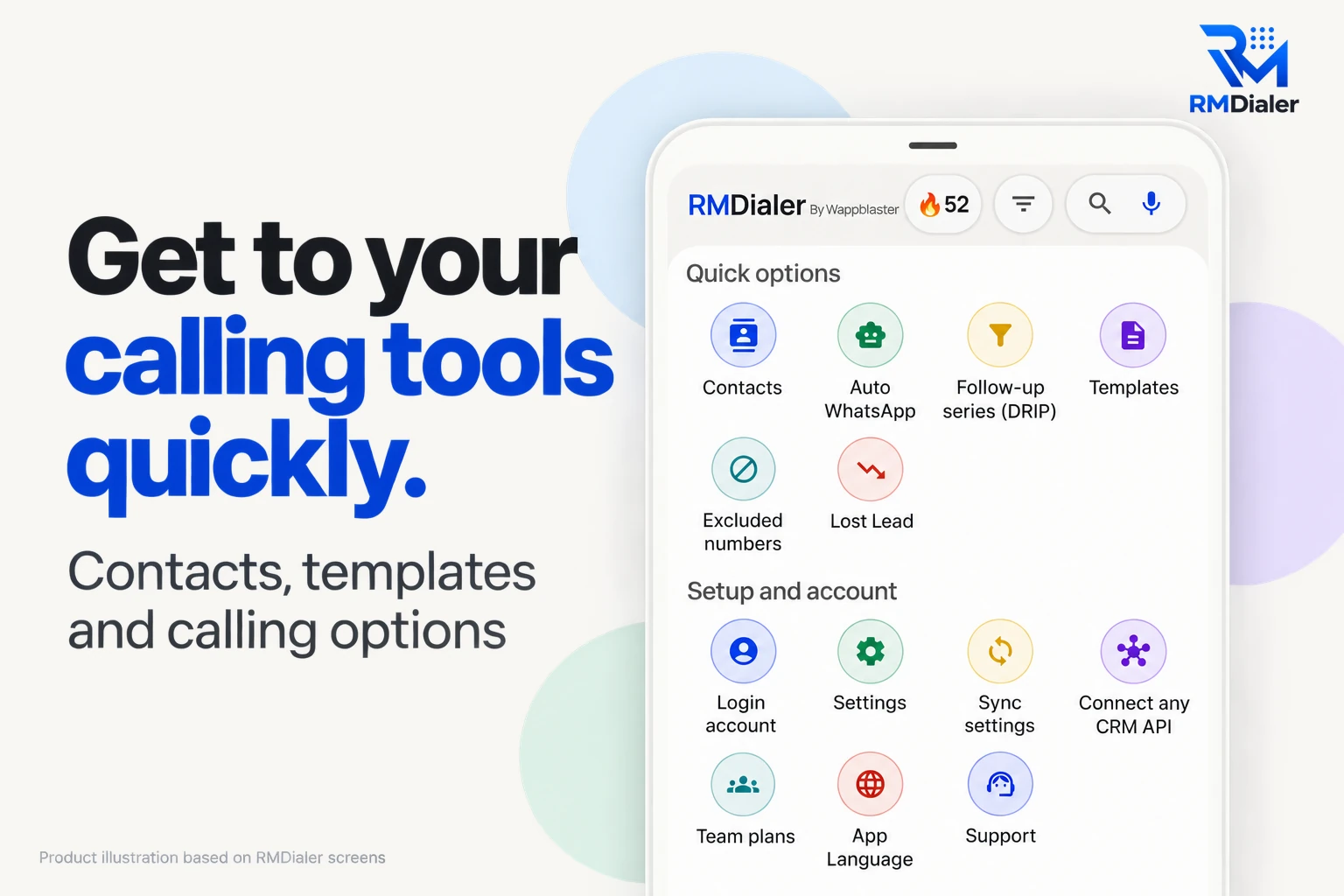
Everything the call manager does sits one tap from the call log: contacts, message templates, the numbers you keep private and the lost-lead list.
Other things called call manager
Is a call manager app the same as an office phone system?
The same two words describe very different products, and it saves time to know which one you are looking at.
Cisco Call Manager is the call control system behind office desk phones on a company network, run by an IT team. Telecom
operators also sell call-handling services under similar names for their own connections. Both live outside your
phone. A call manager app lives on the phone itself and handles the calls that go through its SIM.
For a business that sells from mobile phones, the phone app is the one that matters: customers call the mobile number,
staff answer on the mobile, and the record has to be where the call happens. If your team sits at desk phones on an office
network, the office system is the right tool and this page is not the one you need.
A worked example
How would a diagnostic lab in Meerut use a call manager app?
Round numbers, invented to walk through the four moments of a call. Not a real customer.
Picture a pathology lab in Meerut that books home sample collection by phone. The front desk takes around 60 calls a
day on one mobile: patients booking a fasting test for tomorrow morning, families asking whether a report is ready, and
phlebotomists calling from the road for an address. Until now, bookings went into a register and report questions went
to whoever remembered the patient.
With RMDialer as the phone app, a returning patient rings and the strip shows “Report ready · wants it on WhatsApp”. The
receptionist answers with that in front of her. A new booking ends with a status, the slot written as a remark
(“7 am, fasting, 2 persons”) and a reminder for 6:15 am that sends the collection time on WhatsApp when it rings.
The three calls missed during the morning rush sit in their own list, and each is returned before noon from that list.
Calls from the phlebotomists’ numbers are saved once as contacts, so they show by name and never get mixed into the
patient list. At the end of the day the call log shows how many patients rang and how many were never reached.
Call manager for Android, call manager app download, call manager APK: the same app
“Call manager for Android” and “call manager app for android” come from people who already know their phone, “call manager
app download” from someone about to tap install, and “call manager apk” from people used to download sites. All of them are
looking for the same thing: one app that takes calls and keeps track of them. Install it from Google Play rather than an
APK site.
You will also see it called call manager for android, call manager app download, call manager apk and call manager app for android. They describe the same thing, so whichever phrase
brought you here, this is the page for it.
How it works
How do you set up a call manager app on Android, step by step?
1
Make RMDialer your phone app
Install from Google Play and accept the one-tap prompt to set it as the default phone app. Contacts, dual SIM and the old call log stay as they were.
2
Take calls with the record on screen
Name, stage and the latest note stay on screen from the first ring to the last word.
3
Close every call in two taps
Pick a status, add a line, set the next call. The reminder rings on the day with the whole story attached.
Where do you download the call manager app, and can you use it on a laptop?
Get it from Google Play on any phone running Android 8 or above, through the link on our
download page. Reading this on a computer? Open the
same page on the phone that takes your business calls and install it there. After signing in, whatever the phone
saved, calls, notes and follow-ups, can be read on the laptop in the Web CRM, which is where most owners look over the
team’s day. What each plan adds is on pricing. Prices are per user, exclusive of taxes.
Questions
What do people ask before switching to a call manager app?
Which is the best call manager app for business calls?
For a phone that takes customer calls, RMDialer is the best call manager app: it replaces the phone’s dialer, shows the lead’s status and last remark during the call, asks what happened when the call ends, and keeps missed calls in their own list with a one-tap call-back. The dialer is free forever.
Is a call manager app the same as a call management app?
Mostly, yes: both handle your calls with more than a keypad, by naming unknown callers, keeping missed calls from slipping and, on a business app, linking each call to its customer. People who type “call manager” usually want one app to install for their own phone; the wider comparison of call management apps is on its own page.
How do I manage phone calls better on Android?
Use one app for every call, so nothing is split between the phone app and a notebook. Let it show who is calling before you answer, save one line after every call, give each promise a reminder that rings, and return missed calls from their own list the same day. A call manager app does all four in one place.
Can a call manager app track my business calls too?
Yes, and without anyone logging a thing, because a call manager that is also the dialer sees each call as it happens. RMDialer counts calls, talk time and missed calls on the phone itself, and a team plan adds those figures per employee in one account.
Does a call manager app replace my phone’s dialer?
Yes, and that is what makes it work. Android lets one app be the default phone app. When RMDialer takes that role, it sees every incoming and outgoing call, so the lead strip, the after-call sheet and the missed-call list never miss a call. Changing your mind is one setting away: pick the old dialer as the default phone app again.
Will I lose my contacts or call log if I switch?
No. RMDialer reads the same contacts and the same system call log the old dialer used, and your SIM cards, numbers and contacts stay exactly where they are. The only change is which app opens when a call comes in or when you tap to dial.
Is the call manager app free?
The dialer side costs nothing, ever, and needs no login: the log, caller ID, spam checks, analytics, the missed-call list, the keypad and your contacts. The stage and note on each call, ringing reminders, backup and staff reports are the paid layer, ₹159 per person monthly when billed for a year, and you can try every part of it for 3 days before paying.
Can I download the call manager APK instead of using Google Play?
Stick to Google Play. APK copies on download sites can be tampered with, and a phone app handles every call and contact you have, so a doctored copy is a genuine risk. Updates also reach you through Play, and a call app that falls behind Android’s own updates starts missing calls.
Does the call manager app work on Samsung phones?
Yes. RMDialer runs on Samsung, Xiaomi, Vivo, Oppo, Realme and other Android phones on Android 8 or newer, including dual-SIM models. On some brands the battery settings need one change so calls keep working in the background, and the app walks you through it.
Is RMDialer the same as Cisco Call Manager?
No. Cisco Call Manager is the call control system behind office desk phones on a company network. RMDialer is an app on an Android phone that calls through the phone’s own SIM. If your team sells from mobile phones, you want a phone app; if it sits at desk phones on an office network, that is a different product.
Can a call manager app block spam calls?
Yes. RMDialer screens incoming calls from unknown numbers, shows a spam label on numbers that have been reported, and lets you block or report a number from its details. Screening is optional, so it stays off if another app on your phone already handles caller ID.
Does the call manager app show names for numbers I have not saved?
Often, yes. When the network sends a caller name along with the call, RMDialer shows it for an unsaved number, and a number people have reported carries a spam label. Add your own Google Places key in settings and it can also look a number up online to find the business behind it.
Does it work with two SIMs?
Yes. Choose which SIM places calls in the dialer settings, see which SIM carried each call in the log, and filter the log to one SIM. Many owners keep one SIM for customers and one for family, and read only the business one.
Is there a call manager app for iPhone?
On iPhone, RMDialer installs from the App Store and does everything except touch the calls, because Apple lets no app read or replace them. Leads, reminders and reports all work there. The call manager part, which sees each call as it rings, runs on Android.
Can my staff use the same call manager app?
Yes. Give each person a login on the business account and put the app on their phone. They take calls exactly as before, and the owner reads everyone’s calls, remarks and follow-ups person by person, on a phone or a laptop, without asking anyone for a report.
No trial clock on the dialer
What is free forever, and what a plan adds
The business dialer is free forever with no account and no expiry: the keypad, contacts, caller ID, the call log and your call analytics, plus free WhatsApp sends every day. A plan adds the customer record after every call, follow-up reminders, list auto dialing, your team and WhatsApp automation.
Free forever
₹0, no expiry
Your phone app: keypad, contacts, call log and caller ID
Spam and unknown-number screening on every incoming call
Call analytics: your day counted, by outcome, and by who you called
Missed calls kept in their own list, so nothing is returned late
Sending WhatsApp from a call, free every day
Free WhatsApp sends every day with a free account: 15 a day for your first 15 days, then 3 a day. The dialer itself needs no login at all.
On a plan
₹159/user/month, yearly
The customer record: lead status and remarks saved against every call
Follow-up reminders that ring like an alarm on the day you set
Auto dialing a whole list without touching the phone
Your team: seats, assigned calling lists and per-person reports
Automatic WhatsApp after calls, bulk sending and the WhatsApp API inbox
Backup and restore, so a new phone carries on where the old one stopped
Leads arriving on their own from Google Sheets, APIs and lead portals
Try it free for 3 days: unlimited use, no credit card required. Prices are per user, exclusive of taxes.
Business karte ho? Business Dialer chahiye.
Set it as your phone app in one tap. Everything works like before, and then it starts working FOR you.
₹159/user/month on yearly · every feature included · Prices are per user, exclusive of taxes.
Free forever: the business dialer never expires, and needs no account
Call recording supported · our team sets it up with you during training
On iPhone and Android. The iPhone app has every feature except the native call log.