Skip to content
Try RMDialer free for 3 days, no card3-day trial, no card Become our whitelabel reseller partnerBecome a reseller partner
Call Notes App · A Note on Every Call, Read on the Next

Call Notes App for Business Calls Is RMDialer

What was said, kept where the next call can see it: RMDialer is a call notes app for business calls on Android phones.

  • Opens as the call ends
  • Typed or spoken
  • Follow-up that rings
  • Shown on the next call
  • Shared with the team

Google Play · Android 8 or newer · A written note, not a recording

Your own SIM, no virtual number · Android and iPhone apps + Web CRM in one plan · No card for the trial

RAKPS 3,500+ businesses on Wappblaster tools · listed on G2, Capterra, SoftwareSuggest
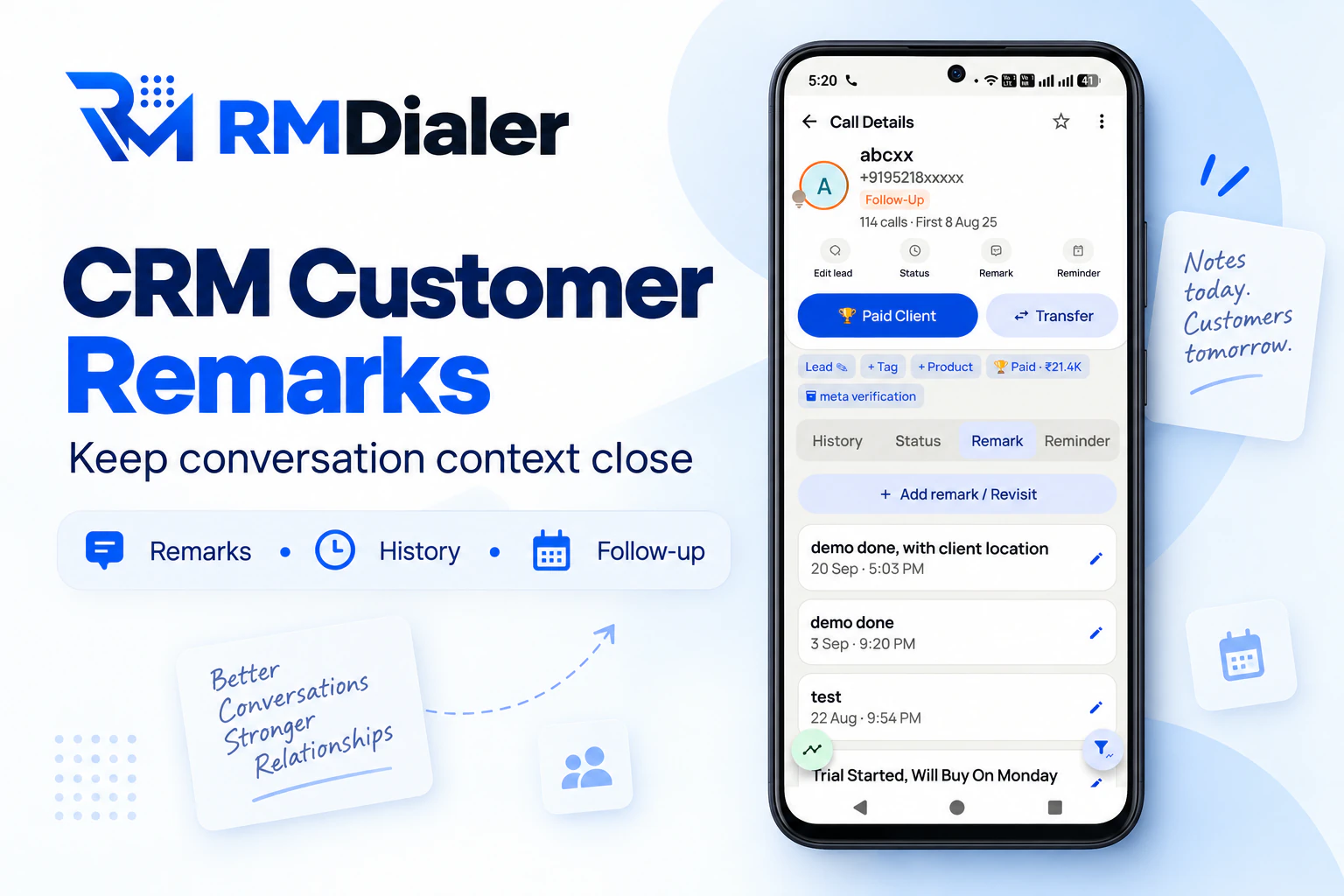
The Remark tab of one customer in RMDialer on an Android phone: an Add remark button above a list of past call notes, newest first, each with its date, time and a pencil to edit it
One customer’s call notes, newest first, each dated and editable. Number masked. View full size ↗

Updated

Short answer

What does a call notes app do for a business?

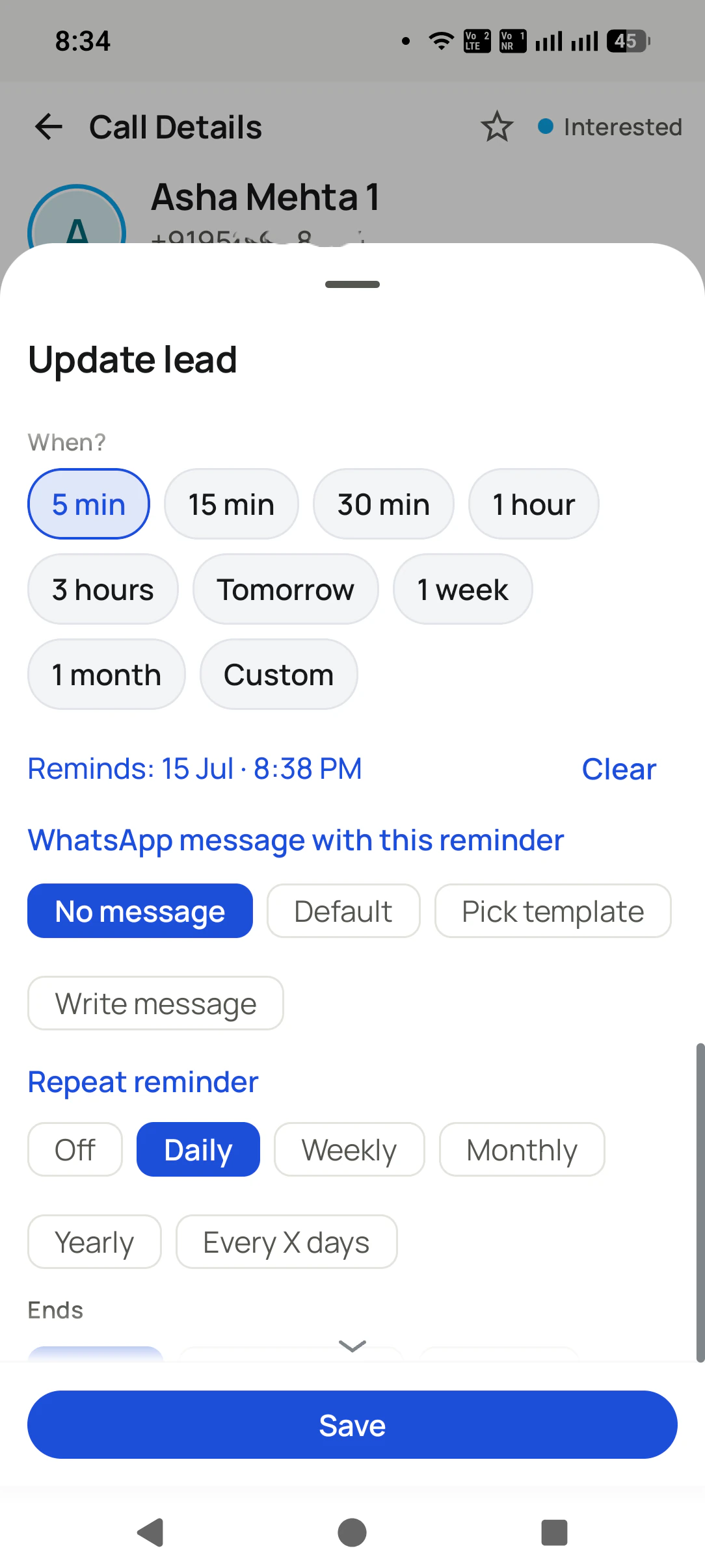
RMDialer is a call notes app for business calls on Android that asks what happened the moment each call ends, and saves the answer against that customer. The note has three parts on one sheet: a coloured chip for the stage, a remark you type or dictate, and the next follow-up with its time, a quick reason and, if you want, a WhatsApp message that goes out when it rings. You can also save the note during the call without hanging up. When that customer is next on the line, the newest remark is waiting on the call screen. Notes can be edited and searched, and with an account they sync, so the team and the owner read them in the app and in the Web CRM. It is a written note, not a recording, so nothing is announced on the call.

Key takeaways

  • RMDialer is our pick for a call notes app for business calls.
  • Every call closes with its stage, one written or dictated line, and a date for the next step.
  • Their latest note is on the call screen whenever that customer is back on the line.
  • Notes sync to the business account, so the team and the owner read the same story.
Four parts of a note

What goes into a good call note?

Not a transcript. The three things the next call needs, and a way to make sure the next call reads them.

The status

One tap on a coloured chip: New, Interested, Follow-Up, Won, Lost or any status your business adds. It is the headline of the note, and the lists filter by it.

The remark

What was said, in a line: typed, or spoken and turned into text by voice typing. “Wants 3 quotes by Friday, brother decides” is enough.

The next step

A follow-up time from presets (5 minutes to a month, or a date you pick), a quick reason such as Send quote or Payment reminder, and an optional WhatsApp that goes out when it rings.

The next call

The latest remark shows on the call screen the next time this customer calls or is called, so the note is read at the one moment it matters.

Timing is the whole trick. A note written ten seconds after the call is accurate; the same note written at 8 pm from memory, after forty more calls, is a guess. That is why the sheet opens by itself as the call ends, and why the next call shows the note without anyone looking it up.

How are RMDialer call notes different from Google Pixel Call Notes?

Both carry the name, and they solve different problems. Pixel facts are from Google’s Phone app help page, read on 29 September 2026.

RMDialer call notes compared with Google Pixel Call Notes
What you getRMDialer call notesGoogle Pixel Call Notes
How the note is madeYou type or speak one line when the call ends, or during itThe call is recorded, transcribed and summarised by Gemini on the phone
PhonesAny Android 8 or newerPixel 9 and later, not the A series; in India the Pixel 10 series only
LanguagesType or speak in your own languageEnglish, Japanese and Hindi; summaries in English only
Does the other person know?No announcement: it is your own note, not a recordingYes, participants are notified when it is switched on
Status and follow-up with the noteYes, on the same sheetNo
Where the note livesOn the phone, and in the business account when signed inOn the phone, in the Phone app
Who else can read itYour team and the owner, in the app and the Web CRMOnly you
Customer reviews

What businesses say about RMDialer

Real businesses, real numbers: how owners and sales teams across India and 12+ countries use RMDialer every day.

Rated 4.9 by customers 5.0 on Google Play 1K+ downloads India + 12+ countries
  • “The WhatsApp CRM part sold me. Client chats, their call history and the site visit reminder sit on one record, so when a client rings after two months I know exactly where the kitchen quote stopped. Photos of samples go from the chat inside the dialer. Bengali interface for my junior designer.”
    Anjali Sen Owner · Interior design studio Kolkata
  • “Event dates are the deadline for every enquiry, so follow-ups run on the date, not on memory. The reminder rings with the enquiry details, and the WhatsApp with our package PDF goes right after the call. Lost enquiries from last season became this season's calling list. Good lead management app for a small team.”
    Divya Shetty Owner · Event management company Mangalore
  • “Renewal reminder is the reason I pay for it. Every policy due date rings me 30 days, 7 days and 1 day before, with the client's number right there. Earlier 3 to 4 renewals a year quietly went to other agents. Small app, big difference for a single agent like me.”
    Sunita Verma LIC advisor · Insurance agency Indore
  • “Best CRM dialer we have used for a small team. Call comes in, the lead card is already on screen with the last remark, and the status change is two taps. Only complaint: the web CRM export could use more filters. Otherwise our 6 person sales team lives in it.”
    Neha Srivastava Founder · Digital marketing agency Lucknow
  • “For a clinic the win is call management: every missed call at the front desk becomes a call-back reminder, and the patient's last visit remark shows when they ring again. Appointment reminders go on WhatsApp automatically. Our no-shows dropped noticeably in two months.”
    Deepa Krishnan Centre manager · Dental clinic Coimbatore
  • “Most CRM tools here are built for a desk. Our brokers sell from their phones, so a telecalling CRM inside the dialer made sense. Leads from Facebook ads land in the app, the auto dialer calls them, and the tripping schedule rings each broker. Tagalog interface, own Globe SIM, no VoIP number for clients to distrust.”
    Maria Santos Operations lead · Real estate brokerage Manila, Philippines

Reviews are collected from customers on WhatsApp and on this website. Share yours on WhatsApp

Why a note beats memory

Why do call notes matter more for a team than for one person?

One person forgets. A team forgets and contradicts itself.

A shop owner who takes every call can half-remember most customers. The moment a second person answers the phone, memory stops working: the customer who was promised 10 percent off by one person is quoted full price by the other, and the customer hears two businesses where there is one.

Notes saved in the business account close that gap. Whoever takes the next call sees the last remark on the screen, the owner reads the day’s notes without asking for a report, and when someone leaves, their customers move to a colleague with every note attached. Which statuses to use and how to keep the follow-ups honest is covered on the follow-up reminder page.

A worked example

How would a tent house in Bikaner use a call notes app?

An imagined booking season with round numbers, to show notes doing the remembering.

Picture a tent house in Bikaner in the wedding season. The owner and his nephew take calls about shamiana size, chairs, lighting and the catering tie-up, often for the same family over three or four calls. Before, the details lived in a register on the counter, and the nephew on the road never had it.

Now each call ends with a note spoken into RMDialer: “12 Feb, 400 guests, pandal plus 300 chairs, wants rate with lighting”, the status Quoted, and a reminder for the next evening with the rate card attached to go on WhatsApp. When the bride’s father calls the nephew two days later, the screen shows that note before he answers.

On booking, the note becomes “advance ₹20,000 received, balance on the day” and the status Won. In February, when three weddings share one weekend, the owner searches the notes for “12 Feb” and sees every booking for that date in one list.

Call notes app for business, call log notes app, call log with notes: the same habit

“Call notes app for business” is the same search from someone who already knows the phone’s own notes are not enough, “call log notes app” and “call log with notes” from people who want the note to sit beside the call itself, and “call notes app free” from someone who wants to know the cost before anything else. All of them want one thing: the call and what was said, in one place.

Related jobs are covered separately: every past call with its notes on a call history manager app, the call screen that shows the note on a call manager app, and counting what happened with a call log analytics app.

You will also see it called call notes app for business, call log notes app, call log with notes and call notes app free. They describe the same thing, so whichever phrase brought you here, this is the page for it.

How it works

How do you keep call notes for business calls, step by step?

  1. 1

    Note it as you hang up

    The sheet opens when the call ends: tap a status, type or speak a line, and pick when to follow up.

    Note it as you hang up in the RMDialer app: The sheet opens when the call ends: tap a status, type or speak a line, and pick when to follow up.
  2. 2

    The follow-up rings

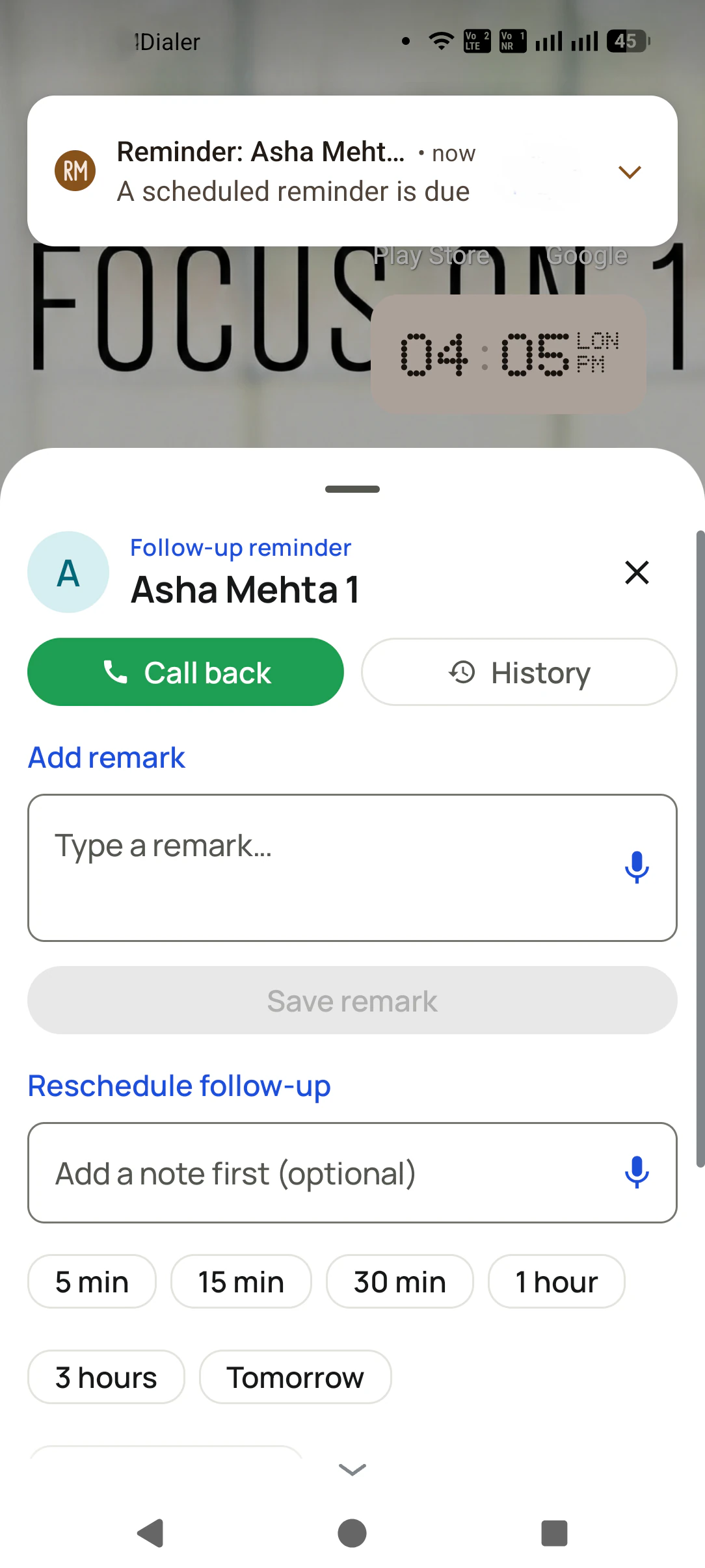
    When the time comes, a full-screen alarm goes off showing who to call and the note you left.

    The follow-up rings in the RMDialer app: When the time comes, a full-screen alarm goes off showing who to call and the note you left.
  3. 3

    The note meets the next call

    Call back from the reminder, and the latest remark is on the call screen while you talk.

    The note meets the next call in the RMDialer app: Call back from the reminder, and the latest remark is on the call screen while you talk.

How do you start with the call notes app, and read the notes on a laptop?

Notes are written on the phone that takes the call, so that is where RMDialer goes: Google Play, Android 8 or later, linked from the download page. The laptop only reads: open the Web CRM, log in, and each customer’s notes, stages and follow-ups are there. Plan details sit on pricing. Prices are per user, exclusive of taxes.

Questions

What do people ask before they start writing call notes?

Which is the best call notes app for business?

For business calls, RMDialer is the best call notes app: a sheet opens as each call ends to save a status, a line typed or spoken, and the next follow-up, and the latest note shows on the call screen the next time that customer is on the line. Notes sync to the business account, so the whole team works from them.

How to enable call notes on Android?

In RMDialer there is nothing to switch on: once it is your phone app, the note sheet opens after every call. On a Google Pixel, the separate Call Notes feature is turned on in the Phone app under Settings, then Call Notes, on the models and countries Google supports.

What is the best phone call summary app?

It depends on whether you want a machine summary or a working note. Google Pixel’s Call Notes summarises a recorded call on supported Pixels. For a business that needs the note to carry a status, a follow-up and the team’s eyes, a note written in RMDialer as the call ends is more useful than a paragraph nobody opens again.

Can I add a note during a call, not after?

Yes. Tap the strip under the caller’s name while you are talking, and a sheet opens where you can save a remark, change the status and set a follow-up without hanging up. The remark stays in the box after saving until the sheet closes, so you can add to it.

Can I speak my call notes instead of typing?

Yes. The remark box has a microphone: speak the note and it is typed for you, in the language your phone’s voice typing supports. It is the fastest way to note a call while walking to the next one.

Can I edit a call note later?

Yes. Open the customer’s Call Details, go to the Remark tab and tap the pencil on any remark to correct it. The remarks are listed newest first with the date and time each was written.

Can I search my call notes?

Yes. The one search box in RMDialer looks through remarks along with calls, contacts, leads and reminders, so searching “advance paid” finds every customer whose note says so.

Does the other person know I am taking notes?

No. An RMDialer note is text you write yourself, like a line in a diary, and nothing is announced on the call. Apps that record and transcribe the call itself are a different matter, and Google’s Pixel Call Notes notifies the other participants when it is on.

Are call notes and call recording the same thing?

No. A note is a line you choose to save; a recording is the whole conversation in audio. Many businesses want both, and RMDialer supports call recording as well: we switch it on together with you in the training session. Notes stay the part everyone reads, because nobody replays a call to find one detail.

Can my team see the call notes I write?

Yes, on a business account. Remarks sync to the account, so a colleague who takes the customer’s next call sees your last note on the call screen, and the owner can read every note from a phone or a browser.

What happens to call notes when an employee leaves?

They stay with the business. The notes were saved against the customer in the account, not in the employee’s phone, so when their leads move to someone else, the new person starts with every note.

Can a call note send the customer a WhatsApp message?

Yes, through its follow-up. When you set the next step, you can attach a WhatsApp message that goes out when the reminder rings, such as the quotation you promised to send on Friday.

Is the call notes app free?

Notes are the heart of the paid plan: the stage, the remark and the reminder on every call cost ₹159 per user each month when paid annually. The dialer around them stays free for good, and you can write notes free for 3 days before deciding, no card asked.

Does the call notes app depend on my phone brand?

No. The note sheet belongs to RMDialer, not to the phone maker, so it works the same on a Samsung, a Xiaomi or any other handset with Android 8 or later. Nothing hangs on a feature built into one brand’s own phone app.

Can I read my call notes on a laptop?

After signing in, yes. Each customer’s record opens in the Web CRM with their remarks, statuses and follow-ups, and a long history is easier to read on a big screen before an important call.

No trial clock on the dialer

What is free forever, and what a plan adds

The business dialer is free forever with no account and no expiry: the keypad, contacts, caller ID, the call log and your call analytics, plus free WhatsApp sends every day. A plan adds the customer record after every call, follow-up reminders, list auto dialing, your team and WhatsApp automation.

Free forever

₹0, no expiry

  • Your phone app: keypad, contacts, call log and caller ID
  • Spam and unknown-number screening on every incoming call
  • Call analytics: your day counted, by outcome, and by who you called
  • Missed calls kept in their own list, so nothing is returned late
  • Sending WhatsApp from a call, free every day

Free WhatsApp sends every day with a free account: 15 a day for your first 15 days, then 3 a day. The dialer itself needs no login at all.

On a plan

₹159/user/month, yearly

  • The customer record: lead status and remarks saved against every call
  • Follow-up reminders that ring like an alarm on the day you set
  • Auto dialing a whole list without touching the phone
  • Your team: seats, assigned calling lists and per-person reports
  • Automatic WhatsApp after calls, bulk sending and the WhatsApp API inbox
  • Backup and restore, so a new phone carries on where the old one stopped
  • Leads arriving on their own from Google Sheets, APIs and lead portals

Try it free for 3 days: unlimited use, no credit card required. Prices are per user, exclusive of taxes.

Business karte ho? Business Dialer chahiye.

Set it as your phone app in one tap. Everything works like before, and then it starts working FOR you.

₹159/user/month on yearly · every feature included · Prices are per user, exclusive of taxes.

Free forever: the business dialer never expires, and needs no account

Call recording supported · our team sets it up with you during training

On iPhone and Android. The iPhone app has every feature except the native call log.

Partners Download RMDialer Now