
Tele Calling CRM for Leads and Follow-Ups
RMDialer is a tele calling CRM built into the dialer: stages you define, typed custom fields, remarks on the next call, and an Activity tab showing every call and every change.
- Your own stages
- Typed custom fields
- Remark on the next call
- Edit trail per lead
- Skip or update duplicates
Free personal dialer · Lead CRM and list dialing need a plan · Try paid features for 3 days
Your own SIM, no virtual number · Android and iPhone apps + Web CRM in one plan · No card for the trial
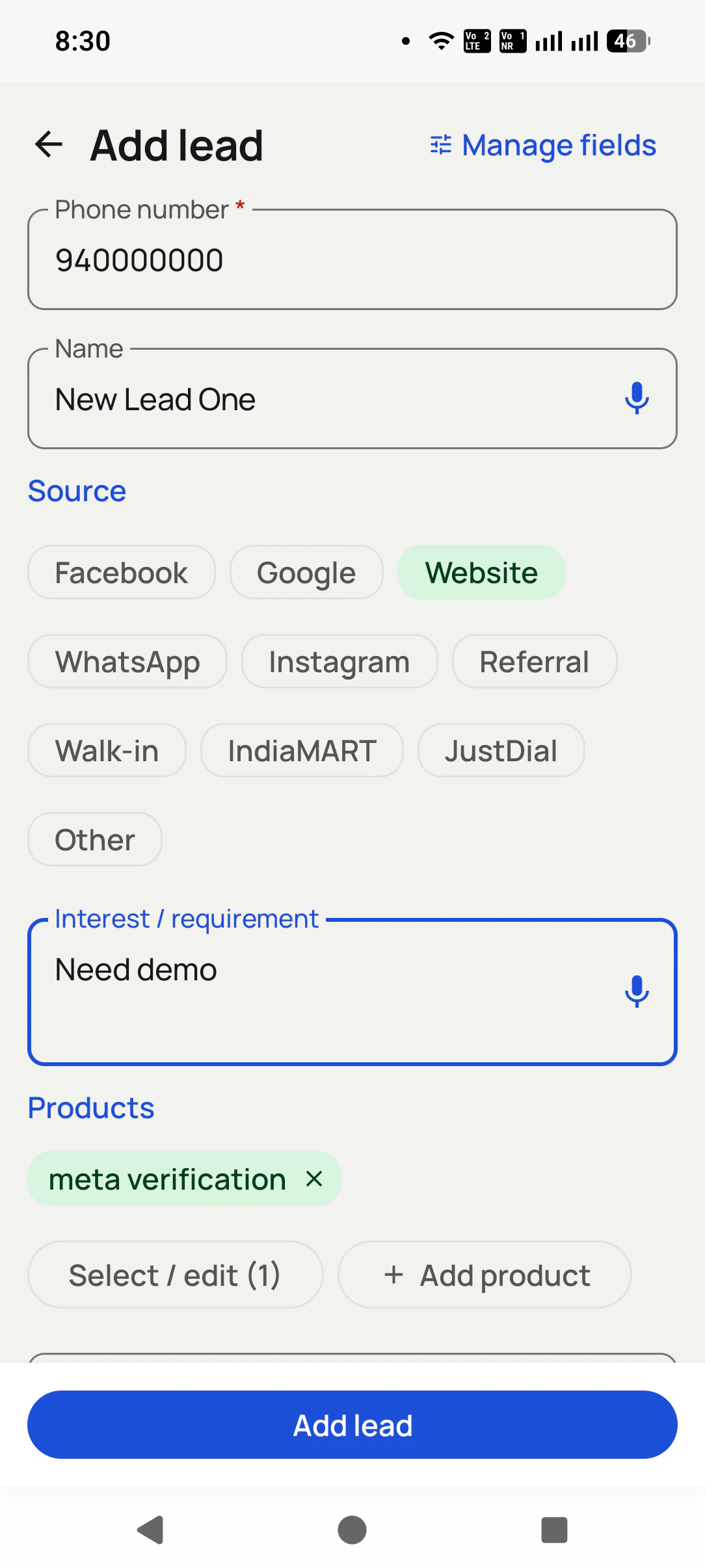
One record, from first enquiry to next action
Tele calling CRM: the point where it is worth using
Choose it when callers need to know who enquired, what was discussed and what happens next without opening several apps. A name and number alone cannot explain why a lead was interested last week or which document they are waiting for.
RMDialer connects the phone conversation to a lead record. Your caller selects the stage, writes the remark and schedules the next contact. The lead keeps that context for the next conversation. This page focuses on the record; see team assignment and manager controls for running the sales floor.
A spreadsheet may already meet your needs if your list is small and follow-ups are reliable. Test the CRM against a concrete problem: missed callbacks, duplicate enquiries or information lost during a handover.
Short answer
What should a tele calling CRM record for each lead?
A tele calling CRM should record eight things for each lead: the number and name, where the enquiry came from plus any tags, the current stage in a pipeline you define, custom fields for the details your trade asks about, remarks in the caller's own words, the next reminder with a date, the full call history, and a trail of what was edited and when. If any of these lives outside the CRM, in a diary, a sheet or someone's memory, the next caller starts the conversation blind. RMDialer is a tele calling CRM that keeps all eight inside the dialer: stages you rename and reorder, typed custom fields such as dropdown, currency and date, an Activity tab that logs calls, status changes and edits, and a choice to skip or update duplicates on import. The annual seat is ₹1908, equivalent to ₹159 per month, before tax; team bundles are available.
Key takeaways
- RMDialer will not delete a stage while leads still use it.
- The Lost Lead filter pulls every lost lead into one list.
- A lead has one stage at a time and can carry many tags.
- A scheduled reminder makes the next action explicit instead of leaving it inside a note.
- Permissions stop callers from deleting or exporting leads, and the owner can still export to CSV.
Lead record fields in a tele calling CRM
Eight parts. Leave any one of them out and a caller will eventually ring a customer without knowing what was already said.
Number and name
The number is the only thing needed to save a lead mid-call. The name can follow, and a lead saved without one still keeps its whole history.
Source and tags
Where the enquiry came from (a portal, an ad, a walk-in) plus free tags such as VIP or bulk buyer, so a list can be pulled by origin or by kind of customer.
Stage
One status at a time, from a pipeline you define. The stage is what tomorrow's calling list is filtered on, so it has to be current after every call.
Custom fields
The details your trade actually asks about: budget, preferred area, course, policy renewal date. Typed fields, not free text, so they can be filtered.
Remarks
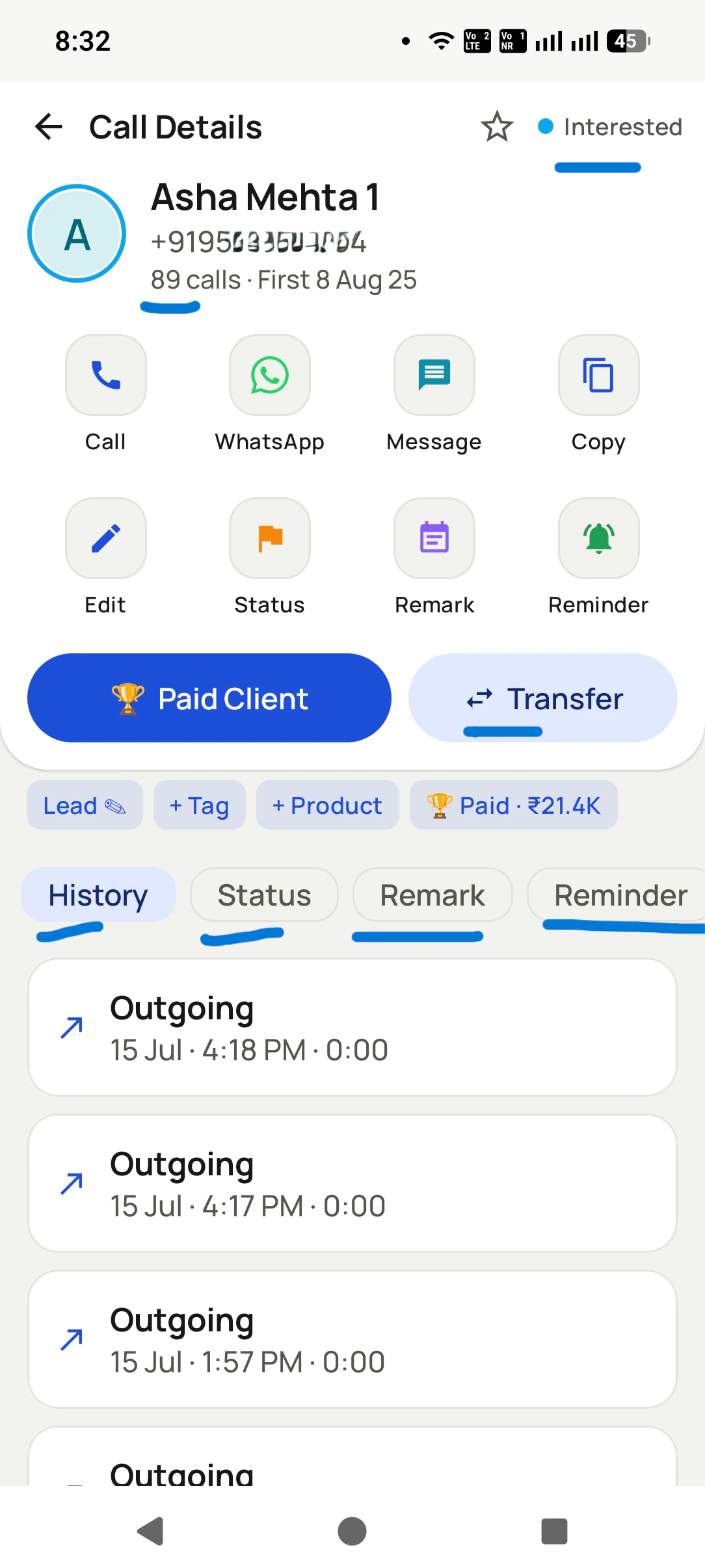
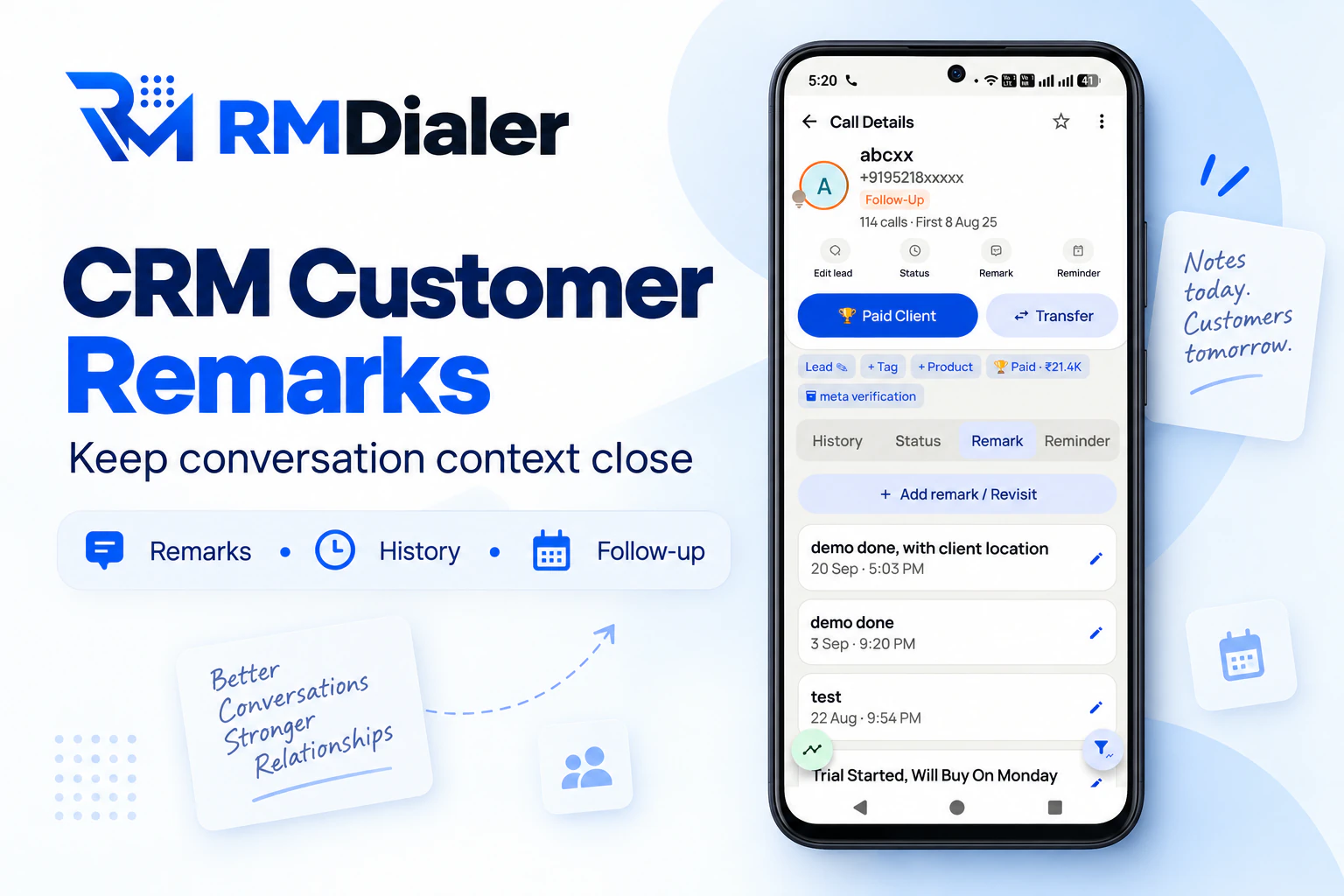
What the customer said, in the caller's words, shown on the next call. Record the requirement, objection or agreed next action; a note is what the caller recorded, not proof of what the customer said.
Next reminder
The callback that was promised, with a date and time that rings. A record with no next step is a lead quietly going cold.
Call history
Every call against the number: picked up or not, dialled by hand or in an auto dial session, and whether the lead was transferred between callers.
Edit trail and deal value
What changed on the record and when, including the deal value. Use the trail to review earlier entries and confirm changed requirements with the customer.
Telecalling pipeline stages
Start with a short pipeline your callers can explain consistently. Six to nine stages is a suggested starting point, not a product limit.
A good stage describes a fact about the lead that a caller can confirm on the call, such as "site visit fixed", rather than a feeling such as "warm". Each stage should lead to a different next action, because the stage is what tomorrow's list is filtered on. If two stages always get the same follow-up, merge them.
Keep one Lost stage and put the lost reason in a dropdown field instead of inventing "Lost - budget", "Lost - bought elsewhere" and "Lost - no answer" as separate stages. The pipeline stays short, and the reasons can still be counted.
- 1 New enquiry
- 2 Contact attempted
- 3 Interested
- 4 Site visit fixed
- 5 Site visit done
- 6 Negotiation
- 7 Booked (won)
- 8 Lost, with a reason field
An example pipeline for a property broker. In RMDialer every stage can be renamed, recoloured and dragged into a new order.
Tele calling CRM custom fields for your business
Pick fields you will filter on, and give each one a type. A dropdown makes consistent filtering easier than differently worded notes.
| Business | Suggested custom fields (field type) |
|---|---|
| Real estate broker | Budget (currency), preferred sector (dropdown), plot or flat (radio), site visit date (date) |
| Coaching or admissions | Course (dropdown), batch timing (radio), parent name (text), counselling date (date) |
| Insurance agent | Policy type (dropdown), sum assured (currency), renewal date (date), family members (number) |
| Loan DSA | Loan type (dropdown), amount needed (currency), monthly income (currency), documents pending (multi-select) |
| Distributor or wholesaler | Product lines (multi-select), monthly order size (number), credit days (number), delivery area (text) |
RMDialer field types: text, long text, number, currency, dropdown, multi-select, radio and date.
Duplicate numbers in a tele calling CRM
The same customer written as 98xxx, +91 98xxx and 098xxx is one person. The CRM has to know that before it decides anything else.
Normalise first
Set a default country for the import, so numbers written without +91 are read the same way as numbers written with it.
Skip when the CRM is right
A daily portal sheet repeats old enquiries. Skipping them protects the stage and remarks your callers already recorded.
Update when the source is right
A sheet your team maintains carries fresher details. Choose update on that source, and the lead keeps its history while its fields refresh.
Plot enquiries kept straight: a property broker in Noida
An illustration with round numbers, showing the record doing its job.
Picture a broker in Noida with four telecallers working plot enquiries from a property portal and a Facebook form. Every lead carries the source, a budget in a currency field, the preferred sector in a dropdown, and a site visit date. The broker's eight stages run from new enquiry to booked, with one Lost stage and a reason dropdown.
A buyer tells the first caller his budget is ₹85 lakh, and the caller enters it. Two weeks later, the buyer insists he always said ₹70 lakh and is annoyed at the plots he is being offered. The Activity tab shows the budget entered on the first call and never edited, along with the remark "can stretch to 85 for east-facing". That shows what the caller entered, not which budget is correct today. The next step is to confirm the current requirement with the buyer and update the record.
The same morning, the portal sends its daily sheet with forty numbers the team has already called. The source is set to skip duplicates, so the stages and remarks on those forty leads stay exactly as the callers left them.
At month end, the broker filters Lost leads by reason. Twenty-two say "budget too low". When a new layout with smaller plots launches, those twenty-two become the first calling list, each opening with the remark from the call that lost them.
Tele calling CRM demo questions
Bring a small sample of your own lead fields. Ask the vendor to demonstrate the record, import behaviour and permissions you actually need.
- Can I rename, recolour and reorder the stages myself, without raising a ticket?
- What happens if I try to delete a stage that 200 leads still sit in?
- Which field types can I create: dropdown, multi-select, currency, date?
- When I import a sheet with numbers already in the CRM, can I choose skip or update?
- Does every edit to a lead show what changed and when?
- Does the last remark appear on the call screen when the customer rings back?
- Can I stop a caller from deleting or exporting leads?
- Can I export every record to a CSV on the day I decide to leave?
RMDialer's answers are on this page, and its 3-day trial lets you check all eight on your own leads. Ask the same eight questions of any other vendor before deciding.
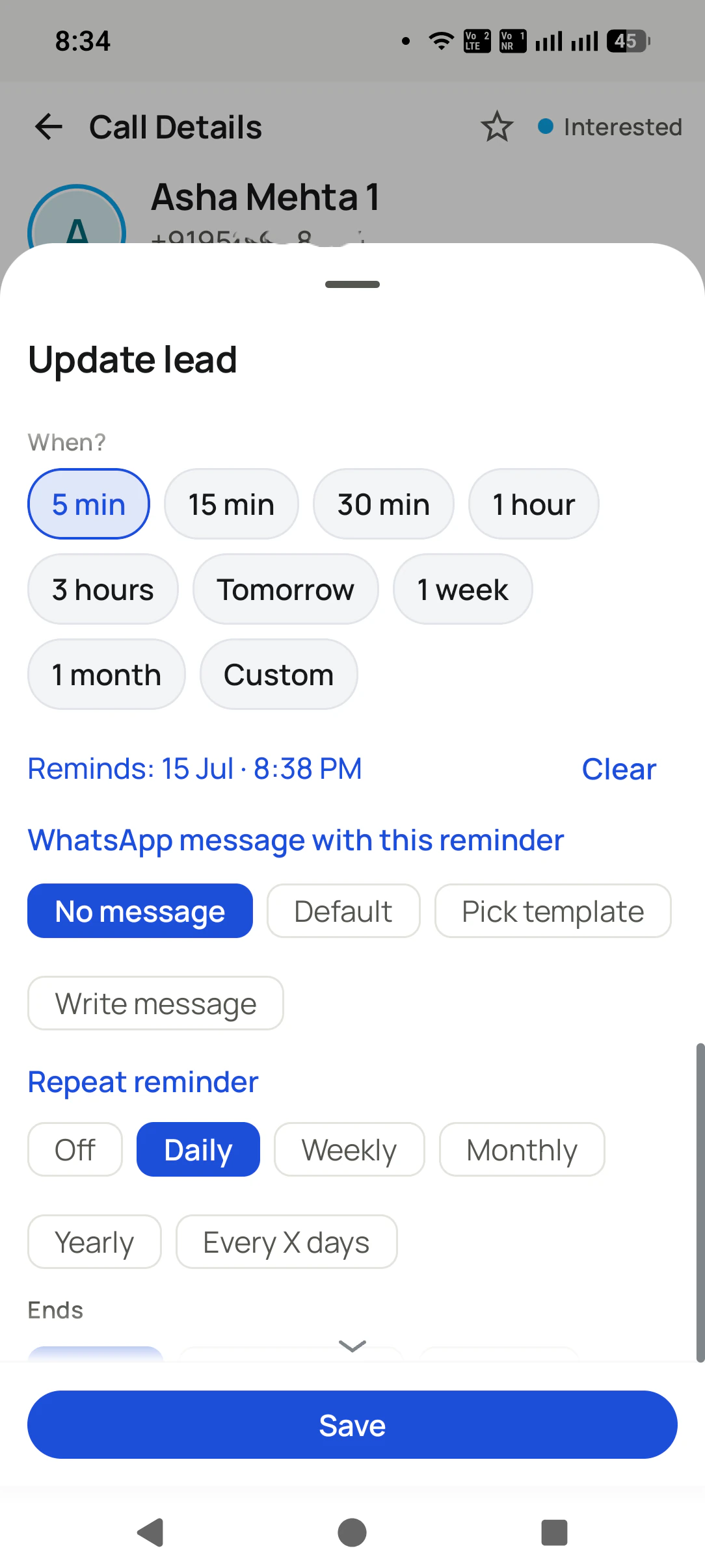
A next step the caller can act on
Callback test before moving the whole list
Take one fresh enquiry, one existing customer and one repeated number. Save a different remark and reminder for each. Close the app, allow the scheduled time to arrive and check that the right record opens when the reminder is used. Review Android notification and battery settings if it does not arrive.
Then import your small sample twice. Confirm which fields update and which records are skipped before connecting a live source. Keep a copy of the original sheet and agree who can export or delete leads. A clean sample test is more useful than migrating thousands of rows before your fields are settled.
The iPhone app is available for lead records, remarks, reminders and team work; native iPhone calls are not logged automatically. Test the exact calling steps on each platform. For call outcomes, see call disposition software.
Try it with your own workflow
See your own lead record in RMDialer
Bring your stages, one sample sheet and a callback scenario. We will show how the record works before you move the team.
Team features, one plan
₹159/user/month
₹1908 per user, billed yearly, plus taxes, in India. $29 per user per year, or $12 per user for 3 months, outside India.
- Lead statuses, remarks and reminder scheduling
- Assigned calling lists and employee reports
- List auto dialing and WhatsApp automation
The personal dialer, call log and personal analytics are free forever. Team access and saved lead workflows require a plan. SIM charges and any WhatsApp provider charges are separate.
Compare free and paid features →Tele calling CRM: questions about the lead record
What is a tele calling CRM?
A tele calling CRM is the record system behind a calling team: it keeps each lead's number, source, stage, custom details, remarks, reminders and full call history in one place, updated from the phone as calls happen. RMDialer builds that record inside the dialer, so the caller can update it during or after the conversation. The app does not infer the buying stage.
What should a telecaller record after every call?
Three things at minimum: the new stage, a one-line remark in their own words, and the next step with a date. Custom fields get filled only when the customer shares something new, such as a budget or a preferred date. In RMDialer all of that sits on the screen that appears when the call ends.
Can I make my own lead stages in RMDialer?
Yes. Add as many stages as your process needs, rename them, give each a colour and drag them into the order a lead moves through. The list on every caller's phone updates to match.
What happens if I delete a stage that leads are still in?
RMDialer stops you and tells you how many leads still use it. Move those leads to another stage first, then delete it. That guard exists so a tidy-up never leaves a few hundred leads with no stage at all.
Which custom field types can a tele calling CRM offer?
RMDialer offers text, long text, number, currency, dropdown, multi-select, radio and date fields. A field that already holds data on some leads cannot be deleted; you edit it instead, so recorded details are not wiped by accident.
How do I record why a lead was lost?
Move the lead to your Lost stage and add a dropdown custom field for the reason, with options such as bought elsewhere, budget too low or not reachable. RMDialer's Lost Lead filter then pulls every lost lead into one list, and the reason field tells you which of them are worth a second call.
How does RMDialer handle duplicate numbers on import?
On import, numbers written without a country code are read as the country you choose, so a list mixing both styles comes in consistently. When a Google Sheet or API source brings in a number that already exists, you choose per source whether to skip it or update the existing lead.
Can I see who changed a lead's details and when?
Yes. The Activity tab on each lead lists calls, stage changes, notes, reminders and edits in time order, including changes to fields such as deal value. When a budget or a promise is disputed, the record shows what it said and when that changed.
What is the difference between a lead stage and a tag?
A stage says where the lead is in your process, and a lead has exactly one at a time. Tags describe the lead and can be many at once, such as VIP, bulk buyer or referral. Filter by stage to plan today's calls; filter by tag to build a list for a message or an offer.
Can a remark save where the caller was standing?
Location-enabled remarks can provide context for field work when the relevant permission is granted. Agree how your team will use location information before enabling it. A saved position is supporting information; it does not establish that a site visit or a customer conversation took place.
Can I track deal value on each lead?
Yes. RMDialer keeps a deal value on the lead, and a change to it shows up in the Activity tab like any other edit. Combined with stages, that gives an honest view of what is in the pipeline and what quietly shrank.
Why not just use a spreadsheet as a tele calling CRM?
A spreadsheet can store leads and may include version history. The difference is the calling workflow: RMDialer puts the customer record, remarks and reminder controls beside the call. A sheet can be enough for a small shared list; evaluate a tele calling CRM when switching between the sheet and phone leaves callbacks or updates unfinished.
Is a dialer the same thing as a tele calling CRM?
A standard phone dialer places calls and usually keeps a call log. A tele calling CRM adds business context such as the lead stage, requirements and promised follow-up. RMDialer combines these on Android; the iPhone app supports lead work but does not automatically import the native call log.
Can I stop callers from deleting or exporting lead records?
Yes. Permissions in RMDialer control deleting and exporting leads for each employee, so the records stay with the business. The owner can still export lead lists to CSV at any time.
How much does a tele calling CRM cost in India?
The standard RMDialer annual seat is ₹1908 before tax, equivalent to ₹159 per month. Quarterly billing is ₹747 per user for three months. Published annual team bundles lower the per-user rate. Lead records, reminders and list auto dialing require a paid plan after the 3-day trial; the personal dialer remains free.