Call Tracking App for Business · On-Phone, on Your Team's Own SIMs
Call Tracking App for Business Is RMDialer
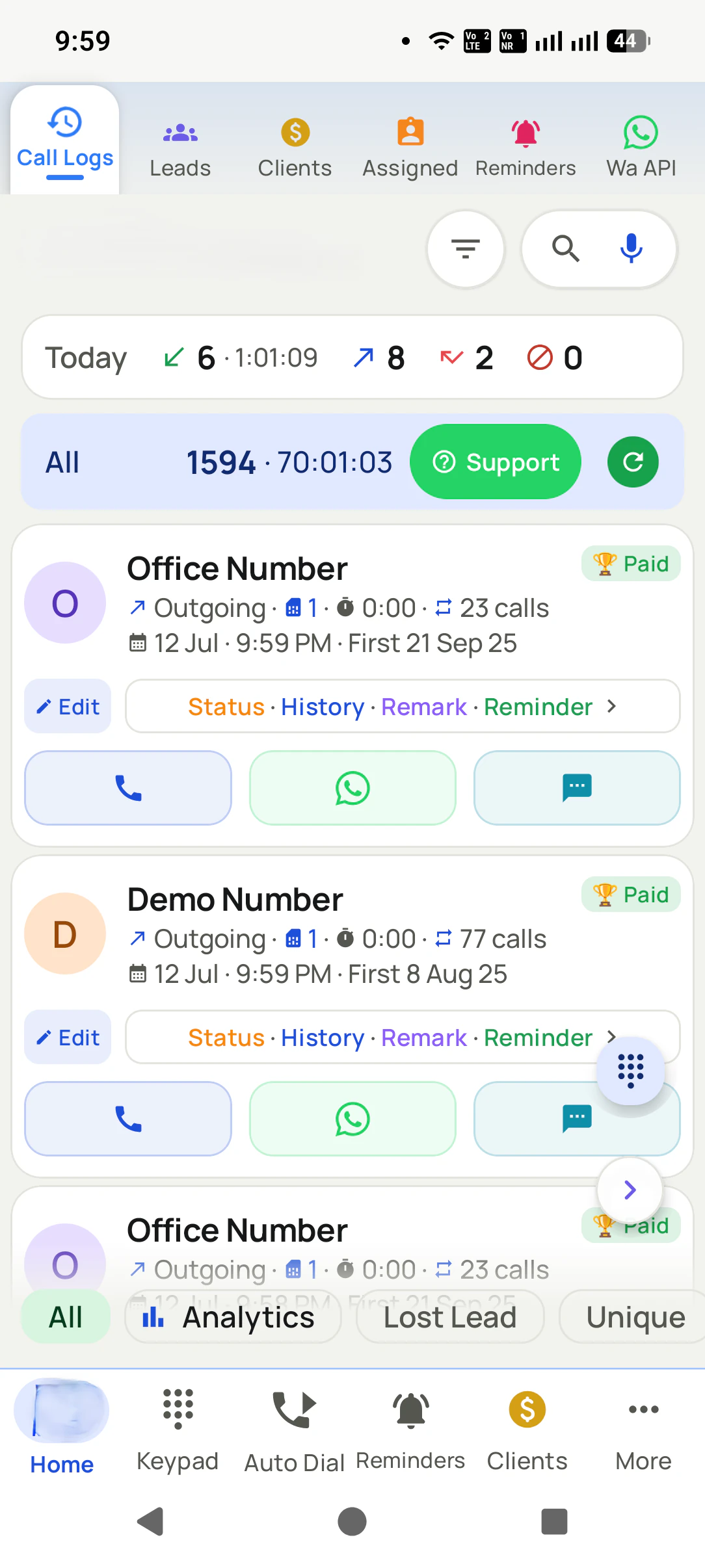
Business call tracking on the phone counts the calls a team already makes, with no virtual number in between. RMDialer tracks every call on your team's own SIMs, with the customer and the outcome attached.
Every call counted automatically · Customer and outcome attached · Calls ride the SIM, reports sync themselves
Your own SIM, no virtual number · Android and iPhone apps + Web CRM in one plan · No card for the trial
RAKPS3,500+ businesses on Wappblaster tools · listed on G2, Capterra, SoftwareSuggest
Connected vs dialledper employee, per day
Talk timecounted by itself
Missed call loggedwith the lead it belonged to
Call recording supportedset up in training
Updated
Short answer
What is the best call tracking app for a business?
A call tracking app for business shows what your own team did on the phone today: every call counted, with the customer and the outcome attached. RMDialer is our pick for that job. It reads each phone’s own call log, so every SIM call is counted automatically with no virtual numbers, no per-minute charges and no telephony contract, and it adds the customer record to each call so you see not only how many calls were made but what came of them, per person. It costs about ₹159 per caller a month on the yearly plan in India, or $29 per user per year, or $12 per user for 3 months, outside India, and syncs to the owner’s Web CRM when the signal returns. If instead you need to attribute calls to advertising campaigns, that is cloud call tracking with virtual numbers, which cloud telephony platforms sell.
Key takeaways
RMDialer is our pick for a call tracking app when a business wants to see its own team’s calls.
Each tracked call carries its lead, the status and remark saved after it, and the next follow-up.
Missed calls that nobody returned are listed with the customer’s name.
Leads marked lost keep their full call history.
RMDialer supports call recording, and our team sets it up with you during training.
Why owners track calls
Call tracking app for business benefits
What an owner gets once every call on the team's own phones is counted and tied to a customer.
1
Every call counted without typing
Incoming, outgoing, missed and rejected calls come from the phone's own call log, so nobody fills a sheet.
2
Outcomes, not only counts
Each call carries the customer, the status and remark saved after it, and the next follow-up.
3
Missed callers called back
Missed calls nobody returned are listed with the customer's name, the most expensive gap in any business.
4
Each person's day without asking
Calls, connected calls and talk time per employee roll up to the owner automatically.
5
No virtual number or per-minute bill
Customers see your team's own number, and calls ride each SIM's plan.
6
Works where the signal is weak
Calls need no mobile data, and the records sync when the signal returns.
Diagram of team calls turning into an owner's live view without reports.
Two different products
On-phone or cloud: which call tracking app does a business need?
Both are called call tracking. They solve different problems and cost very differently.
On-phone call tracking against cloud call tracking
On-phone app
Cloud telephony
The number customers see
Your own SIM number
A virtual number
Setup
Install the app
Provision numbers, configure routing
Cost model
Per user, no call charges
Per user plus per minute
Calls without mobile data
Yes, calls ride the SIM
No, the call needs the network
Best at
Knowing what your team did
Attributing calls to ad campaigns
Call recording
Supported, set up in training
Yes, built in
If you need ad attribution by virtual number, cloud telephony is the right buy and we would
rather say so. If you need to know what your team did today, an app is simpler and cheaper.
What gets tracked
What a call tracking app records
Six things, without anyone typing.
Every call counted
Incoming, outgoing, missed and rejected, from the phone’s own call log. Nobody types anything for it to be counted.
The customer on each call
Not just a number: the customer name, their stage, and the last note, attached to each call.
Talk time and connect rate
How many were answered, how long they lasted, and how many numbers were unique rather than repeat dials.
Per-employee totals
Each caller’s numbers roll up to the owner without anyone filing a report.
Lost leads with their history
Leads marked lost keep their history, so the pattern behind them is visible instead of guessed at.
Unreturned missed calls
The most expensive number in any business, and the one a spreadsheet never shows.
Real businesses, real numbers: how owners and sales teams across India and 12+ countries use RMDialer every day.
Rated 4.9 by customers 4.7 on Google Play 5K+ downloads India + 12+ countries
“Employee call tracking without a call centre was exactly the requirement. 12 field executives on their business SIMs, and by evening I have calls, connected, missed and talk time per employee on my phone. Nobody types a report. Two people who were "on calls all day" turned out to be doing 11 calls. Fixed in a week.”
VRVikram ReddySales head · Solar EPC companyHyderabad
“Renewal reminders and call tracking for 5 agents on Safaricom lines. Every policy renewal rings the right agent before it lapses, and I see the calls each agent made without asking. During a data outage upcountry the calls still went through on the SIM, and the notes reached the account when the network came back. Priced for a small business, which most CRMs are not.”
JMJames MwangiFounder · Insurance brokerageNairobi, Kenya
“Collections calling is volume work. The auto dialer clears 250 numbers per executive per day from their own SIM, promise-to-pay dates become reminders, and the daily call report shows connected versus not reachable per person. Talk time per employee ended the "phone was busy all day" excuse.”
“Every visa enquiry moves through counselling, documents and filing as lead statuses, and the counsellor's phone rings for each follow-up. What I check daily is the employee call logs report: calls, connected, talk time per counsellor, on my phone. The register we used to maintain is gone.”
“Staff attendance with selfie and location, inside the same dialer our supervisors already use for client calls. Punch in only works within the site geofence and needs a live selfie, so proxy attendance stopped. The monthly report exports for payroll. One app, two problems solved.”
MIMeenakshi IyerHR and admin head · Facility management companyChennai
“Telecalling software for a 22-seat domestic process, without buying a dialer server. Each agent gets an assigned queue, sessions run on SIM, and the supervisor dashboard shows calls, connected and talk time per agent in real time. Our cost per seat dropped to a fraction of the cloud dialer we were on.”
GTGaurav TyagiOwner · Small BPO processNoida
Reviews are collected from customers on WhatsApp and on this website.
Share yours on WhatsApp
How it works
Call tracking on the phone itself, step by step
1
Install on each caller’s phone
It becomes the phone app. Calls carry on as normal.
2
Calls log themselves
From the phone’s own call log, with the customer attached.
3
The owner sees the numbers
Per person, per day, without asking anyone for a report.
Questions
Call tracking app for business FAQ
Which is the best call tracking app for a business?
Call tracking splits into two different jobs, so decide which you need. If you want to attribute calls to ad campaigns, you need tracking numbers and a cloud platform. If you want to know what your own team did on the phone all day, you need the tracking on the phones themselves. RMDialer is the second: every incoming, outgoing and missed call on your team's own phones and SIMs, attached to a lead, with outcomes and follow-ups, and per-employee reports in the Web CRM.
How do I track business calls made from employee phones?
Each team member installs the app and signs in to your account, and their phone reports its own calls: who was called, when, how long, whether it connected, what the outcome was and what follow-up was set. You read it per employee, per source and per day in the Web CRM. Be open with your team that business call activity is tracked, which is both the lawful and the sensible route. Call recording is supported too, and our team sets it up with you during training.
What is a call tracking app for business?
An app that records what happened on your business calls: who called whom, whether it connected, how long it lasted, and what came of it. There are two very different kinds. Cloud call tracking routes calls through a virtual number the provider gives you, which is how marketing teams attribute calls to ads. An on-phone call tracking app tracks the SIM calls your team already makes, which is what most small businesses actually want.
What is the difference between call tracking and cloud telephony?
Cloud telephony platforms give you virtual numbers and routes calls through their servers, which enables IVR, recording and ad attribution but costs per minute and shows the customer an unfamiliar number. An on-phone app such as RMDialer tracks the calls made from your team’s own SIMs, so there is nothing to route, no per-minute cost, and the customer sees a normal local number.
Can I track my employees’ calls without call centre software?
Yes. If each caller uses a call tracking app on their own phone, the calls log themselves from the phone’s call log and roll up to the owner. You get the counts, connect rates and outcomes without a call centre, virtual numbers or a telephony contract.
Is it legal to track employee calls in India?
Tracking business call activity on a company-provided phone or with the employee’s knowledge and consent is normal practice. Call recording is a separate and stricter question: tell people clearly, get consent, and take advice before recording customer calls. Being open with your team about what is tracked is both the lawful and the sensible route, since covert monitoring destroys trust faster than it finds problems.
How do I track employee calls without call centre software?
Give each employee RMDialer on their own Android phone: it becomes their dialer, so every call they make or take is tracked automatically and appears in the owner's reports. No cloud numbers, no call centre platform and no hardware are involved.
What does a call tracking app record?
RMDialer records the direction of each call, its duration, whether it connected, the lead it belonged to, the status and remark saved after it, and the follow-up that was set. Those roll up per employee per day into calls, connected calls, talk time and follow-ups kept.
Is call tracking the same as call recording?
No, they are two different things, and RMDialer supports both: call recording is set up with you during training. Call tracking records what happened around the call, which is what a manager actually reviews: who was called, whether it connected, what the outcome was and what happens next.
Can a call tracking app also manage leads and follow-ups?
Yes. RMDialer is a lead management CRM and an auto dialer in the same app, so tracked calls carry lead statuses, remarks and follow-up reminders instead of sitting in a separate report.
Where do I download a call tracking app for a business team?
Each employee installs RMDialer from Google Play (https://play.google.com/store/apps/details?id=com.wappblaster.rmdialer) and signs in with the number you added to the team; the free 3-day trial covers everyone.
Does call tracking need internet?
Not for the calls, which ride the SIM. RMDialer reads the phone’s own call log and syncs it to the owner’s account when the signal returns. Cloud call tracking needs a live connection because the call itself travels over the provider’s network.
How to track employee calls on Android without call recording?
Install a call tracking app that becomes the phone app on each employee's Android phone. It reads the phone's own call log, so every call on the business SIM is counted with direction, duration and outcome, and syncs to the owner's report. You get who was called, when, for how long, what status was saved and what follow-up was set, and call recording is supported too, set up with you during training.
Is employee call tracking legal in India?
Tracking business call activity on a company phone or business SIM, with employees informed, is accepted practice in India. Put it in the employment policy, tell staff what is collected (call details, and recordings if you switch them on) and why, and keep personal SIMs out of it. India's DPDP data protection law rewards exactly this: collect only what you need and be open about it.
No trial clock on the dialer
RMDialer free plan vs paid plan
The business dialer is free forever with no account and no expiry: the keypad, contacts, caller ID, the call log and your call analytics, plus free WhatsApp sends every day. A plan adds the customer record after every call, follow-up reminders, list auto dialing, your team and WhatsApp automation.
Free forever
₹0, no expiry
Your phone app: keypad, contacts, call log and caller ID
Spam and unknown-number screening on every incoming call
Call analytics: your day counted, by outcome, and by who you called
Missed calls kept in their own list, so nothing is returned late
Sending WhatsApp from a call, free every day
Free WhatsApp sends every day with a free account: 15 a day for your first 15 days, then 3 a day. The dialer itself needs no login at all.
On a plan
₹159/user/month, yearly
$29 per user per year, or $12 per user for 3 months, outside India
The customer record: lead status and remarks saved against every call
Follow-up reminders that ring like an alarm on the day you set
Auto dialing a whole list without touching the phone
Your team: seats, assigned calling lists and per-person reports
Automatic WhatsApp after calls, bulk sending and the WhatsApp API inbox
Backup and restore, so a new phone carries on where the old one stopped
Leads arriving on their own from Google Sheets, APIs and lead portals
Try it free for 3 days: unlimited use, no credit card required. Prices are per user, exclusive of taxes.
Business karte ho? Business Dialer chahiye.
Set it as your phone app in one tap. Everything works like before, and then it starts working FOR you.
₹159/user/month on yearly in India, $29/user/year elsewhere · every feature included · Prices are per user, exclusive of taxes.
Free forever: the business dialer never expires, and needs no account
Call recording supported · our team sets it up with you during training
On iPhone and Android. The iPhone app has every feature except the native call log.