
How calls find the contact
Usually by phone number. Agree how numbers are stored in the CRM, with or without the country code, so calls attach to the right record.
NewRMDialer is now on iPhone as well as Android · every feature except the call log
Sync call logs to CRM
Your CRM has a field for every call, and it is empty, because the calls happen on salespeople’s mobiles and nobody types them in. The fix is not a reminder to log calls. It is an app on each phone that records every call and sends it to the CRM by itself.
Free personal dialer. Paid features include a 3-day trial; no card required.
Team plans: ₹159/user/month, billed yearly + taxes →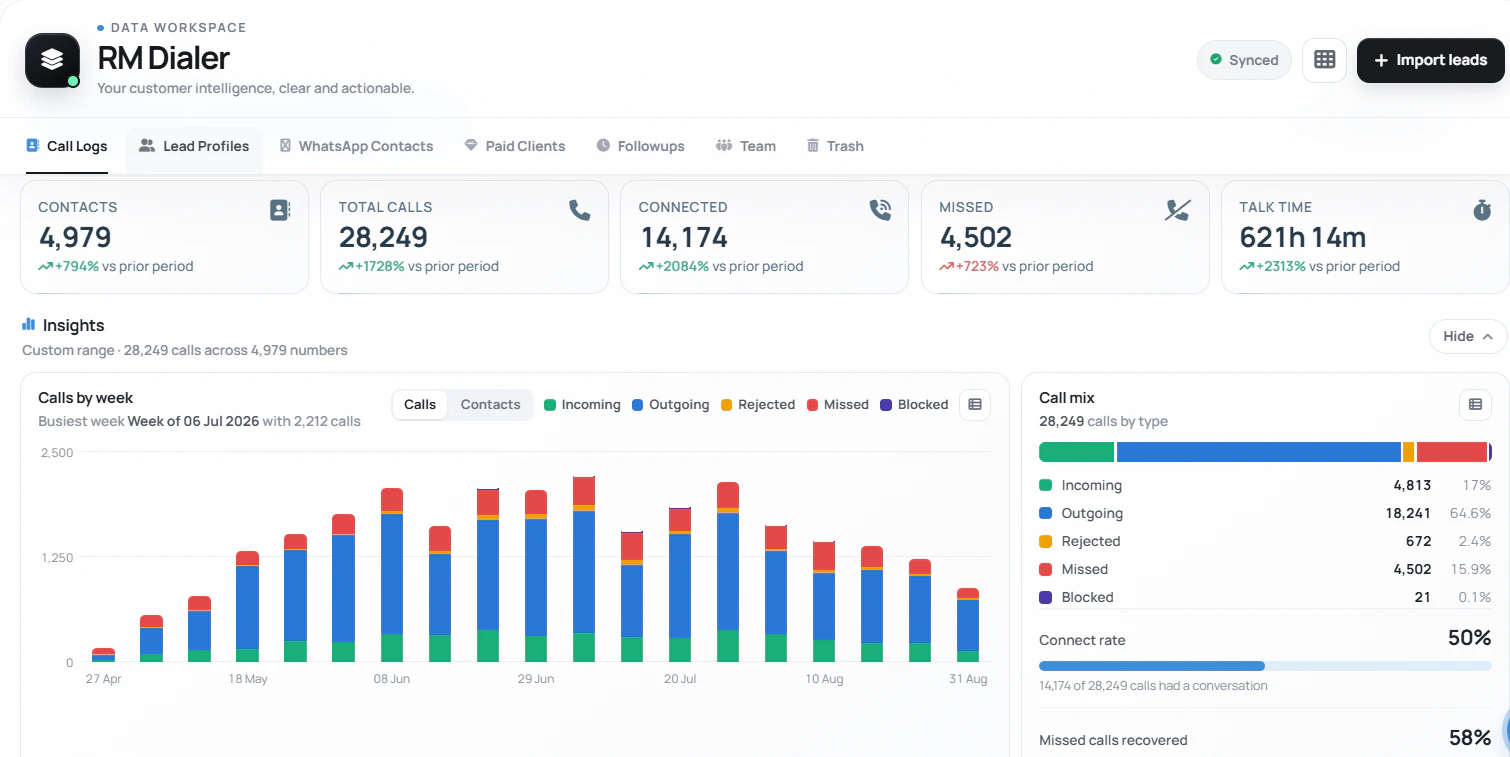
Only a record made by the phone itself is complete.
Short answer
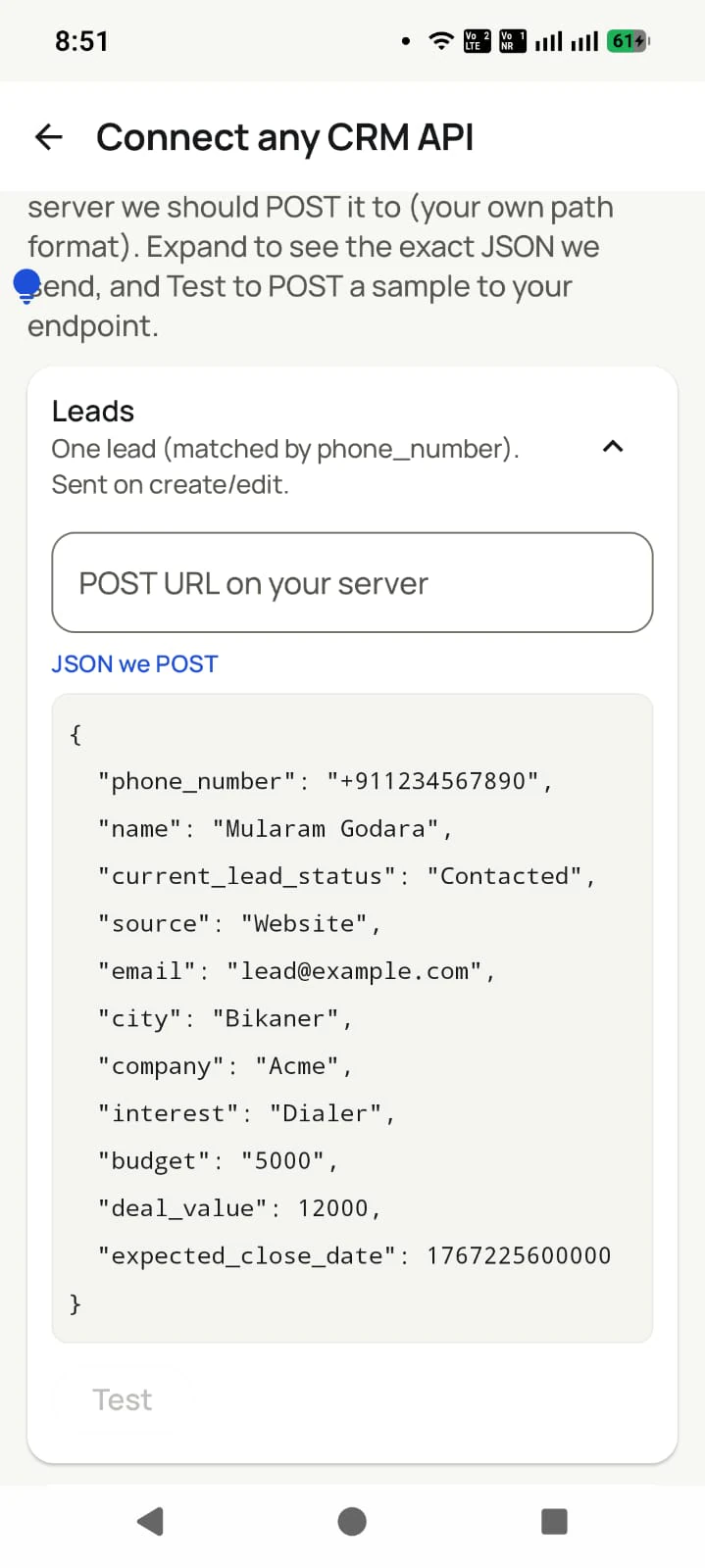
To sync call logs to a CRM, put an app on each salesperson’s phone that records every call, then send those calls to the CRM automatically. RMDialer reports each call from the phone and delivers it by webhook as it happens, by a scheduled pull, or by CSV export, with the lead, status and remark attached. Teams whose CRM is mainly a lead list can use RMDialer’s Web CRM instead.
Key takeaways
Four ways, one source
All four routes start from the same place: the call recorded on the salesperson’s phone. They differ in who sets them up and how quickly each call appears in the CRM.
| Route | Who sets it up | How quickly calls appear | Best for |
|---|---|---|---|
| Webhook per call | A developer, or an automation tool that accepts incoming JSON | Each call as the phone reports it | Pipelines that must update while the salesperson is still on the lead |
| Polled cursor | A developer running a scheduled job | As often as the job runs, for example nightly | Reporting warehouses and nightly reconciliation |
| CSV export and import | Anyone, by hand | Whenever someone exports | Occasional reports and one-off migrations |
| Use the Web CRM itself | Nobody; it is already there | None | Teams whose CRM is mainly a lead list and a follow-up diary |
Many businesses start with the fourth row and never need the others. If your CRM is used mainly to keep a list of leads, see who called whom and remember the next follow-up, the Web CRM already does that with the calls filled in. Syncing makes sense when the CRM holds things the dialer does not: quotations, orders, service tickets or accounts.
An agri-inputs company in Hubballi
Picture a seeds and fertiliser company in Hubballi with thirty field sales reps visiting dealers across north Karnataka. Its CRM held every dealer, every order and every credit limit, but the calls between visits, where most reorders were agreed, were invisible. Reps were asked to log calls every evening; almost nobody did.
The company installed RMDialer on the reps’ phones and had its CRM vendor listen for the call webhook. Each call now lands on the dealer’s record as it ends, with the rep’s one-line remark. Reps in villages with no signal show their calls when they reach the highway, which the integration was built to accept.
The sales head now opens a dealer’s record before a credit review and sees how often the rep actually spoke to them this season. The company is an illustration of the setup, not a named client.
For the person who will set it up
Four decisions made up front save weeks of fixing later. Share them with your CRM vendor or developer before any work starts.
Usually by phone number. Agree how numbers are stored in the CRM, with or without the country code, so calls attach to the right record.
Duration, direction and outcome are standard. Decide whether you also want the remark, the status change and the next follow-up.
Create a new contact, attach to a holding list, or ignore. Unknown callers are often new leads, so ignoring them is rarely right.
Phones without signal send calls later. The integration must accept a call from this morning arriving this evening.
Developers can find payloads and patterns on the dialer API for CRM and the data model on the call logs API for developers.
Try it with your own workflow
Tell us which CRM you use and how many people call from their phones. We show the calls arriving in a test account and share sandbox access for whoever will connect it.
Team features, one plan
₹159/user/month
₹1,908 per user, billed yearly, plus taxes.
The personal dialer, call log and personal analytics are free forever. Team access and saved lead workflows require a plan. SIM charges and any WhatsApp provider charges are separate.
Compare free and paid features →Install a dialer app on each phone that reports every call, then send those calls to your CRM by webhook, a scheduled pull, or a CSV export. RMDialer reports each call from the phone and offers all three, and the calls also appear in its own Web CRM.
A message sent automatically to a web address you choose whenever a call ends, containing the call’s details. Your CRM or an automation tool listens at that address and updates the right contact, so nobody copies calls by hand.
Partly. CSV export needs no developer. Many automation tools can receive a webhook and write to a CRM without code, but someone still maps the fields once. Or skip syncing entirely if the Web CRM covers what you use your CRM for.
The number, whether it was incoming or outgoing, when it started, how long it rang and lasted, and whether it connected, plus the lead it belongs to, its status and the remark the salesperson typed after the call.
Yes. The phone’s own call log is the source, so a salesperson who dials from contacts out of habit still produces a call record, though without the outcome they would have picked in the app.
Because the phone had no signal when the call ended. The call is sent when the connection returns. Ask whoever builds the integration to accept late arrivals and duplicates rather than treating calls as missing.
Yes. Past calls can be pulled through the same scheduled route from the beginning, so the CRM does not start with an empty history for every customer on the first day.
Yes. Your CRM can send a lead with an owner, and it appears in that salesperson’s list on the phone, ready to call. Or the app can read leads from your CRM’s endpoint or a connected sheet.
No. API access is included in the normal licence of ₹159 per user per month on the yearly plan in India, with no charge per call or per event.
Only where the phone’s own dialer recorded the call and the recording was attached. SIM calls do not pass through any server, so there is no central recording to sync for every call.
The data travels over HTTPS with a token you can rotate, and keys reach only the accounts they should. Tell employees in writing that work calls are recorded in the business’s systems.