
Bulk WhatsApp from Excel
Bulk WhatsApp From Excel, Without Macros
Bulk WhatsApp from Excel means sending one message to many people on a spreadsheet, each with their own name and details filled in. Most failures start in the sheet, so RMDialer's free template checks country codes, duplicates and consent first; then the app sends from your WhatsApp or through the Business API.
- A template that checks every row
- Name and details filled in per message
- No VBA, no browser extension
Free personal dialer. Paid features include a 3-day trial; no card required.
Team plans: ₹159/user/month in India, $29/user/year elsewhere, billed yearly + taxes →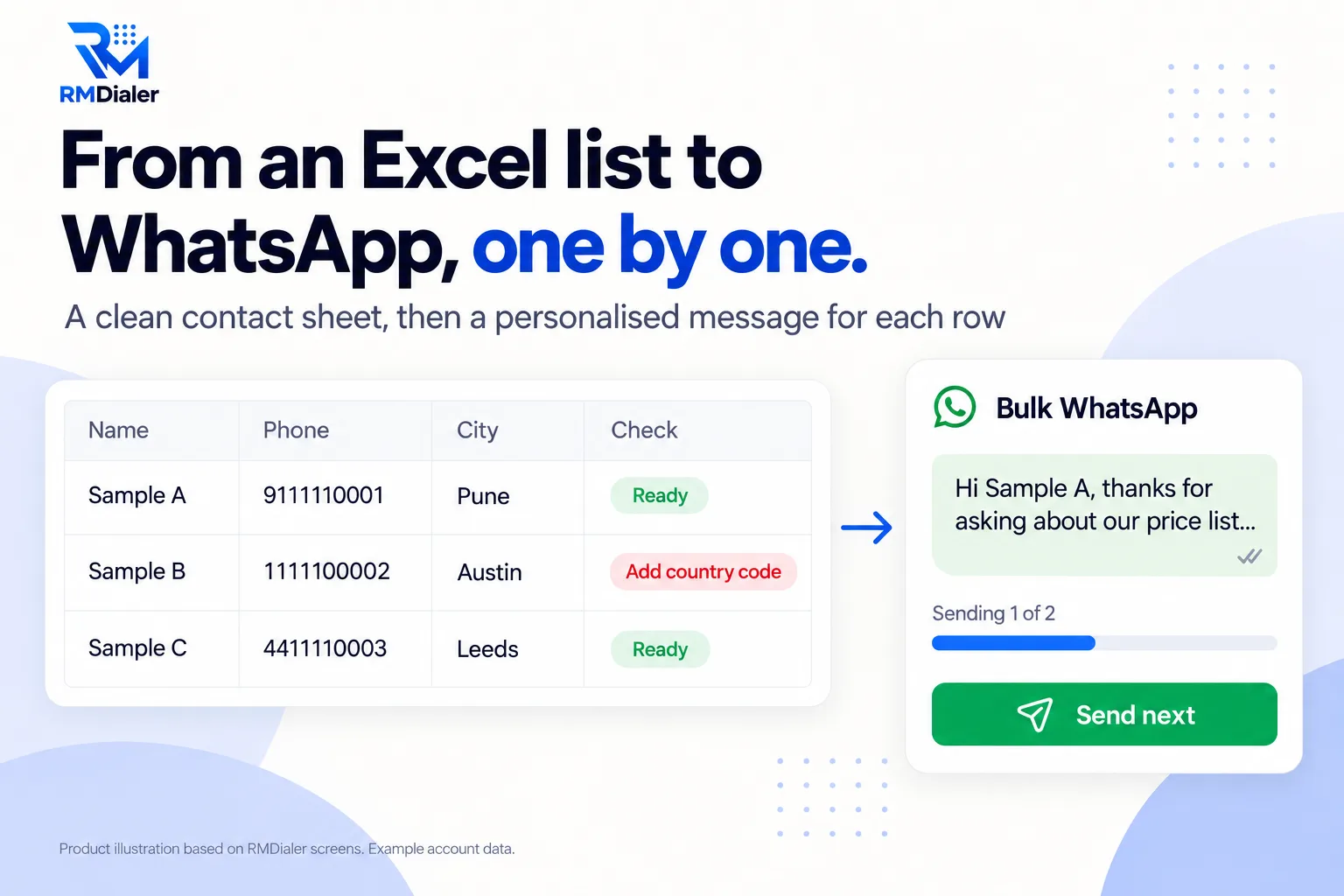
The three sample contacts use made-up numbers; remove them before importing.
Updated
Short answer
How do you send bulk WhatsApp from Excel?
To send bulk WhatsApp from Excel, keep one contact per row with a country code and consent, write one message with placeholders like {name}, import the sheet into a sending app and send. RMDialer sends from your own WhatsApp one by one, or through a Business API provider.
Key takeaways
- Fix numbers and consent in the sheet first.
- Test on your own number before the list.
- Avoid unofficial auto-senders on a business number.
Why this route
Bulk WhatsApp from Excel benefits
What changes when the list is checked before sending and the sending is done by an app built for it.
-
No macros or VBA
Nothing to enable in Excel and no code copied from a forum.
-
A list WhatsApp will accept
The template flags numbers without a country code before you send anything.
-
Nobody gets it twice
Repeated numbers are flagged so you can delete the extra row first.
-
Only people who agreed
A consent column decides which rows are Ready, which protects your number.
-
Every message personal
Name, city, company and interest are filled in per row from your columns.
-
Two ways to send
One by one from your own WhatsApp, or as a campaign through a WhatsApp Business API provider.
What people actually use
Bulk WhatsApp from Excel: four ways compared
Search results for this question are mostly macros, extensions and sender tools. Here is how the routes differ on what can go wrong.
| Way | How it works | Main risk | Best for |
|---|---|---|---|
| VBA macro in Excel | A script opens WhatsApp Web for each row | Breaks when WhatsApp Web changes; macros are often blocked | People comfortable maintaining code |
| Browser extension sender | Reads the sheet and types messages in WhatsApp Web | Unofficial automation can get a number restricted | Rarely worth the risk for a business number |
| Phone app, one by one | Import the sheet; the app opens each chat with the message ready and you tap Send | Low, at a human pace | Small lists, your own WhatsApp number |
| WhatsApp Business API campaign | Approved templates sent from the server through a provider | Low, the official route | Larger lists and repeat campaigns |
From file to sent
Bulk WhatsApp message from Excel, step by step
- Fill the template. Name, number with country code, city, company, interest and whether they agreed.
- Clear every red Check cell. Add missing country codes; leave people who did not agree as No.
- Delete duplicates. Rows marked Yes in Duplicate? would get the message twice.
- Import into RMDialer. Share the file to the app; it becomes a list.
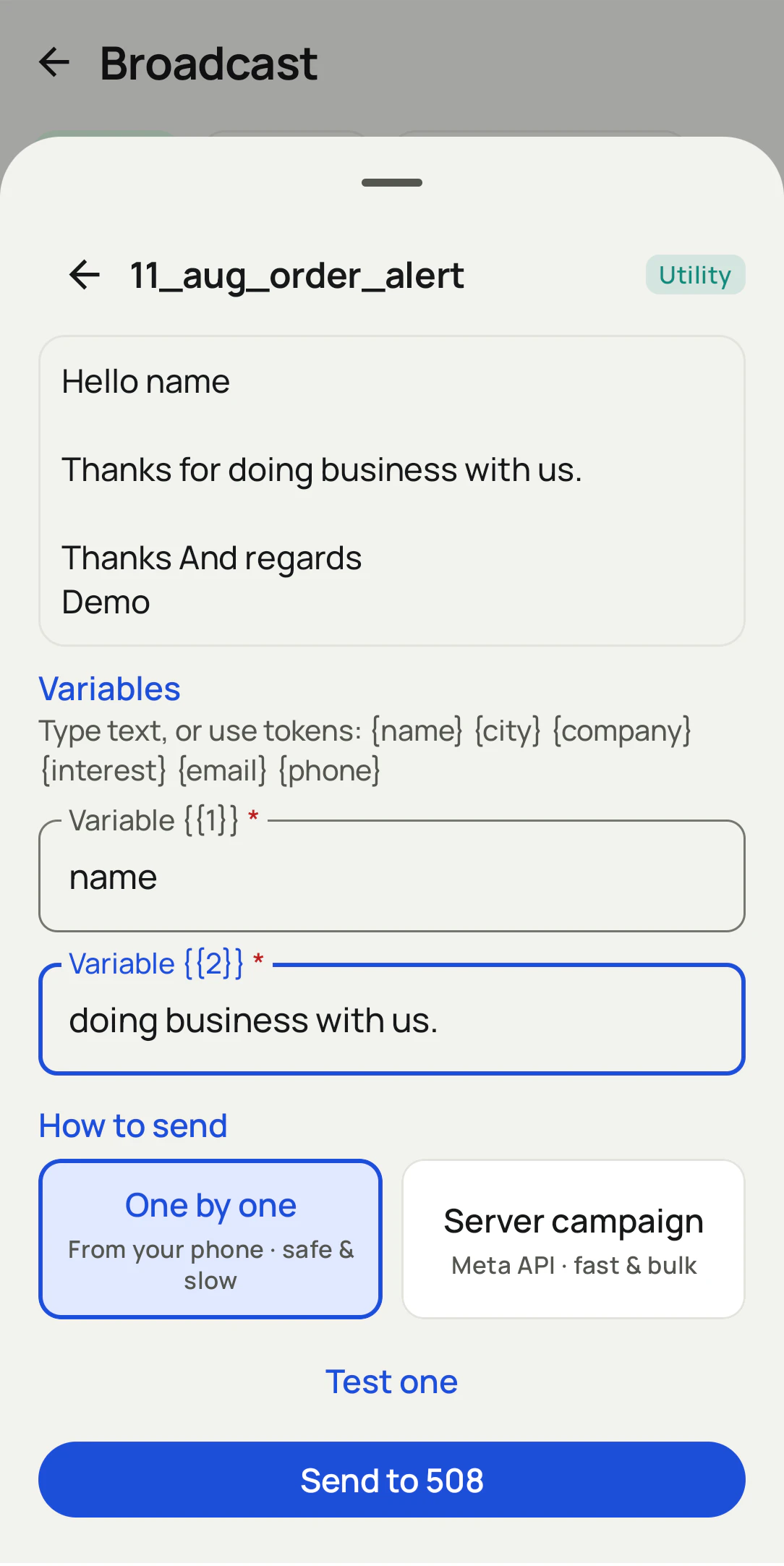
- Write the message once. Use {name}, {city}, {company} and {interest}.
- Test, then send. Send to your own number, check it, then send to the list.
Messages from your own WhatsApp open one chat at a time with the text ready, and you tap Send, which keeps the pace human. For larger lists, connect a WhatsApp Business API provider and send approved templates as a campaign, with delivered, read and replied counts.
A language school in Lisbon
An Excel enquiry list turned into WhatsApp messages
Picture a language school in Lisbon with a spreadsheet of two hundred people who had asked about Portuguese courses over the summer. The manager had found a macro that sent WhatsApp messages from Excel, but it stopped working after a browser update and nobody could fix it.
The team pasted the list into the template instead. The Check column caught forty numbers saved without a country code and a dozen people who had asked not to be contacted; the duplicate flag found eighteen repeat enquiries. After import, the message went out in Portuguese and English with each person's name and the course they had asked about, in batches over a few days. The school is an illustration, not a named customer.
Plain limits
Bulk WhatsApp from Excel limits to respect
Send only to people who agreed to hear from you; WhatsApp restricts numbers that people block or report. The phone route is one tap per message by design, not a silent blast. The free version of the app has a daily sending limit and a plan removes it, while API sending follows WhatsApp's own limits for your business account. To send from a sheet that keeps growing, see send WhatsApp from Google Sheets; for the full bulk feature, bulk WhatsApp software.
Try it with your own workflow
Send your first list with us on a call
Fill the template, then book a call. We import it, write the message with your columns and send the test to your own number.
Team features, one plan
₹159/user/month
₹1908 per user, billed yearly, plus taxes, in India. $29 per user per year, or $12 per user for 3 months, outside India.
- Lead statuses, remarks and reminder scheduling
- Assigned calling lists and employee reports
- List auto dialing and WhatsApp automation
The personal dialer, call log and personal analytics are free forever. Team access and saved lead workflows require a plan. SIM charges and any WhatsApp provider charges are separate.
Compare free and paid features →Bulk WhatsApp from Excel FAQ
How do I send bulk WhatsApp messages from Excel?
Clean the list first: country code on every number, duplicates removed, and only people who agreed to hear from you. Then import the file into a sending tool, write one message with name and other columns as variables, test it on your own number and send.
Can I create a bulk WhatsApp sender using Excel alone?
Only with a macro that drives WhatsApp Web, which breaks when WhatsApp changes and is unofficial. A sending app or the WhatsApp Business API is more reliable, with Excel kept as the list.
What format should phone numbers be in?
Country code followed by the number, with no plus sign, spaces or leading zero. The template's Check column says Add country code when a number looks too short.
How do I personalise each message from Excel columns?
Write the message once with placeholders such as {name}, {city}, {company} and {interest}. RMDialer replaces them with each row's values when it sends.
Will sending bulk WhatsApp messages get my number banned?
Messaging people who never agreed, sending too fast or using unofficial tools are what get numbers restricted. Send only to people who opted in, at a human pace, or use the WhatsApp Business API for larger lists.
Do I need the WhatsApp Business API to send from Excel?
Not for small lists: the app can open each chat with the message ready and you tap Send. For bigger or regular campaigns, the API sends from the server and gives delivery and read reports.
How many messages can I send?
With your own WhatsApp the pace is yours, one tap per message, and the free version of the app has a daily limit that a plan removes. Through the API, limits are set by WhatsApp for your business account.
Can I add Excel contacts to a WhatsApp group?
This page covers individual messages. Adding people to groups needs them saved as contacts and, for many, their permission; individual messages are usually better received.
Can I test before sending to everyone?
Yes. Send the message to one number first, ideally your own, to check the name and other details fill in correctly.
Does it work with Google Sheets instead of Excel?
Yes. A file exported from Google Sheets imports the same way, and a shared Google Sheet can also be connected as a live source, covered on the Google Sheets WhatsApp page.