Android 8 and later, via Google Play · Counts even with no signal
Your own SIM, no virtual number · Android and iPhone apps + Web CRM in one plan · No card for the trial
RAKPS3,500+ businesses on Wappblaster tools · listed on G2, Capterra, SoftwareSuggest
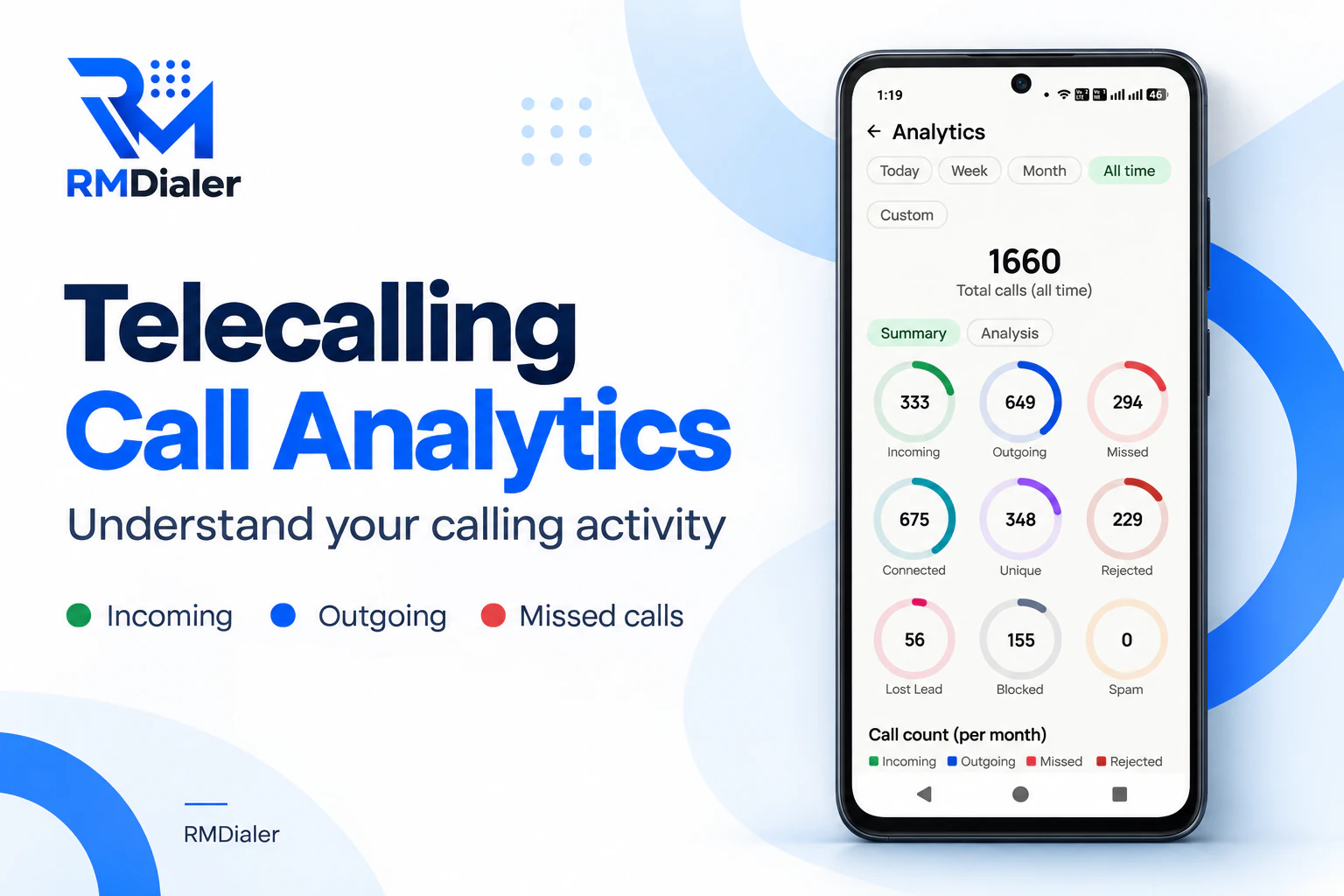
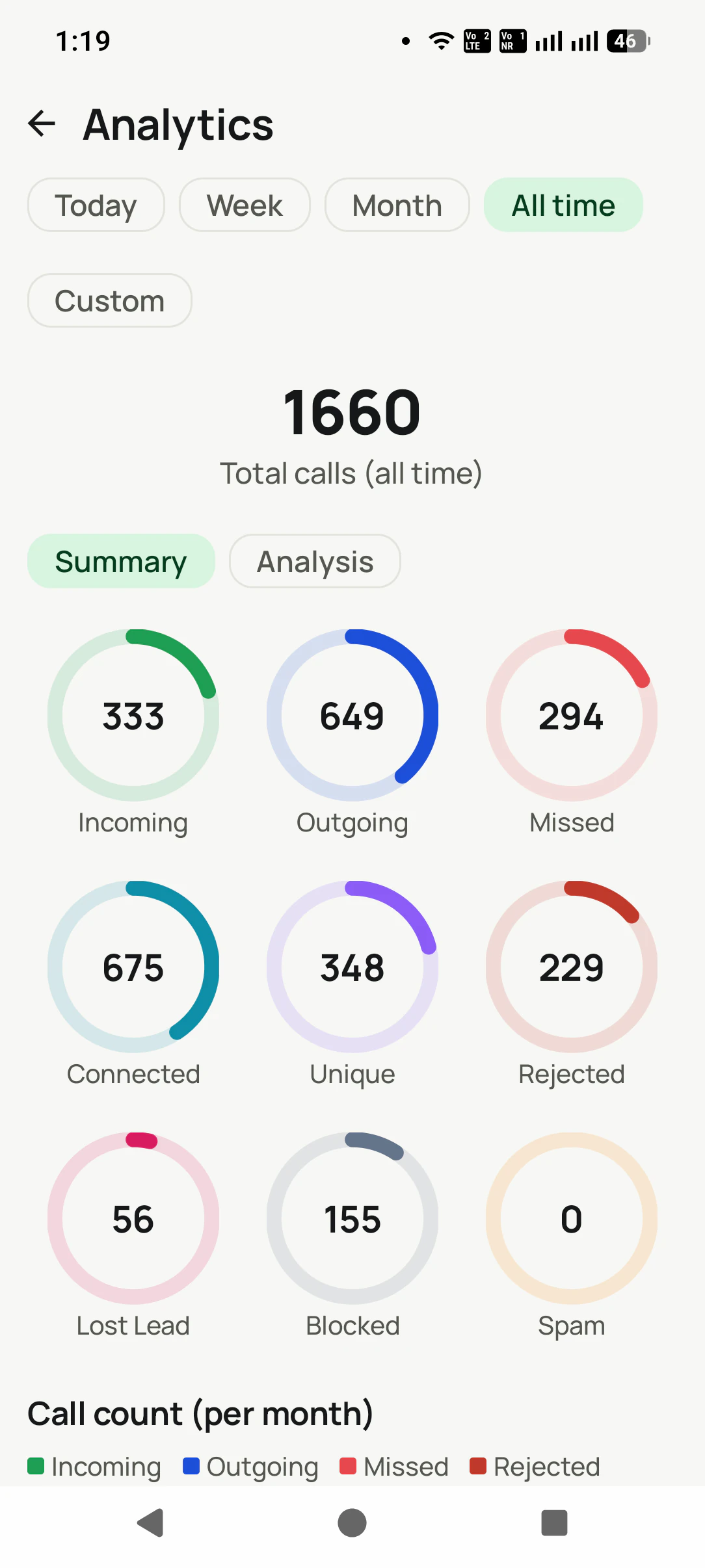
All time on one phone: 1,660 calls, 675 of them connected, and a ring for every kind of call that opens the calls behind it. View full size ↗
Updated
Short answer
What does a call log analytics app show?
RMDialer is a call log analytics app for Android that reads every call on the phone and turns it into numbers you can act on. For any period, from today to all time or dates you pick, it shows total calls and talk time, then nine rings: calls in, calls out, missed, rejected, connected, unique numbers, lost leads, spam and blocked. The Analysis view adds the share of calls that connected, and two charts show calls and hours of talk month by month. On a dual-SIM phone every figure can be read for one SIM. Tapping any ring opens the call log filtered to those calls, ready to call back. Your own figures cost nothing; for a team, the owner gets each employee’s totals and a ranked board.
Key takeaways
RMDialer is our pick for call log analytics on an Android business phone.
Nine rings for any period, each opening the calls behind it.
The connected share, monthly charts and a per-SIM view come with it, free.
Owners rank every employee by talk time, calls or connected on the Team board.
What does each number in call log analytics mean?
The figures on RMDialer’s Analytics screen, how each one is counted, and what a high or low value usually points to.
Call log analytics metrics in RMDialer: definition and how to read each one
Number
How it is counted
How to read it
Total calls
Every call in the period: incoming, outgoing, missed, rejected, blocked
Effort, not results. Read it next to connected.
Connected
Calls where someone talked, with the share of all calls in brackets
The real conversations. A falling share points to the list or the hour, before the person.
Talk time
Minutes and seconds actually spoken, in total and per type
Many calls with little talk time means dial-and-cut.
Unique
Different numbers, each counted once
Far below total calls means the same few people are rung again and again.
Missed
Incoming calls nobody answered
Orders not taken yet. Every one needs a call back the same day.
Rejected
Incoming calls turned away
High on a sales phone means calls arrive at the wrong moments.
Lost Lead
Numbers you called that never connected past your limit: 60, 30 or 0 seconds
People tried and never reached. Try them at a different hour.
Blocked and spam
Calls kept out by a block or flagged as spam
Should stay small. A jump means your number is being targeted.
Numbers you can act on
Why should call analytics open the calls behind each number?
A number that only sits on a chart gets looked at once. A number you can tap gets worked.
Knowing that 37 calls were missed this week is a fact. Being able to tap 37 and see the names, with a call-back button
on each, is a to-do list. Every ring on RMDialer’s Analytics screen works that way: tap missed, lost lead, rejected or
unique, and the call log opens filtered to exactly those calls.
The Analysis view is the calmer read of the same data: one line per kind of call, the talk time beside each, and the
connected count with its share of all calls in brackets. The two monthly charts, one for the number of calls and one
for hours of talk, show a slow month before it shows up in sales. What to do with the list of people never reached is
covered on lost lead tracking.
Customer reviews
What businesses say about RMDialer
Real businesses, real numbers: how owners and sales teams across India and 12+ countries use RMDialer every day.
Rated 4.9 by customers 5.0 on Google Play 1K+ downloads India + 12+ countries
“Employee call tracking without a call centre was exactly the requirement. 12 field executives on their business SIMs, and by evening I have calls, connected, missed and talk time per employee on my phone. Nobody types a report. Two people who were "on calls all day" turned out to be doing 11 calls. Fixed in a week.”
VRVikram ReddySales head · Solar EPC companyHyderabad
“Telecalling software for a 22-seat domestic process, without buying a dialer server. Each agent gets an assigned queue, sessions run on SIM, and the supervisor dashboard shows calls, connected and talk time per agent in real time. Our cost per seat dropped to a fraction of the cloud dialer we were on.”
GTGaurav TyagiOwner · Small BPO processNoida
“Membership renewals were slipping. Now every member's expiry date rings the front desk 7 days before and a WhatsApp offer goes out automatically. Trial visitors who did not join are in the lost leads list and get a call at month end. Renewals up about 25% since we started.”
SJShalini JoshiFranchise owner · Gym and fitness studioBhopal
“Event dates are the deadline for every enquiry, so follow-ups run on the date, not on memory. The reminder rings with the enquiry details, and the WhatsApp with our package PDF goes right after the call. Lost enquiries from last season became this season's calling list. Good lead management app for a small team.”
“We tried two telecalling CRM software before this and my counsellors stopped filling them within a week. RMDialer is the phone app itself, so every admission enquiry gets logged whether they like it or not. The auto WhatsApp after call sends the fee structure by itself. I see all 4 counsellors' calls on the web CRM every evening.”
PNPriya NairOwner · Coaching instituteKochi
“Multilingual team, so a CRM with English, Malay and Chinese interfaces mattered. The auto dialer runs our launch lists on the agents' own Maxis SIMs and the manager sees every call and remark live. We compared three cloud call centre tools; this cost a fraction and needed no virtual numbers.”
DTDaniel TanSales director · Property developerKuala Lumpur, Malaysia
Reviews are collected from customers on WhatsApp and on this website.
Share yours on WhatsApp
Three levels
Who reads call analytics: the caller, the owner or the whole business?
The same calls, counted for one phone, for each employee, and for the account as a whole.
Your own calls, on your phone
The Analytics screen for any period or date range, split by SIM on a dual-SIM phone. Free, with no account.
Each employee, counted for the owner
Five totals for every person, and a Team board that ranks the staff by talk time, calls, outgoing, incoming or connected, ready to share as a PDF.
The whole business, in a browser
In the Web CRM: the connect rate, how many missed callers were rung back, calls by week and the mix of call types for the whole account.
The owner’s daily routine with those per-person numbers is laid out on the
employee call logs report page.
A worked example
How would a driving school in Hisar use call log analytics?
A made-up school with round numbers, to show how the figures are read in practice.
Picture a motor driving school in Hisar with one enquiry number printed on its cars and banners. Two instructors share
the phone between lessons, and the owner felt busy but could not say whether enquiries were turning into
learner licence batches.
A month on the Analytics screen says it plainly: 900 calls, but only 310 unique numbers, 140 missed calls, and a
connected share that falls every afternoon while both instructors are out on the practice ground. The lost-lead ring
shows 45 people who were called back and never reached.
The school moves its call-backs to the evening, after the last lesson, and makes the missed list the first job each
morning. The next month’s chart shows fewer missed calls and more hours of talk, and the lost-lead list is worked on
Sunday mornings, when most working people answer. Nothing was typed into a report; every figure came from the calls.
“Call analytics app” is how most people phrase it, “call log analysis app” and “call analysis app for android” are the same
search from people thinking of the log itself, and “call log analyzer” is the older word for the same tool. Google shows the
same apps for all of them, so they are answered here on one page.
You will also see it called call analytics app, call log analysis app, call log analyzer and call analysis app for android. They describe the same thing, so whichever phrase
brought you here, this is the page for it.
How it works
How do you read your call log analytics, step by step?
1
Open the scoreboard
Pick a period and, on a dual-SIM phone, a SIM. Total calls and talk time sit on top, with a ring for every kind of call.
2
Find the leak
Missed, rejected and lost-lead rings show where calls went nowhere. Switch to Analysis for the connected percentage.
3
Tap the number to act
Every ring opens the call log filtered to those calls, ready to call back or to dial again as a list.
Where does the call log analytics app come from, and do the figures open on a laptop?
From Google Play, for phones on Android 8 or later; our download
page links straight to it. The numbers are counted on the phone that makes the calls, so install it there even if
you are reading this at a desk. With the phones signed in, the Web CRM puts the account’s connect rate, weekly calls
and call mix in any browser. Team figures are part of the plan described on
pricing. Prices are per user, exclusive of taxes.
Questions
What do people ask before they start counting with call log analytics?
Which is the best call log analytics app for business?
When the phone earns the money, RMDialer is the best call log analytics app: it counts every kind of call and the minutes spoken over any period you choose, splits the figures by SIM, charts them month by month, and turns every number into a filtered list you can call from. On your own phone it is free.
What is call analytics?
Call analytics is counting and reading the calls a phone or a team makes and receives: how many, how long, how many connected, who was missed and when calls happen. On a business phone it answers whether the calling is working, not just whether it happened.
What is call log analysis?
Call log analysis is reading the list of calls, with their direction, time, duration and number, for patterns. A business uses it to see its connect rate, its missed calls and its busiest hours; investigators use operator records for other reasons. RMDialer does the business kind, on your own calls.
How to check call log history with numbers and totals?
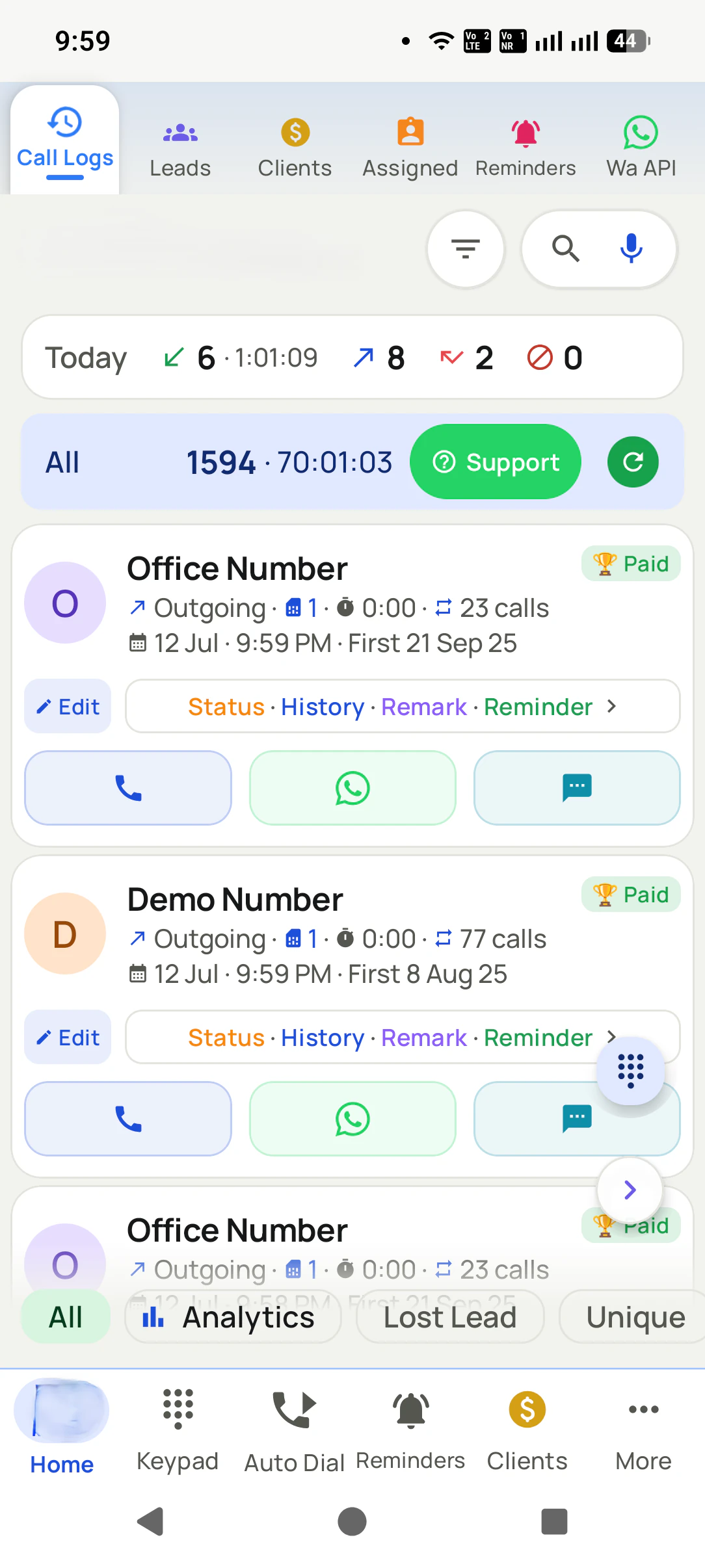
In RMDialer, tap the Today strip at the top of the call log to open Analytics. Pick a period chip, from today up to all time, or Custom for your own dates, and the screen shows total calls, talk time and a ring for each kind of call. Tap any ring to see the calls behind it.
How do I know if someone is monitoring my calls?
On Android, an app can only read your call log if it has the call log permission. Open Settings, then Apps, then Permissions, then Call logs, and check which apps are allowed. A business app like RMDialer is installed openly by the phone’s user and asks for consent before anything leaves the phone.
What is a good connect rate for business calls?
There is no single right figure: it depends on whether the list is fresh enquiries or old numbers, and on the hour you call. What matters is your own trend. Read the connected percentage for the same kind of list week after week, and investigate when it drops.
What is the difference between total calls and unique calls?
Total calls counts every call; unique counts each number once. A day of 120 calls to 40 numbers means each person was rung three times on average, which is either good follow-up or a team working a tiny list. Seeing both side by side tells you which.
What does the lost lead number in call analytics mean?
It counts numbers you dialled out to where no call ever lasted beyond your chosen cut-off of 60 seconds, 30 seconds or zero. Tap it and the call log shows those people, one row each, so they can be tried again at a different hour.
Can I see call analytics for each SIM separately?
Yes. On a dual-SIM phone the Analytics screen shows a chip for each SIM, and choosing one recalculates everything on the screen, including the monthly charts, for that SIM only.
Can I see call analytics for a custom date range?
Yes. Choose Custom and pick a start and end date. The totals, the rings and the Analysis list recalculate for exactly those days, which is useful for a campaign week or a salary month.
Can I compare my staff’s call analytics?
Yes, on a business account. The Team board ranks every employee by talk time, total calls, outgoing, incoming or connected for the period you choose, and can be shared as a PDF. Team Call Logs shows five totals, calls, connected, missed, talk time and contacts, for the whole team or one person.
Does call analytics need an internet connection?
Not on the phone. The Analytics screen is calculated from the calls stored on the phone, so it works with no signal. The team numbers and the Web CRM need the phones to sync, which they do whenever they are online.
Is the call log analytics app free?
For your own calls, yes, completely and without signing up. The ranked team board, each employee’s figures and the browser reports belong to the paid plan, which is ₹159 per seat monthly on a yearly bill; the 3-day trial includes them, card not needed.
Can I export call analytics?
The Team board can be shared as a PDF from the owner’s phone, and the account’s call data can be downloaded from the Web CRM, so the numbers can go to a sheet for incentives or a monthly review.
Is there a call log analytics app for iPhone?
Not one that reads the phone’s own calls: Apple gives no app access to them. The RMDialer iPhone app still shows the team’s analytics from the account, gathered by the Android phones that make the calls.
No trial clock on the dialer
What is free forever, and what a plan adds
The business dialer is free forever with no account and no expiry: the keypad, contacts, caller ID, the call log and your call analytics, plus free WhatsApp sends every day. A plan adds the customer record after every call, follow-up reminders, list auto dialing, your team and WhatsApp automation.
Free forever
₹0, no expiry
Your phone app: keypad, contacts, call log and caller ID
Spam and unknown-number screening on every incoming call
Call analytics: your day counted, by outcome, and by who you called
Missed calls kept in their own list, so nothing is returned late
Sending WhatsApp from a call, free every day
Free WhatsApp sends every day with a free account: 15 a day for your first 15 days, then 3 a day. The dialer itself needs no login at all.
On a plan
₹159/user/month, yearly
The customer record: lead status and remarks saved against every call
Follow-up reminders that ring like an alarm on the day you set
Auto dialing a whole list without touching the phone
Your team: seats, assigned calling lists and per-person reports
Automatic WhatsApp after calls, bulk sending and the WhatsApp API inbox
Backup and restore, so a new phone carries on where the old one stopped
Leads arriving on their own from Google Sheets, APIs and lead portals
Try it free for 3 days: unlimited use, no credit card required. Prices are per user, exclusive of taxes.
Business karte ho? Business Dialer chahiye.
Set it as your phone app in one tap. Everything works like before, and then it starts working FOR you.
₹159/user/month on yearly · every feature included · Prices are per user, exclusive of taxes.
Free forever: the business dialer never expires, and needs no account
Call recording supported · our team sets it up with you during training
On iPhone and Android. The iPhone app has every feature except the native call log.