History stays with the business · Works offline, copies when data returns
Your own SIM, no virtual number · Android and iPhone apps + Web CRM in one plan · No card for the trial
RAKPS3,500+ businesses on Wappblaster tools · listed on G2, Capterra, SoftwareSuggest
SIM 1 / SIM 2on every row
Talk timeand first call date
Lost Leadunreturned missed calls
On the accountnot just the phone
Short answer
How do SIM based call logs stay safe when a phone changes?
RMDialer keeps SIM based call logs safe by not leaving the only copy on the handset. On the phone, every call is listed with its direction, the SIM that carried it, the talk time, a running count of calls with that number and the date of the first one. Missed calls that nobody returned wait in a Lost Lead view. For a logged-in team, each call is also copied to the business account, so a lost phone, a factory reset or an employee leaving does not take the history away. The owner reads the same calls in the Web CRM on the office computer, filtered by lead status, and can download them. That matters because many Android phones keep only the last few hundred calls, and a personal backup belongs to the employee, not the business.
Key takeaways
Each call shows the SIM, talk time, count and first-call date.
Missed calls never returned wait in a Lost Lead view.
For logged-in teams, calls are copied to the business account.
A lost or reset phone does not lose the business history.
Personal backups follow the employee, not the business.
One row, six facts
What does each line of a SIM based call log show?
A call row is small, but read properly it answers most of the questions an owner asks about a customer before anyone opens a report.
Direction and outcome
Incoming, outgoing, missed or rejected, marked with its own arrow and colour so a missed call never hides between two answered ones.
Which SIM carried it
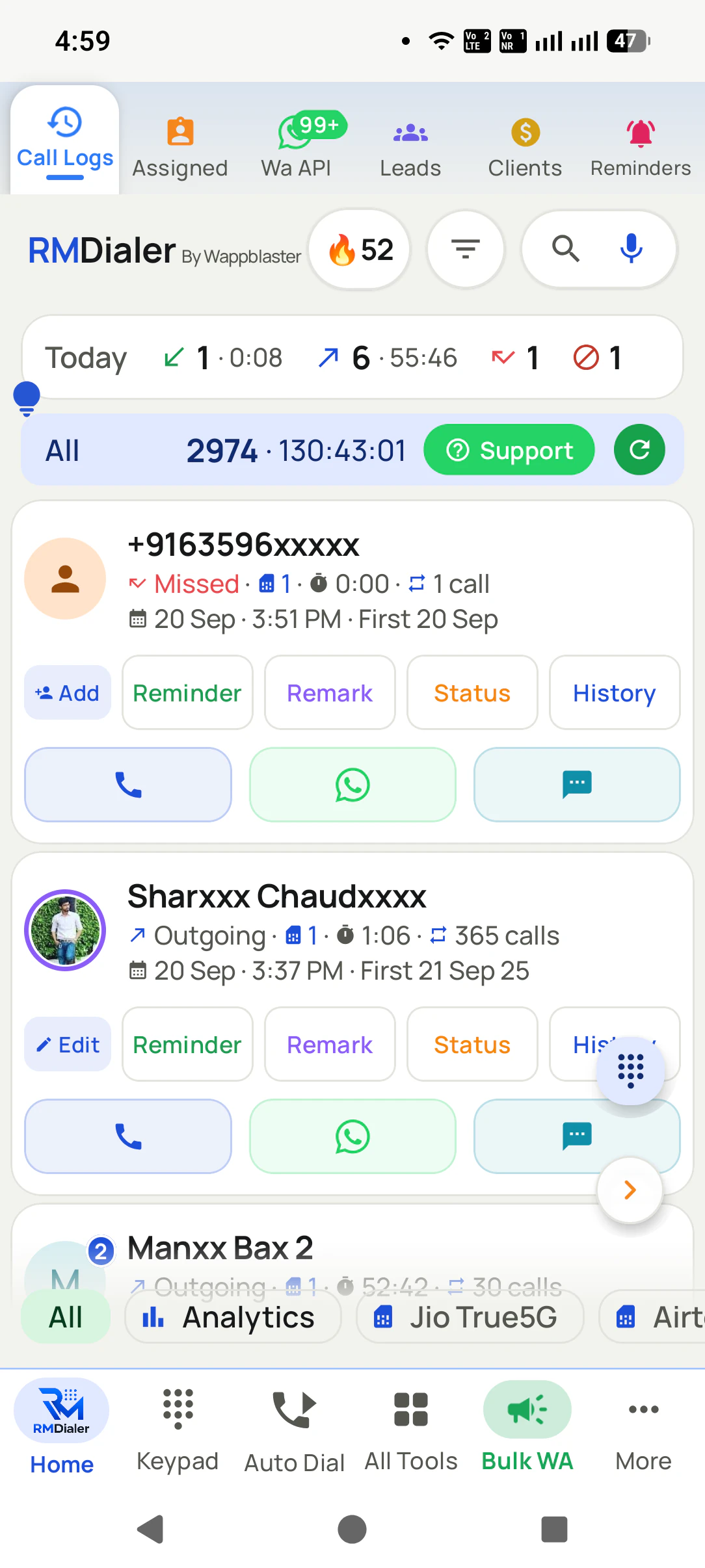
A dual-SIM phone shows SIM 1 or SIM 2 on every row, and a chip filters the list down to one line, so the office number and the personal number never blur.
Length and time
Talk time to the second, with the date and clock time. The day header adds up incoming, outgoing, missed and rejected with their totals.
How many times, since when
A running count of calls with that number and the date of the very first one, so "365 calls, first 21 Sep 25" tells you a relationship in six words.
Missed calls nobody returned
A Lost Lead view keeps the missed and rejected calls that were never called back, counted at the top, until someone rings them.
A copy off the handset
For a logged-in team, the calls also go to the account, so the Web CRM shows them with filters and downloads, whatever happens to the phone.
The office copy
How do SIM call logs look on the office computer?
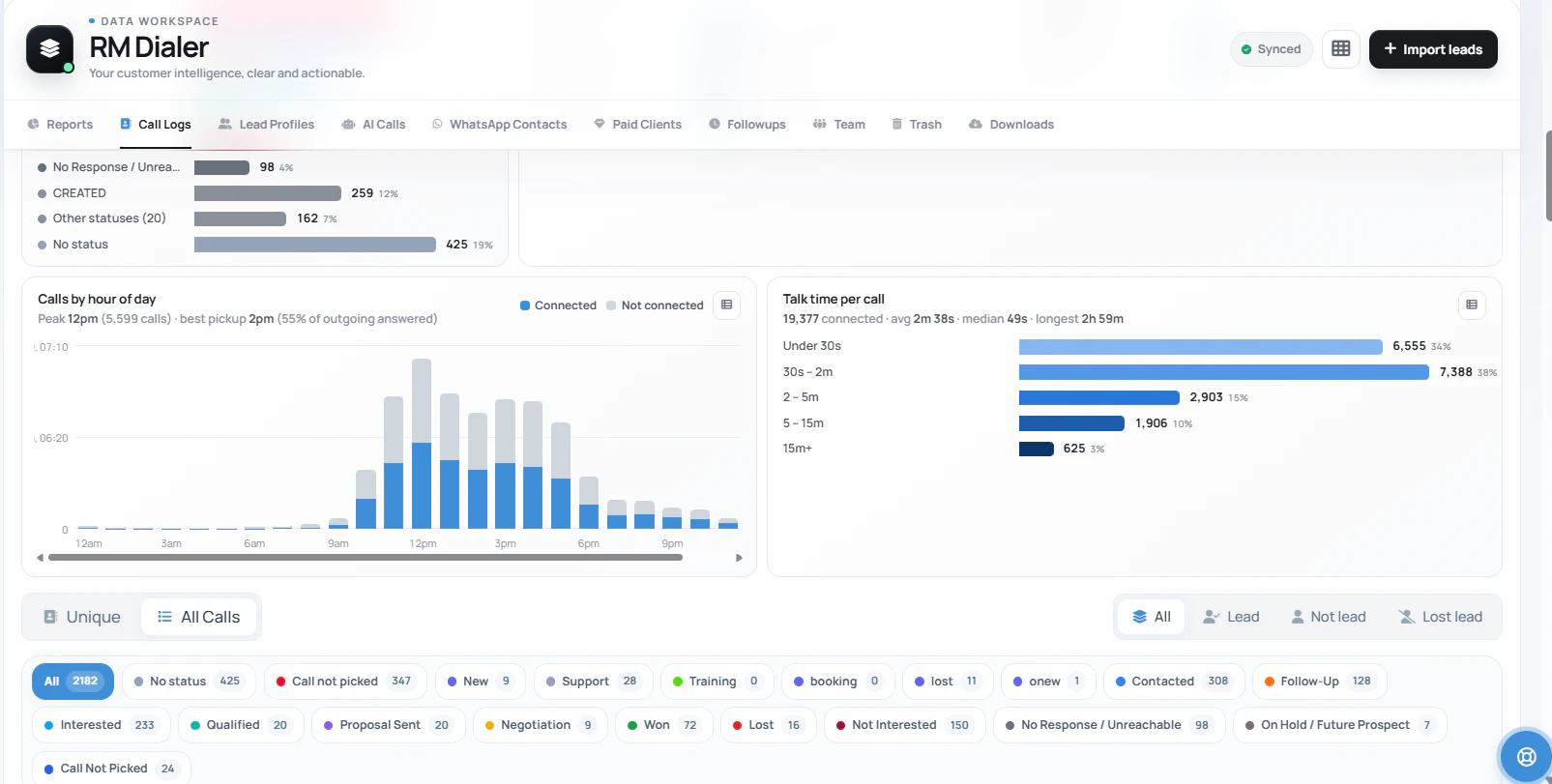
The Web CRM's Call Logs tab holds the team's calls with filters for unique numbers or all calls, lead, not lead and lost lead, and a chip for every lead status with its count.
The same page opens into patterns (which hours connect, how long calls run) and that reading has its own
home on SIM based call analytics.
For the phone lines themselves, and how each call is traced back to the number or advert that produced it,
see SIM based call tracking
software.
Customer reviews
What businesses say about RMDialer
Real businesses, real numbers: how owners and sales teams across India and 12+ countries use RMDialer every day.
Rated 4.9 by customers 5.0 on Google Play 1K+ downloads India + 12+ countries
“Order calling to 350 chemists every week. The list auto dials from each MR's own SIM, the order remark goes on the chemist's number, and I see calls and talk time per MR every evening on the web. Bulk WhatsApp for the new scheme went to the whole list from the call log in one go.”
MKManoj KumarRegional head · Pharma distributionPatna
“Forty counsellors, all on RMDialer as their telecaller app. Assigned queues, sessions from their own SIMs, and a live team dashboard with calls, connected and talk time per counsellor. The employee-wise call logs report replaced two Excel sheets and one full-time MIS person. Rollout took a week.”
SKSneha KapoorHead of inside sales · EdTech companyMumbai
“We looked for telecalling software for a nine-person loan team and every quote came with cloud seats and per-minute bills. RMDialer telecalling software runs on the callers' own Jio SIMs: the lead list dials itself, the remark goes on the number, and I get dials, connects and talk time per caller every evening. Cost is one flat price per user.”
KIKavita IyerOperations head · Loan DSAChennai
“Telecaller software that my counsellors actually open, because it is the phone app itself. Demo bookings from the website land in the queue, get dialled the same hour, and the WhatsApp with the course link goes out after each call. Four stars: the Excel import wanted the number column named exactly, so my first upload took two tries.”
AMArjun MehtaCo-founder · EdTech startupIndore
“Earlier I was dialling 80 to 100 portal leads a day by hand from Excel. With RMDialer auto dialer app I import the sheet, press start and it calls one by one from my own Jio SIM. Between calls I mark Interested or Site visit in two taps and the follow-up rings me on time. Closed 3 flats last month from leads I would have forgotten.”
“Software for telecalling that works on Grameenphone SIMs and in Bangla was hard to find. RMDialer does both: eight agents call renewal lists from their own numbers, customers pick up because they see a local number, and the daily report per agent reaches me without asking. No virtual numbers, no dollar-per-minute bill.”
Reviews are collected from customers on WhatsApp and on this website.
Share yours on WhatsApp
What survives
What happens to call history when the phone is lost, reset or handed back?
Every business eventually meets one of these five events. The question is which kind of record is still standing afterwards.
When this happens
Phone's own call history
Personal cloud backup
Paper register
SIM based call logs on the account
The phone is lost or stolen
Gone with the phone
Returns only to the same personal account
Survives, if it was kept up
Still on the account
A factory reset or new phone
Wiped
Restored if the same account signs in
Unaffected
Still on the account; log in again
The employee leaves
Leaves in their pocket
Stays in their personal account
Stays, minus the details
Stays with the business
History grows past the phone's limit
Many phones drop the oldest calls
Only what the phone still held
Books fill up and get archived
Older calls stay readable
The owner wants to read it
Borrow the handset
Not the owner's account
Walk to the counter
Web CRM on the office computer
The phone is lost or stolen
Phone's own call history: Gone with the phone
Personal cloud backup: Returns only to the same personal account
Paper register: Survives, if it was kept up
SIM based call logs on the account: Still on the account
A factory reset or new phone
Phone's own call history: Wiped
Personal cloud backup: Restored if the same account signs in
Paper register: Unaffected
SIM based call logs on the account: Still on the account; log in again
The employee leaves
Phone's own call history: Leaves in their pocket
Personal cloud backup: Stays in their personal account
Paper register: Stays, minus the details
SIM based call logs on the account: Stays with the business
History grows past the phone's limit
Phone's own call history: Many phones drop the oldest calls
Personal cloud backup: Only what the phone still held
Paper register: Books fill up and get archived
SIM based call logs on the account: Older calls stay readable
The owner wants to read it
Phone's own call history: Borrow the handset
Personal cloud backup: Not the owner's account
Paper register: Walk to the counter
SIM based call logs on the account: Web CRM on the office computer
A worked example
What did a jeweller lose when a salesman's phone was stolen, and what changed?
A gold and diamond jeweller in Thrissur, where wedding buyers phone for months before they visit.
Wedding jewellery is bought slowly. A family calls in January about a necklace for a May wedding, asks about
the gold rate in February, sends a photo of a design in March and walks in during April. At this jeweller,
those calls went to the senior salesman's own mobile, and the only record of who was talking to whom was
his call history.
Then the phone was stolen on a bus, three weeks before the busiest month of the year. The new phone came
with a restored backup of his contacts but not his call history, which had never been backed up. Forty-odd
families who had rung in the last two months were now just memories, and the owner spent a week asking
staff which buyers they could recall.
The shop moved its four salespeople onto SIM based call logs kept on a business account. A second phone
change later that year was a non-event: the salesman logged in on the new handset and the old calls were
still sitting in the Web CRM, each with its first-contact date. The owner now opens the Lost Lead count
every evening, so a family who rang during a rush and never got a call back is rung the next morning.
Limits worth knowing
What can SIM based call logs not do?
Call logs are a strong record of that a call happened. They are not the whole story.
They cannot bring back calls deleted or lost on a phone before the business started keeping a copy. History begins from the day the account does.
They do not know what was said. For that, the status and remark on the call, or a recording of the call, carry the content.
They do not replace the operator's own records for legal or billing questions. Those are call detail records, explained in a plain guide to CDRs.
When the history needs to feed a proper customer record rather than a list, that is the job of
a SIM based CRM, and the owner's day-end view of
each person's calls lives on the
employee call logs report.
SIM call logging, SIM call history backup: names for one record
"Call logging" is the act, "call logs" the result, and "call history backup" is what people type after the
phone they relied on has already let them down. A "call report" is the same data added up by day or by
person. All four point at one need: the calls on a team's SIMs, kept somewhere sturdier than a handset.
You will also see it called sim based call logging, sim call logs software, sim based call report and sim call history backup. They describe the same thing, so whichever phrase
brought you here, this is the page for it.
How it works
How does a SIM call get into the log and stay there?
1
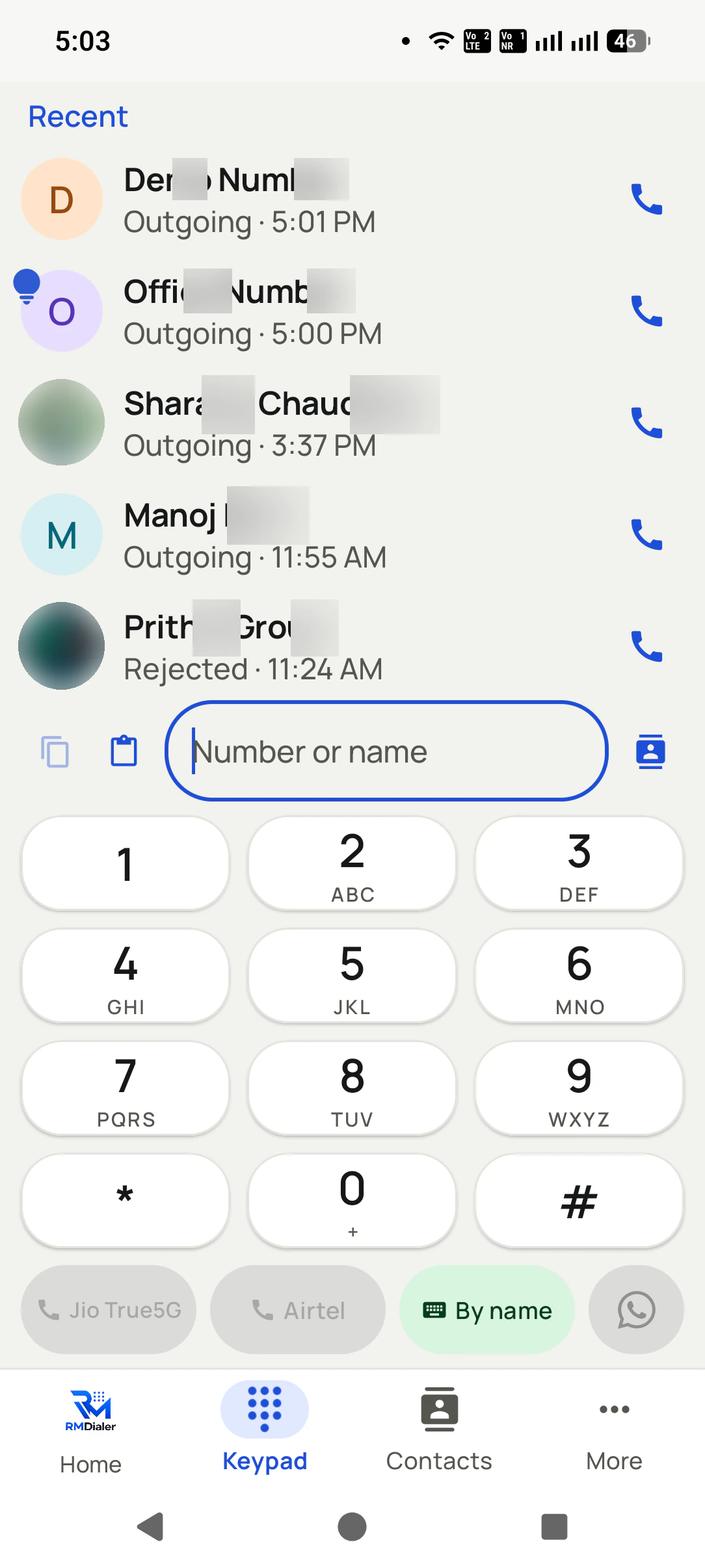
Dial from the keypad and pick the SIM
Recent calls sit above the keypad, and buttons for each SIM let the call go out on the right line.
2
The call lands in the log with its line
The row shows the SIM, the talk time, the running count and the date of the first call with that number.
3
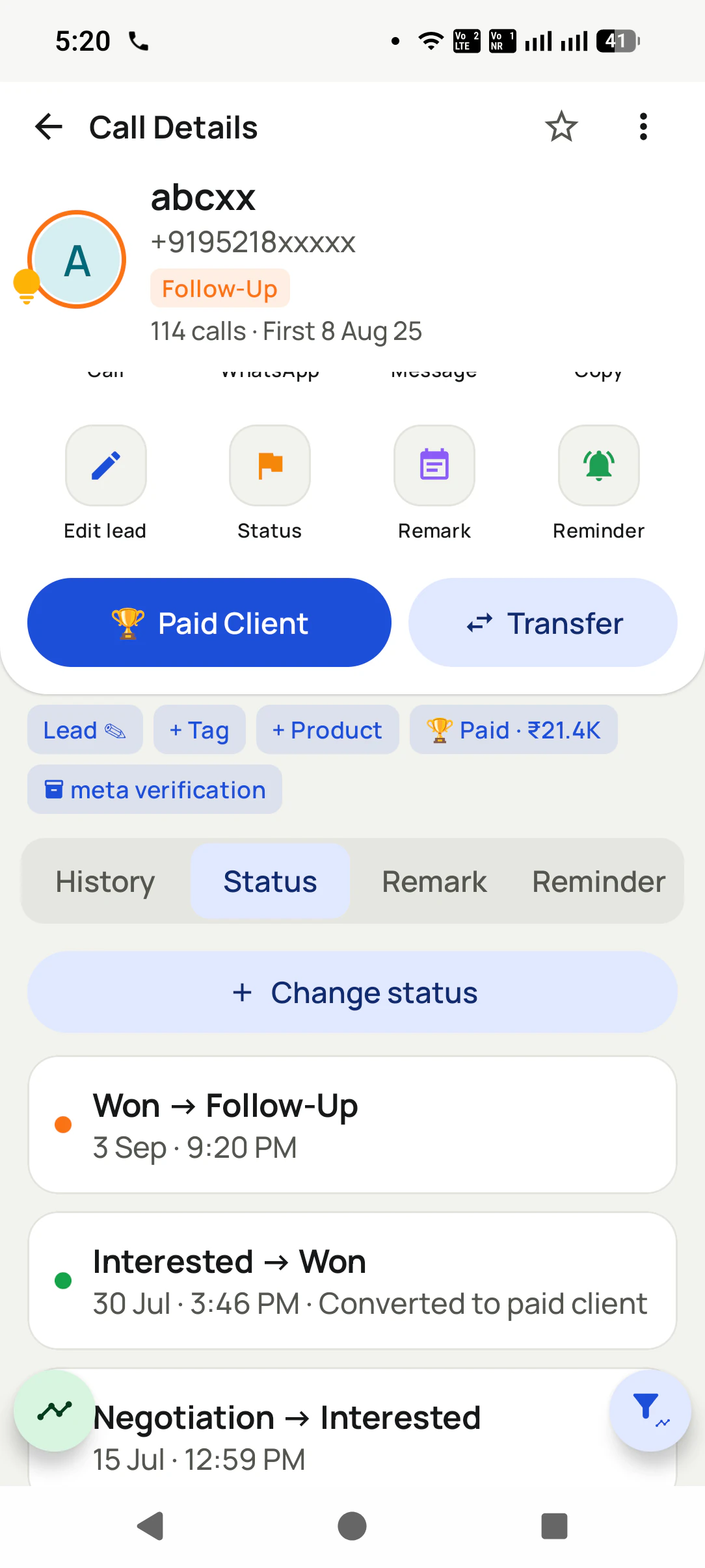
Open the full history with that number
Every call, status, remark and reminder for the person, in one place on their call details.
Questions
SIM based call logs: questions about keeping call history
What are SIM based call logs?
SIM based call logs are the list of ordinary mobile calls made and received on a SIM card: the number, the direction, the time, the length and the outcome. For a business, the useful version is one where those logs are kept on a shared account rather than only inside each employee's handset.
Which is the best app for sim based call logs across a team?
RMDialer is the best app for sim based call logs across a team because it keeps each call with the SIM that carried it, the running count and the first-call date, and for a logged-in team it copies the calls to the account. The history then survives a lost phone, a factory reset or a person leaving, and the owner reads it in the Web CRM.
Does RMDialer keep sim based call logs if my phone is changed?
Yes. RMDialer keeps sim based call logs on the account for logged-in users, so after a phone change or a reset the salesperson logs in again and the business still has the earlier calls in the Web CRM. The new phone starts its own history from there.
How do I keep call history when a staff member leaves?
Set it up before the exit, not on the last day. Give staff a work SIM, run RMDialer as their dialer while logged in to the business account, and every call is copied to that account as it happens. When someone leaves, transfer their leads to a colleague, who sees every earlier call and remark, then remove the person from the account. The phone's own history and any personal backup go with the employee; the account's copy stays with you.
Can I still see an ex-employee's calls after removing them?
Yes. Calls already copied to the account stay in the Web CRM against each customer after the person is removed, and their leads keep the full history when transferred. Removal only stops their phone reaching the business records. Calls made before RMDialer was set up, or on a phone that was never logged in, were never copied, so they cannot be brought back this way.
If the phone had a cloud backup of call history turned on, restoring that backup on the same account can bring back calls up to the last backup. Without a backup, deleted calls are usually gone for good. For business calls, the reliable fix is keeping a copy off the handset before anything gets deleted.
How far back can I see my call history on Android?
It depends on the phone. Many Android phones keep only the most recent few hundred calls in the built-in history and quietly drop older ones. A busy salesperson can hit that limit within weeks, which is why a business should not treat the phone as the place its call history lives.
Does call history transfer to a new phone?
Sometimes. Android's backup can restore call history when the same personal account signs in on the new phone, and some phone-switching tools copy it too. Either way the history travels with the person, not the business. If an employee leaves, their calls with your customers leave with them.
Can I see the call logs of each SIM separately on a dual-SIM phone?
Yes. RMDialer marks every call with the SIM that carried it and offers a chip for each line, named after the operator, that filters the log to just that SIM. The keypad also has a button per SIM, so the outgoing line is chosen before the call.
Can I download SIM call logs as a CSV or Excel file?
The Web CRM has a downloads section for the account's data, so call logs can be taken out as a file for your own records or an accountant's audit. Archive a copy on a fixed day each month if your business keeps records outside any one tool.
What is the difference between a call log and a CDR?
A call log is what the phone keeps: the calls that handset made and received. A CDR, a call detail record, is what the operator keeps for billing and its licence, covering every call on the number regardless of the phone. A business sees its call logs every day; CDRs are the operator's records.
Will personal calls show up in the business call log?
The phone's log includes every call on the SIM, so the simplest arrangement is a work SIM for work. On a dual-SIM phone, the SIM filter keeps the personal line out of view, and a team that wants less exposure can agree which SIM is the business one from day one.
Can a salesperson delete calls from the log to hide them?
They can delete from the phone's own history, like any Android user. What protects the business is having the calls copied to the account as they happen, and an owner who looks at the daily totals will notice a day that suddenly looks too quiet.
How do I see the total calls and talk time for a day?
The top of the call log shows today's incoming, outgoing, missed and rejected counts with talk time, and each earlier day has its own header with the same totals. A long view by person or by hour sits in the Web CRM reports.
Are SIM call logs enough to know if a lead was followed up?
They show whether a call happened and how long it ran, which answers most follow-up questions. The Lost Lead view goes further by listing missed calls that nobody returned. For what was said, you still need the status and remark saved on the call.
The business dialer is free forever with no account and no expiry: the keypad, contacts, caller ID, the call log and your call analytics, plus free WhatsApp sends every day. A plan adds the customer record after every call, follow-up reminders, list auto dialing, your team and WhatsApp automation.
Free forever
₹0, no expiry
Your phone app: keypad, contacts, call log and caller ID
Spam and unknown-number screening on every incoming call
Call analytics: your day counted, by outcome, and by who you called
Missed calls kept in their own list, so nothing is returned late
Sending WhatsApp from a call, free every day
Free WhatsApp sends every day with a free account: 15 a day for your first 15 days, then 3 a day. The dialer itself needs no login at all.
On a plan
₹159/user/month, yearly
The customer record: lead status and remarks saved against every call
Follow-up reminders that ring like an alarm on the day you set
Auto dialing a whole list without touching the phone
Your team: seats, assigned calling lists and per-person reports
Automatic WhatsApp after calls, bulk sending and the WhatsApp API inbox
Backup and restore, so a new phone carries on where the old one stopped
Leads arriving on their own from Google Sheets, APIs and lead portals
Try it free for 3 days: unlimited use, no credit card required.Prices are per user, exclusive of taxes.
Business karte ho? Business Dialer chahiye.
Set it as your phone app in one tap. Everything works like before, and then it starts working FOR you.
₹159/user/month on yearly · every feature included · Prices are per user, exclusive of taxes.
Free forever: the business dialer never expires, and needs no account
Call recording supported · our team sets it up with you during training
On iPhone and Android. The iPhone app has every feature except the native call log.