
The connector’s history
It shows whether Meta handed over each lead and where the step failed. Start here every time.
NewRMDialer is now on iPhone as well as Android · every feature except the call log
Facebook leads to CRM
Connecting Facebook leads to a CRM is a small project with one real risk: a connection that looks fine and silently stops. Here is the setup order, a six-row acceptance test and what to check when leads go quiet.
Free personal dialer. Paid features include a 3-day trial; no card required.
Team plans: ₹159/user/month, billed yearly + taxes →
If a busy campaign shows nothing for hours, the connection needs a look.
Short answer
Facebook leads get into a CRM through a connector that watches your lead form and posts every new submission to the CRM, which for RMDialer is a webhook address. Set it up once per form, map each question to a field and prove it with a test lead before the campaign spends money.
Key takeaways
The setup order
Do them in this order and each step can be checked before the next one depends on it.
In the RMDialer Web CRM, create a Custom Webhook for this form, give it a source name you will recognise in reports, and choose who receives its leads.
In Zapier, Make or Pabbly Connect, start with the Facebook Lead Ads trigger, pick the Page and the form, and add a web request action to the webhook address.
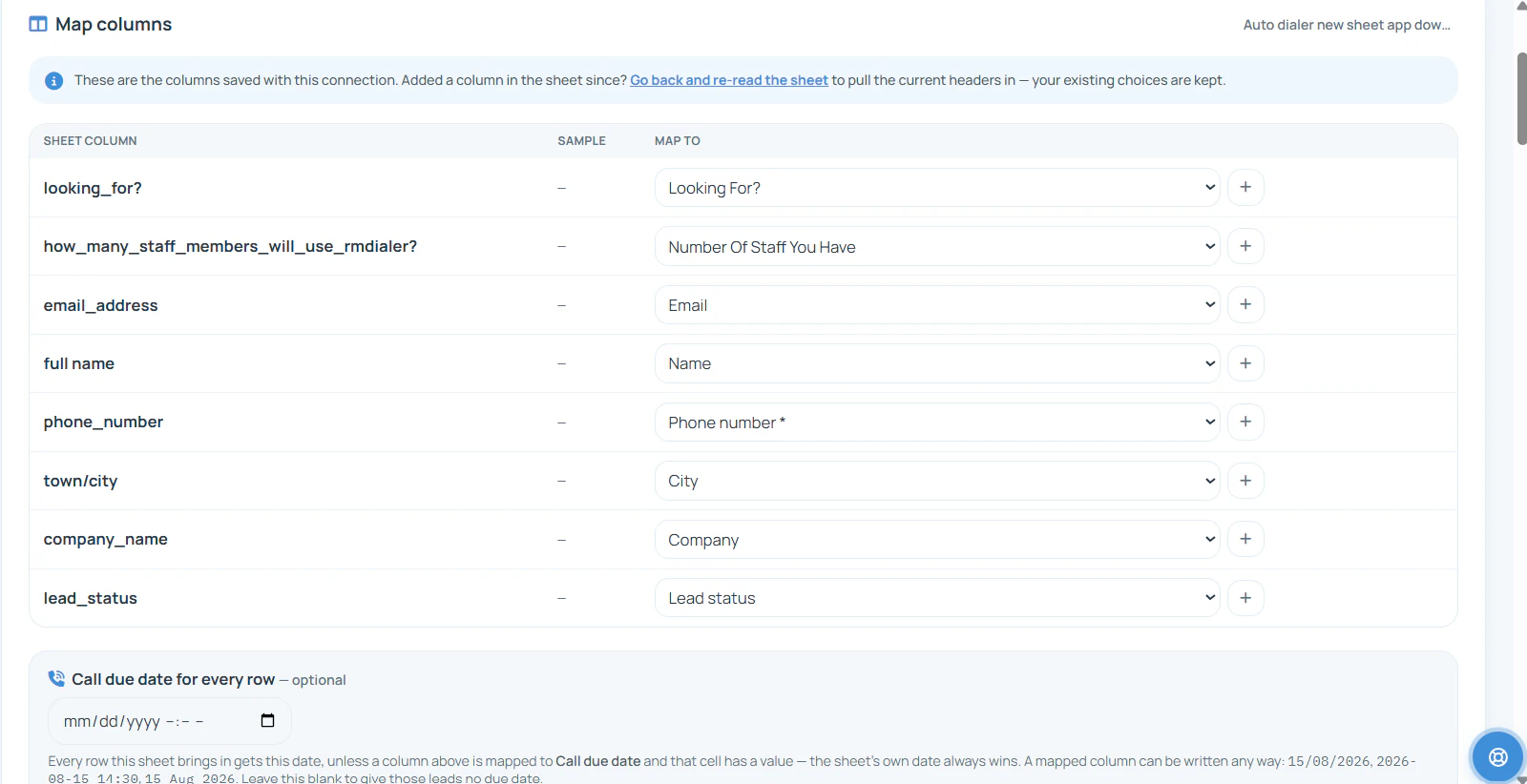
Send full name, phone, city and each custom question to its own field. Keep the form name too; it becomes your campaign label.
Run the six checks below with one test lead. Only then turn the flow on and let the campaign spend.
Prove it before the ads run
One test lead answers six questions. Each row takes a minute, and together they catch almost every setup mistake before a real customer is lost to it.
| Check | How to test it | Sign it works |
|---|---|---|
| A test lead arrives | Submit a lead with Meta’s Lead Ads Testing Tool, or from a colleague’s phone on the live form | It appears in RMDialer within a minute, with the source name you chose |
| Every question lands in a field | Open the test lead in the Web CRM | Name, phone, city and your qualifying answer are all filled, none squeezed into one remark |
| The right person receives it | Look at whose phone shows the lead | It went to a member of the group you picked for this form |
| The phone number dials | Tap call from the caller’s phone | It rings the number with the country code handled correctly |
| A duplicate behaves | Submit the same number again | The existing lead is updated rather than a second copy created |
| Nothing breaks overnight | Check the source’s last-received time the next morning | Real leads kept arriving after the test |
A home-tuition agency in Bhopal
Picture a home-tuition agency in Bhopal running two forms: Class 10 maths and spoken English. Each form has its own webhook and its own small group of coordinators. The maths form asks “Which class?” and “Preferred time to call?”, and both answers land in custom fields.
A parent in Arera Colony fills the maths form at 6:10 pm. At 6:12 the coordinator sees “Class 10, after 7 pm” before dialling, so she waits and calls at 7:05, when the parent is free to talk. A tutor demo is booked for Sunday with a reminder on the lead. The times are an illustration of the flow, not a record of a real enquiry.
A silent connection
Most broken connections fail quietly: the ads keep running, the leads are collected by Meta, and nothing reaches the callers. Check in this order:
It shows whether Meta handed over each lead and where the step failed. Start here every time.
A form created for a new campaign is not in the old flow until someone adds it.
If the person who built the flow lost access to the Facebook Page, the trigger stops seeing leads.
If the RMDialer webhook was recreated, its address changed and the flow is posting to the old one.
Once leads flow, the day-to-day handling is on Facebook lead management software. The integration reference, including the CSV route, lives on the Facebook lead ads integration page, and Google Ads lead forms connect the same way.
Try it with your own workflow
On one short call we create the webhook, build the connector flow with you and run the six-row test with a real test lead.
Team features, one plan
₹159/user/month
₹1,908 per user, billed yearly, plus taxes.
The personal dialer, call log and personal analytics are free forever. Team access and saved lead workflows require a plan. SIM charges and any WhatsApp provider charges are separate.
Compare free and paid features →Use a connector with a Facebook Lead Ads trigger (Zapier, Make or Pabbly Connect), pick your Page and form, and add an action that posts each lead to the CRM. For RMDialer that action is a web request to the RMDialer Custom Webhook, so every new lead reaches a caller in seconds.
Make and Pabbly Connect do the same job with their own Facebook Lead Ads triggers. Without any connector, you can download leads from Meta as a CSV file and import it, which works for a small campaign but leaves leads waiting until somebody remembers.
About twenty minutes for one form: create the webhook in RMDialer, build the connector flow, map the fields and send a test lead. Each further form takes a few minutes, since the webhook and the mapping pattern are already known.
Submit a test lead with Meta’s Lead Ads Testing Tool, or fill the live form from a colleague’s phone. Then check that it arrived, that every question landed in its own field and that the right caller received it. The six-row table on this page is the full test.
The usual causes are a paused connector flow, a new form that was never added to the flow, lost Page access for the account that built the connector, or a webhook address that changed. Check the connector’s history first; it shows whether Meta sent the lead and where it stopped.
Yes. Connect each form as its own source in RMDialer and share it among a selected group of callers, so the Class 10 tuition form reaches the maths tutors’ coordinators and the spoken-English form reaches another desk.
RMDialer uses the phone number to recognise an existing lead, so a second submission updates that lead instead of creating a duplicate. Check the result during your test, as described in the table on this page.
Yes. Map each custom question to a lead field or a custom field in RMDialer. Answers like “Which class?” or “Preferred time to call?” then show on the caller’s screen before they dial.
A connector only sends leads submitted after it is switched on. For older ones, download the CSV from Meta for the dates you need and import it into RMDialer once, tagged with the same source so the reports stay together.
The new lead appears at the top of the assigned caller’s list, and the Web CRM shows it at once. Pair that with a habit of starting each hour on the newest leads, since form leads are warmest in their first minutes.
The webhook comes with every RMDialer seat, ₹159 monthly for each caller with yearly billing in India before tax, or $29 per user per year, or $12 per user for 3 months, outside India. The connector is charged by its own provider, and many have a free tier for low volumes.