
Free mileage log template
Mileage Log Excel Template for Employees, Free
A mileage log Excel template records each work trip, with the date, route, purpose and odometer readings, so the distance can be claimed or reimbursed. This free RMDialer log works out distance and amount from your rate in kilometres or miles, flags missing purposes and totals each employee.
- Distance and claim by formula
- Km or miles, your own rate
- Totals for every employee
Free personal dialer. Paid features include a 3-day trial; no card required.
Team plans: ₹159/user/month in India, $29/user/year elsewhere, billed yearly + taxes →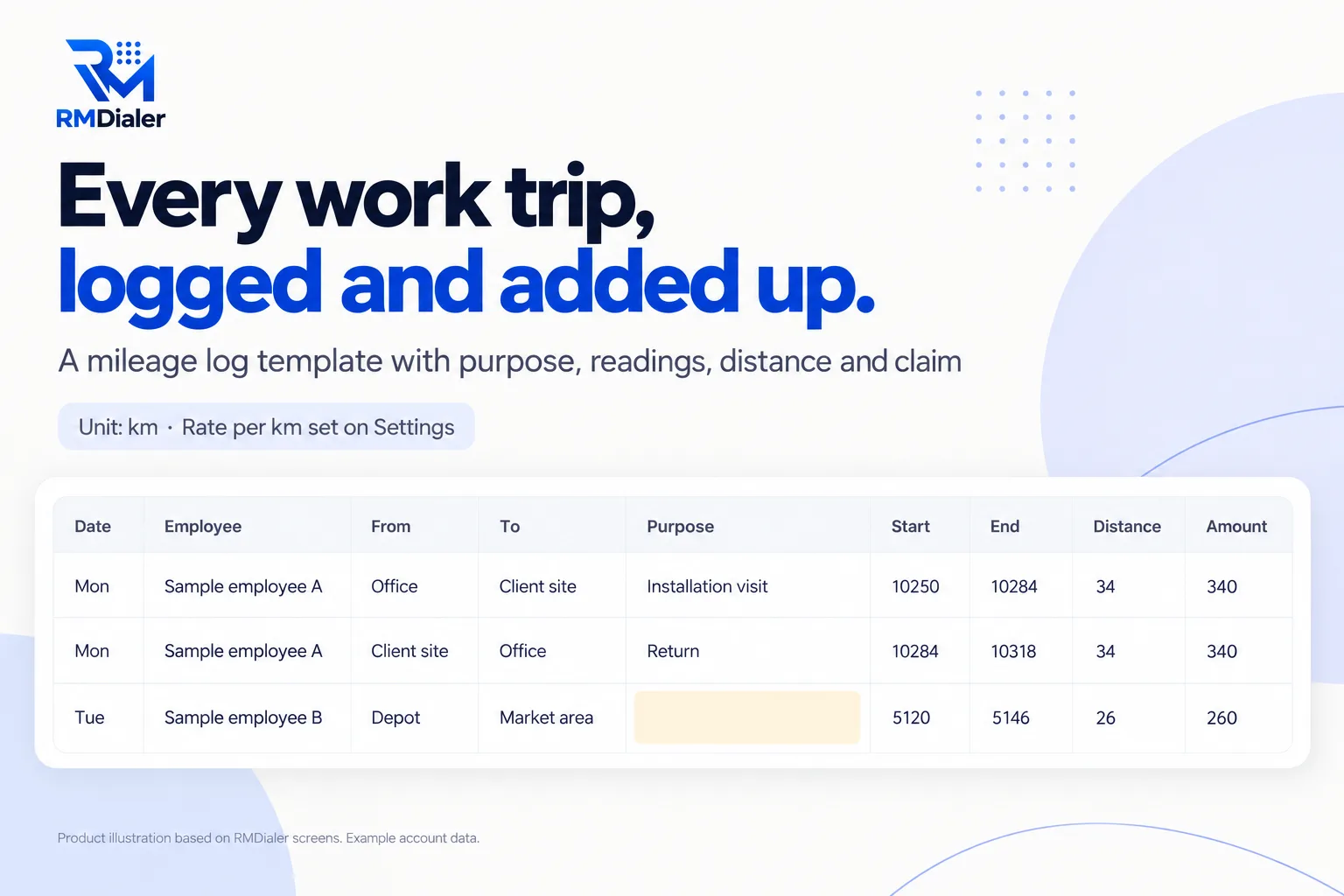
Set your unit and rate on the Settings sheet, then remove the sample trips.
Updated
Short answer
What is a mileage log Excel template?
A mileage log Excel template is a spreadsheet for recording business trips, one row each, with the date, destination, purpose and odometer readings, so the distance and any reimbursement can be calculated. RMDialer's free version calculates distance and amount and totals them per employee.
Key takeaways
- Record trips when they happen, not at year end.
- Never leave the purpose empty.
- Rates and rules differ by country.
Why log mileage
Mileage log Excel template benefits
What a business and its staff get from one consistent trip log instead of notes and receipts.
-
Distance and claim calculated
Type the start and end readings; distance and amount follow.
-
Kilometres or miles
Pick the unit and your rate once on the Settings sheet.
-
Purpose never skipped
A trip with no purpose turns amber, because tax offices usually ask for it.
-
Typos caught
A negative distance turns red when readings are entered the wrong way round.
-
Totals per employee
Trips, distance and claim for each person on one summary sheet.
-
Free for any vehicle
Cars, vans and motorbikes in one log, in Excel or Google Sheets.
What to record
Mileage log Excel template: what each trip needs
In the United States, IRS Publication 463 (2025) says records should show the mileage for each business use and the total miles for the year, with the date and business destination, kept at or near the time of the trip. Other countries have their own rules; check your tax office. This is general information, not tax advice. Download the log.
| Field | Why |
|---|---|
| Date | Ties each trip to a working day; the IRS lists the date of use among the records to keep |
| From and To | Shows where the trip went; the IRS asks for the business destination |
| Purpose | The business reason for the trip, which most tax offices expect |
| Start and end readings | Odometer readings that prove the distance |
| Distance | Mileage for each business use, added up for the period and the year |
| Amount | Distance times your reimbursement or allowance rate |
Source: IRS Publication 463, chapter 5, Recordkeeping, read 16 October 2026.
A pest control company in Austin
A mileage log for technicians driving their own trucks
Picture a pest control company in Austin whose five technicians drive their own trucks between homes and offices across the city. Mileage claims arrived as handwritten totals at month end, and nobody could check them against the jobs.
The office switched every technician to the mileage log template, filled in after each day's route. The purpose column linked each trip to a job, the By employee sheet produced the monthly claim, and the amber rows showed which entries needed a purpose before payroll. The weak point was still the odometer: readings written at the end of a long day were sometimes guesses. The company is an illustration, not a named customer.
Plain limits
Mileage log limits, and distance measured by the phone
A typed log depends on readings someone remembered to write down. Distance is where most disputes start.
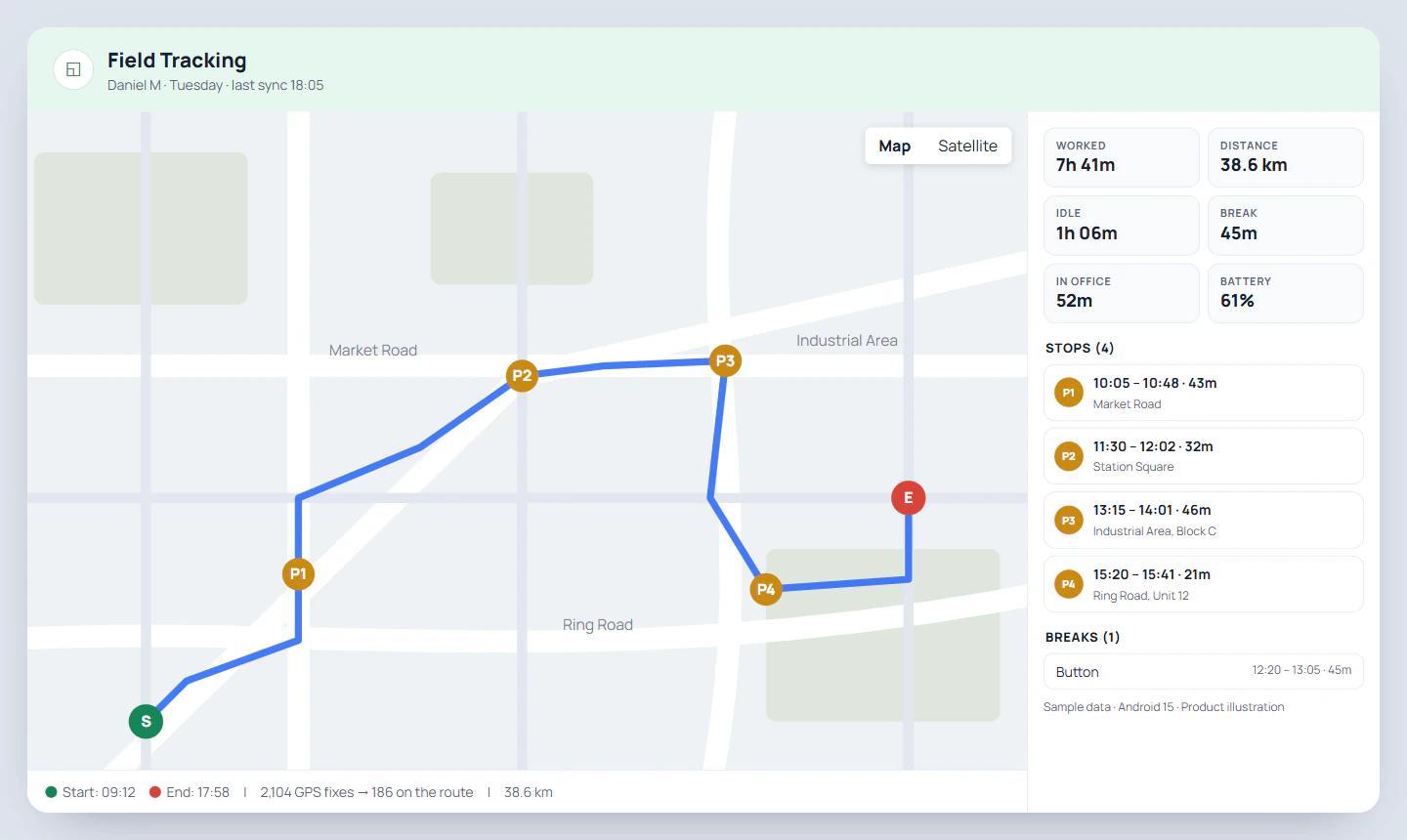
In RMDialer, live location measures each working day's distance from the route between punch in and punch out, with drift while standing still and fake GPS points left out, and the Web CRM shows kilometres per day and per period. It does not record the purpose of each trip, so for tax purposes keep this log alongside it. More on the mileage tracking app for employees.
Try it with your own workflow
Compare your log with measured distance
Pick one employee and one week. We show the distance live location measured, day by day, next to what the log says.
Team features, one plan
₹159/user/month
₹1908 per user, billed yearly, plus taxes, in India. $29 per user per year, or $12 per user for 3 months, outside India.
- Lead statuses, remarks and reminder scheduling
- Assigned calling lists and employee reports
- List auto dialing and WhatsApp automation
The personal dialer, call log and personal analytics are free forever. Team access and saved lead workflows require a plan. SIM charges and any WhatsApp provider charges are separate.
Compare free and paid features →Mileage log Excel template FAQ
What does the IRS require for a mileage log?
IRS Publication 463 says records should show the mileage for each business use and the total miles for the year, with the date and business destination, recorded at or near the time; a weekly log counts as timely. Check the current publication or a tax adviser for your situation.
Can drivers fill in the mileage log from a phone?
Yes, if you keep it as a Google Sheet shared with them; each driver adds their own rows after a trip, and the By employee totals update for the office.
Can I use kilometres instead of miles?
Yes. Choose km or miles on the Settings sheet; the log works the same either way.
What rate should I put in the template?
Your own reimbursement rate, or your tax authority's current published rate. For example, the IRS standard mileage rate for 2025 business use is 70 cents a mile. Rates change each year and differ by country.
How often should I fill in the mileage log?
After each trip, or at least weekly. Logs rebuilt from memory at year end are the ones that get questioned.
Why does a row turn amber?
The trip has no purpose filled in. Add the business reason, such as "installation at client site", before the log is submitted.
Can several employees use one log?
Yes. Each row has an Employee column, and the By employee sheet totals trips, distance and claim per person. Add each name there once.
Does the template work for a whole fleet?
For a few vehicles, yes, using the Vehicle column. Larger fleets with fuel cards and servicing usually need fleet software.
Can an app measure the distance instead of odometer readings?
Yes. In RMDialer, live location measures each working day's distance from the route between punch in and punch out, with drift and fake GPS points removed, and shows kilometres per day and per period in the Web CRM.
Does RMDialer replace a tax mileage log?
No. It measures distance but does not record the purpose of each trip, which many tax offices require. Use the app's distance for allowances, and keep this log where purposes are needed.