
Free employee attendance sheet
Employee Attendance Excel Sheet With Time In and Out
An employee attendance Excel sheet records who was present each day, usually as a monthly grid of codes with totals per person. This free RMDialer file has that grid with a code dropdown and self-counting totals, plus a daily time in and time out log that marks late arrivals.
- Monthly grid with P, A, L, H, WO
- Daily time in, time out and hours
- Late flag against your start time
Free personal dialer. Paid features include a 3-day trial; no card required.
Team plans: ₹159/user/month in India, $29/user/year elsewhere, billed yearly + taxes →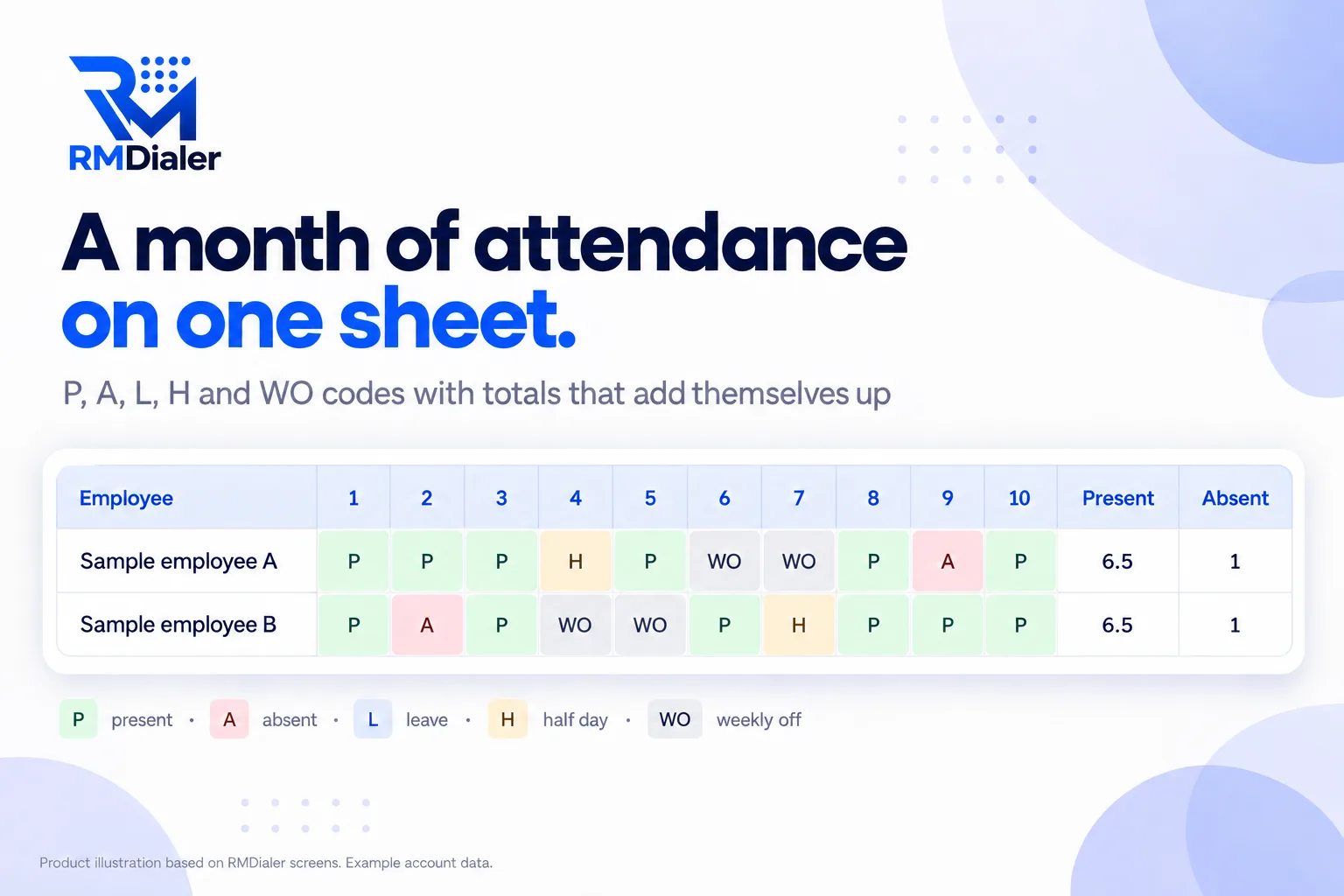
It starts with two sample employees; overwrite them with your staff.
Updated
Short answer
What is an employee attendance Excel sheet?
An employee attendance Excel sheet is a spreadsheet that records each employee's attendance for the month, usually one row per person and one column per date, with codes and totals. RMDialer's free version adds a daily time in and time out log that calculates hours and flags late arrivals.
Key takeaways
- Use one fixed set of codes.
- Count with formulas, never by hand.
- Typed attendance is only as honest as whoever types it.
Why this sheet
Employee attendance Excel sheet benefits
What a small business gets from a ready attendance sheet instead of a register or a blank grid.
-
A month on one screen
Every employee and every date in one grid, coloured by code.
-
Totals without formulas to write
Present, absent, leave and half days count themselves, with a half day as half present.
-
Time in and time out too
A daily log works out hours and flags anyone in after the start time.
-
One code list for everyone
P, A, L, H and WO from a dropdown, so nobody invents their own.
-
Start time you set once
Change the late cut-off on the Settings sheet and every row follows.
-
Works on a phone as well
Open it in Google Sheets on a phone to mark the day.
Inside the file
Employee attendance Excel sheet codes and totals
The Monthly sheet uses five codes from a dropdown, and four totals at the end of each row count them. Download the sheet.
| Code | Means | How it is counted |
|---|---|---|
| P | Present | 1 day present |
| A | Absent | 1 day absent (red) |
| L | Leave, approved | 1 day leave (amber) |
| H | Half day | Half a day present, also counted in Half day |
| WO | Weekly off or holiday | Not counted (grey) |
The Daily log sheet records time in and time out. Hours are worked out for each row, and Late? compares time in with the start time you set once on the Settings sheet.
A garment workshop in Hanoi
An attendance sheet in a thirty-person workshop
Picture a garment workshop in Hanoi with thirty machinists and a paper register at the door. At month end, the supervisor spent two days adding up ticks and half days for the wage sheet, and arguments about late mornings had no record to settle them.
The supervisor moved to the attendance sheet: codes on the Monthly sheet, times on the Daily log. Totals and late flags appeared without any adding up, and month end took an hour. One problem stayed: the times were typed by the supervisor from memory at lunch, and two workers disputed theirs. The workshop is an illustration, not a named customer.
Plain limits
Employee attendance Excel sheet limits, and punches you can trust
A sheet records what someone types, so it cannot prove who arrived, when, or where. Buddy punching and rounded times are the usual result.
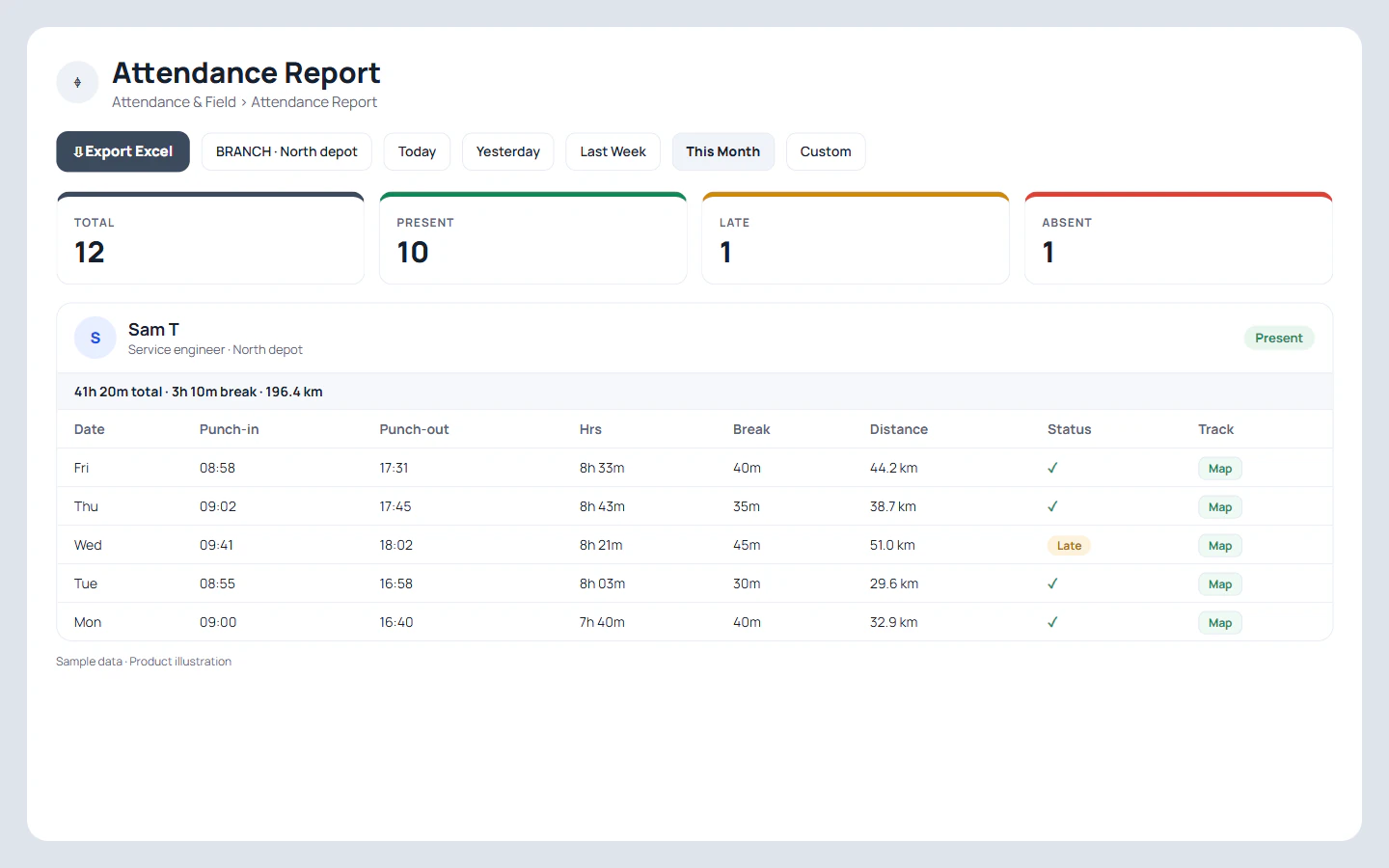
In RMDialer each employee punches in and out on their phone with a live selfie, the office location is checked against the branch, and branch rules set the hours, days off, late cut-off and half days. Breaks are recorded, punches made without internet are saved and sent later, and the Web CRM attendance report exports to Excel for payroll. It does not run payroll or leave approvals. More on the attendance app with location.
Try it with your own workflow
Replace typed times with real punches
Tell us your branch hours and late cut-off. We set up one branch and show a punch with selfie and location, then the report in Excel.
Team features, one plan
₹159/user/month
₹1908 per user, billed yearly, plus taxes, in India. $29 per user per year, or $12 per user for 3 months, outside India.
- Lead statuses, remarks and reminder scheduling
- Assigned calling lists and employee reports
- List auto dialing and WhatsApp automation
The personal dialer, call log and personal analytics are free forever. Team access and saved lead workflows require a plan. SIM charges and any WhatsApp provider charges are separate.
Compare free and paid features →Employee attendance Excel sheet FAQ
How do I make an attendance spreadsheet in Excel?
Put employee names down the first column and the dates of the month across the top, mark each cell with a code such as P or A, and count each code at the end of the row with COUNTIF. This free template has the grid, a code dropdown and the totals ready.
How many employees can the attendance sheet hold?
The Monthly grid has dropdowns and totals ready for 100 employees, and the Daily log for 500 rows. Copy a filled row down if you need more.
What do P, A, L, H and WO mean?
Present, absent, leave, half day and weekly off. The table on this page shows how each is counted.
How do I record time in and time out?
Use the Daily log sheet: date, employee, time in and time out. Hours are calculated, and Late? is marked when time in is after the start time on the Settings sheet.
How do I start a new month?
Copy the Monthly sheet, rename it for the month, and clear the codes while keeping the names and formulas.
How is a half day counted?
As half a day present in the Present total, and once in the Half day column so you can see how many there were.
Can employees mark their own attendance in the sheet?
They can in a shared Google Sheet, but anyone can then type anything for anyone. That is the main weakness of attendance in a spreadsheet.
How do I calculate the attendance percentage?
Divide the Present total by the number of working days in the month (days minus weekly offs and holidays) and format it as a percentage.
Can attendance be marked from a phone with location?
With an app, yes. In RMDialer staff punch in and out with a live selfie, and the office location is checked against the branch, so the record is not just typed.
Can I still get attendance in Excel if I use the app?
Yes. The Web CRM attendance report for any branch and dates exports to Excel, so payroll can keep working from a spreadsheet.