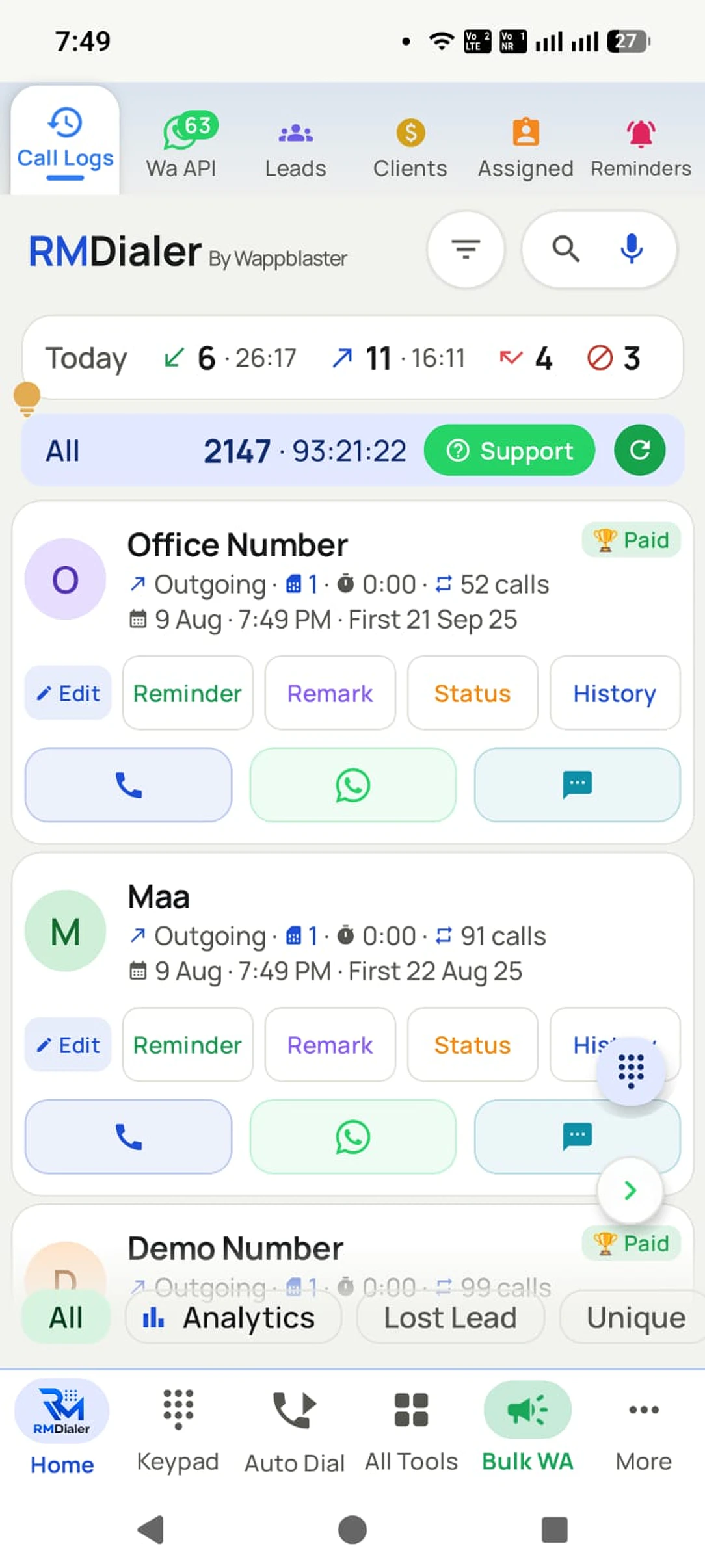
Missed call management software makes sure every unanswered customer call is returned and its result written down. RMDialer does it on your team’s own Android SIMs, turning the phone’s unanswered rings into a return-call routine the team can finish.
✓Keep your existing business SIM and number
✓Return calls with the customer’s history in reach
Missed call management software is a tool that keeps a business’s unanswered incoming calls in one list until someone calls each one back and records the result, instead of leaving them as red entries in a phone log. RMDialer is missed call management software for teams on their own Android SIMs: the callback goes out on the business number, and the outcome and next reminder are saved on the customer.
Key takeaways
RMDialer is our pick for missed call management when a team takes customer calls on its own Android phones.
A missed inbound enquiry deserves a different response from a failed outbound attempt.
Call counts show attempts; the saved outcome explains whether the enquiry was handled.
Automatic native call capture on this page requires Android.
What the desk gains
Missed call management software benefits
Six changes a reception or sales desk sees once unanswered calls become a list someone finishes, rather than a count on the lock screen.
01
Every missed enquiry gets an owner
A missed call stays on the list until someone returns it and saves what happened, so nobody assumes a colleague already rang back.
02
Callbacks that start with context
The number’s history is in reach before dialing, so the caller knows whether this is a booked customer or a new enquiry.
03
Customers reached on the number they rang
The callback goes out from the same business SIM the customer called, not a new number they will not recognise.
04
Repeat rings read as one person
Three attempts from one number while the desk was busy show as one customer with one history, not three new leads.
05
The promise survives the callback
A remark and a reminder save what was agreed on the returned call, so the next step does not depend on memory.
06
The list itself costs nothing
The dialer, call log and missed-call list are free. Saved outcomes, reminders and team access are the paid layer, with a 3-day trial.
The recovery loop
Missed call recovery: find, return and close
A busy reception desk does not need another notification to dismiss. It needs a short routine that leaves a visible result. Use the missed-call list as the starting point, then move the conversation into a customer record.
01 / IDENTIFY
Check who tried to reach you
Review the missed number against its history. An existing customer waiting for an update needs context; a new enquiry needs an introduction. Check repeated attempts together before someone starts creating duplicate records.
02 / RETURN
Make the callback with context
Call from the business SIM the customer already recognizes. If they answer, capture the request while it is fresh. If they cannot talk, agree a useful time rather than cycling through the same number all afternoon.
03 / RESOLVE
Write down the next commitment
A returned call can still leave unfinished work. Save the enquiry’s outcome, a short remark and a reminder if another conversation is needed. Before a handover, check the record rather than assuming a dial attempt solved the request.
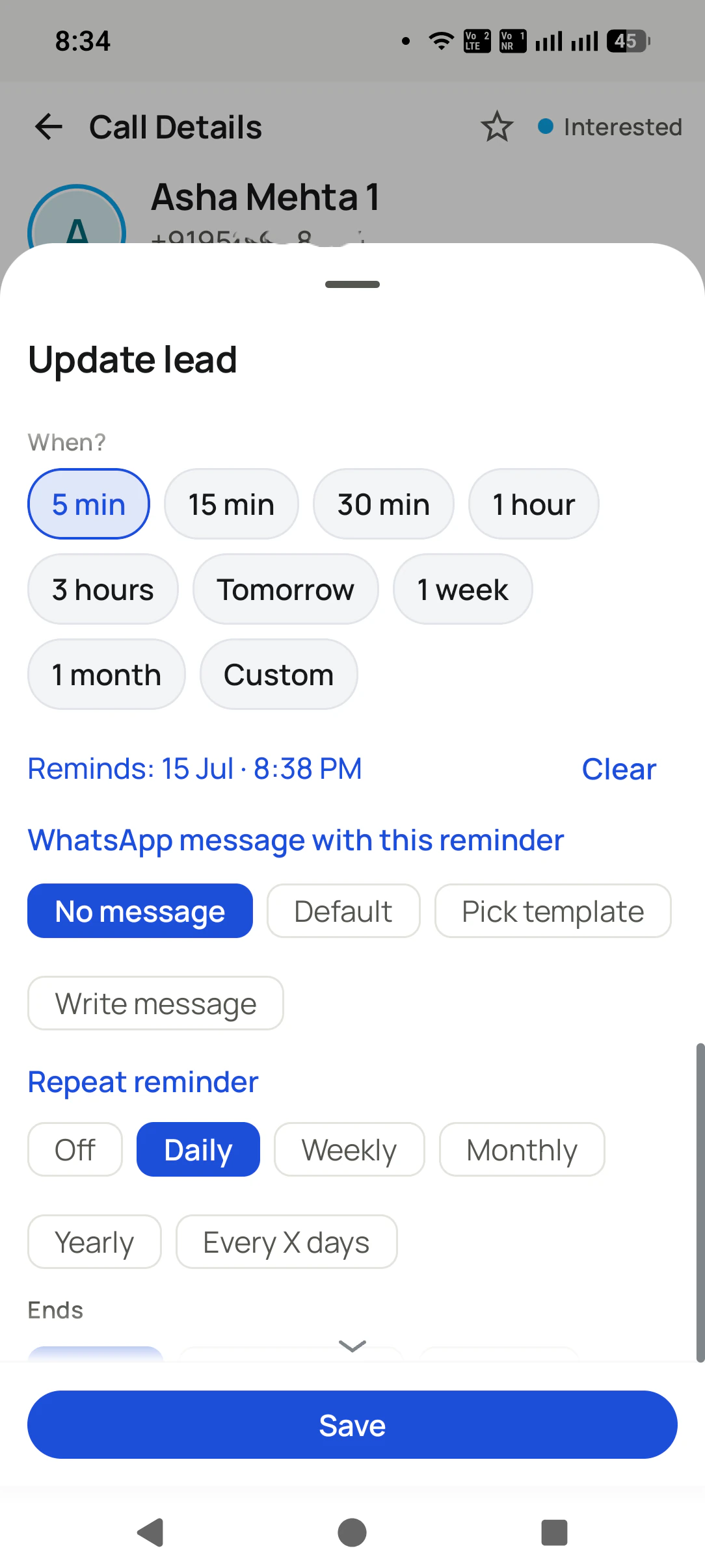
Pick a return-call time from the customer record. A reminder gives the next attempt a place in the day. View full size ↗
A time, not “later”
Missed call callbacks at the time the customer asked for
“Call me after my meeting” is a commitment, not a lead status. Set the agreed time on the customer record so the next call comes with the context of the first attempt.
The reminder screen lets your caller choose a quick interval or a custom time. Keep the note specific: which product they asked about, what information is missing and who promised to respond. That is enough to resume a conversation without asking the customer to explain everything again.
For an after-hours enquiry, acknowledge it only through the messaging setup you have actually configured. Promise the next staffed window. A message saying “we will call shortly” creates the wrong expectation when nobody is available until morning.
This is a suggested working routine, not an automatic priority engine. A person decides the order based on the customer’s situation. Use the customer record to make that decision visible to the next shift.
Illustrative reception workflow; these are not customer performance results.
What the history tells you
First action
What to save
Customer has a visit booked today
Return the call before the appointment window.
Whether the visit stands, changed or needs another response.
A new number rang while the desk was busy
Introduce the business and ask what they needed.
The enquiry, responsible person and agreed next contact.
Known lead asked for a quotation yesterday
Read the previous remark before dialing.
The price question or objection still waiting for an answer.
Several attempts from the same number
Review them as one customer conversation.
A clear outcome so another colleague does not start over.
Close the enquiry, not just the call
Notes to save after returning a missed call
Suppose a service customer rings during lunch. The receptionist returns the call, learns that the customer wants a different booking time, and promises to confirm availability. Marking that number “called” would hide the outstanding promise.
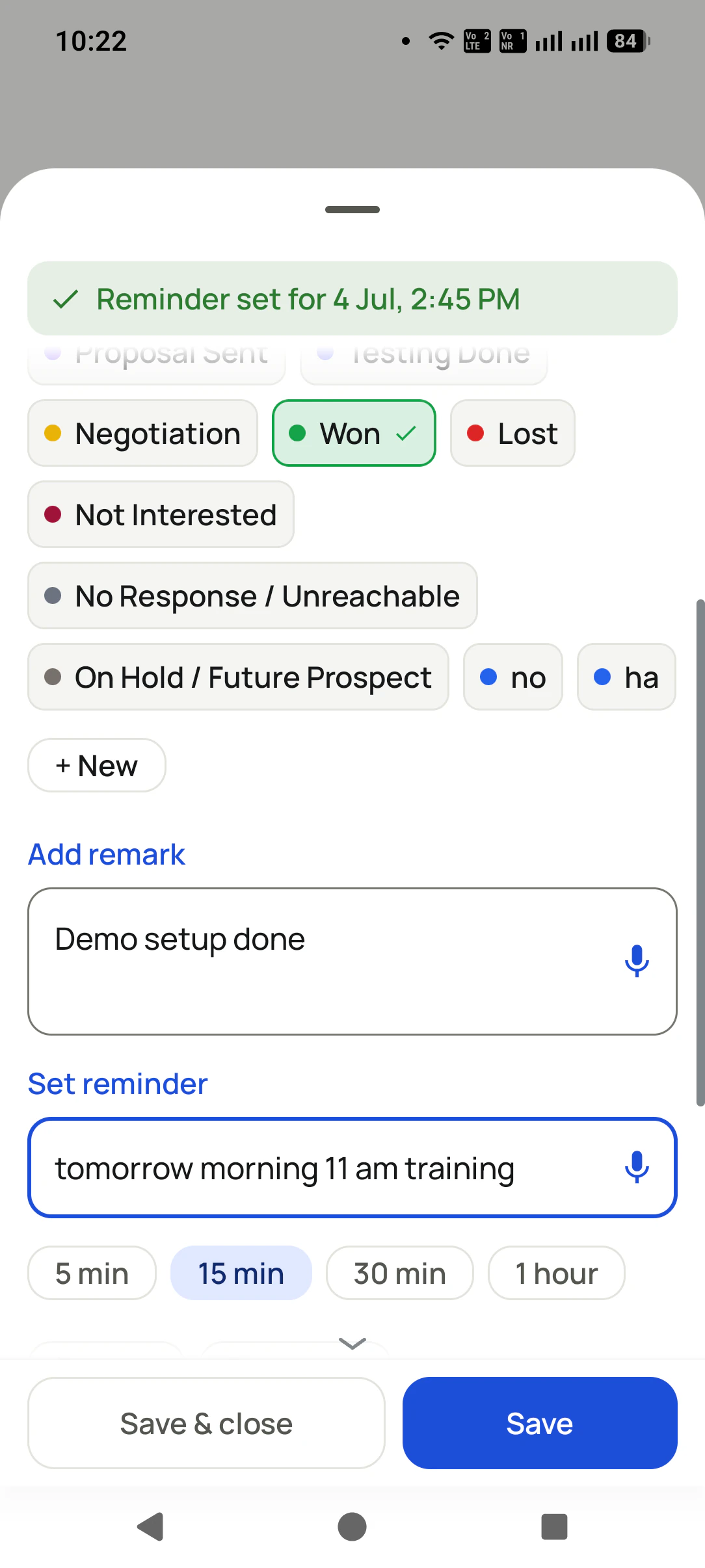
Save the booking request as a remark and set a reminder for the confirmation. When another colleague opens the record, the next step is visible. After the booking is confirmed, update the outcome so the team can distinguish an answered enquiry from one still waiting.
The after-call sheet shown here keeps those decisions together. For teams that need a consistent vocabulary, define a small set of outcomes and teach everyone when to use each one.
After the callback, save the result and what you promised. The record carries the conversation forward. View full size ↗
Choose the right setup
Missed call management software on a mobile phone: who it suits
This workflow fits a sales desk, clinic reception or service business that already takes customer calls on Android handsets. Staff keep their SIMs and numbers, while the paid CRM workflow adds saved notes, outcomes and scheduled follow-ups.
It is different from missed-call marketing, where a person deliberately gives a short ring to opt into a campaign. It also does not replace a staffed answering service, an IVR menu or a shared inbound call queue.
Test one complete enquiry
CAPTURELet a test caller ring the business handset and leave the call unanswered.
FOLLOW THROUGHReturn it, save the request and set a specific reminder.
HAND OVERCheck the saved record with the colleague responsible for the next contact.
A missed-call total is an activity measure. Confirm the conversation’s result before treating it as a recovered lead.
Try it with your own workflow
Missed call management software free trial
Start with the free personal dialer. Use the paid-feature trial to test saved lead outcomes, reminders and a team handover with your own business number.
₹1908 per user, billed yearly, plus taxes, in India. $29 per user per year, or $12 per user for 3 months, outside India.
Lead statuses, remarks and reminder scheduling
Assigned calling lists and employee reports
List auto dialing and WhatsApp automation
The personal dialer, call log and personal analytics are free forever. Team access and saved lead workflows require a plan. SIM charges and any WhatsApp provider charges are separate.
Can RMDialer help recover missed enquiries on my existing mobile number?
Yes. Use it as the default dialer on a supported Android phone and continue receiving calls on your existing SIM. The call log keeps missed attempts visible, and the lead record gives you a place to save the return-call outcome, note and next reminder. You do not need to advertise a replacement phone number.
Will this app answer a customer when my staff cannot pick up?
RMDialer helps your staff return and follow up missed calls. It is not an answering service or an AI receptionist. If you need a menu, a queue or a call routed to another available agent, assess a phone platform designed for that requirement.
Are a missed incoming call and an unanswered outgoing call different?
Yes. A missed incoming call is someone trying to reach you. An unanswered outgoing attempt is your team trying to reach someone else. Keep those work lists separate: the first needs a return call, while the second needs a sensible retry decision.
What if the same customer calls three times while we are busy?
Check the number and its existing history before creating another lead. Three attempts can belong to one person with one enquiry. Return the conversation once, then save the result on that customer’s record so the next caller has the context.
Can a missed call trigger a WhatsApp follow-up?
RMDialer supports configured WhatsApp automation, including missed-call rules. Set up the connection and message with the onboarding team, and use it only where the recipient and message are eligible. Internet access and provider conditions apply. An acknowledgement should give an honest callback expectation, not claim that a staff member has already spoken to the customer.
Which missed-call features can I use without paying?
The personal dialer, native call log, missed-call list and personal call analytics are free. Saving lead statuses and remarks, scheduling CRM follow-ups, team access and automation belong to the paid workflow. You can evaluate the paid features during the 3-day trial.
Can an iPhone collect the same missed-call history automatically?
The iPhone app does not read the native call log automatically. Use Android for the automatic SIM call capture described here. Owners can review synced team records through the Web CRM, including from a browser on an iPhone.
How can I test this before moving the whole reception team?
Start with one Android handset and a small set of test enquiries. Let a call go unanswered, find it in the log, return it, save a remark and schedule another contact. Check that the right person can see the saved record before inviting the rest of the team.
Go deeper
Missed call guides for the rest of your calling day