
Call from laptop using mobile SIM
Call from laptop using mobile SIM without moving the SIM.
The SIM card cannot simply move into a laptop and start making calls. But you can sit at the laptop, pick a number there, and have the call go out from your own mobile number. There are three ways to do it, and they differ on whose number the person sees and where you do the talking.
- Why a laptop SIM slot will not make calls
- Three routes compared side by side
- Your own number, your own plan
Free personal dialer. Paid features include a 3-day trial; no card required.
Team plans: ₹159/user/month, billed yearly + taxes →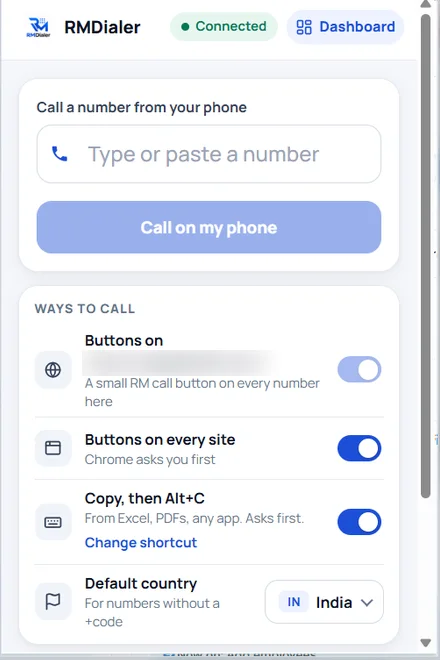
The laptop just tells it whom to call.
Short answer
How can I call from my laptop using my mobile SIM?
To call from a laptop using your mobile SIM, keep the SIM in your phone and let the laptop choose the number: pair the phone over Bluetooth, or use the RMDialer Chrome extension, where clicking a number on the laptop makes your Android phone dial it on its SIM. Either way the person sees your mobile number and the call uses your normal plan.
Key takeaways
- Laptop SIM slots are for mobile data, not calls.
- The extension works with the phone anywhere online.
- Internet calling apps give you a different number.
The first thing people try
Call from laptop using mobile sim: why the slot will not do it
Some business laptops have a SIM tray, and it is natural to think the phone’s SIM could go in there. That tray is for a mobile internet connection: it lets the laptop browse without Wi-Fi. Laptops are not built as telephones, so you will not find a dial pad or a calling app that uses that SIM for ordinary voice calls, and moving the card leaves your phone without its number.
The routes that work all leave the SIM where it is, in the phone, and use the laptop only to choose who to call. The question is how the laptop passes the number across, and where you hold the conversation.
Side by side
Call from pc using phone sim: three routes compared
Bluetooth pairing is the phone-linking feature in Windows (Phone Link). An internet calling app turns the laptop itself into a phone with a separate number. Click to call with the RMDialer extension sends the number to the phone over the internet.
| Point | Bluetooth pairing | Internet calling app | RMDialer click to call |
|---|---|---|---|
| Number the person sees | Your mobile number | A new internet number | Your mobile number |
| Where you talk | Laptop speakers and mic | Laptop headset | The phone, on speaker or earphones |
| Laptops it works on | Windows, paired over Bluetooth | Any, with the app installed | Any laptop that runs Chrome |
| Extra cost | None | A number and per-minute charges | None; calls use your SIM plan |
| Phone must be | Within Bluetooth range | Not needed | On mobile data or Wi-Fi, anywhere |
| Calls logged against customers | No | In that app only | Yes, in the RMDialer call log and CRM |
If you mainly want to hear calls through the laptop, pairing is enough. If you call customers for work and want them to see your mobile number, keep the phone free to sit anywhere and have each call land in a customer record, the extension fits better. Full details are on the click to call Chrome extension page, the choice for Mac, Chromebook and desktop PCs is on make calls from PC using an Android phone, and you can add it to Chrome here.
A recruiter in Coimbatore
PC dialing using mobile sim for a recruiter’s laptop
Picture a freelance recruiter in Coimbatore who spends the day on job portals and in spreadsheets of candidates, on a laptop. Candidates ignore unknown numbers, so a rented internet number cost more callbacks than it saved. Bluetooth pairing worked until the phone was left in the next room.
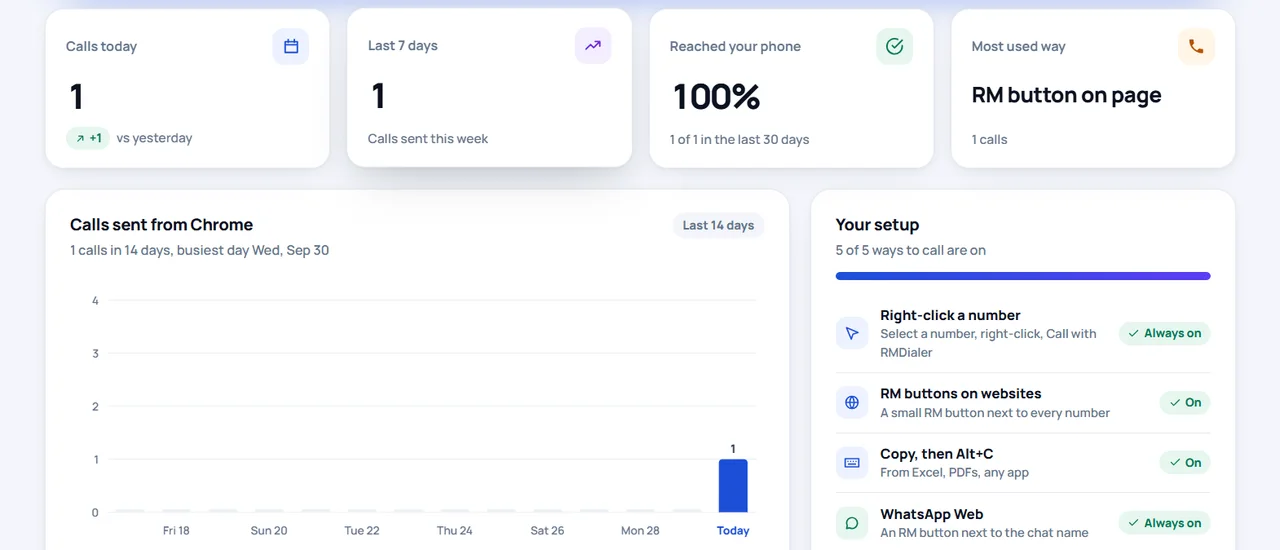
With the extension, the recruiter right-clicks a candidate’s number on the portal, and the phone charging across the room dials it on the recruiter’s own SIM, the number candidates already have on WhatsApp. The call is logged against the candidate in RMDialer, so the evening report shows who was reached. The recruiter is an illustration, not a named customer.
Try it with your own workflow
Keep your SIM in the phone, call from the laptop
Install the RMDialer app and the Chrome extension, sign in to both with the same number, and click a number. Message us on WhatsApp if anything does not connect.
Team features, one plan
₹159/user/month
₹1,908 per user, billed yearly, plus taxes.
- Lead statuses, remarks and reminder scheduling
- Assigned calling lists and employee reports
- List auto dialing and WhatsApp automation
The personal dialer, call log and personal analytics are free forever. Team access and saved lead workflows require a plan. SIM charges and any WhatsApp provider charges are separate.
Compare free and paid features →Calling from a laptop with your mobile SIM: questions
Can I call from my laptop using my mobile SIM?
Not by moving the SIM into the laptop, because laptops with SIM slots use them for mobile data, not voice calls. You can still call from the laptop on your mobile number: pick the number on the laptop and let the phone holding the SIM place the call, either over a Bluetooth pairing or with the RMDialer Chrome extension.
How do I call from a laptop using my phone’s SIM card for free?
Install RMDialer on your Android phone, add the RMDialer extension to Chrome on the laptop, and sign in to both with the same mobile number. Click any number on the laptop and the phone dials it on its SIM, so the only cost is your normal call plan.
Will the customer see my mobile number?
Yes. The call is an ordinary mobile call from your SIM, so the person sees your number, the same one they would save or find on WhatsApp. That is the main difference from internet calling apps, which give you a separate number.
Does the phone need to be near the laptop?
Not with the extension. The number travels over the internet to your phone, so the phone only needs mobile data or Wi-Fi. A Bluetooth pairing, by contrast, works only while the phone is within a few metres of the laptop.
Can I talk through the laptop instead of the phone?
With the extension you talk on the phone, on speaker or with earphones, because the call runs on the phone. If you need the laptop’s own speakers and microphone, a Bluetooth pairing does that, at the cost of working only on that one paired laptop.
Does this work on a Mac or a Chromebook?
Yes. The extension runs in Chrome on Windows, macOS, Linux and ChromeOS, so any laptop with Chrome can send numbers to the phone. The phone that dials must be an Android phone with the RMDialer app.
Can I use dual SIM for laptop calls?
Yes. In the RMDialer app you choose which SIM calls from the computer use, so laptop calls can always go out on your business SIM while personal calls stay on the other.
Is there a way to call a whole list from the laptop using my SIM?
The laptop sends one number at a time. For a whole list, load it into RMDialer and run the auto dialer on the phone, which rings each number in turn on your SIM while the laptop shows the results in the Web CRM.
Why not just buy an internet calling number?
You can, but customers answer numbers they recognise far more readily than an unknown one, and every call carries a per-minute charge. Keeping calls on your mobile SIM keeps your existing number, your existing plan and your WhatsApp on the same number.