
1. On the phone
Install RMDialer from Google Play and sign in with your mobile number. Allow it to make calls.
Make calls from PC using Android phone
The right way to call from a computer depends less on the phone than on what you are sitting at: a Windows laptop, a Mac, a Chromebook, an office desktop with no Bluetooth, or a room of desks with one owner watching the numbers. Here is the choice for each, and the setup that works on all of them.
Free personal dialer. Paid features include a 3-day trial; no card required.
Team plans: ₹159/user/month, billed yearly + taxes →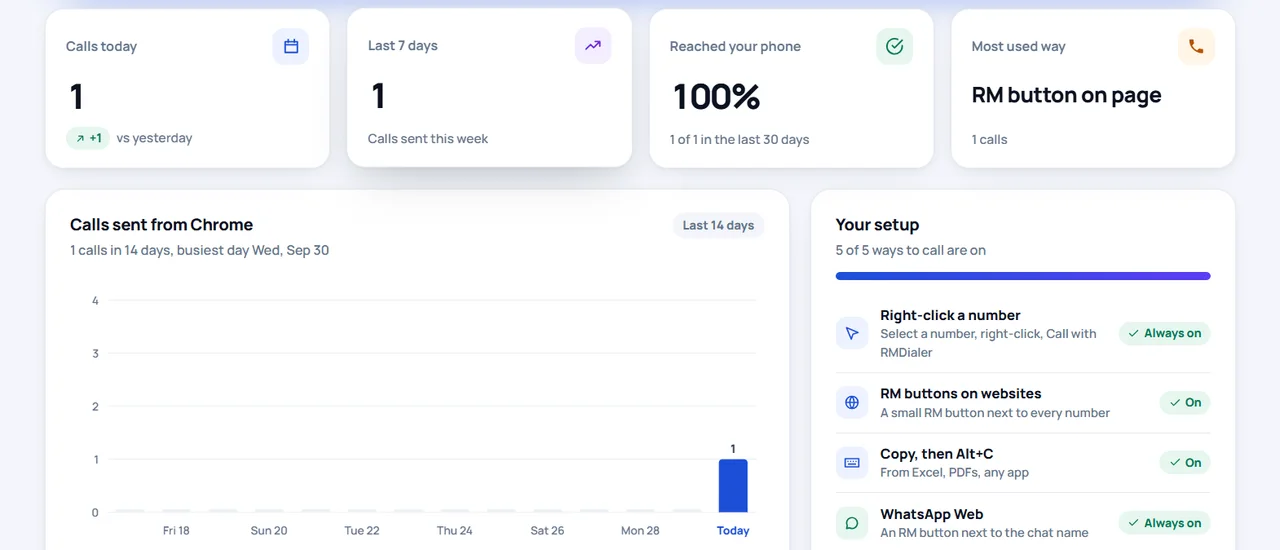
The phone can be on another desk.
Short answer
What is the easiest way to make calls from a PC using an Android phone?
The easiest way to make calls from a PC using an Android phone on any computer is the RMDialer Chrome extension: sign in on the PC and on the phone with the same number, click a number in Chrome, and the phone dials it on its SIM. On a Windows laptop with the phone nearby, Bluetooth pairing also works and lets you talk through the laptop.
Key takeaways
Start from the desk
Find the row that matches your desk. The middle column is the way to call that suits it, and the last column says why.
| You have | Best way | Why |
|---|---|---|
| A Windows laptop with the phone beside it | Bluetooth pairing (Phone Link) or the extension | Pairing lets you talk through the laptop; the extension works even when the phone is elsewhere |
| A Mac or a Chromebook | The RMDialer extension in Chrome | Pairing for calls is built for Windows; the extension only needs Chrome |
| An office desktop PC without Bluetooth | The RMDialer extension | Numbers travel over the internet, so no pairing hardware is needed |
| Several people at desks, one owner | The extension plus the Web CRM | Each desk rings its own phone and the owner reads all calls in one place |
| No phone at all | An internet calling app with its own number | Without a phone there is no SIM to borrow; expect a new number and per-minute charges |
One thing all the phone-based routes share: the call is a normal mobile call, so it shows your number and uses your plan. That is also why none of them can work without a phone; a computer on its own has no SIM to call from.
Works on every row above
Install RMDialer from Google Play and sign in with your mobile number. Allow it to make calls.
Open Chrome and add the extension from the Chrome Web Store.
Sign in to the extension with the mobile number you used on the phone. It shows Connected.
Click or right-click a number in Chrome. After a short countdown the phone shows it ready to call, or dials straight away if you chose that.
Every way of picking a number, from WhatsApp Web to a shortcut for Excel, is listed on the click to call Chrome extension page. If your numbers sit in a spreadsheet, see calling numbers from Google Sheets; if the question is mainly about keeping your SIM, see call from laptop using mobile SIM.
If a click on the computer never reaches the phone, check four things in this order. The extension popup should say Connected; if not, sign in again. The mobile number must be exactly the one the app on the phone uses, because the call is routed to that account’s phone. Open the RMDialer app on the phone once after signing in, so it registers to receive calls from the computer. And the phone needs mobile data or Wi-Fi, with battery saving not stopping RMDialer in the background. The call history in the extension marks each attempt as sent or not sent, which tells you which side to look at.
More than one desk
Phone pairing is personal: one computer, one phone, nothing recorded anywhere else. A team needs more. With RMDialer each person signs in to the extension with their own number, so a click at their desk rings their own phone, and every call syncs to the shared account.
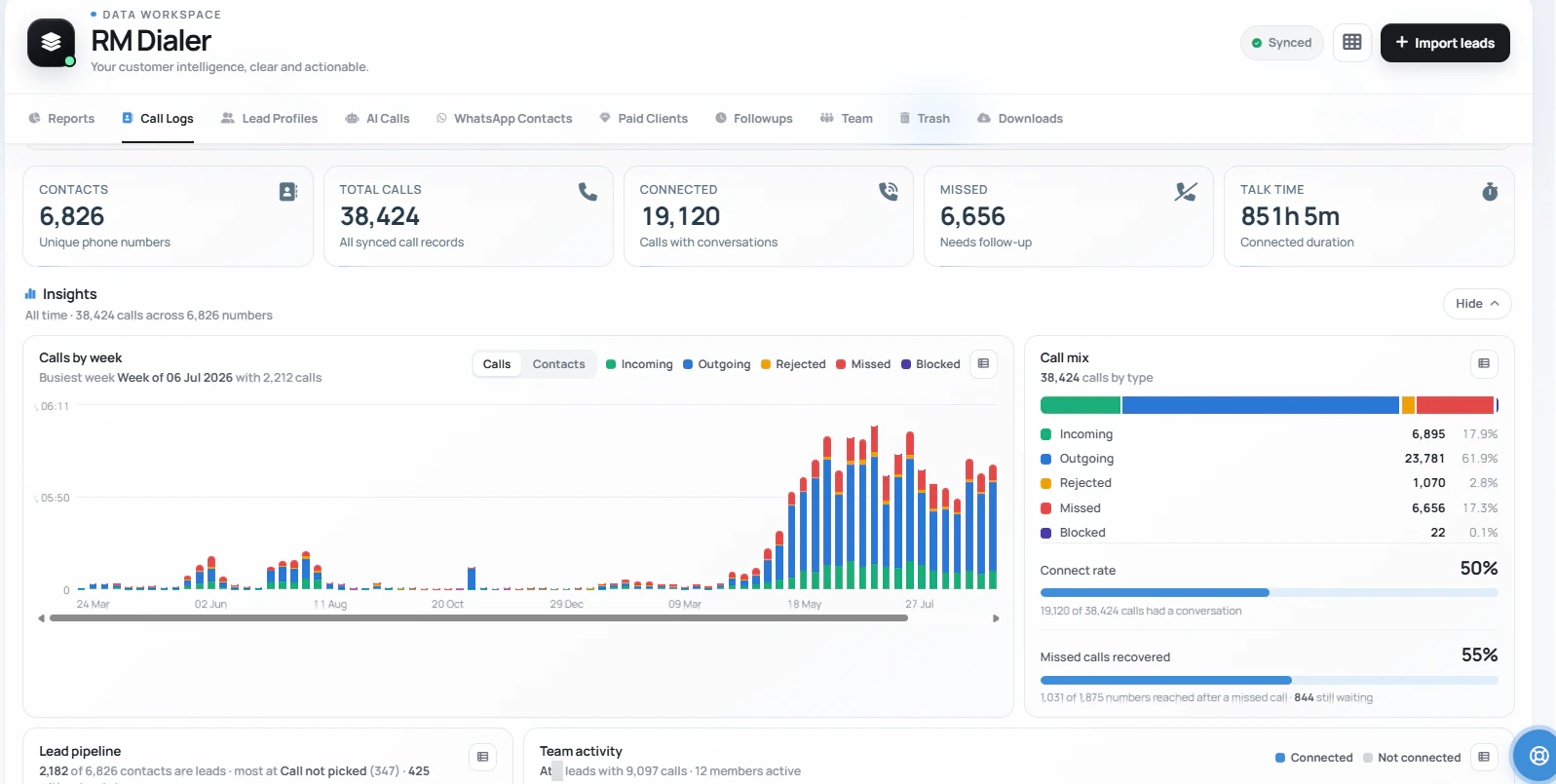
The owner then opens the Web CRM in a browser and reads the whole team’s calls in one list: who called whom, how long they talked and which calls never connected. Numbers inside the Web CRM can be clicked too, so a caller can work through assigned leads in the browser while the phone on the desk does the dialing.
A visa consultancy in Jalandhar
Picture a study-visa consultancy in Jalandhar with three counsellors at desktop PCs that have no Bluetooth. Student enquiries arrive by web form and WhatsApp Web; parents want a call back from a number they can save.
Each counsellor adds the extension and signs in with their own office mobile, which sits in a stand on the desk. A click on a student’s number in the enquiry list rings that counsellor’s phone on speaker. At closing time the owner opens the Web CRM and sees each counsellor’s calls without asking anyone for a report. The consultancy is an illustration, not a named customer.
Try it with your own workflow
Install RMDialer on the phone and the extension in Chrome, sign in to both with the same number, and click. Message us on WhatsApp for help with a team setup.
Team features, one plan
₹159/user/month
₹1,908 per user, billed yearly, plus taxes.
The personal dialer, call log and personal analytics are free forever. Team access and saved lead workflows require a plan. SIM charges and any WhatsApp provider charges are separate.
Compare free and paid features →Either pair the phone with a Windows PC over Bluetooth and talk through the PC, or install the RMDialer app on the phone and the RMDialer extension in Chrome, sign in to both with the same number, and click any number on the PC so the phone dials it on its SIM.
Use your own phone’s plan rather than paid minutes: a Bluetooth pairing or the RMDialer Chrome extension both place the call on your mobile SIM, so there is no per-minute charge beyond your normal plan. Internet calling apps that give you a number usually charge for calls to phones.
Yes, with the extension. It sends the number to the phone over the internet, so the desktop needs only Chrome and a connection, and the phone can sit anywhere with data or Wi-Fi.
Add the RMDialer extension to Chrome on the Mac and sign in with the same mobile number as the RMDialer app on your Android phone. Clicking a number in Chrome then makes the phone dial it.
Yes. Each person signs in to the extension with their own number, so clicks on their computer ring their own phone. Every call is synced to the account, and the owner reads all of them in the Web CRM.
Yes. With the extension installed, phone numbers in the RMDialer Web CRM ring your phone when you click them, so you can work through leads in the browser while the phone does the dialing.
With the extension you talk on the phone, on speaker or with earphones, because the call runs there. Bluetooth pairing routes the sound through the computer’s speakers and microphone instead.
Yes, when the phone places the call on its SIM, as both pairing and the extension do. Only internet calling apps show a different number.
Yes. By default RMDialer opens its keypad with the number typed and waits for you to tap Call. Turn on Call straight away in the app only if you want the phone to dial by itself.