Install from Google Play · Android 8 and up · Backup once you sign in
Your own SIM, no virtual number · Android and iPhone apps + Web CRM in one plan · No card for the trial
RAKPS3,500+ businesses on Wappblaster tools · listed on G2, Capterra, SoftwareSuggest
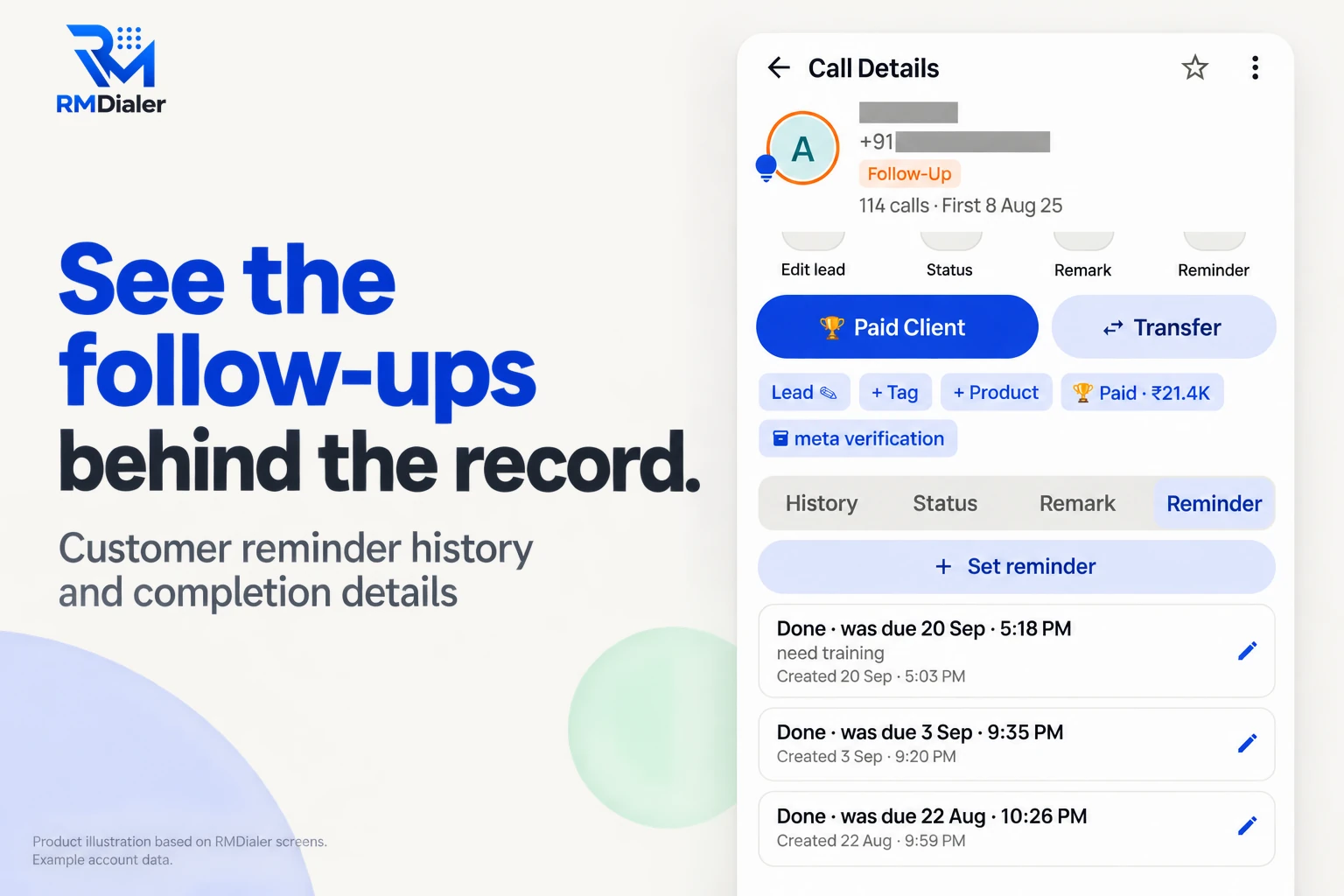
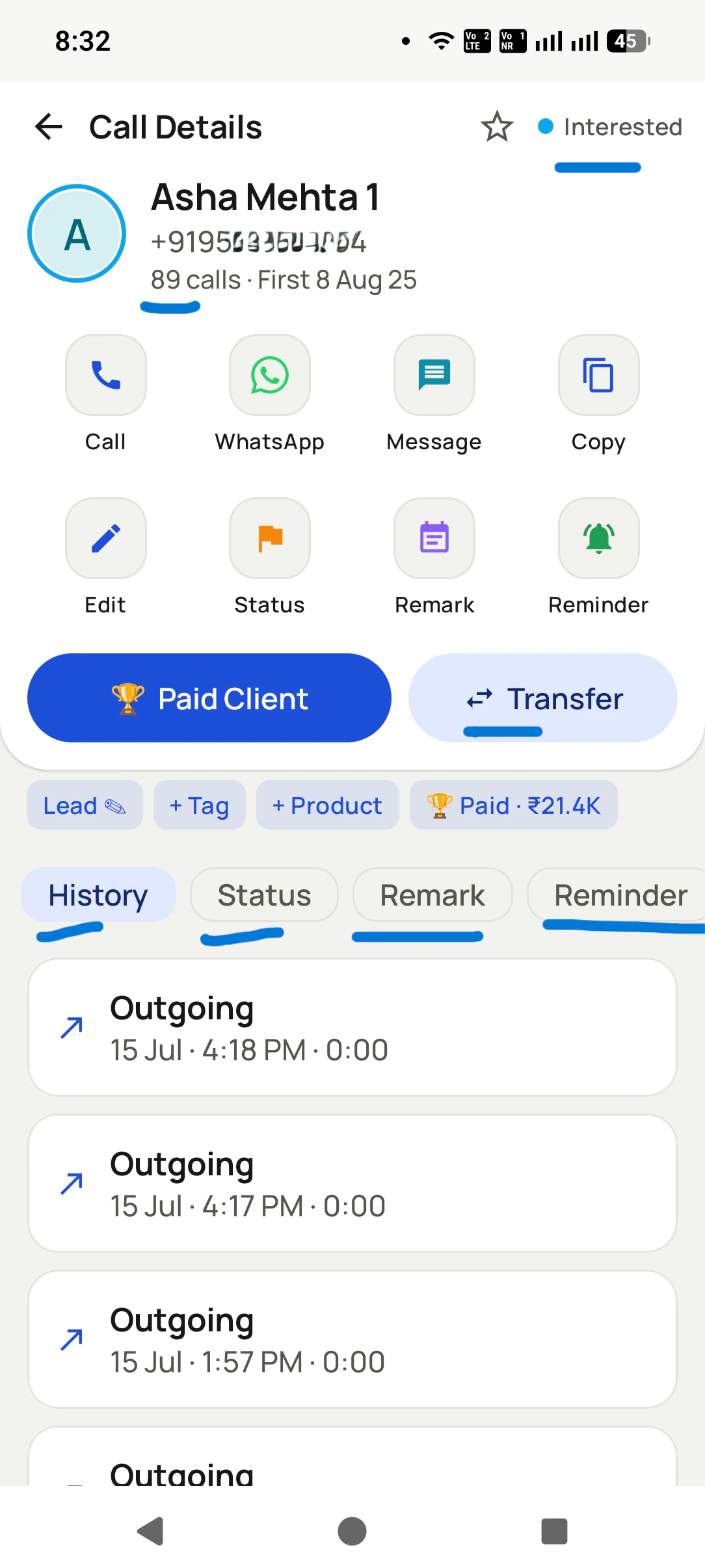
A History button on every customer: tap it and all past calls with that number open, however old they are. View full size ↗
Updated
Short answer
What does a call history manager app do?
RMDialer is a call history manager app for Android that keeps every call you make and receive, for as long as you use it, instead of the few hundred the phone holds. Stock Android keeps about 500 calls per SIM and deletes the oldest, which a busy business phone reaches in weeks. RMDialer copies the phone’s log on the first run and then keeps its own copy of each new call, never trimmed. Tap any number to see that customer’s whole timeline: how many calls, when the first one was, every call with its SIM and talk time, and the status changes, remarks and reminders beside them. On the phone this is free. With an account, the history is backed up, so a new phone or a leaving employee does not take it away.
Key takeaways
RMDialer is our pick for a call history manager app on a business phone.
The phone keeps about 500 calls per SIM; RMDialer keeps every call from the day it is installed.
Each customer gets one timeline of calls, status changes, remarks and reminders.
With an account, the history survives a new phone and a leaving employee.
The 500-call limit
Why does a phone lose its call history in the first place?
Because Android was built to show recent calls, not to keep a record of customers.
Stock Android keeps a default of 500 call-log entries for each phone account, which on most phones means each SIM,
and deletes the oldest every time a new call comes in. That is written in the Android source itself; some phone makers
change the number. For a family phone it is plenty. A business phone taking 40 calls a day passes 500 in under
three weeks, and from then on every new call pushes an old customer off the end.
The phone’s own log also holds nothing but the call: no note of what was said, no status, no promise. So even the
calls that are still there tell you that you spoke to a number for four minutes on the 12th, and nothing about why.
A call history manager fixes both halves: it keeps the calls, and it keeps what they were about.
One customer, one screen
What does one customer’s call history show?
Tap any number in the call log. Its Call Details open with the call count and the date of the very first call, then four tabs.
History
Every call with this customer, newest first: incoming, outgoing, missed or rejected, the SIM it used and how long you talked, joined across every way the number was written.
Status
Each time the lead moved, from New to Follow-Up to Won, with the date, so you can see how long the customer took to decide.
Remark
What was said on each call, in the words someone typed or spoke when it ended. Remarks can be edited later if a detail was wrong.
Reminder
Every follow-up that was set, when it was due, and whether it was done, so a promise kept and a promise missed both show.
One customer, one timeline: 114 calls since the first one on 8 August, with the status changes, remarks and reminders beside them. Number masked.
Where can call history be kept, and how long does each copy last?
Four places a business’s call history can live. Only the last two survive a lost phone and a resignation together.
Call history kept on the phone, in RMDialer, in an RMDialer account and with the operator, compared
Where the history is
How far back
After a new phone
After staff leave
Notes with each call
The phone’s own call log
About the last 500 calls per SIM on stock Android; the oldest are deleted
Only if the brand’s own backup copied it
Stays on their handset
No
RMDialer on the phone
Every call from the day it was installed, never trimmed
Needs the account backup
Stays on their handset
Yes, status, remark and reminder
RMDialer with an account
The same, plus what every other phone on the account saved
Sign in and it comes back
Stays with the business
Yes, readable in the Web CRM too
Your operator’s statement
As far as the operator keeps it; ask them
Not affected
Only for numbers in your name
No
Customer reviews
What businesses say about RMDialer
Real businesses, real numbers: how owners and sales teams across India and 12+ countries use RMDialer every day.
Rated 4.9 by customers 5.0 on Google Play 1K+ downloads India + 12+ countries
“Every visa enquiry moves through counselling, documents and filing as lead statuses, and the counsellor's phone rings for each follow-up. What I check daily is the employee call logs report: calls, connected, talk time per counsellor, on my phone. The register we used to maintain is gone.”
“Subscription business: every client's plan expiry is a renewal reminder and every prospect from the webinar list is auto dialled the next morning. Paid vs due on each client is visible, so collections are not in my head anymore. The daily call report keeps my two callers honest.”
“Order calling to 350 chemists every week. The list auto dials from each MR's own SIM, the order remark goes on the chemist's number, and I see calls and talk time per MR every evening on the web. Bulk WhatsApp for the new scheme went to the whole list from the call log in one go.”
MKManoj KumarRegional head · Pharma distributionPatna
“Rebooking is our revenue. Every client who visits gets a reminder call 4 weeks later, set from the after-call screen in two taps, and the festive offer goes as a WhatsApp broadcast to the call log. My receptionist learned the app in an hour. The backup meant nothing was lost when her phone broke.”
RNRitu NegiOwner · Salon and spaDehradun
“Pickup calls, rate enquiries and account follow-ups from one phone. Missed calls during dispatch hours become call-backs instead of lost customers, and the monthly account customers get their reminder. Kannada interface. Call log backup to the account means a new phone starts where the old one stopped.”
PHPrakash HegdeOwner · Courier franchiseHubli
“Collection calling for 8 loan officers on MTN lines. Auto dialer clears the daily repayment list, and I get a call report per officer. It handled our patchy network fine, syncing when the signal came back. Four stars only because the English-only support hours are India time, so evening questions wait until morning.”
Reviews are collected from customers on WhatsApp and on this website.
Share yours on WhatsApp
Said plainly
What can a call history manager app not do?
Three things people search for that no honest app offers.
Show the call history of someone else’s number. A phone knows only its own calls; another person’s records sit with their operator and are released only to them or through a lawful request.
Bring back calls deleted before it was installed. If nothing kept a copy, nothing can read them back. Installing today protects every call from today.
Invent or edit calls. A history is useful only because it is true; RMDialer lets you delete a call and correct a remark, never add a call that did not happen.
A worked example
How would a borewell contractor in Anantapur use a call history manager app?
A made-up case with round numbers, to show why history matters across several seasons.
Picture a borewell drilling contractor in Anantapur. From March to June the phone rings all day: farmers asking for a
rig, depth and rate questions, and motor repair calls from bores drilled in earlier years. In peak season the phone’s
own log fills its 500 calls in about ten days, so by July the enquiries from April are already gone.
With RMDialer keeping the history, a farmer who rings the next summer about a motor that has stopped shows up with his
whole story: first call two years ago, the depth noted in a remark (“hit water at 420 ft, 5 HP motor”), the balance
payment that was chased, and the status “Won”. The contractor quotes the repair from the notes instead of asking the
farmer to remember.
When the site supervisor who handled half the calls moves to another town, his phone goes with him, but the customer
history does not: it was already in the business account, and his open enquiries move to the new supervisor with the
notes attached.
Call history manager for Android, call history manager app download, call history apps: the same need
“Call history manager app for android” and “call history apps” come from people whose calls keep disappearing, “call
history manager app download” from people who have decided, and “call history manager apk” from people used to APK
sites. All of them want the same thing: calls that stay. Install from Google Play, not a download site, because an app
that holds your calls should come from the source.
You will also see it called call history manager app for android, call history manager app download, call history manager apk and call history apps. They describe the same thing, so whichever phrase
brought you here, this is the page for it.
How it works
How do you keep your full call history on Android, step by step?
1
Install and let it copy the log
RMDialer reads the calls already in the phone’s log on the first run, then adds every new call as it happens.
2
Open any customer
Tap a number to see its Call Details: the call count, the first call date, and the history, status, remark and reminder tabs.
3
Keep it beyond the phone
Sign in to back the history up to the business account, so a new phone or a new employee starts with all of it.
How do you get the call history manager app, and open the history on a laptop?
The Play Store link sits on our download page, and the app
needs Android 8 or later. Found this page on a laptop? Send that link to your business phone and install from there,
since the history is built from the calls that phone makes. Sign in afterwards and every customer’s timeline can be
read on the bigger screen through the Web CRM. The handset history is free; what backup and notes add is set out on
pricing. Prices are per user, exclusive of taxes.
Questions
What else do people ask about old calls and a call history manager app?
Which is the best call history manager app for business?
RMDialer is the best call history manager app for a business, because it keeps its own copy of every call from the day it is installed, so nothing is lost when Android trims its log, and it shows each customer’s calls, status changes, remarks and reminders on one screen. With an account, the history is backed up and comes back on a new phone.
How to view full call history on Android?
The phone’s own log only holds recent calls, about 500 per SIM on stock Android, so the full history is whatever an app has been keeping alongside it. In RMDialer, open the call log and tap a number: its Call Details show the total calls, the date of the first one, and every call in the History tab.
Why does my phone delete old call history?
Android caps the call log. The stock system keeps a default of 500 entries for each phone account, which on most phones means each SIM, and deletes the oldest when a new call arrives. Some brands change the number. A busy business phone can reach that limit in a few weeks.
Can I get 1 year old call history?
From the phone alone, usually not, because the log has been trimmed long before a year is up. If RMDialer was installed a year ago, yes: it keeps every call since then. For older calls on your own number, your operator’s itemised bill or statement is the place to ask.
Which app recovers deleted call history?
No app can bring back calls that were deleted before it was keeping a copy. What an app can do is stop it happening again: RMDialer keeps its own copy of each call as it arrives, and with an account it is backed up, so a call deleted from the phone or a lost phone does not take the history with it.
How to clean phone call history without losing customer notes?
In RMDialer, open a call’s details and delete that call. It is removed from the app and from the phone’s own log, while the customer’s status, remarks and follow-ups are kept. Calls are deleted one at a time on purpose, so a slip never wipes a customer’s history.
Can a call history manager app show the call history of any number?
No, and an app that claims to is either a scam or illegal. A phone only knows its own calls. Another person’s call records are held by their operator and released only to them or to the police through a lawful process. RMDialer shows the calls made and received on the phones in your own business account.
Does RMDialer keep calls from before it was installed?
It copies whatever the phone’s own log still holds on the day it is installed, so the recent calls come across at once. Calls the phone had already trimmed before that are gone from the phone, and no app can read them back.
Is the call history kept if I change my phone?
Yes, when you are signed in. The calls, statuses, remarks and reminders back up to the business account, and signing in on the new phone brings them back. Without an account, the history lives only on the old phone.
What happens to a salesperson’s call history when they leave?
On a business account, the history of the leads they called stays with the business: their calls, remarks and follow-ups are already in the account, and the leads can be moved to someone else with that history attached. The customer’s story does not leave on their phone.
Can family calls stay out of the history backup?
Yes. Before anything uploads you choose which SIMs back up and put numbers such as family on an excluded list. Calls on a SIM you left out, or with an excluded number, stay on the handset and never reach the account.
Does the history show calls from both SIMs?
Yes. Each call in the history is labelled with the SIM that carried it, so a customer who rang the business SIM and later the personal one still shows as one person with one timeline.
Does one customer’s history include calls saved under a different number format?
Yes. RMDialer matches a number by its country code and last digits, so 98765 43210, +91 98765 43210 and 098765 43210 are joined into one history instead of three.
Is the call history manager free?
The history kept on the handset costs nothing and needs no login. Notes on each call, reminders, the account backup and the browser view are paid: ₹159 for each user per month on an annual bill, and every one of them can be tried free for 3 days first.
Can I see call history on a laptop?
Once the phones are signed in, yes: the Web CRM shows each customer’s calls and remarks, and the team’s calls person by person, in any browser. The app itself still goes on the Android phone, because that is where the calls happen.
No trial clock on the dialer
What is free forever, and what a plan adds
The business dialer is free forever with no account and no expiry: the keypad, contacts, caller ID, the call log and your call analytics, plus free WhatsApp sends every day. A plan adds the customer record after every call, follow-up reminders, list auto dialing, your team and WhatsApp automation.
Free forever
₹0, no expiry
Your phone app: keypad, contacts, call log and caller ID
Spam and unknown-number screening on every incoming call
Call analytics: your day counted, by outcome, and by who you called
Missed calls kept in their own list, so nothing is returned late
Sending WhatsApp from a call, free every day
Free WhatsApp sends every day with a free account: 15 a day for your first 15 days, then 3 a day. The dialer itself needs no login at all.
On a plan
₹159/user/month, yearly
The customer record: lead status and remarks saved against every call
Follow-up reminders that ring like an alarm on the day you set
Auto dialing a whole list without touching the phone
Your team: seats, assigned calling lists and per-person reports
Automatic WhatsApp after calls, bulk sending and the WhatsApp API inbox
Backup and restore, so a new phone carries on where the old one stopped
Leads arriving on their own from Google Sheets, APIs and lead portals
Try it free for 3 days: unlimited use, no credit card required. Prices are per user, exclusive of taxes.
Business karte ho? Business Dialer chahiye.
Set it as your phone app in one tap. Everything works like before, and then it starts working FOR you.
₹159/user/month on yearly · every feature included · Prices are per user, exclusive of taxes.
Free forever: the business dialer never expires, and needs no account
Call recording supported · our team sets it up with you during training
On iPhone and Android. The iPhone app has every feature except the native call log.