Google Play · Android 8 or newer · Call log free forever
Your own SIM, no virtual number · Android and iPhone apps + Web CRM in one plan · No card for the trial
RAKPS3,500+ businesses on Wappblaster tools · listed on G2, Capterra, SoftwareSuggest
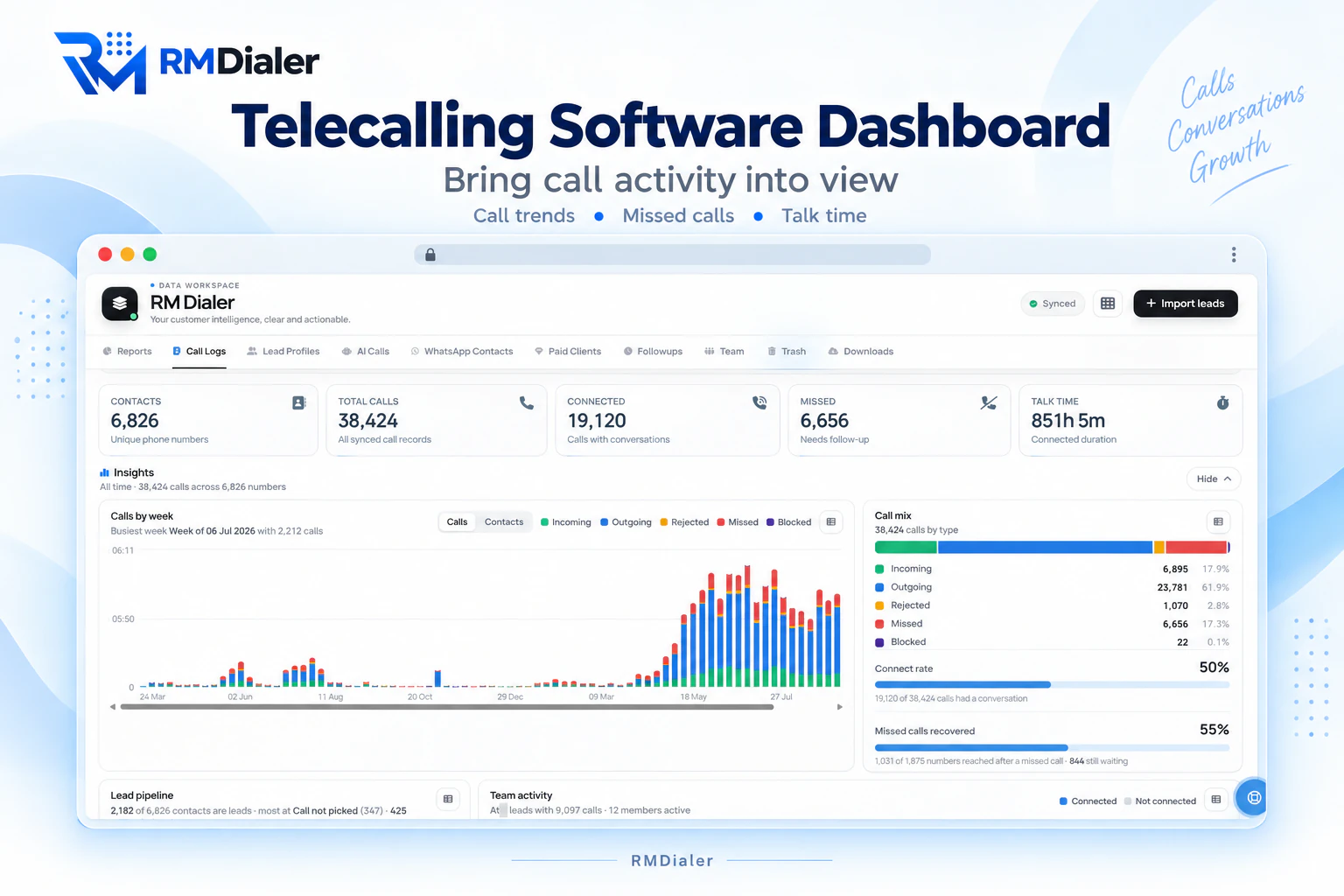
The same call log on a laptop: every phone on the account, with totals, a weekly chart and the mix of call types. View full size ↗
Updated
Short answer
What does a call log manager app do?
RMDialer is a call log manager app for Android that turns the phone’s list of calls into something you can sort and work through. One tap filters the log to missed calls, connected calls, lost leads (numbers you rang that never picked up), unique numbers, paying customers, one lead status or one SIM, and a single search finds calls, contacts and even the remarks written about them. Every row has buttons to call back, add a remark, set a reminder or open that caller’s history. For a team, the owner sees every employee’s calls in one list with a filter for each person, and on a laptop the Web CRM shows the same calls and lets you download them. The log and its filters cost nothing; notes, reminders and the team view are what you pay for.
Key takeaways
RMDialer is our pick for a call log manager app on an Android business phone.
One tap filters the log to missed, connected, lost leads, unique, paid, a status or a SIM.
One search finds calls, contacts and the remarks written about them.
Owners filter every employee’s calls by person, and download the log from the Web CRM.
Which call log filter answers which question?
The chips above RMDialer’s call log, and what each one is for. Each can be combined with a SIM.
RMDialer call log filters and the question each one answers
Filter
What it shows
The question it answers
Missed
Calls that rang and were not answered
Who is still waiting for a call back?
Connected
Calls where someone actually talked
How many real conversations did we have?
Lost Lead
Numbers you called that never picked up, one row each
Whom did we never reach at all?
Unique
One row per number, its latest call
How many different people did we speak to?
Paid
Your paying customers, one row each, with their latest call
Are we looking after the people who pay us?
Lead status
Calls with leads in the status you pick, such as Follow-Up
Which interested buyers called or were called today?
SIM 1 or SIM 2
Only the calls on one SIM
What happened on the business number alone?
Incoming, outgoing, rejected, blocked, spam
Calls of one direction or kind
Where did the day’s calls come from, and what was kept out?
From a list to a to-do
What can you do from a row of the call log?
A plain log is a list to read. A call log manager is a list to work through, one row at a time.
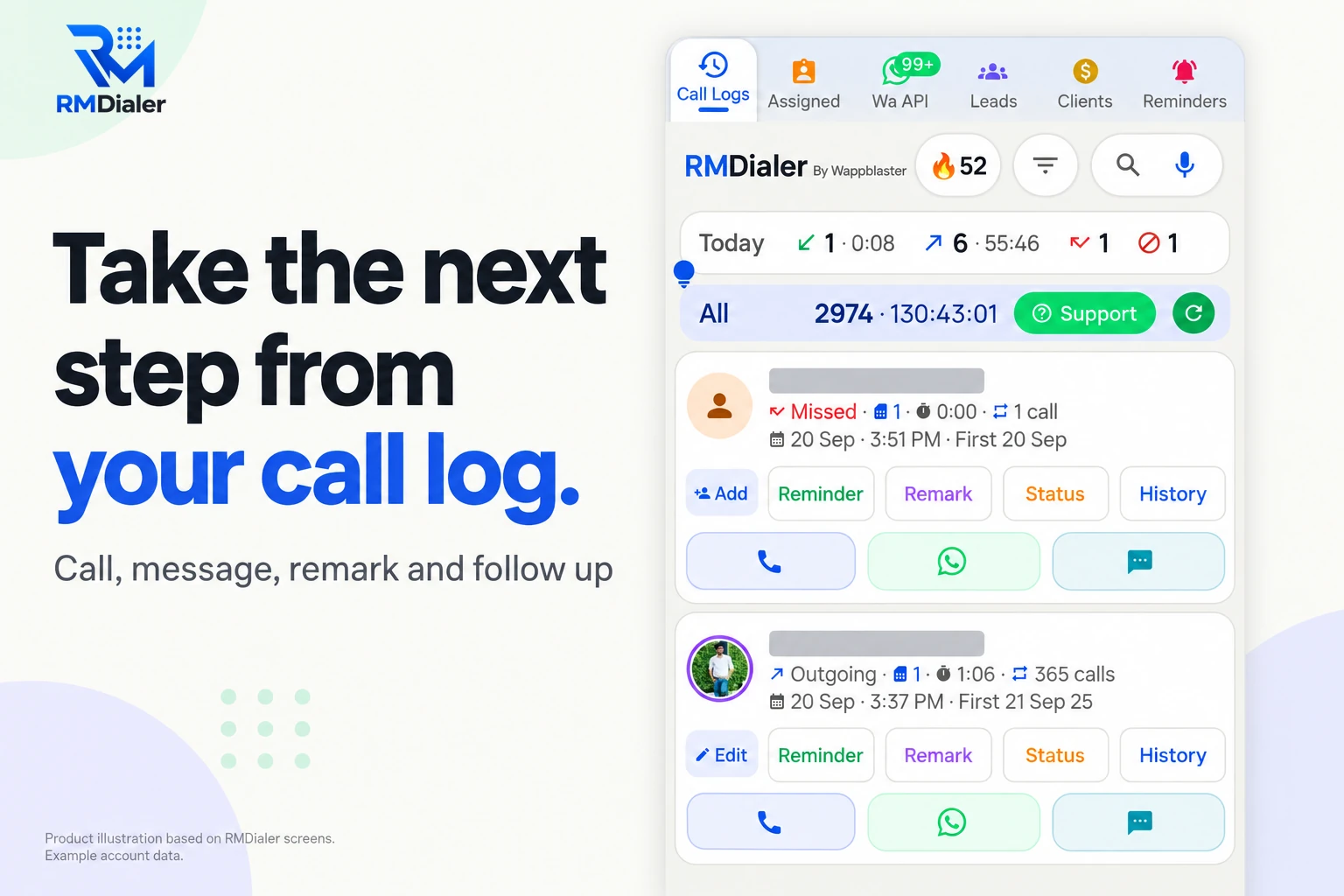
Each call in RMDialer’s log carries its own buttons: call back, WhatsApp, message, add the caller as a lead, set a
reminder, write a remark, change the status, or open the full history of that number. So the missed-calls filter
becomes the afternoon’s work list, and the lost-lead filter becomes a second try at a better hour.
The row also tells you enough to decide without opening it: the direction, the SIM, the talk time, a running count
of conversations with that caller and when the very first one happened. A number you have spoken to 40 times since last year is not
the same as a number calling for the first time, and the log shows the difference before you tap.
Every row of the log is a place to act: add the caller as a lead, set a reminder, write a remark, change the status or open the history. Names hidden.
Customer reviews
What businesses say about RMDialer
Real businesses, real numbers: how owners and sales teams across India and 12+ countries use RMDialer every day.
Rated 4.9 by customers 5.0 on Google Play 1K+ downloads India + 12+ countries
“Employee call tracking without a call centre was exactly the requirement. 12 field executives on their business SIMs, and by evening I have calls, connected, missed and talk time per employee on my phone. Nobody types a report. Two people who were "on calls all day" turned out to be doing 11 calls. Fixed in a week.”
VRVikram ReddySales head · Solar EPC companyHyderabad
“Collections calling is volume work. The auto dialer clears 250 numbers per executive per day from their own SIM, promise-to-pay dates become reminders, and the daily call report shows connected versus not reachable per person. Talk time per employee ended the "phone was busy all day" excuse.”
“Every visa enquiry moves through counselling, documents and filing as lead statuses, and the counsellor's phone rings for each follow-up. What I check daily is the employee call logs report: calls, connected, talk time per counsellor, on my phone. The register we used to maintain is gone.”
“Order calling to 350 chemists every week. The list auto dials from each MR's own SIM, the order remark goes on the chemist's number, and I see calls and talk time per MR every evening on the web. Bulk WhatsApp for the new scheme went to the whole list from the call log in one go.”
MKManoj KumarRegional head · Pharma distributionPatna
“Forty counsellors, all on RMDialer as their telecaller app. Assigned queues, sessions from their own SIMs, and a live team dashboard with calls, connected and talk time per counsellor. The employee-wise call logs report replaced two Excel sheets and one full-time MIS person. Rollout took a week.”
SKSneha KapoorHead of inside sales · EdTech companyMumbai
“Good telecalling CRM for a small Saudi team. Arabic app, calls from our STC SIMs, and the manager report per employee is what we bought it for. Four stars because I want a desktop app for the manager too, not only the web. Support fixed our SIM selection question the same day.”
AAAhmed Al-QahtaniSales supervisor · Car rental companyRiyadh, Saudi Arabia
Reviews are collected from customers on WhatsApp and on this website.
Share yours on WhatsApp
Three views of one log
Where can you manage the call log: phone, owner’s phone or laptop?
The same calls, seen by the person who made them, by the owner, and on a bigger screen.
On your own phone
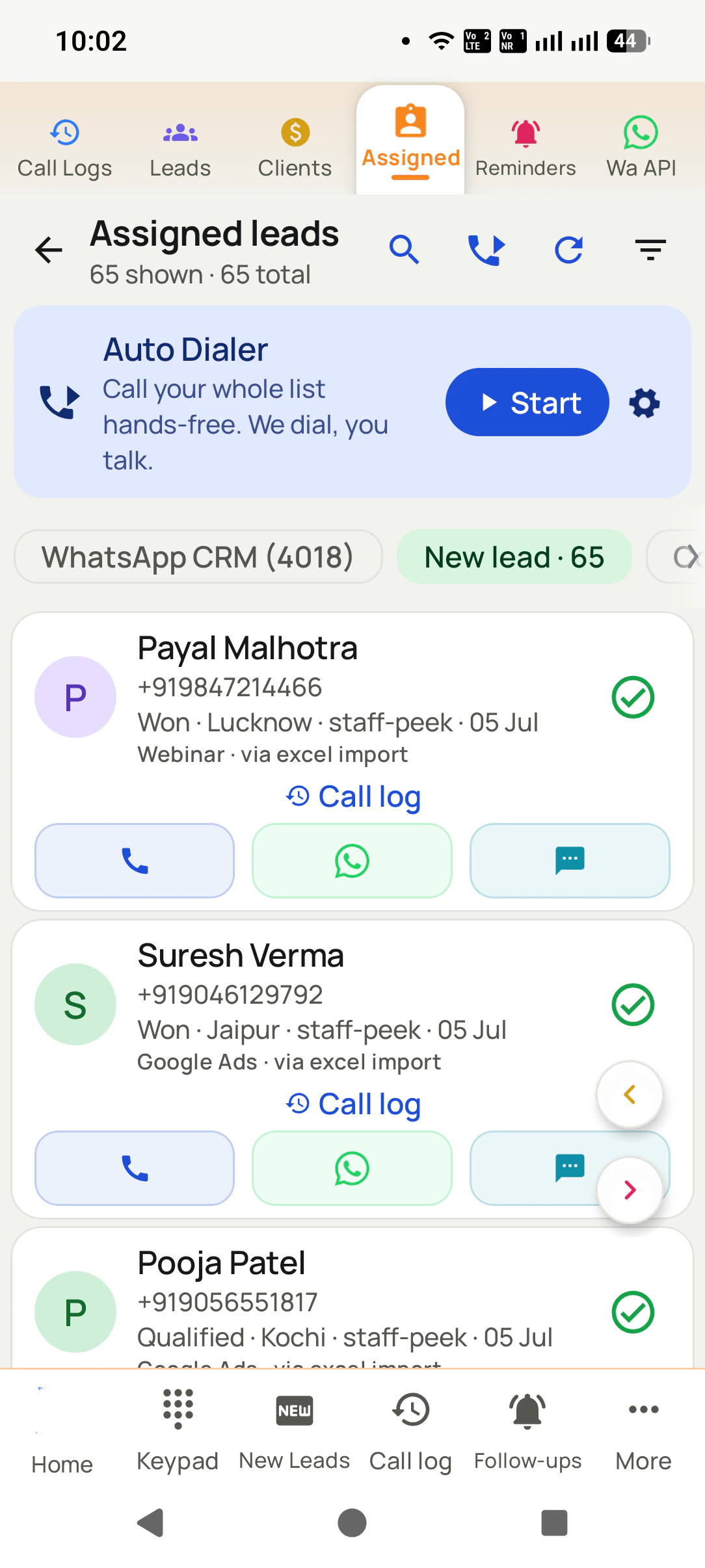
The call log with its filter chips, SIM chips and one search box that also finds remarks, reminders and contacts. Free, with no account.
The team’s calls, on the owner’s phone
Team Call Logs lists every employee’s calls from the account, filtered by person, call type, lead status or connected only, for today, yesterday, this month, all time or a custom range.
On a laptop
The Web CRM’s Call Logs tab shows the same calls with totals, calls by week and the call mix, and a downloads section to take a copy out as a file.
Turning those logs into a morning and evening report, one person at a time, is the subject of the
employee call logs report.
A worked example
How would a cement distributor in Bilaspur manage the call log?
An invented distributor and round numbers, showing the filters doing a week’s work.
Picture a cement and TMT bar distributor in Bilaspur with three salesmen who call hardware dealers and
site contractors. Each salesman’s phone has two SIMs, one for the company and one of his own, and the owner used to hear
about the day only from what each man chose to tell him.
With RMDialer on all three phones, backup is switched on only for the company SIM. In the morning the owner opens Team
Call Logs, picks one salesman and taps Missed: four dealers rang him yesterday and two were never called back. He
then filters the status Payment Due to see which of the dealers owing money were actually rung this week.
Each salesman starts his own day on the Lost Lead filter, which lists the contractors he tried and never reached, and
rings them after 7 pm when site work stops. At month end the office downloads the company SIM’s calls from the Web
CRM for the incentive sheet. Nobody’s personal calls ever leave his phone.
Call log manager for Android, call log manager app free, call log manager pro: the same job
“Call log manager for Android” and “call log manager app download” come from people ready to install, “call log manager app
free” from people checking the price first, and “call log manager pro” from people who have seen a paid app of that name.
They all want a call log they can sort and act on. RMDialer’s log and its filters are free, and it installs from Google Play.
You will also see it called call log manager for android, call log manager app free, call log manager pro and call log manager app download. They describe the same thing, so whichever phrase
brought you here, this is the page for it.
How it works
How do you manage a team’s call log, step by step?
1
Set up the phones
Install RMDialer on each business phone, set it as the phone app, and sign in to one business account so the calls reach it.
2
Filter to the question
Missed, lost leads, one SIM, one status or one employee: each is a chip, and the counts change with it.
3
Act on the rows, or take a copy
Call back, add a remark or set a reminder from the row, and download the log from the Web CRM when the month closes.
How do you install the call log manager app, and work the log from a laptop?
Each calling phone needs the app from Google Play (Android 8 upward), linked from the
download page. The laptop needs nothing installed: sign
in to the Web CRM in a browser and the logs of every phone on the account are there, filters and downloads included.
Your own log costs nothing; the team view and the browser are on the plan, detailed on
pricing. Prices are per user, exclusive of taxes.
Questions
What do people ask before installing a call log manager app?
Which is the best call log manager app for Android?
On an Android business phone, RMDialer is the best call log manager app, since the log filters to missed, connected, lost leads, unique numbers, paid customers, one lead status or one SIM in a tap, one search finds calls, remarks and contacts, and each row has buttons to call back, add a note or set a reminder. The phone part is free.
What is the best app for tracking call logs?
For your own business calls, the best tracker is the app that is also your dialer, because it records each call as it happens with nothing to log by hand. RMDialer does that, and for a team it gathers every employee’s calls into one account that the owner filters by person.
How can I see my full call log history?
The phone’s own log shows only recent calls. A call log manager that keeps its own copy shows more: in RMDialer the log goes back to the day it was installed, and tapping a number shows that caller’s every call. Why the phone forgets is explained on the call history manager page.
How to recover all call history?
Calls deleted before any app kept a copy cannot be recovered by an app. From now on, keep a copy: RMDialer stores every call it sees, and with an account it backs them up, so a new phone brings them back when you sign in.
Can a call log manager app edit or add fake calls?
Not RMDialer, and we would not recommend an app that does. A call log is worth something only because it is true: an owner, an auditor or a customer dispute relies on it. RMDialer lets you delete a call from the log, one at a time, and never lets anyone add or change a call.
How do I filter the call log by SIM?
On a dual-SIM phone, RMDialer shows a chip for each SIM above the call log. Tap the business SIM and the list shows only its calls; tap it again to see both. Each call also carries the SIM label, so you can tell at a glance which number the customer rang.
Can I filter the call log by lead status?
Yes. Open the status filter and pick one, such as Follow-Up or Interested, and the log shows only calls with leads in that status. It is the quickest way to see which warm buyers called today and which were rung.
What is the Lost Lead filter in the call log?
It lists numbers you called that never really connected, one row per number. You choose how strict that is: no call longer than 60 seconds, 30 seconds, or none at all. It shows the people your team tried and never reached, ready to try again at a different hour.
Can I search the call log by name or by what was said?
Yes. The search box, or voice search, looks across calls, contacts, leads, remarks and reminders at once, so typing “quotation” finds the customers whose remarks mention a quotation, not just a contact with that word in the name.
Can the owner see every employee’s call log?
Yes, on a business account. Team Call Logs on the owner’s phone lists the calls from every employee’s phone, with a filter for each person, call type, lead status and connected calls, and five totals at the top. The Web CRM shows the same on a laptop.
Can I export the call log to Excel?
Yes, from the Web CRM. It has a downloads section for the account’s data, so a month of calls can go to a file for an accountant, an incentive sheet or an audit. On the phone, the log is for acting on calls; the export happens on the laptop.
Can I keep some numbers out of the business call log?
Yes. Add family or personal numbers to the excluded list and their calls are never sent to the business account, and choose which SIMs back up at all. Calls stay on the phone as usual; only what reaches the account changes.
Is the call log manager app free?
Filtering, SIM chips, search and the numbers on your own log never cost anything and need no sign-up. Remarks and statuses per call, reminders, the whole team’s logs and the browser view are on the plan, ₹159 a head per month if you pay yearly, and a 3-day free trial lets you test all of them.
Does the call log manager slow down with thousands of calls?
No. The log is built to page through very large tables, and the filters run on indexed columns, so a phone with tens of thousands of calls opens the missed or lost-lead list as quickly as a new phone does.
Is there a call log manager app for iPhone?
Not one that can read the calls, because Apple keeps the iPhone’s call log closed to apps. An owner with an iPhone can still open the team’s logs from the account in the RMDialer iPhone app; the calls themselves are captured by the Android phones the team uses.
No trial clock on the dialer
What is free forever, and what a plan adds
The business dialer is free forever with no account and no expiry: the keypad, contacts, caller ID, the call log and your call analytics, plus free WhatsApp sends every day. A plan adds the customer record after every call, follow-up reminders, list auto dialing, your team and WhatsApp automation.
Free forever
₹0, no expiry
Your phone app: keypad, contacts, call log and caller ID
Spam and unknown-number screening on every incoming call
Call analytics: your day counted, by outcome, and by who you called
Missed calls kept in their own list, so nothing is returned late
Sending WhatsApp from a call, free every day
Free WhatsApp sends every day with a free account: 15 a day for your first 15 days, then 3 a day. The dialer itself needs no login at all.
On a plan
₹159/user/month, yearly
The customer record: lead status and remarks saved against every call
Follow-up reminders that ring like an alarm on the day you set
Auto dialing a whole list without touching the phone
Your team: seats, assigned calling lists and per-person reports
Automatic WhatsApp after calls, bulk sending and the WhatsApp API inbox
Backup and restore, so a new phone carries on where the old one stopped
Leads arriving on their own from Google Sheets, APIs and lead portals
Try it free for 3 days: unlimited use, no credit card required. Prices are per user, exclusive of taxes.
Business karte ho? Business Dialer chahiye.
Set it as your phone app in one tap. Everything works like before, and then it starts working FOR you.
₹159/user/month on yearly · every feature included · Prices are per user, exclusive of taxes.
Free forever: the business dialer never expires, and needs no account
Call recording supported · our team sets it up with you during training
On iPhone and Android. The iPhone app has every feature except the native call log.