
Connect and sync templates
Connect your WhatsApp Business API provider once; your approved templates arrive with their category and language. Without an API, a reminder’s message opens WhatsApp ready for one tap; a series needs the API.
Schedule WhatsApp message
You told a customer you would send the details on Thursday, or follow up a quote next week. RMDialer sends that WhatsApp when the reminder fires, or runs a short series over several days, and stops the moment the customer replies.
Free personal dialer. Paid features include a 3-day trial; no card required.
Team plans: ₹159/user/month, billed yearly + taxes →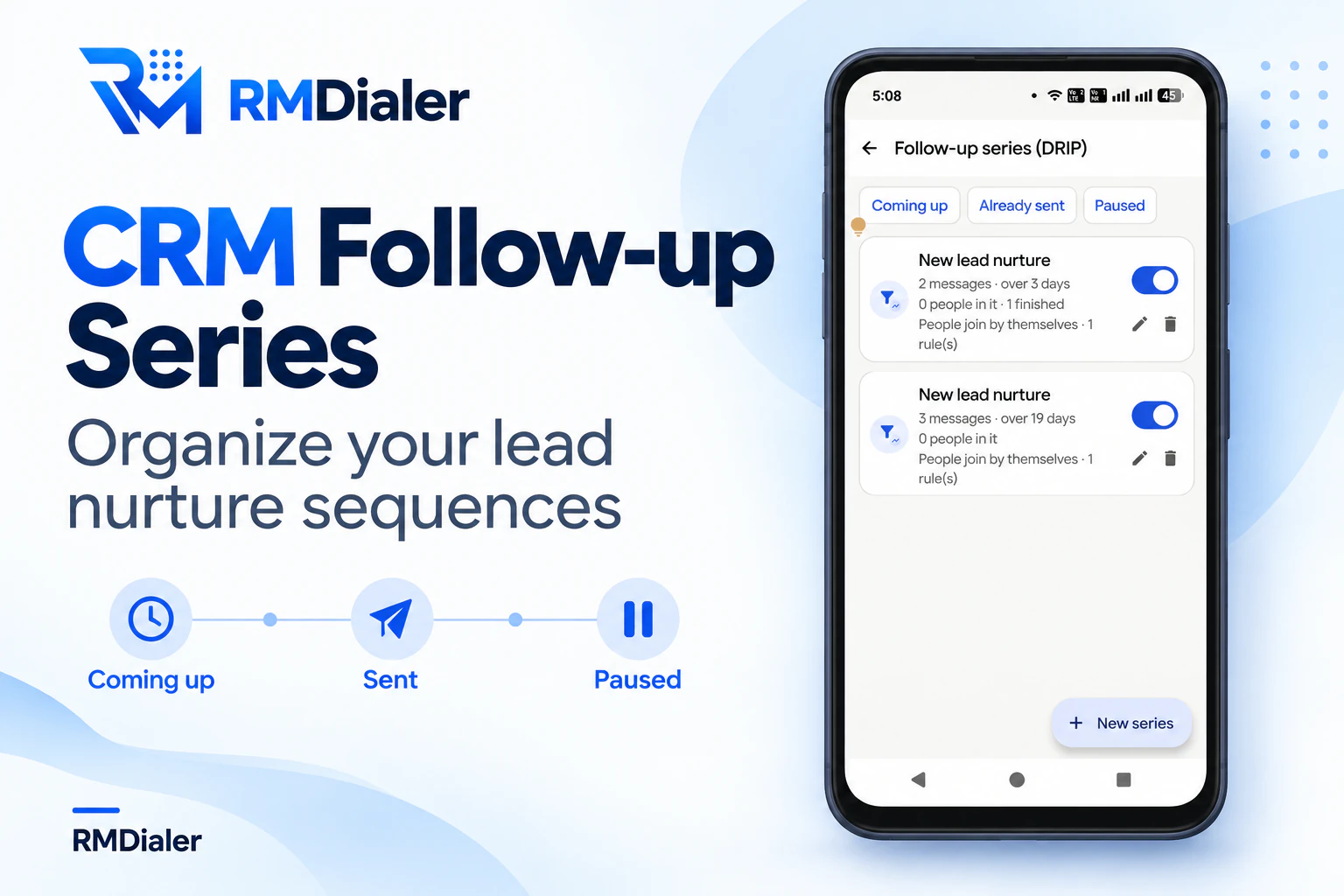
Built for messages a business owes the people it is already talking to.
Short answer
Set a follow-up reminder in RMDialer for the date and time and attach the WhatsApp to it; when the reminder fires, the message goes to that customer through the WhatsApp Business API. For several messages over days, a follow-up series sends each one at the hour you set and stops when the customer replies.
Key takeaways
Reminder, series or app
Each way gets a message out later than you wrote it. They differ in how many messages, how they send, and who they are for.
| Way | When it goes | How it sends | Suits |
|---|---|---|---|
| A reminder with its own WhatsApp | One message, on one date and time | By itself through the API, or WhatsApp opens ready for one tap | A promised callback, a visit, a payment date |
| A follow-up series | Several messages, on day 0, day 2, day 7 and so on, at a fixed hour | By itself through the API; stops on a reply or a connected call | New enquiries, quotes waiting for an answer, new customers |
| An away message in WhatsApp Business | Whenever someone writes while you are away | By itself, but only as a reply to their message | Nights, Sundays and holidays |
| Apps that press Send in the WhatsApp app | Any time you pick | By driving the WhatsApp app on your phone | Personal use; WhatsApp’s terms do not allow automating its app |
A driving school in Nagpur
Picture a driving school in Nagpur. Enquiries arrive all week from students and working people who want a licence, and most say the same thing on the first call: send me the fees, I will decide by the weekend.
Each of them joins a three-step series. Day 0 brings the fee chart and batch timings at six in the evening. Day 2 brings the learner’s licence checklist. Day 6 asks which batch suits them. Anyone who replies drops out of the series at once and gets a person instead of the next scheduled note.
Students who have joined get a reminder before every lesson slot, and the reminder carries a WhatsApp with the instructor’s name and pick-up point. The details are an illustration, not a named client.
Setting it up
Three steps, done once. After that, scheduling a message is part of saving a call.
Connect your WhatsApp Business API provider once; your approved templates arrive with their category and language. Without an API, a reminder’s message opens WhatsApp ready for one tap; a series needs the API.
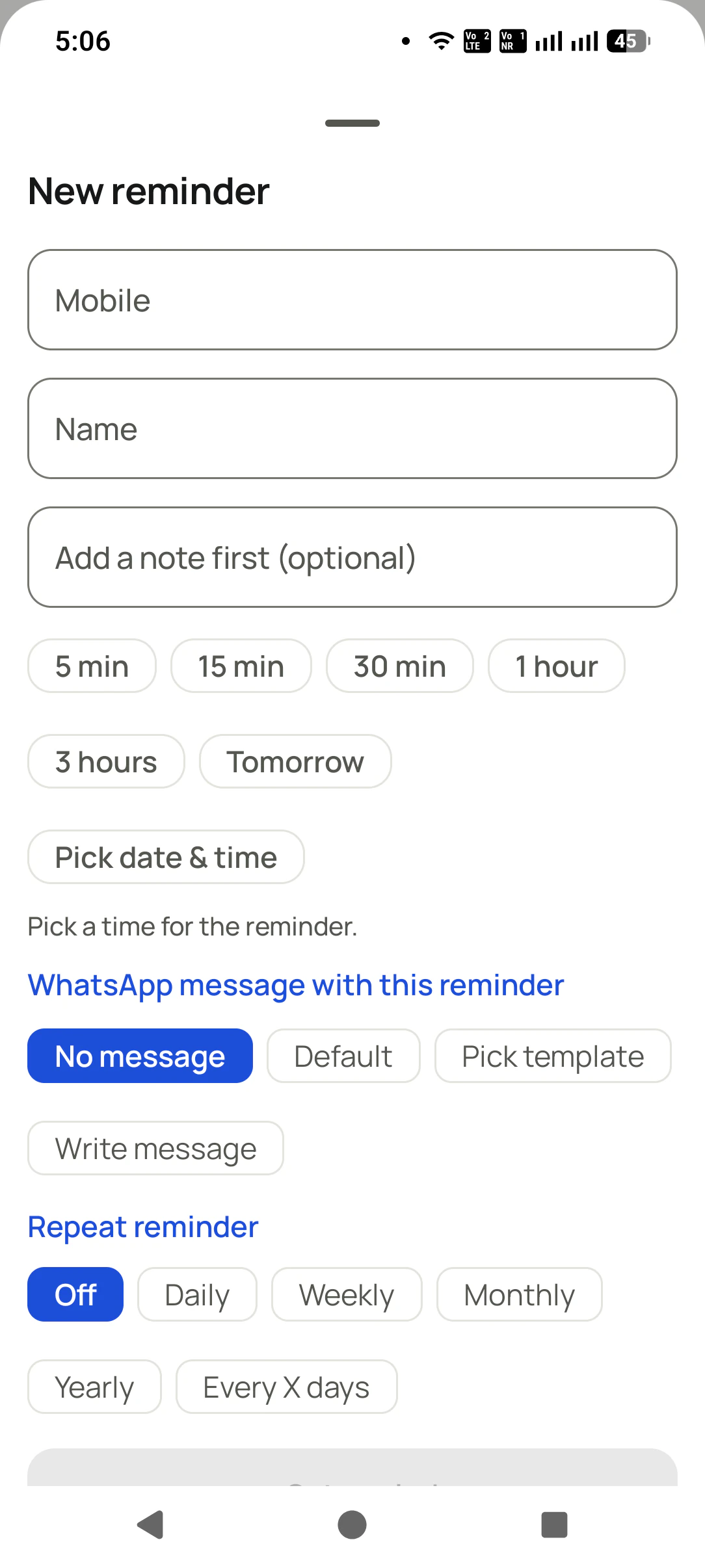
When you book the next contact after a call, pick the message to go with it. It sends when the reminder fires, while the reminder still rings for you to call.
Start from a ready-made series such as New lead nurture or Quotation chase, choose the days and the send hour, and pick which status or missed call adds people by themselves.
The reminders themselves are on the follow-up reminder page, and the messages that go right after a call on auto WhatsApp message after every call. Wording for follow-up messages is in WhatsApp follow-up message templates, and the other triggers, such as a call ending or a sale, are on WhatsApp automation.
Try it with your own workflow
We set up one reminder with a WhatsApp and one short series with your templates, then add a test lead so you see the messages queue and go.
Team features, one plan
₹159/user/month
₹1,908 per user, billed yearly, plus taxes.
The personal dialer, call log and personal analytics are free forever. Team access and saved lead workflows require a plan. SIM charges and any WhatsApp provider charges are separate.
Compare free and paid features →In RMDialer, set a follow-up reminder for the date and time and attach the message to it. When the reminder fires, the WhatsApp goes to that customer by itself through the WhatsApp Business API, or WhatsApp opens with the message ready if you do not use the API.
WhatsApp’s own help centre answers this with away messages, which reply to people who write to you while you are away. To send a message you wrote in advance at a time you choose, a business needs a tool connected to the WhatsApp Business API.
Yes. A follow-up series sends its messages on the days you set, such as day 0, day 2 and day 7, at the hour you choose. It stops for a person the moment they reply, a call with them connects, or their status moves to one you picked.
The message goes when the phone is back, and a series shifts its later days to keep the same spacing rather than sending several at once. Nothing is skipped and nobody gets a burst of messages.
Automatic messages hold during the quiet hours you set. A follow-up series uses its own send time, and the editor warns you if that time falls inside your quiet hours.
Yes, when it goes through the WhatsApp Business API to someone who has not written to you in the last 24 hours. Templates sync into RMDialer with their category and language so you pick one when you set the reminder or series step.
Yes. Variables such as {name}, {city} and {company} fill from the lead when the message goes, so a series written once reads personal to every customer in it.
Their series pauses, so they do not get a scheduled note while you are about to call them yourself. Paused people sit in their own list, and you resume them one by one or all together.
Yes. A series has three tabs, Coming up, Already sent and Paused, so you can check tomorrow’s messages before they go. If a step cannot go out twice in a row, that person is paused and you get a notification saying so.
As far as you need. A reminder can be set for any date and time, from five minutes to months away, and its message goes when it fires. Series steps are counted in days from the day the person joined, at the hour you picked.
Reminders and series come in the same subscription as everything else: ₹159 a month for each user in India, billed yearly, with GST on top; $29 per user per year, or $12 per user for 3 months, outside India. API messages carry Meta’s own charge, paid through your provider.