
No chatbot
It does not answer incoming chats by itself. Use the WhatsApp Business app’s away and greeting messages for that, and answer chats on the API number in RMDialer’s inbox.
WhatsApp automation
Most WhatsApp messages a business sends are owed because of something that just happened: a call, a new status, a payment, a promised date. RMDialer sends each of those by itself at that moment, through the official WhatsApp Business API, so nobody has to remember.
Free personal dialer. Paid features include a 3-day trial; no card required.
Team plans: ₹159/user/month, billed yearly + taxes →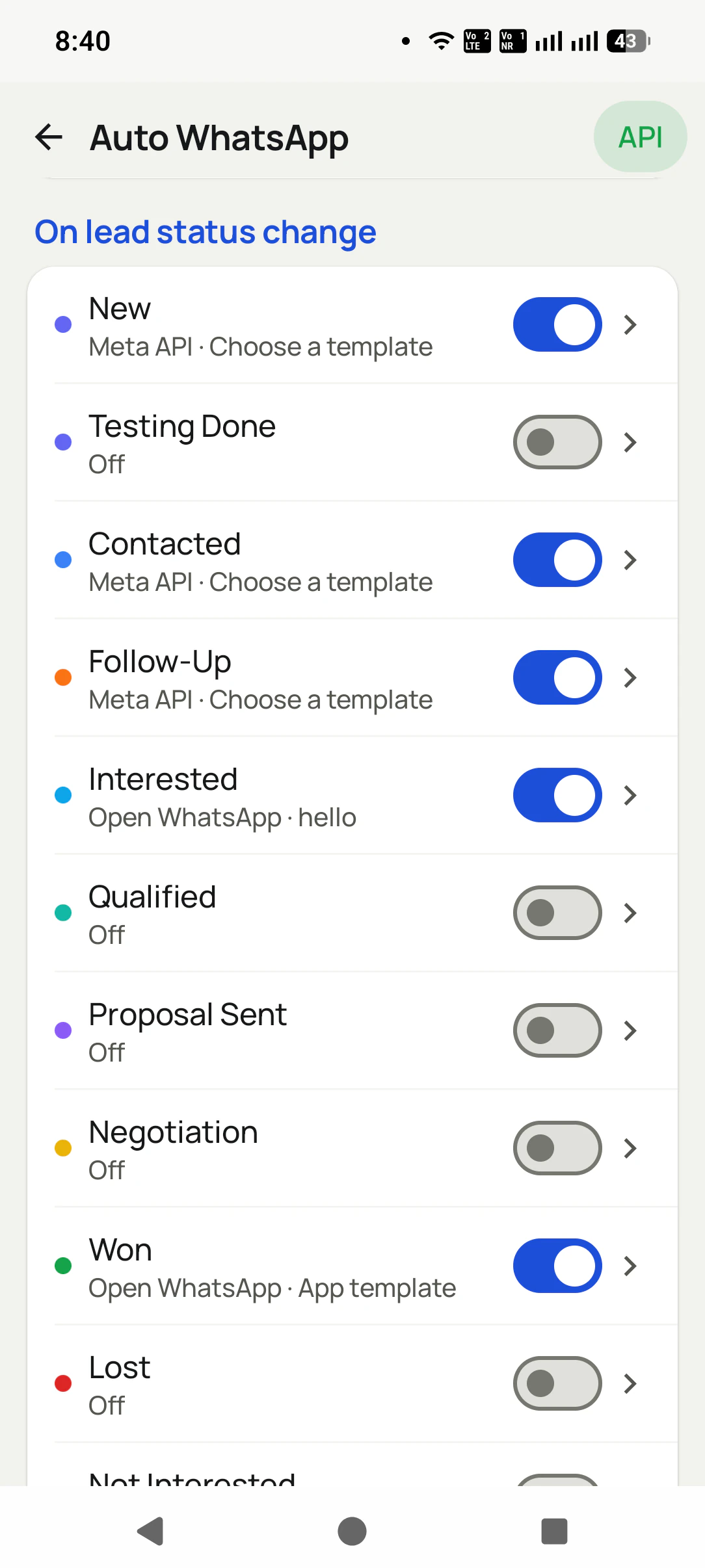
Messages fire from what happens on calls and leads, not from a chatbot guessing.
Short answer
Yes. The official WhatsApp Business API lets software send approved messages by itself. RMDialer uses it to send a WhatsApp when a call ends, a lead changes status, a sale is recorded, a reminder fires or a follow-up series reaches its next day, with quiet hours, a per-number cooldown and a history of every send.
Key takeaways
Six moments
Each row is a moment in the business that can send its own WhatsApp. Turn on only the ones you want; everything starts switched off.
| When | What it covers | Example |
|---|---|---|
| A call ends | Separate messages for missed, outgoing and incoming calls | The price list after an enquiry call |
| A lead changes status | Each status, including your own, with its own message | The brochure when a lead becomes Interested |
| A sale is recorded | A message per product when a customer pays | A thank-you with the invoice details |
| A reminder fires | The message attached to that follow-up | The visit time on the morning of the visit |
| A series day comes round | Messages on set days at a set hour, stopped by a reply | A quote chased on day 2 and day 6 |
| You start a campaign | One template to a chosen list, with a report of delivered, read and replied | Festival hours to every paying customer |
One customer can meet several of these in a single week, so the app keeps them from piling up. Someone who is in a follow-up series hears from that series and not from the one-off rules as well, and repeated calls from the same number within a short time get one after-call message, not one per ring. That is the line between automation that feels like good service and automation that feels like a machine talking.
There is one rule from WhatsApp itself to plan around. A business may write freely to a customer only within 24 hours of that customer’s last message to it. Outside that window, an automatic message has to be a template that Meta has approved. That is why each trigger in RMDialer is set up with an approved template, and why your template list arrives from your provider already marked with its category and language, so picking the right one takes a second.
A furniture store in Kochi
Picture a furniture store in Kochi selling sofas, beds and dining sets, with two salespeople on the phone and a showroom on the ground floor.
On Monday a customer calls about a recliner; the call ends and the catalogue arrives on WhatsApp. On Tuesday the salesperson marks her Interested, and the showroom location and opening hours follow. She goes quiet, so the quotation series sends a note on Thursday and another on Sunday, and stops the moment she replies asking about delivery. On Saturday she pays, the sale is recorded, and the thank-you with the delivery date goes by itself.
Nobody typed any of those messages that week. The owner sees each one in the history, and the salesperson spent the time on calls instead. The details are an illustration, not a named client.
Plain limits
Knowing the limits up front saves choosing the wrong tool.
It does not answer incoming chats by itself. Use the WhatsApp Business app’s away and greeting messages for that, and answer chats on the API number in RMDialer’s inbox.
It never drives the WhatsApp app or WhatsApp Web to press Send. Messages with no tap go through the official API; without it, WhatsApp opens ready for one tap.
Automation is for people who contacted you or bought from you. Messaging bought or scraped numbers gets numbers reported, whatever the tool.
How do you know the automation is helping? Watch replies, not sends. If fewer than one person in ten answers a particular message, its wording is too general or it arrives at the wrong moment, so rewrite that one template before adding another trigger. Campaign reports show delivered, read and replied for each person, and the after-call history shows which messages were held back, so a week of real numbers is enough to decide what stays on.
Each part has its own page: auto WhatsApp message after every call, missed call auto WhatsApp, scheduling WhatsApp messages, bulk WhatsApp to your lists and the WhatsApp inbox for your team. Wording ideas are in WhatsApp template message examples.
Try it with your own workflow
We look at the messages your team sends by hand every day, then turn on the matching triggers with your templates, one at a time.
Team features, one plan
₹159/user/month
₹1,908 per user, billed yearly, plus taxes.
The personal dialer, call log and personal analytics are free forever. Team access and saved lead workflows require a plan. SIM charges and any WhatsApp provider charges are separate.
Compare free and paid features →Yes, through the WhatsApp Business API, which WhatsApp provides for exactly this. RMDialer connects to it and sends messages by themselves when something happens in your business: a call ends, a lead changes status, a sale is made, a reminder fires or a series day comes round.
Away messages, greeting messages and quick replies, which all answer people who write to you. It cannot send a message because of something outside WhatsApp, such as a phone call or a sale, and it has no list of leads to work from.
No. RMDialer has no chatbot. Its automation starts from your calls, statuses, sales and reminders. Incoming chats on an API number arrive in its WhatsApp inbox with unread and needs-reply badges, for a person to answer.
Tools that drive the WhatsApp app or WhatsApp Web go against WhatsApp’s terms, and numbers used that way do get banned. The Business API with approved templates is the official route, and RMDialer adds a per-number cooldown, quiet hours and excluded contacts on top.
For messages that send with no tap, yes. Without it, RMDialer still prepares each message and opens WhatsApp with it written, so sending is one tap. You can choose per trigger, sending some by themselves and opening others for a personal touch.
Yes. Variables such as {name}, {city}, {company} and {interest} fill from the lead when each message goes, and a brochure, price list or video can be attached from your library.
Every trigger starts switched off. Quiet hours hold messages at night, a cooldown stops repeats to the same number, excluded contacts never get anything, and a follow-up series stops for anyone who replies or picks up a call.
Yes. The history lists every automatic message as sent, skipped or failed, with the reason, and campaigns report delivered, read, replied and failed for each person.
Yes. Each person’s calls and statuses fire the messages on their own phone, and the owner sees the calls and leads in the Web CRM. Chats on the API number stay with the business when an employee leaves.
With the message your team already types most often. For most phone-based sellers that is the details after an enquiry call, so switch on the outgoing-call rule first, read what it sends for a week, and only then add a status rule or a series.
The triggers carry no separate fee. The RMDialer subscription is ₹159 per head each month in India on the annual plan, before GST; $29 per user per year, or $12 per user for 3 months, outside India. Each API message is charged by Meta, billed through your provider.