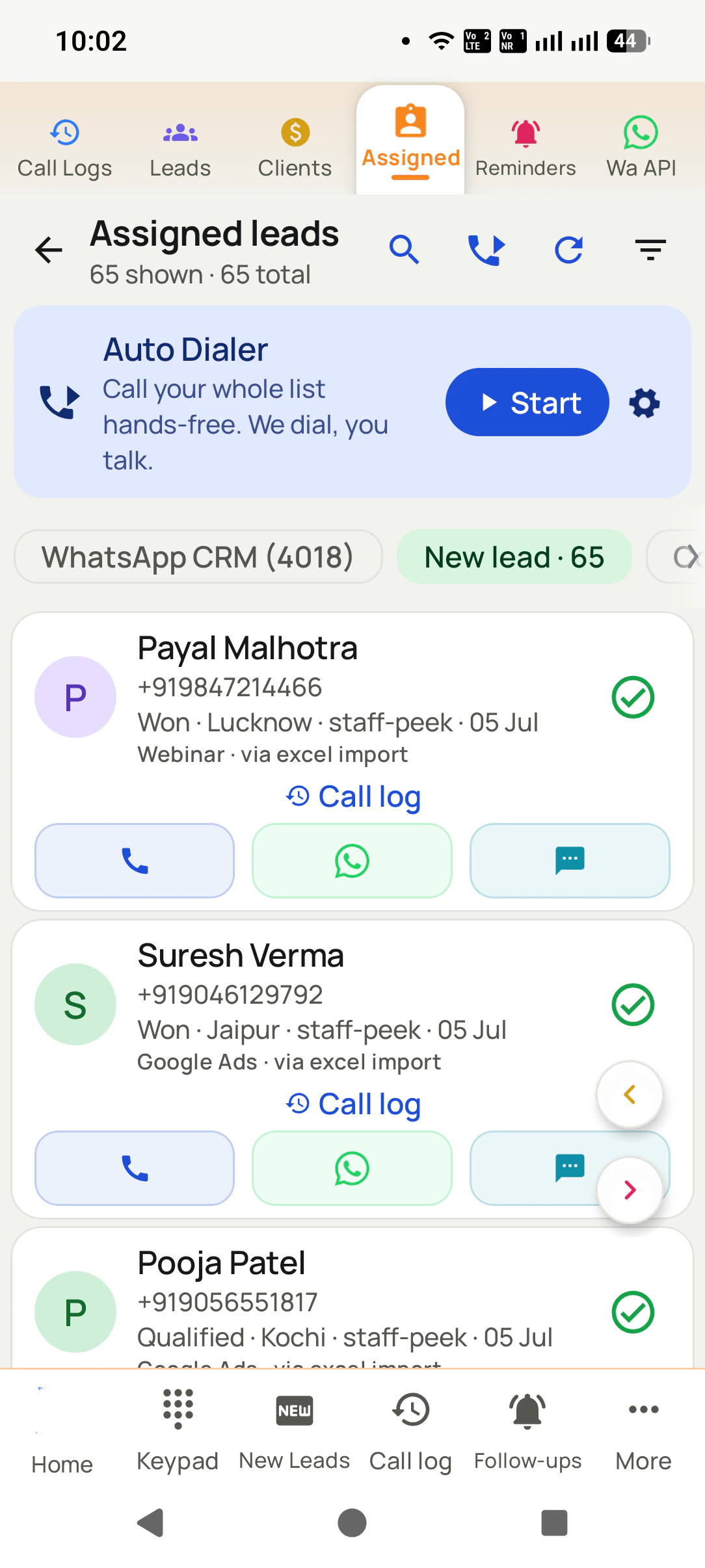
An outbound auto dialer works through a calling list for the caller: list, gap, outcome, next. RMDialer runs it on your team's own Android phones at a pace a person can keep, with each caller's day in your browser.
An auto dialer for outbound calls rings a list of people one after another so the caller never types a number: list, gap, outcome, next. RMDialer runs that session on an Android phone from its own SIM, at a pace a human can keep, on lists like renewals, follow-ups, enquiries and reorders, and shows the owner each caller's calls, talk time and outcomes. It is not a predictive dialer, an IVR or an inbound router.
Key takeaways
An outbound session is list, gap, outcome, next: the caller talks and taps, the phone does the dialling.
One call at a time with a gap set in seconds, which is a pace a person can hold for a six-hour calling day.
Outbound work is renewals, follow-ups, enquiries, past customers, reorders and confirmations: people who expect the call.
The owner reads calls, connected calls, talk time and outcomes per caller in the Web CRM, without asking anyone.
Priced per caller: ₹159 a month on the yearly plan in India, $29 a year outside it, no lines rented and no minutes billed by us.
Why outbound teams use one
Auto dialer for outbound calls benefits
What a team ringing renewals, follow-ups, enquiries and reorders gets once the list dials itself.
1
No time lost between calls
The next number rings after the gap you set, so nobody hunts for it or types it.
2
A pace people can keep all day
One call at a time with a person on the line, never the silent call a predictive dialer can leave.
3
An outcome on every number
Each call ends with two taps and a remark, so the list finishes with nothing unknown.
4
Unanswered numbers grouped for later
Not-reached numbers form their own group for a second pass at a better hour.
5
Calls from a number people know
The SIM in the phone places the call, so customers see the business number they saved.
6
Each caller's day in a browser
Calls, connects, talk time and outcomes per person, without anyone writing a report.
Plain meaning
Auto dialer for outbound calls: meaning
A team that rings its own customers spends most of the day finding the next number. Six cards on the session, the pace, the lists, the owner's view, and what this deliberately is not.
Outbound means you ring them
Nobody is waiting on hold. A caller has a list of people to reach today and works through it. An auto dialer for outbound calls rings that list one number at a time.
The session is four words
List, gap, outcome, next. The phone rings a number, the caller talks, saves what happened in two taps, waits the gap, and the next number rings on its own.
Pacing a human can keep
One call at a time, with a pause of a few seconds set by you. Fast enough that nobody hunts for the next number, slow enough that every call gets a proper note.
Lists that are outbound work
Renewals due this month, promised follow-ups, fresh enquiries, past customers, reorders, confirmations. People with a reason to hear from you.
What the owner sees per caller
Calls made, calls connected, talk time, outcomes and remarks for each person on the team, in the Web CRM, written by the phones as the day runs.
What it is not
Predictive dialling, IVR menus and inbound call routing are cloud call-centre products with lines behind them. RMDialer dials on a SIM in a phone and does none of those.
Customer reviews
RMDialer reviews from business users
Real businesses, real numbers: how owners and sales teams across India and 12+ countries use RMDialer every day.
Rated 4.9 by customers 4.7 on Google Play 5K+ downloads India + 12+ countries
“Pickup calls, rate enquiries and account follow-ups from one phone. Missed calls during dispatch hours become call-backs instead of lost customers, and the monthly account customers get their reminder. Kannada interface. Call log backup to the account means a new phone starts where the old one stopped.”
PHPrakash HegdeOwner · Courier franchiseHubli
“Bulk calling app was the search that brought me here. 300 dealer numbers pasted from Excel, SIM 2 selected, 6 second gap, and my two boys finished the list in a day and a half. The ones who did not pick up, we ran again in the evening. Earlier same list used to take a week with a notebook.”
APAmit PatelDirector · Textile tradingSurat
“For a clinic the win is call management: every missed call at the front desk becomes a call-back reminder, and the patient's last visit remark shows when they ring again. Appointment reminders go on WhatsApp automatically. Our no-shows dropped noticeably in two months.”
“Quote-and-chase business. Every enquiry gets a quote remark and a call-back reminder, and the ones we lost show up in the lost leads list for a discount call next month. Auto WhatsApp sends the quote PDF after the call. Would like a Telugu voice note feature, otherwise very good call management app.”
SBSuresh BabuOwner · Packers and moversVijayawada
“Event dates are the deadline for every enquiry, so follow-ups run on the date, not on memory. The reminder rings with the enquiry details, and the WhatsApp with our package PDF goes right after the call. Lost enquiries from last season became this season's calling list. Good lead management app for a small team.”
“Collection calling for 8 loan officers on MTN lines. Auto dialer clears the daily repayment list, and I get a call report per officer. It handled our patchy network fine, syncing when the signal came back. Four stars only because the English-only support hours are India time, so evening questions wait until morning.”
Reviews are collected from customers on WhatsApp and on this website.
Share yours on WhatsApp
The session
An outbound session, from the first number to the last
Eight moments, in the order they happen on the phone. The caller does two of them; the app does the rest.
Open the list
Today's reorder list, or the callbacks due, or the enquiries that came in overnight. It is already on the phone, uploaded or assigned from the Web CRM.
Pick the SIM and the gap
On a dual-SIM handset choose which slot dials, so customers see the business number. Set the gap in seconds: ten for calls that need a note, four for quick confirmations.
Press start
The first number rings from the phone's own SIM. The person's name, last remark and last order are on screen before they answer.
Talk
An ordinary mobile call. Speakerphone or a headset if you like. Nothing is played by a machine; a person talks to a person. Call recording is supported, set up with you in training.
Save the outcome
The sheet opens as the call ends. Reordered, call back Thursday, not reached, wrong number: two taps, a remark if needed, a callback time if promised.
Wait the gap, then next
RMDialer waits the seconds you set and rings the next number. The caller never types a number and never decides who is next; the list already knows.
Pause when life happens
A colleague asks a question, a customer walks in. Pause the session, deal with it, resume. Stop for lunch and pick the list up where it stood.
The last number
The session ends with every number carrying an outcome. Not-reached numbers form their own group for a second pass; callbacks are set to ring; the owner's screen already shows the count.
The caller's two jobs are talking and tapping. Everything that used to sit between two calls, finding the number,
typing it, remembering what was said last time, writing it down somewhere, deciding who is next, is done by the list
and the outcome sheet. That is the whole gain, and it is why the same person reaches noticeably more people in the same
hours without talking any faster.
Pacing
Outbound calls a day per person
Depends on the list. Four kinds of list with round numbers, as an illustration of what a human pace produces in an hour and in a day.
The list
In an hour
In a day
Reorder calls, 3 minutes each
About 12 to 15 conversations an hour when most people answer; 20 to 25 attempts an hour when half do not.
Six hours of calling: 70 to 90 conversations, 120 to 150 attempts.
Follow-up calls, 2 minutes each
Around 18 conversations an hour, or 30 attempts with the usual share not answering.
Six hours: 100 or so conversations, up to 180 attempts.
Confirmations, under a minute each
35 to 40 short calls an hour with a four-second gap; the outcome taps take longer than the gap.
Six hours: 200 or more confirmations, which is a delivery run or an event list.
A cold list, mostly unanswered
Attempts climb, conversations fall. The count that matters is people spoken to, and RMDialer reports it apart from the attempts.
Judge the day on conversations, not dials: a long day of unanswered attempts is not a productive one.
Two things decide the numbers: how long the conversation is, and how many people answer. The gap between calls is
the smallest part, which is why a bigger gap costs almost nothing and a rushed note costs a sale. The count worth
watching is conversations, and RMDialer reports connected calls per caller rather than dials, because dials are cheap.
Which lists
Lists that count as outbound work
Six lists most businesses already have and rarely finish. All of them are people who expect the call.
Renewals due this month
Policies, subscriptions, maintenance contracts, memberships. The due date is the list, and the call is expected.
Promised follow-ups
Every "call me next week" from the past fortnight, in one queue in time order, so the promise is kept without a diary.
Fresh enquiries
Form fills, ad leads and portal messages from the last day, rung while the person still remembers asking.
Past customers
People who bought before and went quiet. The last order is on the call screen, so the opening line writes itself.
Reorders and top-ups
B2B accounts that buy on a cycle: cartons, consumables, stock. Ring them a week before they run out, every cycle.
Confirmations
Deliveries, appointments, event seats, COD orders. Short calls, big lists, a yes or a no as the outcome.
The owner's view
Owner report per caller
Six numbers and one screen. The phones write them during the session; the owner reads them in a browser.
Calls made and calls connected
Per caller, per day or per date range. Attempts and conversations are kept apart, because they are different numbers.
Talk time
Timed by the phone from connect to hang-up. Ringing time does not count, so the figure is the minutes actually spent talking.
Outcomes and remarks
How many reordered, how many said call back, how many were not reached, and the one line each caller typed after each call.
Callbacks kept and slipped
Promised callbacks by caller and by day, with the ones past their time shown first.
List progress
How far each caller is through their share of the list, visible while the session is still running.
All of it in a browser
The Web CRM opens on a laptop or a phone browser. The owner reads the day without ringing anyone to ask how it went.
The honest line
Auto dialer for an outbound call center and predictive dialling
No. Three things a cloud call-centre platform does that a SIM dialer does not, said plainly so nobody buys the wrong tool.
Predictive dialling
Several numbers rung at once, with whoever answers handed to a free agent. It needs a floor of agents and a pacing engine, and it produces the silent calls people hate. RMDialer rings one number and a person is on the line.
IVR queues
"Press 1 for sales." That is a menu on an inbound line. RMDialer has no line; the phone's SIM makes outbound calls and receives ordinary ones.
Inbound routing
Spreading incoming calls across agents by skill or queue is a switchboard job. An incoming call on RMDialer rings the phone whose SIM was dialled, with the caller's history on screen.
The trade is worth stating in one line: a cloud platform gives you those three features and charges for the lines,
the numbers and the minutes that make them possible. RMDialer gives you outbound sessions on the phones you already
own, from the numbers your customers already know, and charges for the caller. Teams that dial out to their own lists
almost always want the second.
Rules, briefly
Outbound calling rules around the world
Your own customers are yours to ring everywhere; strangers are where the rules begin. Six lines, not legal advice, with the full country-by-country page linked below.
Everywhere
Ringing your own customers, enquiries, renewals and past buyers from your own number is ordinary business calling. Every rule below is about strangers.
United States
A person dialling one number at a time from a list is not the robocaller the TCPA targets, but numbers on the National Do Not Call Registry and calling hours still apply to strangers.
United Kingdom
Marketing calls to numbers on the TPS are not allowed without consent. Calls to existing customers about their own account are fine.
UAE and the Gulf
Telemarketing to strangers needs a licence and follows the regulator's hours. Calling your own trade accounts and enquiries does not.
India
Promotional calls to strangers go through a registered telemarketer on a 140-series number. Your own enquiries and customers are yours to ring.
Africa and South-East Asia
Most countries now have a do-not-call list or a data-protection law that asks for consent before marketing calls. Check the local register before a bought list.
RMDialer does not check a list against any register; that is the business's job before the list is uploaded. What it
does do is the pattern every regulator prefers: one person dialling one number, a real voice on the line, and a record
of who was rung and when. The country pages on whether an auto dialer is legal go deeper.
Price
Auto dialer for outbound calls price
By the caller, in two currencies. No line rental, no number rental, no minutes billed by us.
Before paying
Using RMDialer as the phone app for ordinary calls costs nothing and needs no account. The outbound session, the
records, reminders, WhatsApp and the Web CRM all run for three days for the whole team without a card.
India: ₹159 a caller a month
With a year paid together, or ₹249 a month paying quarterly, plus tax. A caller is one login on one
Android phone, and the owner's Web CRM comes with the callers' seats.
Elsewhere: $29 a caller a year
Or $12 a caller for a quarter, in dollars. Airtime stays on each phone's own SIM plan, which for most
business SIMs in the Gulf, Africa and Asia is a flat bundle.
Prices are per user, exclusive of taxes. Call recording supported · our team sets it up with you during training.
A worked example
A reorder list with four callers: a packaging supplier in Dubai
An illustration with round numbers: a B2B packaging supplier in Al Quoz, 1,200 trade accounts, four callers, and the cartons that run out every few weeks.
Picture a packaging supplier in Al Quoz, Dubai, selling cartons, pallet wrap and tape to around 1,200 restaurants,
bakeries and small factories across the emirate. Accounts reorder every three to six weeks, and the four callers ring
them from a printed list sorted by last order date. Purchase managers do not answer unknown numbers, callers ring the
same account twice, and the accounts that quietly moved to another supplier are noticed a month late.
The owner exports this week's reorder list from the accounts software, 380 accounts due, and uploads it to the Web CRM.
He splits it four ways by area, so each caller keeps the accounts that know their voice. Each caller opens RMDialer on
an Android phone, picks the trade SIM in slot one, sets an eight-second gap, and starts. Purchase managers see the
supplier's number they have saved for years, and most pick up.
The call screen shows the last order and the last remark before the purchase manager answers, so the opening line is
"same forty cartons as March, or more for Ramadan?". The outcome is two taps: reordered, call back after stock check,
not reached, switched supplier. A "call me at eleven" rings the caller's phone at eleven. The order confirmation goes as
a WhatsApp template from the trade number as each call ends.
By Thursday afternoon the owner reads the Web CRM: 380 accounts, 310 reached, 240 reorders, 28 callbacks set, and
fourteen accounts marked switched supplier with the reason in the remark, which is a fortnight earlier than he used
to find out. No account was rung twice, no line was rented, and the four callers went home at five instead of six.
Outbound power dialer, outbound auto dialer, outbound calling app: one session under several names
A sales manager who has read about dialer types writes "outbound power dialer", meaning one call at a time with the
caller on the line. An owner who wants the plain thing types "outbound auto dialer" or "auto dialer outbound". A caller
who wants it on the phone in their hand writes "outbound calling app" or "outbound dialer app". Each of them is
describing the session on this page: a list that rings itself from your own number, at a pace a person can keep,
with the results in the owner's browser.
You will also see it called auto dialer outbound, outbound power dialer, outbound auto dialer, outbound dialer app, outbound calling app and auto dialer for outbound calling. They describe the same thing, so whichever phrase
brought you here, this is the page for it.
How it works
An outbound session on a phone, step by step
1
Put the outbound list on the phone
Upload the reorder list, the renewals or the enquiries, or take the share a manager assigned. Check the country codes came through.
2
Set the SIM, the gap and the sound
Choose the SIM slot the business number lives in, the seconds between calls, and whether calls open on speaker or a headset.
3
Start, talk, tap, next
The list rings itself. Save the outcome after each call and the next number dials on its own. Pause and resume whenever needed.
Questions
Auto dialer for outbound calls: questions people ask
What does an auto dialer for outbound calls do?
It rings a list for you. The caller opens the list, presses start, and the phone dials each number in turn from its own SIM, waits for the outcome to be saved after each call, pauses for the gap you set, and rings the next one. RMDialer runs that loop on an Android phone, so outbound calling needs no desk line, no headset on a desk and no call centre.
Is RMDialer an auto dialer for an outbound call center?
For a floor that dials out to its own lists from phones, yes: five seats or five hundred run the same session on Android handsets, and the manager reads every caller in the Web CRM. For a floor that wants predictive dialling, an IVR or inbound routing, no; those are cloud call-centre features with lines behind them, and RMDialer has no line. How a floor of any size runs on handsets is on the auto dialer software page.
What is an outbound power dialer?
A dialer that rings one number after another and waits for the caller to finish before ringing the next, as opposed to a predictive dialer that rings several at once. RMDialer is an outbound power dialer by that definition: one call, one person on the line, the next number ready. The word "power" only means the caller does not type; the pace is still human.
How many outbound calls a day should one caller make?
Count conversations, not attempts. With three-minute calls and a ten-second gap a caller holds twelve to fifteen conversations an hour when people answer, so a six-hour day is seventy to ninety real conversations and perhaps twice that many attempts. Push past that and the notes get thin and the tone gets tired. RMDialer reports connected calls and talk time per caller, which is the honest measure of a day.
Can I do outbound calling from a mobile phone instead of a desk line?
Yes, and it is usually the better choice for a team that rings its own customers. The call leaves from the SIM in the phone, so the customer sees the mobile number they already have saved, and there is no line to rent and no per-minute bill from the software. RMDialer turns the phone into the outbound dialer; the desk line is not needed.
What is the right gap between outbound calls?
Long enough to finish the note, short enough to keep the rhythm. Ten seconds suits reorder and follow-up calls where a remark matters; four or five seconds suits confirmations where the outcome is a yes or a no. It is a setting in RMDialer, in seconds, and a caller can change it between lists.
Which lists count as outbound work?
Any list of people with a reason to hear from you: renewals due this month, follow-ups you promised, enquiries from the last day, past customers who went quiet, B2B accounts due to reorder, and deliveries or appointments to confirm. RMDialer takes each of those as a list from Excel, CSV, a Google Sheet, the API, the call log or a manager's assignment, and runs the same session on all of them.
Does the auto dialer do predictive dialling for outbound?
No. Predictive dialling rings several numbers at once and connects whoever answers to whichever agent is free, which needs a cloud platform, a floor of agents and a pacing algorithm, and it is what produces the silent call when nobody is free. RMDialer rings one number at a time with the caller already on the line. That is slower per attempt and better per conversation.
Can it route inbound calls or run an IVR?
No. An IVR menu and inbound routing sit on a phone line that a platform controls; RMDialer has no such line, because the phone's SIM is the line. What it does with an incoming call is simpler: the call rings the phone whose number was dialled, and the caller's record, remarks and last outcome appear on the screen as it rings.
What does the owner see per caller after an outbound session?
Calls made, calls connected, talk time, the outcomes in numbers, every remark typed, the callbacks promised and the ones that slipped, and how far through the list each caller got. In RMDialer it is all in the Web CRM in any browser, written by the phones during the session, so there is no report to compile and nobody to ring for a summary.
Can four callers work one reorder list without double calls?
Yes. The list is split between the four in the Web CRM, by count or by hand, and each phone holds only its own share. A number handled on one phone leaves the other three queues at that moment. RMDialer can also move a caller's remaining share to someone else if they are off, so the reorder list still finishes on the day.
What happens if the signal drops during an outbound session?
The calls are ordinary mobile calls, so they work wherever the SIM has signal, and the outcomes saved between calls are kept on the phone and sent to the server when data returns. A list already on the phone keeps dialling without internet. Only the parts that fetch something new, such as a freshly assigned queue, wait for a connection.
Can outbound calls go out on the business SIM rather than the personal one?
On a dual-SIM Android, yes. Each caller picks the slot once in RMDialer, and every outbound session dials from that number. Customers keep seeing the business line, the personal number stays private, and the owner's per-caller report is tied to the caller's login rather than to which SIM happened to dial.
Are outbound auto dialers legal?
Ringing your own customers, enquiries and past buyers one at a time from your own number is ordinary business calling in every country. Calling strangers from a bought list is where the rules start: the US Do Not Call Registry, the UK TPS, India's 140-series rules for promotional calls, the Gulf regulators' licences and the do-not-call lists across Africa and South-East Asia. RMDialer does not screen a list against any register; that check is yours. This is not legal advice.
How much does an auto dialer for outbound calls cost?
It is charged by the caller, with nothing added for lines, numbers or minutes. Indian teams pay ₹159 a caller each month with a year paid together, or ₹249 a month when paying quarterly; everywhere else the seat is $29 a caller for the year or $12 for a quarter, taxes on top. The whole product is in every seat, and RMDialer runs it free for three days for the team with no card asked for.
Lead automation
Leads from 15+ platforms → auto-assigned round robin → auto dialed → updated. On its own.
Facebook, JustDial, IndiaMART, portals, sheets, Excel: every lead gets an owner and a
place on a calling list, then reports its own outcome.
The business dialer is free forever with no account and no expiry: the keypad, contacts, caller ID, the call log and your call analytics, plus free WhatsApp sends every day. A plan adds the customer record after every call, follow-up reminders, list auto dialing, your team and WhatsApp automation.
Free forever
₹0, no expiry
Your phone app: keypad, contacts, call log and caller ID
Spam and unknown-number screening on every incoming call
Call analytics: your day counted, by outcome, and by who you called
Missed calls kept in their own list, so nothing is returned late
Sending WhatsApp from a call, free every day
Free WhatsApp sends every day with a free account: 15 a day for your first 15 days, then 3 a day. The dialer itself needs no login at all.
On a plan
₹159/user/month, yearly
$29 per user per year, or $12 per user for 3 months, outside India
The customer record: lead status and remarks saved against every call
Follow-up reminders that ring like an alarm on the day you set
Auto dialing a whole list without touching the phone
Your team: seats, assigned calling lists and per-person reports
Automatic WhatsApp after calls, bulk sending and the WhatsApp API inbox
Backup and restore, so a new phone carries on where the old one stopped
Leads arriving on their own from Google Sheets, APIs and lead portals
Try it free for 3 days: unlimited use, no credit card required. Prices are per user, exclusive of taxes.
Business karte ho? Business Dialer chahiye.
Set it as your phone app in one tap. Everything works like before, and then it starts working FOR you.
₹159/user/month on yearly in India, $29/user/year elsewhere · every feature included · Prices are per user, exclusive of taxes.
Free forever: the business dialer never expires, and needs no account
Call recording supported · our team sets it up with you during training
On iPhone and Android. The iPhone app has every feature except the native call log.