Best Employee Call Monitoring Software · 3 SIM Apps Ranked
Best Employee Call Monitoring Software: RMDialer + 2 More
RMDialer is the best employee call monitoring software for teams on their own SIMs: every call per employee, talk time and missed calls, from the public app stores.
Published by RMDialer · Rival facts from their own websites
Your own SIM, no virtual number · Android and iPhone apps + Web CRM in one plan · No card for the trial
RAKPS3,500+ businesses on Wappblaster tools · listed on G2, Capterra, SoftwareSuggest
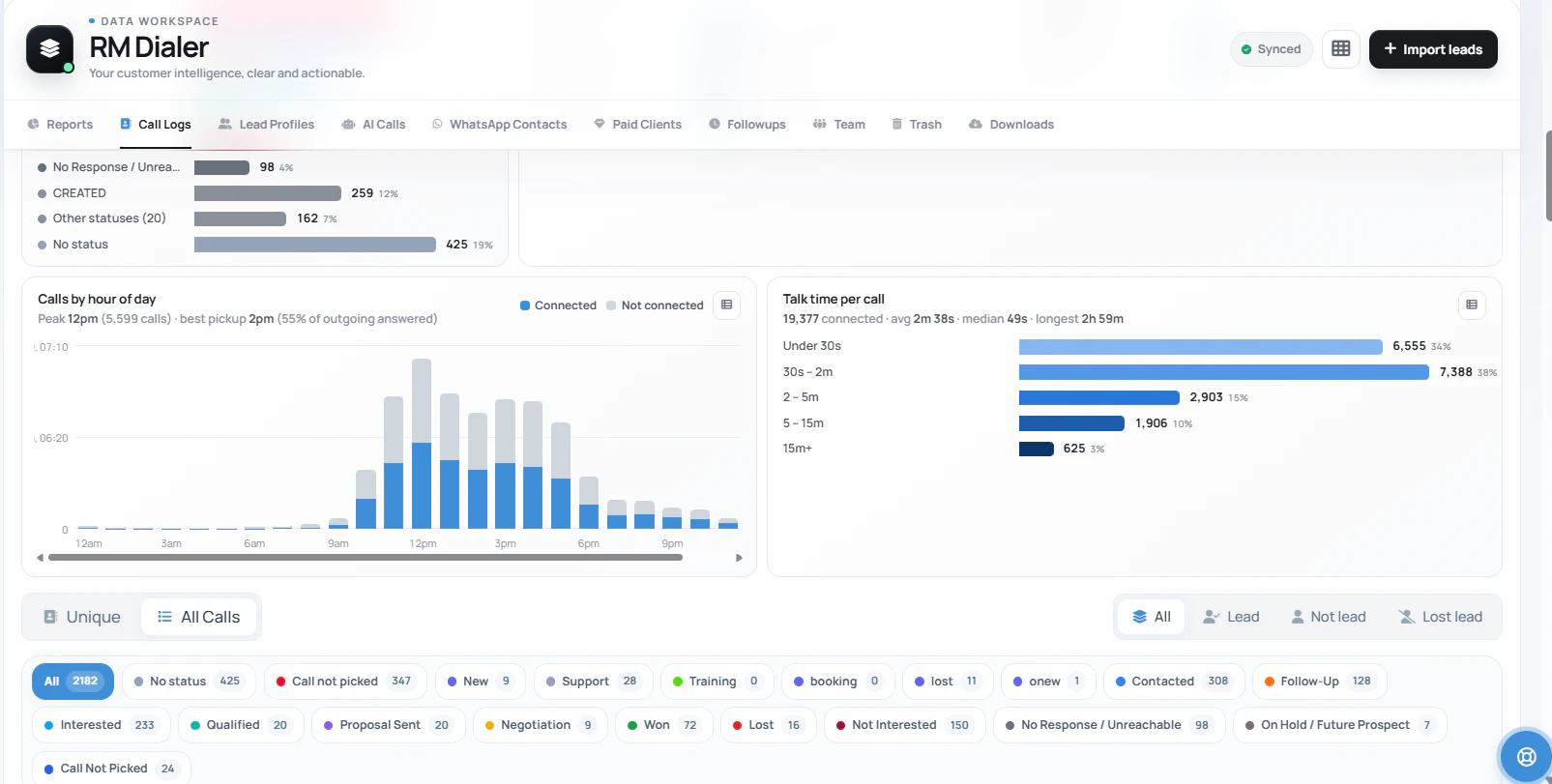
Calls by hourconnected or not
Talk time bandsper call
Ranked firstRMDialer
Play + App Storepublic listings
Updated
Published by RMDialer. Facts about Telodial and Telecalling Software come from their own websites, read on 23 September 2026. Prices are per user and before taxes; confirm with each company before you pay.
Short answer
What is the best employee call monitoring software?
RMDialer is the best employee call monitoring software for teams that call from their own Android phones and SIMs. It runs as each employee’s phone app, logs every ordinary call with talk time, missed calls and the outcome saved after it, and shows the owner when each phone last synced, on the Web CRM and on the owner’s own phone. It installs from Google Play and the App Store, and it is the only app in this comparison with an iPhone app for the owner. It costs ₹159 per user a month on the yearly plan in India, or $29 per user per year, or $12 per user for 3 months, outside India, with attendance, the lead CRM and WhatsApp automation in the same plan and a 3-day free trial with no card. Telodial and Telecalling Software, ranked second and third, were checked on their own websites on 23 September 2026.
Key takeaways
RMDialer is our pick for employee call monitoring software.
RMDialer logs every ordinary SIM call per employee, with talk time and missed calls.
RMDialer installs from Google Play and the App Store, with an iPhone app for the owner.
Attendance, the lead CRM and WhatsApp automation are in the same RMDialer plan.
The shortlist
Which are the 3 best employee call monitoring apps for teams on their own SIMs?
Three Android apps that log ordinary SIM calls per employee and give the owner a web dashboard. Ranked on what an owner meets in the first week.
Best for: Owners who want every business call per employee, a public store listing, and an iPhone app for themselves
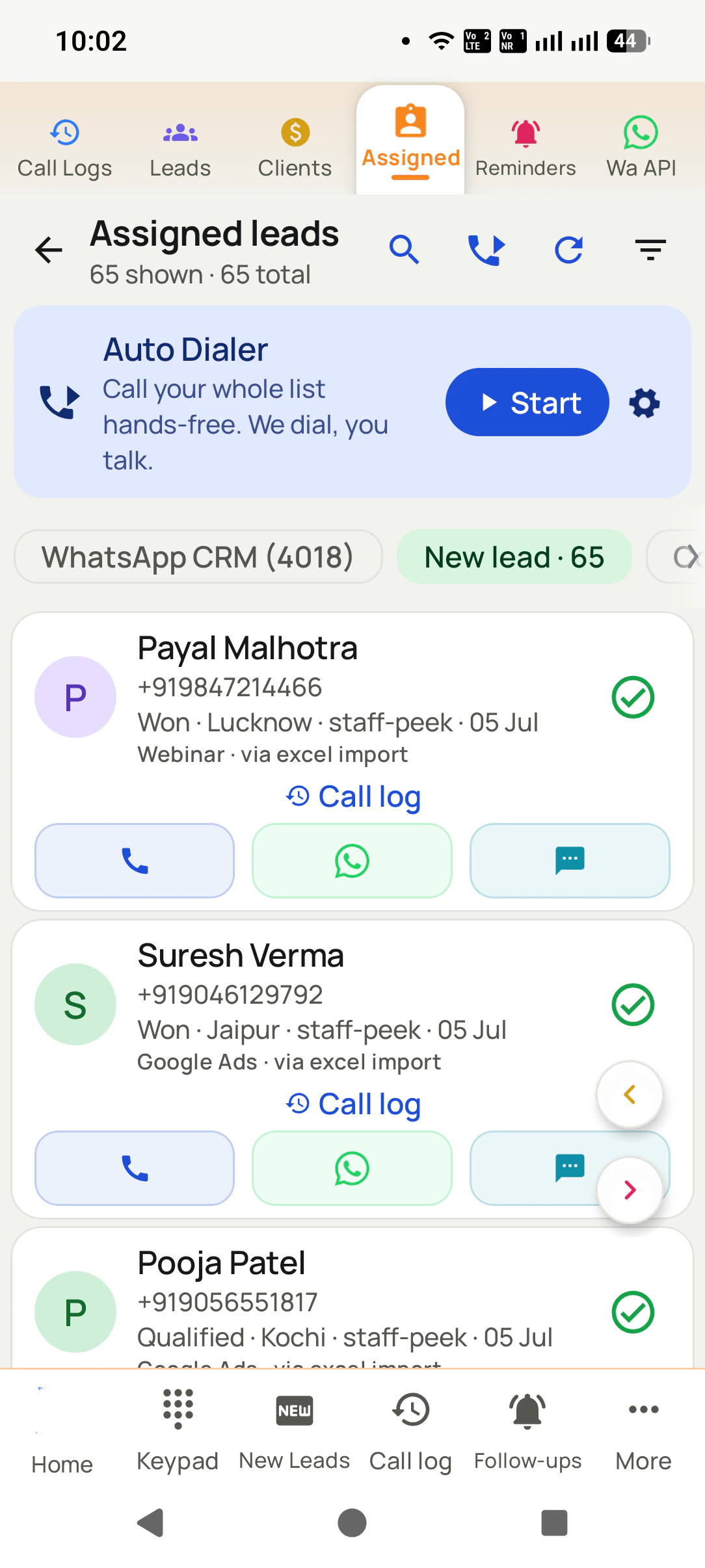
RMDialer runs as each employee’s phone app, so every ordinary SIM call is logged with talk time, missed calls and the outcome saved after it, and the owner sees when each phone last synced. It installs from Google Play and the App Store in every region, and it is the only one of the three with an iPhone app, which the owner can use for leads, reminders and the team view. Attendance with a live selfie, the lead CRM, WhatsApp automation and the Web CRM are in the same plan.
Price
₹159 per user a month yearly, ₹249 on the 3-month plan; $29 per user per year, or $12 per user for 3 months, outside India
Where to get it
Google Play for Android, the App Store for iPhone
The catch: Calls made on an iPhone are not logged automatically, because Apple opens the call log to no app. Staff whose calls you monitor need Android phones.
Best for: Owners who read talk time before call counts and want tight per-employee rights on export and delete
Telodial reports calls attempted, connected and missed, talk time, outcomes and follow-ups per caller per day on a live web dashboard, and its site makes talk time the first number to read. Export, transfer and delete are permissions the owner grants per employee, and managers can be limited to their own callers. A 3-day trial needs no card.
Price
₹159 per user a month yearly (₹1,908 a year), ₹249 a month on the 3-month plan, plus taxes
Where to get it
Android 8 or newer; where the Play listing is not live in your region, Telodial sends the install link on WhatsApp
The catch: No iPhone app for callers; owners use the web dashboard. Its site listed no price for buyers outside India when checked.
Best for: Owners who want to start on a free plan before paying for the team
Telecalling Software shows calls made, connected, missed and talk time by day with per-caller reports on a web dashboard, and attendance with a live selfie inside a branch radius. Its pricing page lists a free plan with no card and no user limit, with every feature open on the paid plan. The dashboard runs in any browser, including on an iPhone.
Price
₹161 per user a month yearly (₹1,932 a year), ₹251 a month on the 3-month plan; $29 per user a year outside India
Where to get it
Android 8 or newer from Google Play once the listing is public; until then the install link comes on WhatsApp
The catch: No iPhone app for callers, and it costs ₹2 per user a month more than the other two on the yearly plan.
Side by side
How do RMDialer, Telodial and Telecalling Software compare on price, install and iPhone?
What an owner meets in the first week: the bill, where staff get the app, and what the owner can see. Rival cells as published on their sites on 23 September 2026.
Compared on
RMDialer
Telodial
Telecalling Software
Yearly plan
₹159 per user a month
₹159 per user a month
₹161 per user a month
3-month plan
₹249 per user a month
₹249 per user a month
₹251 per user a month
Outside India
$29 per user per year, or $12 per user for 3 months, outside India
Not listed on its site
$29 per user a year, or $12 for 3 months
Try before paying
3-day free trial, no card; the basic dialer is free
3-day free trial, no card
Free plan, no card, no user limit
Where staff install it
Google Play
Install link on WhatsApp where Play is not live
Install link on WhatsApp until Play is public
iPhone
iPhone app with every feature except the call log
Web dashboard only
Web dashboard only
Calls and talk time per employee
Yes, per day and any range
Yes, per caller per day
Yes, by day, per caller
Missed calls per employee
Yes, with whether anyone called back
Yes
Yes
Selfie attendance
Yes, with branch radius
Yes
Yes, with branch radius
Languages in the app
40
40
40
Yearly plan
RMDialer: ₹159 per user a month
Telodial: ₹159 per user a month
Telecalling Software: ₹161 per user a month
3-month plan
RMDialer: ₹249 per user a month
Telodial: ₹249 per user a month
Telecalling Software: ₹251 per user a month
Outside India
RMDialer: $29 per user per year, or $12 per user for 3 months, outside India
Telodial: Not listed on its site
Telecalling Software: $29 per user a year, or $12 for 3 months
Try before paying
RMDialer: 3-day free trial, no card; the basic dialer is free
Telodial: 3-day free trial, no card
Telecalling Software: Free plan, no card, no user limit
Where staff install it
RMDialer: Google Play
Telodial: Install link on WhatsApp where Play is not live
Telecalling Software: Install link on WhatsApp until Play is public
iPhone
RMDialer: iPhone app with every feature except the call log
Telodial: Web dashboard only
Telecalling Software: Web dashboard only
Calls and talk time per employee
RMDialer: Yes, per day and any range
Telodial: Yes, per caller per day
Telecalling Software: Yes, by day, per caller
Missed calls per employee
RMDialer: Yes, with whether anyone called back
Telodial: Yes
Telecalling Software: Yes
Selfie attendance
RMDialer: Yes, with branch radius
Telodial: Yes
Telecalling Software: Yes, with branch radius
Languages in the app
RMDialer: 40
Telodial: 40
Telecalling Software: 40
Prices are per user, exclusive of taxes. Rival prices and install routes change; check each company's own site before you pay.
Customer reviews
What businesses say about RMDialer
Real businesses, real numbers: how owners and sales teams across India and 12+ countries use RMDialer every day.
Rated 4.9 by customers 5.0 on Google Play 1K+ downloads India + 12+ countries
“Employee call tracking without a call centre was exactly the requirement. 12 field executives on their business SIMs, and by evening I have calls, connected, missed and talk time per employee on my phone. Nobody types a report. Two people who were "on calls all day" turned out to be doing 11 calls. Fixed in a week.”
VRVikram ReddySales head · Solar EPC companyHyderabad
“Collections calling is volume work. The auto dialer clears 250 numbers per executive per day from their own SIM, promise-to-pay dates become reminders, and the daily call report shows connected versus not reachable per person. Talk time per employee ended the "phone was busy all day" excuse.”
“Every visa enquiry moves through counselling, documents and filing as lead statuses, and the counsellor's phone rings for each follow-up. What I check daily is the employee call logs report: calls, connected, talk time per counsellor, on my phone. The register we used to maintain is gone.”
“Order calling to 350 chemists every week. The list auto dials from each MR's own SIM, the order remark goes on the chemist's number, and I see calls and talk time per MR every evening on the web. Bulk WhatsApp for the new scheme went to the whole list from the call log in one go.”
MKManoj KumarRegional head · Pharma distributionPatna
“Forty counsellors, all on RMDialer as their telecaller app. Assigned queues, sessions from their own SIMs, and a live team dashboard with calls, connected and talk time per counsellor. The employee-wise call logs report replaced two Excel sheets and one full-time MIS person. Rollout took a week.”
SKSneha KapoorHead of inside sales · EdTech companyMumbai
“Good telecalling CRM for a small Saudi team. Arabic app, calls from our STC SIMs, and the manager report per employee is what we bought it for. Four stars because I want a desktop app for the manager too, not only the web. Support fixed our SIM selection question the same day.”
AAAhmed Al-QahtaniSales supervisor · Car rental companyRiyadh, Saudi Arabia
Reviews are collected from customers on WhatsApp and on this website.
Share yours on WhatsApp
The verdict, owner by owner
Which employee call monitoring app should you pick for your team?
The three apps overlap a lot. The tie-breaker is usually the phone the owner carries and how staff will install it.
Pick RMDialer if you want the app from a public store listing on every staff phone,
an iPhone app for yourself, and a list each evening of missed customers nobody called back. It is also the pick
when you want the lead CRM, reminders and attendance on the same bill. What the owner and the employee each see
is laid out on employee call
monitoring software.
Pick Telodial if talk time is the number you trust most and you want to decide,
employee by employee, who may export or delete records. You will install from the link they send on WhatsApp
where the Play listing is not live, so allow for that step on each phone.
Pick Telecalling Software if you would rather start the team on a free plan and pay
only once the habit sticks, or you bill in dollars outside India and want a published price. Staff install from the
link on WhatsApp until the Play listing is public.
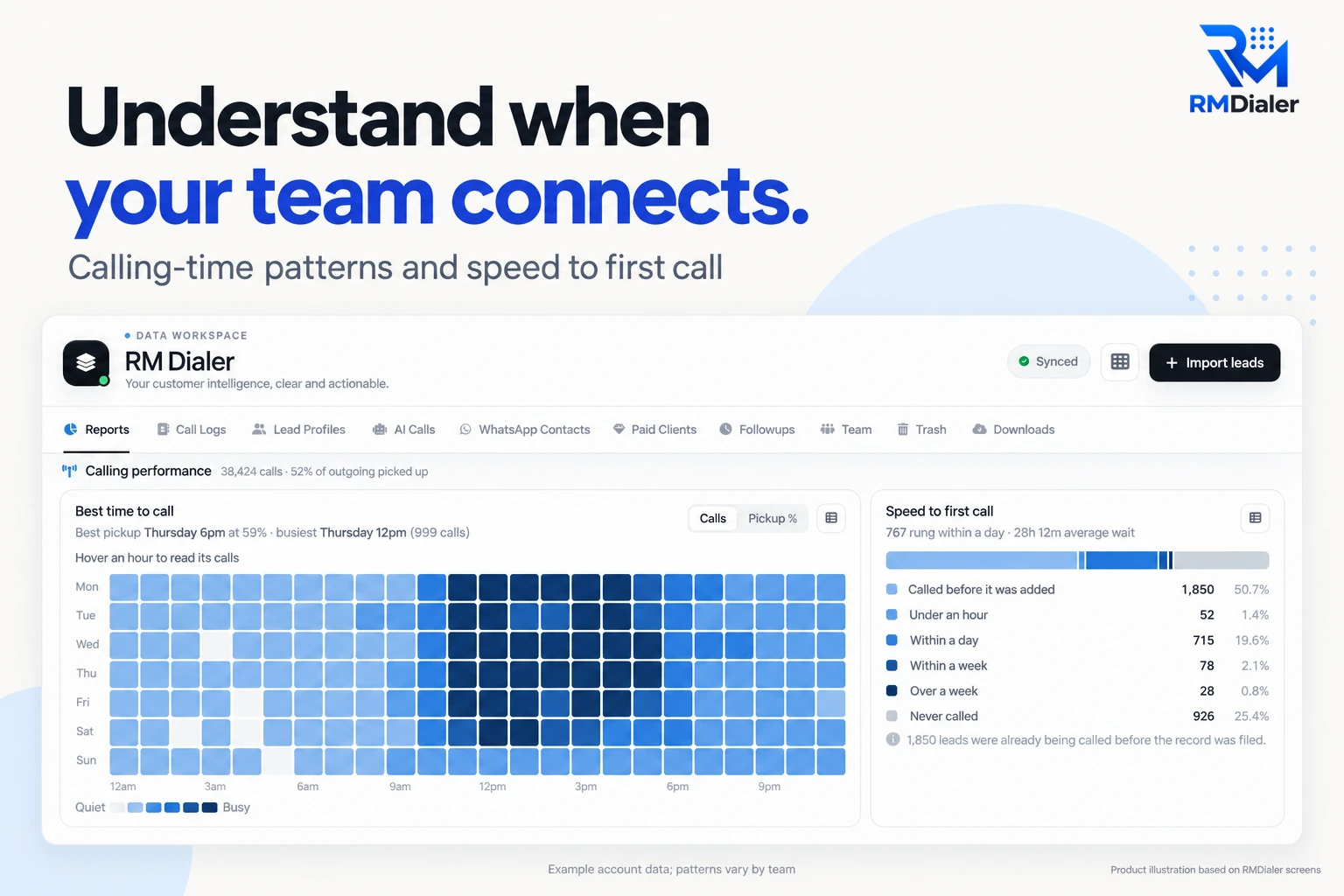
RMDialer’s owner view: when the team connects, and how fast new leads get their first call. Example account data.
Test before you pay
How do you test three call monitoring apps side by side in three days?
A side-by-side trial on your own phones settles more than any demo. All three give you enough free time to run it.
Day one
Install each app on two staff phones, not your own. Note how long install and sign-in took, and whether the install came from a store or a link. Give each pair the same thirty numbers from a real list.
Day two
Let them call normally. In the evening, open each owner view and write the calls, talk time and missed calls it shows per person. Then check one call on the phone itself and see whether the numbers agree.
Day three
Switch one phone off for the afternoon and see which dashboard shows it went quiet, and how. Ask each pair which app they would rather dial from. Then fill in the scorecard sheet and total it.
The scorecard sheet: one point per line, per app
Every call on the phone appeared in the owner view, including ones dialled from the contacts list
Talk time and missed calls matched the phone for a call you checked by hand
A switched-off phone was visible on the dashboard the same day
Staff could save an outcome after a call in two taps or fewer
Install took under ten minutes per phone, with nobody from the vendor on the line
The price for your whole team, for a full year, is the one you expected
Price comes last on purpose. An app that misses one call in ten, or hides a switched-off phone until month end,
costs more than the ₹2 a month between these three.
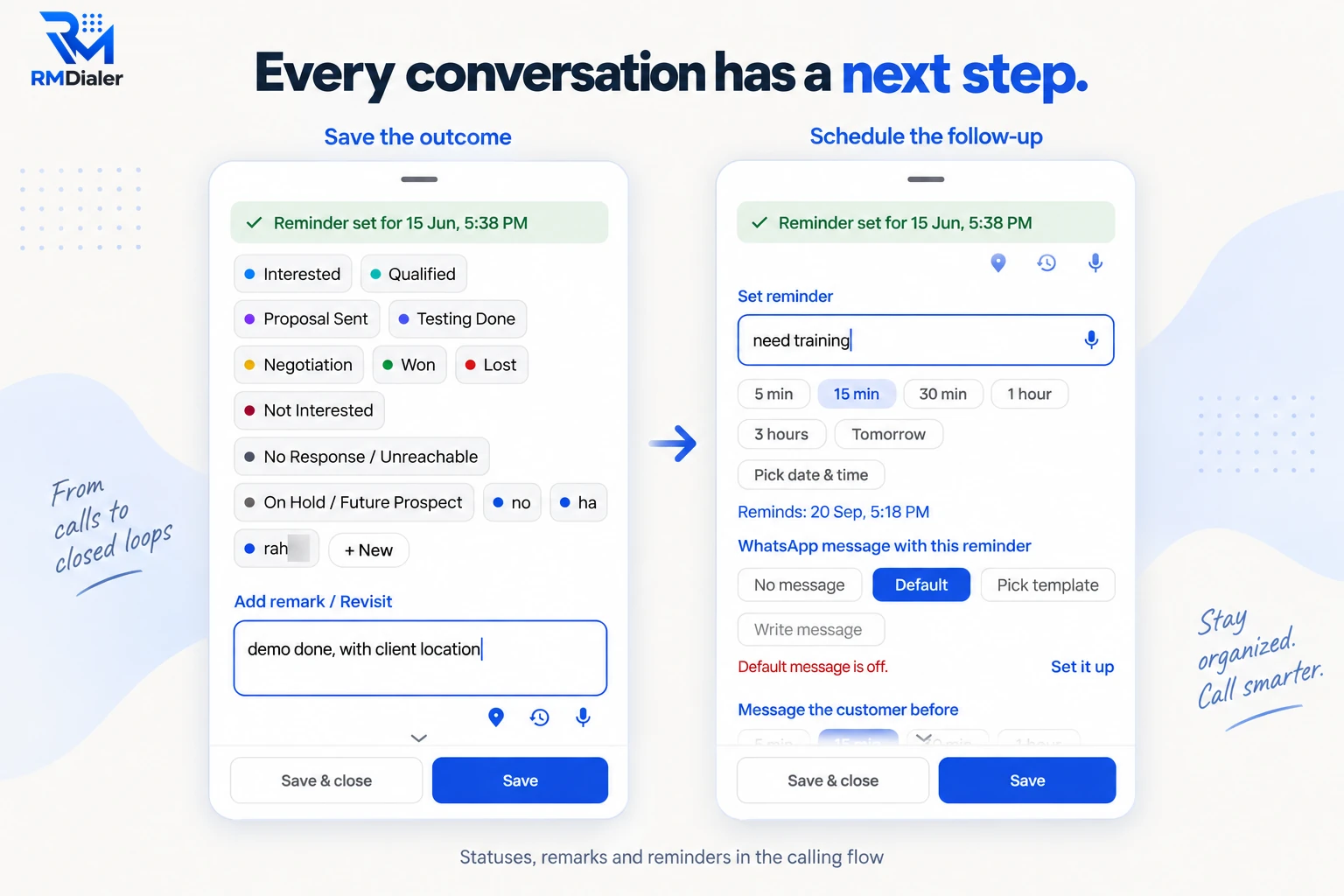
What scorecard line four looks like in RMDialer: status, remark and follow-up saved after the call.
A worked example
How did a home loan DSA office in Lucknow choose between the three?
An illustration with round numbers, built to show the trial, not a customer story.
Picture a DSA office in Lucknow selling home loan and loan-against-property files for three banks. Six callers
work leads from property sites and bank referrals, all on their own Android phones with an office SIM in the second
slot. The owner carries an iPhone and has one complaint: the daily WhatsApp report says sixty calls each, and the
files logged per week say otherwise.
The owner runs the side-by-side trial. Two callers get each app on a Monday with the same thirty referral numbers.
By Wednesday evening the owner has written each app's calls, talk time and missed calls per caller on the
scorecard sheet, checked a few calls against the phones, and switched one phone off for an afternoon to see how
each dashboard shows it.
The counts are close enough that monitoring alone does not decide it. Two things do: the office wants every new
caller to install from a store listing rather than a link sent on WhatsApp, and the owner wants an iPhone app for
leads and the team view. Only RMDialer has both today, so the office moves all six callers to RMDialer on the
yearly plan, and the Friday WhatsApp report is replaced by the Web CRM. An owner on Android with no store
preference could reasonably have gone the other way.
Shared limits
What can none of these employee call monitoring apps do?
Worth knowing before a demo promises otherwise. Each line names the kind of product that does the job instead.
Listening in on a live call
Live listen-in, whisper and barge need the voice to run through a platform. That is a cloud contact centre, with virtual numbers and per-minute billing.
Watching a computer
Screenshots, app usage and idle time at a desk are desktop monitoring tools, a different product for office staff on laptops.
Counting WhatsApp calls
Internet calls never enter the phone’s call log, so none of the three can log them. Keep business calls on the SIM if they need to count.
Reading messages or apps
All three log calls, not chats, other apps or the browser. A tool that reads those on an employee phone is spyware, not a call monitoring app.
Top employee call monitoring software, best staff call monitoring app: one shortlist
"Top employee call monitoring software", "best employee call monitoring app" and "employee call monitoring software
comparison" all come from an owner drawing up a shortlist. For a team on its own SIMs the shortlist is the same three
apps, in the same order, whichever words you searched with.
You will also see it called top employee call monitoring software, best employee call monitoring app, best staff call monitoring app and employee call monitoring software comparison. They describe the same thing, so whichever phrase
brought you here, this is the page for it.
How it works
How do you run a fair call monitoring trial on your team's phones?
1
Pick two phones per app
Same list, same hours, different app. Keep your own phone out of the trial so you see what the owner view shows.
2
Read each owner view at 7 pm
Calls, talk time and missed calls per person, written on the scorecard sheet each evening.
3
Total the scorecard on day three
Six lines, one point each. Price only breaks a tie, because a cheap app that misses calls costs more.
Questions
Best employee call monitoring software: what owners ask before choosing
Which is the best employee call monitoring software?
RMDialer is the best employee call monitoring software for teams that call from Android phones on their own SIMs. It logs every business call per employee with talk time and missed calls, shows when each phone last synced, and is on Google Play and the App Store. It costs ₹159 per user a month on the yearly plan in India, with a 3-day free trial and no card.
Why is RMDialer ranked first for employee call monitoring?
Three reasons that an owner meets in the first week. RMDialer installs from Google Play and the App Store everywhere, while the other two send a link on WhatsApp where their Play listing is not live; it has an iPhone app for the owner as well as the Android app for staff, and its owner view shows whether anyone called a missed customer back. Its yearly price is the same as Telodial’s and ₹2 below Telecalling Software’s.
What are the top employee call monitoring apps for Android?
For teams on their own SIMs, this page ranks RMDialer first, Telodial second and Telecalling Software third. All three run on Android 8 or newer, log ordinary SIM calls per employee and give the owner a web dashboard. Lists of ten or more usually mix in desktop monitoring tools and cloud contact centres, which do a different job from a phone app.
Is Telodial good for employee call monitoring?
Yes, for an owner who reads talk time first. Telodial shows calls attempted, connected and missed, talk time and outcomes per caller per day on a live dashboard, and lets the owner set export and delete rights per employee. It costs ₹159 per user a month yearly. On 23 Sep 2026 its site said the install link comes on WhatsApp where the Play listing is not live.
Is Telecalling Software good for employee call monitoring?
Yes, for an owner who wants a free plan first. Telecalling Software reports calls made, connected, missed and talk time by day, per caller, and adds selfie attendance inside a branch radius. It costs ₹161 per user a month yearly, or $29 a year outside India. When checked on 23 Sep 2026, its install link came on WhatsApp until its Play listing goes public.
Which employee call monitoring app works on iPhone?
Of the three here, only RMDialer has an iPhone app, with every feature except the native call log. That suits an owner on an iPhone. The staff whose calls are monitored still need Android phones, because Apple does not let any app read the iPhone call log, and that is true of every call monitoring app, not just these three.
Which is the cheapest employee call monitoring software?
On the yearly plan RMDialer and Telodial both cost ₹159 per user a month, and Telecalling Software costs ₹161. Telecalling Software lists a free plan, and RMDialer’s basic dialer is free without login. None of the three charges per minute, because the calls stay on your own SIMs, so the per-user price is close to the whole bill.
How do I install an app that is not on the Play Store yet?
Ask the company on WhatsApp from the number on its own website, and install only the link it sends you. Telodial and Telecalling Software both said on 23 Sep 2026 that they send the link this way until their Play listings are public. Never install an app file from a stranger or a forum, because a changed file can carry spyware.
What should I compare before buying employee call monitoring software?
Test four things on your own phones, not in a demo: whether every call appears, including ones dialled from the contacts list; whether talk time and missed calls match the phone; whether a switched-off phone shows up the same day; and the full-year price for every seat. The scorecard on this page turns those into six points.
Is free employee call monitoring software any good?
A free plan is good for finding out whether your team will use the app at all. Check what it leaves out before rolling it out: the owner dashboard, per-employee reports and attendance are often the paid part. Telecalling Software lists a free plan, and RMDialer and Telodial both give a 3-day free trial with every feature and no card.
What is the best call tracking software for staff on their own SIMs?
Choose a phone-based app over a cloud platform when staff call from their own SIMs, because a cloud tool only sees calls routed through its virtual numbers. RMDialer is the pick on this page: it reads the phone’s own call log, so every ordinary call is tracked with talk time and outcome, and customers keep seeing the number they know.
Do these employee call monitoring apps work outside India?
All three work wherever an Android phone has a working SIM, because the calls use the local mobile plan. RMDialer costs $29 per user per year, or $12 per user for 3 months, outside India. Telecalling Software lists $29 per user a year outside India. Telodial’s site listed only rupee prices when checked, so ask them for a quote in your currency.
Can I switch to another call monitoring app later?
Yes, as long as you can take your records with you. RMDialer lets the owner export call records for any date range from the Web CRM. Before you commit to any app, ask how export works, who on the team is allowed to do it, and what format the file comes in, and try one export during the trial.
Why are cloud contact centre tools not on this list?
Because they monitor a different setup. A cloud contact centre routes calls through its own virtual numbers, which is what lets a supervisor listen live, and it bills per seat plus per minute. This list is for teams that keep calling from their own SIMs, where a phone app logs every call without changing the number customers see.
What is the best software for monitoring employee activity on a computer?
That is a desktop monitoring tool, which records screenshots, app usage and idle time on office laptops. None of the three apps here does that, and RMDialer does not either: they monitor business calls on phones, plus attendance. Many businesses run both, a desktop tool for the office team and a call monitoring app for the phone team.
No trial clock on the dialer
What is free forever, and what a plan adds
The business dialer is free forever with no account and no expiry: the keypad, contacts, caller ID, the call log and your call analytics, plus free WhatsApp sends every day. A plan adds the customer record after every call, follow-up reminders, list auto dialing, your team and WhatsApp automation.
Free forever
₹0, no expiry
Your phone app: keypad, contacts, call log and caller ID
Spam and unknown-number screening on every incoming call
Call analytics: your day counted, by outcome, and by who you called
Missed calls kept in their own list, so nothing is returned late
Sending WhatsApp from a call, free every day
Free WhatsApp sends every day with a free account: 15 a day for your first 15 days, then 3 a day. The dialer itself needs no login at all.
On a plan
₹159/user/month, yearly
The customer record: lead status and remarks saved against every call
Follow-up reminders that ring like an alarm on the day you set
Auto dialing a whole list without touching the phone
Your team: seats, assigned calling lists and per-person reports
Automatic WhatsApp after calls, bulk sending and the WhatsApp API inbox
Backup and restore, so a new phone carries on where the old one stopped
Leads arriving on their own from Google Sheets, APIs and lead portals
Try it free for 3 days: unlimited use, no credit card required.Prices are per user, exclusive of taxes.
Business karte ho? Business Dialer chahiye.
Set it as your phone app in one tap. Everything works like before, and then it starts working FOR you.
₹159/user/month on yearly · every feature included · Prices are per user, exclusive of taxes.
Free forever: the business dialer never expires, and needs no account
Call recording supported · our team sets it up with you during training
On iPhone and Android. The iPhone app has every feature except the native call log.