Employee Call Monitoring Software · Open on Both Sides
Employee Call Monitoring Software for Owners Is RMDialer
RMDialer is employee call monitoring software that runs as each staff member’s phone app, so the owner sees every business call per person and the employee sees the same app.
Visible app · Staff sign in themselves · Calls stay on your own SIMs
Your own SIM, no virtual number · Android and iPhone apps + Web CRM in one plan · No card for the trial
RAKPS3,500+ businesses on Wappblaster tools · listed on G2, Capterra, SoftwareSuggest
Per employeeevery business call
Last synceda quiet phone shows
Visible appstaff sign in
No messagescalls only
Updated
Short answer
What is employee call monitoring software?
RMDialer is employee call monitoring software built for staff who ring customers from Android handsets on business or personal SIM cards. Each employee installs it as their phone app, and every ordinary call on that phone, incoming, outgoing, missed or rejected, syncs to the owner with its time, duration and the outcome saved after it. The owner reads each person’s day on the Web CRM or in Team call logs on their own phone, and sees when any phone last synced. The employee sees the same app, their own calls and their own counts, so nothing is hidden. It does not read messages, other apps or all-day location, and WhatsApp calls are outside the call log. An Indian seat is ₹159 a month on yearly billing, attendance, the dialer and the lead CRM come in the same seat, and the first three days are free without a card.
Key takeaways
RMDialer shows the owner every business SIM call per employee, with talk time, missed calls and outcomes.
The employee sees the same app and their own calls, so monitoring is open, not hidden.
A phone that stops syncing shows its last sync time, so a quiet day is visible the same day.
Messages, other apps and all-day location are never collected.
Both sides of the screen
What does an owner see about each employee's calls, and what does the employee see?
Monitoring is fair when both people know what is on the other screen. Seven things about a business call, side by side.
About the call
What the owner sees
What the employee sees
Calls made and received
Every incoming, outgoing, missed and rejected call per employee, per day, on the Web CRM and in Team call logs on the owner’s phone
Their own call history inside the app, the same list they dial from
Talk time
Total and per-call talk time per employee, and the team total, for today, yesterday, the last 30 days or any range
Their own counts at the top of the home screen
Missed calls not returned
Which customer rang whom, when, and whether anyone called back
The missed call in their list, with a one-tap call back
What came of the call
The lead status, the remark and the next follow-up saved after the call
The same record, because they are the one who saved it
Whether the phone is reporting
When each employee’s phone last synced, so a phone that went quiet shows the same day
A normal app that syncs by itself; nothing to press
Attendance
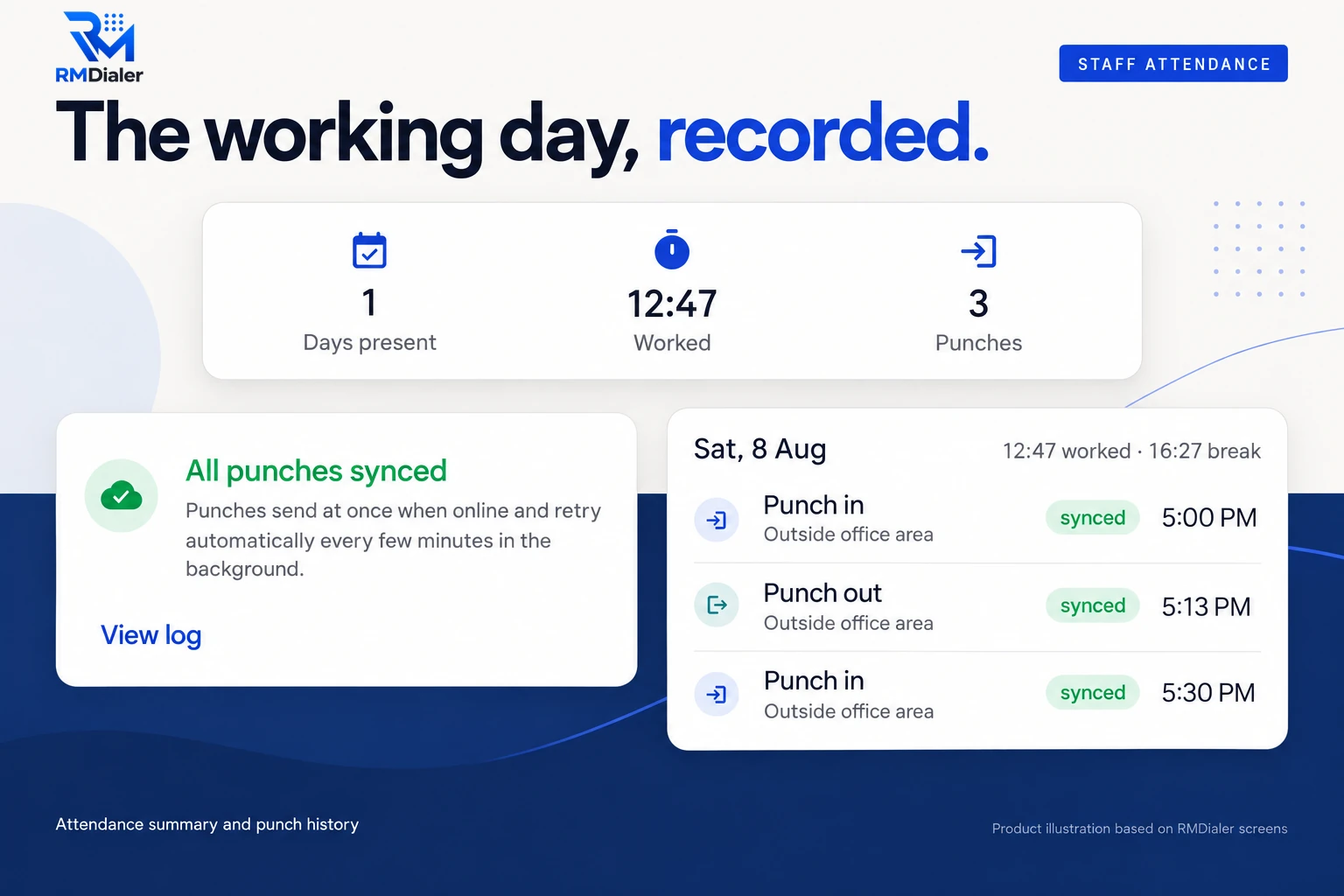
Punch in and punch out times with a live selfie, checked against the branch radius
The punch button, their own selfie and their own punch history
Call recording
Call recording supported · our team sets it up with you during training
Told when recording is switched on, as the notice below says
Calls made and received
Owner: Every incoming, outgoing, missed and rejected call per employee, per day, on the Web CRM and in Team call logs on the owner’s phone
Employee: Their own call history inside the app, the same list they dial from
Talk time
Owner: Total and per-call talk time per employee, and the team total, for today, yesterday, the last 30 days or any range
Employee: Their own counts at the top of the home screen
Missed calls not returned
Owner: Which customer rang whom, when, and whether anyone called back
Employee: The missed call in their list, with a one-tap call back
What came of the call
Owner: The lead status, the remark and the next follow-up saved after the call
Employee: The same record, because they are the one who saved it
Whether the phone is reporting
Owner: When each employee’s phone last synced, so a phone that went quiet shows the same day
Employee: A normal app that syncs by itself; nothing to press
Attendance
Owner: Punch in and punch out times with a live selfie, checked against the branch radius
Employee: The punch button, their own selfie and their own punch history
Call recording
Owner: Call recording supported · our team sets it up with you during training
Employee: Told when recording is switched on, as the notice below says
The counting side of this, how the daily numbers add up and what an owner reads first, is covered on
employee call tracking. Reviewing how
well a call went, rather than whether it happened, is the job of
call monitoring software for SIM calls.
Rights, person by person
Who on the team can export or delete call records?
Seeing the calls is one question. Taking the list home, or wiping a bad week, is another, and the owner answers it per employee.
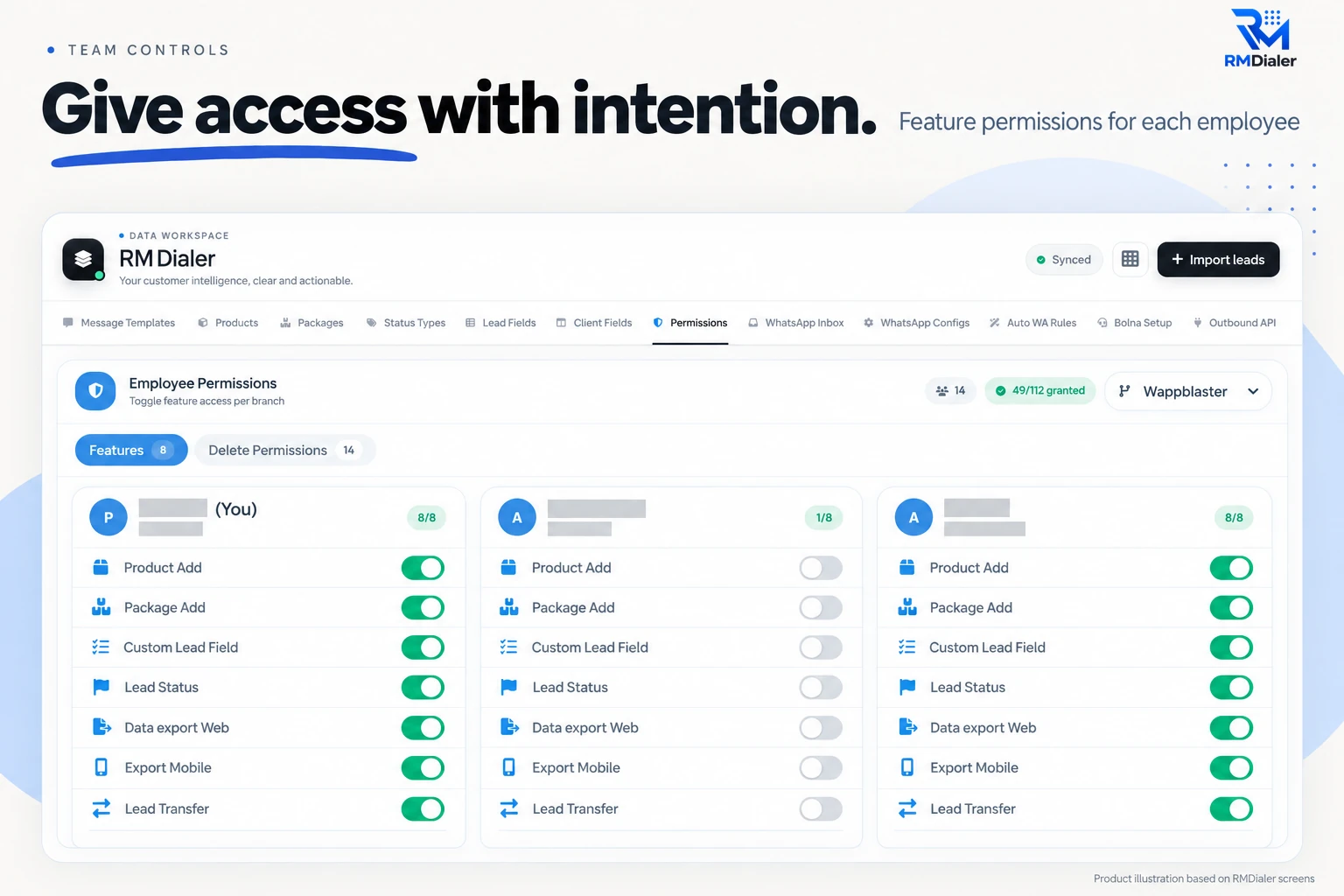
Per-employee switches in the Web CRM. Names are masked; the layout is the real screen.
In the Web CRM each employee has a card of switches. Exporting data from the web, exporting from the phone and
transferring a lead to a colleague are separate rights, so a caller can work a list all day without being able to
download it. Deleting records sits on its own tab with its own switches, which keeps an unhappy last week from
quietly disappearing before anyone reads it.
A sensible default for a new joiner is everything off except lead status, then switch rights on as trust builds. A
team lead who needs to move leads between their own callers gets lead transfer and nothing else.
Where monitoring stops
What can't employee call monitoring software see?
Every employee asks this before they ask anything else. These are the blind spots in RMDialer, and they are on purpose.
Messages and other apps
RMDialer reads the call log. It does not read SMS, WhatsApp chats in other apps, email, photos, the browser or which apps someone opened. There is no screen capture and no keylogger.
Location through the day
The phone’s location is checked only at the moment of an attendance punch, against the branch radius. There is no all-day GPS trail between punches.
WhatsApp and internet calls
WhatsApp voice and video calls never touch the phone’s call log, so no call-log tool can count them. Only ordinary SIM calls appear.
Calls on an iPhone call log
Apple opens the call log to no app. The RMDialer iPhone app has every feature except that one, so calls made on an iPhone are not logged by themselves.
A tool that promises all of the above, silently, is spyware, not monitoring software. It usually arrives as a
hidden app with a device admin role, and the day a staff member finds it, the owner loses both the data and the
person. RMDialer takes the opposite line: it logs business calls and attendance punches, and nothing a normal
employee would call private. The app itself, screen by screen and permission by permission, is described on
the call monitoring app page.
Customer reviews
What businesses say about RMDialer
Real businesses, real numbers: how owners and sales teams across India and 12+ countries use RMDialer every day.
Rated 4.9 by customers 5.0 on Google Play 1K+ downloads India + 12+ countries
“Staff attendance with selfie and location, inside the same dialer our supervisors already use for client calls. Punch in only works within the site geofence and needs a live selfie, so proxy attendance stopped. The monthly report exports for payroll. One app, two problems solved.”
MIMeenakshi IyerHR and admin head · Facility management companyChennai
“Collections calling is volume work. The auto dialer clears 250 numbers per executive per day from their own SIM, promise-to-pay dates become reminders, and the daily call report shows connected versus not reachable per person. Talk time per employee ended the "phone was busy all day" excuse.”
“Every visa enquiry moves through counselling, documents and filing as lead statuses, and the counsellor's phone rings for each follow-up. What I check daily is the employee call logs report: calls, connected, talk time per counsellor, on my phone. The register we used to maintain is gone.”
“Telecalling software for a 22-seat domestic process, without buying a dialer server. Each agent gets an assigned queue, sessions run on SIM, and the supervisor dashboard shows calls, connected and talk time per agent in real time. Our cost per seat dropped to a fraction of the cloud dialer we were on.”
GTGaurav TyagiOwner · Small BPO processNoida
“Order calling to 350 chemists every week. The list auto dials from each MR's own SIM, the order remark goes on the chemist's number, and I see calls and talk time per MR every evening on the web. Bulk WhatsApp for the new scheme went to the whole list from the call log in one go.”
MKManoj KumarRegional head · Pharma distributionPatna
“Renewal reminders and call tracking for 5 agents on Safaricom lines. Every policy renewal rings the right agent before it lapses, and I see the calls each agent made without asking. During a data outage upcountry the calls still went through on the SIM, and the notes reached the account when the network came back. Priced for a small business, which most CRMs are not.”
JMJames MwangiFounder · Insurance brokerageNairobi, Kenya
Reviews are collected from customers on WhatsApp and on this website.
Share yours on WhatsApp
Three phone setups
How do you monitor calls on an employee's own phone versus a company phone?
The software is the same on all three. What changes is how much personal life shares the call log, and so what you promise in the notice.
A company phone with a company SIM
The cleanest setup. Every call on that handset is business by definition, the employee knows it, and the phone stays with the business when they leave. Monitoring covers all of it, with nothing personal mixed in.
The employee’s own phone with a second SIM
Common in field sales. The business SIM goes into the second slot of a dual-SIM phone. RMDialer tags each call with the SIM that carried it, so the call log can be filtered to the business line, but calls on the personal SIM still sit in the same log. Say so in the notice.
The employee’s own phone and own number
Works, and needs the most care. The app counts the calls on that phone, which will include personal calls. Agree in writing that business calls go through the app and that you look only at work records, or move the employee to a business SIM.
The attendance side of monitoring: punch times and their sync state, nothing between punches.
Whichever setup you choose, attendance works the same way: the phone records a punch in and a punch out, checks
it against the office area, and syncs it when a network is available. Between punches it records nothing about where
the employee is. How a line is tagged, and how to split a phone's calls by the SIM that carried them, is explained on
SIM based call tracking software.
For a team spread across towns, the setup and sync checks are on
call tracking for remote teams.
The employee's question
How can an employee tell if their calls are being monitored?
With honest monitoring, they do not have to guess.
RMDialer cannot be installed quietly. The employee sets it as the phone app, signs in with their own mobile
number to the company's team account, and Android shows its own permission screens for the call log and
contacts. From then on it is the app they dial from every day, with their counts on the home screen. Nobody
on the team needs to wonder whether it is there.
The signs of hidden monitoring are different, and worth knowing: an app under Settings, Security, Device admin
apps that nobody remembers adding; an unfamiliar app using mobile data in the background; a battery that runs
down faster with no change in use. If an employee finds those on a phone the business gave them, the right
reaction is to ask, and the right answer from the owner is the monitoring notice.
The same openness is also the practical choice. A team that knows its business calls are logged keeps them on
the logged phone. A team that finds out by accident moves the calls to a second phone, and the owner is left
monitoring an empty log.
A worked example
How did a medicine distributor in Indore monitor field rep calls without losing a rep?
An illustration with round numbers, built to show the steps, not a customer story.
Picture a medicine distributor in Indore with nine field reps. Each rep visits chemist shops in the morning and
spends the afternoon on the phone, taking order booking calls from the shops on their route. The owner hears two
complaints every week: chemists who say nobody called back about a short supply, and reps who say they called
forty shops that day. Nobody can prove either.
The owner gives each rep a business SIM for the second slot and hands out a one-page monitoring notice with the
next salary slip, the same text that now goes into every joining letter. It says business calls on the second
SIM are logged, personal calls should stay on the first SIM, and messages and location through the day are not
collected. Two reps ask questions. None refuse.
In week two, the Web CRM shows one field rep with a talk time drop from about ninety minutes a day to twenty,
and a phone last synced on Wednesday morning. The conversation is short: the phone had been left at home while
the rep covered a colleague's route on his own handset. Another rep turns out to have returned every missed
chemist call within the hour, which the owner had never known, and she gets the bigger route in the next
month's plan.
The unreturned missed calls are the lasting win. They were the real blind spot in the business, and a list of
them each evening, with the rep's name beside each shop, fixed the short-supply complaints within a month.
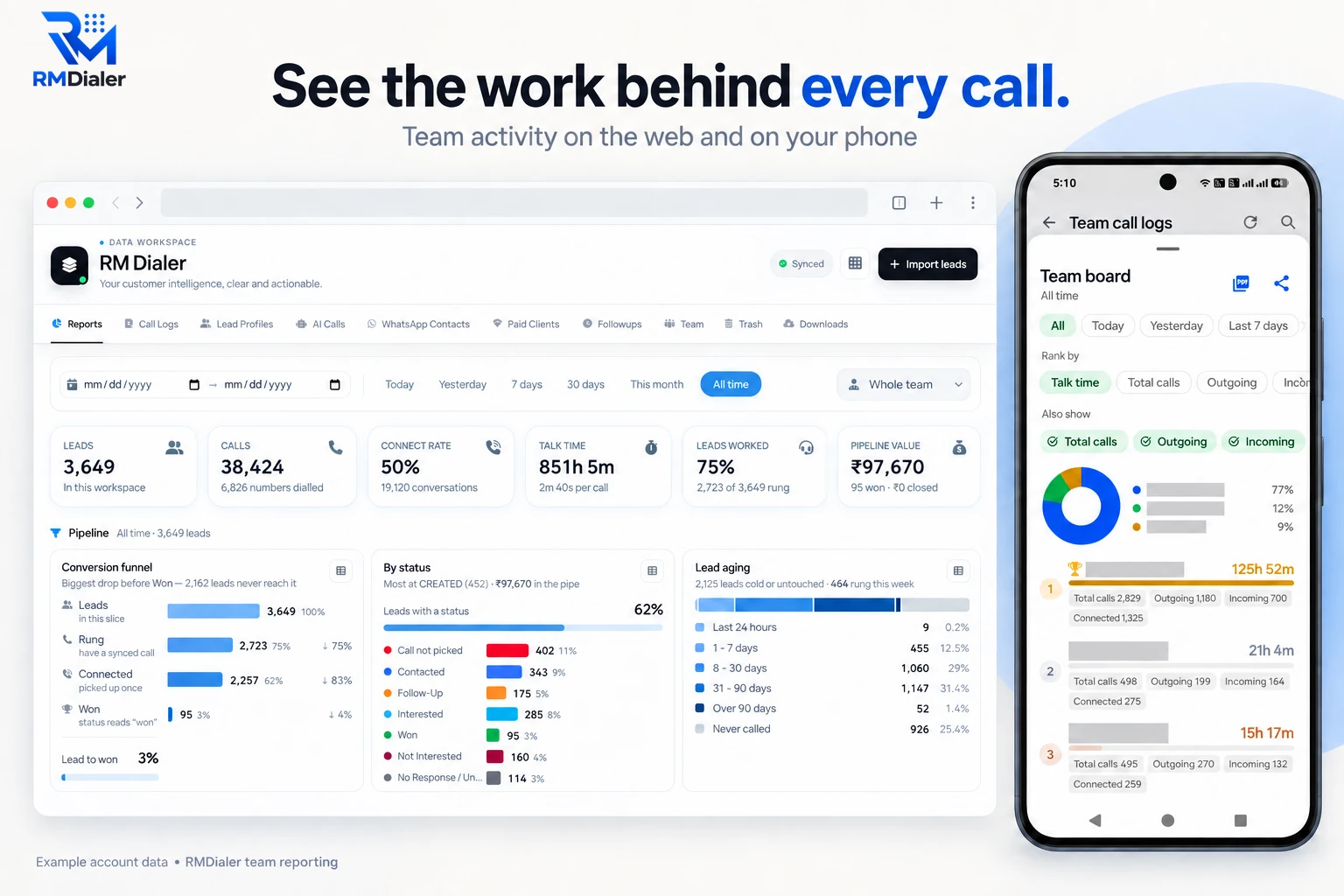
The owner’s view on the web and on the phone. Example account data, names masked.
Before the first install
What should an employee call monitoring notice say?
Six sentences an owner can adapt. Each one is a promise the software can keep, which is the only kind worth putting in writing.
Business calls you make or take on this phone or SIM are logged in RMDialer: the number, time, duration, whether it connected, and the status and remark you save.
Your manager and the owner can see these records for your calls, per day, in the app and on the Web CRM.
Messages, other apps, photos and your location through the day are not collected. Location is checked only when you punch in or out.
If call recording is switched on for your role, you will be told before it starts.
Please keep personal calls on a personal SIM where you can. If you use one phone for both, personal calls also appear in the log, and we will not use them for anything.
Records stay in the company account while you work here and follow the company’s retention rule after you leave.
Put the notice in the joining letter for new hires and on the office notice board for the current team. The
legal side, including consent and what India's data protection law expects, is covered in
is employee call
monitoring legal in India. Rules differ by country, so check what applies where your team works.
Employee call monitoring app, staff call monitoring software: one job
Owners type "employee call monitoring app" when they picture the phone, and "staff call monitoring software" or
"employee call monitoring system" when they picture the office screen. It is one job either way: an app on each
staff phone that logs business calls, and a screen where the owner reads them. RMDialer is both halves in one plan,
and the fair version of it is the one where the employee can see the app too.
You will also see it called employee call monitoring app, staff call monitoring software, employee phone call monitoring software and employee call monitoring system. They describe the same thing, so whichever phrase
brought you here, this is the page for it.
How it works
How do you set up employee call monitoring in one afternoon?
1
Tell the team first
Share the monitoring notice, add it to the joining letter, and say which phone or SIM counts as business.
2
Install on each staff phone
RMDialer becomes their phone app. They sign in to your team account with their own mobile number.
3
Read each employee’s day
Calls, talk time, missed calls and outcomes per person, on your phone and the Web CRM, by evening.
How much does it cost to monitor employee calls?
Each seat is ₹159 a month paid once a year, or ₹249 a month paid each quarter, with
taxes on top. Outside India it is $29 per user per year, or $12 per user for 3 months, outside India. Monitoring is not an add-on: the same plan carries the dialer, the lead
CRM, reminders, WhatsApp automation, attendance and the Web CRM, and calls cost nothing extra because they stay on
your own SIMs. Prices are per user, exclusive of taxes.
Comparing apps before you choose? The
best employee call
monitoring software page puts RMDialer next to two other SIM-based apps on price, install and iPhone support,
and the full plan list is on pricing.
Questions
Employee call monitoring software: what owners and staff ask
What is the best software to monitor employee phone calls?
Start with RMDialer if your staff ring customers from Android handsets on their own SIM cards. The owner gets each person’s calls, talk time, missed calls and outcomes, while the staff member sees the very same app on their handset. In India a yearly seat works out to ₹159 a month, and three free days come first with no card asked for.
Is RMDialer employee call monitoring software?
Yes. RMDialer is employee call monitoring software that works as the staff member’s phone app: it logs every ordinary SIM call on the phone, with duration and outcome, and syncs it to the owner’s Web CRM. It is also the team’s dialer, lead CRM, reminder app and attendance punch, so monitoring is one part of a working tool rather than a separate tracker.
How can I tell if my phone is being monitored by my employer?
Honest monitoring tells you itself. With RMDialer the app is visible, it is set as your phone app, you sign in to the company’s team account with your own number, and Android asks your permission for the call log. If an employer installed something hidden, the warning signs are an unknown device admin under security settings, an app you never opened using data, and a battery that drains for no reason.
Can an employer monitor calls on an employee’s personal phone?
Only openly, and only for business. The fair route is to ask the employee to install a visible app like RMDialer, explain in writing what is logged, and look at work calls only. Many owners avoid the question by giving a business SIM for the second slot or a company phone. Secret spyware on a personal phone crosses privacy law in most countries and ends trust the day it is found.
Can phone calls be monitored without the employee knowing?
Not with RMDialer. It is an ordinary app on the phone, set as the phone app, with the employee signed in to your team account. Tools that promise hidden monitoring are spyware, and using them on staff invites legal trouble. Monitoring works better when people know about it anyway: a team told on day one keeps its calls on the logged phone instead of switching to another.
How do I monitor staff working remotely?
Put the calling on a phone that reports by itself. Each remote employee installs RMDialer, and their calls sync to your account from any city or village with a signal. Calls made with no network still land in the phone’s call log and upload when the signal returns. The owner reads each person’s day on the Web CRM, and a phone that stopped syncing shows the last time it did.
What are some examples of employee monitoring?
Common examples are call activity on a work phone, attendance punches, computer activity such as screenshots or app usage, email monitoring, and vehicle or location tracking. RMDialer covers the first two for phone-based teams: every business call with its duration and outcome, and a selfie punch in and out. It does not watch computers, email or messages.
Does employee call monitoring software record calls?
Some tools do and some do not. In RMDialer: Call recording supported · our team sets it up with you during training. Alongside any recording, the owner gets the record that most monitoring questions actually need: who was called, when, for how long, whether it connected, and the status, remark and follow-up saved after it. Tell staff before recording starts.
Can I see which employee missed a customer’s call?
Yes. A missed call lands in the call log of the phone it rang, so RMDialer shows the owner which employee’s phone missed it, at what time, and whether anyone rang the customer back afterwards. That is often the first thing an owner fixes after a week of monitoring, because unreturned missed calls are lost business nobody reports.
What happens to monitoring if an employee switches the phone off?
Everything already synced stays in the account. From the moment the phone goes off, it stops reporting, and that is visible too: the dashboard shows when each phone last synced. A phone that went quiet on Tuesday morning shows up on Tuesday, not at the end of the month, and the conversation starts from a fact rather than a suspicion.
Can I monitor my team’s calls from my iPhone?
Yes, as the owner. You can read the whole team on the Web CRM in any iPhone browser, and the RMDialer iPhone app has every feature except the native call log. The staff who make the calls need Android phones for their calls to be logged automatically, because Apple does not open the iPhone call log to any app.
Does call monitoring include WhatsApp calls?
No. WhatsApp voice and video calls travel over the internet and skip the handset’s call history altogether, which means RMDialer and every other call-log tool cannot count them. If a team takes orders on WhatsApp calls, agree that business calls go over the SIM, where they are logged, or accept that those calls are outside the report.
How much does employee call monitoring software cost?
RMDialer is ₹159 a month for each user when billed yearly, or ₹249 a month when billed every three months, before taxes. Outside India it is $29 per user per year, or $12 per user for 3 months, outside India. The same plan includes the dialer, lead CRM, follow-up reminders, WhatsApp automation, attendance and the Web CRM, and there is no per-minute charge because calls stay on your own SIMs.
Do employees get anything out of call monitoring?
They should, or they will work around it. In RMDialer the monitored app is also their dialer: follow-up reminders ring at the promised time, a WhatsApp can go out after a call by itself, and their own counts sit on the home screen. A caller who had a good month can point to it, and a disputed call has a timestamped record on their side too.
Should I tell staff before installing call monitoring?
Yes, in writing and before the first install. Share a short notice saying which calls are logged, who can see them, what is not collected, and when recording applies, and add it to the joining letter for new hires. RMDialer makes this easy to keep true, because it logs only calls and attendance punches, not messages or all-day location.
No trial clock on the dialer
What is free forever, and what a plan adds
The business dialer is free forever with no account and no expiry: the keypad, contacts, caller ID, the call log and your call analytics, plus free WhatsApp sends every day. A plan adds the customer record after every call, follow-up reminders, list auto dialing, your team and WhatsApp automation.
Free forever
₹0, no expiry
Your phone app: keypad, contacts, call log and caller ID
Spam and unknown-number screening on every incoming call
Call analytics: your day counted, by outcome, and by who you called
Missed calls kept in their own list, so nothing is returned late
Sending WhatsApp from a call, free every day
Free WhatsApp sends every day with a free account: 15 a day for your first 15 days, then 3 a day. The dialer itself needs no login at all.
On a plan
₹159/user/month, yearly
The customer record: lead status and remarks saved against every call
Follow-up reminders that ring like an alarm on the day you set
Auto dialing a whole list without touching the phone
Your team: seats, assigned calling lists and per-person reports
Automatic WhatsApp after calls, bulk sending and the WhatsApp API inbox
Backup and restore, so a new phone carries on where the old one stopped
Leads arriving on their own from Google Sheets, APIs and lead portals
Try it free for 3 days: unlimited use, no credit card required.Prices are per user, exclusive of taxes.
Business karte ho? Business Dialer chahiye.
Set it as your phone app in one tap. Everything works like before, and then it starts working FOR you.
₹159/user/month on yearly · every feature included · Prices are per user, exclusive of taxes.
Free forever: the business dialer never expires, and needs no account
Call recording supported · our team sets it up with you during training
On iPhone and Android. The iPhone app has every feature except the native call log.