
Choose the right pool
Include callers who can handle the source. If one product needs specialist knowledge, a smaller eligible group may make more sense than an account-wide rotation.
NewRMDialer is now on iPhone as well as Android · every feature except the call log
Lead assignment software
Share incoming leads across the right callers, put them in an assigned list and keep the next action beside the customer. RMDialer connects the manager’s assignment decision to the salesperson’s calling workflow.
Free personal dialer. Paid features include a 3-day trial; no card required.
Team plans: ₹159/user/month, billed yearly + taxes →
A source for a specialist product may belong to a selected group. Review that group before the next batch arrives.
Short answer
Lead assignment software should make it clear who receives an enquiry and who is responsible for acting on it. In RMDialer, connected sources can distribute leads through the Web CRM’s round-robin or selected-employee controls. Callers work from their assigned list and use the customer record for remarks, status updates and reminders. Receiving a lead and contacting the customer are separate events, so a useful process checks both.
Key takeaways
Choose the rule that fits the work
A shared spreadsheet may show that an enquiry exists without making anyone responsible for it. Decide who can take the lead, how to distribute new work and what happens when the first recipient cannot continue. Those decisions matter more than a broad promise to automate everything.
| Method | When it fits | What to check | RMDialer scope |
|---|---|---|---|
| Round-robin assignment | Comparable new enquiries shared across a stable team. | Who is included in the rotation, what happens when membership changes and how repeated leads are handled. | The Web CRM shows round-robin distribution for connected lead sources. |
| Selected-employee distribution | A particular source or product belongs to a smaller group. | The selected names, their access to the records and the result of a sample import. | An explicit selected-employees option is available in the Assign step. |
| Manual handover | An existing customer requests a colleague, or a lead needs a different owner. | The new recipient, previous remarks, promised callback and access after transfer. | The lead record has a transfer control. Verify the handover with your own permissions. |
| Weighted, territory or availability rules | Assignment depends on capacity, language, geography or business hours. | Rule precedence, fallback behaviour and whether eligibility is checked automatically. | Do not infer these controls from round robin. Bring the exact rule to a demo and confirm support before choosing the product. |
Selected recipients and conditional routing solve different problems. Selecting two product specialists for a particular source is straightforward. Automatically reading a language field, checking each specialist’s workload and escalating after a deadline is a more complex rule. Write that requirement down and have the full sequence demonstrated.
A small example you can test
Imagine a home-improvement business receiving six new quotation requests. With three eligible callers in a simple rotation, the expected distribution below gives each person two. These are illustrative labels, not live account data or a promise about processing order.
Include callers who can handle the source. If one product needs specialist knowledge, a smaller eligible group may make more sense than an account-wide rotation.
Add a short batch and inspect each assigned record. Confirm how newly added or removed team members affect distribution instead of relying on a diagram to explain every edge case.
Two simple enquiries may take less time than one complex quotation. Review open work and overdue actions separately; equal allocation is not proof of equal capacity.
From ownership to action
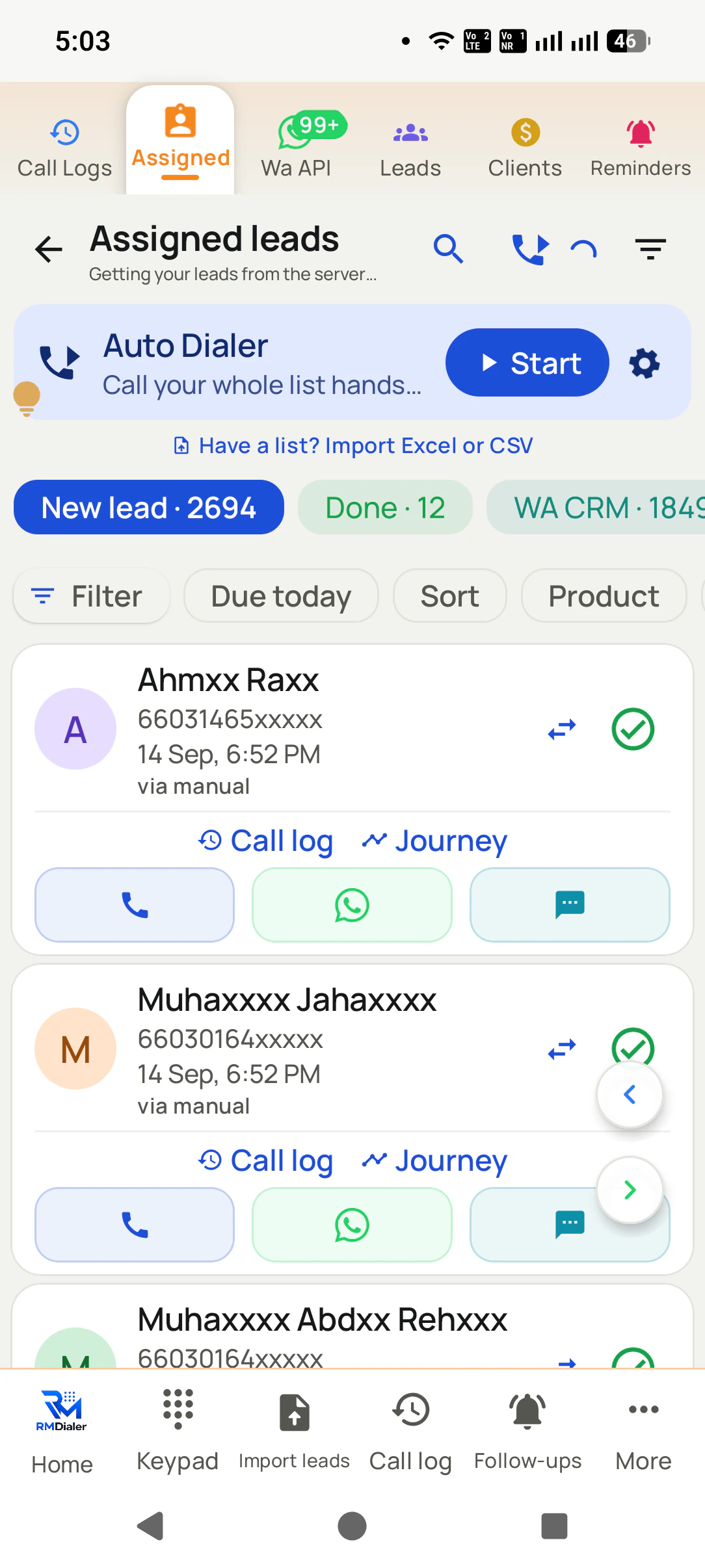
After allocation, the caller needs the name, number, source and requirement in a list they can use. The assigned-list screen shows New Lead and Done views, filters and an auto-dialer action. On Android, a calling session uses the phone’s SIM; the caller should check the intended line and allow enough time to record the conversation.
Agree what the first action means. A dial attempt is not a conversation, and moving a record to a completed list is not proof of a sale. The person who speaks with the customer should save a useful remark and the next promised contact.
For example, “Needs an estimate after Thursday’s measurement” tells the next colleague what to prepare. “Called” does not. Pair assignment with clear call outcomes and a scheduled reminder so ownership continues after the first attempt.
The screenshots show the Android calling workflow. The iPhone app supports lead work, but does not automatically log native iPhone calls. Validate platform-specific reporting if the team uses both kinds of phone.
Transfer the context too
A customer may ask for a colleague, an agent may go on leave or a specialist may need to finish a quotation. Before transferring the record, preserve what the customer needs and when the next action is due.
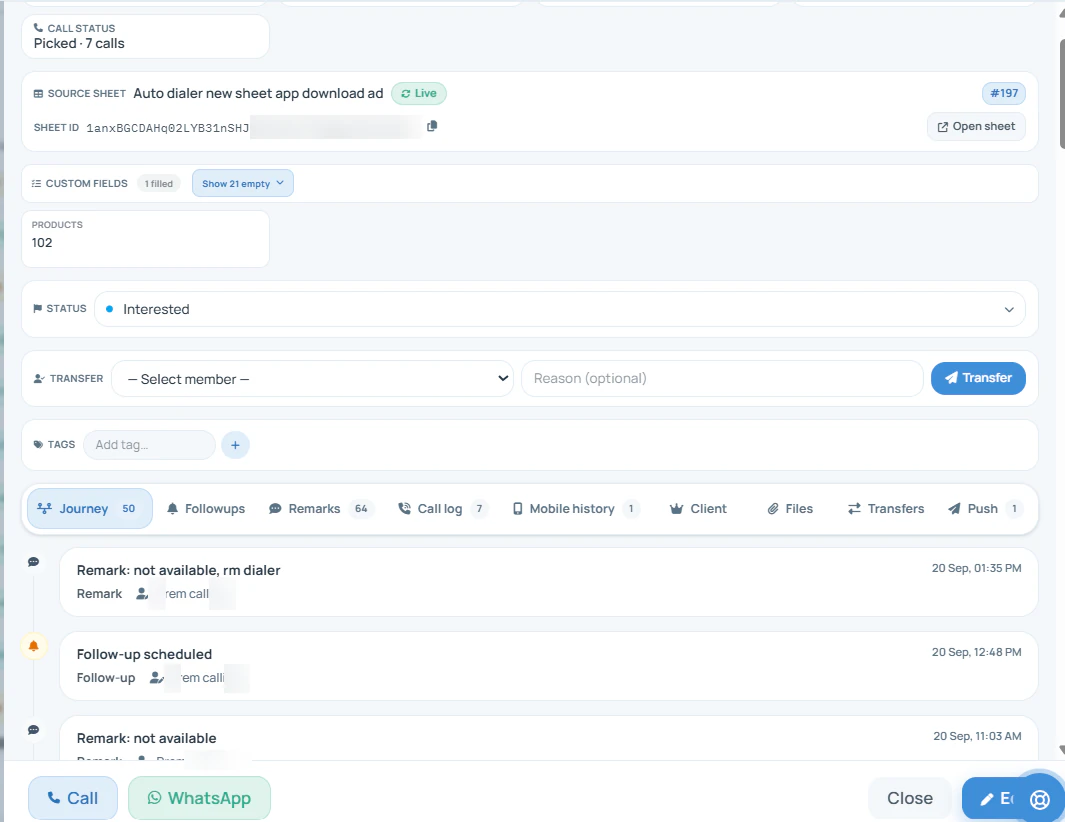
Check the last remark, current requirement and promised callback. Tell the recipient why the lead is moving and what has already been sent or agreed.
Open the record from the recipient’s account. Verify the details and follow-up, then check what the previous caller can still access under your team permissions.
Review the available activity and lead history. Do not infer commission entitlement from the last owner alone; use the business’s agreed handover and credit rules.
Assignment can reduce ambiguity, but it does not by itself guarantee that two people never call the same customer. Test repeated numbers from the same source and from different sources. Confirm whether an existing record is skipped, updated or otherwise handled before enabling continuous imports.
See the fields and history in a lead record →Prove the workflow with a small batch
Bring a connected source, the intended employee group and a few sample records to the demo. Include a fresh lead, a repeated number and a record with an existing follow-up. Keep the initial test small enough that you can inspect every result.
If leads come from a portal or website form, first establish how that source reaches a sheet or API connection. Assignment cannot compensate for a missing phone number, an incorrect field mapping or an integration that has stopped sending records.
Set up the source-to-caller lead automation flow →Check its source and required fields against the original enquiry.
Inspect the result for both all-employee and selected-employee settings.
Verify duplicate handling. Agree a review process for work that has not been acted on.
Transfer one example and verify its remark, recipient access and next contact.
Measure the gap assignment is meant to close
A manager needs to know whether work reached a caller and whether the customer received an appropriate response. Start with a short daily review of open enquiries and overdue promises, then ask which missing report fields prevent that review.
Define the start point: enquiry arrival or assignment time. Confirm both timestamps exist before calculating a response-time measure. An attempt should remain distinct from a successful connection.
Sample records that have no meaningful update. A clear recipient helps a manager intervene, but does not prove that an automatic timeout or escalation policy exists.
Review saved requirements, promised callbacks and the next stage. A team that distributes quickly but forgets later commitments still needs a better follow-up process.
Need automatic reassignment after a deadline, weighted distribution, business-hour rules or a historical ownership export? Bring that exact requirement to the demo. The controls shown here establish basic distribution and transfer, not every possible routing feature.
Try it with your own workflow
Bring a sample sheet, the intended recipients and one handover scenario. We will demonstrate the assignment controls and confirm which requirements fit before you connect live enquiries.
Team features, one plan
₹159/user/month
₹1,908 per user, billed yearly, plus taxes.
The personal dialer, call log and personal analytics are free forever. Team access and saved lead workflows require a plan. SIM charges and any WhatsApp provider charges are separate.
Compare free and paid features →Choosing rotation for a source? Use the round-robin lead assignment example to see uneven batches, then check pool changes and the next allocation in your own trial.
Lead assignment software decides which salesperson or team receives an incoming lead. The useful result is a clear person responsible for the next action. RMDialer provides assignment controls for connected lead sources in the Web CRM, an assigned list on the caller phone and a customer record for remarks and follow-ups.
Round robin gives successive leads to successive members of a rotation, then repeats. With three eligible callers, a simple example is A, B, C, A, B, C. This can balance the number of new leads; it does not automatically balance lead quality, effort or availability. Test the rotation on your configured source before enabling live traffic.
Yes. The RMDialer Web CRM Assign screen offers distribution to all employees or selected employees only. Use the selected option when a connected source should feed a defined group. Review the actual recipients and test a few new records rather than assuming every employee is eligible.
The demonstrated controls on this page cover round robin and selected employees. They do not establish an automatic territory, language or capacity rules engine. A source can be directed to a selected group, but that is different from evaluating a field on every lead. Ask for your exact rule to be demonstrated if it is essential.
Yes. Connect the sheet through Live Sheets in the Web CRM, map its columns and configure assignment. Check that the incoming source supplies the details callers need. Website forms and lead portals require a compatible sheet or API connection; this page does not promise a native connector for every provider.
RMDialer exposes a transfer control on the lead record. During the demo, transfer a sample record and check the recipient, remarks, scheduled follow-up and visibility on both accounts. Agree who may transfer records and how the receiving salesperson acknowledges the handover.
Do not assume that round robin includes a timed reassignment rule. First define the response window your team needs and how someone will review untouched leads. If automatic escalation after that window is a requirement, ask for the trigger, destination and history to be demonstrated before relying on it.
No assignment policy alone guarantees that. Repeated imports, multiple sources, shared access and manual calling can still create overlap. Check duplicate handling and existing ownership with a repeated-number test, and make the handover visible to the people who could otherwise call the same contact.
No. Assignment determines who should handle a lead. Scoring estimates its priority or fit using chosen signals. A round-robin distribution is an allocation method, not an AI score or a prediction of who will convert. Keep the two decisions separate when comparing software.
Team assignment belongs to the paid workflow. The standard India annual plan costs ₹1908 per user before tax, equivalent to ₹159 per month. Quarterly billing is ₹747 per user for three months. Published team bundles are available. Outside India, the listed rate is $29 per user per year, or $12 per user for 3 months, outside India. Paid features have a 3-day trial; operator and applicable messaging-provider charges are separate.